Ardupilot: Cube/Here GPS heading off by 90deg sometimes
I've found that on my CUBE using a Here GPS with master Copter or Rover, that the vehicle's heading is off by 90degrees (it's turned 90degrees clockwise from it's actual heading).
If I use the COMPASS_TYPEMASK parameter to disable the QMC5883L driver, the heading is correct again after the next reboot.
 rmackay9
All 104 comments
Just to note that neither the cube nor the Here have this chip fitted.
 proficnc
on 20 Jul 2017
proficnc
on 20 Jul 2017
@proficnc Can you say what compasses are in the Here (and The Cube might help too)?
I've found something in the driver that shouldn't be done (writing a register before detection): https://github.com/ArduPilot/ardupilot/blob/master/libraries/AP_Compass/AP_Compass_QMC5883L.cpp#L95 but I'm not sure that's the cause.
 OXINARF
on 20 Jul 2017
OXINARF
on 20 Jul 2017
It doesn't seem 100% easily repeatable. I was having this issue constantly with master Rover and Copter but then when I retested again with my own build the problem went away. Anyway, I will attempt to recreate the issue again tomorrow.
rmackay9
on 20 Jul 2017
Sure.
In a standard first revision here, there is a HMC5983, and an LIS3MDL
In the Here + an additional MCU9250 as well as the others.
In future Here and here plus units, only a single ICM20948 is fitted due to both the LIS3MDL and the HMC5983 being EOL.
In the 2.0 cube... (by 3DR) there is a HMC5983 on SPI, and an LSM303D
In the 2.1 cube... (ProfiCNC/Hex) there are two MPU9250's, and the LSM303D
proficnc
on 20 Jul 2017
Philip, I wonder if this might be why a few of the people who put a here on their solos are randomly unable to get their compass to calibrate despite the settings all being correct?
 Pedals2Paddles
on 20 Jul 2017
Pedals2Paddles
on 20 Jul 2017
By the way, I'm pretty sure I've seen this on an mRobotics Pixhawk1 using Plane as well.
rmackay9
on 21 Jul 2017
@rmackay9 If you reproduce the problem again, please write down what DEVIDs you have.
After a bit of looking at code:
- MPU9250 is likely unaffected since it is on SPI
- same for LSM303D
- LIS3MDL is disabled by default on PH2 (@rmackay9 when you changed the disabled drivers did you have this in consideration? I'm wondering if for some reason you enabled this driver and it is that one causing the problem)
- HMC5983 could be affected, but the register the QMC5883 driver is writing before identification is the first identification register in the HMC; that's only a read register so nothing should happen, but there is always a chance the HMC gets confused with it.
OXINARF
on 21 Jul 2017
i suspect its a conflict with an AK8963 on i2c
we need to disable this compass by default I think.
The register the QMC5883 driver is using for its ID is marked as "reserved", not an ID register in the datasheet
 tridge
on 24 Jul 2017
tridge
on 24 Jul 2017
ping @ljwang1102 as author of QMC5883 driver
tridge
on 24 Jul 2017
I ask the factory engineer,Also can checks the register 0x21,i will fixed it
 ljwang1102
on 24 Jul 2017
ljwang1102
on 24 Jul 2017
I've temporarily disabled the QMC compass until we sort out the heading issue, hope that's ok!
https://github.com/ArduPilot/ardupilot/commit/a657daf6355bf3f0d6ff7026897ebd40c0bf0f61
rmackay9
on 25 Jul 2017
@rmackay9 Some problems has been repaired, I expect you to test, now this issue only you found
ljwang1102
on 31 Jul 2017
@rmackay9 I think it should be cancelled #6657,This can't be widely tested,Although I have tested it
ljwang1102
on 7 Aug 2017
I have not seen the 90degree error issue since the changes went in so I'm closing this.
I am seeing issues with the Compass being off by 180degrees now on one of my Rovers which has an early PH2 on it. I'm still investigating this issue but it seems to be different.
rmackay9
on 14 Aug 2017
@rmackay9 I think it might be Calibration problem,You click on pixhawk if you calibrate it,It will set the first compass for the external compass,pixhawk2 and pixhracer have an internal HMC5983,if you not click pixhawk in missionplaner,may be OK
Then I think it should be cancelled #6657,enable_QMC5883,It's a mistake
ljwang1102
on 14 Aug 2017
@ljwang1102, maybe it's a hardware thing but I think it would be best if the QMC could be placed in the same orientation as the HMC by default..
rmackay9
on 14 Aug 2017
@rmackay9 QMC have same orientation with HMC,You can not directly modify the GPS circuit board
ljwang1102
on 14 Aug 2017
I have a Pixhawk 2.1 Cube orientated 180 degrees and 2 Here GPS's orientated 0 degrees. Both external compasses are enabled for the Here GPS modules and the internal compasses of the cube are disabled. AHRS orientation is set at 180 yaw, compasses are set at 0. I'm using a Arducopter 3.5 version. I'm also seeing the heading being 90 degrees off and 180 degrees off. Sometimes it works fine and sometimes it is one or the other. I've done a lot of reboots and one time it fixed by enabling the internal compasses on startup and then disabling them after to remove the inconsistent compasses message. I have not reproduced this effect 100% of the time though. I checked the logs and the two external compasses agree but the internal compasses are slightly off most likely because of a carbon fiber frame, however they are disabled. I will try updating the firmware version to see if it is fixed, as well as the Compass type-mask parameter.
 tdot00cc
on 12 Sep 2017
tdot00cc
on 12 Sep 2017
@tdot00cc, yes, I saw it once today as well on a new vehicle with Copter-3.5.2. This is very concerning..
rmackay9
on 12 Sep 2017
@tdot00cc can you plese send me a log?
proficnc
on 12 Sep 2017
Is there an optimal way to fly/test it out so that the log I send you contains the best information?
tdot00cc
on 12 Sep 2017
@rmackay9 Can we change the title of this issue then? 3.5 doesn't have the QMC driver, so it looks like it isn't related.
@tdot00cc The best would probably be to turn on the LOG_DISARMED parameter so that it will be logging when this situation happens.
OXINARF
on 12 Sep 2017
I've captured logs and @peterbarker and @proficnc and I looked at them today. The issue, when it occurs, is very obvious if you compare the MAG.MagZ vs MAG2.MagZ. In cases where the heading is off the two will be reversed (i.e. one positive, one negative) while in the normal situation they're consistent.
I can recreate the issue about 1 in 10 boots and it seems it's easier to recreate if you unplug and then plug back in the battery within a couple of seconds. So far, if the board is powered down completely (i.e. for 10 seconds) the issue does not occur.
Once the problem occurs, rebooting ardupilot (on the flight controller) does not resolve the problem, only powering down the flight controller resolves it.
We've used mavproxy's devop command to read the individual I2C registers from the compass in bad and good states and this is what we got. Sorry if the formatting isn't good.
address | location | Name | bad | good
-- | -- | -- | -- | --
0 | 0x00 | Configuration Register A | 00:98 | 00:98
1 | 0x01 | Configuration Register B | 01:20 | 01:20
2 | 0x02 | Mode Register | 02:03 | 02:01 or 02:03
3 | 0x03 | Data Output X MSB Register | 03:01 | 03:00
4 | 0x04 | Data Output X LSB Register | 04:fc | 04:42
5 | 0x05 | Data Output Z MSB Register | 05:fe | 05:01
6 | 0x06 | Data Output Z LSB Register | 06:2d | 06:cd
7 | 0x07 | Data Output Y MSB Register | 07:ff | 07:fe
8 | 0x08 | Data Output Y LSB Register | 08:93 | 08:57
9 | 0x09 | Status Register | 09:01 | 09:01
10 | 0x0A | Identification Register A | 0a:48 | 0a:48
11 | 0x0B | Identification Register B | 0b:34 | 0b:34
12 | 0x0C | Identification Register C | 0c:33 | 0c:33
49 | 0x31 | Temperature Output MSB Register | 31:e1 | 31:08
50 | 0x32 | Temperature Output LSB Register | 32:e0 | 32:40
rmackay9
on 13 Sep 2017
I have a log of my crash the other day using dual HERE sensors as external compasses. Thankfully my drone is a tank and only broke 2 carbon fiber props. Prior to flight the heading was 90 degrees off but I did the stupid thing and took off anyway because I wanted to get a log of the problem. The Mags were consistent for the xyz axis until the crash between the 2 Here compasses. MAGz of the third internal compass was opposite to Magz of the external ones. Maybe there is a problem somewhere in the initial yaw alignment calculation if there is an orientation difference of the flight controller and external compasses. I have compass_learn turned of. If internal compasses are disabled can the autopilot resolve the heading if the AHRS doesn't know which way it is pointing? I find that if I calibrate internal with external sensors the issue goes away until a couple boots later when compasses become inconsistent, I then disable the internal compass which fixes it until a few boots later where it goes off by 90, 180, 45 degrees. I see the MagZ difference on some ground tests as well. I see very good comparisons between the 2 HERE sensors but not so good between the Here sensor and the Cube. But I have a carbon fibre frame which most likely interferes with the cube.
tdot00cc
on 13 Sep 2017
Does this issue arise if the Cube and Here sensor are both orientated 0 degrees?
tdot00cc
on 13 Sep 2017
regarding the HMC5983 rotation error, I have probed the compass on Randys machine, and found that when in the bad state that the -ve self-test bias produces the same output as the +v2 self-test bias. They should produce opposite biases. This may give a way to detect the issue and mark the compass unhealthy.
tridge
on 14 Sep 2017
@tdot00cc, we don't know yet if the orientation of the Cube and Here GPS are important but I suspect it doesn't matter.
It's easy to spot the problem once you know what to look for. When the Here compass is messed up, the "mz" value (magnetometer Z-axis) is opposite what it normally is. So If you're in the northern hemisphere the "mz" value should be positive but when the heading is off by 90-degrees, it appears as negative. if you're in the southern hemisphere the value is normally negative, but when there's a problem it appears as positive.
I live in Japan (which is in the northern hemisphere) so below is a screen capture of the "mz" value when the problem occurred.
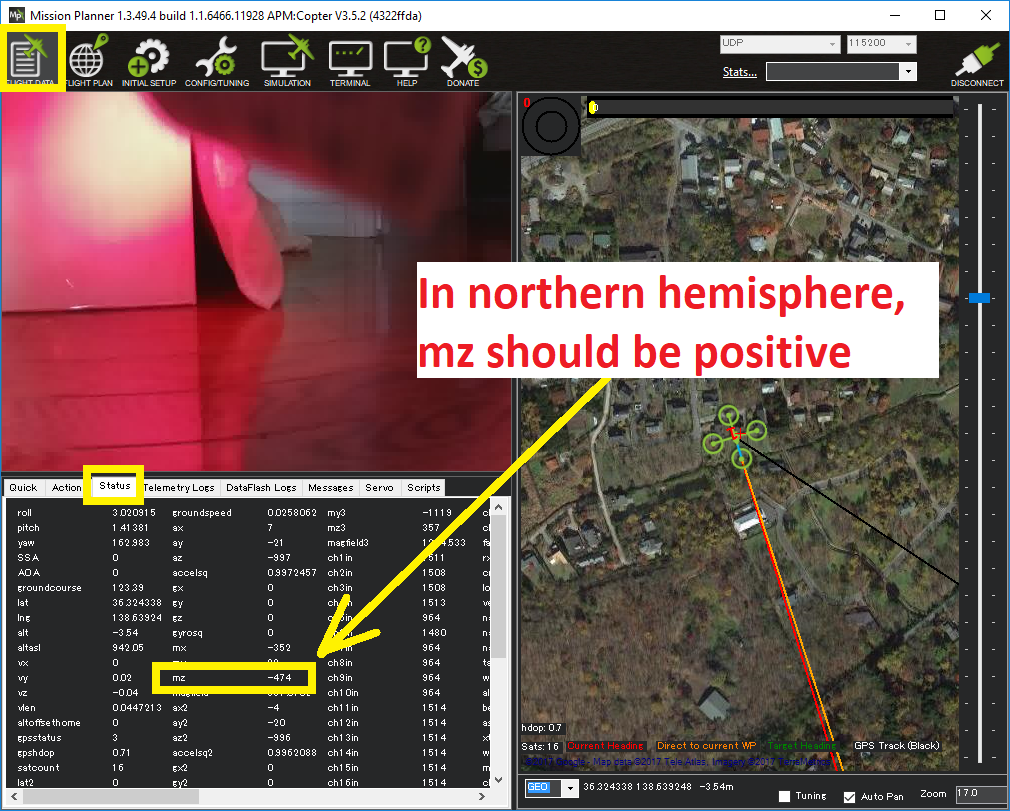
For me, I've only seen this problem if I quickly unplug and plug back in the Cube/Here GPS from a battery. I've never seen it when using USB power and never when I've left the Cube/HEreGPS for 10 seconds before applying power again. So I think the short-term, people should wait 10seconds before re-attaching the battery.
rmackay9
on 14 Sep 2017
I tried orientating the cube and Here the same way but it doesn't matter. Also, I am more commonly seeing the heading off 180 degrees not 90. But the same thing is happening with mz, one being positive and one being negative. I'm also seeing that sometimes when the issue happens it's not just mz but the my and mx values are inverted as well. I'm seeing it on usb power as well and 10 seconds seems to resolve the issue.
tdot00cc
on 14 Sep 2017
I had this issue today. Using PH2.1, Here as GPS1, AsteRX-m2 as GPS2 and arducopter from master.
It took off fine with all 3 Mag.z positive. Then 3 minutes into the flight it decided to erratically rotate 90° whenever it reached a waypoint :(
Not nice when you have a 2D gimbal.... yaw is VERY messed up
 amilcarlucas
on 22 Sep 2017
amilcarlucas
on 22 Sep 2017
I noticed the yaw rotation 90 degrees inflight as well when the ROI was the center of a circular flight path and when it initially flew fine.
tdot00cc
on 25 Sep 2017
Hello,
We have PH2.1 with GPS1 : uBlox and GPS2 : AsteRX-m2. Around the 540 second mark, the yaw gets messed up. We were trying in spiral path around a ROI in the center of the spiral. If anyone could help in debugging the logs!
Yaw_Error.log
 karthikdesai
on 26 Sep 2017
karthikdesai
on 26 Sep 2017
@karthikdesai and I have a second copter with the same GPS hardware (GPS1 : uBlox and GPS2 : SBF AsteRX-m2) and running the same FW, but on a pixhawk1. We also use the same missions and parameters on both copters.
PH1 flies fine and never had this issue. PH2.1 has it around 60% of the time.
amilcarlucas
on 26 Sep 2017
Can this be hardware error that only pops in some boards ?
@proficnc can you look at the logs I provided ?
Can you send me a PH2.1 so that I can test on a second board ? I already invested two weeks on this. And so far the only fix I have found is to use a PH1
amilcarlucas
on 28 Sep 2017
I don't see your specific log?
proficnc
on 28 Sep 2017
It's the one from Karthik, we work at the same company.
amilcarlucas
on 28 Sep 2017
Have you switched GPS's between the two platforms?
If the issue is a hardware issue with the Here gps, then it should follow from the PH2, to the Ph1
proficnc
on 28 Sep 2017
No, I have not.
I tested with the Here on the PH2.1 and the problem is there.
Then I replaced it with the same 3DR ublox GPS that was supplied with the PH1 and the problem persists.
So I think it is the PH2.1 itself that is causing the problem.
Copter1: PH1 GPS1 : 3DR uBlox and GPS2 : SBF AsteRX-m2
Copter2: PH2.1 GPS1 : 3DR uBlox and GPS2 : SBF AsteRX-m2
Copter nr.2 has issues regardless if I use 3DR uBlox or here GPS
amilcarlucas
on 28 Sep 2017
I can't think of any hardware issues that could possibly cause one part of a compass i2c data stream to change...
the 2.1 does however have more going on internally than the PH1
I think we may need to get Paul looking at this..
proficnc
on 28 Sep 2017
Well I disabled both internal compasses.
It does however not solve the issue.
amilcarlucas
on 28 Sep 2017
When I made the switch I changed from PH1 & 3DR uBlox to PH2.1 & Here & 3DR ublox. The problem arose after the switch so the problem could be related to the Here GPS or the Pixhawk2.1.
tdot00cc
on 28 Sep 2017
My boss asked me to buy PH1s instead because of this. So I might have to abandon my PH2.1.
amilcarlucas
on 28 Sep 2017
Has the problem occurred on earlier firmware versions than 3.5.2?
tdot00cc
on 28 Sep 2017
@amilcarlucas check your pm on gitter
 lvale
on 28 Sep 2017
lvale
on 28 Sep 2017
I did not test it. Been running master.
I could try to go back to 3.4.3 or something like that. But that is not a solution for me, I would have to change a lot of my code into that codebase and that would cost me a ton of time.
amilcarlucas
on 28 Sep 2017
I should have my copter up and running again the next few days. I'm going to try the PH2.1 and 3dr uBlox combo to see if I reproduce the problem.
tdot00cc
on 28 Sep 2017
@tdot00cc Can you provide logs of the flight where it seemed to gain a 90 degree yaw error in-flight, please?
 peterbarker
on 28 Sep 2017
peterbarker
on 28 Sep 2017
On the log from Karthik it happened at second 535 aprox.
amilcarlucas
on 28 Sep 2017
I bought a APM 2.6 stand alone compass and could try with that next week.
amilcarlucas
on 28 Sep 2017
I will see if I can dig that one up. I'm not sure I saved that one because at that point I wasn't trying to figure out/resolve the problem.
tdot00cc
on 28 Sep 2017
@amilcarlucas, @peterbarker and I had a chat about his problem today and @karthikdesai's log shows his vehicle's issue is quite different. In Karthik's log the compass values are fine, the vehicle's estimated heading is also fine. It's more than there's some yaw control funniness when using ROI with spline waypoints. I'm not saying @karthikdesai's vehicle's issue is not a problem, I'm just saying that it's quite different and we shouldn't muddy the waters by including it in this discussion - it should go in a different/new discussion.
rmackay9
on 28 Sep 2017
Currently have this issue on 2 Aircraft, Hex + with Here+ and Here - 3.5.3 with AHRS orientation 0, and Quad X with Here - 3.5 AHRS 270degrees yawed. Both PH2.1.
Have also been able to replicate it with brand new PH/Here/Here+ with clean firmware on the bench.
We have it happening with the Hex more often than being correct, so if you need some test data - I have the machine to use!
Here or Here+ in GPS1, both will do it. USB/Battery in, no change There does seem to be some correlation with time between cycling power but its not 100%.
Have been going mad trying to troubleshoot it. Have both 90 and 180 degree out issues on boot, and once had it spinning in 360 circles!
 JacksonUAS
on 4 Oct 2017
JacksonUAS
on 4 Oct 2017
Trouble shooting -
Known good compass param copied from (apparently) identical airframe to misbehaving one - Issue still exists.
Misbehaving airframe rolled back to 3.4.6, flashed with above compass param - Issue still exists.
Flashed to 3.6 Dev Arducopter, flashed with above compass param - Issue still exists.
Are we sure this isnt something to do with the new onboard calibration?
JacksonUAS
on 4 Oct 2017
No similar issues seen when using onboard calibration on PixRacer or PixHawk
lvale
on 5 Oct 2017
Bunch of testing, looks to be a hardware issue.
JacksonUAS
on 6 Oct 2017
Any news or resolution on this?
Pedals2Paddles
on 6 Dec 2017
Hardware issue on Heres and Here+, transient voltage remains after being powered down, which results in the magnetometer booting up in bizarre ways, and arducopters drivers boot up error checking isnt up to speed in catching the error. Adding a resistor to the test pads to discharge the circuit solves the issue.
JacksonUAS
on 7 Dec 2017
Correct, only occurs after a brownout.
Adding a 1K resistor across 5v and ground removes the issue.
This only affects people doing rapid power cycling.
Discussion continues on detecting this sort of issue and causing a prearranged failure based on this.
Issue affects all HMC5983 compasses that don’t have a chance to restart cleanly, not just here.
proficnc
on 7 Dec 2017
Interesting. How much time should lapse when rebooting to avoid this?
Pedals2Paddles
on 7 Dec 2017
30s is good
proficnc
on 7 Dec 2017
For my Rover that sees this issue all the time, 10seconds is more than enough. Below 6 seconds is when I see problems.
rmackay9
on 7 Dec 2017
Re Here vs other brands of GPS/Compass modules using the HMC... I've only ever seen this happen with the Here GPS so I hate to disagree but I really think that there's a difference with the Here hardware that makes the brownout much much more likely.
rmackay9
on 7 Dec 2017
There may be some correlation between length of cable to the GPS having an effect on the voltage? once the solution was found havent looked into it further, its around 1.2V that hangs in the circuit. I have seen it happen with up to 30s between power cycles as well. the onboard compass calibration requirement to cycle power after calibration is likely making it more common now? Post resistor mod we have hundreds of (documented) cycles without issue. No idea if it exists just on Heres, personally Ive only seen it on Heres, but thats more likely a sample issue than anything else!
JacksonUAS
on 7 Dec 2017
Can someone post a pic of the resistor modification ?
Can I do it between GND and 5V of my yet unused serial 4/5 or does it need to be done on serial 3 (GPS) ?
amilcarlucas
on 10 Dec 2017
I was having this issue today, doing first time calibration of a new Here GPS. I could not get any of the orientations to make sense. Northern hemisphere, Z-axis positive and it was impossible to get X & Y to move in correct directions.
If this is a hardware issue, I will return the GPS. (Which I probably can't, as I modified the cable to fit on a Pixhawk1)
 Kigurai
on 31 Dec 2017
Kigurai
on 31 Dec 2017
Just do the mod, costs cents and takes a few minutes. 1k resistor between the Vcc and Ground test pads on the here. Bend the leads into a [ shape and solder onto the test pads.
JacksonUAS
on 1 Jan 2018
Hmm, closest I got is a 2.2k
Kigurai
on 1 Jan 2018
Kigura, if you use a HERE shipped from late ontober onwards you have to set the external compass orientation to be Roll190yaw90 for the compass readings to align. This is due to the way the new ICM compass chip is built.
 caomuqing
on 1 Jan 2018
caomuqing
on 1 Jan 2018
Actually, it looks like it's Roll180Yaw270. I wish they would build these without offsets or at least very clearly indicate it on the case of the unit.
Kigurai
on 1 Jan 2018
Would it make sense to disable HMC from COMPASS_TYPEMASK and enabling LIS in this case? What was the issue behind LIS3MDL driver?
 mijarck
on 11 Jan 2018
mijarck
on 11 Jan 2018
Would this voltage transient issue not affect the LIS3MDL just the same? I mean, give it a try and report your findings :). You'll need to redo the compass calibrations.
The LIS3MDL _was_ disabled by default in ArduPilot because it is end of life hardware and nothing was using it. So there was no sense in having it enabled, and nobody was expecting all of a sudden have two compasses hot in the HERE either. Unfortunately, mRo recently released a new GPS/Compass device that uses the LIS3MDL, and it was therefore re-enabled in ArduPilot. I believe that is the backstory on it anyway.
Pedals2Paddles
on 11 Jan 2018
LIS3MDL doesnt have the same issue. One of the outcomes of this was a request to get compass typemask out of master. We did find that the offsets for the LIS3MDL are larger than the HMC mags, and lead to whole new issues.
JacksonUAS
on 11 Jan 2018
So if I understand all this correctly, I should add a 1K resistor between vcc and gnd of an unused serial port and set COMPASS_TYPEMASK to 32 ?
http://ardupilot.org/copter/docs/parameters.html#compass-typemask-compass-disable-driver-type-mask
amilcarlucas
on 15 Jan 2018
Nope, well, that may work, but - On the bottom of the Here next to the JST-GH are test pads. Solder the resistor to those. No need to change compass type bitmask, as this "fixes" the HMC5883s that are used by default.
JacksonUAS
on 15 Jan 2018
But if I do not disable the LIS3MDL will I not end up with 4 compasses ?
amilcarlucas
on 15 Jan 2018
@amilcarlucas, the software only supports 3 compasses max so if there are more, the last one in the detection list in Compass.cpp will be left out... so then that COMPASS_TYPEMASK will be useful if you want skip one of the earlier ones and use the fourth one instead. Apologies if you already know all this.
rmackay9
on 15 Jan 2018
I'm getting the issue so consistently it's preventing me from completing my two builds entirely. I'm in Montana and even with the 1Kohm fix it's always 116º off (±6º) CW as viewed from the top. (Indicates ~SE heading when it's facing due north). I've made >50 total calibration attempts, without one accurate calibration on the Here. Calibration does always complete.
Two systems, identical builds, identical calibration problems. S1000 frames, PX2.1v3, Here, running 3.5.4r1
I've tried calibrating >100m away from anything that might potentially affect it, no effect.
Tried Compass_Typemask at 0, 32 & 4096, all with identical results. All the tests have been done in a very consistent way and experimented on both systems with identical results. I've also waited more than 5min after the calibration reboot before re-powering, no affect, mz value shows negative (roughly -565).
If I disable the external compass, change the primary to compass2 and use one or both internal compasses I get very accurate calibration but get an enormous amount of interference due to the proximity of the Pixhawk to the power dist board. mz2 and mz3 in this situation are both positive with mz still showing negative.
The issues seems to be pretty clearly an issue with the Here. I've tried everything I can conceive of, am already behind shipping these units and would deeply appreciate any insight or help.
 sbeams
on 21 Jan 2018
sbeams
on 21 Jan 2018
Just tried it (several times, both builds) on the beta 3.5.4r2, no affect. It's very consistently calibrating at 116º of CW. If the issue was a transient voltage issue in the Here, it seems that it wouldn't be this consistent. This feels like a code level issue.
I can also say with reasonable confidence that the issue is either in the Here, or in how in interacts with the Pixhawk2.1.
sbeams
on 21 Jan 2018
and even with the 1Kohm fix
Can you post a picture?
 magicrub
on 21 Jan 2018
magicrub
on 21 Jan 2018
@magicrub I'm sorry but I have it all back together now. If you disassemble the Here, underneath the JST connector are 7x solder test pads. The furthest left (purple wire) is VCC, the furthest right is Ground (Black).
I simply bent the leads of a 1Kohm resiter into a sharp U shape and soldered them to each pad. Confirmed the resistance via multi-meter between the PUR and BLK wires at the end of the harness to confirm the job.
sbeams
on 21 Jan 2018
Just tried again of 3.5.4r2 with a Compass_Typemask of 15392, still 116º off CW.
If ANYONE has an idea how to fix this, or even something to try please help.
sbeams
on 22 Jan 2018
@sbeams are you sure you don't have one of the newer HEREs that requires a different COMPASS_ORIENT parameter?
Pedals2Paddles
on 22 Jan 2018
@Pedals2Paddles they are brand new Here units. I am not aware of the compass_orient issue, please elaborate.
I figured with it being a strange value (116º) that a basic 90º orientation change would still result in a 26º error. Is that not the case?
my current Compass_Orient is at: 0
sbeams
on 22 Jan 2018
The newer HERE units with the ICM20948 compass require ROTATION_PITCH_180_YAW_90. I think HEREs shipped after October have the new compass in them, but I'm not 100% on that time frame. But anyway, if you have the newer one, and you are forcing it to orientation 0, then it would never work properly.
Copter 3.5.5-RC1 (just released the other day) has automatic orientation built into the driver so you don't need to set compass_orient manually. It it is also in 3.6-dev master. You might try that and see if it fixes your problem.
Pedals2Paddles
on 22 Jan 2018
You. Are. A. Lifesaver. That worked, 22hrs I have invested in this... Thank you.
For future reference how did you know this, or perhaps more importantly, where should've I looked to know that this parameter needed changing?
For anyone else reading needing this thread the solution was to change the:
Compass_Orient value from 0 to 26
sbeams
on 22 Jan 2018
Glad to help! I believe the vendor you bought the HERE from should have sent you something that stated this, either in the box or by email or something. I'm aware of it because of the PRs into master and 3.5.5. And also because we're trying to find a way to make it not confuse the crap out of non-techie consumers with Solos.
@proficnc FYI
Pedals2Paddles
on 22 Jan 2018
Yeah, just double checked the box and my email, nada. That's one sleepless weekend down, ha... Sincerely appreciate your time, thank you.
sbeams
on 22 Jan 2018
Chiming in to provide an overview of my own issues.
In an airframe, I've a Pixhawk 2.1 (running Plane 3.8.4) facing backwards. As such, I've set AHRS_ORIENTATION to Yaw180.
Facing directly forward (opposite direction of the PH 2.1) is a Here+ RTK GPS.
My understanding has been that of the multiple compasses internal to the Here/Here+, only one makes it into the compass configuration window (to be set to external, as Compass 1). Compass 2 and Compass 3 are then internal compasses of the PH 2.1. Please clarify if this is an incorrect understanding of the default behavior of a PH 2.1, Here+, and Plane 3.8.4.
My issue with this current setup is that, with AHRS_ORIENTATION = Yaw180, my heading reported by Mission Planner always springs back to the same value. For example, I initialize the system, the heading is reported as 118 degrees -> I rotate the system by 90 degrees in either direction -> heading value is momentarily correct, then rapidly springs back to 118 +/- 3 degrees. The further I rotate in either direction, the faster my output heading springs back to 118. Note that this testing was done indoors, but I can't imagine rogue magnetic fields producing such consistent behavior.
Not knowing for sure whether I had a Here+ with updated compass, I have tried the following Compass 1 rotations:
- None
- PITCH_180_YAW_90 (Per Pedals4Paddles)
- PITCH_180_YAW_270 (In case the AHRS_ORIENTATION does not change the reference frame of the compass orientation).
All of the above rotation settings yield different "sticky" heading values, but all exhibit the same spring-back behavior described above.
This is not my first struggle with compass setup, and in general I've perceived erratic behavior on the part of configurations involving numerous controllers (Pixhawk 1, PixRacer, Pixhawk 2.1) with a number of firmwares (Antenna Tracker 1.0, Plane 3.8.3, Plane 3.84). All of these setups involved a Here (not Here+) GPS. That said, one of my latest involves a PixRacer (Plane 3.8.4) and mRo uGPS (SAM M8Q + LIS3MDL) which has the above 90-off heading issue.
@sbeams Was your compass orientation change in addition to the 1kOhm resistor fix? Or was the compass orientation config the only thing you changed? Additionally, was the orientation value (Pitch 180 Yaw 90) applied only to Compass 1, or multiple?
 Evan1010
on 23 Jan 2018
Evan1010
on 23 Jan 2018
@Evan1010 One of the builds has the 1kOhm fix the other does not. No apparent difference in compass calibration or performance. Both are working well now.
Both builds are using only one external compass (each build set at Pitch180Yaw90) as the PixHawk itself is too close to power distribution to use any of the internal compasses.
sbeams
on 23 Jan 2018
Did a little more behavior testing today. I've eliminated AHRS_ORIENTATION to remove one factor (Pixhawk 2.1 now faces forward). I moved testing outside to eliminate indoor sources of magnetic fields (probably). I have not applied any compass masks (I believe the default param is 32?)
By default, when the Pixhawk 2.1 is loaded with Plane 3.8.4, attached to a HERE+ RTK, with default params, both Compass 1 and Compass 2 are automatically configured as external, with no orientation modifier. Compass 3 defaults to internal. The regular HERE only results in one external.
I've not found any permutation of compass orientations for 1 and 2 (with 3 enabled or disabled) that results in a correct heading. Disabling both 1 and 2, 3 still reports an incorrect heading. Using only 1 or only 2 is also not working for several orientations.
Tomorrow I will attempt the above with a second and third PH 2.1, check the HERE+ revision (Pitch180Yaw90?), and try without any GPS at all (ONLY internal compasses). Last would be using an old release.
@sbeams Do your configurations apply any compass masks? Also, are you using 3.8.4?
Evan1010
on 24 Jan 2018
@Evan1010 I was using them on two Octo multicopter builds so I was running 3.5.4r2 with the compass mask set to 0 in both builds.
sbeams
on 24 Jan 2018
My plane today was running properly with the HERE orientation set to 26 (pitch 180, yaw 90) although the module was pointed straight ahead normal. Very annoying. Plane 3.8.4. HERE serial number HX4-06003-7A00009.
 Naterater
on 28 Jan 2018
Naterater
on 28 Jan 2018
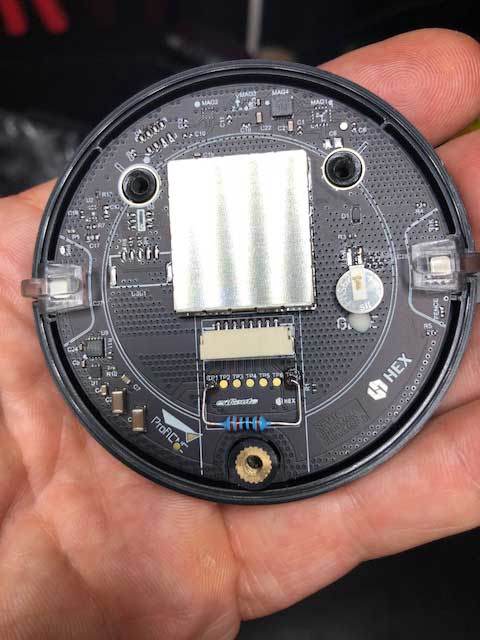
I spent months trying to problem solve a build with a PH 2.1, Here, Here+ on an S1000+ frame. Initial build was PH 2.1 yawed 180, rebuilt to face 0. Errors included EKF warnings, compass offsets, bad compass health (an S1000 gets bloody heavy after the 1 millionth calibration...) and unable to arm. I tried a new PH 2.1 and Here with all the same prob's. I tried the 1k resistor in both the Here and Here+ and voila, all systems online and a successful test flight (albeit short with a 20m fence set with RTH, because I'm a chicken).
See the attached pic. The resistor needs to be within the white lines but very close, to clear the plug once the unit is reassembled. Thank you all for this conversation, I'm back on track.
 blackrocket
on 16 Feb 2018
blackrocket
on 16 Feb 2018
Glad it helped, I gave myself blisters carrying out well over 200 compass calibrations, I feel your pain :)
JacksonUAS
on 16 Feb 2018
Could we re-think of enabling LIS3MDL driver again? Seems these guys changed from HCM5983 to LIS3MDL now. :(
https://drotek.com/shop/en/rtk/881-xl-rtk-gps-neo-m8p-rover.html
https://drotek.com/shop/en/rtk/792-xl-rtk-gps-neo-m8p-rover.html
mijarck
on 14 Mar 2018
I've also seen this LIS3MDL popping up every now and then even in new units. I've also tried to search for NRDN or EOL notifications for this sensor but have not found one
This drotek is actually discontinuing HMC5983 and bringing LIS3MDL as a replacement. Sounds a bit odd to replace EOL (HMC5983) with other sensor rumoured to be EOL?
Warning: the magnetometer component HMC5983 is obsolete We advise you to order our new GPS design
New design https://drotek.com/shop/en/rtk/881-xl-rtk-gps-neo-m8p-rover.html
LIS3MDL magnetometer
@proficnc where did you find EOL notification for this sensor? I'm unable to find one and wondering if it is in fact EOL or has there been some misunderstanding earlier?
@JacksonUAS Care to explain a bit more what kind of issues you encountered with LIS3MDL
 Nurffe
on 14 Mar 2018
Nurffe
on 14 Mar 2018
Hello:
I've just installed a Pixhawk 2.1 with Here GPS/compass on a 650mm quad. Compass calibration has been a pain and I was eventually forced to use only compass1.
The puck is set to Pitch180Yaw90. The initial flight this morning was a hand full. The compass indicated about 60deg off and AIL and ELE were reversed. Mission Planner showed correct control directions prior to the flight. Yaw was in appropriate directions.
Reading this thread, I'm confused as to what orientation the puck should be. My initial guidance was from the Robot Shop website PDF concerning the latest Here versions. Now I read here people are using others.
Any clarification would be helpful. Also soldering in the 1k resistor, is that a recommended "addition"?
 glacier51
on 30 Mar 2018
glacier51
on 30 Mar 2018
@glacier51, if you're using Copter-3.5.5 then the COMPASS_ORIENT parameter should be set to zero (the default). This doesn't really explain the roll and pitch being reversed so I'm confused by that but perhaps sort out the compass orientation first and see if the roll/pitch issue persists.
rmackay9
on 31 Mar 2018
I am using 3.5.5 and finally saw the the "pixhawk/px4" box above the compasses. When I clicked on Pixhawk/PX4, the Compass_Orient parameter set to zero. Re-calibrated the compass, which went faster than before and did a flight.
Now I have good yaw and roll but the pitch is still out. My mz is +, mx +, but my is still negative. I'm in the northern hemisphere. MY is the pitch axis I believe, so would a compass orientation of Pitch 180 solve this?
glacier51
on 31 Mar 2018
@glacier51, if you've got the nearly invisible arrow on the top of the GPS/compass pointing towards the front of the vehicle and you're using Copter-3.5.5 (which you are) then the compass-orient should definitely remain at 0. If you've done a compass calibration after changing the orientation (which it sounds like you have) then all should be fine and I wouldn't worry about it further.
rmackay9
on 31 Mar 2018
Randy:
The puck is facing forward. I tried 0 and got a good calibration. But the ELE/pitch was still backwards.
I'm in the southwest U.S. Should I also be seeing all positive values for mx,my,mz?
glacier51
on 31 Mar 2018
@glacier51, we really shouldn't do support here on the issues list, it should be in the forums. The compass should be fine so I think it's unrelated to the response of the vehicle. My guess is the radio setup is incorrect. From the MP's radio calibration screen, the green bars should move in the same direction as the physical sticks except for the pitch which should move in the opposite direction. Don't change the REV checkboxes (if you see them on that screen), instead change the reverse setting in the transmitter itself.
This is documented on this wiki page when it says:
The green bars should move in the same direction as the transmitter sticks (except for Pitch where the bars move opposite to stick movements - low values are forward, high values are back). If the green bars move in the wrong direction, reverse them using your RC transmitter’s channel-reverse function (see your RC gear’s manual for guidance).
rmackay9
on 31 Mar 2018
Randy:
Thanks for the help. I'm obviously new to the whole GitHub thing, thinking it was a forum.
Ron
glacier51
on 31 Mar 2018
LIS3MDL is EOL but LIS3MDLTR (tape reel) is still current
 ukmook
on 9 Jun 2018
ukmook
on 9 Jun 2018
This has been resolved.
 WickedShell
on 25 Jun 2018
WickedShell
on 25 Jun 2018
Related issues
 JonathanPlasse
·
9Comments
JonathanPlasse
·
9Comments
 bosskwei
·
3Comments
Naterater
·
3Comments
peterbarker
·
7Comments
rmackay9
·
4Comments
bosskwei
·
3Comments
Naterater
·
3Comments
peterbarker
·
7Comments
rmackay9
·
4Comments
Most helpful comment
I spent months trying to problem solve a build with a PH 2.1, Here, Here+ on an S1000+ frame. Initial build was PH 2.1 yawed 180, rebuilt to face 0. Errors included EKF warnings, compass offsets, bad compass health (an S1000 gets bloody heavy after the 1 millionth calibration...) and unable to arm. I tried a new PH 2.1 and Here with all the same prob's. I tried the 1k resistor in both the Here and Here+ and voila, all systems online and a successful test flight (albeit short with a 20m fence set with RTH, because I'm a chicken).

See the attached pic. The resistor needs to be within the white lines but very close, to clear the plug once the unit is reassembled. Thank you all for this conversation, I'm back on track.