Arduino: Fluctuating ADC with stabilized source
I supply the ADC with a stable voltage, supplied by a separate LM1117 3.3V with 100uF capacitor a resistor voltage divider. The LM1117 will provide 3.3V regardless of the load of the ESP's own voltage regulator, the capacitor takes away any noise and the 2 resistors make a fixed voltage suitable to be read by the ADC.
(GND for both the ESP and the LM1117 are connected)
Then, based on this article, I tried to add more stability to the readings:
https://www.quora.com/Why-is-a-little-delay-needed-after-analogRead-in-Arduino
So I do subsequent readings and only use the last one. I even do it 3 times instead of 2, and then only use the last one because that one is supposed to be stable.
#define ANALOGPIN A0;
...
analog = analogRead(ANALOGPIN);
delay(1);
analog = analogRead(ANALOGPIN);
analog = analogRead(ANALOGPIN);
Serial.print(F("Stablized Analog pin: "));
Serial.println(analog);
Readings are done and stored every minute.
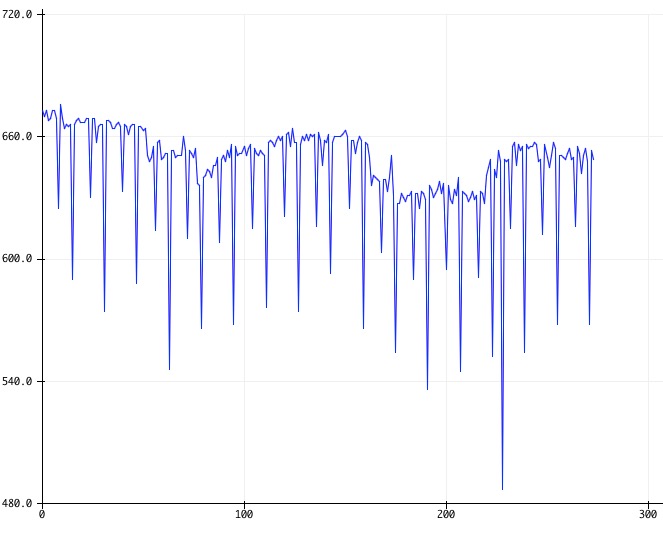
The ADC reading has 2 fluctuations, a slow drift and spikes.
This show the ADC output:

This has been tested with the mentioned 'external' 3.3V regulator and with the 3.3V output from the ESP itself. I also tried with or without the subsequent readings. I don't really mind the spikes because I can add some code to flatten those, but the "long" wave-like fluctuation makes it all useless.
(I need this to read an MQ135 sensor.)
Using current core stable and Arduino IDE 1.6.9.
Want to back this issue? Post a bounty on it! We accept bounties via Bountysource.
 supersjimmie
All 129 comments
Full code, when logging to the IDE's Serial Plotter:
#include <Arduino.h>
void setup() {
Serial.begin(115200);
}
void loop() {
int A;
A = analogRead(A0);
A = analogRead(A0);
Serial.println(A);
delay(60000);
}
I've had this code running for a few hours on a ESP with only the 2 resistors on the A0, one connected to Gnd and one connected to an LM1117 3.3v output.
supersjimmie
on 31 May 2016
I've set up a circuit to test this, so far I'm getting readings within 1 LSB of average. The thing will run for a few hours, and I'll post a graph by end of day.
Here's my schematic, for the record:

ESP8266 is mounted on a test board, which is powered by a SY8088 dc/dc step-down regulator. 3.3V to ADC input is supplied by another identical board, which doesn't have an ESP on it (so the regulator is only loaded by ADC divider).
 igrr
on 1 Jun 2016
igrr
on 1 Jun 2016
No drift, just random noise mostly within 1 LSB:

igrr
on 1 Jun 2016
Strange, had it running on a separate ESP (NodeMCU), which is powered through USB, and the ADC powered like this:

Yesterday it kept going up and down about 10, currently it runs smooth.
supersjimmie
on 1 Jun 2016
@igrr , I think I made some progress.
I've done several tests:
- with 2 different 'external' 3.3V power sources or with the 3.3V line from my NodeMCU board,
- with one or two subsequent analogRead calls,
- intervals ranging from 100ms to 60s,
- two different nodeMCU boards,
- with or without some WiFi related libraries loaded and connect/webclient calls.
In all cases it kept jumping up and down with a difference of about 10.
Then I noticed that after a reset, it was stable for only a few seconds.
So that made me think about the fact that even without any WiFi library loaded and without any WiFi.begin(), the modules are still using their last save Wifi settings.
So I added #include <ESP8266WiFi.h> and in the setup I just called WiFi.disconnect() and then it was totally rock stable!
Then I added the WiFi.begin(..) again and it got unstable.
So this issue is related to WiFi.
supersjimmie
on 7 Jun 2016
To me, this looks like the power draw from WiFi is distorting the onboard ADC.
This is honestly not too surprising, and unless there is an on-board external reference input, it is difficult to combat in software. Perhaps an I2C attached external ADC would serve your purposes if you need actual precision?
The onboard 10bit ADC is most likely a SAR type (simplest and cheapest).
So, if it is possible to control sample timing, giving the ADC more time to do its job may also help.
 ibaranov-cp
on 9 Jun 2016
ibaranov-cp
on 9 Jun 2016
Using an 'external' adc is not an option for my setup, simply because I don't have any empty usable digital pins left on the module. How could I control the sample timing?
supersjimmie
on 9 Jun 2016
Until now I have this as a work-around to do a reading every minute:
void loop() {
unsigned long starttime = millis();
WiFi.disconnect();
delay(10); // allow a short time to disconnect wifi
Serial.println(analogRead(A0));
WiFi.begin(ssid, password);
while ((WiFi.status() != WL_CONNECTED)) { // wait for connect wifi
delay(500);
}
delay(60000-(millis()-starttime)); // make loop time 60 sec
}
Only this introduces another issue, that the ESP doesn't always (re)connect to wifi causing it to hang.
supersjimmie
on 11 Jun 2016
I have the issue with 3 NodeMCU boards, so I tried to find out if it was perhaps related to the small power regulator on those board. Instead of powering over usb or with an external 5V powersupply to the Vin pin, I now used a LM1117 3.3V reguator to supply to the 3.3V of the board. (thus bypassing the small onboard voltage regulator)
This still gives the same jumpy values.
supersjimmie
on 15 Jun 2016
Same problem for me see:
http://bbs.espressif.com/viewtopic.php?f=66&t=2286&p=7367#p7367
https://www.mikrocontroller.net/topic/399791#4616103
Even tried battery powered and entire Board shielded with foil.
Definitive the transmitting is causing this
After wifi.disconnect() the reading is ok!
In the Beginnin good readings then fluctuating
 Gorkde
on 16 Jun 2016
Gorkde
on 16 Jun 2016
Btw as for me I also have no pins for external ADC which probably would be the best choice.
Gorkde
on 16 Jun 2016
Isn't there a way to check if wifi is transmitting and poll the ADC when it's not?
Gorkde
on 16 Jun 2016
same problem here... is there a way to "pause" the wifi radio without really disconnecting?
 arizzi
on 17 Jun 2016
arizzi
on 17 Jun 2016
how about trying this:
https://github.com/esp8266/Arduino/blob/master/libraries/ESP8266WiFi/src/ESP8266WiFiGeneric.cpp#L366
arizzi
on 17 Jun 2016
Simply tested that.
Doing WiFi.forceSleepBegin(100); disconnects indeed, but it seems to be buggy because it never reconnects anymore. I needed to add WiFi.forceSleepWait() after the analogRead(). Then it has to re-connect (re-associate?) wifi, which takes 4-5 seconds. So any subsequent code that needs a connection will fail...
The resulting analogRead looks stable.
supersjimmie
on 17 Jun 2016
Another Thing I noticed.... When using Blynk App in my sketch and doing Blynk.Write every 100ms it seems to be stable as well so the unstability might be just when Wifi starts or stops transmitting.
Gorkde
on 27 Jun 2016
I also noticed it just starts getting wrong readings once it seems the WIFI connection has been established the first time (some seconds after powerup).
It then gets wrong radings in the range 1-7 above (always!) the correct reading with seldom a correct reading in between.
If I put AIN to GND I get readings 0-1 which schould be normal but as soon as the connection is established the readings are 0-7 where most of them are in the 5-7 range.
I now used a sketch to read for some time and only use the lowest reading which works but is VERY slow because as soon as I sample readings for less than around 100ms it seems to miss the seldom correct (low) readings and I get wrong ones sometimes in my result.
int ReadAIN()
{
int Ergebnis = analogRead(0);
for (int i = 0 ; i < 50 ; i++)
{
int Messung = analogRead(0);
if (Messung < Ergebnis)
{
Ergebnis = Messung;
}
delay(2);
}
return (Ergebnis);
}
BTW... I also use the same voltage regulator, maybe a problem with that one (LM1117V33)?
I also found this (https://github.com/esp8266/Arduino/commit/09bb75874deb95c22b4c09e63b842fc1f89eebc3) and would like to try if that's solving my problen but don't know how. Just integrating it in my sketch doresn't seem to work. Any advice?
REMARK: If the ESP has established a connection once it automatically will after powerup so you will see this problen only if the ESP has been connected before or if it gets connected by WiFi.begin() command
Closed my other Issue since it's the same as this.
Gorkde
on 28 Jun 2016
@Gorkde I think that code fails on rom_i2c_writeReg_Mask? I cannot find where that should come from, probably something that only existed in older SDK?
@igrr I have tested it with the latest GIT version, which includes SDK 1.5.4. In the rellease notes of that SDK is a note about a fix of analogread:
8. Revised the issue that API system_adc_read and system_get_vdd33 may return wrong value.
But no luck it still does exacly the same.
supersjimmie
on 30 Jun 2016
@supersjimmie:
I wrote that piece of code to make my sketch work until the issue is fixed.
When I do analogread I found the readings always go up from the correct reading.
Therefore I wrote a read function that samples readings an just uses the lowest of them because that's the correct reading.
But as I said, it's just for the time being until the issue is fixed.
Maybe this is an hardware issue of the modules we have or the voltage regulator?
Which one do you use?
Will buy another one for testing purposes but I really don't think that's the reason.
Gorkde
on 30 Jun 2016
Did some further investigation.
When printing in Serial plotter it's easy to see the readings are +/-1 which should be normal but once the Wifi is enabled and connected it seems to have a constant minimal positive voltage offset that's causing the problem (no longterm fluctuations fir me, they probably are Vcc related).
So I get 6 +/-1 from then on most of the time.
Tried some Capacitors (100nF and/or 10uF) soldierd directly to Vcc/GND, as well GPIO0, GPIO2, GPIO15 to GND. Same readings.
Therfore I really don't think thats a voltage regulator issue, maybe defective Modules or really some kind of bug in ADC.
@igrr
Did you test with 12E? Do you have 12F that you could test?
@others
Which Voltage regulator do you use?
Which ESP module do you use? 12E or 12F or other?
Gorkde
on 4 Jul 2016
I tested with an ESP8266 mounted onto a test board, I can repeat with a NodeMCU which has ESP12F on it. Could you please post your sketch so that our tests happens in the same conditions?
Thanks.
igrr
on 4 Jul 2016
ADC is Grounded and reading should be 0/1
Once I do WiFi.disconnect() every reading is ok again.
// ***** Print ADC Reading *****
#include <ESP8266WiFi.h>
void setup()
{
Serial.begin(115200);
WiFi.begin(ssid, pass);
}
void loop()
{
int ReadingADC = analogRead(0);
Serial.println(ReadingADC);
delay(200);
}

Gorkde
on 4 Jul 2016
I mounted my ESP on a pcb along with 100nF (also tried 10uF additional) which is plugged in my breadboard.
Voltage is supported by a LM1117V33 with 100nF input and 10uF or 470uF at the output (tried all possible means). VCC of the ESP is connected by a switch (tried with direct connection as well, same result). Also tried on a seperate Breadboard with no other Hardware than Voltage regulator ESP and Caps.
While testing I also noticed the ESP-VCC drops from 3.3V to 3.2 or even 3.0 (at random for each start) as I apply VCC to the ESP (no matter what, the voltage regulator cannot get it up again). Even with very big capacitors directly at ESP-VCC and Voltage regulator directly at the ESP the Voltage drops.
My Voltage regulator is supplied by an 1A power adapter which I tried setting to lower or higher voltage. Doesen't change anything. Also the input voltage doesn't break in below 7V so that's not the problem. Tried another power adapter as well, no change.
The Voltage regulator is rated 800mA so either the ESP is drawing more than that (which shouldnt be the case) or there's some other thing going on that I can't locate with my means of measuring.
But as soon as WiFi connects the voltage goes up to normal 3.3V again.
So at the mysterious voltage drop before connecting I get correct readings (also when ADC is not Grounded but set to any voltage like 0,5V) but when WiFi connects and VCC gets to normal the reading starts getting an offset.
I got no parts here to try ESP12E or another voltage regulator but ordered them. This will take 3 at least 3 weeks until they arrive.
Gorkde
on 4 Jul 2016
For what I can measure the ESP draws around 20-70mA
Gorkde
on 4 Jul 2016
My code is really simple:
#include <Arduino.h>
#include <ESP8266WiFi.h>
#include <ESP8266HTTPClient.h>
char ssid[] = "SSID"; // SSID of network
char password[] = "password"; // Password of network
void setup() {
Serial.begin(115200);
WiFi.mode(WIFI_STA);
WiFi.begin(ssid, password);
}
void loop() {
Serial.println(analogRead(A0));
delay(10000);
}
I have use both an external voltage regulator and the internal one, as mentioned in my previous postings. I am using two different NodeMCU boards. LoLin and some other. Problem persists, so that does not make any difference too.
supersjimmie
on 4 Jul 2016
(sorry, by mistake I keep pushing the wrong button that closes the issue)
supersjimmie
on 4 Jul 2016
Haha! Read the Button before clicking it ;)
Gorkde
on 4 Jul 2016
It seems I solved the Mystery for me.... I get stable 0 readings now with ADC grounded. Not even one 1 in between.
Will check further the next days since I often had things mysteriously working and then failing again...
What I did:
1) I did replace the Voltage regulator by another of the same kind.
2) I used another ESP-12F board (since the old one started failing for no reason. I didn't change the electronic and uploaded my sketch then it started resetting randomly with all kind of crazy reasons. I even reflashed the latest NONOS SDK but could'nt get it stable again)
3) I replaced the power plug by another one (I did try that one before and it had no effect, so this very surely was'nt the reason)
4) I used the shortest possible cable connection directly to the pins of the voltage regulator (which I did before as well)
So probably either the voltage regulator or the ESP were defective since the beginning I suppose. But I'm pretty sure I also tried exchanging the voltage regulator before.
But you never know, will see if I get wrong readings again tomorrow when working with it in more detail.... Wouldn't be the first time this happens.... Will let you know.
Gorkde
on 14 Jul 2016
Crazy..... did further testing....
Now it's working when ADC is grounded but once I apply any voltage it's the same as before...

Gorkde
on 14 Jul 2016
Just noticed before I got correct readings when WiFi was OFF.
Now the correct readings are when WiFi is ON and I get wrong readings when its OFF....
So there must be some difference between the ESP I assume but they are from the same order....
Will see what my soon to arrive ESP12-E will do...
Gorkde
on 15 Jul 2016
Also the ESP before did detect 1.08V as 1024 this one does so for 1.1V
Gorkde
on 15 Jul 2016
Tried the same with my bought Wemos D1. Only external connections were 2 resistors as voltage divider for ADC (GND to 3.3V of Wemos D1) and the USB connection.
Same as with my hardware, so it's pretty sure no hardware issue.

Gorkde
on 16 Jul 2016
@igrr
In a similar Issue #338 you wrote: "So we have two groups of users, and two versions. One version works for one group, another works for the rest."
Which (topic and this section) seems to me somewhat related to our problem since
a) One of my modules did read correctly when WiFi was OFF and had a positive ADC offset when WiFi was ON
b) The other module (same shipment) did read correctly when WiFi was ON and had a negative ADC offset when WiFi was OFF
(because of the negative offset it seems to read correctly when grounded since there's no way to get more negative than GND)
So could there be some relation?
(Btw... That voltage drop I reported earlier was my faulty measuring since my meters GND was too far away)
Gorkde
on 16 Jul 2016
Exactly the same with the 12-E that arrived yesterday...

Gorkde
on 24 Jul 2016
Anyone made any progress about this?
Gorkde
on 24 Jul 2016
@igrr
I totally forgot this can't be a voltage regulator issue since I already in the beginning did test my Wemos D1 clone with only 9V battery and no other connection than this and ADC to GND.
For testing I wrote a sketch that did blink the internal LED if the ADC is fluctuating.
I also tried shielding the board with Aluminium foil that was connected to GND.
Therefore the only possible cause besides a software issue could have been the ESP12F module. But I did rule that out because I tried and had the same issue.
Therefore could you look into this?
Maybe I could send some ESP module with that behavior if you need it for testing.
Gorkde
on 1 Aug 2016
Our wrapper around the sdk function is pretty thin, so I don't think there is much room for improvement in Arduino code. I'll pass this on to the SDK team, but given the fact that this is still an issue after almost two years of SDK releases, I don't think much can be done.
igrr
on 1 Aug 2016
Thanks. But since it doesn't seem to be a hardware issue I wonder why some people have that issue and others seem to not having that issue at all (like you).
Gorkde
on 1 Aug 2016
Back from holiday and a bit unhappy to see this issue still exists.
Thanks @Gorkde and @igrr for keeping on top of this!
I too was using different power sources so I don't think it's the lm1117.
As far as I can remember, my setup had most stable reading while wifi was inactive/off. When having the issue most readings are higher and only some are lower than the rest. Therefor I thought that the highest values should be correct. But now I understand that the lowest values are correct, so only a few...
I ony own 3 NodeMCU boards and a couple of lm1117's, anything you guys would like me to test?
Edit: maybe a strange thought, but it slightly looks like a lot of my wrong values are 32 off. That's one bit wrong, isn't it? That's not for all, but I noticed that many jumps are more-or-less the same difference.
supersjimmie
on 9 Aug 2016
As said I remembered I already tested with only battery connected at a WeMos clone, so it can't be the power.
Igrr said its working with his NodeMcu Board so could you test that one?
Doesn't NodeMcu have a different software than this ArduinoESP one? I think I saw another Github for that.
If so and it works with that the issue must be in the ArduinoESP software right?
They use the same SDK.
Gorkde
on 9 Aug 2016
I have only NodeMCU boards, which are just normal ESP chips on an easy board.
So same chip(s) with same software.
supersjimmie
on 9 Aug 2016
As I said yesterday, it looks like some kind of problem with the bit that stands for 32 decimal (6th bit).
So I did a (0xFFDF & analogRead(A0)) to always set this bit to zero, only for testing.
This seems to result in a less jumpy output, only now I cannot have values where that bit should have been '1'. This was just to see if it might have to do with that specific bit being the error... And so it seems!
supersjimmie
on 10 Aug 2016
A little workaround to get right adc value and send data over wifi
dofile("config.lua")
retry = 0
data = ''
i = 0
function sendData()
if retry == 0 then wifi.sta.connect() end
retry = retry + 1
if retry < 20 then
print(wifi.sta.status())
if wifi.sta.status() ~= 5 then
tmr.alarm(0, 500, 0, sendData)
else
local cu = net.createConnection(net.TCP, 0)
cu:on("connection", function(cu) cu:send(data) end)
cu:on("sent",function(cu) cu:close() end)
cu:on("disconnection", function(cu) node.restart() end)
cu:connect(server_port, server_ip)
end
end
end
tmr.alarm(0, 6000, tmr.ALARM_AUTO, function()
data = data .. '|' .. adc.read(0)
i = i + 1
if (i > 9) then
sendData()
end
end)
 gcarrieri
on 10 Aug 2016
gcarrieri
on 10 Aug 2016
Thanks @gcarrieri
I don't speak lua, the essential part seems to be data = data .. '|' .. adc.read(0)?
That just takes some kind of average? I don't understand it fully...
supersjimmie
on 10 Aug 2016
sorry
tmr.alarm(0, 6000, tmr.ALARM_AUTO,
autostart every min the following func
data = data .. '|' .. adc.read(0)
i = i + 1
if (i > 9) then
sendData()
end
data is updated with adc.read(0) [ .. is string concat ] and every 10 times we call sendData
ex.: |818|817|816|818|817|817|816|818|817|817
if retry == 0 then wifi.sta.connect() end
retry = retry + 1
if retry < 20 then
print(wifi.sta.status())
if wifi.sta.status() ~= 5 then
tmr.alarm(0, 500, 0, sendData)
first call try to connect, then for 20 times (500ms every time) or connected (~= 5) recall sendData
local cu = net.createConnection(net.TCP, 0)
cu:on("connection", function(cu) cu:send(data) end)
cu:on("sent",function(cu) cu:close() end)
cu:on("disconnection", function(cu) node.restart() end)
cu:connect(server_port, server_ip)
if connected, send data and restart (retry, data and i are reinitialized)
remember to disconnect wifi on start!! (wifi.sta.autoconnect(0))
gcarrieri
on 10 Aug 2016
I don't understand Lua either.
The crazy thing I had 2 ESP where the correct value was the High reading in general the after WIFI connection.
But I tested another one where the correct reading was the lowest and the sparks down after WIFI connected.
My first attempt was to filter this out, read multiple times (100ms al least) and to generaly use the lowest reading.
But since the other ESP behaved exactly the other way it works only with some ESP.
How did you filter that bit you suggest might be the problem? Do you have some example code?
Gorkde
on 10 Aug 2016
@gcarrieri
I don't understand how this solves the issue since I understand it reads multiple times if WIFI on, then sends the read data right?
But this doesn't seem to change or correct the wrong readings?
Maybe I didn't understood it correctly.
Gorkde
on 10 Aug 2016
@Gorkde how much do your correct/incorrect values differ on those two esp's?
Are their differences simmilar and possibly also (about) the value of 1 specific bit (1/2/4/8/16/32/...)?
supersjimmie
on 10 Aug 2016
@Gorkde
it reads 10 times when WIFI is OFF, with WIFI off adc.read returns right values. After 10 times it connects to wifi and send data, then restart.
gcarrieri
on 10 Aug 2016
@supersjimmie
They are pretty similar in Value as far as I remember. Habe a look at the graphs I posted above .
@gcarrieri
Ok, so that is no workaround I could use
a) because reconnect takes way too long for being useful in my project
b) as I said I had ESP that had correct reading when Wifi was off, other had them when it was on only.
I suppose that thing about the wrong bit could be something to investigate. At least it would make sense.
Gorkde
on 10 Aug 2016
@Gorkde in your graphs I am unable to see if the are like 26 of 32 of 39 or so apart.
If it's mostly 24 or 32, then it looks like 1 flipping bit too. (like here)
I am now running an esp with an analog CO2 sensor which was very jumpy, now with the bit6 filter it looks very normal except for the missing bit6. (only jumps when the real value is passing the '32' boundaries)
supersjimmie
on 10 Aug 2016
I now notice something strange in the core_esp8266_wiring_analog.c file.
The one that was automatically installed by the Arduino IDE when I installed esp8266 has:
return readvdd33() >> 2;
The one here on github says:
return system_adc_read();
And an older version has a lot of different stuff, ending with return tout >> 4; :
https://github.com/esp8266/Arduino/commit/09bb75874deb95c22b4c09e63b842fc1f89eebc3
So should I use readvdd33()>>2, or system_adc_read() or even try the old tout method?
I created a small test setup, with a resistor and a potmeter, to manually change the value.
This way I can see if the problem changes at different values or code.
On the ESP I am testing on, I get very large jumps now:
131 with sometimes 811. This is with readvdd() >> 2.
Same ESP with the potmeter at the same position:
644 with sometimes 638. This is with system_adc_read().
Changed the potmeter:
65 with sometimes 705. This is with readvdd() >> 2.
Same ESP with the potmeter at the same position:
308 with sometimes 302. This is with system_adc_read().
Same type of results on another esp. (both nodemcu boards).
And with my third board I now tested with the system_adc_read and the same potmeter setting and that one also varies 6.
Strange, because the CO2 sensor has much larger differences (like 32) beside the normal fluctuations.
supersjimmie
on 10 Aug 2016
Currently it got even worse with the readings.
It jumps roughly between 320 and 420.
(offcoursse CO2 readings change over time, but they don't jump like this)

supersjimmie
on 13 Aug 2016
For testing just use GND or a fixed voltage by a voltage divider. The spikes are from the esp the general fluctuations from your sensor I think
Gorkde
on 13 Aug 2016
Yes the fluctuations are normal, the spikes are the problem for which we are searching a solution.
What I was trying to say here is that is looks like the intensity of the spikes has some unknown factor, because a couple of days the difference around the spikes was constantly about 30-32 and now it's constantly about 100.
supersjimmie
on 14 Aug 2016
For me it seemed it either had to do with the specific esp or maybe the input voltage at the ADC.
Gorkde
on 14 Aug 2016
On one same esp with one one same powersupply and the same other sensors, the spike were 32 a few days ago and about 100 since the last few days... Can't think of a reason why exept for a re-upload of the code and a few resets...
(and after just another reset it's still the same)
supersjimmie
on 14 Aug 2016
Perhaps we are expecting too much from the ESP, other micros have a completely separate VCC and GND for supplying the ADC reference voltage and a pin for adding extra capacitance to VREF.
 drmpf
on 14 Aug 2016
drmpf
on 14 Aug 2016
If there's such microcontroller it's functions should work properly.
Also some seem to not have this issue so there must be a reason.
Gorkde
on 15 Aug 2016
@Gorkde both your Wemos and my NodeMCU board have a voltage divider (2 resistors 100k/220k) between the onboard pin and the actual ESP's pin. Those resistors make it possible to input 0-3.3V instead of 0-1.1V.
Have you ever tried to bypass those and connected your voltage directly to the pin on the ESP?
supersjimmie
on 15 Aug 2016
I know I usually don't use the WeMos I have the ESP directly on my Breadboard.
I just used the WeMos to double check if the problem is with my circuit.
I had the problem with ANY ESP and WeMos.
I also had the idea since other doesn't seem to have this problem maybe it's dependend on WiFi Channel or connection type. That's the only thing that never changed at our setup but is probably not the same at other people's circuits.
Would you be willing to check this?
I just got my system up and running again afer a crappy Chinese power source killed my circuit, FTDI Adapter and PC with a big blue spark...
Still need to test if all is working again and got pretty low enthusiasm after that....
Gorkde
on 15 Aug 2016
Ouch, that hurts seeing your stuff being blown up.
I can't imagine how connection type/channel can make any difference, I do remember that I have done a few tests in the past on another location with my iPhone as an AP setup. I will think about a simple way to reproduce that later.
Right now I have done another test. I powered my nodemcu with an 'external' LM1117 3v3 regulator directly on it's 3.3v pins. (instead of 5V on it's 5V pin and let the onboard regulator do it) That also did not solve it. The differences are now even worse, about 120!
supersjimmie
on 15 Aug 2016
As I said it can't be any other than ESP or the ArduinoESP or the Wifi connection since I already tested the WeMos with battery only and no other connection than ADC grounded.
You can test that if you set up the router to a different frequency and for example without encryption and so on fir a short time.
Gorkde
on 15 Aug 2016
To explain:
I wrote a sketch to blink the on board LED WHILE fluctuations and it did so even with the battery only setup
Gorkde
on 15 Aug 2016
@Gorkde I created a separate wlan on another accesspoint at channel 1 without any security (Open).
The result is still the same.
I also added yield() right before the `analogRead(A0)`` but also with the same result.
supersjimmie
on 16 Aug 2016
I'll investigate that once I got time but if that's also not the issue then either the ESP have problems or there's a bug in any of the software regarding the esp
Gorkde
on 16 Aug 2016
@igrr @Gorkde
Today I took one NodeMCU at work, with just a potmeter on the A0 between 3.3V and Gnd.
When I connect to the public wifi which doesn't have a wifi password but that needs to accept a login-page (so the esp never gets to the internet because it cannot accept the terms) the ADC looks stable.
It does get an IP address, but it's not allowed to the internet.
AP info: Channel 1, 802.11g/n, Open, Juniper Networks.
Then I created a hotspot on my iPhone, with a password, used the same setup, and it started to fluctuate.
AP Info: Channel 11, 802.11b/g/n, WPA2 PSK-CCMP, Apple iPhone.
Yesterday I tested at home with an open wifi connection but there it still fluctuated.
AP Info: Channel 1, 802.11b/g, Open, pfSense.
So that shows that it is/could be wifi related in a very complex way!
supersjimmie
on 17 Aug 2016
I assume that spike ar each time he sends or receives data. Since he couldn't login he didn't receive data.
But what bothers me is that DC offset once connection is established.
Without that the reading would be stable since there were no difference between high and low reading (so not a bandwidth he reads - See my graghs above).
Will probably take some time before I can check. I'm pretty frustrated right now...
Gorkde
on 17 Aug 2016
In the code that I am using for testing right now, there is nothing sending or receiving over wifi.
Just analogread and display, and I have the wifi libs/setup offcourse.
So unless there is something hidden built-in, there are no transmissions...
supersjimmie
on 17 Aug 2016
As soon as he once had connection to a Wifi he automatically reconnects without any code.
And once connected he needs to send some handshake from time to time to stay connected I think.
The only way to avoid that I found is the Wifi disconnect command then also the fluctuations stop but that's not working for me since I need to send data while measuring and can't wait 6 Seconds each time for reconnection.
Gorkde
on 17 Aug 2016
When you give him a wrong gateway he can't connect and can't send data so as I said... Once he sends you get fluctuations.
But my Idea was maybe it depends on WiFi Frequency etc. Because some doesn't seem to have this issue so ther must be a difference at our setup to theirs somehow.
Gorkde
on 17 Aug 2016
Sorry, i deleted that post about giving it a wrong gateway because that turned out to be not true.
If I give a wrong gateway it still starts fluctuating. :(
supersjimmie
on 17 Aug 2016
Looks like I've found another workaround for this issue to get stable readings and Wi-Fi usable at the same time:
If there is any network activity, Wi-Fi module seems not to go to this (powersave?) mode, which makes internal voltage regulator of ESP8266 fluctuate, affecting the ADC.
Here is a sample of ADC output, approx. at the middle I've started pinging the device every second
("ping _ip_address_ -t -w 500" from Windows, for example)

Network activity to fix the issue can be of any form (regular requests from the module itself, external pings, etc), and should happen every second or so.
 k-korn
on 27 Aug 2016
k-korn
on 27 Aug 2016
With the internal voltage regulator of the esp8266, you don't mean the regulator that is on the boards like the wemos and nodemcu? Because I also tested with another external lm1117 regulator and with that it kept fluctuating.
Btw, I ordered and received an ads1015 4-channel ADC over SPI, so I can continue with my project for now. But I still would like to avoid such external worka-arounds because they make things more complicated that needed. (and it also uses more power, making my low power project a bit less nice)
supersjimmie
on 28 Aug 2016
@supersjimmie Yes, internal in the microcontroller itself (there should be one, as different parts of the MCU may need different voltages) - external 3.3V supply is stable, and does not fluctuate.
k-korn
on 29 Aug 2016
Hmm, but pinging the esp is not an option, who wants a second device to keep pinging, just to fix an issue like this... On the other hand, this shows where the problem lies. What you say, when wifi/network is kept active the issue does not appear?
Something I can really not explain is that I seem to have the same issue with an external ADC.
My ADS1015 is giving me simmilar fluctuations!
I will search for a different 5V power source to see what that does.
supersjimmie
on 29 Aug 2016
@supersjimmie Yes, if the network is used at least every 1.5-2 seconds - ADC is perfectly stable. Instability returns in ~2.5 seconds after the network activity is stopped (but wi-fi is not disabled)
k-korn
on 29 Aug 2016
The other way around...
We (I) cannot disable wifi because that would render the rest of my code useless.
So would there be an easy way to make sure wifi is "doing something" when reading the ADC?
That way, if it's always active when reading, all readings would be with the same conditions.
supersjimmie
on 30 Aug 2016
As ge said you just need to ping something.
You can also just ping Google from the esp.
Will try as soon as I go on with my project.
At least a working solution! Thanks!
But I also probably will use ab external ADC. Already did changed my electronic circuit to free up pins for it. But there should be no fluctuations normally
Gorkde
on 1 Sep 2016
Could it be that transitions between sleep states are causing this?
In that case calling wifi_set_sleep_type(NONE_SLEEP_T); may help.
igrr
on 1 Sep 2016
That sounds plausible. Will check when I get on with the project but maybe someone other could check before.
Gorkde
on 1 Sep 2016
Will test this and compare it with a stable ADC (ads1015).
supersjimmie
on 1 Sep 2016
@igrr Looking at:
typedef enum {
NONE_SLEEP_T = 0,
LIGHT_SLEEP_T,
MODEM_SLEEP_T
} sleep_type_t;
Which is default, and will it revert to that default vaule if it is left out of the code or will any once set value remain after a recode?
supersjimmie
on 1 Sep 2016
@igrr , thanks a lot!
wifi_set_sleep_type(NONE_SLEEP_T);
This indeed removes ADC fluctuations with no need in extra network activity.
k-korn
on 1 Sep 2016
Finally!
Gorkde
on 1 Sep 2016
So is this something we can clarify with the maker once multiple people confirm that behavior? Probably something they need to adjust in their SDK right?
Gorkde
on 1 Sep 2016
First results wih my analog CO2 meter on a 'heavy loaded' esp, polling once every minute:
NONE_SLEEP_T = looks stable
MODEM_SLEEP_T = spikes
Will do some more testing on an empty esp later.
What is the default and will a setting be stored like wifi ssid/password, so it will remain even in a next sketch without setting it? Or will it always be the default unless it is set?
Are there negative effects when setting it to none?
supersjimmie
on 2 Sep 2016
Default is modem sleep. This setting is not saved in flash. Obvious negative effect is increased power consumption.
igrr
on 2 Sep 2016
on another esp:
NONE_SLEEP_T stable
LIGHT_SLEEP_T spikes (looks like less though)
MODEM_SLEEP_T spikes.
And to answer my own question: it defaults to '2', which is MODEM_SLEEP_T
supersjimmie
on 2 Sep 2016
Not sure if this is related but I did notice a difference in the ADC readings when using package version 2.3.0 vs 2.2.0. There seems to be an offset and some instability when using v2.3.0 that wasn't there before. Did someone here try using v2.2.0 to see if the same reported symptoms exist? For me, v2.3.0 is not usable because of this. I started with v2.1.0 and it was fine. Then I tried v2.2.0 and it was also good. Only when I updated to v2.3.0, is when I noticed something different.
 Energybrain
on 14 Sep 2016
Energybrain
on 14 Sep 2016
@chungmiester did you also try the suggested NONE_SLEEP_T?
And are you sure you didn't have the issue with 2.2.0 and 2.1.0, without any other possiible cause/change?
I am still wondering if it may be SDK related, and if so I would like to know/test if it is fixed with a newer SDK? https://github.com/esp8266/Arduino/issues/2304
supersjimmie
on 14 Sep 2016
@supersjimmie no I haven't tried the suggested wifi_set_sleep_type(NONE_SLEEP_T); yet. The reason why is because the only thing I did was go from 2.1.0 to 2.3.0 and immediately noticed the offset so I went back to 2.1.0 and it was fine. Then I went to 2.2.0 and it was also fine. Then I tried 2.3.0 again and same issue. I then went back to 2.2.0 and it was good. I then tried a Mac platform and same pattern. I then upgraded the IDE from 1.6.8 to 1.6.11 and still same pattern. All this without changing the code one bit. When I get a chance I'll try a newer SDK and report back.
Energybrain
on 14 Sep 2016
I'm pretty sure I had this with 2.2 as well but I haven't tried 2.1
Gorkde
on 14 Sep 2016
But maybe I remember wrongly. Anyone can confirm that?
Gorkde
on 14 Sep 2016
And... As said I have some offset as well
Gorkde
on 14 Sep 2016
Very good to know, thanks so far @chungmiester !
please keep us informed about your experiences with the newer sdk.
supersjimmie
on 15 Sep 2016
For some reasons beyond my skills, I can't link without a lot of errors when using sdk 2.0.0. Also, not sure where to add wifi_set_sleep_type(NONE_SLEEP_T); to make it compile successfully. So I think I'm stuck in helping to troubleshoot.
Energybrain
on 16 Sep 2016
I'm not sure, but I think you need to add:
extern "C" {
#include "user_interface.h"
}
https://github.com/esp8266/Arduino/blob/master/tools/sdk/include/user_interface.h#L354
supersjimmie
on 16 Sep 2016
@supersjimmie that worked! Thanks, however, the wifi__set_sleep_type(NONE_SLEEP_T) does remove the offset but some how makes the performance about 15% slower so this workaround won't work for me.
Energybrain
on 21 Sep 2016
Why does performance drop 15%, how did you see that and how did you implement the sleep_type?
Normally you only need to set the sleep_type once, so if you are currently doing that before each analogRead, I would expect it to take more time.
But I am still not sure if the drops are completely gone, sometimes after only a restart of the esp, I still get lower/higher readings.
supersjimmie
on 21 Sep 2016
Yes, I implemented it in setup() so it should be called only once in the beginning. I'm sampling a constant 60 hz signal and noticed I get about 15% less sample points per cycle when using this function with 2.3.0 using the enum NONE_SLEEP_T. If I use either MODEM_SLEEP_T or LIGHT_SLEEP_T, the offset is back and the sample points increase but not to the same amount as 2.2.0. If I use the same code for 2.2.0, NONE_SLEEP_T is slower as well but either LIGHT or MODEM works fine.
Energybrain
on 21 Sep 2016
@igrr
Any reason why this should only happen after 2.2.0?
Didn't got time to check or continue my project until now but need to anyway next time.
Gorkde
on 21 Sep 2016
I now noticed that even my DHT22 sensor is sensitive to this problem.
Humidity jumps about 5% up and down with default wifi sleep_t and becomes stable with none_sleep.
supersjimmie
on 27 Oct 2016
Thanks for the effort on this guys. I found the same thing tonight and spent hours trying to stabilize! Now in bed and found this!! I will try it setting the sleep mode in the morning.
Just wanted to chime in and say thanks!
 timmclaurin
on 6 Nov 2016
timmclaurin
on 6 Nov 2016
Hi,
I have added
wifi_set_sleep_type(NONE_SLEEP_T);
delay(10);
just before my analogRead(A0), and I have added
wifi_set_sleep_type(MODEM_SLEEP_T);
after the analogRead, but it is still jumping all over the place.
I am getting values from 144-165 with about two out of every ten values typically between 69 and 90 (from a pot connected to 3.3v/GND).
I have also tried with just
wifi_set_sleep_type(NONE_SLEEP_T);
at the start of my setup function with similar results.
Has anyone had any better success.
 gjt211
on 23 Nov 2016
gjt211
on 23 Nov 2016
Hi guys, I noticed the same problems with the Esp8266 adc hence how I found this thread.
Has anyone successfully written a function to do proper readings? Some sort of comparator that polls multiple reads and calculates some average while ignoring the spikes?
Am I right that the spikes all go towards 0? So polling the highest reads with an specified tolerance could save the day?
I will be using the ADC to calculate battery voltage of a 18650 so I know that my valid values will be in a specific range so I can ignore the most low ones. I'd rather not populate my tiny projects with an I2C ADC such as the PCF8591 for battery voltage monitoring since my project needs to keep the size of a single 18650 battery
 Fettkeewl
on 6 Feb 2017
Fettkeewl
on 6 Feb 2017
I did but it didn't work for me since yo do need to read 300ms or more to get correct results all the time.
Gorkde
on 6 Feb 2017
I'm getting reasonable stability with a combination of picking the lowest value out of a bunch and calculating an exponential moving average of subsequent minimums:
adc_value = adc.read(0)
ADC_SAMPLES_PER_READING = 10
EMA_ALPHA = 10
function read_adc()
local lowest_sample, new_sample = adc.read(0)
for i = 1, ADC_SAMPLES_PER_READING do
new_sample = adc.read(0)
if new_sample < lowest_sample then lowest_sample = new_sample end
end
adc_value = (EMA_ALPHA * lowest_sample + (100 - EMA_ALPHA) * adc_value) / 100;
end
tmr.alarm(2, 200, 1, function() read_adc() end)
This runs non-stop and I check the global adc_value as a proxy for the actual reading.
 puttu
on 6 Feb 2017
puttu
on 6 Feb 2017
Did the same but I also had an esp where I had to pick the highest. Also as said takes very long to be sure you get the correct one.
Gorkde
on 6 Feb 2017
Yeah, it depends on the use case. For me it was acting as a temperature sensor for a PID controller, so stability and repeatability were much more important than speed or absolute accuracy.
puttu
on 6 Feb 2017
Hello again lads, thank you for your answers.
Have any of you tried system_adc_fast_read API?
I quote
How accurate is the internal ADC?
When connected to routers, ESP8266 will enter modem_sleep in STA mode only, which will cause the changes of the internal chip currents and reference values, and thus result in abnormal ADC sampling.If a high accuracy is required, please use system_adc_fast_read API. But RF circuitry should be shut down before measuring and Wi-Fi will be disconnected. For an relatively lower accuracy when readings’ difference of 1 or 2 can be tolerated, Wi-Fi can be configured to non_sleep mode.
For lower accuracy, the user may enter sleep mode. Power consumption is lower in this case.
Just read about it over here: https://espressif.com/en/support/explore/faq
Edit:
When I search for it on google I only find the chinese faq mentioning it. Can't read it though, because of .. you know.. reasons.. ..
http://espressif.com/sites/default/files/documentation/espressif_faq_cn.pdf
Fettkeewl
on 6 Feb 2017
Have you tried with a simple condenser?
 lrmoreno007
on 6 Feb 2017
lrmoreno007
on 6 Feb 2017
The noise is not random and does not average around the true value. So a capacitor will not necessarily provide the correct result. If it were consistent then it would be easier to compensate for the deviations.
 RudyFiero
on 6 Feb 2017
RudyFiero
on 6 Feb 2017
My findings for this were that the internal WiFi circuitry is coupling to the ADC reference of the ADC.
most of the solutions here changed the behavior of the WiFi, which would change what the ADC did, but were not a reliable solution because the chip would just use current at other times..
This is why the system_adc_fast_read() required you to disable interrupts and turn off Wifi.
I might try use it without turning off Wifi and computing the results...
Also, why is the minimum value the correct one? All my tests show that the highest one is the correct one. Unless my LiPo batter really is dropping to 2.3V and up to 3.7V :-p
Note: I am not using Arduino. I use the ESP8266_NONOS_SDK_V2.0.0
I will try to look for some way to interrupt the ic when its not drawing current, like the start of an incoming WiFi packet, assuming its synchronous.
Any one got any idea on this?
Or Does anyone know how the WiFi circuity can be properly decoupled from the ADC?
 leon-v
on 14 Sep 2017
leon-v
on 14 Sep 2017
OK.. My ideas worked with varying degrees if failure..
My first idea was to use system_phy_set_max_tpw() to make WiFi use less current.. Which sort of worked, but made other things unstable.
I next tried to use wifi_status_led_install() to toggle a pin based on activity, then only used the ADC when that pin was low.. Which again worked, but not as well as i would have expected if that was the issue.
So i tried to hold the CH_PD pin low, which helped a lot, since my design was toggling GPIO14 next to CH_PD, there was noise coupling onto CD_PD and the IC was slowing or stuttering for a bit which was one issue.
I then thought "what if my big fat capacitor does need to be closer to the module?"
I had it in line with short feed wires, but that doesn't seem to be enough.
Putting a big capacitor right on the VCC and GND of the module fixed my issue.
And i must say i am surprised at how much decoupling the ESP8266 needed.
Or maybe i created a resonant circuit ?
Anyway.. My statement above was wrong. And i did have supply decoupling issues.
leon-v
on 14 Sep 2017
I think it is a hardware problem due to the floating nature. It is like we need a clean reference via a diode... Not saying it can't be accomplished via software just over my head. ;/
timmclaurin
on 14 Sep 2017
Closing this, because so far I don't really see a possible action within the core. If that changes, please open a new issue with the relevant details, and reference this one.
 devyte
on 17 Oct 2017
devyte
on 17 Oct 2017
So everyone gave up having a stabilised ADC on the ESP8266?
I have tried everything I read in this thread and nothing helped.
Even worse, flashing same code gives different values each time, also if I power it off and on again, different values (jumping from 600-ish to 700-ish).
 dynek
on 24 Aug 2018
dynek
on 24 Aug 2018
My issues were related to interrupts firing and sleep states. From memory, when I put the ADC conversion code inside a task, instead of an interrupt handler, all was OK. And I added proper decoupling capacitors. The ones I was using were not small enough.
leon-v
on 24 Aug 2018
setup is made of
WiFi.disconnect();
wifi_set_sleep_type(NONE_SLEEP_T);
and reading analog in loop
float analog = 0;
analog = analogRead(A0);
delay(1);
analog = analogRead(A0);
analog = analogRead(A0);
Serial.println(analog);
Serial.print(" ");
delay(1000);
Yeah, I gave up and used an external adc. I only needed one input, too. Super sad. looking for a different chip to produce my product. Amazing insight in this thread, but we need a stable pin with wifi on.
timmclaurin
on 24 Aug 2018
Not really given up, just stopped discussing for a while.
As a side note, my own experience with the esp12e is not as described here, at least as far as I've noticed. For me it's pretty stable, and I'm reading over wifi via webserver.
devyte
on 25 Aug 2018
This was from an ESP-07 and I can't seem to find a way to have "not too bad" results :-|
dynek
on 27 Aug 2018
OK got something not too bad with a 0.1uF cap between the ADC and GND... not perfect but much better so far.
dynek
on 12 Sep 2018
Does this stabilize the readings? For my purposes consistency is more
important an precise accuracy.
Thanks for the update!!
On Wed, Sep 12, 2018, 12:24 Pierrick Brossin notifications@github.com
wrote:
OK got something not too bad with a 0.1uF cap between the ADC and GND...
not perfect but much better so far.—
You are receiving this because you commented.
Reply to this email directly, view it on GitHub
https://github.com/esp8266/Arduino/issues/2070#issuecomment-420767691,
or mute the thread
https://github.com/notifications/unsubscribe-auth/ALAHUZS1NG36ZVoMLV8zB0HdSC8GVjNjks5uaV9cgaJpZM4Ipuna
.
timmclaurin
on 12 Sep 2018

As I said not perfect but better. Readings fluctuate less and if I power off and on the device I have close to identical results. It wasn't the case before.
dynek
on 12 Sep 2018
Just removed one of the cap to use an external antenna instead:
https://www.esp8266.com/viewtopic.php?p=35604
And it seems to also improve things... There are still weird results though:

dynek
on 12 Sep 2018
Just gave an ADS1115 a try and it's damn stable :-)
dynek
on 18 Sep 2018
I finally got pretty stable results using...
extern "C" {
    #include "user_interface.h"
}

int getAnalog() {
    unsigned int total = 0;
    wifi_set_opmode(NULL_MODE);
    system_soft_wdt_stop();
    ets_intr_lock( );
    noInterrupts();
    total = system_adc_read();
    interrupts();
    ets_intr_unlock();
    system_soft_wdt_restart();
    return total;
}
 wzaggle
on 11 Oct 2018
wzaggle
on 11 Oct 2018
Related issues
 hulkco
·
3Comments
hulkco
·
3Comments
 eliabieri
·
3Comments
eliabieri
·
3Comments
 mechanic98
·
3Comments
mechanic98
·
3Comments
 tttapa
·
3Comments
tttapa
·
3Comments
 Geend
·
3Comments
Geend
·
3Comments
Most helpful comment
I finally got pretty stable results using...