Arduino-esp32: ESP32 WiFi.begin works only every second time - workaround
Hardware:
Board: ESP32-WROOM-32 Dev Module
Core Installation version: 1.0.1 (installed using board manager feb/23)
IDE name: Arduino IDE 1.88
CPU Frequency: 80MHz
Flash Frequency: 40Mhz
Flash Mode: QIO
Flash Size: 2MB (16MB)
Partition Scheme: Standard
PSRAM enabled: no
Upload Speed: 921600
Computer OS: Windows 10
Description:
With a portable device I need to ensure that WiFi connection is beeing established as soon as the router is in range. Also I need to do some stuff as soon the connection is established or lost (in my sketch below just a serial output).
I have the problem that "WiFi.begin(ssid, pass)" works only every second time. If it doesn't work, I have to press the reset button and then it works. If I press reset again it won't work. Pressing reset again and it works, and so on.
If it doesn't work I get the following output with Debug Level set to verbose:
[W][WiFiGeneric.cpp:357] _eventCallback(): Reason: 202 - AUTH_FAIL
My router is a Fritz! Box 6490 cable and even though I've checked the router's options I can't find anything wrong. Regarding to familiar posts I even have tried with a regulated power supply at 5V (current limit 2.5A) - but no change.
I came up with a workaround with a task checking the connection and that works pretty well. In case of "WiFi.status" turns to "WL_CONNECT_FAILED" I need to call "WiFi.disconnect(true)" and a bit later "WiFi.begin" again.
About the whole working sketch below I have several questions:
- Is that "works/doesn't work" behaviour a firmware bug, a bug in arduino or this SDK or a router problem?
- In my sketch I'm using "xTaskCreatePinnedToCore" for the connection watching task. How large does the stack for that task need to be (seems to work with 8kB) and what priority does such a task need to have (I just took 3 to be higher than IDLE)?
- I never got "WL_CONNECTION_LOST" as Wifi status. Do I need to consider that? And if so, how?
Please advise! Thank's!
Sketch:
#include <WiFi.h>

const char* ssid = "...";
const char* password = "...";

bool myWiFiFirstConnect = true;

void myWiFiTask(void *pvParameters) {
  wl_status_t state;

  while (true) {
    state = WiFi.status();
    if (state != WL_CONNECTED) {  // We have no connection
      if (state == WL_NO_SHIELD) {  // WiFi.begin wasn't called yet
        Serial.println("Connecting WiFi");

        WiFi.mode(WIFI_STA);
        WiFi.begin(ssid, password);

      } else if (state == WL_CONNECT_FAILED) {  // WiFi.begin has failed (AUTH_FAIL)
        Serial.println("Disconnecting WiFi");

        WiFi.disconnect(true);

      } else if (state == WL_DISCONNECTED) {  // WiFi.disconnect was done or Router.WiFi got out of range
        if (!myWiFiFirstConnect) {  // Report only once
          myWiFiFirstConnect = true;

          Serial.println("WiFi disconnected");
        }
      }

      vTaskDelay (250); // Check again in about 250ms

    } else { // We have connection
      if (myWiFiFirstConnect) {  // Report only once
        myWiFiFirstConnect = false;

        Serial.print("Connected to ");
        Serial.println(ssid);
        Serial.print("IP address: ");
        Serial.println(WiFi.localIP());
        Serial.println("");
      }

      vTaskDelay (5000); // Check again in about 5s
    }
  }
}

void setup() {
  delay(1000); // Power up

  Serial.begin(115200);

  // Create a connection task with 8kB stack on core 0
  xTaskCreatePinnedToCore(myWiFiTask, "myWiFiTask", 8192, NULL, 3, NULL, 0);
}

void loop() {
}
Debug Messages:
If WiFi.begin works:
[D][WiFiGeneric.cpp:342] _eventCallback(): Event: 0 - WIFI_READY
[D][WiFiGeneric.cpp:342] _eventCallback(): Event: 2 - STA_START
....[D][WiFiGeneric.cpp:342] _eventCallback(): Event: 4 - STA_CONNECTED
[D][WiFiGeneric.cpp:342] _eventCallback(): Event: 7 - STA_GOT_IP
[D][WiFiGeneric.cpp:385] _eventCallback(): STA IP: 192.168.178.21, MASK: 255.255.255.0, GW: 192.168.178.1

If it doesn't work:
[D][WiFiGeneric.cpp:342] _eventCallback(): Event: 0 - WIFI_READY
[D][WiFiGeneric.cpp:342] _eventCallback(): Event: 2 - STA_START
[D][WiFiGeneric.cpp:342] _eventCallback(): Event: 5 - STA_DISCONNECTED
[W][WiFiGeneric.cpp:357] _eventCallback(): Reason: 202 - AUTH_FAIL
 DIRR70
All 238 comments
Also I confirm it , i use check every 5 seconds if is not connect, also sometimes passing char[] ssid and pass not work, i ve said many times but i never get a reply
 asetyde
on 24 Feb 2019
asetyde
on 24 Feb 2019
From my experience, it seems that a
WiFi.disconnect();
Seems to reset the configurations. To be clear, while closing a connection/disconnecting you need to clear the configurations to enable a clean connect the second time around. I've used this to ensure solid connects and reconnects with any network. Although this seems to fail regardless of settings when connecting to a Mobile Hotspot. I feel it has something to do with the mobile hotspots, though.
 baaridunnasr
on 27 Feb 2019
baaridunnasr
on 27 Feb 2019
I trying to solve the exact same problem here -
Test scenario: using example WifiClientEvents
If I reset the board, only every other reboot gives me a Wifi connection.
Is there something I can do to help fix this problem?
 ImkereiWetzel
on 1 Apr 2019
ImkereiWetzel
on 1 Apr 2019
Facing the same issue here. If I capture the events via WiFi.on, i get the WiFiEvent_t number 5 which seems to be WIFI_REASON_ASSOC_TOOMANY.
When I keep resetting the board, this event is occuring every other time.
 timothy3001
on 13 Apr 2019
timothy3001
on 13 Apr 2019
Also experiencing this issue. NodeMCU board with ESP-WROOM-32. Calling WiFi.disconnect did not help.
 kireol
on 22 May 2019
kireol
on 22 May 2019
with library 1.0.3 rc connection 1 of 3 go , with 1.0.2 at 2 of 3 connect
asetyde
on 22 May 2019
I can confirm the issue with latest GIT. WiFi.disconnect() does not help, neither with true nor with false as argument.
 nouser2013
on 26 May 2019
nouser2013
on 26 May 2019
I'm new to GitHub so please keep the flames low. I have duplicated the aforementioned "every other reset" issue on several ESP32 Wroom. I have also found a permanent solution to my problem. Not to suggest that this will address others problems but certainly worth the effort.
Arduino IDE 1.8.6
ESP32 1.0.2
I am running a fauxmoESP and Blynk app so not using WiFi.begin(). Just the same, only using WiFi.begin() without fauxmoESP and Blynk, always duplicated the "every other" reset condition.
I my case; ESP32 connected with RSSI levels of -70 or higher (even lower signal strength). After moving my project to final destination, RSSI levels of -50 or lower (higher signal strength) have been the expected normal. My ESP32 is connecting after every reset without any problem. So, signal quality appears to have EVERYTHING to do with my issue. I have not verified at what signal levels do things again become marginal.
Just to be clear:
D][WiFiGeneric.cpp:342] _eventCallback(): Event: 0 - WIFI_READY
[D][WiFiGeneric.cpp:342] _eventCallback(): Event: 2 - STA_START
[D][WiFiGeneric.cpp:342] _eventCallback(): Event: 5 - STA_DISCONNECTED
[W][WiFiGeneric.cpp:357] _eventCallback(): Reason: 202 - AUTH_FAIL
Followed after reset by:
[D][WiFiGeneric.cpp:342] _eventCallback(): Event: 0 - WIFI_READY
[D][WiFiGeneric.cpp:342] _eventCallback(): Event: 2 - STA_START
....[D][WiFiGeneric.cpp:342] _eventCallback(): Event: 4 - STA_CONNECTED
[D][WiFiGeneric.cpp:342] _eventCallback(): Event: 7 - STA_GOT_IP
[D][WiFiGeneric.cpp:385] _eventCallback(): STA IP: 192.X.X.X, MASK: 255.255.255.0, GW: 192.X.X.X
Results after every reset with RSSI at -50 or lower
[D][WiFiGeneric.cpp:342] _eventCallback(): Event: 0 - WIFI_READY
[D][WiFiGeneric.cpp:342] _eventCallback(): Event: 2 - STA_START
....[D][WiFiGeneric.cpp:342] _eventCallback(): Event: 4 - STA_CONNECTED
[D][WiFiGeneric.cpp:342] _eventCallback(): Event: 7 - STA_GOT_IP
[D][WiFiGeneric.cpp:385] _eventCallback(): STA IP: 192.X.X.X, MASK: 255.255.255.0, GW: 192.X.X.X
Hope this helps someone.
 goldwingman
on 8 Jun 2019
goldwingman
on 8 Jun 2019
Well, that may help pinpoint the bugs source code location. I did a different approach:
RTC_DATA_ATTR int bootCount;
void setup() {
// ...
// Reset Boot counter if reason was brownout or first power-on
if (rtc_get_reset_reason(0) == 1 || rtc_get_reset_reason(0) == 15 || rtc_get_reset_reason(1) == 1 || rtc_get_reset_reason(1) == 15) { bootCount = 0; }
bootCount++;
// [Try to connect to WIFI here]
if (WiFi.status() == WL_CONNECTED) {
Serial.print("...WIFI is connected, local IP: ");
Serial.println(WiFi.localIP());
} else {
if (bootCount < 3) {
Serial.println("...failed, REBOOT!");
// Do not use ESP.restart! This would reset the RTC memory.
esp_sleep_enable_timer_wakeup(10);
esp_deep_sleep_start();
} else {
Serial.println("...finally failed.");
Serial.println("Opening unprotected access point...");
// Code to open WIFI AP
}
}
// ...
}
I had the same problem, the ESP.reboot() or esp_deep_sleep_start(); cannot proper reset the WiFi-Hardware, so every sencond time I got no Wifi connection.
I extended the code from DIRR70, now I get a connection every new start...
else if (wifi_state == WL_DISCONNECTED) // WiFi.disconnect was done or Router.WiFi got out of range
{
if (!myWiFiFirstConnect) // Report only once
{
myWiFiFirstConnect = true;
Serial.println("WiFi disconnected");
}
Serial.println("No Connection -> Wifi Reset");
WiFi.persistent(false);
WiFi.disconnect();
WiFi.mode(WIFI_OFF);
WiFi.mode(WIFI_STA);
// WiFi.config(ip, gateway, subnet); // Only for fix IP needed
WiFi.begin(ssid, password);
delay(3000); // Wait 3 Seconds, WL_DISCONNECTED is present until new connect!
}
vTaskDelay(250); // Check again in about 250ms
 barneyz
on 15 Jul 2019
barneyz
on 15 Jul 2019
I can confirm this issue too with 2 different devices. @DIRR70 and @barneyz you made my day. The combination of your coding is a working workaround. Hopefully this issue will be solved. The above solution is not suitable for beginners.
 Sandotter
on 21 Jul 2019
Sandotter
on 21 Jul 2019
Same here... Its pretty annoying...
WiFi Event ID: 3
[D][WiFiGeneric.cpp:336] _eventCallback(): Event: 0 - WIFI_READY
[D][WiFiGeneric.cpp:336] _eventCallback(): Event: 2 - STA_START
[WiFi-event] event: 2
WiFi client started
[WiFi-event] event: 0
WiFi interface ready
.[D][WiFiGeneric.cpp:336] _eventCallback(): Event: 5 - STA_DISCONNECTED
[W][WiFiGeneric.cpp:351] _eventCallback(): Reason: 202 - AUTH_FAIL
202
 kugelkopf123
on 22 Jul 2019
kugelkopf123
on 22 Jul 2019
By the way another Solution:
Based on @nouser2013 idea
WiFiEventId_t eventID = WiFi.onEvent([](WiFiEvent_t event, WiFiEventInfo_t info) {
Serial.print("WiFi lost connection. Reason: ");
Serial.println(info.disconnected.reason);
if (info.disconnected.reason == 202) {
Serial.println("Connection failed, REBOOT/SLEEP!");
esp_sleep_enable_timer_wakeup(10);
esp_deep_sleep_start();
delay(100);
}
}, WiFiEvent_t::SYSTEM_EVENT_STA_DISCONNECTED);
I had the same issue and it was fixed with calling WiFi.disconnect() before going into deep sleep.
 Informaticore
on 23 Aug 2019
Informaticore
on 23 Aug 2019
How come this problem is still present?!?! EPS32 is a mess like this.
Can anyone please post a decent code? Also i can make it reboot and have it connected but why do we need to do this, how come it cannot work properly. Not to mention that i have this problem on 3 devices and they also DC during the day without reconnecting anymore!
 maxdd
on 27 Aug 2019
maxdd
on 27 Aug 2019
Another possibility is using wifimulti. But it takes longer.
#include <WiFi.h>
#include <WiFiMulti.h>
void setup() {
wifiMulti.addAP("SSID", "PASS");
if((wifiMulti.run() == WL_CONNECTED)) {
Serial.println("Fantastic iam connected...");
}
}
wifiMulti.run() works only at second time after reset
````
include
WiFiMulti wifiMulti;
void setup() {
wifiMulti.addAP("Wolles-FRITZBOX", "xxxxxxxxx");
wifiMulti.run();
WiFi.disconnect(true);
wifiMulti.run();
}
void loop() {
}
result:
[I][WiFiMulti.cpp:84] addAP(): [WIFI][APlistAdd] add SSID: Wolles-FRITZBOX
[I][WiFiMulti.cpp:114] run(): [WIFI] scan done
[I][WiFiMulti.cpp:119] run(): [WIFI] 7 networks found
[I][WiFiMulti.cpp:160] run(): [WIFI] Connecting BSSID: 08:96:D7:FB:72:65 SSID: Wolles-FRITZBOX Channal: 11 (-28)
[W][WiFiGeneric.cpp:353] _eventCallback(): Reason: 202 - AUTH_FAIL
[E][WiFiMulti.cpp:184] run(): [WIFI] Connecting Failed.
[I][WiFiMulti.cpp:114] run(): [WIFI] scan done
[I][WiFiMulti.cpp:119] run(): [WIFI] 7 networks found
[I][WiFiMulti.cpp:160] run(): [WIFI] Connecting BSSID: 08:96:D7:FB:72:65 SSID: Wolles-FRITZBOX Channal: 11 (-31)
[I][WiFiMulti.cpp:174] run(): [WIFI] Connecting done.
````
 schreibfaul1
on 30 Aug 2019
schreibfaul1
on 30 Aug 2019
wifiMulti.run() works only at second time after reset
#include <WiFiMulti.h> WiFiMulti wifiMulti; void setup() { wifiMulti.addAP("Wolles-FRITZBOX", "xxxxxxxxx"); wifiMulti.run(); WiFi.disconnect(true); wifiMulti.run(); } void loop() { }result:
[I][WiFiMulti.cpp:84] addAP(): [WIFI][APlistAdd] add SSID: Wolles-FRITZBOX [I][WiFiMulti.cpp:114] run(): [WIFI] scan done [I][WiFiMulti.cpp:119] run(): [WIFI] 7 networks found [I][WiFiMulti.cpp:160] run(): [WIFI] Connecting BSSID: 08:96:D7:FB:72:65 SSID: Wolles-FRITZBOX Channal: 11 (-28) [W][WiFiGeneric.cpp:353] _eventCallback(): Reason: 202 - AUTH_FAIL [E][WiFiMulti.cpp:184] run(): [WIFI] Connecting Failed. [I][WiFiMulti.cpp:114] run(): [WIFI] scan done [I][WiFiMulti.cpp:119] run(): [WIFI] 7 networks found [I][WiFiMulti.cpp:160] run(): [WIFI] Connecting BSSID: 08:96:D7:FB:72:65 SSID: Wolles-FRITZBOX Channal: 11 (-31) [I][WiFiMulti.cpp:174] run(): [WIFI] Connecting done.
Yes. But it doesnt reboot the ESP ;)
kugelkopf123
on 30 Aug 2019
Are there any news on this?
timothy3001
on 21 Oct 2019
Not fine, but this seems to work for me:
while (WiFi.status() != WL_CONNECTED) {
    WiFi.begin(c_wifi_ssid, c_wifi_psk);
    delay(1000);
    Serial.print(".")
 HendrikHo
on 31 Oct 2019
HendrikHo
on 31 Oct 2019
WiFi.disconnect(); worked for me! Thank you so much @baaridunnasr
 ThePositronCode
on 23 Nov 2019
ThePositronCode
on 23 Nov 2019
I'm also facing this annoying issue.
Using the workaround with WiFi.begin() works for me, but that's not a really satisfying solution because I'd like to use the wifimanager library - that's not possible with this method.
The WiFi issue seems to depend on the router or AP the ESP32 connects to.
I tested it with a "Netgear WN2000RPTv3" - the issue occurs and a connection is only established every second time.
Connecting to an "Arcadyan ARV752DPW" shows a completely different result: the ESP32 always connects as expected and the issue doesn't occur at all.
I really hope someone will find the reason for this bug and find a solution !
 ElToberino
on 3 Dec 2019
ElToberino
on 3 Dec 2019
I too have this issue - but I am having much more difficult luck than most. It seems as though some combination of the disconnect, and deep-sleep reboot work - but sometimes it takes several reboots for that to happen. My AP is usually -70 to -50 dB.
I can't believe that this has gone on for SO LONG with so many people having connection issues...
BTW - BLE works flawlessly.
 bkgoodman
on 30 Dec 2019
bkgoodman
on 30 Dec 2019
Using Wifi.disconnect()
This works for me. Thanks.
void connectToNetwork() {
  uint8_t veces = 10;
  WiFi.begin(ssid, password);
  Serial.println("Establishing connection to WiFi..");
  while (WiFi.status() != WL_CONNECTED) {
    delay(1000);
    Serial.println(veces);
    if (!veces--){
      veces = 10;
      WiFi.disconnect();
      Serial.println("Wifi reset...");
      delay(1000);
      WiFi.begin(ssid, password);
      Serial.println("Establishing connection to WiFi..");
    }
  }
   Serial.println("Connected to network");
}``
 candelo
on 14 Jan 2020
candelo
on 14 Jan 2020
I'm not sure how ESP32 handles WiFi.begin(ssid, password) concerning the persistence of credentials. In former(!) ESP8266 versions this had been an issue there: Every time Wifi.begin() was called, the credentials were written to flash, even if they hadn't changed. Being not sure how ESP32 handles this I avoid writing the credentials into the sketch.
So I use the follwing code to handle both issues - the "only every second time connection" issue and the possible flash issue with WiFi.begin(ssid, password):
                                   // works on ESP8266 and ESP32 via  #ifdef ESP32

void wificonnect(){
   uint8_t  wifi_retry_count=0;                 // counter for connection attemps
  #ifdef ESP32
      while (WiFi.status() != WL_CONNECTED && wifi_retry_count < 3) {
  #else
      while (WiFi.waitForConnectResult() != WL_CONNECTED && wifi_retry_count < 3) {
  #endif
     Serial.print("Not yet connected...retrying - Attempt No. ");
     Serial.println(wifi_retry_count+1);
    WiFi.begin();
    delay(3000);                 // time between connection attemps - should be set according to situation
    wifi_retry_count++;
    }

    if(wifi_retry_count >= 3) {
        Serial.println("no connection, starting AP");
        WiFiManager wifiManager;                            // WiFiManager is used to write the credentials **once**
        wifiManager.startConfigPortal("New_AP");
        Serial.println("AP started");
        }

    if (WiFi.waitForConnectResult() == WL_CONNECTED){
      Serial.println("Connected as");
      Serial.println(WiFi.localIP());
      }
  }
As you can see, I use WiFiManager to write the credentials once into the flash, so there's no need to write the credentials into the code. I use the development branch of WifiManager by tzapu which works fine for both, ESP8266 and ESP32.
ElToberino
on 15 Jan 2020
Hello is there an final Solution for this topic?
 hasenradball
on 8 Mar 2020
hasenradball
on 8 Mar 2020
I can confirm that putting the WiFi.begin(...) inside the block bounded by while (WiFi.status() != WL_CONNECTED) works for me. Setup is similar to what the OP described with a Fritz!Box on the other end and hard-coded credentials.
 muellerj
on 2 Apr 2020
muellerj
on 2 Apr 2020
I confirm that making a loop on wifi.begin() with a short timer (500ms) works on OpenMQTTGateway, this loop is done just before the call to autoConnect call of WifiManager
 1technophile
on 8 Apr 2020
1technophile
on 8 Apr 2020
I am also having this issue with all of my ESP32s (WROOM, WROVER, PICO). However, I think this is purely a router issue, and not enough attention is paid here for the type of router used. My router:
- FritzBox 7490: the problem box, connection only every 2nd attempt, but this very consistently
- FritzBox 7272: a flawless connection on first try almost every time (99 of 100) on this old device
- Android Smartphone configured as router: a flawless connection on first try almost every time (99 of 100)
I had contacted FritzBox Support. They looked at the issue, and I tried a few Beta versions for the FritzBox7490 which they had provided, but nothing helped. Then support had given up on this. Today I installed latest FB firmware 07.19-77568 BETA, but also no improvement.
My work-around is to program a double-hitter for the WiFi: do a 1st begin(), then wait for ~1sec, then 2nd begin(). This also almost always works. But this can't be a serious solution to a modern device!
 ullix
on 26 Apr 2020
ullix
on 26 Apr 2020
That is state of the art of the esp32 core!!!
My proposal is that this wifi functionality should be updated to the wifi functionality to the state of the art of the esp8266 core.
hasenradball
on 26 Apr 2020
Hi Guys, try this one, ESP32 will retry connecting after rising timeout about 10 seconds.
    Serial.begin(115200);
    pinMode(2,OUTPUT);
    digitalWrite(2,false);
    retry:  //<<<<<<<<<<<<<<<<<<<<<<<<<<< retry label added
    // Connect to wifi
    WiFi.begin(ssid, password);

    // Wait some time to connect to wifi, timeout 10 seconds
    for(int i = 0; i < 10 && WiFi.status() != WL_CONNECTED; i++) {
        Serial.print(".");
        delay(1000);
    }

    // Check if connected to wifi
    if(WiFi.status() != WL_CONNECTED) {
        Serial.println("No Wifi!");
        goto retry; //<<<<<<<<<<<<<<<<<<<<<<<< goto Retry if failed
    }
 rprimasta
on 28 Apr 2020
rprimasta
on 28 Apr 2020
@rprimasta That isn't a new solution; it's just the same workaround described by many others in this topic: the repeated call of WiFi.begin().
A workaround like this shouldn't be necessary - WiFi.begin() should work at first attempt, regardless of the AP/router it connects to. Moreover, the autoconnect feature should even establish a connection before any call of WiFi.begin(), as it works flawlessly with an ESP8266.
All these workarounds here are nice and they work, but they significantly retard the connection process. Setting up the connection with an ESP32 does not work as intendend and it should be fixed; like some other annoying issues...
ElToberino
on 28 Apr 2020
Have you all tried the following
- erase NVS
- Disable sleep and test
- Set Country code to proper country
- Set STA and delay
I have been unable to reproduce this issue hence not found a solution or cause, which supports the claim that it is router involvement.
Also try disabling that multimedia thingy on the router, I forget the name if it.
 tablatronix
on 25 May 2020
tablatronix
on 25 May 2020
erase NVS
Yes
Disable sleep and test
Yes
Set Country code to proper country
No
Set STA and delay
Yes
It really depends on your router, a few weeks ago I was able to reproduce the issue with an Hitron router. Now that I have a netgear one it works flawlessly.
1technophile
on 25 May 2020
I was asking myself if we should not put the workaround into WifiManager code. In my code I was able to handle all the restart case with the workaround, but when I use wifimanager web portal 1/2 times I need to reenter the credentials due to this issue (and I'm sure the credential are good each time).
1technophile
on 26 May 2020
Anyone already tried the Countrycode idea?
kugelkopf123
on 26 May 2020
There is a disconnect option, you can try that, its called cleanconnect, feel free to discuss in that issue linked above.
tablatronix
on 26 May 2020
I dont know about the country code!
How to set it?
hasenradball
on 26 May 2020
Question why is it not possible to do itcexactly like the ESP8266???
hasenradball
on 26 May 2020
I think its, depends on your country, I am not seeing an example
/** @brief Structure describing WiFi country-based regional restrictions. */
typedef struct {
    char                  cc[3];   /**< country code string */
    uint8_t               schan;   /**< start channel */
    uint8_t               nchan;   /**< total channel number */
    int8_t                max_tx_power;   /**< This field is used for getting WiFi maximum transmitting power, call esp_wifi_set_max_tx_power to set the maximum transmitting power. */
    wifi_country_policy_t policy;  /**< country policy */
} wifi_country_t;
// how I do it in wm
// WIFI MUST BE INIT
const wifi_country_t WM_COUNTRY_US{"US",1,11,CONFIG_ESP32_PHY_MAX_TX_POWER,WIFI_COUNTRY_POLICY_AUTO};
bool ret = esp_wifi_set_country(&WM_COUNTRY_US) == ESP_OK;
fyi WMM is the wifi multimedia setting others have had issues with, it was brought up in other issues, it is a setting on some routers. That is all I know about it
tablatronix
on 26 May 2020
Also since some of you actually enabled debugging
[W][WiFiGeneric.cpp:351] _eventCallback(): Reason: 202 - AUTH_FAIL
This is clearly something wrong with the SDK and handshaking, this is probably not user code or a bug, I mean its says AUTH FAIL!, without advanced wifi sniffing, I don't think anyone can hope to figure out analytically other than espressif.
tablatronix
on 26 May 2020
And how looks it for Germany?
Was is the effect of setting the country?
hasenradball
on 26 May 2020
Country sets the wifi power and channels correctly for your country.
Not sure how germany, but there are typically only a few variations.
const wifi_country_t WM_COUNTRY_US{"US",1,11,CONFIG_ESP32_PHY_MAX_TX_POWER,WIFI_COUNTRY_POLICY_AUTO};
const wifi_country_t WM_COUNTRY_CN{"CN",1,13,CONFIG_ESP32_PHY_MAX_TX_POWER,WIFI_COUNTRY_POLICY_AUTO};
const wifi_country_t WM_COUNTRY_JP{"JP",1,14,CONFIG_ESP32_PHY_MAX_TX_POWER,WIFI_COUNTRY_POLICY_AUTO};
This is a shot in the dark, but just wanted to make sure as it could be using channels that do not exist or something.
tablatronix
on 26 May 2020
Germany allows 13 channels on 2.4GHz. This is a picture of current channel use on my router, a Fritz!box 7490, located in Germany. This is one of the trouble routers, that needs a double-hitter in order to connect ( but with the double hit does it reliably).

You see I am not even using channel 13, nor do I use channels 9, 10, 11, 12.
ullix
on 26 May 2020
Out of curiosity I switched my router to channel 13. Was easily done, but my ESP32 had connection problems beyond double-hitter, did not connect, and crashed with stack-smashing. Must be something beyond the current issue?
Then I allowed the FB7490 to automatically chose the WiFi channel, and it choose channel 6:

The legend marks the light-blue channels 9...13 as "other radio signals". No idea what that means.
But on channel 6 I am back to the "reliable double-hitter" connection.
ullix
on 26 May 2020
I was more interested in testing the esp code to see if it affected anything else, like rf cal etc. also some locale OS and routers will not allow or act differently since the client broadcasts its country as CN.
tablatronix
on 26 May 2020
Curious as to what people are using for hardware. I changed over to a completely different toolchain (Arduino vs. EspressIF) and my hardware, and didn't have this problem. Then when I changed _back_ to the original hardware (with the _new_ toolchain) - the problem came back, My theory is that it had to do with:
- The SparkFun ESP32 Thing board I was using - like a PCB, power or antenna issue
- The fact that the SparkFun ESP32 Thing used a 26MHz clock. (I saw some reference in ESP32 documentation that implied 40MHz was required for Wifi support). My working board used 40 MHz clock.
Does this possibly jive with anyone else's findings???
bkgoodman
on 26 May 2020
I hope to provide more insight with code which makes the double-hitting more efficient, and demonstrates that one-and-the-same code works bad on one router (FritzBox 7490), and fine on another (FritzBox 7272), and they are even from the same manufacturer AVM.
On my UECIDE IDE I've set the Debug level to verbose in order to catch WiFi messages. On my bad router I get this (some pseudo-code plus the Debug messages):
        // Bad router Fritz!Box 7490
            WiFi.begin(SSID, password);
            // loop checking Wifi.status()
        [D][WiFiGeneric.cpp:337] _eventCallback(): Event: 0 - WIFI_READY
        [D][WiFiGeneric.cpp:337] _eventCallback(): Event: 2 - STA_START
        [D][WiFiGeneric.cpp:337] _eventCallback(): Event: 5 - STA_DISCONNECTED
        [W][WiFiGeneric.cpp:353] _eventCallback(): Reason: 202 - AUTH_FAIL
            Check[ms:Status]: 0:6 100:6 200:6 300:6 400:6 500:6 600:6 700:6 800:4 Failed

            WiFi.begin(SSID, password);
            // loop checking Wifi.status()
        [D][WiFiGeneric.cpp:337] _eventCallback(): Event: 4 - STA_CONNECTED
        [D][WiFiGeneric.cpp:337] _eventCallback(): Event: 7 - STA_GOT_IP
        [D][WiFiGeneric.cpp:381] _eventCallback(): STA IP: 10.0.0.85, MASK: 255.255.255.0, GW: 10.0.0.1
            Check[ms:Status]: 0:4 100:4 200:4 300:4 400:4 500:4 600:4 700:4 800:3 Connected
After the first begin() I loop checking for WiFi.status() which is at 6 (WL_DISCONNECTED= 6) for 700ms, then changes to 4 (Failed). At this point I break out of the loop.
After the second begin() the status remains at Failed until 800ms, when it turns directly to 3 (Connected). This works almost-always, like 99 out of 100 times, and you can't go faster than that.
On the good router (though this one being too old for other reasons for being my main router) the very same code gives this:
        // Good router Fritz!Box 7272
            WiFi.begin(SSID, password);
            // loop checking Wifi.status()
        [D][WiFiGeneric.cpp:337] _eventCallback(): Event: 0 - WIFI_READY
        [D][WiFiGeneric.cpp:337] _eventCallback(): Event: 2 - STA_START
        [D][WiFiGeneric.cpp:337] _eventCallback(): Event: 4 - STA_CONNECTED
        [D][WiFiGeneric.cpp:337] _eventCallback(): Event: 7 - STA_GOT_IP
        [D][WiFiGeneric.cpp:381] _eventCallback(): STA IP: 192.168.188.32, MASK: 255.255.255.0, GW: 192.168.188.1
            Check[ms:Status]: 0:6 100:6 200:6 300:6 400:6 500:6 600:6 700:6 800:6 900:0 1000:3 Connected
After the first begin() the status is at 6 (Disconnected) for 800ms, then at 900ms changes to 0 (IDLE_STATUS), then at 1000ms is connected (3). No second round necessary. Again, it is almost-always like this using this router.
The relevant code used at both routers (without error checking) is this:
        // up to 5 rounds: 0, ..., 5
        WiFi.begin(SSID, password);
        while (true){
            uint16_t wifistatus = WiFi.status();
            if (wifistatus == WL_CONNECTED)                     {msg += "Connected"; success = true;  break;}
            if (wifistatus == WL_CONNECT_FAILED and round == 0) {msg += "Failed";    success = false; break;}
            delay(100);
        }
Where is the bug, in the routers or in the ESP32? Why is there a consistent Auth_fail in the bad example, when obviously the Auth info is correct?
The only difference I can see is that the good router goes through an Idle status, while the bad one goes directly to connect on the second attempt (which could be due to time resolution, but even when the time steps are made much smaller I have not seen an idle step, data not shown)
ullix
on 27 May 2020
What happens if you instead of restarting, turn it off wait a bit then turn it back on everytime. I wonder if there is a timeout window on the router before the same client can reconnect.
tablatronix
on 27 May 2020
What do you mean: a) turn off the router, or b)turn off the ESP32?
a) turning off the router and restarting it is what I did a few times when AVM support made some suggestions on this issue. But this takes quite a few minutes, and all WAN, LAN, WiFi, and Telephone is down in my house. Interestingly, after this ordeal the esp could connect to the FB7490 on first hit. From then on it was only double-hitting.
b) turning off the ESP32 - meaning de-powering and rebooting? - is in essence what I do, because that would be the second connection.
Lay out a clear proposal for sequencing ESP actions and I'll do it.
ullix
on 27 May 2020
The esp, actually removing power as opposed to a reset, no delay
and with a delay, to see if the same thing occurs.
tablatronix
on 27 May 2020
So, the ESP is running smoothly. I pull the USB plu; the ESP is depowered. Wait for 10sec. Then replugging.
Result: exactly the same as before; a double hitter is needed.
ullix
on 27 May 2020
Even if you wait like a minute?
So strange
How many APs do you guys have around you , curious , is it excessive/enterprise , or normal residential 10 or so
tablatronix
on 27 May 2020
Waited 1min 17sec: no change, double hitter needed.
This is residential. Look at my pics from the FB7490 WiFi connections a few posts earlier. There is not much going on. On 2.4GHz my smartphone, about a meter away from the router, sees two APs from the FB7490, one from the FB7272, and one TV. That is all.
ullix
on 27 May 2020
I can offer another router: configured my smartphone (Android 7.1.1) as router, and connected the ESP to the net via smartphone.
Went smooth, only a single-hit needed, though it took a bit longer:
        [D][WiFiGeneric.cpp:337] _eventCallback(): Event: 0 - WIFI_READY
        [D][WiFiGeneric.cpp:337] _eventCallback(): Event: 2 - STA_START
        [D][WiFiGeneric.cpp:337] _eventCallback(): Event: 4 - STA_CONNECTED
        [D][WiFiGeneric.cpp:337] _eventCallback(): Event: 7 - STA_GOT_IP
        [D][WiFiGeneric.cpp:381] _eventCallback(): STA IP: 192.168.43.127, MASK: 255.255.255.0, GW: 192.168.43.1
        Check[ms:Status]: 0:6 100:6 200:0 300:0 400:0 500:0 600:0 700:0 800:0 900:0 1000:0 1100:0 1200:0 1300:0 1400:0 1500:0 1600:0 1700:0 1800:0 1900:0 2000:0 2100:0 2200:0 2300:0 2400:0 2500:0 2600:0 2700:0
        2800:0 2900:0 3000:0 3100:3 Connected
You see it was on status 6 (disconnect) for only 100ms, but then on 0 (idle) for almost 3sec, then connected. Overall a longer connect time as needed for double-hitting the bad router, but in a single hit only. Perhaps the Android CPU not being as powerful as the FB7490?
Perhaps relevant, perhaps not: in this single-hit there was also an idle period before connect, as was with the good router, FB7272, and was not with the bad router.
ullix
on 27 May 2020
Perhaps it has something to do with the Bandsteering from the FB7490? Have you tried to deactivate this?
kugelkopf123
on 27 May 2020
I can confirm that putting the
WiFi.begin(...)inside the block bounded bywhile (WiFi.status() != WL_CONNECTED)works for me. Setup is similar to what the OP described with a Fritz!Box on the other end and hard-coded credentials.
Worked for me too. I used to do ESP.restart(); and connect again to solve this problem, but that solution is way better.
Waiting for an "official" fix...
Hardware: DOIT ESP32 DEVKIT V1 80MHz
 pedrorambo
on 27 May 2020
pedrorambo
on 27 May 2020
May I add a cent, or less... I had this problem once, with a specific router (not my home one). I remember its password was an unusual 64 hexadecimal digits. Maybe it has something to do with the kind of password or its length?
 flo-x
on 27 May 2020
flo-x
on 27 May 2020
I have also the "double-hitter-problem" with a Fritz!box 7590 (password 16 digits), located in Germany. But with a Fritz!Box 7360 without dual band WiFi (only 2,4GHz, no 5GHz), it connects every first time.
Can dual band be a reason?
The ESP8266 never need a second try and connects much faster!
barneyz
on 27 May 2020
@kugelkopf123 : Perhaps it has something to do with the Bandsteering from the FB7490? Have you tried to deactivate this?
What do you mean with that? Where do I find this setting in the router?
EDIT: If I am not mistaken then bandsteering means switching between 2.4GHz and 5GHz? The ESP32 can do only 2.4GHz.
ullix
on 28 May 2020
@flo-x :
At least both my good and bad Fritz.Box router use the same password length of 20 characters, while my good Android router uses 11 characters.
Currently nothing can be excluded, but that would be a really weird one.
ullix
on 28 May 2020
@barneyz : Can dual band be a reason?
My dual band is bad, my single 2.4GHz band router is good, so it fits. However, my Android phone configured as router is dual band also, but is good.
Nevertheless, anyone reporting 'good' or 'bad' routers should be encouraged to name their router and give such specs. Maybe a picture emerges.
@barneyz : when I had contacted AVM support with my double-hitter problem they made it sound like I am the only one to ever have this problem. Good to see that there are more people with this problem, and even with a newer FB. Why don't you contact AVM service also and report this problem? They need to experience some pressure from customers. I contacted them at: [email protected] (I still believe it is a router problem, though ESP32 code needs to get a workaround for such bad routers, I use the FBs since many years and still do like them).
ullix
on 28 May 2020
@kugelkopf123
Found the bandsteering setting and and inactivated it (although the ESP32 would not have been able to use it, as it has only a single 2.4Ghz band wifi).
The first connection attempt after that was a single-hitter! But jubilation faded quickly since all subsequent ones (~ a dozen) were double-hitters.
Then I inactivated the two other options (co-existence and TV). No benefit; nothing but double hitters!
ullix
on 28 May 2020
Tried one more thing, but the result is not unexpected. I set my FB7490 to password-free access, and all connections were single-hitters, and they were fast, < 200ms!
            WiFi.begin(SSID) // no password!
        [D][WiFiGeneric.cpp:337] _eventCallback(): Event: 0 - WIFI_READY
        [D][WiFiGeneric.cpp:337] _eventCallback(): Event: 2 - STA_START
        [D][WiFiGeneric.cpp:337] _eventCallback(): Event: 4 - STA_CONNECTED
        [D][WiFiGeneric.cpp:337] _eventCallback(): Event: 7 - STA_GOT_IP
        [D][WiFiGeneric.cpp:381] _eventCallback(): STA IP: 10.0.0.85, MASK: 255.255.255.0, GW: 10.0.0.1
            Check[ms:Status]: 0:6 100:6 200:3 Connected
Interestingly, after I switched back to with-password access, the first connection attempt was in all aspects exactly as the password-free access, including < 200ms connection, while all subsequent ones required double-hitting.
Authentication is the issue, but where? Router and/or ESP32?
ullix
on 28 May 2020
@ullix
Sorry I didn't answer you sooner. Just packing for a short vacation ;)!
Yes exactly, I meant the automatic change between 2,4ghz and 5ghz forced by the FB7490.
I've often heard that "2,4ghz only" devices have problems with it. So I suggested this.
It's strange that it really seems to be the router. I've only had my attempts with the FritzBox7490 so far.
But it must be possible to control it somehow with the ESP32. Because I have a bag full of ESP8266 where not a single one of them has problems with the router.
Unfortunately, this topic has been around for quite a while and it's not really going anywhere. Had hoped that it might get better sometime with new core versions. This seems not to have been the case so far.
Unfortunately there are no starting points for a solution at the moment.
kugelkopf123
on 28 May 2020
What I can confirm here:
- the problem occurs only with my FB7490, not with an old 2,4 GHz d-link
- all my ESP8266 have no problems (since years)
- all other device (android-phones, macbook, windows-computers and alexas do not have any connection problems
But in the fritz mesh it looks as if it happens also when it connects to the FRITZ!Repeater 2400 or FRITZ! Repeater 1160
And it is really random.
When simply doing resets again and again I sometimes have five in a row where it works, two failed, some OK, failed, failed, failed, failed, three OK, ...
This is my way how I always (OK, did only about 100 resets) get a connection:
WiFi.begin("ssid", "pass");
while (retryCounter < 20 && !WiFi.isConnected()) {
  retryCounter++;
  delay(100);
  Serial.print(".");
}
if (!WiFi.isConnected()) {
  Serial.println("\nAgain");
  WiFi.begin("ssid", "pass");
  retryCounter = 0;
  while (retryCounter < 20 && !WiFi.isConnected()) {
    retryCounter++;
    delay(100);
    Serial.print(".");
  }
}
And if the first loop gets a connections there are normally between 2 and 4 dots - means between 200 and 400 ms
pass is 25 characters long
 hcs-svn
on 28 May 2020
hcs-svn
on 28 May 2020
How about setting the ip, gateway, subnet, dns to static on the ESP32?
Does this change something? Or did anyone of you testet how it behave if there is no wpa security active?
kugelkopf123
on 28 May 2020
I did switching the security off right here: https://github.com/espressif/arduino-esp32/issues/2501#issuecomment-635255576
Works flawlessly even on the bad router.
Authentication gives trouble.
ullix
on 28 May 2020
I did switching the security off right here: #2501 (comment)
Works flawlessly even on the bad router.
Authentication gives trouble.
Oh, I must have missed that.
Maybe problems with special characters in the password?
kugelkopf123
on 28 May 2020
digits only in password
ullix
on 28 May 2020
The only time I ever had a double or random working not working is the esp8266 setMode race condition I found, wifi set opmode is asynchronous.
I do not know if this problem exists in esp32, afaik it has no fix for it so maybe not.
If you want to test edit the wifigeneric.cpp source inside mode() and add a loop to wait for mode to be set, atm it probably just checks the return value and assumes true = we all good!, when in fact it is not ( or was in not esp8266 )
I cannot reproduce so I cannot work on this issue atm. ill try to boot up some of the various routers I have and see if I can get one to do the same.
Let me know if you want to try this out and are capable of coding, I can link the esp8266 issue so you can see how I was testing and working around it
tablatronix
on 28 May 2020
Tried the static thingy. Still needs double-hitter! But it goes a lot faster.
Before I show it, pay attention to a little gotcha: the Arduino reference page on the WiFi.config() topic gives wrong advice on the order of parameters (at least for the ESP32). This is the correct order taken from the lib in WiFiSTA.h:
bool config(IPAddress local_ip, IPAddress gateway, IPAddress subnet, IPAddress dns1 = (uint32_t)0x00000000, IPAddress dns2 = (uint32_t)0x00000000);
this is the pseudo code with debug output; code not shown is same as here: https://github.com/espressif/arduino-esp32/issues/2501#issuecomment-634670194
            IPAddress local_IP      (10,0,0,99);
            IPAddress gateway       (10,0,0,1);
            IPAddress subnet        (255,255,255,0);
            IPAddress primaryDNS    (8, 8, 8, 8);
            IPAddress secondaryDNS  (8, 8, 4, 4);
            WiFi.config(local_IP, gateway, subnet, primaryDNS, secondaryDNS);

        [D][WiFiGeneric.cpp:337] _eventCallback(): Event: 0 - WIFI_READY
        [D][WiFiGeneric.cpp:337] _eventCallback(): Event: 2 - STA_START
            WiFi.begin(SSID: fb7490, pw: *****)
        [D][WiFiGeneric.cpp:337] _eventCallback(): Event: 5 - STA_DISCONNECTED
        [W][WiFiGeneric.cpp:353] _eventCallback(): Reason: 202 - AUTH_FAIL
            Check[ms:Status]: 0:6 100:6 200:4 Failed

            WiFi.begin(SSID: fb7490, pw: *****)
        [D][WiFiGeneric.cpp:337] _eventCallback(): Event: 7 - STA_GOT_IP
        [D][WiFiGeneric.cpp:381] _eventCallback(): STA IP: 10.0.0.99, MASK: 255.255.255.0, GW: 10.0.0.1
        [D][WiFiGeneric.cpp:337] _eventCallback(): Event: 7 - STA_GOT_IP
        [D][WiFiGeneric.cpp:381] _eventCallback(): STA IP: 10.0.0.99, MASK: 255.255.255.0, GW: 10.0.0.1
            Check[ms:Status]: 0:4 100:4 200:4 300:3 Connected
Note two things:
- the last 2 [D] lines are exact as the previous ones; this is what the lib gave, I did not inadvertently double copy!
- the first begin() failed in only 200ms, the second succeeded in only 300ms. That is faster than the non-static tries!
ullix
on 28 May 2020
@tablatronix
I'm not understanding; could you elaborate?
ullix
on 28 May 2020
The speed hit of using dhcp is well known, it is widely recommended to use static for battery powered for this reason.
Ullix if you don’t understand I cannot explain it, you have to be familiar with Esp sdk code
tablatronix
on 28 May 2020
@tablatronix in this case I hope you find a proper bad router among your treasures to work with!
I still wouldn't mind if you posted the link to the ESP8266 issue, that you mentioned.
ullix
on 29 May 2020
tablatronix
on 29 May 2020
I have stumbled across the same Problem a couple of days ago and found a workaround on a German forum that works quite well for me:
WiFi.begin(_ssid, _pwd);
uint8_t tryCount=0;
while (WiFi.status() != WL_CONNECTED && tryCount <= 4) {
    delay(500);
    tryCount++;
    if (tryCount >= 4 && WiFi.status() == WL_CONNECT_FAILED) {
        WiFi.begin(_ssid, _pwd);        // ESP32-workaround (otherwise WiFi-connection sometimes fails)
    }
}
I have a FRITZ!Box 6490 with FritzOS 07.12
 Mr-Bubbles
on 12 Jun 2020
Mr-Bubbles
on 12 Jun 2020
Probably the same thing here (Fritzbox 7590).
When uploading via USB, no WLAN and thus no Internet connection is established. Only when pressing the microcontroller's reset button (not the reset button on the ESP32 module) or uploading a second time, I arrive at case 4.
```
void connectToWLANAndMQTT()
{
if ((WiFi.status() != WL_CONNECTED) && (stateConnection != 1))
{
stateConnection = 0;
}
if ((WiFi.status() == WL_CONNECTED) && (mqtt.connected() != 0) && (stateConnection != 3))
{
stateConnection = 2;
}
if ((WiFi.status() == WL_CONNECTED) && (mqtt.connected() == 0) && (stateConnection != 5))
{
stateConnection = 4;
}
switch (stateConnection)
{
case 0:
if (millis() - timeNowWLAN >= intervalWLAN)
{
timeNowWLAN = millis();
Serial.println("(Re)start WLAN connection");
WiFi.disconnect();
WiFi.begin(WLAN_SSID, WLAN_PASS);
printWLANStatus();
stateConnection = 1;
}
break;
case 1:
  Serial.println("Wait for WLAN connection");
  break;

case 2:
    Serial.println("WLAN connected. Start MQTT connection");
    mqtt.connect();
    stateConnection = 3;
  break;

case 3:
  Serial.println("WLAN connected. Wait for MQTT connection");
  break;

case 4:
  WiFi.setLEDs(255, 0, 0); // Green
  Serial.println("WLAN and MQTT connected");
  stateConnection = 5;
  break;
}
}
 systembolaget
on 12 Jun 2020
systembolaget
on 12 Jun 2020
I can confirm that putting the
WiFi.begin(...)inside the block bounded bywhile (WiFi.status() != WL_CONNECTED)works for me. Setup is similar to what the OP described with a Fritz!Box on the other end and hard-coded credentials.Worked for me too. I used to do
ESP.restart();and connect again to solve this problem, but that solution is way better.Waiting for an "official" fix...
Hardware: DOIT ESP32 DEVKIT V1 80MHz
This worked for me!!! solved my issue.
 tophat17
on 13 Jun 2020
tophat17
on 13 Jun 2020
I have never had this issue, but here is the "official" method of waiting for a connection:
WiFi.begin("ssid", "passwd");
if (WiFi.waitForConnectResult() != WL_CONNECTED) {
  log_e("Unable to connect to WiFi");
}
 lbernstone
on 13 Jun 2020
lbernstone
on 13 Jun 2020
@lbernstone this times out everytime and errors with wrong password, there is clearly something wrong with the handshake with fritzbox routers. Requires a second connection
tablatronix
on 13 Jun 2020
It seems that all workarounds use some variant of the double-hitter scheme.
I went through this issue and noted all the good and bad routers mentioned. The Fritz-Boxes in particular feature very poorly. I verified the dual/single band specs. ("Android" was my smartphone configured as WiFi router) :
    Bad Router/Repeater
    FritzBox6490          (dual band) (2013)
    FritzBox7490          (dual band) (2013)
    FritzBox7590          (dual band) (2017)
    FritzRepeater2400     (dual band) (?)
    FritzRepeater1160     (dual band) (?)
    Netgear WN2000RPTv3   (single band) (2008? 2010?) Repeater

    Good Router
    FritzBox7050          (single band) (2005)
    FritzBox7272          (single band) (2013)
    FritzBox7312          (single band) (2012)
    FritzBox7360          (single band) (2011 ?)
    O2 DSL Router Comfort (single band) (~2008, made by ZyXEL, model P-2602-HW-D7A)
    "old 2.4GHz d-link"   (single band) (?)
    Android 7.1.1         (dual band)   (2016)
    Android 6.0.1         (dual band)   (2013, device: Nexus 7 (2013))
This table seems to suggest that "dual band" does play a role. The only exceptions are the Android Smartphone and Tablet. Does that ring a bell to someone?
Feel free to add your router(s) to the list!
ullix
on 14 Jun 2020
Just got my hand at an even older router, a FritzBox 7050. As a device from year 2005 it is a single band router. And, sure enough, it is a good router; the ESP32 connects on first trial in less than 200ms.
And another one: FritzBox 7312 (from year 2012). A rather small and simple device. Also a single band, and, yes, connects in first hit! Though it took at least 1500ms for a connection, tested in some 10 attempts.
And one more, an O2 DSL Router Comfort (made by ZyXEL, ~2008). Single band router, connects fast on first try within <200ms.
I added all to the table in comment https://github.com/espressif/arduino-esp32/issues/2501#issuecomment-643733428
This completes the trash collection from the neighborhood ;-) ...
Added tablet Nexus7 (2013) with Android 6.0.1 configured as router; also a Good one! But making a connection takes >3sec; but works always on 1st try.
A nice overview of many (all?) FritzBox, Speedport, and other routers is here: https://www.router-faq.de/
ullix
on 14 Jun 2020
Thanks, ullix, that's great information. I shouldn't have bought a 7590 then. Too bad not many have pointed out that it's not the coding scheme, but definitely the router model that can throw a spanner in the works.
I also had sudden drop-outs once per day or every few weeks, troubleshooting in code like an idiot, only to find out it was a neighbour's TP-Link powerline adapter used to extend their WLAN coverage. TP-Link unplugged, no more disconnects.
systembolaget
on 14 Jun 2020
@ullix do you by any chance have the Fritz!OS Version of the Routers? Maybe dual band is not the problem, but just Indikation of the problem which maybe was introduced with a newer Firmware version.
Since the ESP32 is throwing an AUTH_FAILED error, maybe there is an incompatibility with the used WPA2 TKIP Encryption of the newer routers?
Has anybody tried changing the WPA2 encryption Standart? Is that even possible with ne new fritz!OS?
I will try that later.
@Edit: one can chance between WPA2 TKIP and WPA2 CCMP, since CCMP is the new standard maybe the there is a incompatibility.
Mr-Bubbles
on 14 Jun 2020
@Mr-Bubbles I don't have the Fritz!Os versions
I would caution of interpreting the table as a single- vs dual-band problem per se. Because the dual-band ones are the younger ones, and somewhere along the time axis some code may have been changed.
However, this also is not strictly so, as the FB7272 and the FB7490 were both first released in the same year, 2013, and one is good and one is bad.
I have no clue what CCMP vs TKIP is, but this might be the type of modification that goes along both timeline and modernization of routers. @Mr-Bubbles can you provide more details and/or a link?
Many of you will have younger and older Android versions; can you give it a try and report?
ullix
on 14 Jun 2020
Following up on the CCMP and TKIP idea (spoiler: no success):
the FritzBox 7490 has 4 modes of wifi access: 1 unsecure mode WEP, and 3 secure WPA modes.
The WEP mode works always on 1st try; no surprise, as the failure is in AUTH, and WEP has none of it.
The 3 WPA modes are this;

and in all of them I need a double-hitter to connect.
But there is one interesting aspect: whenever I change from one WPA mode to another, the next connection attempt always works on first hit, irrespective which mode was selected; it is the change which matters!
All of the subsequent connection attempts then always need the double-hitter.
ullix
on 14 Jun 2020
Thanks for all that testing!
Reliable ESP32 WiFi network and then Internet re-connection is excruciatingly painful.
Just for curiosity, I took a prehistoric Nokia and a new Samsung, made them WPA2 hotspots, and could reconnect instantly after removing power from my set-up and then reconnecting power again. No USB connection. No reset button on the ESP32 board necessary. It just works.
systembolaget
on 14 Jun 2020
Also disabling the WLAN on the two smartphones and re-enabling it has my set-up reconnecting automatically as it should.
Out go the f*^"ing Fritzboxes. What WLAN router brand do you suggest one should buy?
systembolaget
on 14 Jun 2020
@ullix some more Information about the ins and outs of WPA2 encryption can be found in the English Wikipedia Page IEEE_802.11i-2004 (What I didn't now was, that CCMP is mandatory for WPA2 encryption since over 15 years now and since it has been around for so long it might not be the culprit after all)
However I also tested around a bit more an came to the same result as you. That is, even with WPA1 and TKIP (no longer considered secure) the ESP32 needs 2 retries to successfully connect to my Fritz!Box.
I then went along and tried the Wifi example code from Espressifs own ESP-IDF Framework. (can be found here ESP-IDF WIFI Station Example ), because i thought maybe the Adruino Framework messed something up, but even that code needs a second retry to successfully connect. Since the example Code generates a lot of debug output I will post it here, so maybe it will help someone:
0;32mI (543) wifi station: ESP_WIFI_MODE_STA␛[0m
I (573) wifi:wifi driver task: 3ffc2114, prio:23, stack:6656, core=0
␛[0;32mI (573) system_api: Base MAC address is not set, read default base MAC address from BLK0 of EFUSE␛[0m
␛[0;32mI (573) system_api: Base MAC address is not set, read default base MAC address from BLK0 of EFUSE␛[0m
I (603) wifi:wifi firmware version: aa5336b
I (603) wifi:config NVS flash: enabled
I (603) wifi:config nano formating: disabled
I (603) wifi:Init dynamic tx buffer num: 32
I (603) wifi:Init data frame dynamic rx buffer num: 32
I (613) wifi:Init management frame dynamic rx buffer num: 32
I (613) wifi:Init management short buffer num: 32
I (623) wifi:Init static rx buffer size: 1600
I (623) wifi:Init static rx buffer num: 10
I (633) wifi:Init dynamic rx buffer num: 32
␛[0;32mI (733) phy: phy_version: 4180, cb3948e, Sep 12 2019, 16:39:13, 0, 0␛[0m
I (733) wifi:mode : sta (30:ae:a4:19:d7:6c)
␛[0;32mI (733) wifi station: wifi_init_sta finished.␛[0m
␛[0;32mI (733) wifi station: connect to ap SSID:XXXX password:XXXX␛[0m
I (853) wifi:new:<1,0>, old:<1,0>, ap:<255,255>, sta:<1,0>, prof:1
I (853) wifi:state: init -> auth (b0)
I (863) wifi:state: auth -> init (8a0)
I (863) wifi:new:<1,0>, old:<1,0>, ap:<255,255>, sta:<1,0>, prof:1
␛[0;32mI (863) wifi station: retry to connect to the AP␛[0m
␛[0;32mI (873) wifi station: connect to the AP fail
␛[0m
␛[0;32mI (2913) wifi station: retry to connect to the AP␛[0m
␛[0;32mI (2913) wifi station: connect to the AP fail
␛[0m
I (3033) wifi:new:<1,0>, old:<1,0>, ap:<255,255>, sta:<1,0>, prof:1
I (3033) wifi:state: init -> auth (b0)
I (3043) wifi:state: auth -> assoc (0)
I (3043) wifi:state: assoc -> run (10)
I (3093) wifi:connected with XXXX, aid = 1, channel 1, BW20, bssid = e0:28:6d:57:c3:8a
I (3093) wifi:security: WPA-PSK, phy: bg, rssi: -53
I (3103) wifi:pm start, type: 1

I (3173) wifi:AP's beacon interval = 102400 us, DTIM period = 1
␛[0;32mI (4043) tcpip_adapter: sta ip: 192.168.42.64, mask: 255.255.255.0, gw: 192.168.42.254␛[0m
␛[0;32mI (4043) wifi station: got ip:192.168.42.64␛[0m
So my conclusion is, the bug might be somewhere deep inside the WiFI encryption library of the ESP32 and it only surfaces against a Fritz!Box because they seem to be especially picky when it comes to following the standard, but debugging that is way out of my league.
@systembolaget: I believe the ESP library at fault, not the Fritz!Box (however, that is just my guts, no hard evidence there.) And I refuse to throw out a 200€ Router, that is the quasi standard when it comes to stability, security, updates and support. There simply is no better home router you can by for your money.
However if you really want to change you router, either the TP-Link Archer VR2800v (also includes DECT and support for analog telephones) or the Turris Omnia (runs its own OpenWRT Version and has quite a lot of external interfaces such as mSATA or an SFP+ Port, but needs an external Modem) seem to be worth a look.
Mr-Bubbles
on 14 Jun 2020
@Mr-Bubbles Yeah, well, I have lots of Adafruit AirLift FeatherWings for a forest/lake monitoring project; they shall receive remote data via RFM69HCW packet radios, and for "WiFi-huts", to finally get the data squeezed into the Internet, I bought Fritzboxes in Germany, as they were recommended. I need something reliable and refuse to throw out all ESP32 devices. I think it is a better solution to buy what you suggest, TP-Link Archer VR2800v, which costs 3278kr apiece. In the worst case, I pepper the forest with old Nokias, lol.
I'm just so very chuffed that I finally know what the culprit is, as I fiddled with code for weeks.
systembolaget
on 14 Jun 2020
@systembolaget Ok, that's understandable. Personally I have had good experience with other TP-Link Routers especially when it comes to value for money . If you don't need all the DECT and telefone stuff there should be even cheaper TP-Link routers around that can do everything you need for even less money. (Maybe look for a model that is compatible with the OpenWRT Firmware which will convert the router into a micro Linux Server with almost endless possibilitys)
Regarding the Fritz!Box problem: I opened a support ticked with the manufacturer AVM. Lets see if they are willing to dig into this problem or at least can shed some light onto what is going wrong. Maybe i have more luck than @ullix. I even linked this BUG report.
Mr-Bubbles
on 14 Jun 2020
Why do these reports differ from first attempt?
I (3033) wifi:state: init -> auth (b0)
I (3043) wifi:state: auth -> assoc (0)
I (3043) wifi:state: assoc -> run (10)
The first attempt doesn't include that last line.
David
On Sun., Jun. 14, 2020, 8:42 a.m. Mr-Bubbles, notifications@github.com
wrote:
@ullix https://github.com/ullix some more Information about the ins and
outs of WPA2 encryption can be found in the English Wikipedia Page
IEEE_802.11i-2004 https://en.wikipedia.org/wiki/IEEE_802.11i-2004 (What
I didn't now was, that CCMP is mandatory for WPA2 encryption since over 15
years now and since it has been around for so long it might not be the
culprit after all)However I also tested around a bit more an came to the same result as you.
That is, even with WPA1 and TKIP (no longer considered secure) the ESP32
needs 2 retries to successfully connect to my Fritz!Box.I then went along and tried the Wifi example code from Espressifs own
ESP-IDF Framework. (can be found here ESP-IDF WIFI Station Example
https://github.com/espressif/esp-idf/blob/v3.2.2/examples/wifi/getting_started/station/main/station_example_main.c
), because i thought maybe the Adruino Framework messed something up, but
even that code needs a second retry to successfully connect. Since the
example Code generates a lot of debug output I will post it here, so maybe
it will help someone:0;32mI (543) wifi station: ESP_WIFI_MODE_STA␛[0m
I (573) wifi:wifi driver task: 3ffc2114, prio:23, stack:6656, core=0
␛[0;32mI (573) system_api: Base MAC address is not set, read default base MAC address from BLK0 of EFUSE␛[0m
␛[0;32mI (573) system_api: Base MAC address is not set, read default base MAC address from BLK0 of EFUSE␛[0m
I (603) wifi:wifi firmware version: aa5336b
I (603) wifi:config NVS flash: enabled
I (603) wifi:config nano formating: disabled
I (603) wifi:Init dynamic tx buffer num: 32
I (603) wifi:Init data frame dynamic rx buffer num: 32
I (613) wifi:Init management frame dynamic rx buffer num: 32
I (613) wifi:Init management short buffer num: 32
I (623) wifi:Init static rx buffer size: 1600
I (623) wifi:Init static rx buffer num: 10
I (633) wifi:Init dynamic rx buffer num: 32
␛[0;32mI (733) phy: phy_version: 4180, cb3948e, Sep 12 2019, 16:39:13, 0, 0␛[0m
I (733) wifi:mode : sta (30:ae:a4:19:d7:6c)
␛[0;32mI (733) wifi station: wifi_init_sta finished.␛[0m
␛[0;32mI (733) wifi station: connect to ap SSID:XXXX password:XXXX␛[0m
I (853) wifi:new:<1,0>, old:<1,0>, ap:<255,255>, sta:<1,0>, prof:1
I (853) wifi:state: init -> auth (b0)
I (863) wifi:state: auth -> init (8a0)
I (863) wifi:new:<1,0>, old:<1,0>, ap:<255,255>, sta:<1,0>, prof:1
␛[0;32mI (863) wifi station: retry to connect to the AP␛[0m
␛[0;32mI (873) wifi station: connect to the AP fail
␛[0m
␛[0;32mI (2913) wifi station: retry to connect to the AP␛[0m
␛[0;32mI (2913) wifi station: connect to the AP fail
␛[0m
I (3033) wifi:new:<1,0>, old:<1,0>, ap:<255,255>, sta:<1,0>, prof:1
I (3033) wifi:state: init -> auth (b0)
I (3043) wifi:state: auth -> assoc (0)
I (3043) wifi:state: assoc -> run (10)
I (3093) wifi:connected with XXXX, aid = 1, channel 1, BW20, bssid = e0:28:6d:57:c3:8a
I (3093) wifi:security: WPA-PSK, phy: bg, rssi: -53
I (3103) wifi:pm start, type: 1
I (3173) wifi:AP's beacon interval = 102400 us, DTIM period = 1
␛[0;32mI (4043) tcpip_adapter: sta ip: 192.168.42.64, mask: 255.255.255.0, gw: 192.168.42.254␛[0m
␛[0;32mI (4043) wifi station: got ip:192.168.42.64␛[0m
So my conclusion is, the bug might be somewhere deep inside the WiFI
encryption library of the ESP32 and it only surfaces against a Fritz!Box
because they seem to be especially picky when it comes to following the
standard, but debugging that is way out of my league.@systembolaget https://github.com/systembolaget: I believe the ESP
library at fault, not the Fritz!Box (however, that is just my guts, no hard
evidence there.) And I refuse the throw out a 200€ Router, that is the
quasi standard when it comes to stability, security, updates and support.
There simply is no better home router you can by for your money.
However if you really want to change you router, either the TP-Link Archer
VR2800v (also includes DECT and support for analog telephones) or the
Turris Omnia (runs its own OpenWRT Version and has quite a lot of external
interfaces such as mSATA or an SFP+ Port, but needs an external Modem) seem
to be worth a look.—
You are receiving this because you are subscribed to this thread.
Reply to this email directly, view it on GitHub
https://github.com/espressif/arduino-esp32/issues/2501#issuecomment-643783876,
or unsubscribe
https://github.com/notifications/unsubscribe-auth/AAEDQSQMLW3MPVV72U54NV3RWTVVDANCNFSM4GZZ3XNA
.
 dpharris
on 14 Jun 2020
dpharris
on 14 Jun 2020
Why do these reports differ from first attempt? I (3033) wifi:state: init -> auth (b0) I (3043) wifi:state: auth -> assoc (0) I (3043) wifi:state: assoc -> run (10) The first attempt doesn't include that last line. David
…
Yes you are right.
Its a bit strange that init starts auth and the auth starts init:
I (853) wifi:state: init -> auth (b0)
I (863) wifi:state: auth -> init (8a0)
on second try there is no init anymore.
Perhaps there is something wrong with the order.
Same with the debug message:
Retry to connect to the APand then connection to AP failed.
it should be the other way around.
kugelkopf123
on 14 Jun 2020
EDIT: Not a solution, see posts further down
OK people I MAY have found the culprit and a solution:
After activating PMF (Protected Management Frames) on my FritzBox (WLAN -> Security -> Encryption) the ESP32 no longer needs a second try to connect to my WLAN but manages to connect on every attempt. Deactivated PMF again on the FritzBox (this is the default) and the problem was back again.
On the AVM Homepage it states, that PMF is a new security feature to mitigate connection hijacking by evil APS, but since old clients (pre 2009) might not support it, it is off by default. (For further info IEEE 802.11w-2009 )
@kugelkopf123, @dpharris:
After activating PMF the debug protocol now looks like this, and the strange init -> auth / auth -> init seems to be gone
␛[0;32mI (543) wifi station: ESP_WIFI_MODE_STA␛[0m
I (573) wifi:wifi driver task: 3ffc2114, prio:23, stack:6656, core=0
␛[0;32mI (573) system_api: Base MAC address is not set, read default base MAC address from BLK0 of EFUSE␛[0m
␛[0;32mI (573) system_api: Base MAC address is not set, read default base MAC address from BLK0 of EFUSE␛[0m
I (603) wifi:wifi firmware version: aa5336b
I (603) wifi:config NVS flash: enabled
I (603) wifi:config nano formating: disabled
I (603) wifi:Init dynamic tx buffer num: 32
I (603) wifi:Init data frame dynamic rx buffer num: 32
I (613) wifi:Init management frame dynamic rx buffer num: 32
I (613) wifi:Init management short buffer num: 32
I (623) wifi:Init static rx buffer size: 1600
I (623) wifi:Init static rx buffer num: 10
I (633) wifi:Init dynamic rx buffer num: 32
␛[0;32mI (723) phy: phy_version: 4180, cb3948e, Sep 12 2019, 16:39:13, 0, 0␛[0m
I (733) wifi:mode : sta (30:ae:a4:19:d7:6c)
␛[0;32mI (733) wifi station: wifi_init_sta finished.␛[0m
␛[0;32mI (733) wifi station: connect to ap SSID:XXXX password:XXXX␛[0m
I (853) wifi:new:<1,0>, old:<1,0>, ap:<255,255>, sta:<1,0>, prof:1
I (853) wifi:state: init -> auth (b0)
I (863) wifi:state: auth -> assoc (0)
I (873) wifi:state: assoc -> run (10)
I (913) wifi:connected with XXXX, aid = 5, channel 1, BW20, bssid = e0:28:6d:57:c3:8a
I (913) wifi:security: WPA-PSK, phy: bg, rssi: -47
I (913) wifi:pm start, type: 1
I (973) wifi:AP's beacon interval = 102400 us, DTIM period = 1
␛[0;32mI (1543) tcpip_adapter: sta ip: 192.168.42.64, mask: 255.255.255.0, gw: 192.168.42.254␛[0m
␛[0;32mI (1543) wifi station: got ip:192.168.42.64␛[0m
So contrary to my guts, the FritzBox is to blame! (Shame on you FitzBox!)
Mr-Bubbles
on 14 Jun 2020
Great. With the right keyword found this:
ESP32 supports the following three modes of operation with respect to PMF.
PMF not supported: In this mode, ESP32 indicates to AP that it is not capable of supporting management protection during association. In effect, security in this mode will be equivalent to that in traditional mode.
PMF capable, but not required: In this mode, ESP32 indicates to AP that it is capable of supporting PMF. The management protection will be used if AP mandates PMF or is at least capable of supporting PMF.
PMF capable and required: In this mode, ESP32 will only connect to AP, if AP supports PMF. If not, ESP32 will refuse to connect to the AP.
esp_wifi_set_config() can be used to configure PMF mode by setting appropriate flags in pmf_cfg parameter. Currently, PMF is supported only in Station mode.
Can be found here: https://docs.espressif.com/projects/esp-idf/en/latest/esp32/api-guides/wifi.html
hcs-svn
on 14 Jun 2020
Good find.
But it looks like the Arduino-esp* Framework does not seem to expose those low level parameters, so if you are using the Arduino library's one can not disable or force the use of PMF? (At least i don't know how to.)
However, enabling PMF on my FriztBox is a good enough solution for me, since it also rises the security level and is the IEEE standard.
@systembolaget maybe you don't need new routers after all.
Mr-Bubbles
on 14 Jun 2020
@Mr-Bubbles Yeah, I contacted the German Fritzbox supplier and they said it is a problem with the ESP32, which is a non-standard device outside of China, lol.
I ordered the routers you recommended and hope I have them arriving super quick.
I meanwhile tried with a prehistoric Nokia N9, Nokia Lumia 920, iPhone 4 and Sony Xperia X10 as WiFi hotspots (I have a large collection from working in the field of GSM), and my ESP32 set-up (Adafruit AirLift FeatherWing on an Adafruit Metro Mini) reconnects instantly 1. when I remove power and 2. reboot the WLAN spawning device with the basic state machine WLAN and MQTT code. After trying many smartphone hotspots with WPA2, I conclude that the Fritzbox router must be the culprit.
systembolaget
on 14 Jun 2020
@Mr-Bubbles
I would not say directly that it is a bug from the Fritzboxes but rather a compatibility problem. Probably the ESP32 expects PMF by default, but doesn't get it from the FB because it is trimmed for compatibility (default).
It would be really great if someone could make this available in Arduino as well. Unfortunately my knowledge is not enough.
Nevertheless a super find! Thanks!
kugelkopf123
on 14 Jun 2020
Could not find "PMF" on my Fritzboxes 7590 https://imgur.com/aUkWtBA which were a waste of money. Top harware/software, I doubt it, if an antique Nokia N9 works straight away.
No AVM feedback. I guess your TP-Link routers will be the better choice.
Found this just now on German embedded ESP32 forum, Swedish translation: "Fritzkotz ist bekanntermaßen kein guter WLAN-Router.", lol.
systembolaget
on 14 Jun 2020
This is where the option is on my FritzBox https://imgur.com/a/u6ivQCQ (FritzOS Version 7.12, it should be available at least since V 7.01)
Mr-Bubbles
on 15 Jun 2020
So has anyone tested esp_wifi_set_config and confirmed this , by changing the PMF mode?
tablatronix
on 15 Jun 2020
I tried adding it to the Arduino Core. I'm not 100% sure if its correct. It doesn't make any difference. No matter what I choose.
You can have a look or try on:
https://github.com/kugelkopf123/arduino-esp32/tree/PMF_wip
Select via:
WiFi.begin(const char* ssid, const char *passphrase, int32_t channel, const uint8_t* bssid, bool connect, const uint16_t pmf_mode)

pmf_mode:
0:
capable = 0
required = 0
1:
capable = 1
required = 0
2:
capable = 1
required = 1
Doesn't make any difference by changing the Fritzbox setting. No matter if PMF on or off or WPA3+WPA2, it still connects only at the 2nd time.
Board: Lolin d32 (clone)
Fritzbox: 7490
FritzOS: 07.19-79325 BETA
Password with special characters.
kugelkopf123
on 15 Jun 2020
Sorry I meant in IDF, only thing exposed in arduino seems to be
wifi_sta_config()
and the 2
wifi_pmf_config_t pmf_cfg;
options
But not sure if this is in the sdk yet..
It should work though, lets find the commit and see.
static void wifi_sta_config(wifi_config_t * wifi_config, const char * ssid=NULL, const char * password=NULL, const uint8_t * bssid=NULL, uint8_t channel=0, wifi_scan_method_t scan_method=WIFI_ALL_CHANNEL_SCAN, wifi_sort_method_t sort_method=WIFI_CONNECT_AP_BY_SIGNAL, uint16_t listen_interval=0, bool pmf_required=false){
    wifi_config->sta.channel = channel;
    wifi_config->sta.listen_interval = listen_interval;
    wifi_config->sta.scan_method = scan_method;//WIFI_ALL_CHANNEL_SCAN or WIFI_FAST_SCAN
    wifi_config->sta.sort_method = sort_method;//WIFI_CONNECT_AP_BY_SIGNAL or WIFI_CONNECT_AP_BY_SECURITY
    wifi_config->sta.threshold.rssi = -75;
    wifi_config->sta.pmf_cfg.capable = true;
    wifi_config->sta.pmf_cfg.required = pmf_required;
I can't find it on github, I have it in my local , not sure what branch this is though..
Must be my s2 idf...
tablatronix
on 15 Jun 2020
The PMF setting does NOT help on Fritzbox7490 with OS 07.19-78834 BETA.
Out of the 3 possible settings for WPA-Modus, setting "WPA2 + WPA3" has the PMF option pre-selected and greyed out, so can't be deselected.
The other 2, "WPA + WPA2" and "WPA2 (CCMP)" do allow selection and de-selection, but whatever is chosen, a double-hitter is needed!
But again, note that the first connection after a change of any of these 3 settings always works at the first try. All subsequent ones need double-hitting!
UPDATE: just updated my FB to OS: 07.19-79325 BETA, and tried all permutations of WPAX and PMF: same as before, double -hitter needed.
ullix
on 15 Jun 2020
@tablatronix äh ? What?
If I get u right, than all I’ve done doesn’t help, because it’s not in the sdk from arduino ESP32?
How to add it?
Perhaps someone else could do it.
@ullix
The PMF setting does NOT help on Fritzbox7490 with OS 07.19-78834 BETA.
Out of the 3 possible settings for WPA-Modus, setting "WPA2 + WPA3" has the PMF option pre-selected and greyed out, so can't be deselected.
The other 2, "WPA + WPA2" and "WPA2 (CCMP)" do allow selection and de-selection, but whatever is chosen, a double-hitter is needed!
But again, note that the first connection after a change of any of these 3 settings always works at the first try. All subsequent ones need double-hitting!
Yes... that’s what I said. How about the people that aren’t on a beta stage of fritz OS? Does it work for them?
kugelkopf123
on 15 Jun 2020
Ok, new day, old problems...
I tried again this morning without changing any settings or sketches:
- PMF still enabled
- WPA2 CCMP
- 2,4 GHz fixed on channel 1
- 5 GHz channel on auto-select (which shouldn't matter since ESP32 has only 2,4GHz)
- FritzOS 7.12
and the problem is back. (It was definitely working at least 15 times in a row yesterday, so i was pretty sure...)
If somebody can give me an hint on how to use the esp_wifi_set_config() function correctly to force or disable PMF (my C isn't good enough to understand the docs), I will try it in my ESP-IDF Framework test sketch. If someone want to try themselves, I am using this example: ESP32-IDF / Examples / Wifi / Station
Mr-Bubbles
on 15 Jun 2020
@Mr-Bubbles
Try changing this function like this.
No guarantee it's right.
void wifi_init_sta()
{
    s_wifi_event_group = xEventGroupCreate();

    tcpip_adapter_init();
    ESP_ERROR_CHECK(esp_event_loop_init(event_handler, NULL) );

    wifi_init_config_t cfg = WIFI_INIT_CONFIG_DEFAULT();
    ESP_ERROR_CHECK(esp_wifi_init(&cfg));
    wifi_config_t wifi_config = {
        .sta = {
            .ssid = EXAMPLE_ESP_WIFI_SSID,
            .password = EXAMPLE_ESP_WIFI_PASS,
        .pmf_cfg.capable = true, // else try 1 / 0 or false
        .pmf_cfg.required = true // else try 1 / 0 or false
        },
    };
But again, note that the first connection after a change of any of these 3 settings always works at the first try. All subsequent ones need double-hitting!
But the ESP8266 can connect every first time. So i am not sure it is a Fritzbox-problem.
@Mr-Bubbles:
Last week i tested some sketches and i had also one day the ESP32 can connect every first time. But next day i got the "return of the double-hitter"
barneyz
on 15 Jun 2020
For me it is random. Sometimes 10 in a row connect immediately an then one fails, sometimes 20, sometimes only 2, ...
And yes, I also observe that there are good and bad days.
I have a 7490 with OS version 07.12 (no beta)
Tried PMF on and off, does not make a difference.
hcs-svn
on 15 Jun 2020
For me it is random. Sometimes 10 in a row connect immediately an then one fails, sometimes 20, sometimes only 2, ...
And yes, I also observe that there are good and bad days.
I have a 7490 with OS version 07.12 (no beta)
Tried PMF on and off, does not make a difference.
This is all very strange.
That AVM won't put on this shoe, I thought so.
The forgotten point with the ESP8266, which doesn't cause any problems at all when connecting, should be investigated further. Where are the differences here. But I'm afraid that this is too deep in the material than we can do it from here.
Has anyone ever asked Espressif about this?
kugelkopf123
on 15 Jun 2020
So i am not sure it is a Fritzbox-problem.
Possibly.
But why then does connecting and reconnecting work well with a bunch of prehistoric smartphones used as WPA2 access points?
I hope the TP-Link router @Mr-Bubbles suggested arrives asap so I can see how that fares compared to the Fritzbox.
systembolaget
on 15 Jun 2020
I hope the TP-Link router @Mr-Bubbles suggested arrives asap so I can see how that fares compared to the Fritzbox.
Though that does not rule out the possibility that the TP-Link works because it has a software defect and is not properly handling the ESP32 command? Like all the old routers do.
This is like nailing a pudding to the wall. Isn't @kugelkopf123's reminder of the forgotten ESP8266 something that promises help?
ullix
on 15 Jun 2020
So I asked before but no one ever responded:
What kind of ESP32 board are you using, and is it driven by a 40MHz or 27
MHz clock? Stuff I've read said 40MHz is required for Wifi - but I have a
27MHz board (SparkFun ESP32 Thing) which "works" with WiFi - but is the one
where I am having these types of intermittent connection issues. I've tried
3 or 4 other ESP32s (40MHz) and have never had a problem.
On Mon, Jun 15, 2020 at 10:02 AM ullix notifications@github.com wrote:
I hope the TP-Link router @Mr-Bubbles https://github.com/Mr-Bubbles
suggested arrives asap so I can see how that fares compared to the Fritzbox.Though that does not rule out the possibility that the TP-Link works
because it has a software defect and is not properly handling the ESP32
command? Like all the old routers do.This is like nailing a pudding to the wall. Isn't @kugelkopf123
https://github.com/kugelkopf123's reminder of the forgotten ESP8266
something that promises help?—
You are receiving this because you commented.
Reply to this email directly, view it on GitHub
https://github.com/espressif/arduino-esp32/issues/2501#issuecomment-644154105,
or unsubscribe
https://github.com/notifications/unsubscribe-auth/AADTSN4T5U42DPQ5U6AHAWDRWYSX7ANCNFSM4GZZ3XNA
.
bkgoodman
on 15 Jun 2020
So I asked before but no one ever responded: What kind of ESP32 board are you using, and is it driven by a 40MHz or 27 MHz clock? Stuff I've read said 40MHz is required for Wifi - but I have a 27MHz board (SparkFun ESP32 Thing) which "works" with WiFi - but is the one where I am having these types of intermittent connection issues. I've tried 3 or 4 other ESP32s (40MHz) and have never had a problem.
…
On Mon, Jun 15, 2020 at 10:02 AM ullix @.*> wrote: I hope the TP-Link router @Mr-Bubbles https://github.com/Mr-Bubbles suggested arrives asap so I can see how that fares compared to the Fritzbox. Though that does not rule out the possibility that the TP-Link works because it has a software defect and is not properly handling the ESP32 command? Like all the old routers do. This is like nailing a pudding to the wall. Isn't @kugelkopf123 https://github.com/kugelkopf123's reminder of the forgotten ESP8266 something that promises help? — You are receiving this because you commented. Reply to this email directly, view it on GitHub <#2501 (comment)>, or unsubscribe https://github.com/notifications/unsubscribe-auth/AADTSN4T5U42DPQ5U6AHAWDRWYSX7ANCNFSM4GZZ3XNA .
How to find this out?(Frequency)
Have different Boards. From esp32 Clone to original Espressif one.
kugelkopf123
on 15 Jun 2020
I have an ESP32 Wroom, Wrover and Pico, and each one has a 40MHz crystal, and the CPU is running at 240MHz ( I am using UECIDE IDE, and it tells you those details on uploading)
I've tried 3 or 4 other ESP32s (40MHz) and have never had a problem.
You are missing one important piece: the router may be the culprit, and there are multiple routers that do work just fine, look in this table e.g.: https://github.com/espressif/arduino-esp32/issues/2501#issuecomment-643733428
If your router is among the good ones then there is no surprise that you "never had a problem"!
The question is: is it the router? or the ESP? (or both?). Given that the less powerful ESP8266 does seem to have no problems at all, the speed of the cpu does not look like the most likely problem anyway. And as said, my ESPs all run at 240MHz and do NOT work with e.g. a FB7490 router.
ullix
on 15 Jun 2020
@kugelkopf123, @bkgoodman: The WLAN Example from the ESP-IDF Framework also outputs a lot of dmesg like infos while the ESP32 is booting:
rst:0x1 (POWERON_RESET),boot:0x13 (SPI_FAST_FLASH_BOOT)
configsip: 0, SPIWP:0xee
clk_drv:0x00,q_drv:0x00,d_drv:0x00,cs0_drv:0x00,hd_drv:0x00,wp_drv:0x00
mode:DIO, clock div:2
load:0x3fff0018,len:4
load:0x3fff001c,len:7028
load:0x40078000,len:14076
load:0x40080400,len:4304
entry 0x400806e8
␛[0;32mI (71) boot: Chip Revision: 1␛[0m
␛[0;32mI (72) boot_comm: chip revision: 1, min. bootloader chip revision: 0␛[0m
␛[0;32mI (39) boot: ESP-IDF HEAD-HASH-NOTFOUND 2nd stage bootloader␛[0m
␛[0;32mI (40) boot: compile time 00:18:56␛[0m
␛[0;32mI (40) boot: Enabling RNG early entropy source...␛[0m
␛[0;32mI (45) boot: SPI Speed      : 40MHz␛[0m
␛[0;32mI (49) boot: SPI Mode       : DIO␛[0m
␛[0;32mI (53) boot: SPI Flash Size : 4MB␛[0m
␛[0;32mI (57) boot: Partition Table:␛[0m
␛[0;32mI (61) boot: ## Label            Usage          Type ST Offset   Length␛[0m
␛[0;32mI (68) boot:  0 nvs              WiFi data        01 02 00009000 00006000␛[0m
␛[0;32mI (76) boot:  1 phy_init         RF data          01 01 0000f000 00001000␛[0m
␛[0;32mI (83) boot:  2 factory          factory app      00 00 00010000 00100000␛[0m
␛[0;32mI (91) boot: End of partition table␛[0m
␛[0;32mI (95) boot_comm: chip revision: 1, min. application chip revision: 0␛[0m
␛[0;32mI (102) esp_image: segment 0: paddr=0x00010020 vaddr=0x3f400020 size=0x17500 ( 95488) map␛[0m
␛[0;32mI (145) esp_image: segment 1: paddr=0x00027528 vaddr=0x3ffb0000 size=0x0389c ( 14492) load␛[0m
␛[0;32mI (151) esp_image: segment 2: paddr=0x0002adcc vaddr=0x40080000 size=0x00400 (  1024) load␛[0m
␛[0;32mI (152) esp_image: segment 3: paddr=0x0002b1d4 vaddr=0x40080400 size=0x04e3c ( 20028) load␛[0m
␛[0;32mI (169) esp_image: segment 4: paddr=0x00030018 vaddr=0x400d0018 size=0x6db04 (449284) map␛[0m
␛[0;32mI (330) esp_image: segment 5: paddr=0x0009db24 vaddr=0x4008523c size=0x0ff44 ( 65348) load␛[0m
␛[0;32mI (371) boot: Loaded app from partition at offset 0x10000␛[0m
␛[0;32mI (371) boot: Disabling RNG early entropy source...␛[0m
␛[0;32mI (372) cpu_start: Pro cpu up.␛[0m
␛[0;32mI (375) cpu_start: Application information:␛[0m
␛[0;32mI (380) cpu_start: Project name:     ESP32WifiTest␛[0m
␛[0;32mI (386) cpu_start: App version:      1␛[0m
␛[0;32mI (390) cpu_start: Compile time:     Jun 15 2020 00:18:27␛[0m
␛[0;32mI (396) cpu_start: ELF file SHA256:  345bb37c3c334bab...␛[0m
␛[0;32mI (402) cpu_start: ESP-IDF:          HEAD-HASH-NOTFOUND␛[0m
␛[0;32mI (408) cpu_start: Starting app cpu, entry point is 0x400811dc␛[0m
␛[0;32mI (0) cpu_start: App cpu up.␛[0m
␛[0;32mI (418) heap_init: Initializing. RAM available for dynamic allocation:␛[0m
␛[0;32mI (425) heap_init: At 3FFAE6E0 len 00001920 (6 KiB): DRAM␛[0m
␛[0;32mI (431) heap_init: At 3FFB9A28 len 000265D8 (153 KiB): DRAM␛[0m
␛[0;32mI (438) heap_init: At 3FFE0440 len 00003AE0 (14 KiB): D/IRAM␛[0m
␛[0;32mI (444) heap_init: At 3FFE4350 len 0001BCB0 (111 KiB): D/IRAM␛[0m
␛[0;32mI (450) heap_init: At 40095180 len 0000AE80 (43 KiB): IRAM␛[0m
␛[0;32mI (457) cpu_start: Pro cpu start user code␛[0m
␛[0;32mI (475) spi_flash: detected chip: gd␛[0m
␛[0;32mI (475) spi_flash: flash io: dio␛[0m
␛[0;32mI (476) cpu_start: Starting scheduler on PRO CPU.␛[0m
␛[0;32mI (0) cpu_start: Starting scheduler on APP CPU.␛[0m
My Boards are a DOIT Devkit V1 (clones) and run at 40Mhz
Has anyone ever asked Espressif about this?
Haven't stumbled across anything while googling the error. Since it also happens with the ESP-IDF Framework, maybe it worth opening a Bug there too?
Mr-Bubbles
on 15 Jun 2020
@kugelkopf123 This simple command gives you the freq:
uint8_t freq = ESP.getCpuFreqMHz();
more details here: https://github.com/espressif/arduino-esp32/blob/master/cores/esp32/Esp.cpp
like this:
    Device: ESP32-WROOM-Dev

    ESP32 Details:
       SketchSize:     1089008 (0x109DF0) (83.1% of Max)
       MaxSketchSpace: 1310720 (0x140000)
       SketchMD5:      56fb8d78799f9032271c99f0afc7d93f

       HeapSize:       325804
       FreeHeap:       80192
       MinFreeHeap:    59212
       MaxAllocHeap:   49796

       FlashChipSize:  4194304 (0x400000)
       FlashChipSpeed: 80000000
       FlashChipMode:  2 = DIO

       ChipID:         25BA 952DE6B4
       MACaddress:     B4:E6:2D:95:BA:25
       ChipRevision:   1
       CpuFreqMHz:     240
       CycleCount:     2352739135
       SdkVersion:     v3.2.3-14-gd3e562907

       PsramSize:      0
       FreePsram:      0
       MinFreePsram:   0
       MaxAllocPsram:  0
@Mr-Bubbles
Try changing this function like this.
No guarantee it's right.void wifi_init_sta() { s_wifi_event_group = xEventGroupCreate(); tcpip_adapter_init(); ESP_ERROR_CHECK(esp_event_loop_init(event_handler, NULL) ); wifi_init_config_t cfg = WIFI_INIT_CONFIG_DEFAULT(); ESP_ERROR_CHECK(esp_wifi_init(&cfg)); wifi_config_t wifi_config = { .sta = { .ssid = EXAMPLE_ESP_WIFI_SSID, .password = EXAMPLE_ESP_WIFI_PASS, .pmf_cfg.capable = true, // else try 1 / 0 or false .pmf_cfg.required = true // else try 1 / 0 or false }, };
Tried it, both with capable/require true and false, but no difference. Assuming the PMF Flags worked as intended, it might not be the Problem?
Mr-Bubbles
on 15 Jun 2020
So I asked before but no one ever responded: What kind of ESP32 board are you using, and is it driven by a 40MHz or 27 MHz clock?
I use lots of these:
Adafruit AirLift – ESP32 WiFi Co-Processor Breakout Board
Adafruit AirLift FeatherWing – ESP32 WiFi Co-Processor
Adafruit HUZZAH32 – ESP32 Feather Board
No clue about clock speed though.
systembolaget
on 15 Jun 2020
@bkgoodman Are you sure your ESP32 has a 27MHz crystal? According to the Espressif datsheet
https://www.espressif.com/sites/default/files/documentation/esp32_datasheet_en.pdf
External 2 MHz~60 MHz crystal oscillator (40 MHz only for Wi-Fi/BT functionality)
sounds like the requirement of 40MHz is stringent?
and later in the document:
7-stage pipeline to support the clock frequency of up to 240 MHz (160 MHz for ESP32-S0WD, ESP32-D2WD, and ESP32-U4WDH)
(2 single cores, and 1 2MB flash dual core)
as 160MHz is the ESP8266 speed, which behaves well on WiFi, there shouldn't be an issue at least re speed.
ullix
on 15 Jun 2020
Something I just stumbled upon while testing, but maybe it is just my imagination:
The first WiFi connection attempt after flashing a new sketch, always seems to work at the first try, which got me an idea:
Maybe some information about the Wifi connection gets stored in the nvs flash (wasn't there a "connect at boot" option for the wlan?), but that information is somehow buggy and when it gets reused at the next connection attempt that failes and the info gets invalidated and so the next connection works again and stores (again) buggy info in the flash.
This is the code in the ESP-IDF example that got me that idea:
void app_main()
{
    //Initialize NVS
    esp_err_t ret = nvs_flash_init();
    if (ret == ESP_ERR_NVS_NO_FREE_PAGES || ret == ESP_ERR_NVS_NEW_VERSION_FOUND) {
      ESP_ERROR_CHECK(nvs_flash_erase());
      ret = nvs_flash_init();
    }
    ESP_ERROR_CHECK(ret);
Well only a sought, I am hunting shadows here...
Mr-Bubbles
on 15 Jun 2020
The state machine called from loop() works for me now, whether with antique Nokias or nasty Fritzboxes as routers. Remove power from set-up or router, or force a router restart, sooner or later it reconnects, so I'm happy for now.
unsigned long timeNowWLAN = 0; // Timestamp that updates each loop() iteration
unsigned long timeNowMQTT = 0; // Timestamp that updates each loop() iteration
const int intervalWLAN = 11000; // WLAN (re-)connection interval 11s
const int intervalMQTT = 3000; // MQTT (re-)connection interval 3s

bool AIOconnected = false; // Flag to enable publish and subscribe

enum : byte {
  WLAN_DOWN_MQTT_DOWN,
  WLAN_STARTING_MQTT_DOWN,
  WLAN_UP_MQTT_DOWN,
  WLAN_UP_MQTT_STARTING,
  WLAN_UP_MQTT_UP
} connectionState;

void connectToWLANAndMQTT()
{
  static byte connectionState = WLAN_DOWN_MQTT_DOWN;

  switch (connectionState)
  {
    case WLAN_DOWN_MQTT_DOWN:
      if (WiFi.status() != WL_CONNECTED)
      {
        Serial.println("(Re)start WLAN connection");
        WiFi.setLEDs(0, 255, 0); // Red
        WiFi.begin(WLAN_SSID, WLAN_PASS);
        timeNowWLAN = millis();
        connectionState = WLAN_STARTING_MQTT_DOWN;
      }
      break;

    case WLAN_STARTING_MQTT_DOWN:
      if (millis() - timeNowWLAN >= intervalWLAN)
      {
        Serial.println("Wait for WLAN connection");
        if (WiFi.status() == WL_CONNECTED)
        {
          connectionState = WLAN_UP_MQTT_DOWN;
        }
        else
        {
          Serial.println("Retry WLAN connection");
          WiFi.disconnect();
          connectionState = WLAN_DOWN_MQTT_DOWN;
        }
      }
      break;

    case WLAN_UP_MQTT_DOWN:
      if ((WiFi.status() == WL_CONNECTED) && !mqtt.connected())
      {
        Serial.println("WLAN connected. Start MQTT connection");
        WiFi.setLEDs(160, 255, 0); // Yellow
        timeNowMQTT = millis();
        connectionState = WLAN_UP_MQTT_STARTING;
      }
      break;

    case WLAN_UP_MQTT_STARTING:
      if (millis() - timeNowMQTT >= intervalMQTT)
      {
        Serial.println("WLAN connected. Wait for MQTT connection");
        if (mqtt.connect() == 0)
        {
          connectionState = WLAN_UP_MQTT_UP;
        }
        else
        {
          Serial.println("Retry MQTT connection");
          connectionState = WLAN_UP_MQTT_DOWN;
        }
      }
      break;

    case 4:
      Serial.println("WLAN and MQTT connected");
      WiFi.setLEDs(255, 0, 0); // Green
      AIOconnected = true;
      break;
  }
}
Serial monitor output:
```
01:01:46.972 -> (Re)start WLAN connection
01:02:07.927 -> Wait for WLAN connection
01:02:07.962 -> WLAN connected. Start MQTT connection
01:02:10.919 -> WLAN connected. Wait for MQTT connection
01:02:10.990 -> Connecting to: io.adafruit.com
01:02:14.170 -> Connect result: 1
01:02:14.170 -> MQTT connect packet:
01:02:14.206 -> #,
01:02:14.273 -> #,
01:02:14.378 -> #,
01:02:14.450 -> #,
01:02:14.523 -> #,
01:02:14.626 -> #,
01:02:14.696 -> #,
01:02:14.803 -> #,
01:02:14.869 -> Client sendPacket returned: 63
01:02:15.046 -> Read data: [0x20],
01:02:15.079 -> Packet Type: [0x20],
01:02:15.113 -> Read data: [0x02],
01:02:15.149 -> Packet Length: 2
01:02:15.149 -> Read data: [0x00], [0x00],
01:02:15.183 -> WLAN and MQTT connected
systembolaget
on 16 Jun 2020
@Mr-Bubbles Supposedly this is determined by these commands:
    WiFi.persistent(bool);
    WiFi.setAutoConnect(bool);
However, no permutations of the order of the commands nor the true/false values made a change in my tests. Though perhaps the problem is deeper in the IDF?
ullix
on 16 Jun 2020
The first WiFi connection attempt after flashing a new sketch, always seems to work at the first try, which got me an idea:
Maybe some information about the Wifi connection gets stored in the nvs flash (wasn't there a "connect at boot" option for the wlan?), but that information is somehow buggy and when it gets reused at the next connection attempt that failes and the info gets invalidated and so the next connection works again and stores (again) buggy info in the flash.
I don't think so because the autoconnect feature doesn't work at all. Even with routers where this "connection only second time" bug doesn't occur, a WiFi connection is only established after an explicit call of WiFi.begin(). But autoconnect should connect to WiFi immediately after startup without any call of WiFi.begin() - as it works fine with the ESP8266 devices.
By the way - I think you're wrong with focusing on the Fritzbox routers. As I wrote months ago, this problem also occurs with other routers; in my case it's an "Netgear WN2000RPTv3".
ElToberino
on 16 Jun 2020
By the way - I think you're wrong with focusing on the Fritzbox routers. As I wrote months ago, this problem also occurs with other routers; in my case it's an "Netgear WN2000RPTv3".
In trying to complete my bookkeeping table here https://github.com/espressif/arduino-esp32/issues/2501#issuecomment-643733428 is this a single or dual band router, and in which year was its market introduction?
ullix
on 16 Jun 2020
The Netgear WN2000RPTv3 is 2,4 GHz single band router. If Amazon is right it should have been available from the year 2010.
ElToberino
on 16 Jun 2020
The Netgear WN2000RPTv3 is 2,4 GHz single band router. If Amazon is right it should have been available from the year 2010.
This device number is a repeater ("RPT"), not a router? https://www.downloads.netgear.com/files/GDC/datasheet/de/WN2000RPT.pdf
Is the device number correct?
Whatever type of device this actually is, it would be the first first single band, old device, which requires double hitting!
ullix
on 16 Jun 2020
Did another "shadow hunt":
As the ESP8266 is said to run well, and runs at 160MHz or even only 80MHz, I wondered whether there may be some timing issue involved. So reduced the ESP32 CPU freq down to 160, and 80 MHz (also tried 40, 20 and 10 MHz, but then sketch always crashed at WiFi.begin()).
No luck, it still always required double-hitting!
ullix
on 16 Jun 2020
Did another "shadow hunt":
As the ESP8266 is said to run well, and runs at 160MHz or even only 80MHz, I wondered whether there may be some timing issue involved. So reduced the ESP32 CPU freq down to 160, and 80 MHz (also tried 40, 20 and 10 MHz, but then sketch always crashed at WiFi.begin()).No luck, it still always required double-hitting!
i also tried that in arduino. It worked as double hitter till 80mhz. 40,20,10 hangs on wifi begin.
kugelkopf123
on 16 Jun 2020
The Netgear WN2000RPTv3 is 2,4 GHz single band router. If Amazon is right it should have been available from the year 2010.
This device number is a repeater ("_RPT_"), not a router? https://www.downloads.netgear.com/files/GDC/datasheet/de/WN2000RPT.pdf
Is the device number correct?
Whatever type of device this actually is, it would be the first first single band, old device, which requires double hitting!
Yes, that's the device - but mine is V3; I don't know if and how they differ in hardware. But it's definitely a single band device. I don't use it as a repeater - my device is configured as access point.
ElToberino
on 16 Jun 2020
Does someone tested if its a problem with the 802.11 Standard? So perhaps the Phones and older Router set up Wifi Networks with 802.11b + g + n? I know that my Fritzbox at home is configured as only g+n. Perhaps it works better if there is b, too? Can not test it now, i am not at home.
kugelkopf123
on 16 Jun 2020
By the way. A friend of mine also has an FB7490 with two FB repeaters. Set on AutoChannel, PMF deactivated (default) and a bunch of different esp32 with non of them having this Problem.
kugelkopf123
on 16 Jun 2020
FB7490 with two FB repeaters. Set on AutoChannel, PMF deactivated (default) and a bunch of different esp32 with non of them having this Problem.
And the ESPs are connecting to the router or to the RPT? Which RPT?
ullix
on 16 Jun 2020
Does someone tested if its a problem with the 802.11 Standard? So perhaps the Phones and older Router set up Wifi Networks with 802.11b + g + n? I know that my Fritzbox at home is configured as only g+n. Perhaps it works better if there is b, too? Can not test it now, i am not at home.
Unfortunately another Shadow hunt result, no, does not help.
My FB7490 has these settings:
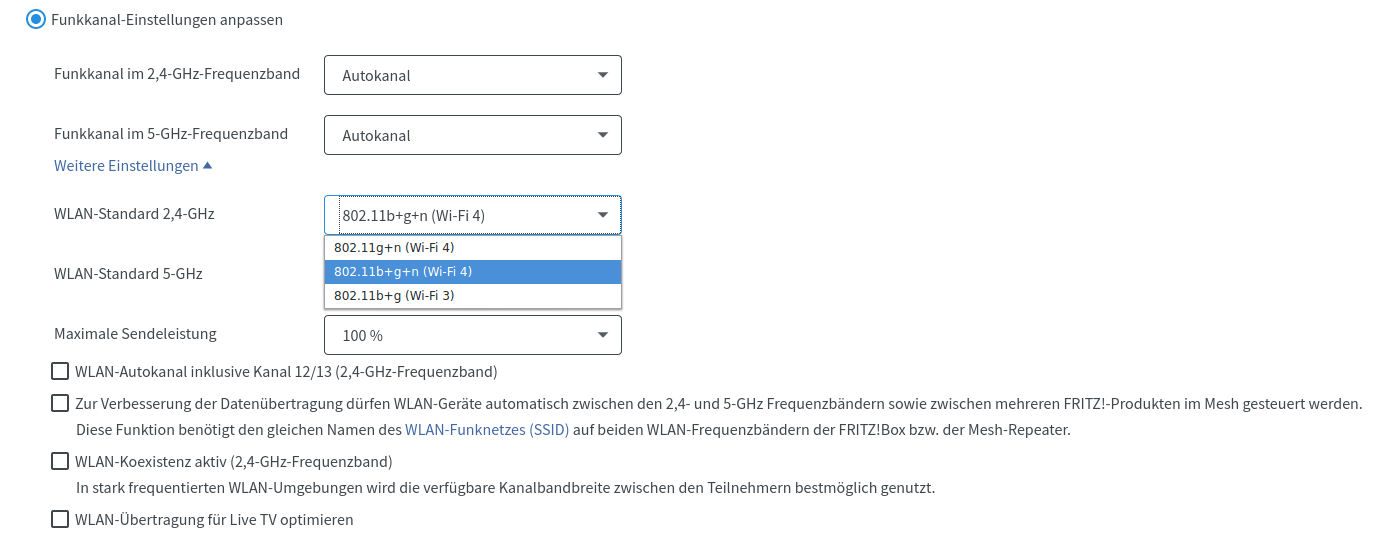
I tried all 3 and at least from the 2nd connection onward it required double hitting.
And while I was on it, I also tried the other options (all unchecked in the picture), checking one-by-one and then multiple. None of them changed anything.
ullix
on 16 Jun 2020
FB7490 with two FB repeaters. Set on AutoChannel, PMF deactivated (default) and a bunch of different esp32 with non of them having this Problem.
And the ESPs are connecting to the router or to the RPT? Which RPT?
Connected to the Router. Its about 5m distance to the Router and 10m to the RPT.
kugelkopf123
on 17 Jun 2020
I wrote a function one year ago for a stable connect/autoconnect/doublehit which works on all my smarthome devices(ESP32 w. arduino framework) running in "background" on ESP32 core 0. For each new project, i only change MY_IP. The arduino framework runs on ESP32 core 1.
wificonnect.h
// WiFi
#define MY_SSID     "myWiFi"        // Wifi name
#define MY_PASSWORD     "123456789";        // Wifi password

#define MY_IP       (192, 168, 0, 240)      // My WiFi-IP
#define MY_GATEWAY  (192, 168, 0, 100)  // Fritzbox
#define MY_SUBNET   (255, 255, 255, 0)  // Subnet
#define MY_DNS      (192, 168, 0, 100)  // Fritzbox

extern void myWiFiTask(void *pvParameters);

#define CS_INIT         0
#define CS_CONNECTING   1
#define CS_CONNECTED    2
#define CS_WIFIRESET    3

extern volatile short connect_state;
wificonnect.c
#include <WiFi.h>
#include "wificonnect.h"

const char* ssid =      MY_SSID;
const char* password =      MY_PASSWORD;
IPAddress   ip      MY_IP;
IPAddress   gateway     MY_GATEWAY;
IPAddress   subnet      MY_SUBNET;
IPAddress   dns         MY_DNS;

/*
    WL_NO_SHIELD = 255,   // for compatibility with WiFi Shield library
    WL_IDLE_STATUS = 0,
    WL_NO_SSID_AVAIL = 1,
    WL_SCAN_COMPLETED = 2,
    WL_CONNECTED = 3,
    WL_CONNECT_FAILED = 4,
    WL_CONNECTION_LOST = 5,
    WL_DISCONNECTED = 6
*/

volatile short connect_state = CS_INIT;

#define MAX_CONNECTING_TIME 4000

String wifistatestr[] = {
    "WL_IDLE_STATUS", "WL_NO_SSID_AVAIL", "WL_SCAN_COMPLETED", "WL_CONNECTED",
    "WL_CONNECT_FAILED", "WL_CONNECTION_LOST", "WL_DISCONNECTED", "WL_NO_SHIELD"};

void printwifistatus(wl_status_t state)
{
    static short laststate = 255;

    if (laststate != state)
    {
        if (state > 6)
        {
            state = (wl_status_t)7; //WL_NO_SHIELD = 255 und new states map to 7
        }
        Serial.print(state);
        Serial.print(" : ");
        Serial.println(wifistatestr[state]);
        laststate = state;
    }
}

void wifi_reset ( void )
{
    WiFi.persistent(false);
    WiFi.disconnect();
    WiFi.mode(WIFI_OFF);
}

void wifi_init ( void )
{
    WiFi.mode(WIFI_STA);
    WiFi.config(ip, gateway, subnet, dns);
    WiFi.begin(ssid, password);
}

void wifi_printconnection( void )
{
    Serial.print("Connected to ");
    Serial.println(ssid);
    Serial.print("IP address: ");
    Serial.println(WiFi.localIP());
    Serial.println("\n");
}

void myWiFiTask(void *pvParameters)
{
    while (true)
    {
        static long wait_for_connect;
        wl_status_t wifi_state = WiFi.status();
        printwifistatus(wifi_state);
        switch ( connect_state )
        {
            case CS_INIT:                   // Start things
                Serial.println("Init WiFi");
                wifi_init();
                wait_for_connect = millis();
                connect_state = CS_CONNECTING;
                Serial.println("Connecting WiFi");
                break;
            case CS_CONNECTING:
                if (wifi_state == WL_CONNECT_FAILED)
                {
                    Serial.println("Connect failed, wait 10s");
                    vTaskDelay(10000);
                    connect_state = CS_WIFIRESET;
                }
                else if (wifi_state == WL_DISCONNECTED)
                {
                    connect_state = CS_WIFIRESET;
                }
                else if ( wifi_state != WL_CONNECTED )
                {
                    if ((millis() -  wait_for_connect) < MAX_CONNECTING_TIME)
                    {
                        vTaskDelay(250);
                        Serial.print(".");
                    }
                    else
                    {
                        connect_state = CS_WIFIRESET;
                    }
                }
                else        // WL_CONNECTED
                {
                        wifi_printconnection();
                        connect_state = CS_CONNECTED;
                }
                break;
            case CS_CONNECTED:
                vTaskDelay(5000); // Check again every 5s
                if ( wifi_state != WL_CONNECTED )
                {
                    connect_state = CS_WIFIRESET;
                }
                break;
            case CS_WIFIRESET:
                Serial.println("Wifi Reset, then max 4s wait to connect");
                wifi_reset();
                wifi_init();
                short i = 0;
                while ((WiFi.status() != WL_CONNECTED) && (i++ < 40))
                {
                    Serial.print(".");
                    vTaskDelay(100); // wait max 4 seconds for new connection
                }
                Serial.println(".");
                connect_state = CS_CONNECTING;
                break;
        }
    }
}
ESP32_wificonnect_example.ino
#include <WiFi.h>
#include "wificonnect.h"
#define LEDPort 5   // example LED port

void setup()
{
    Serial.begin(115200);
    // Create a connection task with 8kB stack on core 0
    xTaskCreatePinnedToCore(myWiFiTask, "myWiFiTask", 8192, NULL, 3, NULL, 0);  // wifi connection task
    while (connect_state != CS_CONNECTED)   // wait for first time connection
    {
        digitalWrite(LEDPort, 1);           // blink on WiFi connection
        delay(100);
        digitalWrite(LEDPort, 0);
        delay(200);
    }
}

void loop()
{
    // reconnect in "background" at myWiFiTask
}
Yeah the workarounds are easy, but not a solution, for battery powered mqtt apps they need to connect immediately run and sleep, not do timing loops to make sure they connect
tablatronix
on 17 Jun 2020
A reconnect of around 30 seconds is not too bad. How fast does the ESP8266 reconnect with the exact same set-up and router in comparison? Is it so very much faster that the 'lectricity savings make a substantial difference?
systembolaget
on 17 Jun 2020
A reconnect of around 30 seconds is not too bad.
Good Heavens! I consider 3 seconds as too long!
My double-hitter code can be found here: https://github.com/espressif/arduino-esp32/issues/2501#issuecomment-634670194
A time of 800 milliseconds in the first hit, and another 800 millisec on the second hit is fairly typical for my bad router FB7490. The good routers tend to be older ones with a less powerful CPU, so there the one-and-only hit takes a total of 1 sec.
If 30 sec pleases you, this will delight you. But to quote @tablatronix :+1:
Yeah the workarounds are easy, but not a solution
There should not be any need at all for double-hitters - what is causing them?
ullix
on 17 Jun 2020
30 seconds is a hell a lot of time when trying to maximize battery lifetime.
I would say in a most setups one would try to get everything done in way under 3 seconds, wake up, connect to WLAN, read the sensors, send the data and immediately go back to sleep.
People are disabling DHCP and setting hard coded IPs to even save ~1 to ~1,5 seconds and WLAN traffic to maximize battery lifetime.
Considering the ESP32 needs ~200µA in deep sleep and ~140mA with running WLAN one will want to save every second.
Mr-Bubbles
on 17 Jun 2020
Is this issue specific to the Fritzboxes? Is the OP around to change the topic to include that?
lbernstone
on 17 Jun 2020
Is this issue specific to the Fritzboxes? Is the OP around to change the topic to include that?
@ElToberino says the same problem occurs with a Netgear WN2000RPTv3.
Mr-Bubbles
on 17 Jun 2020
I got a reply from AVM about my issue. Their first question was if i could update my FritzBox with the current lab firmware from their website and try again. Unfortunately I can not, since I have a provider branded model where I can not update the firmware myself.
However, maybe someone here can try that, the lab firmware can be found here: FRITZ! Labor (site is in German)
Mr-Bubbles
on 17 Jun 2020
@Mr-Bubbles As I already told, I’m on the latest beta lab version. Still the same.
kugelkopf123
on 17 Jun 2020
So many good things were said about the ESP8266 that I got me one (26MHz crystal) and ran my tests with the old ESP32 code (only WiFi lib needed to be changed) against my FB7490.
The first handful runs resulted in no connection at all (FB's fault?) but from then on all connection attempts succeeded in first hit; a double-hitter was never needed.
However, each one took from 2.4 ... 3.0 seconds! So if air-time is an issue, an ESP32 even with the need for a double-hitter on a FB is faster!
Only after some 2+ dozen connections there was an occasional - like every tenth - connection that was completed within 200 millisec! Is that other's experience too?
ullix
on 17 Jun 2020
@Mr-Bubbles @kugelkopf123 I also have the latest 'Labor' firmware - no improvement.
ullix
on 17 Jun 2020
I don't know if it helps and I'm not familiar with the wireshark and ip packages. But with the FB there is the possibility to record them per interface and then evaluate them in wireshark.
How to find the menu (german Howto). Maybe someone can do something with it and find a bug!?
kugelkopf123
on 17 Jun 2020
@ullix alot of that time is dhcp, dhcp is slow on esp8266, use static ip it should be 1s
tablatronix
on 17 Jun 2020
@ullix
Its right what @tablatronix says. And if you add the BSSID and Channel from your Router its even more faster.
WiFi.begin(SSID,PW,CHannel,BSSID);
if I remember correctly.
kugelkopf123
on 17 Jun 2020
@kugelkopf123 @tablatronix Indeed, and providing the BSSID was essential, otherwise it took ~3sec. After rebooting several dozen times, it always connected on first hit, and always in under 120ms! Impressive.
So, are the FB7490 and the ESP8266 bug-free, and the ESP32 has a bug, or do FB and ESP8266 each have a bug that happen to compensate, and the ESP32 is without guilt?
ullix
on 18 Jun 2020
These two functions called from loop() work for my ESP32 devices, too, also with my recommended new TP-Link router. Takes between 2 to 11 seconds. That'll do, because the 20,000mAh Li-Poly battery suffices for my use-case (tree shake, accelerometer, once per hour). After all, there won't be a reconnection necessary very often, as I found out that power or router outages are rare.
```
unsigned long timeNowWLAN = 0; // Timestamp that updates each loop() iteration
const int intervalWLAN = 1000; // WLAN (re-)connection interval 1s
bool AIOconnected = false; // Flag to enable publish and subscribe
void connectToWLAN()
{
if (WiFi.status() == WL_NO_MODULE)
{
Serial.println("Connection to WLAN module failed");
while (true)
{
WiFi.setLEDs(0, 255, 0); // Red
}
}
if (WiFi.status() == WL_CONNECTED)
{
return;
}
if (millis() - timeNowWLAN >= intervalWLAN)
{
timeNowWLAN = millis();
Serial.println("Trying to connect to WLAN router");
WiFi.disconnect();
WiFi.end();
WiFi.setLEDs(160, 255, 0); // Yellow
WiFi.begin(WLAN_SSID, WLAN_PASS);
Serial.println(WiFi.status());
Serial.println("Connection to WLAN router successful");
WiFi.setLEDs(255, 0, 0); // Green
}
}
void connectToMQTT()
{
if (mqtt.connected())
{
return;
}
if (WiFi.status() == WL_CONNECTED)
{
Serial.println("Trying to connect to Adafruit IO");
int8_t MQTTerror;
while ((MQTTerror = mqtt.connect()) != 0)
{
  if (MQTTerror >= 0)
  {
    WiFi.setLEDs(0, 255, 255); // Magenta
    mqtt.disconnect();
    Serial.println("Retry to connect to Adafruit IO");
    return;
  }
}

WiFi.setLEDs(255, 0, 255); // Cyan
AIOconnected = true;
Serial.println("Connection to Adafruit IO successful");
}
}
systembolaget
on 18 Jun 2020
Not sure, but this would need to be tested against latest IDF and then escalated to espressif as an sdk issue.
Could be a sdk bug that is already fixed upstream. Needs testing outside of arduino to prove it though.
tablatronix
on 18 Jun 2020
Not sure, but this would need to be tested against latest IDF and then escalated to espressif as an sdk issue. ...
@tablatronix can you do this?
Never worked with the idf.
kugelkopf123
on 18 Jun 2020
I cannot reproduce this bug so no
tablatronix
on 18 Jun 2020
I tried it with the official Espressif IDF that can be installed in Platform.IO and had the same bug. ESP-IDF (V1.12.3). I could not find out which Espressif IDF release that is however.
Mr-Bubbles
on 18 Jun 2020
ESP-IDF does it always on first hit!
I thought that @tablatronix 's comment about needing to show the bug in IDF is very valid. So I took up the adventure of using ESP-IDF.
It turned out, it is not that much of a challenge. Go to 'Get Started' https://docs.espressif.com/projects/esp-idf/en/latest/esp32/get-started/index.html#get-started-get-esp-idf and follow to the letter. Success is almost guaranteed (I used it on Ubuntu 16.04). And you don't need to understand all the supporting files and configuration meanings, just paint by numbers.
I started with the 'Hello World' example and then moved to the 'WiFi-->getting_started-->station' example. The *.c file is included as zip.
station_example_main.c.zip
With this example I get this output on the Serial Terminal (all original, except password):
    ets Jun  8 2016 00:22:57

    rst:0x1 (POWERON_RESET),boot:0x13 (SPI_FAST_FLASH_BOOT)
    configsip: 0, SPIWP:0xee
    clk_drv:0x00,q_drv:0x00,d_drv:0x00,cs0_drv:0x00,hd_drv:0x00,wp_drv:0x00
    mode:DIO, clock div:2
    load:0x3fff0030,len:4
    load:0x3fff0034,len:7092
    load:0x40078000,len:13696
    load:0x40080400,len:4000
    0x40080400: _init at ??:?

    entry 0x40080688
    I (29) boot: ESP-IDF v4.2-dev-1905-g625bd5e 2nd stage bootloader
    I (29) boot: compile time 13:23:30
    I (29) boot: chip revision: 1
    I (33) boot_comm: chip revision: 1, min. bootloader chip revision: 0
    I (40) boot.esp32: SPI Speed      : 40MHz
    I (45) boot.esp32: SPI Mode       : DIO
    I (49) boot.esp32: SPI Flash Size : 4MB
    I (54) boot: Enabling RNG early entropy source...
    I (59) boot: Partition Table:
    I (63) boot: ## Label            Usage          Type ST Offset   Length
    I (70) boot:  0 nvs              WiFi data        01 02 00009000 00006000
    I (78) boot:  1 phy_init         RF data          01 01 0000f000 00001000
    I (85) boot:  2 factory          factory app      00 00 00010000 00100000
    I (93) boot: End of partition table
    I (97) boot_comm: chip revision: 1, min. application chip revision: 0
    I (104) esp_image: segment 0: paddr=0x00010020 vaddr=0x3f400020 size=0x16e20 ( 93728) map
    I (149) esp_image: segment 1: paddr=0x00026e48 vaddr=0x3ffb0000 size=0x03998 ( 14744) load
    I (155) esp_image: segment 2: paddr=0x0002a7e8 vaddr=0x40080000 size=0x00404 (  1028) load
    0x40080000: _WindowOverflow4 at /home/ullix/esp/esp-idf/components/freertos/xtensa/xtensa_vectors.S:1730

    I (156) esp_image: segment 3: paddr=0x0002abf4 vaddr=0x40080404 size=0x05424 ( 21540) load
    I (174) esp_image: segment 4: paddr=0x00030020 vaddr=0x400d0020 size=0x7092c (461100) map
    0x400d0020: _stext at ??:?

    I (349) esp_image: segment 5: paddr=0x000a0954 vaddr=0x40085828 size=0x104a4 ( 66724) load
    0x40085828: wr_bt_tx_atten at ??:?

    I (390) boot: Loaded app from partition at offset 0x10000
    I (390) boot: Disabling RNG early entropy source...
    I (391) cpu_start: Pro cpu up.
    I (394) cpu_start: Application information:
    I (399) cpu_start: Project name:     wifi_station
    I (405) cpu_start: App version:      1
    I (409) cpu_start: Compile time:     Jun 19 2020 13:23:39
    I (415) cpu_start: ELF file SHA256:  81bb874e9d478743...
    I (421) cpu_start: ESP-IDF:          v4.2-dev-1905-g625bd5e
    I (427) cpu_start: Starting app cpu, entry point is 0x40081f74
    0x40081f74: call_start_cpu1 at /home/ullix/esp/esp-idf/components/esp32/cpu_start.c:286

    I (0) cpu_start: App cpu up.
    I (438) heap_init: Initializing. RAM available for dynamic allocation:
    I (445) heap_init: At 3FFAE6E0 len 00001920 (6 KiB): DRAM
    I (451) heap_init: At 3FFB9328 len 00026CD8 (155 KiB): DRAM
    I (457) heap_init: At 3FFE0440 len 00003AE0 (14 KiB): D/IRAM
    I (463) heap_init: At 3FFE4350 len 0001BCB0 (111 KiB): D/IRAM
    I (470) heap_init: At 40095CCC len 0000A334 (40 KiB): IRAM
    I (476) cpu_start: Pro cpu start user code
    I (494) spi_flash: detected chip: generic
    I (495) spi_flash: flash io: dio
    I (495) cpu_start: Starting scheduler on PRO CPU.
    I (0) cpu_start: Starting scheduler on APP CPU.
    I (581) wifi station: ESP_WIFI_MODE_STA
    I (601) wifi:wifi driver task: 3ffc1cf0, prio:23, stack:6656, core=0
    I (601) system_api: Base MAC address is not set
    I (601) system_api: read default base MAC address from EFUSE
    I (621) wifi:wifi firmware version: 0507408
    I (621) wifi:wifi certification version: v7.0
    I (621) wifi:config NVS flash: enabled
    I (621) wifi:config nano formating: disabled
    I (631) wifi:Init dynamic tx buffer num: 32
    I (631) wifi:Init data frame dynamic rx buffer num: 32
    I (641) wifi:Init management frame dynamic rx buffer num: 32
    I (641) wifi:Init management short buffer num: 32
    I (651) wifi:Init static rx buffer size: 1600
    I (651) wifi:Init static rx buffer num: 10
    I (651) wifi:Init dynamic rx buffer num: 32
    I (751) phy: phy_version: 4182, f1ba940, Jun  4 2020, 19:40:07, 0, 0
    I (751) wifi:mode : sta (24:6f:28:96:aa:f4)
    I (761) wifi station: wifi_init_sta finished.
    I (881) wifi:new:<6,1>, old:<1,0>, ap:<255,255>, sta:<6,1>, prof:1
    I (881) wifi:state: init -> auth (b0)
    I (891) wifi:state: auth -> assoc (0)
    I (901) wifi:state: assoc -> run (10)
    I (931) wifi:connected with fb7490, aid = 4, channel 6, 40U, bssid = cc:ce:1e:7a:91:ea
    I (931) wifi:security type: 4, phy: bgn, rssi: -51
    I (931) wifi:pm start, type: 1

    I (971) wifi:AP's beacon interval = 102400 us, DTIM period = 1
    I (1581) esp_netif_handlers: sta ip: 10.0.0.75, mask: 255.255.255.0, gw: 10.0.0.1
    I (1581) wifi station: got ip:10.0.0.75
    I (1581) wifi station: connected to ap SSID:fb7490 password:11111111111111111111
Tried this several dozen times, and it never looked different (at least I didn't notice). I never saw a failed 'auth' or a repeat of anything. Or am I missing it?
If not, don't we have to conclude that neither the ESP32 nor the Fritz!Box is at fault?
Calling the Arduino-Gurus to fix the code ;-)
ullix
on 19 Jun 2020
@ullix I also tried with the ESP IDF a couple of days ago, unfortunately for me it did not fix the problem. see my post here
Edit: seems you have a different WiFi Firmware than me, does anyone know of a way to update it, or is it part of the framework?
Mr-Bubbles
on 19 Jun 2020
@Mr-Bubbles missed your post. Fortunately, because I would never have tried it also, had I realized what it is :-/
Remind me: which router was used in that experiment?
The good part is that we now have something at hand that confirms that software on the ESP side determines connection success.
Regarding the upgrade, I suggest to follow the getting started recommendation:
Updating ESP-IDF
You should update ESP-IDF from time to time, as newer versions fix bugs and provide new features. The simplest way to do the update is to delete the existing esp-idf folder and clone it again, as if performing the initial installation described in Step 2. Get ESP-IDF.
ullix
on 19 Jun 2020
Re firmware: strangely, your number is higher than mine. I downloaded today using git clone as specified in their Getting Started Step 2. Get ESP-IDF.
ullix
on 19 Jun 2020
@ullix hm, maybe I will try again with the current release (I think the Framework that Platform.IO uses is not the latest stable)
My fritz.box is 6490 with firmware 7.12
Mr-Bubbles
on 19 Jun 2020
The necessary (still nobody knows why that is so) double-hit procedure (Arduino, WiFiNINA library) takes 13 seconds with my Fritzbox or the new TP-Link router, also from an old smartphone. I cannot get it any faster, but at least it connects and re-connects reliably.
If the WLAN is out once per week, I think a 13 seconds reconnection attempt will not unduly strain the battery, although of course one would want a 1 second reconnection with a single hit.
systembolaget
on 21 Jun 2020
@systembolaget Taking 13 sec still seems to be outrageously long for making a WiFi connection; it should always be possible in less than 1 sec, even for bad routers!
Try this piece of code; the key is to check for status and restart immediately after success or failure:
    /*
     * call until success (on my FB7490 no more than two calls needed )
     */
    bool getWifiConnection(uint8_t round){
        auto t0 = millis();
        bool success  = false;
        WiFi.begin(SSID, password);
        while ((millis() - t0) < 5000 ){   // just to limit in case of router failure
            uint16_t wifistatus = WiFi.status();
            if (wifistatus == WL_CONNECTED)                     {success = true;  break;}
            if (wifistatus == WL_CONNECT_FAILED and round == 0) {success = false; break;}
            delay(20);
        }
        return success;
    }
With that the whole thing from first attempt to success including all overhead takes no more than 600ms (see millis() in 1st column), whereby the individual rounds take 140ms (until failure) and 200ms (until success), resp. This is the last result from today and fairly typical:
    2892    -------------------- WiFi Connection round #0
    2899    getWifiConnection: WiFi.begin(SSID: fb7490, pw: *****)
    [D][WiFiGeneric.cpp:337] _eventCallback(): Event: 0 - WIFI_READY
    [D][WiFiGeneric.cpp:337] _eventCallback(): Event: 2 - STA_START
    [D][WiFiGeneric.cpp:337] _eventCallback(): Event: 5 - STA_DISCONNECTED
    [W][WiFiGeneric.cpp:353] _eventCallback(): Reason: 202 - AUTH_FAIL
    3125    Check[ms:Status]: 0:6 20:6 40:6 60:6 80:6 100:6 120:6 140:4 Failed
    3127    -------------------- WiFi Connection round #1
    3128    getWifiConnection: WiFi.begin(SSID: fb7490, pw: *****)
    [D][WiFiGeneric.cpp:337] _eventCallback(): Event: 4 - STA_CONNECTED
    [D][WiFiGeneric.cpp:337] _eventCallback(): Event: 7 - STA_GOT_IP
    [D][WiFiGeneric.cpp:381] _eventCallback(): STA IP: 10.0.0.75, MASK: 255.255.255.0, GW: 10.0.0.1
    3476    Check[ms:Status]: 0:4 20:4 40:4 60:4 80:4 100:4 120:4 140:4 160:4 180:4 200:3 Connected
    3484    --------------------  WiFi Connection ended after 2 rounds with SUCCESS
    3493    connected with SSID: 'fb7490', RSSI: -39, Hostname: 'ambiomon', IP address: 10.0.0.75, BSSID: CC:CE:1E:7A:91:EA
I find it helpful to activate all Debug output to see a bit of what is happening.
I noticed in the code, you posted above, commands like WiFi.setLEDs(0, 255, 0); // Red. This method does not exist in my WiFi lib. What WiFi lib are you using? Is this strange/modified/nonstandard lib the reason for the very long connection times?
ullix
on 22 Jun 2020
@ullix Thanks, as I'm using all kinds of Adafruit ESP32 boards, I'm using Adafruit's fork of the WiFiNINA library. The RGB LED class is in WiFi.cpp.
systembolaget
on 22 Jun 2020
@systembolaget Hm... what is the WL_DELAY_START_CONNECTION in this class for? If the only thing you use from this class, is the begin and setleds,
I would suggest to use the normal ESP32 WiFi class and add the code for setting the leds by yourself into your script.
kugelkopf123
on 22 Jun 2020
@kugelkopf123 Yeah, I don't know where the time for that delay is defined. The Adafruit fork also deals with pin definitions for the various Adafruit ESP32 boards. Maybe it addresses other things, too, which I don't know about. Maybe I could add the LED and pin specific classes to the "regular" WiFiNINA library, if that library is "faster".
systembolaget
on 22 Jun 2020
With
void loop()
{
  getWifiConnection(100);
}

bool getWifiConnection(uint8_t rounds)
{
  unsigned long t0 = millis();

  WiFi.begin(WLAN_SSID, WLAN_PASS);

  while ((millis() - t0) < 5000 ) // just to limit in case of router failure
  {
    uint16_t wifistatus = WiFi.status();

    if (wifistatus == WL_CONNECTED)
    {
      success = true;
      Serial.println("Connected");
      break;
    }
    if (wifistatus == WL_CONNECT_FAILED and rounds == 0)
    {
      success = false;
      Serial.println("Not connected");
      break;
    }
    delay(20);
  }
  return success;
}
Nothing happens at all.
systembolaget
on 22 Jun 2020
Of course, not. You missed this part:
/*
 * call until success (on my FB7490 no more than two calls needed )
 */
The full init with get routines could be like this:
    void initWIFI() {

        bool success = false;
        Serial.println("Initializing WIFI STA");

        uint8_t i;
        for (i = 0; i < 5; i++){    // Do up to N (=5) rounds of connection attempts
            Serial.printf("-------------- WiFi Connection round #%i\n", i);
            success = getWifiConnection(i);
            if (success) break;
        }
        Serial.printf("-------------- WiFi Connection ended after %i rounds with %s\n", i+1 , (success) ? "SUCCESS" : "FAILURE");

        if (WiFi.status() != WL_CONNECTED ){        // FAILURE, no connection
            Serial.printf("Failure to connect to WiFi\n");
        }
        else{
            Serial.printf("Connected with SSID: '%s', RSSI: %i, Hostname: '%s', IP address: %s, BSSID: %s\n",  SSID,
                                                                                                               WiFi.RSSI(),
                                                                                                               WiFi.getHostname().c_str(),
                                                                                                               WiFi.localIP().toString().c_str(),
                                                                                                               WiFi.BSSIDstr().c_str());
        }
    }

    bool getWifiConnection(uint8_t round){
        auto t0 = millis();
        bool success = false;
        WiFi.begin(SSID, password);
        while ((millis() - t0) < 5000 ){   // just to limit in case of router failure
            uint16_t wifistatus = WiFi.status();
            if (wifistatus == WL_CONNECTED)                     {success = true;  break;}
            if (wifistatus == WL_CONNECT_FAILED and round == 0) {success = false; break;}
            delay(20);
        }
        return success;
    }
Note that the init function determines how often the get function is called. The get function receives the round parameter as index, because it treats the wifistatus differently in round zero and round >= 1!
Success is evaluated in init. Init should be called from Setup.
If more than 2 rounds are needed, then it generally also fails even after more than 5 rounds. But those are rare events, almost never happen.
I suggest to activate Debug output to gain more insight.
Update: I just noticed to have forgotten the line bool success = false; in the get routine. I updated the code.
ullix
on 22 Jun 2020
Since esp uses autoconnect, have you tried skipping the first begin() see if it takes longer or less ?
tablatronix
on 22 Jun 2020
I guess it is a IDF topic. Tested with the IDF-trunk-version (yesterday). 70% (estimated) of the connects work and 30% need a second try.
FB7490 V07.12
Different ESP32. Some chip rev 0 and some chip rev 1, some with 40 MHz chrystal and some with 26 MHz. Always the same behavior.
Reduced the log a little bit and modified the program to use static ip.
Time to connect (if the first try works) is arround 500ms.
Works on second try
I (70) boot: Chip Revision: 1
I (71) boot_comm: chip revision: 1, min. bootloader chip revision: 0
I (39) boot: ESP-IDF HEAD-HASH-NOTFOUND 2nd stage bootloader
I (39) boot: compile time 20:29:33
I (39) boot: Enabling RNG early entropy source...
I (44) boot: SPI Speed      : 40MHz
I (48) boot: SPI Mode       : DIO
I (52) boot: SPI Flash Size : 4MB
I (56) boot: Partition Table:
I (60) boot: ## Label            Usage          Type ST Offset   Length
I (67) boot:  0 nvs              WiFi data        01 02 00009000 00006000
I (75) boot:  1 phy_init         RF data          01 01 0000f000 00001000
I (82) boot:  2 factory          factory app      00 00 00010000 00100000
I (90) boot: End of partition table
I (94) boot_comm: chip revision: 1, min. application chip revision: 0
I (101) esp_image: segment 0: paddr=0x00010020 vaddr=0x3f400020 size=0x17664 ( 95844) map
I (144) esp_image: segment 1: paddr=0x0002768c vaddr=0x3ffb0000 size=0x0389c ( 14492) load
I (150) esp_image: segment 2: paddr=0x0002af30 vaddr=0x40080000 size=0x00400 (  1024) load
I (152) esp_image: segment 3: paddr=0x0002b338 vaddr=0x40080400 size=0x04cd8 ( 19672) load
I (168) esp_image: segment 4: paddr=0x00030018 vaddr=0x400d0018 size=0x6e350 (451408) map
I (330) esp_image: segment 5: paddr=0x0009e370 vaddr=0x400850d8 size=0x100a8 ( 65704) load
I (371) boot: Loaded app from partition at offset 0x10000
I (371) boot: Disabling RNG early entropy source...
I (372) cpu_start: Pro cpu up.
I (375) cpu_start: Application information:
I (380) cpu_start: Project name:     IDF-Test
I (385) cpu_start: App version:      1
I (390) cpu_start: Compile time:     Jun 22 2020 20:28:12
I (396) cpu_start: ELF file SHA256:  3e21d95bc655a380...
I (402) cpu_start: ESP-IDF:          HEAD-HASH-NOTFOUND
I (408) cpu_start: Starting app cpu, entry point is 0x400811dc
I (0) cpu_start: App cpu up.
I (418) heap_init: Initializing. RAM available for dynamic allocation:
I (425) heap_init: At 3FFAE6E0 len 00001920 (6 KiB): DRAM
I (431) heap_init: At 3FFB9A10 len 000265F0 (153 KiB): DRAM
I (437) heap_init: At 3FFE0440 len 00003AE0 (14 KiB): D/IRAM
I (444) heap_init: At 3FFE4350 len 0001BCB0 (111 KiB): D/IRAM
I (450) heap_init: At 40095180 len 0000AE80 (43 KiB): IRAM
I (456) cpu_start: Pro cpu start user code
I (475) spi_flash: detected chip: gd
I (475) spi_flash: flash io: dio
I (475) cpu_start: Starting scheduler on PRO CPU.
I (0) cpu_start: Starting scheduler on APP CPU.
I (543) wifi station: ESP_WIFI_MODE_STA
I (573) wifi:wifi driver task: 3ffc20d4, prio:23, stack:6656, core=0
I (573) system_api: Base MAC address is not set, read default base MAC address from BLK0 of EFUSE
I (573) system_api: Base MAC address is not set, read default base MAC address from BLK0 of EFUSE
I (603) wifi:wifi firmware version: aa5336b
I (603) wifi:config NVS flash: enabled
I (603) wifi:config nano formating: disabled
I (603) wifi:Init dynamic tx buffer num: 32
I (603) wifi:Init data frame dynamic rx buffer num: 32
I (613) wifi:Init management frame dynamic rx buffer num: 32
I (613) wifi:Init management short buffer num: 32
I (623) wifi:Init static rx buffer size: 1600
I (623) wifi:Init static rx buffer num: 10
I (633) wifi:Init dynamic rx buffer num: 32
I (723) phy: phy_version: 4180, cb3948e, Sep 12 2019, 16:39:13, 0, 0
I (723) wifi:mode : sta (84:0d:8e:20:3b:60)
I (853) wifi:new:<6,1>, old:<1,0>, ap:<255,255>, sta:<6,1>, prof:1
I (853) wifi:state: init -> auth (b0)
I (863) wifi:state: auth -> init (8a0)
I (863) wifi:new:<6,0>, old:<6,1>, ap:<255,255>, sta:<6,1>, prof:1
I (863) wifi:new:<6,1>, old:<6,0>, ap:<255,255>, sta:<6,1>, prof:1
I (863) wifi:state: init -> auth (b0)
I (873) wifi:state: auth -> init (8a0)
I (873) wifi:new:<6,0>, old:<6,1>, ap:<255,255>, sta:<6,1>, prof:1
I (883) wifi:new:<6,1>, old:<6,0>, ap:<255,255>, sta:<6,1>, prof:1
I (883) wifi:state: init -> auth (b0)
I (893) wifi:state: auth -> init (8a0)
I (893) wifi:new:<6,0>, old:<6,1>, ap:<255,255>, sta:<6,1>, prof:1
E (903) wifi station: retry to connect to the AP
E (2953) wifi station: retry to connect to the AP
I (3073) wifi:new:<6,1>, old:<6,0>, ap:<255,255>, sta:<6,1>, prof:1
I (3073) wifi:state: init -> auth (b0)
I (3083) wifi:state: auth -> assoc (0)
I (3083) wifi:state: assoc -> run (10)
I (3113) wifi:connected with mySSID, aid = 3, channel 6, 40U, bssid = 2c:91:ab:e4:e1:e1
I (3123) wifi:security: WPA2-PSK, phy: bgn, rssi: -56
I (3123) wifi:pm start, type: 1
I (3123) tcpip_adapter: sta ip: 192.168.31.212, mask: 255.255.255.0, gw: 192.168.31.1
I (3133) wifi station: got ip:192.168.31.212
I (3133) wifi station: connected to ap
I (3153) wifi:AP's beacon interval = 102400 us, DTIM period = 1
Works on first try
I (70) boot: Chip Revision: 1
I (71) boot_comm: chip revision: 1, min. bootloader chip revision: 0
I (39) boot: ESP-IDF HEAD-HASH-NOTFOUND 2nd stage bootloader
I (39) boot: compile time 20:29:33
I (39) boot: Enabling RNG early entropy source...
I (44) boot: SPI Speed      : 40MHz
I (48) boot: SPI Mode       : DIO
I (52) boot: SPI Flash Size : 4MB
I (57) boot: Partition Table:
I (60) boot: ## Label            Usage          Type ST Offset   Length
I (67) boot:  0 nvs              WiFi data        01 02 00009000 00006000
I (75) boot:  1 phy_init         RF data          01 01 0000f000 00001000
I (82) boot:  2 factory          factory app      00 00 00010000 00100000
I (90) boot: End of partition table
I (94) boot_comm: chip revision: 1, min. application chip revision: 0
I (101) esp_image: segment 0: paddr=0x00010020 vaddr=0x3f400020 size=0x17664 ( 95844) map
I (144) esp_image: segment 1: paddr=0x0002768c vaddr=0x3ffb0000 size=0x0389c ( 14492) load
I (150) esp_image: segment 2: paddr=0x0002af30 vaddr=0x40080000 size=0x00400 (  1024) load
I (152) esp_image: segment 3: paddr=0x0002b338 vaddr=0x40080400 size=0x04cd8 ( 19672) load
I (168) esp_image: segment 4: paddr=0x00030018 vaddr=0x400d0018 size=0x6e350 (451408) map
I (330) esp_image: segment 5: paddr=0x0009e370 vaddr=0x400850d8 size=0x100a8 ( 65704) load
I (371) boot: Loaded app from partition at offset 0x10000
I (371) boot: Disabling RNG early entropy source...
I (372) cpu_start: Pro cpu up.
I (375) cpu_start: Application information:
I (380) cpu_start: Project name:     IDF-Test
I (385) cpu_start: App version:      1
I (390) cpu_start: Compile time:     Jun 22 2020 20:28:12
I (396) cpu_start: ELF file SHA256:  3e21d95bc655a380...
I (402) cpu_start: ESP-IDF:          HEAD-HASH-NOTFOUND
I (408) cpu_start: Starting app cpu, entry point is 0x400811dc
I (0) cpu_start: App cpu up.
I (418) heap_init: Initializing. RAM available for dynamic allocation:
I (425) heap_init: At 3FFAE6E0 len 00001920 (6 KiB): DRAM
I (431) heap_init: At 3FFB9A10 len 000265F0 (153 KiB): DRAM
I (437) heap_init: At 3FFE0440 len 00003AE0 (14 KiB): D/IRAM
I (444) heap_init: At 3FFE4350 len 0001BCB0 (111 KiB): D/IRAM
I (450) heap_init: At 40095180 len 0000AE80 (43 KiB): IRAM
I (456) cpu_start: Pro cpu start user code
I (475) spi_flash: detected chip: gd
I (475) spi_flash: flash io: dio
I (475) cpu_start: Starting scheduler on PRO CPU.
I (0) cpu_start: Starting scheduler on APP CPU.
I (543) wifi station: ESP_WIFI_MODE_STA
I (573) wifi:wifi driver task: 3ffc20d4, prio:23, stack:6656, core=0
I (573) system_api: Base MAC address is not set, read default base MAC address from BLK0 of EFUSE
I (573) system_api: Base MAC address is not set, read default base MAC address from BLK0 of EFUSE
I (603) wifi:wifi firmware version: aa5336b
I (603) wifi:config NVS flash: enabled
I (603) wifi:config nano formating: disabled
I (603) wifi:Init dynamic tx buffer num: 32
I (603) wifi:Init data frame dynamic rx buffer num: 32
I (613) wifi:Init management frame dynamic rx buffer num: 32
I (613) wifi:Init management short buffer num: 32
I (623) wifi:Init static rx buffer size: 1600
I (623) wifi:Init static rx buffer num: 10
I (633) wifi:Init dynamic rx buffer num: 32
I (723) phy: phy_version: 4180, cb3948e, Sep 12 2019, 16:39:13, 0, 0
I (723) wifi:mode : sta (84:0d:8e:20:3b:60)
I (853) wifi:new:<6,1>, old:<1,0>, ap:<255,255>, sta:<6,1>, prof:1
I (853) wifi:state: init -> auth (b0)
I (863) wifi:state: auth -> init (8a0)
I (863) wifi:new:<6,0>, old:<6,1>, ap:<255,255>, sta:<6,1>, prof:1
I (863) wifi:new:<6,1>, old:<6,0>, ap:<255,255>, sta:<6,1>, prof:1
I (863) wifi:state: init -> auth (b0)
I (873) wifi:state: auth -> assoc (0)
I (883) wifi:state: assoc -> run (10)
I (923) wifi:connected with mySSID, aid = 9, channel 6, 40U, bssid = 7c:ff:4d:64:b5:7e
I (923) wifi:security: WPA2-PSK, phy: bgn, rssi: -62
I (933) wifi:pm start, type: 1
I (933) tcpip_adapter: sta ip: 192.168.31.212, mask: 255.255.255.0, gw: 192.168.31.1
I (943) wifi station: got ip:192.168.31.212
I (943) wifi station: connected to ap
I (1013) wifi:AP's beacon interval = 102400 us, DTIM period = 1
@tablatronix This autoconnect is a strange beast. In my tests it does absolutely nothing, whether you define it as WiFi.setAutoConnect(true); or as false. Nothing changes. I have the suspicion it is a remnant from ESP8266 and is inactive in ESP32 (but have not further verified this).
When you set WiFi.setAutoConnect(true); and optionally also WiFi.persistent(true);, and then check WiFi.status(); for up to 30 sec you always get status=255 (from WiFitype.h: WL_NO_SHIELD = 255, // for compatibility with WiFi Shield library). When you also set WiFi.mode(WIFI_STA); - either before or after these two other commands - you get status=6 (WL_DISCONNECTED = 6). I think I tried all permutations ;-).
In all cases no connection. You have to then issue the begin command, and need the 'normal' double hitter to connect, almost always taking a total time of 400 ... 800 ms.
EDIT:
should have looked it up earlier; from WiFiSTA.cpp:
    /**
     * Setting the ESP32 station to connect to the AP (which is recorded)
     * automatically or not when powered on. Enable auto-connect by default.
     * @param autoConnect bool
     * @return if saved
     */
    bool WiFiSTAClass::setAutoConnect(bool autoConnect)
    {
        /*bool ret;
        ret = esp_wifi_set_auto_connect(autoConnect);
        return ret;*/
        return false;//now deprecated
    }

    /**
     * Checks if ESP32 station mode will connect to AP
     * automatically or not when it is powered on.
     * @return auto connect
     */
    bool WiFiSTAClass::getAutoConnect()
    {
        /*bool autoConnect;
        esp_wifi_get_auto_connect(&autoConnect);
        return autoConnect;*/
        return false;//now deprecated
    }
Looks like my gut feeling was right :-(
ullix
on 23 Jun 2020
Oh yeah, I forgot it was never implemented on esp32, my bad. Probably needs to add a compiler warning for that func
tablatronix
on 23 Jun 2020
I searched this github issue for posts which used the ESP-IDF code and named the wifi firmware version. I found only 3 posts with only 2 different firmweare versions:
wifi firmware version aa5336b was used by @Mr-Bubbles https://github.com/espressif/arduino-esp32/issues/2501#issuecomment-643812088 and @hcs-svn https://github.com/espressif/arduino-esp32/issues/2501#issuecomment-647950326, and
wifi firmware version 0507408 was used by myself https://github.com/espressif/arduino-esp32/issues/2501#issuecomment-646595374
Of these the first 2 poster had mixed results, apparently both had single hitters as well as double hitters, while I had only single hitters for several dozen tries.
Given that I downloaded the code on the day of my post, and @Mr-Bubbles had posted several days earlier, it seems that my firmware is the youngest. (although at first glance the magnitude of the firmware number would suggest otherwise, but who knows how the define the version number).
We now have mixed messages; I suggest to retry after updating to the most recent IDF code! If you have never done this, see my post https://github.com/espressif/arduino-esp32/issues/2501#issuecomment-646595374, it is surprisingly easy to do.
BTW: these github issues are really awful to search through, given the hiding of posts several times along a long issue like this, and the exclusion of the hidden parts from search!
ullix
on 24 Jun 2020
@ullix Ok! Sounds good. Is there a possibility to have look on the changelog?
And how to add this to arduinoesp32?
kugelkopf123
on 24 Jun 2020
Is there a possibility to have look on the changelog?
And how to add this to arduinoesp32?
Jeez, I am afraid you are asking the wrong person; I am making my first steps into IDF.
Is anyone else able to answer?
ullix
on 24 Jun 2020
@ullix Unfortunately, with that, I never get a WLAN and then Internet connection : (
What I find most annoying, using either WiFiNINA or Adafruit's fork, is that in testing, after 5 or 6 uploads, the output from WiFi.begin(WLAN_SSID, WLAN_PASS) becomes 255 (WL_NO_SHIELD) for quite some time, which is nuts. After disconnecting from power for over half an hour, one can use the ESP32 again, as if something is stored in eventually decaying memory. And there is no documentation why that could be just so, and what to do about it. This happens with every ESP32 part I listed above.
systembolaget
on 24 Jun 2020
I think I have a very similar problem using a sparkfun ESP32 Thing.
I am using a basic WiFi Client example :
...
  WiFi.begin(ssid, pwd);
  WiFi.setSleep(false);

  while (WiFi.status() != WL_CONNECTED)
  {
    Serial.printf("Status: %u\n",WiFi.status());
    // Blink LED while we're connecting:
    digitalWrite(LED_PIN, ledState);
    ledState = (ledState + 1) % 2; // Flip ledState
    delay(500);
    Serial.print(".");
  }
...
And sometimes it's working and sometimes not. I would say that on 10 tries, It works twice.
I tried with another WiFi router, completely different and it's the same behavior. With other devices (ESP8266 for example), I have no trouble at all.
I noticed that once it works, it is going to work many times in sequence (just pushing the reset button).
I would like to understand if it's an hardware problem (linked to my sparkun) or if it could be the same problem than the one described here.
 ben-64
on 24 Jun 2020
ben-64
on 24 Jun 2020
I think whether Adafruit's or Sparkfun's ESP32 boards, it's the ESP32 that causes issues.
As I have a whole box of these, and three routers now (yay!) I emboldened myself and yanked out the frigging 3.3V connection to the ESP32 board and plugged it back in after a few seconds, while the whole shebang was powered up. Sod it. And what did I see? Suddenly the 255ers disappeared and connection/reconnection worked again. Until after 11 code uploads, it was 255ers all over again. So, apparently, ripping out the 3.3V connection resets these things. The reset button itself does nothing and there is no documentation about it.
systembolaget
on 24 Jun 2020
The reset button pulls EN down. https://www.wemos.cc/en/latest/_static/files/sch_d32_v1.0.0.pdf
I think whether Adafruit's or Sparkfun's ESP32 boards, it's the ESP32 that causes issues. ...
@systembolaget
kugelkopf123
on 24 Jun 2020
I gotta say still sounds like a race condition. Especially when you mention the resetting. Where it is though is still just as mysterious.. and why these routers..
tablatronix
on 24 Jun 2020
@kugelkopf123
Adafruit AirLift FeatherWing ESP32 (schematic) reset pin goes to ESP_RESET/3/EN
SparkFun ESP32 Thing (schematic) reset pin goes to CHIP_PU/9
With both boards, when powered, caught in the 255ers, pressing the reset button does... absolutely zilch.
So, each connects and reconnects well - until one uploads new code for testing and then, after around 10 uploads of tweaked code, one eventually obtains WL_NO_SHIELD or 255 and that's the end of the story. When now, while alive, one yanks the 3.3V connector off, and plugs it back in a few seconds later, and one uploads new code, each board connects and reconnects well again.
With all Serial doodas and LED hoohas removed, I get 8 seconds from uploading to the first MQTT packet sent. That's as fast as I can get it.
Whence those bloody 255ers, I have absolutely no clue. It is frustrating.
systembolaget
on 24 Jun 2020
I have 4 different ESP32 modules, 2 generic Dev, 1 orig Wrover, 1 orig Pico, and tried them all again with the ESP-IDF code created on June 19 described here: https://github.com/espressif/arduino-esp32/issues/2501#issuecomment-646595374, as well as my Arduino Code, using the plain-vanilla WiFi code from Arbuino. Including version numbers as far as they are known:
    ESP-IDF: v4.2-dev-1905-g625bd5e
    ESP-IDF: wifi firmware version: 0507408
    ESP-IDF: wifi certification version: v7.0
    Arduino: name=WiFi, version=1.0, author=Hristo Gochkov
    Arduino: WiFiSTA.cpp:  "Reworked on 28 Dec 2015 by Markus Sattler" (Really? 4.5 years old?)

                                            ESP-IDF         Arduino-Code
    ESP-WROOM32         (Dev, Generic #1)   single-hit      double-hit
    ESP-WROOM32         (Dev, Generic #2)   single-hit      double-hit
    ESP-WROVER-KIT_V4.1 (Espressif)         single-hit      double-hit
    ESP32-PICO-KIT_V4.1 (Espressif)         single-hit      double-hit
Absolutely consistently: using IDF code gives single-hitters only, using Arduino code gives double hitters only. I think this leaves little doubt on the reason for the double hitting problem. Hint: it is not the Fritz!Box.
The Arduino WiFi-STA code is said to have been last reworked 4.5 years ago. Really? Given the changes occurring in the world of microprocessors, this would be truly amazing. But a rework seems to be more than overdue.
But how does one get the new IDF code into the Arduino environment?
ullix
on 25 Jun 2020
there is rarely anything to rework in Arduino for WiFi, because it is just calling the IDF functions. If you want IDF 4.2, try the esp32s2 branch here. Master is on 3.3
 me-no-dev
on 25 Jun 2020
me-no-dev
on 25 Jun 2020
plus... github changes and file header are two different things. Do not expect the header to be updated every time something is done.
me-no-dev
on 25 Jun 2020
If you want IDF 4.2, try the esp32s2 branch here.
Where is "here"?
ullix
on 25 Jun 2020
"here" is this repository
me-no-dev
on 25 Jun 2020
Arbuino
Yeah, nice wordplay... trees grow slow ; )
But how does one get the new IDF code into the Arduino environment?
If only I knew how to update WiFiNINA library with your IDF findings : (
systembolaget
on 25 Jun 2020
@ullix I still wonder why with your suggestion https://github.com/espressif/arduino-esp32/issues/2501#issuecomment-647484089 I don't get a connection using WiFiNINA or Adafruit's branch of WiFiNINA either. Any idea why that could be? Thanks for chipping back in!
systembolaget
on 29 Jun 2020
@systembolaget First suspect is this *NINA stuff. I have no experience with it. In the lib description the ESP32 isn't even stated as a supported device, as far as I can see. Sure it is working at all?
Does your code work when you use the vanilla WiFi lib, at least for making the Wifi connection?
Can you shrink your code to the very minimum which demonstrates the problem and post it here as a file attachment? I'm curious enough to test it.
ullix
on 30 Jun 2020
@ullix I have disassembled my set-up but will put it back together asap and try the "vanilla" WiFi library. Which one would that be?
systembolaget
on 30 Jun 2020
@systembolaget As it is also designated as a "built-in" lib, I would say by simply #include <WiFi.h>. Hopefully nobody has forked it and given the same name...
ullix
on 30 Jun 2020
@ullix Thanks! The question then is how to handle the pin issue, as in the field, the main part of my RFM69 to WiFi bridge is an RFM69HCW Packet Radio board, and so WiFi functionality can only be added via an external WiFi board, the kind of which I mentioned in an earlier post. At the moment, I'm just using a Metro Mini instead of a Packet Radio or LoRa board. This is the bare minimum to communicate between two boards, before trying the plain WiFi.h library:
```
include
include
define SPIWIFI SPI // SPI port
define SPIWIFI_SS 10 // AirLift ESP32 chip select pin
define ESP32_RESET 4 // AirLift ESP32 reset pin
define SPIWIFI_ACK 3 // AirLift ESP32 ready pin
define ESP32_GPIO0 -1 // AirLift ESP32 pin not used
WiFiSSLClient client;
void setup()
{
WiFi.setPins(SPIWIFI_SS, SPIWIFI_ACK, ESP32_RESET, ESP32_GPIO0, &SPIWIFI);
}
systembolaget
on 30 Jun 2020
This thread is about the need for double-hitting certain routers - with the Fritz!boxes very prominently among them - in order to make a WiFi connection. It looks like your problem is quite a bit off-topic!
Since you were the only one to report very long to very very long connection times, it seemed like worth checking. But I am afraid this look like a question for a very different thread.
ullix
on 1 Jul 2020
@ullix Well, that's exactly what my set-ups with all three different ESP32 boards do, with Fritzboxes and the TP-Link routers I bought upon a recommendation above. A minimum of two connection attempts is always necessary.
Remember that not all ESP32 users use an all-in-one board, as there are many add-on boards available, like the three different types I have in use.
That the two attempts also take very long is a "bonus" issue, which may be related to WiFi versus WiFiNINA, but maybe not. As I can see from the struggles in this thread, the fundamental problem, the "double hitter", seems library usage agnostic, which is why I am certain it is ESP32 related in general.
systembolaget
on 1 Jul 2020
That the two attempts also take very long is a "bonus" issue, which may be related to WiFi versus WiFiNINA, but maybe not.
Indeed. That's why the answer to the vanilla part still belongs here ;-)
ullix
on 1 Jul 2020
Indeed. And that's why I posted the code snippet that sets the pins for all external ESP32 boards which I somehow have to implement in WiFi.h, which seems only catering to all-in-one devices ; )
systembolaget
on 1 Jul 2020
Can confirm this still is there, also using a Fritz!Box.
 thewavelength
on 18 Aug 2020
thewavelength
on 18 Aug 2020
I debugged further. Connecting with the same code to a hotspot opened by my iPhone it works every second try. Connecting to my Fritz!Box it simply never works after the first time where it has worked.
This is very hard to reproduce/debug.
thewavelength
on 18 Aug 2020
I'm totall NOOB but my isue was the same. Conecting to wifi every second reboot.
This helped me:
WiFi.begin(ssid, password);
  delay(200);
  WiFi.disconnect();
  WiFi.begin(ssid, password);
  while (WiFi.status() != WL_CONNECTED) {
    leds[0] = CRGB::White;
    FastLED.show();
    delay(100);
    leds[0] = CRGB::Black;
    FastLED.show();
    delay(50);
    Serial.print(".");
  }
so i just conect and disconect and conect again :)
works on my atom lite
 mumin50
on 4 Sep 2020
mumin50
on 4 Sep 2020
mumin50, works for me but not clean.
 luceec
on 16 Sep 2020
luceec
on 16 Sep 2020
This is very hard to reproduce/debug.
Extremely frustrating indeed.
systembolaget
on 18 Sep 2020
Mumin50, works for me too. even with call without credentials: WiFi.begin(); Delay is needed, tried it without delay but that did not work. Thanks
 JFdeB
on 20 Sep 2020
JFdeB
on 20 Sep 2020
Suffering of the same. The WiFi.disconnect() before deep sleep did not help.
Probably naive, the last release is about one year old now, any chance to have another release version using a more recent version of the IDF? @me-no-dev, can you safely use another branch not release and how? You just replace the content of the 1.0.4 directory? Thank you for your help.
 Tintin4000
on 26 Sep 2020
Tintin4000
on 26 Sep 2020
mumin50, works for me but not clean.
Try to increase delay or try to use WiFi.begin(), without credentials
Remember this is just work around not solution.
mumin50
on 26 Sep 2020
Thank you @mumin50. Adding a delay of 1ms after the WiFi.disconnect() did the trick. I still would like to know when a new release would see the light ;-).
Tintin4000
on 26 Sep 2020
@mumin50 Could you paste your connect/reconnect code? What I tried earlier this year from the discussion in this thread is still not 100% reliable with Frizbox routers : (
I hope they update the Arduino/Adafruit libraries eventually...
systembolaget
on 1 Oct 2020
@systembolaget as far as I heard, there is no further work going on at the current FW. Currently only the S2 version is being updated.
I don't know if it is compatible with the "normal" esp32. Maybe someone should try it and see if this problem still exists.
Oh, as I just saw, a lot of new commits were added 20h ago. maybe something has been changed.
kugelkopf123
on 1 Oct 2020
Here the same issue, different ESP32 devices from different manufacturers in combination with a Fritzbox. Each second boot did not connect...
 MatthijsThijssen
on 2 Oct 2020
MatthijsThijssen
on 2 Oct 2020
Anything news on this with the latest DEV? Cant check this @ the moment. Have no Fritzbox here.
kugelkopf123
on 6 Oct 2020
Hi,
Thanks for your reply.
I actually take another Accesspoint because it wasn’t stable.
I will do tests with the Fritzbox later but because I need to go forward this was the best option for now.
Met vriendelijke groet / Kind Regards,
Flight Illusion B.V.
Matthijs Thijssen
Laan van de Ram 29B
7324BW Apeldoorn / The Netherlands
+31 (0) 55-2000129
+31 (0) 6-54217580
[email protected] matthijs@flightillusion.com
www.flightillusion.com http://www.flightillusion.com/
www.simcentrum.nl http://www.simcentrum.nl/
Van: kugelkopf123 [mailto:[email protected]]
Verzonden: dinsdag 6 oktober 2020 12:44
Aan: espressif/arduino-esp32 arduino-esp32@noreply.github.com
CC: MatthijsThijssen matthijs@flightillusion.com; Comment comment@noreply.github.com
Onderwerp: Re: [espressif/arduino-esp32] ESP32 WiFi.begin works only every second time - workaround (#2501)
Anything news on this with the latest DEV? Cant check this @ the moment. Have no Fritzbox here.
—
You are receiving this because you commented.
Reply to this email directly, view it on GitHub https://github.com/espressif/arduino-esp32/issues/2501#issuecomment-704185655 , or unsubscribe https://github.com/notifications/unsubscribe-auth/AHHKZ2YCY76AWOW62DXZAHLSJLYIHANCNFSM4GZZ3XNA . https://github.com/notifications/beacon/AHHKZ26X42XWPJI2UV6V5BTSJLYIHA5CNFSM4GZZ3XNKYY3PNVWWK3TUL52HS4DFVREXG43VMVBW63LNMVXHJKTDN5WW2ZLOORPWSZGOFH4QKNY.gif
MatthijsThijssen
on 7 Oct 2020
Hi
I have the same problem... What I can see in wireshark is clearly that after wakeup from deepsleep with some routers (in my case a Fritz7362) the ESP32 does NOT send the Keys for encryp. I have another router where I have no problem at all with wifi and deep sleep it works any time. So now the goal is to find out what is going why wrong with some combination of ESP32 and router... Or does anybody know in the meantime what the problem is ? :-)

 joma0815
on 8 Oct 2020
joma0815
on 8 Oct 2020
@joma0815 This seems to be a new finding, great!
Since you can do this: consider trying ESP-IDF directly, as I describe it here: https://github.com/espressif/arduino-esp32/issues/2501#issuecomment-646595374
This worked always on first try on my system, which is a classical double-hitter. It seems to use version IDF 4.2, while via Arduino you are still on 3.X.
ullix
on 8 Oct 2020
Update on this: Still don't know why key exch, doesnt happen sometimes especially with the fritz routers but this seems to be the problem. It can be solved by adding a reconnect after some seconds in the code there's no need to reboot the SoC.
At least for me that works fine...
WiFi.begin(WIFI_SSID, WIFI_PASS);
while (WiFi.status() != WL_CONNECTED) {
if ( i == 15 )
WiFi.reconnect();
if (i > 30)
break;
delay(500)
i++;
}
@ullix: I don't use the ESP-IDE and unfortunately I dont have time to check this also...
joma0815
on 10 Oct 2020
I'm experiencing something very similar using my Omada setup (it's a TP-Link access point network). WiFi only connects on every other boot, disconnect reason 202 (AUTH_FAIL) etc.
I have a pretty solid workaround using an event callback and a semaphore:
SemaphoreHandle_t _connected;
void onEvent(WiFiEvent_t event, WiFiEventInfo_t info) {
    switch (event) {
    case SYSTEM_EVENT_STA_DISCONNECTED:
        xSemaphoreTake(_connected, 0);
        switch (info.disconnected.reason) {
        case WIFI_REASON_NOT_AUTHED:
        case WIFI_REASON_AUTH_FAIL:
            WiFi.reconnect();
            break;
        }
        break;
    case SYSTEM_EVENT_STA_GOT_IP:
    case SYSTEM_EVENT_AP_STACONNECTED:
        xSemaphoreGive(_connected);
        break;
    }
}

// Initialisation
void setup() {
    Serial.begin(115200);
    _connected = xSemaphoreCreateBinary();
    auto on_event_id = WiFi.onEvent(onEvent);

    // Connect to access point. Allow up to 10s for the connection to complete
    WiFi.begin("your_ssid", "your_pass");
    if (xSemaphoreTake(_connected, 10000)) {
    Serial.printf("Connected: %s\n", WiFi.localIP().toString().c_str());
    }  else {
        Serial.printf("Timed out waiting for connection\n");
    }
}
The advantage of using a semaphore is that the main thread is unblocked as soon as the connection is established, without spinning a lot of cycles testing WiFi.status. Also, using an event handler allows us to handle disconnections that occur after the connection is established, including forced disconnections (where the access point kicks the client off for some reason).
Looking at the implementation in WiFiGeneric.cpp I see that a lot of disconnection reasons are already handled internally, but WIFI_REASON_AUTH_FAIL is _explicitly_ not one of them:
        if(((reason == WIFI_REASON_AUTH_EXPIRE) ||
            (reason >= WIFI_REASON_BEACON_TIMEOUT && reason != WIFI_REASON_AUTH_FAIL)) &&
            WiFi.getAutoReconnect())
        {
            WiFi.disconnect();
            WiFi.begin();
As you can see, things like beacon timeouts etc. do result in re-connection, but WIFI_REASON_AUTH_FAIL for some reason does not. I'm not sure of the reason for this - initially I assumed that this stopped devices with incorrect passwords from endlessly trying to reconnect but when testing (with the Omada APs anyway) the debug logs show that an incorrect password actually results in a WIFI_REASON_4WAY_HANDSHAKE_TIMEOUT.
I'd be interested if anyone can shed some light on this. In the meantime I'm just happy to have found a way to make my ESP32 devices connect reliably (and stay connected).
 Javerre
on 11 Oct 2020
Javerre
on 11 Oct 2020
@joma0815 @Javerre
Did one of you tried the latest dev Version ESP32 from this repro Branch here?
kugelkopf123
on 11 Oct 2020
@kugelkopf123 no, I've not. Though after your prompt I looked at the code in the latest master and don't see any changes to WiFiGeneric.cpp that would affect this?
Javerre
on 11 Oct 2020
@Javerre ok! I hadn’t done this. But perhaps there are some idf updates in?
kugelkopf123
on 12 Oct 2020
FWIW: I have updated Arduino from 1.8.12 to 1.8.13, and also updated any lib offered for update: No changes re connection; the need for double hitters on a Fritzbox remains.
ullix
on 14 Oct 2020
As @ullix commented (and I can also confirm on my system), ESP_IDF examples always connect first time. This indicates the problem is not with the chip or even the underlying firmware, its in the Arduino port.
I therefore did some digging into the implementation in WiFIGeneric.cpp and WiFiSTA.cpp, tracing out the calls to esp functions to compare with the successful ESP_IDF implementation.
In ESP_IDF, following some initialisation, installing event loop handlers, etc the (simplified) flow of control is :
    esp_wifi_init(&cfg);
    esp_wifi_set_mode(WIFI_MODE_STA);
    esp_wifi_set_config(WIFI_IF_STA, &conf);
    esp_wifi_start();
    esp_wifi_connect();
which looks pretty self explanatory.
By comparison, the arduino port's behaviour is much more unexpected. Following a call to WiFi.begin() the equivalent (simplified) flow of control is:
esp_wifi_init(&cfg);
esp_wifi_start();
esp_wifi_set_mode(WIFI_MODE_STA);
esp_wifi_get_config(WIFI_IF_STA, ¤t_conf);
esp_wifi_disconnect();
esp_wifi_set_config(WIFI_IF_STA, &conf);
esp_wifi_connect();
I'm not sure exactly why there is quite such a dance but it looks suspicious. I suspect delaying the call to start() until set_mode() and set_config() have been called would eliminate the need for the intermediate disconnect() and this might fix the problem.
Javerre
on 15 Oct 2020
@Javerre interesting observation.
When I reported that ESP_IDF always connects at the first try, it was commented that current ESP_IDF is version 4.x, while Arduino still uses 3.x. Which versions were you using? Could that explain your observations, or is it something on top of it?
ullix
on 15 Oct 2020
The above test was done with PlatformIO using platform-espressif32 v2.0.0. I believe that means esp-idf 4.1 and arduino-esp32 1.0.4 (which is based on esp-idf 3.2).
So I retried using platform-espressif32 v1.8.0 which pulls in the older esp-idf 3.2 and rebuilt the stock wifi test. This time the esp-idf implementation also had trouble connnecting, with a number of SYSTEM_EVENT_STA_DISCONNECTED events being logged before SYSTEM_EVENT_STA_GOT_IP.
Looks like there's definitely some improvements in WiFi handling rolled into esp-idf 4.1
Javerre
on 16 Oct 2020
I have now tried every version of esp-idf up to 4.1 and can confirm that this issue exists in all prior versions, including 4.0.1, but seems to be fixed in esp-idf 4.1.
Sadly, I've no idea when this might get rolled into arduino-esp32. @me-no-dev ?
Javerre
on 17 Oct 2020
Looks like some progress, finally!
@Javerre now looking back into your post https://github.com/espressif/arduino-esp32/issues/2501#issuecomment-708704583 what difference in flow control do you see in 4.0.1 vs 4.1?
ullix
on 17 Oct 2020
I have the same issue. I'm using a FritzBox as router, and an Fritzbox Extender.
WifiMulti often does not connect - and if it connects it connects randomly to one of the both networks (they have the same name) - not to the one with the better RSSI.
How to install the latest Github Version?
 FrankBoesing
on 26 Oct 2020
FrankBoesing
on 26 Oct 2020
use this program to solve the second boot wifi connection.
class EspClass;
const char* ssid = "ssid";
const char* password = "password";
int reset=0;
WiFiServer server(80);
void setup() {
Serial.begin(115200);
Serial.print("Connecting to ");
Serial.println(ssid);
WiFi.begin(ssid, password);
while (WiFi.status() != WL_CONNECTED) {
delay(500);
Serial.print(".");
reset++;
if(reset==10){
ESP.restart();
}
}
Serial.println("");
Serial.println("WiFi connected");
server.begin();
Serial.println("Server started");
Serial.println(WiFi.localIP());
}
 kasimlashkar
on 10 Nov 2020
kasimlashkar
on 10 Nov 2020
DIRR70: Does not work for me.
Working: Install the newest pre-relase 1.0.5.
The bug seems to be fixed.
FrankBoesing
on 10 Nov 2020
try this code. this works for me in multikasking esp32 dev model
IPAddress local_IP(192, 168, 43, 225);
// Set your Gateway IP address
IPAddress gateway(192, 168, 42, 129);
IPAddress subnet(255, 255, 0, 0);
IPAddress primaryDNS(8, 8, 8, 8); //optional
IPAddress secondaryDNS(8, 8, 4, 4); //optional
char ssid[] = "";
char pass[] = "";
WiFiServer server(80);
void setup(){
if (!WiFi.config(local_IP, gateway, subnet, primaryDNS, secondaryDNS)) {
Serial.println("STA Failed to configure");
}
if(WiFi.status() != WL_CONNECTED){
// Connect to Wi-Fi network with SSID and password
Serial.print("Connecting to ");
Serial.println(ssid);
WiFi.begin(ssid, pass);
while (WiFi.status() != WL_CONNECTED) {
delay(500);
Serial.print(".");
wifireset++;
if(wifireset==10){
wifireset=0;
WiFi.begin(ssid, pass);
while (WiFi.status() != WL_CONNECTED) {
delay(5000);
Serial.print(".");
break;
}
}
}
// Print local IP address and start web server
Serial.println("");
Serial.println("WiFi connected.");
Serial.println("IP address: ");
Serial.println(WiFi.localIP());
server.begin();
}
}
kasimlashkar
on 20 Nov 2020
@FrankBoesing confirmed 1.0.5RC works for me too :)
Javerre
on 20 Nov 2020
I just started a new project with an ESP-WROOM-32 and had
the same issue. The following solved the problem for me:
Before trying to establish the real connection send a
WiFi.begin();
without any parameter.
The initial status from
WiFi.status();
should be "WL_DISCONNECTED" (=6)
Wait using
WiFi.status();
until it leaves this status.
Usually it goes to "WL_CONNECT_FAILED" (=4)
After that establish the wanted connection.
In short:
!------------------
WiFi.begin();
wait until WiFi.status(); leaves status "WL_DISCONNECTED" (=6)
delay(100);
WiFi.begin(with paramaters);
wait until WiFi.status(); reaches "WL_CONNECTED" (=3)
!------------------
It works for me since I added the additional WiFi.begin();
(after a few initial flashings / reboots).
Now it always connects within 300ms to my network.
Mike Knife
 MikeKnife
on 21 Nov 2020
MikeKnife
on 21 Nov 2020
Sounds like a wifi init issue, but why does this only happen on these devices? @joma0815 seems to have noticed a diff in wireshark captures.
tablatronix
on 21 Nov 2020
Why don't you just use the latest version?
FrankBoesing
on 21 Nov 2020
Is it fixed? Do you have a commit to reference, I do not see anything
tablatronix
on 21 Nov 2020
A fix likely came upstream from esp_wifi or lwip. There have been a number of idf updates in the commit history. If you really want to track down what changed, you will need to bisect, and then dig into those commits on the idf side to see what has changed. Ultimately, if it is fixed in the esp_wifi blobs, those are proprietary, and you will never know what the fix is.
lbernstone
on 21 Nov 2020
FWIW:
I recently read this regarding the failing wifi connect every second time:
"After a reboot without WiFi.disconnect() a WiFi error Reason202 - AUTH_FAIL occurs with some routers: the connection was not broken off correctly. A begin/disconnect pair seems to properly cleanup. Delays are experimentally found and may need to be different for different routers.
WiFi.disconnect(true);
WiFi.begin();
delay(500);
WiFi.disconnect(true);
delay(500);
"
Maybe this is the explanation.
Mike Knife
MikeKnife
on 11 Dec 2020
heh a bit observational but useful, I would prefer to see what the actual cause is...
tablatronix
on 11 Dec 2020
@MikeKnife I don't see it: why is this different from all the other double-hitter proposals?
ullix
on 11 Dec 2020
Related issues
 OAXP
·
4Comments
OAXP
·
4Comments
 mistergreen
·
4Comments
mistergreen
·
4Comments
 paramono
·
4Comments
paramono
·
4Comments
 lonerzzz
·
3Comments
lonerzzz
·
3Comments
 Curclamas
·
4Comments
Curclamas
·
4Comments
Most helpful comment
Not fine, but this seems to work for me: