Arduino-esp32: Help me be a better debugger?
I wonder if anyone can recommend techniques/tips for helping to determine what's wrong with my set-up/sketch/bad code... I usually start at the end of the log and read back a bit to find an error that points to the problem but I'm new to Arduino and really anxious to try some magic with my ESP32 module but I can't seem to get the tools/directories/libraries all in order to make things work. Any pointers would be appreciated! Thank you.
Paul
 MrJustPaul
All 20 comments
Creative problem solving is required with windows. Also note that some creativity requires destruction: have you tried to turn it off and on again reinstall windows and start the install from a fresh system with no user app history ?
 tobozo
on 27 Jul 2017
tobozo
on 27 Jul 2017
Hi @tobozo,
I haven't gone as far as to uninstall and reinstall Windows. This is a brand-new PC so it would only be MILDLY painful to do that. I have uninstalled (via Control Panel) Arduino IDE and GIT - several times - and carefully stepped through the "espressif" instructions but I seem to run into different issues - tools (I believe - ESP32 board not appearing in list) ... directories - duplicate or missing items.
I'm reluctant to wipe and reload the entire PC from scratch since this is not just a development machine. Getting all that "STUFF" working again - apps, scanners, printers, permissions... is a chore!
Thanks! Paul
MrJustPaul
on 27 Jul 2017
What is your Sketchbook location? see it on Arduino -> File -> Preferences menu
Where did you put the ESP32 files?
 copercini
on 27 Jul 2017
copercini
on 27 Jul 2017
@MrJustPaul maybe create a new user and try the tutorial again ?
A failure in this situation (provided the tutorial is correct and you followed all steps) would mean the problem isn't on the user side but on the Arduino (software installation) side.
[edit] because finding what the problem is not may help you find what it is (by process of elimination).
tobozo
on 27 Jul 2017
Thanks both of you! I'd been thinking that my "Documents" folder being on another computer on our network could be an issue and I'm SURE there is plenty of junk strewn around. I created another user and left all folder paths to Windows defaults. I will go through the tutorial again as a brand new user and see what happens! I'll let you know. Wish me luck!
MrJustPaul
on 27 Jul 2017
I didn't get very far...
- Installed Arduino IDE - sets Sketchbook Location to: C:\Users\justp_i2qm3ez\Documents\Arduino - my new user.
- Installed Git but when I try to "Clone" I get
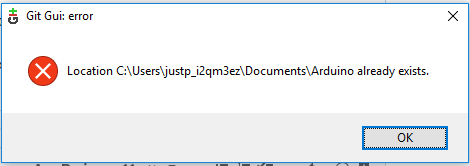
Well, YEAH! I just installed Arduino and it created it. What's my next step? I've gotten this before and deleted the folder, assuming that the clone would re-build everything, but I thought I would ask those far smarter than I! Thanks in advance.
Paul
MrJustPaul
on 27 Jul 2017
Oops! Now I know what the "Close and Comment" button does. Sorry!
MrJustPaul
on 27 Jul 2017
clone to C:/Users/justp_i2qm3ez/Documents/Arduino/hardware/espressif/esp32
another alternative is just download as zip from here: https://github.com/espressif/arduino-esp32/archive/master.zip and extract the files from arduino-esp32-master folder to C:/Users/justp_i2qm3ez/Documents/Arduino/hardware/espressif/esp32
copercini
on 27 Jul 2017
Wow! Thanks @copercini ! Changing the "clone to:" path worked. ESP32 Boards appear in Arduino. But I'm back to the "'class WiFiClass' has no member named 'firmwareVersion'" error when I try to compile. I will try to figure out what's wrong but I'm too new all this to understand classes and where this WiFiClass thing is and who took his firmwareVersion member! Here's where I could use some guidance about where to start looking.
MrJustPaul
on 28 Jul 2017
What code are you running?
copercini
on 28 Jul 2017
Sorry, I don't understand the question.. are you asking which sketch am i using?
MrJustPaul
on 28 Jul 2017
Yep
copercini
on 28 Jul 2017
What do I need to include/attach to give you the info you need?
MrJustPaul
on 28 Jul 2017
I picked this from the examples... ScanNetworks
Some sketches WILL compile so I'm assuming they're not looking for the "firmwareVersion" in WiFiClass. Is that correct?
Paul
Here's the sketch Is there a better way to attach this?
`/*
This example prints the Wifi shield's MAC address, and
scans for available Wifi networks using the Wifi shield.
Every ten seconds, it scans again. It doesn't actually
connect to any network, so no encryption scheme is specified.
Circuit:
- WiFi shield attached
created 13 July 2010
by dlf (Metodo2 srl)
modified 21 Junn 2012
by Tom Igoe and Jaymes Dec
*/
include
include
void setup() {
//Initialize serial and wait for port to open:
Serial.begin(9600);
while (!Serial) {
; // wait for serial port to connect. Needed for native USB port only
}
// check for the presence of the shield:
if (WiFi.status() == WL_NO_SHIELD) {
Serial.println("WiFi shield not present");
// don't continue:
while (true);
}
String fv = WiFi.firmwareVersion();
if (fv != "1.1.0") {
Serial.println("Please upgrade the firmware");
}
// Print WiFi MAC address:
printMacAddress();
}
void loop() {
// scan for existing networks:
Serial.println("Scanning available networks...");
listNetworks();
delay(10000);
}
void printMacAddress() {
// the MAC address of your Wifi shield
byte mac[6];
// print your MAC address:
WiFi.macAddress(mac);
Serial.print("MAC: ");
Serial.print(mac[5], HEX);
Serial.print(":");
Serial.print(mac[4], HEX);
Serial.print(":");
Serial.print(mac[3], HEX);
Serial.print(":");
Serial.print(mac[2], HEX);
Serial.print(":");
Serial.print(mac[1], HEX);
Serial.print(":");
Serial.println(mac[0], HEX);
}
void listNetworks() {
// scan for nearby networks:
Serial.println("* Scan Networks *");
int numSsid = WiFi.scanNetworks();
if (numSsid == -1) {
Serial.println("Couldn't get a wifi connection");
while (true);
}
// print the list of networks seen:
Serial.print("number of available networks:");
Serial.println(numSsid);
// print the network number and name for each network found:
for (int thisNet = 0; thisNet < numSsid; thisNet++) {
Serial.print(thisNet);
Serial.print(") ");
Serial.print(WiFi.SSID(thisNet));
Serial.print("\tSignal: ");
Serial.print(WiFi.RSSI(thisNet));
Serial.print(" dBm");
Serial.print("\tEncryption: ");
printEncryptionType(WiFi.encryptionType(thisNet));
}
}
void printEncryptionType(int thisType) {
// read the encryption type and print out the name:
switch (thisType) {
case ENC_TYPE_WEP:
Serial.println("WEP");
break;
case ENC_TYPE_TKIP:
Serial.println("WPA");
break;
case ENC_TYPE_CCMP:
Serial.println("WPA2");
break;
case ENC_TYPE_NONE:
Serial.println("None");
break;
case ENC_TYPE_AUTO:
Serial.println("Auto");
break;
}
}
`
MrJustPaul
on 28 Jul 2017
So, that's it!
Try some examples of this repository, like this https://github.com/espressif/arduino-esp32/blob/master/libraries/WiFi/examples/WiFiScan/WiFiScan.ino
copercini
on 28 Jul 2017
Really?? WHAT'S it? I don't understand. I went to the link and copy/pasted the code into a new sketch and it compiled! Then I uploaded it and it uploaded!! Can you tell me what you see that I'm missing?
I did try to view the Serial Monitor and it errors: "Board at COM3 is not available'"
I expected to see something... ??
Now I seem to be locked up. COM3 is not available. Rebooted everything and I seem to be stuck.
MrJustPaul
on 28 Jul 2017
Your code is for arduino wifi shield, which is not full compatible with ESP32 (it should be, but isn't), so running an ESP32 sketch, everything works fine
About COM3, probably is open by another Arduino window running in your PC, try close everything and open again and test it
copercini
on 28 Jul 2017
I was able to get my COM port back but now when I plug in the ESP32 it just connects/disconnects and plays the little ba-da-bink connect sound over and over and I can't connect to the board in the IDE
MrJustPaul
on 28 Jul 2017
I'm afraid I may have a bad ESP32 module - connecting it just loops on and off - USB problems now. Is there a way to RESET/Wipe it?
I took a different path altogether! I picked up a LinkNode D1 WiFi board a while back - ESP-8266EX based.
I figured I'd see if I had better luck with the tried-and-true 8266 and voila! I went through the LinkNode tutorial, installed the tools, worked through a directory issue, compiled/uploaded and off and running!
So, I will close this. @tobozo @copercini Thank you so much for all your help! I'm sure I'll be back to the ESP32 but I'm thinking that this chip and an Arduino noob may not be a good fit. Too many bumps in the road for now. Thanks again!
Paul
MrJustPaul
on 29 Jul 2017
Am a new bee to the esp32 and trying out the different features of the module. When i tried example of this repository, https://github.com/espressif/arduino-esp32/blob/master/libraries/WiFi/examples/WiFiScan/WiFiScan.ino, i got an error as "'class WiFiClass' has no member named 'mode' ". Any suggestions would be nice.
thanks in advance...
 sahique
on 16 Oct 2017
sahique
on 16 Oct 2017
Related issues
 huming2207
·
4Comments
huming2207
·
4Comments
 maxpromer
·
3Comments
maxpromer
·
3Comments
 jhowkis
·
3Comments
jhowkis
·
3Comments
 Darkhub
·
3Comments
Darkhub
·
3Comments
 OAXP
·
4Comments
OAXP
·
4Comments
Most helpful comment
Creative problem solving is required with windows. Also note that some creativity requires destruction: have you tried to
turn it off and on againreinstall windows and start the install from a fresh system with no user app history ?