Arduino_core_stm32: Serial interface locks up on Nucleo-F411RE board
If you try and transfer more than about 384 characters via the serial interface it locks up, and the only solution is to unplug the USB cable.
The following program demonstrates the problem:
void setup() {
  Serial.begin(9600);
  while (!Serial);
  Serial.println("Ready");
}

int count = 0;

void loop() {
  if (count % 64 == 0) {
    Serial.println();
    Serial.print(count);
    Serial.write(' ');
  }
  while (!Serial.available());
  Serial.write((int)Serial.read());
  count++;
}
Open the Serial Monitor, copy a block of text (of more than 384 characters), paste it into the input field, and click Send.
 technoblogy
All 17 comments
Hi @technoblogy,
thanks to report.
On which OS you run arduino and which version?
I've just do the test on Linux and Windows 7 with 1.8.5 version of the Arduino IDE with no issue on Nucleo-F411 using the Serial monitor (9600 no line ending).
Sending a 512 strings 3 times :
0123456789abcdefghijklmnopqrstuvwxyzABCDEFGHIJKLMNOPQRSTUVWXYZ0123456789abcdefghijklmnopqrstuvwxyzABCDEFGHIJKLMNOPQRSTUVWXYZ0123456789abcdefghijklmnopqrstuvwxyzABCDEFGHIJKLMNOPQRSTUVWXYZ0123456789abcdefghijklmnopqrstuvwxyzABCDEFGHIJKLMNOPQRSTUVWXYZ0123456789abcdefghijklmnopqrstuvwxyzABCDEFGHIJKLMNOPQRSTUVWXYZ0123456789abcdefghijklmnopqrstuvwxyzABCDEFGHIJKLMNOPQRSTUVWXYZ0123456789abcdefghijklmnopqrstuvwxyzABCDEFGHIJKLMNOPQRSTUVWXYZ0123456789abcdefghijklmnopqrstuvwxyzABCDEFGHIJKLMNOPQRSTUVWXYZ0123456789abcdef
Results is as expected
Ready
0 0123456789abcdefghijklmnopqrstuvwxyzABCDEFGHIJKLMNOPQRSTUVWXYZ01
64 23456789abcdefghijklmnopqrstuvwxyzABCDEFGHIJKLMNOPQRSTUVWXYZ0123
128 456789abcdefghijklmnopqrstuvwxyzABCDEFGHIJKLMNOPQRSTUVWXYZ012345
192 6789abcdefghijklmnopqrstuvwxyzABCDEFGHIJKLMNOPQRSTUVWXYZ01234567
256 89abcdefghijklmnopqrstuvwxyzABCDEFGHIJKLMNOPQRSTUVWXYZ0123456789
320 abcdefghijklmnopqrstuvwxyzABCDEFGHIJKLMNOPQRSTUVWXYZ0123456789ab
384 cdefghijklmnopqrstuvwxyzABCDEFGHIJKLMNOPQRSTUVWXYZ0123456789abcd
448 efghijklmnopqrstuvwxyzABCDEFGHIJKLMNOPQRSTUVWXYZ0123456789abcdef
512 0123456789abcdefghijklmnopqrstuvwxyzABCDEFGHIJKLMNOPQRSTUVWXYZ01
576 23456789abcdefghijklmnopqrstuvwxyzABCDEFGHIJKLMNOPQRSTUVWXYZ0123
640 456789abcdefghijklmnopqrstuvwxyzABCDEFGHIJKLMNOPQRSTUVWXYZ012345
704 6789abcdefghijklmnopqrstuvwxyzABCDEFGHIJKLMNOPQRSTUVWXYZ01234567
768 89abcdefghijklmnopqrstuvwxyzABCDEFGHIJKLMNOPQRSTUVWXYZ0123456789
832 abcdefghijklmnopqrstuvwxyzABCDEFGHIJKLMNOPQRSTUVWXYZ0123456789ab
896 cdefghijklmnopqrstuvwxyzABCDEFGHIJKLMNOPQRSTUVWXYZ0123456789abcd
960 efghijklmnopqrstuvwxyzABCDEFGHIJKLMNOPQRSTUVWXYZ0123456789abcdef
1024 0123456789abcdefghijklmnopqrstuvwxyzABCDEFGHIJKLMNOPQRSTUVWXYZ01
1088 23456789abcdefghijklmnopqrstuvwxyzABCDEFGHIJKLMNOPQRSTUVWXYZ0123
1152 456789abcdefghijklmnopqrstuvwxyzABCDEFGHIJKLMNOPQRSTUVWXYZ012345
1216 6789abcdefghijklmnopqrstuvwxyzABCDEFGHIJKLMNOPQRSTUVWXYZ01234567
1280 89abcdefghijklmnopqrstuvwxyzABCDEFGHIJKLMNOPQRSTUVWXYZ0123456789
1344 abcdefghijklmnopqrstuvwxyzABCDEFGHIJKLMNOPQRSTUVWXYZ0123456789ab
1408 cdefghijklmnopqrstuvwxyzABCDEFGHIJKLMNOPQRSTUVWXYZ0123456789abcd
1472 efghijklmnopqrstuvwxyzABCDEFGHIJKLMNOPQRSTUVWXYZ0123456789abcdef
1536
 fpistm
on 26 Apr 2018
fpistm
on 26 Apr 2018
Thanks for testing it. I'm running Arduino IDE 1.8.5 on MacOS High Sierra 10.13.4. Arduino IDE settings as follows:
Board: "Nucleo-64"
USB Interface: "None"
Optimize: "Smallest (-Os default)"
Board part number: "Nucleo F411RE"
Serial interface: "Generic Serial"
Upload method: "Mass Storage"
Port: "/dev/cu.usbmodem1413"
technoblogy
on 26 Apr 2018
Ok
Unfortunately, I do not have a MAC.
Anyway it seems not linked to the embedded part as binary is cross compiled for the target and not depend of the OS and Serial works fine for Windows/linux.
My guess is this is an USB driver issue for the STLink VCP (internal buffer issue ?...), I don't know how install or update theVCP driver for MAC and also where to find it :(
You can also try to update the STLink Firmware using the http://www.st.com/en/development-tools/stm32cubeprog.html
One other possible issue is a limitation of the Serial Monitor of Arduino IDE running on MAC OS
fpistm
on 26 Apr 2018
Any update on this?
fpistm
on 2 May 2018
I have succeeded in getting my Lisp interpreter, uLisp, running on a Nucleo-F411RE board. However, this problem reduces its usability. To communicate with the interpreter you paste text into the Arduino IDE Serial Monitor input field, and if you paste a program of more than about 384 characters the serial input hangs.
I'm happy to provide a copy of my uLisp interpreter to anyone who wants to see if they can solve this.
technoblogy
on 2 May 2018
Ok thanks for the status.
You can provide information to test your Lisp interpreter here.
Maybe I could test with other boards and with program >384.
As mentioned before I really think your issue is not related to the core but to VCP USB driver used.
fpistm
on 2 May 2018
Thank you. You can download the ARM 2.1 beta version of uLisp here:
http://www.ulisp.com/list?25SH
To demonstrate the problem you can try the Infinite Precision Arithmetic program here:
http://www.plasticki.com/list?1FO1
and then run:
(fac 32)
It works if you copy and paste the functions one at a time, but if you try copying and pasting the whole listing the serial port locks up.
technoblogy
on 2 May 2018
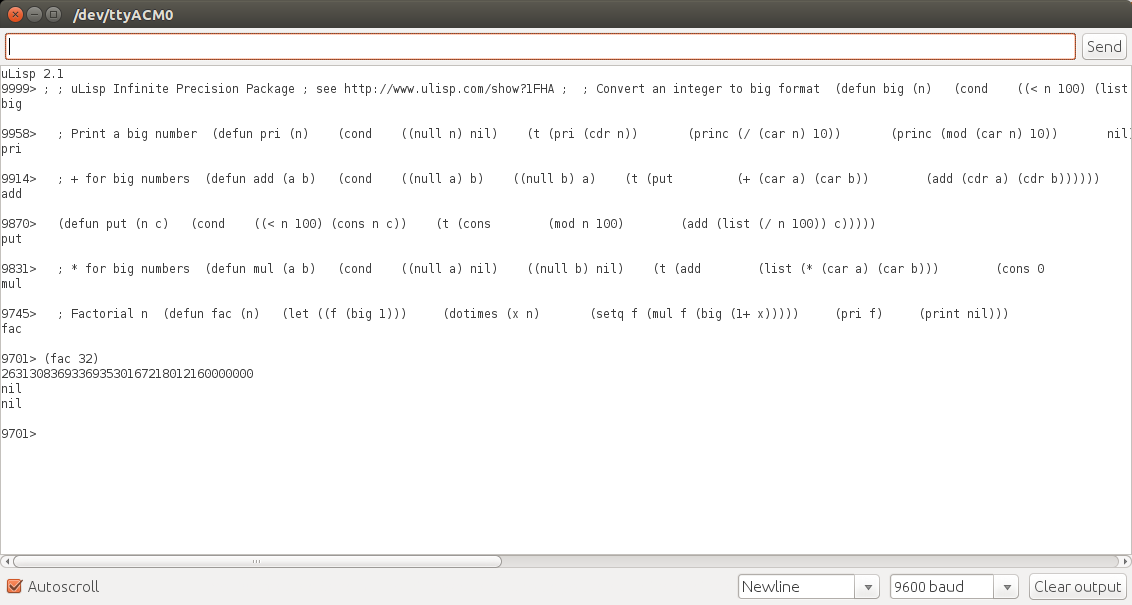
I gave a try on Nucleo F411.
I do not have hang but it do not work properly.
If I compare data send and those one prints by uLisp, it seems some char are missing.
So this result of an Incomplete list
By default , the Rx and Tx buffer of the core is 64.
https://github.com/stm32duino/Arduino_Core_STM32/blob/bad5b56870ce311a4d591f789cbe5d47450097e4/cores/arduino/HardwareSerial.h#L42
So, I've changed it to 256 and now it work.
You can redefined them by adding a new file (Tab on Arduino IDE) named _build_opt.h_
Then in this file put:
-DSERIAL_RX_BUFFER_SIZE=256 -DSERIAL_TX_BUFFER_SIZE=256
Increasing only one of both works also but I advise to keep them aligned.
fpistm
on 2 May 2018
fpistm
on 2 May 2018
Many thanks - I'll try it.
technoblogy
on 2 May 2018
@fpistm thank you for your suggestions.
I tried increasing the buffer sizes to 256 as you suggested. I first added a build_opt.h file, and when that didn't help I tried editing the HardwareSerial.h file in the Arduino core. I also tried again increasing the buffer sizes to 512.
In each case the serial input still appears to stop accepting input after about 384 characters.
I'll do some more tests and if I find anything I'll report here. In the meantime it would be useful if anyone can try reproducing the test in my first post.
technoblogy
on 8 May 2018
Ok thanks for your update.
It seems it happens only on mac. I've already tested your first post on Linux and Windows. I really think it is linked to USB VCP driver... or maybe STLink fw update.
One other thing you can try is to use real Serial port using a FTDI with the board connected to one Serial of your MAC.
fpistm
on 8 May 2018
OK I'll try an FTDI interface. So do I connect the TX and RX from the FTDI interface to the pins at bottom right of the Nucleo board? And how do I tell the Nucleo board to use those pins to talk to the Arduino IDE? Thanks, David
technoblogy
on 8 May 2018
I've made the test using USART1 RX on PA10(D2) and Tx on PA9(D8) and it is ok (using your test sketch or the uLisp arm V2.1)
To do that, update like this in the F411RE variant.h:
https://github.com/stm32duino/Arduino_Core_STM32/blob/master/variants/NUCLEO_F411RE/variant.h#L126
// UART Definitions
#define SERIAL_UART_INSTANCE    1 //Connected to ST-Link
// Default pin used for 'Serial' instance (ex: ST-Link)
// Mandatory for Firmata
#define PIN_SERIAL_RX           2
#define PIN_SERIAL_TX           8
@fpistm
Your solution is working fine. Thank you so much
 Qudor-Engineer
on 3 Jun 2018
Qudor-Engineer
on 3 Jun 2018
Hi @technoblogy,
I've been able to test on Mac (High Sierra version 10.13.6)
By default, with Nucleo F411 it's not works properly as some bytes are lost due to high number of data (circular buffer overrun).
Increasing the Serial Buffer (using the build_opt.h as described before) to 256 allow to work properly.
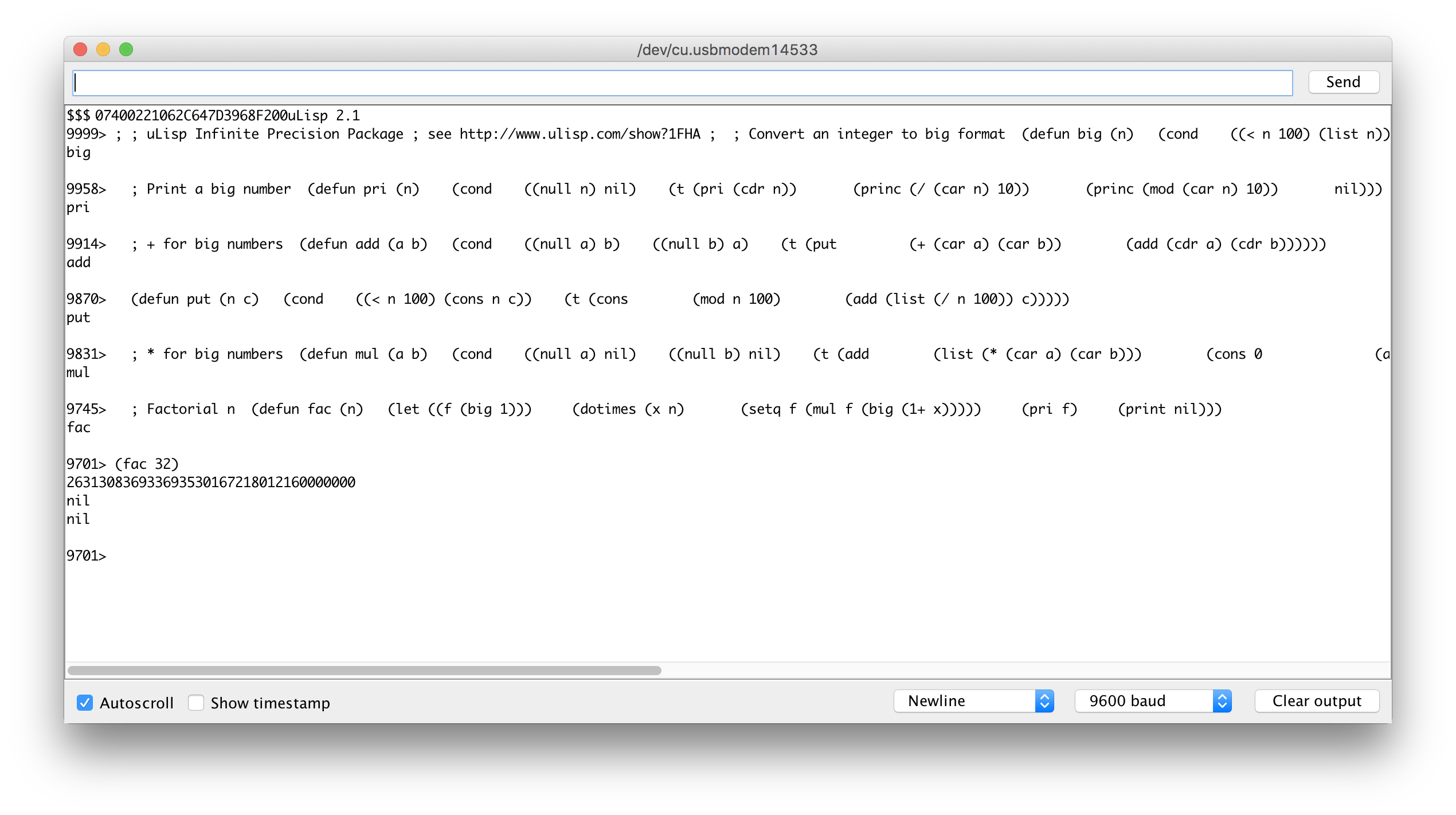
But I never had any lock.
I also test with a USB to Serial cable without any issue.
Have you succeed to make it work on your side?
Can we close this issue?
Thanks in advance
fpistm
on 26 Sep 2018
Close this has no OP feedback and solution provided.
fpistm
on 12 Oct 2018
Related issues
 Pararera
·
5Comments
Pararera
·
5Comments
 johncblacker
·
5Comments
johncblacker
·
5Comments
 greiman
·
5Comments
greiman
·
5Comments
 Jorgen-VikingGod
·
8Comments
Jorgen-VikingGod
·
8Comments
 davidanger
·
7Comments
davidanger
·
7Comments
Most helpful comment
I've made the test using USART1 RX on PA10(D2) and Tx on PA9(D8) and it is ok (using your test sketch or the uLisp arm V2.1)
To do that, update like this in the F411RE variant.h:
https://github.com/stm32duino/Arduino_Core_STM32/blob/master/variants/NUCLEO_F411RE/variant.h#L126