Arduino_core_stm32: Version 1.3.0 the Serial function is not compatible with V1.2.0
In 1.2.0 I using the config "Serial interface: All(up to 10)"
In code I just using
Serial1.begin();
Serial6.begin();
like this.
But in 1.3.0, This not worked.
 davidanger
All 7 comments
Hi @davidanger
Yes, as mentioned in the release note:
https://github.com/stm32duino/Arduino_Core_STM32/releases/tag/1.3.0
Serial menu has been reviewed, now the menu define only if Serial feature is enable and if default Serial instance is define.
So, by default, only the Serialx linked to Serial is instantiate.
If in your code Serial1 and Serial6 are not defined this is because they are not linked to default Serial instance.
You can define them like this on top of your sketch:
HardwareSerial Serial1(USART1);
HardwareSerial Serial6(USART6);
or add in a file named build_opt.h:
-DENABLE_HWSERIAL1 -DENABLE_HWSERIAL6
 fpistm
on 28 Jun 2018
fpistm
on 28 Jun 2018
Thx @fpistm
I using your way the Serial problem looks solved.
BUT I can't verify the code EVEN Demo Blink!!!!
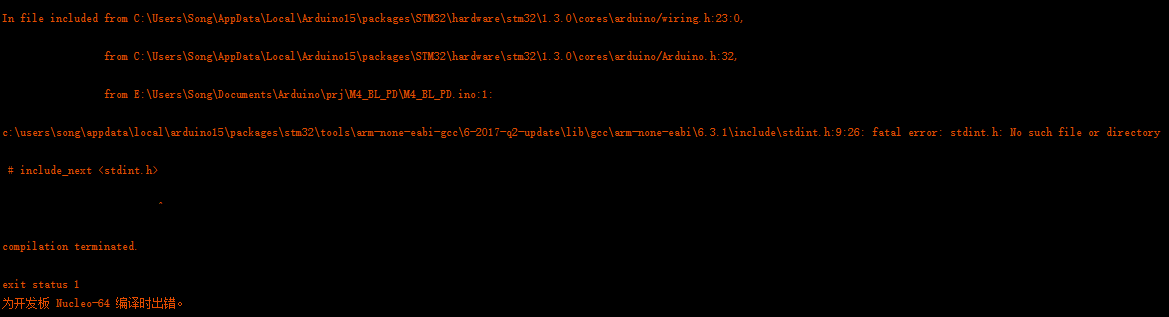
Here is my ERROR massage:
In file included from C:UsersSongAppDataLocalArduino15packagesSTM32hardwarestm321.3.0coresarduino/wiring.h:23:0,
from C:UsersSongAppDataLocalArduino15packagesSTM32hardwarestm321.3.0coresarduino/Arduino.h:32,
from sketchBlink.ino.cpp:1:
c:userssongappdatalocalarduino15packagesstm32toolsarm-none-eabi-gcc6-2017-q2-updatelibgccarm-none-eabi6.3.1includestdint.h:9:26: fatal error: stdint.h: No such file or directory
/# include_next
^
compilation terminated.
exit status 1
I'm Using NUCLEO-F411RE or What ever other board configuration.
But If I using 1.2.0 every thing is fine!
davidanger
on 29 Jun 2018
I've reproduced your issue by deleting the:
arm-none-eabi-gcc/6-2017-q2-update/arm-none-eabi/include/stdint.h
This file is part of arm gcc toolchains and not linked to the core.
arm gcc package has not been changed between 1.3.0 and 1.2.0.
Could you check if the file exist?
Maybe the file is corrupted, issue during update process from 1.2.0 to 1.3.0?
I advice you to remove core and then reinstall it. Maybe armgcc package extraction had an issue...
fpistm
on 29 Jun 2018
Thanks @fpistm
I uninstall the core lib and reinstall again this solved!~
Before this I try to change version, it not work. But when I do uninstall and reinstall, it worked!~
davidanger
on 29 Jun 2018
Probably an issue during arm gcc archive extraction. Archive was good else you would have crc issue raised.
fpistm
on 29 Jun 2018
Note : Change version do not uninstall arm gcc toolchain as it is the same version. only uninstall remove it.
Can we close this issue ?
fpistm
on 30 Jun 2018
Thank you very much @fpistm , this can be closed.
davidanger
on 30 Jun 2018
Related issues
 kwastek
·
4Comments
davidanger
·
6Comments
kwastek
·
4Comments
davidanger
·
6Comments
 pasindu-sandima
·
5Comments
pasindu-sandima
·
5Comments
 romainreignier
·
7Comments
romainreignier
·
7Comments
 zhaorui4142
·
4Comments
zhaorui4142
·
4Comments