Arcore-unity-sdk: How to pause/resume an ARCore Session ?
I'd like to pause and then resume an existing ARCore Session (not destroy, just pause/resume).
My use case is GVR/ARCore combined (I know, not officially supported, but it works well). When the ARCore loses tracking the GVR and ARCore rotations get out of sync, and walking towards a game object may move you backwards or sideways.
The Release Notes say you can pause and resume a session, but the resume is done via ArCoreUnity_resumeSession and there is no corresponding ArCoreUnity_pauseSession in libarcore_unity_api.so, although there are both an ArSession_resume and ArSession_pause in the C API.
Is there a way with the Unity SDK to do this?
 reed-alpert
All 17 comments
Hi Reed!
This should be fixed in an upcoming release. Feel free to add the missing C# code to your project for the time being.
 fredsa
on 18 Jan 2018
fredsa
on 18 Jan 2018
I've added C# access for ARSession_pause and ARSession_resume. When pausing, the ARCore no longer reports changes in position, but when resumed seems to try to recover. That is, if I pause, rotate 90 degrees, and then resume ARCore will try to set itself as if it has been active the entire time. Is this by design?
If so, what does the pause/resume accomplish? Are CPU requirements reduced during that time.
reed-alpert
on 30 Jan 2018
Pause/resume will allow you to temporarily suspend AR functionality, incl. AR tracking and processing. CPU/GPU processing related to ARCore will be paused. What will remain is some memory usage, include data for the paused AR session.
fredsa
on 30 Jan 2018
Hey @reed-alpert - would you be able to share how you added the ARSession_pause and ARSession_resume C# access with me? Trying to accomplish this on my side and struggling to find what should be added where.
Thanks!
 Sarghm
on 7 Feb 2018
Sarghm
on 7 Feb 2018
Hi @Sarghm, I've attached the 3 files I changed in ARCore cs code. For the initial session connect it still calls ArCoreUnity_resumeSession as before, but after that I pair the calls to ARSession_pause and ARSession_resume. My comment token is "ARSPIN" where I made changes. I also added a few changes for the IL2CPP build, but those are not required for using the pause and resume.
reed-alpert
on 7 Feb 2018
@reed-alpert Thank you so much for this - have implemented this and works flawlessly, will definitely tide me over until the final release!
Sarghm
on 7 Feb 2018
Is this fixed in ARCore v1.0? If yes, Please let me know what apis I need to use for the same
 arghyasur1991
on 24 Feb 2018
arghyasur1991
on 24 Feb 2018
+1, I would also like to know if this is officially implemented in 1.0.
 andrelevi
on 25 Feb 2018
andrelevi
on 25 Feb 2018
You can now toggle ARCore tracking by enabling and disabling the ARCoreSession component.
 chaosemer
on 26 Feb 2018
chaosemer
on 26 Feb 2018
@chaosemer please, can you explain how to enable/disable the session. Right now I'm developing an arcore based app where the user can do screen captures. I'm doing the capture by using the ProjectionManager.createScreenCaptureIntent() .. as result, this starts a new activity to capture the screen, when back (onResume()) I'm losing all the context of my current session which is annoying. I'm wondering if the there's some workaround to avoid losing the session data in this situation.
 rkachach
on 4 Apr 2018
rkachach
on 4 Apr 2018
Hi, to pause/resume the session enable/disable the ARCoreSession component. To destroy/create new session, destroy/create a new ARCoreSession component. I believe when you are switching to and from your other activity your session is being destroyed and you're creating a new one, is that your case?
 pablisho
on 4 Apr 2018
pablisho
on 4 Apr 2018
Thanks Pablo, I'm not using Unity. Finally I managed to solve the issue I was facing (I was doing some extra checks on Anchors ..). Anyway thanks for your help.
rkachach
on 4 Apr 2018
Hi,
It works with enable/disable ARcoreSession component...but it freeze the camera...no more motion Tracking...is it normal ?
I would like to pause Arcoresession (pause tracking) but continue to have motion tracking to move around the object...is it possible ?
Thanks
 nico74
on 25 May 2018
nico74
on 25 May 2018
just some precision : i would likr to lock a model because when you move/rotate in your real room and come back to the model...the model is not placed exactly where i pose it...you know what I mean ?
So i would like to lock a model once i pose the model in Ar scene :) and can have the motion tracking to move around :)
Many Thanks for helping
nico74
on 25 May 2018
Hi @nico74,
Positional tracking requires the ARCore Session to be active. This is because motion tracking is performed by ARCore.
In other words, ARCore is not just trying to understand the scene, but is also responsible for positional tracking.
fredsa
on 25 May 2018
Hi, to pause/resume the session enable/disable the ARCoreSession component. To destroy/create new session, destroy/create a new ARCoreSession component. I believe when you are switching to and from your other activity your session is being destroyed and you're creating a new one, is that your case?
Hi @pablisho ,
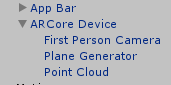
How do we achieve this? Can you post some sample code , I am changing between different canvases and only specific canvases require AR core to be running , What is the best way to reset/pause ARcore sessions?
I have this component attached in canvas
 Kitwradr
on 23 Sep 2018
Kitwradr
on 23 Sep 2018
Hi, to pause/resume the session enable/disable the ARCoreSession component. To destroy/create new session, destroy/create a new ARCoreSession component. I believe when you are switching to and from your other activity your session is being destroyed and you're creating a new one, is that your case?
Hi @pablisho,
Thats exactly happening in my case when i am returning from other activity a new session gets created what should i do to resume the previous session after i return from other activity? and Also if i want to access the camera in the other activity is it possible?
 kushal98
on 5 Dec 2018
kushal98
on 5 Dec 2018
Related issues
 AdilRabbani
·
4Comments
AdilRabbani
·
4Comments
 tavilad
·
6Comments
tavilad
·
6Comments
 tarakinsuide
·
4Comments
tarakinsuide
·
4Comments
 Maikol2712
·
5Comments
Maikol2712
·
5Comments
 alexbu92
·
4Comments
alexbu92
·
4Comments