Arc-theme: Nautilus left panel background color suggestion
In the arc theme, for ubuntu unity, the nautilus' left panel could have a lighter color.

 leoheck
All 9 comments
Yea, it's blending in a bit with the toolbars. I'll make it a bit lighter.
 horst3180
on 19 Sep 2015
horst3180
on 19 Sep 2015
:) thank you
leoheck
on 21 Sep 2015
Better leave this open or I'll forget :)
horst3180
on 21 Sep 2015
Hi @horst3180, is there some progress here? Can I make somthing to help you?
leoheck
on 3 Nov 2015
I think It's better to have Arc Lighter. I tweaked Arc GTK3 on nautilus part and I have this:

 ghost
on 29 Nov 2016
ghost
on 29 Nov 2016
How you did it @JustPerfection? It looks cool :+1:
 Anyanka13
on 1 Feb 2017
Anyanka13
on 1 Feb 2017
@Anyanka13 Backup '/usr/share/themes/Arc/gtk-3.0/gtk.css' and replace uploaded file with the gtk.css
It's the latest version of ARC and I modified that. Also I modified selected color. Enjoy.
ghost
on 1 Feb 2017
OMG! Thanks a lot! :1st_place_medal:
Anyanka13
on 1 Feb 2017
In case anyone would like to edit it manually: look for .nautilus-window placessidebar.sidebar and .nautilus-window.maximized placessidebar.sidebar to change sidebar background color. .nautilus-window placessidebar.sidebar row.sidebar-row and .nautilus-window placessidebar.sidebar row.sidebar-row .sidebar-icon to change text and icons color. Then .nautilus-window placessidebar.sidebar scrollbar,, .nautilus-window placessidebar.sidebar scrollbar.overlay-indicator:not(.dragging):not(.hovering) slider and .nautilus-window placessidebar.sidebar scrollbar trough to change scrollbar colors. I hope I haven't missed anything...
I made it white - it looks pretty decent in my humble opinion.
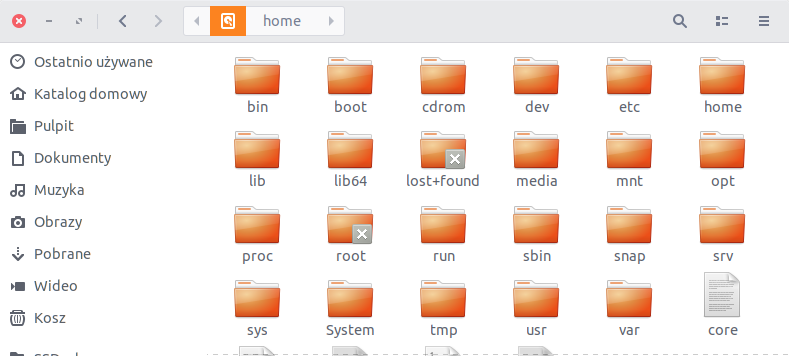
Base color changed with https://github.com/erikdubois/Arc-Theme-Colora/ by the way. ;)
 kcpr
on 4 Dec 2018
kcpr
on 4 Dec 2018
Related issues
 beruic
·
5Comments
beruic
·
5Comments
 cbcoutinho
·
3Comments
cbcoutinho
·
3Comments
 roidm
·
7Comments
roidm
·
7Comments
 timorei
·
7Comments
timorei
·
7Comments
 keevitaja
·
6Comments
keevitaja
·
6Comments
Most helpful comment
I think It's better to have Arc Lighter. I tweaked Arc GTK3 on nautilus part and I have this: