Ar.js: Back Camera on mobile - SOLVED!
I think I have a solution to the camera preference when using mobile.
The navigator.getUserMedia function is deprecated and you should instead use the newer MediaDevices.getUserMedia function. The link for the docs.
in your Threex.ArToolkitSource.js file at line 143 should then be changed to
var constraints = { video: {
                   facingMode: "environment"
                   mandatory: {
                                        maxWidth: _this.parameters.sourceWidth,
                               maxHeight: _this.parameters.sourceHeight
                    }
};
And if someone wants to instead use the 'selfie' camera they change "environment" to "user". You can even make a button to choose between the two.
However this might result in you changing a lot of code possibly
 hipstermojo
All 42 comments
ahhhh! great. i had some kludge there. i will incorporate that asap.
how does it work if i have only user facing camera ? e.g. on a laptop with the internal camera
 jeromeetienne
on 3 Jun 2017
jeromeetienne
on 3 Jun 2017
see #74
jeromeetienne
on 3 Jun 2017
if statements maybe, hehe 😂 . Since AR.js is primarily for bringing AR on the phone, it only makes sense to have this feature instead. Every phone has a back camera. So actually for laptops, that is only necessary during development so the developer can just manually configure that part out
hipstermojo
on 3 Jun 2017
i cant get it to work here. im likely missing something
@curtello do you mind doing a pull request ?
jeromeetienne
on 4 Jun 2017
I'll get on it
hipstermojo
on 4 Jun 2017
Adding to this, we can also pull out the camera devices from mobile and give the user an option to choose either front or back camera when the screen opens. I have tried this earlier and it works like magic.
 MrRaam
on 4 Jun 2017
MrRaam
on 4 Jun 2017
what do you mean by pull out?
hipstermojo
on 4 Jun 2017
` function init() {
var videoSelect = document.querySelector('select#videoSource');
var selectors = [videoSelect];
function gotDevices(deviceInfos) {
// Handles being called several times to update labels. Preserve values.
var values = selectors.map(function(select) {
return select.value;
});
selectors.forEach(function(select) {
while (select.firstChild) {
select.removeChild(select.firstChild);
}
});
Pull all the available cameras from the device ( PC , Tab , Laptop or mobiles )
for (var i = 0; i !== deviceInfos.length; ++i) {
var deviceInfo = deviceInfos[i];
var option = document.createElement('option');
option.value = deviceInfo.deviceId;
if (deviceInfo.kind === 'videoinput') {
option.text = deviceInfo.label || 'camera ' + (videoSelect.length + 1);
videoSelect.appendChild(option);
} else {
console.log('Some other kind of source/device: ', deviceInfo);
}}
selectors.forEach(function(select, selectorIndex) {
if (Array.prototype.slice.call(select.childNodes).some(function(n) {
return n.value === values[selectorIndex] })) {
select.value = values[selectorIndex]; } }); }
navigator.mediaDevices.enumerateDevices().then(gotDevices).catch(handleError);
function gotStream(stream) {
window.stream = stream; // make stream available to console
video.srcObject = stream;
// Refresh button list in case labels have become available
return navigator.mediaDevices.enumerateDevices();
}
function start() {
if (window.stream) {
window.stream.getTracks().forEach(function(track) {
track.stop();
});
}
var videoSource = videoSelect.value;
var constraints = {
video: {
deviceId: videoSource ? { exact: videoSource } : undefined }
};
navigator.mediaDevices.getUserMedia(constraints).
then(gotStream).then(gotDevices).catch(handleError);
}
videoSelect.onchange = start;
start();

`
MrRaam
on 4 Jun 2017
Awesome stuff man. I get you now. Will integrate it
hipstermojo
on 4 Jun 2017
Thanks @curtello , It should work, It's working for my application. However, thinking from the end user perspective we can keep the back camera as default.
Note: if we use the above code there is no need for polyfill I believe.
MrRaam
on 4 Jun 2017
Just like I had said, the choice of camera wouldn't exactly make sense because ~99% of people will just want to use the back camera constantly so maybe only when building the project will the choosing of camera become necessary. Now the equivalent of this code in the AFrame implementation is what can bring problems, should the camera in use be the selfie camera.
hipstermojo
on 4 Jun 2017
May I ask what you used to implement your app.
hipstermojo
on 4 Jun 2017
Yes sometimes it depends upon the concept, some concept needs front cam and some don't. I used threejs and a bit of babylon initially to test out few things.
MrRaam
on 4 Jun 2017
and what web framework?
or at least can I see your repository for the example
hipstermojo
on 4 Jun 2017
Sure, I like your curiosity. Web frameworks being a bit of jquery, larval and others.. Let's keep this thread for this issue. Ping me out for other quiries.
MrRaam
on 4 Jun 2017
i wanted to use Express but wanted to know how other people went about the whole issue of making a whole web app out of it. Isn't pinging you being intrusive 😂 . are you on gitter?
I don't see why this conversation needs to be publicized
hipstermojo
on 4 Jun 2017
I wouldn't mind :) , yep gitter. can i see a working link of this demo in Ar.js?
https://www.youtube.com/watch?v=EuF-k0ajsjk
MrRaam
on 4 Jun 2017
it's not yet done so i wanted to see other people's implementations
hipstermojo
on 4 Jun 2017
@MrRaam could I get your email so I can contact you
hipstermojo
on 5 Jun 2017
Sure, [email protected]
On Jun 5, 2017 9:36 PM, "curtello" notifications@github.com wrote:
@MrRaam https://github.com/mrraam could I get your email so I can
contact you—
You are receiving this because you were mentioned.
Reply to this email directly, view it on GitHub
https://github.com/jeromeetienne/AR.js/issues/86#issuecomment-306220923,
or mute the thread
https://github.com/notifications/unsubscribe-auth/Ab0zlF96DxqW4J0ogPC8lzszg-g3jANKks5sBCDEgaJpZM4Ns62a
.
MrRaam
on 5 Jun 2017
@curtello @jeromeetienne getUserMedia can be very uncooperative with deviceId constraint, especially on chrome for android.
In our PWA we resorted to "explore" various width and height combinations to get the maximum supported values on the user's device and then use the device ID from enumerateDevices with those values to get the back camera.
Works as a charm.
Only caveat is adapter.js for the shims.
If you want I can craft a pr
 francesco-marafini
on 5 Jun 2017
francesco-marafini
on 5 Jun 2017
i merged all the modification. So it is supposed to work now and it is using the new API.
It has been reported to work on IOS. and work on my chrome/firefox desktop. plus my android phone.
Lets close and reopen if we experiences issues :)
jeromeetienne
on 11 Jun 2017
@Jerome Can we use it for one of our commercial project ?
ᐧ
On Sun, Jun 11, 2017 at 7:28 PM, Jerome Etienne notifications@github.com
wrote:
i merged all the modification. So it is supposed to work now and it is
using the new API.It has been reported to work on IOS. and work on my chrome/firefox
desktop. plus my android phone.Lets close and reopen if we experiences issues :)
—
You are receiving this because you were mentioned.
Reply to this email directly, view it on GitHub
https://github.com/jeromeetienne/AR.js/issues/86#issuecomment-307630763,
or mute the thread
https://github.com/notifications/unsubscribe-auth/Ab0zlABgw46qRTut5XwRHNl_uuNeAJNnks5sC_KdgaJpZM4Ns62a
.
MrRaam
on 11 Jun 2017
@MrRaam Could you give me a demo of 86# THX
 junzhaok
on 2 Jul 2017
junzhaok
on 2 Jul 2017
@MrRaam
the demo of you writed
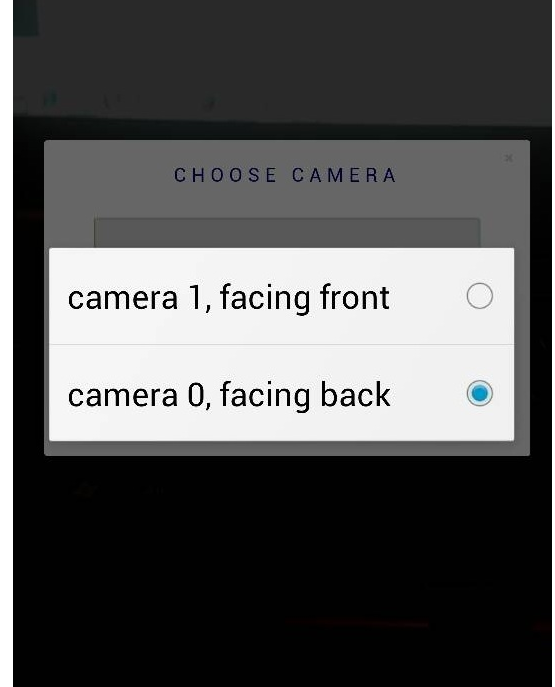
junzhaok
on 2 Jul 2017
I open the test link used “wechat”,only front camera work,can not change to the back camera!
Just instead use the newer MediaDevices.getUserMedia function and changed Threex.ArToolkitSource.js at line 143 in my file.
Any help?
Thanks
 254773230
on 2 Jul 2017
254773230
on 2 Jul 2017
@junzhoak the project code is bit huge, I'll condense and send it over to
you. Shortly.
On Jul 2, 2017 3:54 PM, "junzhaok" notifications@github.com wrote:
@MrRaam https://github.com/mrraam
the demo of you writed[image: _20170702182148]
https://user-images.githubusercontent.com/29834096/27769037-b2e8cc4c-5f53-11e7-96ba-2feca8a3474b.png—
You are receiving this because you were mentioned.
Reply to this email directly, view it on GitHub
https://github.com/jeromeetienne/AR.js/issues/86#issuecomment-312483021,
or mute the thread
https://github.com/notifications/unsubscribe-auth/Ab0zlGhsh_2CcYTOtc8n9zlKW1gdJpV0ks5sJ2_tgaJpZM4Ns62a
.
MrRaam
on 3 Jul 2017
I'm not seeing how you can pass in a desired video source as an argument to the ArToolkitSource constructor. I see that you can hardcode it by changing the facingMode property from "environment" to "user" within userMediaConstraints. However, it would be nice to pass in a camera's unique deviceId as a parameter of ArToolkitSource, that way users on a desktop can choose their desired video source if they have more than 1 camera (for example, surface books have the rear and front facing cameras).
I see above that someone has designed an application to toggle back and forth between the front and back cameras, but I'm not seeing how to do this without making changes to the library itself.
So:
- Is there already a way to do what I'm describing?
- If not, would this be something people find useful? If people would like this feature, I can open a pull request to work on this.
Thanks!
 rustynymph
on 10 Aug 2017
rustynymph
on 10 Aug 2017
Here is a working solution of @MrRaam:
just add to your code or modify the basic.html example
HTML:
<div class="select">
      <label for="videoSource">Select Camera: </label><select id="videoSource"></select>
</div>
Code:
var videoSelect = document.querySelector("select#videoSource");
var selectors = [videoSelect];

function gotDevices(deviceInfos) {
  // Handles being called several times to update labels. Preserve values.
  var values = selectors.map(function(select) {
    return select.value;
  });
  selectors.forEach(function(select) {
    while (select.firstChild) {
      select.removeChild(select.firstChild);
    }
  });

  for (var i = 0; i !== deviceInfos.length; ++i) {
    var deviceInfo = deviceInfos[i];
    var option = document.createElement("option");
    option.value = deviceInfo.deviceId;

    if (deviceInfo.kind === "videoinput") {
      option.text = deviceInfo.label || "camera " + (videoSelect.length + 1);
      videoSelect.appendChild(option);
    } else {
      console.log("Some other kind of source/device: ", deviceInfo);
    }

    selectors.forEach(function(select, selectorIndex) {
      if (
        Array.prototype.slice.call(select.childNodes).some(function(n) {
          return n.value === values[selectorIndex];
        })
      ) {
        select.value = values[selectorIndex];
      }
    });
  }
}

navigator.mediaDevices
  .enumerateDevices()
  .then(gotDevices)
  .catch(handleError);

function gotStream(stream) {
  arToolkitSource.domElement.srcObject = stream; // make stream available to console
  // video.srcObject = stream;
  // Refresh button list in case labels have become available
  return navigator.mediaDevices.enumerateDevices();
}

function start() {
  if (window.stream) {
    window.stream.getTracks().forEach(function(track) {
      track.stop();
    });
  }
  var videoSource = videoSelect.value;
  var constraints = {
    video: {
      deviceId: videoSource ? { exact: videoSource } : undefined
    }
  };
  navigator.mediaDevices
    .getUserMedia(constraints)
    .then(gotStream)
    .then(gotDevices)
    .catch(handleError);
}

videoSelect.onchange = start;

function handleError(error) {
  console.log("navigator.getUserMedia error: ", error);
}

start();
if you see above I just used:
arToolkitSource.domElement.srcObject = stream;
to the switch the artoolkit camera stream source to the new source.
 OmranAbazid
on 30 Oct 2017
OmranAbazid
on 30 Oct 2017
@OmranAbazid This is fantastic and so simple, thank you!
rustynymph
on 30 Oct 2017
I'm glad that my work is helping out you guys a lot. Cheers keep coding.
On Oct 30, 2017 9:40 PM, "Annie" notifications@github.com wrote:
@OmranAbazid https://github.com/omranabazid This is fantastic and so
simple, thank you!—
You are receiving this because you were mentioned.
Reply to this email directly, view it on GitHub
https://github.com/jeromeetienne/AR.js/issues/86#issuecomment-340495401,
or mute the thread
https://github.com/notifications/unsubscribe-auth/Ab0zlDDN7tEl8gICADEUy95u1fgZdLblks5sxfUAgaJpZM4Ns62a
.
MrRaam
on 31 Oct 2017
Good day friends,
I am trying to use the code from @OmranAbazid , it recognizes the 2 cameras of the phone and all good, but when changing cams, it doesn't switch between them, I see also this error:
`navigator.getUserMedia error: ReferenceError: arToolkitSource is not defined
at gotStream (arzxdsfdsf:187)
at
In my case I am working with aframe-ar , so with aframe and ar.js combined,
inside aframe-ar.js I can see where it by default chooses environment
// get available devices
    navigator.mediaDevices.enumerateDevices().then(function(devices) {
                var userMediaConstraints = {
            audio: false,
            video: {
                facingMode: 'environment',
so the question now is how to use javascript to switch between environment and user anytime I want, with aframe-ar
any tips? thanks a lot :)
`
 javismiles
on 28 Nov 2017
javismiles
on 28 Nov 2017
ok I made it work, I just don't know if this is the ideal way, please let me know ;)
I went inside of aframe-ar.js,
and I added this call here:
` // attach
this.domElement = domElement
this.domElement.style.position = 'absolute'
this.domElement.style.top = '0px'
this.domElement.style.left = '0px'
this.domElement.style.zIndex = '-2';
this._mynewcode();`
And then in that function I added your code
`ARjs.Source.prototype._mynewcode = function(){
var _this = this
var parent = this;
var videoSelect = document.querySelector("select#videoSource");
var selectors = [videoSelect];
function gotDevices(deviceInfos) {
// Handles being called several times to update labels. Preserve values.
var values = selectors.map(function(select) {
return select.value;
etc, etc
`
and then in gotstream I do
function gotStream(stream) {
  parent.domElement.srcObject = stream; // make stream available to console
  return navigator.mediaDevices.enumerateDevices();
}
and it all works great,
but maybe there is a better place to put all this?
let me know if there is
thanks very much for all your support ;)
javismiles
on 28 Nov 2017
Taking advantage of the environment and user parameter constraint settings, I simplified the code a lot to be controlled with a camera-flip icon and it works well:
`
............................
// attach
this.domElement = domElement
this.domElement.style.position = 'absolute'
this.domElement.style.top = '0px'
this.domElement.style.left = '0px'
this.domElement.style.zIndex = '-2';
    this._switchCams();


return this
    function onSourceReady(){
    document.body.appendChild(_this.domElement);
    _this.ready = true
    onReady && onReady()
    }
}
ARjs.Source.prototype._switchCams = function(){
var _this = this
var parent = this;
var numcams=0;
var myfacingMode="environment";


function gotDevices(deviceInfos) {

for (var i = 0; i !== deviceInfos.length; ++i) {
 var deviceInfo = deviceInfos[i];
 if (deviceInfo.kind === "videoinput") {numcams=numcams+1;}
}
if (numcams>1){document.getElementById('choosecam').style.display = 'block';}
}
navigator.mediaDevices
.enumerateDevices()
.then(gotDevices)
.catch(handleError);
function gotStream(stream) {
parent.domElement.srcObject = stream; // make stream available to console
return navigator.mediaDevices.enumerateDevices();
}
function start() {
if (window.stream) {
window.stream.getTracks().forEach(function(track) {track.stop();});
}
if (myfacingMode=="environment"){myfacingMode="user";}
else {myfacingMode="environment";}
var constraints = {
video: {facingMode: myfacingMode}
};
navigator.mediaDevices
.getUserMedia(constraints)
.then(gotStream)
.catch(handleError);
}
document.getElementById("choosecam").onclick = function() {start()};
function handleError(error) {
console.log("navigator.getUserMedia error: ", error);
}
}`
The only -buts-:
a) it is embedded within aframe-ar, it would be nice to take it out of it, how could I take it out of it while still referencing the aframe-ar domElement variable?
b) after switching a few times from environment to user and like that a few times, sometimes the switch doesnt happen and it all goes white, its not a crash, because then you click again the button and it switches well, and again it will do it ok and then fail once in a while, I wonder if this is just a matter of memory issues , device issues etc
javismiles
on 28 Nov 2017
so I got how to take it out of aframe-ar
setting in aframe-ar:
var domElement = document.createElement('video');
domElement.setAttribute('id', 'camvid');
and then outside of aframe-ar:
function gotStream(stream) {
    document.getElementById("camvid").srcObject = stream;
    return navigator.mediaDevices.enumerateDevices();
  }
now I will see why once in a while the switch fails, but i think it has to do
with speed of change and the device
javismiles
on 28 Nov 2017
So I got the console error, whenever the switch fails, it is:
Uncaught (in promise)
DOMException: the play() request was
interrupted by a new load request
gotStream function
promise (async)
any idea how to prevent this from happening, or maybe its unavoidable because of the speed and memory limits of my nexus 5X phone?
it never happens at the start, it begins happening after a few switches
javismiles
on 28 Nov 2017
I've got a problem with back camera. Well, I've used code described above with enumerateDevices and getUserMedia methods, got stream object of back camera with deviceId property, tried to set to video DOM and got such error: NotReadableError: Could not start video source. Front camera works good, but when I'm swithing to back, getting such error. Permissions was accepted. This problem is only on Android devices, iPhone switches on back camera automatically.
Also, I'm getting this trouble here: https://simpl.info/getusermedia/sources/
When I'm switching to another camera
 Disorrder
on 5 Dec 2018
Disorrder
on 5 Dec 2018
Has anyone solved the problem for android? I'm having a problem where ar.js is defaulting to my wide angle lens and it isn't letting me switch when I click the drop down.
 Darrel-Collinsworth
on 7 Nov 2019
Darrel-Collinsworth
on 7 Nov 2019
I'm having the same issue as well.
 ybinstock
on 21 Nov 2019
ybinstock
on 21 Nov 2019
I found someone who said they made some code to get it to switch. but when i tried using it it wouldn't let me switch the cameras around. The best option is using firefox because it explicitly asks which camera would you like to use. I don't really like that option since I'd really like the experience to work on any browser.
Does anyone know of any alternatives to Ar.js in general? I still love AR.JS but I do worry about it's stability in the future.
Darrel-Collinsworth
on 22 Nov 2019
I will try to include this feature on next version
 nicolocarpignoli
on 24 Nov 2019
nicolocarpignoli
on 24 Nov 2019
I may have done some progress to this. Can anyone please test? See there: https://github.com/jeromeetienne/AR.js/pull/661#issuecomment-559787020
nicolocarpignoli
on 29 Nov 2019
Related issues
 markleeyw
·
37Comments
markleeyw
·
37Comments
 mpacary
·
25Comments
mpacary
·
25Comments
 ks1505
·
22Comments
ks1505
·
22Comments
 Bug-Reaper
·
51Comments
Bug-Reaper
·
51Comments
 janpio
·
94Comments
janpio
·
94Comments
Most helpful comment
Here is a working solution of @MrRaam:
just add to your code or modify the basic.html example
HTML:
Code:
if you see above I just used:
arToolkitSource.domElement.srcObject = stream;
to the switch the artoolkit camera stream source to the new source.