Apps: [UX] Add a more friendly alternative for the Address_index of the derivation path
When users use a mnemonic seed with ECDSA the default derivation path is m/44'/60'/0'/0/0. The user needs to manually increment the address_index to get the subsequent address from the same mnemonic seed.
It would a good idea to implement either a dropdown menu that shows all the addresses (either by groups of 5) or just use the next one (if it finds that the previous index has been used).
This is similar to the behavior when using MetaMask, from a mnemonic seed you just click on a button that says "Add Account" and automatically creates an address from the next address_index of the derivation path.
In such a way users will be able to just add multiple accounts from the same mnemonic seed without needing to know/understand how derivation paths work.
 albertov19
All 9 comments
I am assuming you are referring to the Frontier-like chains here which are using Ethereum-compatible keys, e.g. Moonbeam? The standard Substrate Ecdsa doesn't use the bip39 derivation paths.
Willing to accept PRs for it, e.g. in the Ledger derivation this is exactly what is done - it "hides" the full path until right at the end, only allowing you to select the Account & address indexes. (the m/* paths are seriously very non user-friendly)
 jacogr
on 26 Feb 2021
jacogr
on 26 Feb 2021
Yes you are totally right, I was referring to Ethereum-compatible keys. I'm with the Moonbeam team :) Thanks Jaco!
albertov19
on 26 Feb 2021
In such a way users will be able to just add multiple accounts from the same mnemonic seed without needing to know/understand how derivation paths work.
But just to be clear: the mnemonic is randomly generated everytime, so one would have to re-enter the mnemonic to derive multiple accounts from the same mnemonic
 joelamouche
on 26 Feb 2021
joelamouche
on 26 Feb 2021
I would suggest connecting to Polkadot/Kusama and try the Ledger paths - they are not perfect, but may give some ideas. (At least would align it with MM-like selection, so would lean towards the defaults they have)
jacogr
on 26 Feb 2021
@joelamouche Yes but let's say I have my mnemonic from MetaMask for example, or I have it written down or whatever and I want to import multiple accounts from it.
albertov19
on 26 Feb 2021
@jacogr how do I try the ledger path? Where is it on the app?
joelamouche
on 1 Mar 2021
Connect to one of the Ledger supported chains - Kusama, Polkadot or Dock and add an account. (Polymesh would work as well, but they are not in the apps UI) Then select the crypto type as Ledger-compatible.
jacogr
on 1 Mar 2021
Then select the crypto type as Ledger-compatible.
How do I do that? I wasn't presented with this option when I added an address
joelamouche
on 1 Mar 2021
Think it may not show unless you have selected to activate Ledger under settings. Here it is, simpler -
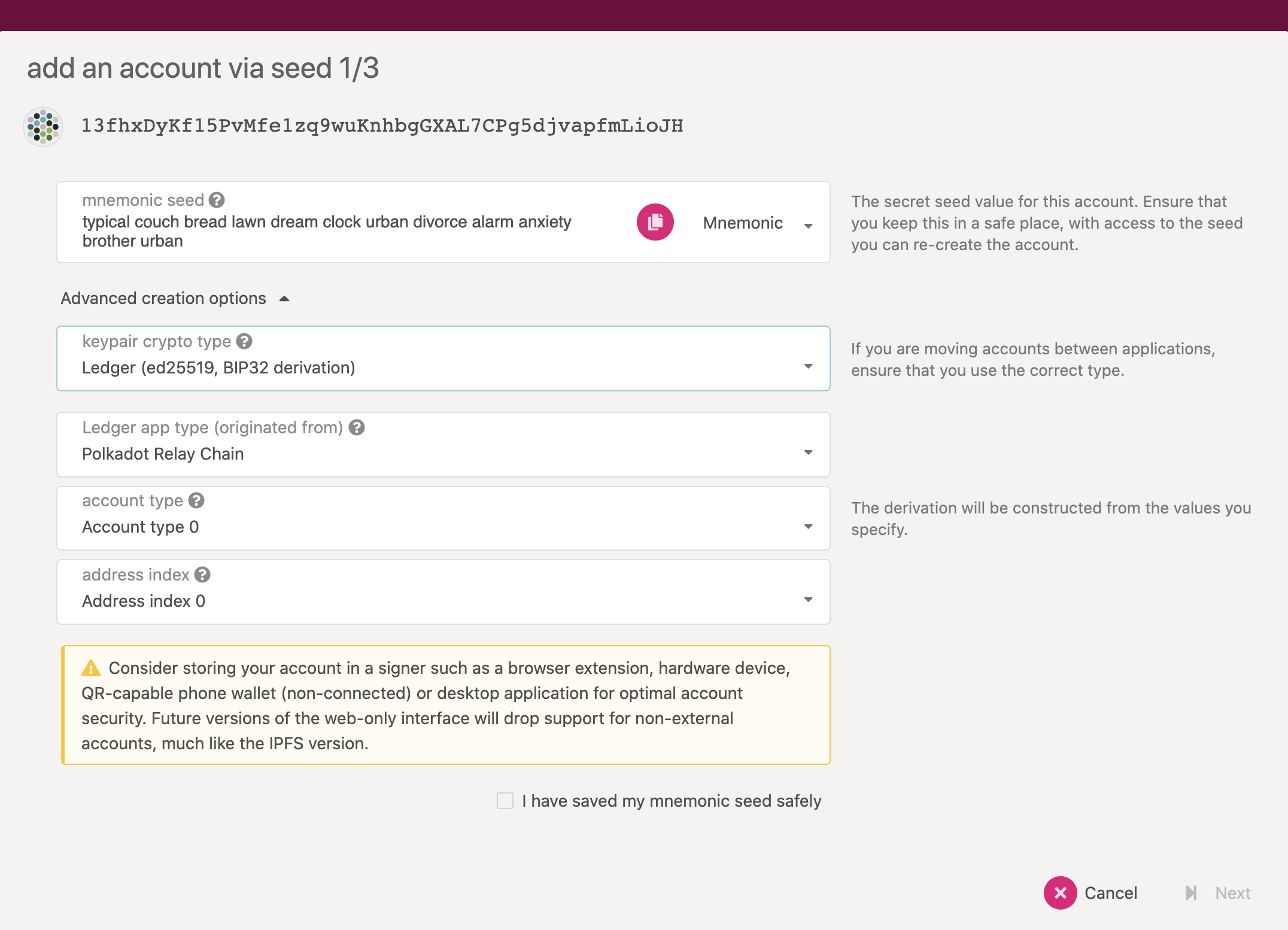
so it creates the path from those values, you you end up with this on the last screen -
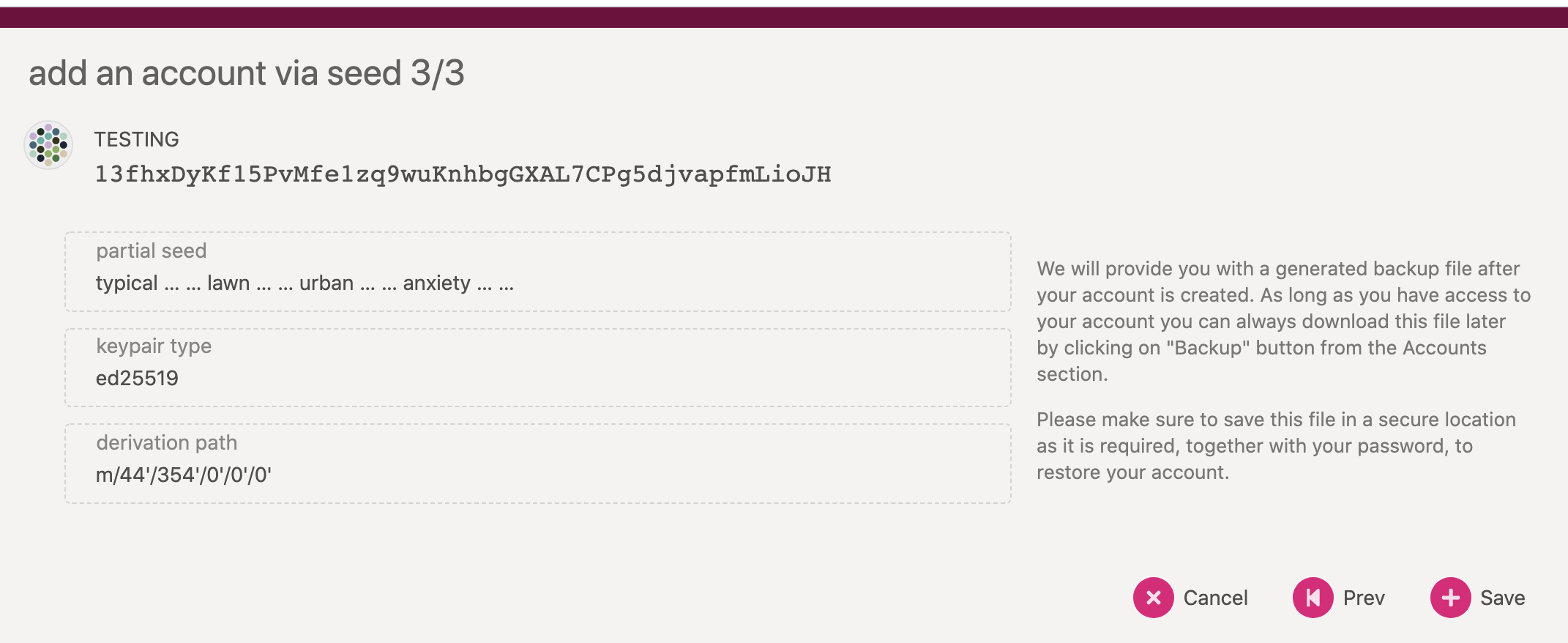
jacogr
on 1 Mar 2021
Related issues
 laurogripa
·
6Comments
laurogripa
·
6Comments
 jak-pan
·
5Comments
jacogr
·
3Comments
jak-pan
·
5Comments
jacogr
·
3Comments
 brenzi
·
8Comments
brenzi
·
8Comments
 illlefr4u
·
6Comments
illlefr4u
·
6Comments
Most helpful comment
I am assuming you are referring to the Frontier-like chains here which are using Ethereum-compatible keys, e.g. Moonbeam? The standard Substrate Ecdsa doesn't use the bip39 derivation paths.
Willing to accept PRs for it, e.g. in the Ledger derivation this is exactly what is done - it "hides" the full path until right at the end, only allowing you to select the Account & address indexes. (the
m/* paths are seriously very non user-friendly)