Appium-desktop: Appium 1.18.0-2 and Xcode 12 failure when running ./Scripts/bootstrap.sh
You are reporting an issue at the Appium Desktop repository. Appium Desktop is a wrapper around Appium. If you are having trouble running tests, it is much more likely that the problem you are encountering is not a problem with Appium Desktop but with Appium. For that reason we require you to have tried your testcase with Appium CLI before reporting issues. Check the checkbox below to confirm that you have proven your issue does _not_ reproduce on Appium itself:
- [x] I have verified that my issue does not occur with Appium and should be investigated as an Appium Desktop issue
The problem
I'm trying to run my test on Xcode 12 but I get a Carthage failure when running ./Scripts/bootstrap.sh
[debug] [WebDriverAgent] * Building scheme "iOS Framework" in CocoaAsyncSocket.xcodeproj
[debug] [WebDriverAgent] Build Failed
[debug] [WebDriverAgent] Task failed with exit code 1:
carthage-xcodebuild.TYyo9w.log
[debug] [WebDriverAgent] /usr/bin/xcrun lipo -create
Environment
- I am running Appium Desktop version 1.18.0-2
- I am on (pick one):
- [x] Mac
- [ ] Windows
- [ ] Linux
 santtyamen
All 13 comments
I have the same issue when using the Appium Desktop 1.18.0-2
as far as I understand, there is report issue with the running carthage to build WebDriverAgent 14611 , and there is already a workaround solution for this and merged to the beta version 1.19.0-beta.0 because I'm using this beta version now without problems of building the app
Can anyone confirm my comments above? And how to use the Appium Desktop on Xcode 12 now please or waiting for the new Appium Desktop release?
Many thanks
 anhhanuman
on 22 Sep 2020
anhhanuman
on 22 Sep 2020
just use some success wda to replace /Applications/Appium.app/Contents/Resources/app/node_modules/appium/node_modules/appium-webdriveragent or install the appium by npm dont use desktop
 Cuphoria
on 22 Sep 2020
Cuphoria
on 22 Sep 2020
Thanks, @Cuphoria for the idea.
@santtyamen I replaced the bootstrap.sh and add the carthage-wrapper.sh and I can run the script
anhhanuman
on 23 Sep 2020
AD can attach to local appium server as https://github.com/appium/appium-desktop#connect-to-local-appium-server
AD will bundle Appium 1.18.2 or 3 (probably 3)
 KazuCocoa
on 23 Sep 2020
KazuCocoa
on 23 Sep 2020
Hi, I am having the same issue and I stil can't fix anything...
I need to run Appium Desktop in order to use the inspector ( to create automated UI test for iOS).
Here is my configuration:
Environment:
Xcode 12
Appium Desktop 18
Mac Os 0.15.6
iphone 7 - version iOS 14
What I am doing:
When I want to install the WebDriverAgentRunner on the real device I get the same issue all the time after running in my appium-webdriveragent:
mkdir -p Resources/WebDriverAgent.bundle
./Scripts/bootstrap.sh -d
My Error Message:
Building scheme "iOS Framework" in CocoaAsyncSocket.xcodeproj
Build Failed
Task failed with exit code 1:
carthage-xcodebuild.uJMJEC.log
Then I am stuck and I cannot create the WebDriverAgent on my phone.
I would appreciate some advice,
thanks a lot!
Dvorah
 DvorahC
on 23 Sep 2020
DvorahC
on 23 Sep 2020
As https://github.com/appium/appium-desktop/issues/1567#issuecomment-697203264 , you can try out Appium 1.18.2 which have Xcode 12 build workaround.
Probably we'll push 1.18.3 with more Xcode 12 build fixes. Then, AD also bump the internal Appium version to 1.18.3.
KazuCocoa
on 24 Sep 2020
As #1567 (comment) , you can try out Appium 1.18.2 which have Xcode 12 build workaround.
Probably we'll push 1.18.3 with more Xcode 12 build fixes. Then, AD also bump the internal Appium version to 1.18.3.
@KazuCocoa ok Thanks for the quick reply, I will try right now and update then. thanks.
DvorahC
on 24 Sep 2020
Thanks, @Cuphoria for the idea.
@santtyamen I replaced the bootstrap.sh and add the carthage-wrapper.sh and I can run the script
Ok tanks, I downloaded Xcode 11.7 and updated the command line tools whit this version of Xcode
santtyamen
on 24 Sep 2020
@KazuCocoa -- Didn't see the 1.18.2 version in the Appium.io site. Latest one is 1.18.0 -2 . Is it the same your stating. Thanks.
 BijjamSuresh
on 1 Oct 2020
BijjamSuresh
on 1 Oct 2020
I find a kind of ultimate solucion (without having to )... in order to use the lastest WDA you will have to modify the package.json located in the _/Applications/Appium.app/Contents/Resources/app/node_modules/appium_ path (MacOS) to something like this: "appium-xcuitest-driver": "^3.30.0". Then run the command _rm -rf node_modules/ && npm i_ in order to remove the old packages and install the new version. cd node_modules/appium-webdriveragent and do the basic configs (follow the instructions at https://github.com/appium/appium-xcuitest-driver/blob/master/docs/real-device-config.md). You might have to restart your GUI Server but it works!.
 DaNiELChIoRo
on 1 Oct 2020
DaNiELChIoRo
on 1 Oct 2020
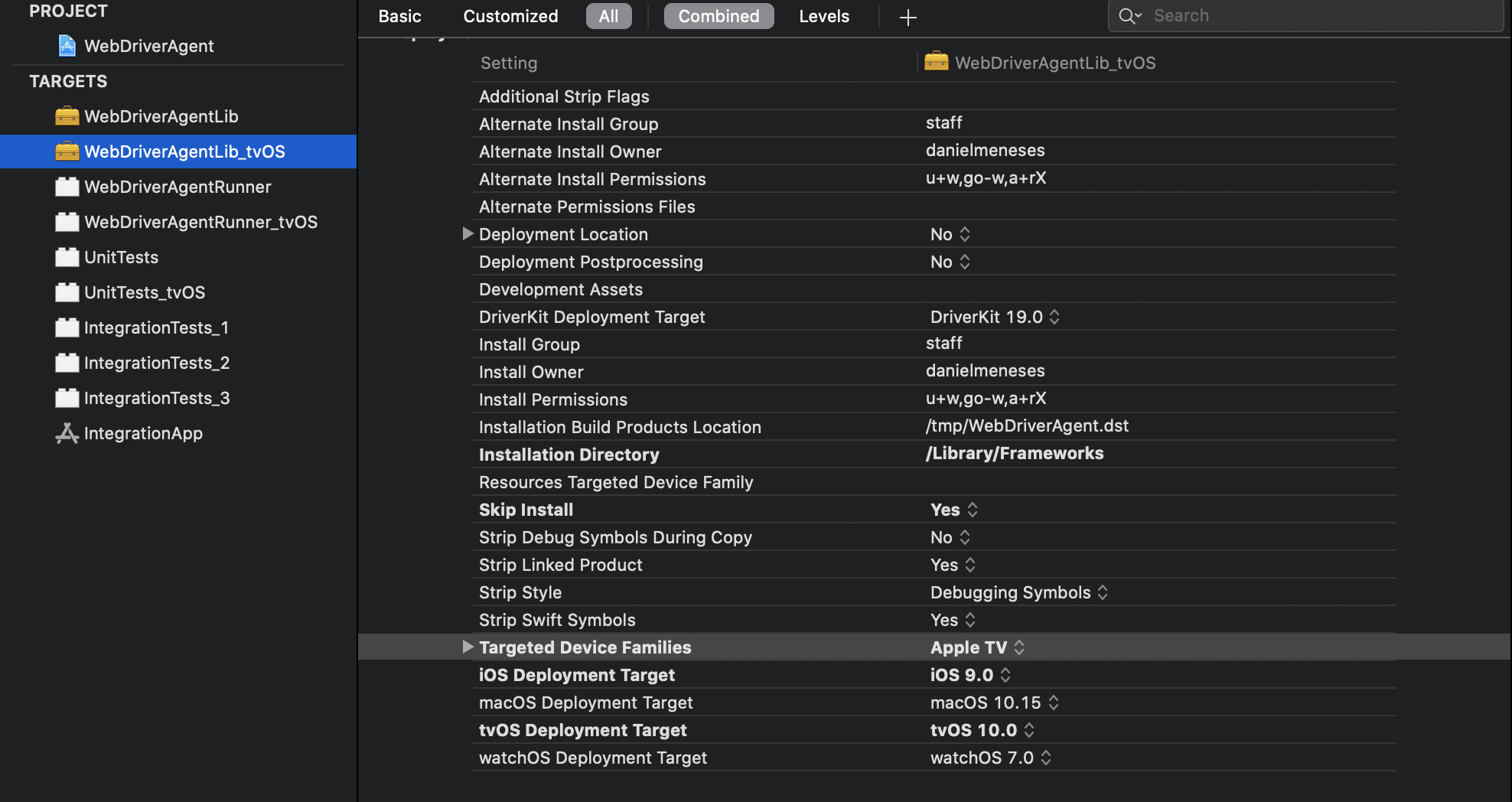
Forgot to tell but you will have to change the target device families on xcode project if you willing to use it for TVOS. Something like this
DaNiELChIoRo
on 1 Oct 2020
Didn't see the 1.18.2 version in the Appium.io site. Latest one is 1.18.0 -2 . Is it the same your stating. Thanks.
What do you mean?
Appium 1.18.2 is in https://github.com/appium/appium/releases
Appium Desktop does not have the version yet, so we guide https://github.com/appium/appium-desktop#connect-to-local-appium-server to use local appium server for now. Appium Desktop is just an inspector. (Will bump embedded Appium server later)
KazuCocoa
on 2 Oct 2020
KazuCocoa
on 2 Oct 2020
Related issues
 Prasant-Sutaria
·
11Comments
Prasant-Sutaria
·
11Comments
 hunzai
·
7Comments
hunzai
·
7Comments
 jphennessey
·
9Comments
jphennessey
·
9Comments
 vikramvi
·
3Comments
KazuCocoa
·
4Comments
vikramvi
·
3Comments
KazuCocoa
·
4Comments
Most helpful comment
just use some success wda to replace
/Applications/Appium.app/Contents/Resources/app/node_modules/appium/node_modules/appium-webdriveragentor install the appium by npm dont use desktop