Appium-desktop: V1.11.1 desktop Unable to run appium after install. zipAlignApk failed - was looking for an apk that does not exist in installation -appium-uiautomator2-server-debug-androidTest.apk
The problem
Installed the new version 1.11.1 and attempted to run my automation scripts (that worked with 1.10.1).
After starting appium and then kicking off my automation, I encounter an error:
[W3C] Encountered internal error running command: Error: zipAlignApk failed. Original error: Command 'C\:\Users\dkusc\AppData\Local\Android\sdk\build-tools\28.0.3\zipalign.exe -f 4 'C:\Program Files\Appium\resources\app\node_modules\appium\node_modules\appium-uiautomator2-server\apks\appium-uiautomator2-server-debug-androidTest.apk' C\:\Users\dkusc\AppData\Local\Temp\201925-35412-1qadtch.jjmr\appium.tmp' exited with code 1. Stdout: ''; Stderr: 'Unable to open 'C:\Program Files\Appium\resources\app\node_modules\appium\node_modules\appium-uiautomator2-server\apks\appium-uiautomator2-server-debug-androidTest.apk' as zip archive
The appium-uiautomator2-server-debug-androidTest.apk does not exist in that directory.
Environment
v1.11.1 desktop connected to a real device.
V1.10.1 was working ok.
c#
 susanma
All 17 comments
Moved to Appium Desktop
 mykola-mokhnach
on 5 Mar 2019
mykola-mokhnach
on 5 Mar 2019
            AppiumOptions capabilities = new AppiumOptions();
            capabilities.AddAdditionalCapability("platformName", "Android");
         capabilities.AddAdditionalCapability("platformVersion", "6.0.1");  //Susans
         capabilities.AddAdditionalCapability("deviceName", "gtaxlwifi");   //susans
            capabilities.AddAdditionalCapability("newCommandTimeout",120000);
           capabilities.AddAdditionalCapability("adbExecTimeout", 500000);
                    capabilities.AddAdditionalCapability("noReset", true);
            capabilities.AddAdditionalCapability("dontStopAppOnReset", true);
 //  capabilities.AddAdditionalCapability("automationName", "UIAutomator2");
It appears to be an issue with the above capabilities - capabilities.AddAdditionalCapability("automationName", "UIAutomator2");
When I uncomment this out, then the application is unable to sign the debug version and deletes it.
GIST Log for version 1.10.1 which will now not work either upon reinstall.
https://gist.github.com/susanma/0d7be377b4af384019c630b6bb374481
susanma
on 5 Mar 2019
I donwloaded appium-desktop-setup-1.11.0.exe in https://github.com/appium/appium-desktop/releases/download/v1.11.0/appium-desktop-setup-1.11.0.exe and extract the package on mac.
Then, I could find the file below
app-64 ▸ resources ▸ app ▸ node_modules ▸ appium ▸ node_modules ▸ appium-uiautomator2-server ▸ apks ▸ appium-uiautomator2-server-debug-androidTest.apk
Could you re-install the pachage again?
Maybe, the apk file was missed.
 KazuCocoa
on 8 Mar 2019
KazuCocoa
on 8 Mar 2019
I'm currently having the same issue. The UiAutomator2 apk is available for use and I've given Appium permission to view it even though I always run Appium as an admin.
Running zipalign -f 4 path\to\app.apk aligned.apk gives the same error, "Unable to open 'path\to\app.apk' as zip archive".
This exact apk was working recently. I've not changed anything other than updated my device's OS and downloaded the new Android SDK (9.0). I don't know if it's relevant but the app was made using Xamarin.
OS: Windows 10
Device: Samsung Galaxy S8, Android 9
Appium: v1.11.1
Android SDK Build Tools: v28.0.3
Android SDK Platform Tools: v28.0.2
 reiversolutions
on 22 Mar 2019
reiversolutions
on 22 Mar 2019
When I built apks with 29.0 rc build tools, the same issue happened even the zipalign was bundled in the 29 rc toolchain.
I think if you build the apk with 28.0.3 toolchain, it does not happen.
https://github.com/appium/appium/issues/12311#issuecomment-473535496
KazuCocoa
on 22 Mar 2019
I eventually gave up and went back to version 1.9
susanma
on 25 Mar 2019
Same thing happens in version 12.0
susanma
on 1 Apr 2019
A bug that Xamarin apps cannot work with Appium has been confirmed.
I am creating an issue in Xamarin.
https://github.com/xamarin/xamarin-android/issues/4069
but,
I eventually gave up and went back to version 1.9
I checked with version 1.9.1, and the Xamarin app was able to work with Appium.
https://github.com/appium/appium-desktop/releases/tag/v1.9.1
 gremito
on 28 Jan 2020
gremito
on 28 Jan 2020
I checked with version 1.9.1, and the Xamarin app was able to work with Appium.
Is this automationName = uiautomator2?
uiautomator2 depends on Android Accessibility info.
KazuCocoa
on 29 Jan 2020
@KazuCocoa
Yes, The details are as follows, and the settings have not been changed.
{
  "platformName": "Android",
  "deviceName": "Android Emulator",
  "automationName": "UiAutomator2",
  "avd": "Pixel_3a_API_28",
  "appPackage": "net.gremito.app.xamarin.appname",
  "appActivity": "md53ed500d57a300a1b65c55bb91ad526f0.MainActivity",
  "app": "/Users/gremito/xamarin/appname/Droid/bin/Debug/net.gremito.app.xamarin.appname.apk"
}
Thank.
How about Espresso Driver?
KazuCocoa
on 29 Jan 2020
I have never worked with the espresso tool, but when using the espresso tool I realize that I need to incorporate espresso into my app.
We avoid espresso because we want to test the app in a state close to production.
gremito
on 29 Jan 2020
Appium's espresso driver just re-package with appium-dev's sign like uia2 driver does.
If your espresso means Google's vanilla espresso, it is a bit different. (Internally, espresso driver handles the app under test via Espresso APIs.)
https://appium.io/docs/en/drivers/android-espresso/
Espresso driver gets elements more directly by Android APIs like View. So, I wondered if it worked for you.
KazuCocoa
on 30 Jan 2020
I'm struggling with the same phenomena as the linked issue.
Details are as follows.
It has been confirmed that the situation does not change even if noSign is set or removed.
https://github.com/appium/appium-espresso-driver/issues/302
- error message
- > An unknown server-side error occurred while processing the command. Original error: java.lang.SecurityException: Permission Denial: starting instrumentation ComponentInfo{io.appium.espressoserver.test/androidx.test.runner.AndroidJUnitRunner} from pid=7862, uid=7862 not allowed because package io.appium.espressoserver.test does not have a signature matching the target com.xxx.yyy.xamarin_app
- logs
gremito
on 4 Feb 2020
I found a way around the error.
Uninstall Appium related apps and apps you want to test.

Build the app in Release mode, not Debug mode, in the project that builds the app (such as Android Studio or Xamarin).
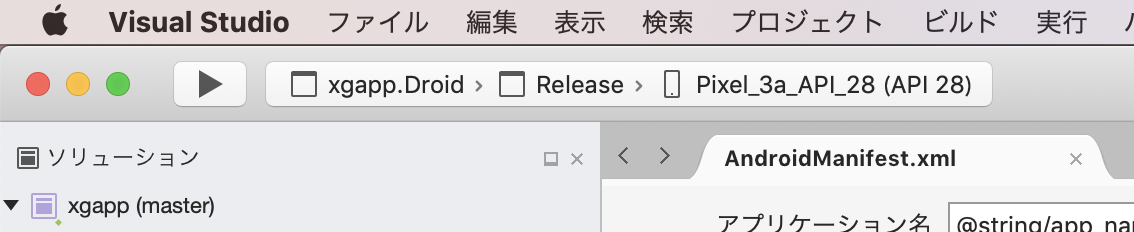
Start a session with either
UiAutomator2orEspressofrom the Appium desktop app.
With this support, it was confirmed that version 1.9.1 and the latest can be linked normally.
gremito
on 4 Feb 2020
Around here is the cause of sign. Probably your environment failed to sign with apksigner.
[ADB] Checking app cert for /var/folders/hm/0rhbvj1d7t769n29dm9t3dzw0000gn/T/io.appium.espressoserver.test_1.16.0_com.xxx.yyy.xamarin_app.apk
[ADB] Using 'apksigner' from '/Users/gremito/Library/Android/sdk/build-tools/29.0.2/apksigner'
[ADB] Starting '/Users/gremito/Library/Android/sdk/build-tools/29.0.2/apksigner' with args '["verify","--print-certs","/var/folders/hm/0rhbvj1d7t769n29dm9t3dzw0000gn/T/io.appium.espressoserver.test_1.16.0_com.xxx.yyy.xamarin_app.apk"]'
[ADB] Got an error during apksigner execution: Command '/Users/gremito/Library/Android/sdk/build-tools/29.0.2/apksigner verify --print-certs /var/folders/hm/0rhbvj1d7t769n29dm9t3dzw0000gn/T/io.appium.espressoserver.test_1.16.0_com.xxx.yyy.xamarin_app.apk' exited with code 1
[ADB] apksigner stderr: DOES NOT VERIFY
[ADB] ERROR: JAR signer CERT.RSA: JAR signature META-INF/CERT.SF indicates the APK is signed using APK Signature Scheme v2 but no such signature was found. Signature stripped?
[ADB]
KazuCocoa
on 4 Feb 2020
Yes, but changing from Debug build to Release build did not solve the above problem, so it was important to uninstall everything.
gremito
on 4 Feb 2020
Related issues
 aaratitambe
·
6Comments
aaratitambe
·
6Comments
 apn6125
·
3Comments
apn6125
·
3Comments
 jutamasJeab
·
3Comments
jutamasJeab
·
3Comments
 Vijayabaskar03
·
3Comments
Vijayabaskar03
·
3Comments
 VTINFOJames
·
7Comments
VTINFOJames
·
7Comments
Most helpful comment
A bug that Xamarin apps cannot work with Appium has been confirmed.
I am creating an issue in Xamarin.
https://github.com/xamarin/xamarin-android/issues/4069
but,
I checked with version 1.9.1, and the Xamarin app was able to work with Appium.
https://github.com/appium/appium-desktop/releases/tag/v1.9.1