Appium-desktop: Could not find adb Please set the ANDROID_HOME environment variable with the Android SDK root directory path
Appium Desktop
- [CHECK] I have verified that my issue does not occur with Appium and should be investigated as an Appium Desktop issue
Appium Desktop does not start inspector and throws error - "Could not find adb Please set the ANDROID_HOME environment variable with the Android SDK root directory path".
I know there are more than 5 forums where this has been discussed, but I am just not able to overcome this issue. These are the steps I followed:
- I have set the path in ~/.zshrc, ~/.bashrc and ~/.bash_profile.
- Here is the result from appium doctor:


- I have tried installing versions 1.2.3 and 1.0.1. I see the same issue. So it is not a regression.
For some reason Appium Desktop is unable to read the env variables from the shell. Not sure if the shell_env package is not kicking in at the right moment.
Environment
- I am running Appium Desktop version 1.2.4.
- I am on (pick one):
- [CHECK] Mac
- [ ] Windows
- [ ] Linux
Appium CLI works fine and I am able to connect to Android and iOS devices.
I have been struggling with this for almost 6 hours now. Kindly help.
 arjunvk
All 34 comments
FYI, I see the capability sets remain after I do a reinstall of the application. Maybe some cache files are still present and a clean uninstall is not happening.
Can you tell me the best way to do a clean uninstall on Mac ?
arjunvk
on 22 Oct 2017
Are you able to run Appium from the command line?
 dpgraham
on 22 Oct 2017
dpgraham
on 22 Oct 2017
Yes... Appium runs fine on command line... Even my tests run neat.
arjunvk
on 23 Oct 2017
Is it being run from the /Applications folder?
dpgraham
on 23 Oct 2017
Yes... AppiumDesktop is placed in /Applications
arjunvk
on 23 Oct 2017
Okay, I'm not able to reproduce on my side. Are you able to clone Appium Desktop and run it locally
npm install
npm run dev
...and then have a look at what is going on in the shell-env module? I want to see if it's an issue with that module or if it's an Appium Desktop issue. The shell-env module should be copying over your environment variables.
dpgraham
on 23 Oct 2017
Its a mystery. Works perfectly fine using the cloned dev application.
Here is the screenshot of the Chrome application it captured:
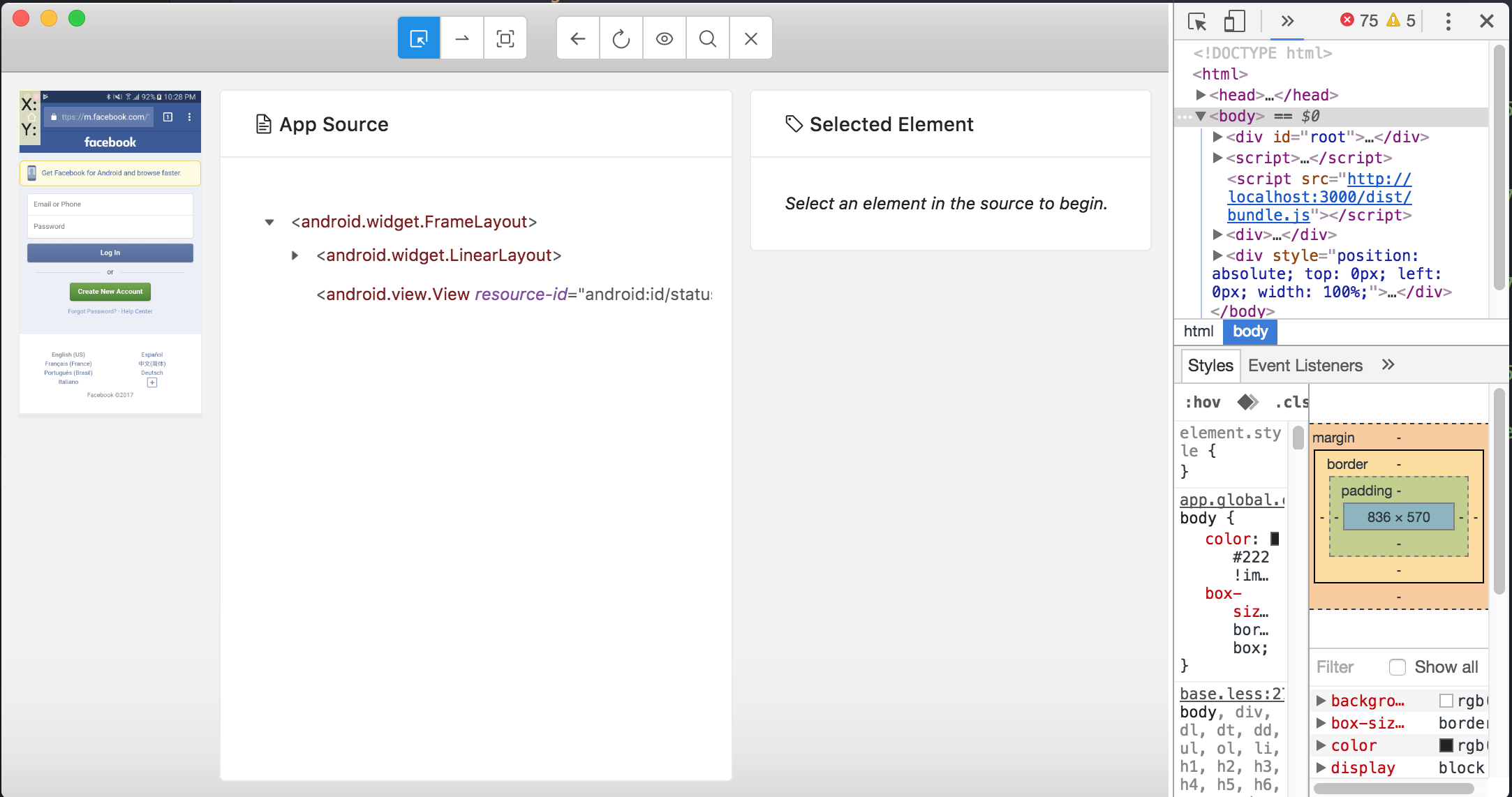
Attaching the logs from Appium-server.
appium-server-logs.txt
Another thing I noticed is, the capability sets were reset and I had to create new ones. I strongly feel it is a cache issue. Is there a way I can do a clean uninstall of Appium Desktop?
arjunvk
on 23 Oct 2017
The desired caps cache is saved to a wherever electron-settings saves them (https://github.com/nathanbuchar/electron-settings).
Can you open the file main.development.js and edit this part of it
//if (!isDev) {
  // if we're running from the app package, we won't have access to env vars
  // normally loaded in a shell, so work around with the shell-env module
  const decoratedEnv = shellEnv.sync();
  console.log('Shell Env variables', shellEnv.sync());
  process.env = {...process.env, ...decoratedEnv};

  // and we need to do the same thing with PATH
  fixPath();
//}
I'd like to see what shellEnv.sync is logging out.
dpgraham
on 23 Oct 2017
Here is what I did:
- Extracted a fresh copy of Appium desktop
- Edited the main.development.js file as mentioned.
- Did "npm install"
- Run "npm run dev"
- Invoked inspector after starting Appium server.
Here are the logs.
appium-server-logs.txt
I did a search of "Shell Env variables", but wasn't able to find any log.
arjunvk
on 24 Oct 2017
Can you try writing a basic NodeJS script that imports shell-env and then logs out the contents of shellEnv.sync()? I'd like to determine if it's a big with shell-env or with Appium Desktop.
I would do it myself but I can't reproduce the error on my machine.
dpgraham
on 24 Oct 2017
Here is the output:
f45c89c61d1b:shell-env-master arjunvij$ node ayeveekay.js
{ TERM_PROGRAM: 'iTerm.app',
ANDROID_HOME: '/Users/arjunvij/Library/Android/sdk',
TERM: 'xterm-256color',
SHELL: '/bin/false',
TMPDIR: '/var/folders/n4/fg255rp10kz0x2t8v49mxn30mjsw8m/T/',
Apple_PubSub_Socket_Render: '/private/tmp/com.apple.launchd.1ochdXBLhs/Render',
TERM_PROGRAM_VERSION: '3.1.3',
TERM_SESSION_ID: 'w0t0p0:1FBD4D60-32C0-470B-A314-F8FC71FAC31E',
USER: 'arjunvij',
SSH_AUTH_SOCK: '/private/tmp/com.apple.launchd.c6PZe41XMj/Listeners',
__CF_USER_TEXT_ENCODING: '0x291CF114:0x0:0x0',
PATH: '/Library/Java/JavaVirtualMachines/jdk1.8.0_152.jdk/Contents/Home/bin:/Users/arjunvij/Library/Android/sdk/tools:/Users/arjunvij/Library/Android/sdk/build-tools:/Users/arjunvij/Library/Android/sdk/platform-tools/adb:/Users/arjunvij/Library/Android/sdk/platform-tools:/apollo/env/SDETools/bin:/usr/local/bin:/usr/bin:/bin:/usr/sbin:/sbin:/Users/arjunvij/library/Android/sdk/platform-tools:/Users/arjunvij/library/Android/sdk/tools:/Users/arjunvij/library/Android/sdk/tools/bin',
PWD: '/Users/arjunvij/Downloads/shell-env-master',
JAVA_HOME: '/Library/Java/JavaVirtualMachines/jdk1.8.0_152.jdk/Contents/Home',
LANG: 'en_US.UTF-8',
ITERM_PROFILE: 'Default',
XPC_FLAGS: '0x0',
XPC_SERVICE_NAME: '0',
SHLVL: '1',
HOME: '/Users/arjunvij',
COLORFGBG: '7;0',
ITERM_SESSION_ID: 'w0t0p0:1FBD4D60-32C0-470B-A314-F8FC71FAC31E',
LOGNAME: 'arjunvij',
BRAZIL_CLI_BIN: '/apollo/env/SDETools/bin',
COLORTERM: 'truecolor',
_: '/usr/local/bin/node',
OLDPWD: '/Users/arjunvij/Downloads' }
arjunvk
on 24 Oct 2017
So it looks like shell-env isn't the problem. Are you able to set breakpoints in main.development js to see what's happening with shellEnv?
If not then let me know and we can try troubleshooting this. We've had issues with environment variables in the past and I'd love to resolve this.
dpgraham
on 24 Oct 2017
I'm also facing the same issue in appium versions: 1.7.1 and 1.6.5. But this issue is not found in appium version 1.5.3 (Ara) since we are able to set Android sdk path in the app itself.
I tried setting the variables in bash_profile, bashrc but it's not picked.
Is there any particular way in which the ANDROID_HOME variable could be set in the latest version?
 HindhujaAshokkumar
on 24 Oct 2017
HindhujaAshokkumar
on 24 Oct 2017
Apologies for the delay but I was stuck at work.
I tried debugging using my IntelliJ IDE. Am not sure if my setup is incorrect, but IntelliJ is unable to run the appium-master project in debug mode.
Here is the log for it:
2017-10-29T06_52_49_704Z-debug.log
I was able to run from Terminal though. Again, I couldn't see any output from main.development.js. I tried placing console logs at different points in the file, but no logging comes from that particular file.
Kindly let me know what I am doing wrong here.
arjunvk
on 29 Oct 2017
FYI, I installed WebStorm and tried.
I get the same error stating /bin/sh: npm: command not found
arjunvk
on 29 Oct 2017
Can you try npm run build and then running Appium.app from the terminal open release/mac/Appium.app/ and see if the problem gets reproduced there. I would try this myself, but I'm unable to reproduce this problem
dpgraham
on 1 Nov 2017
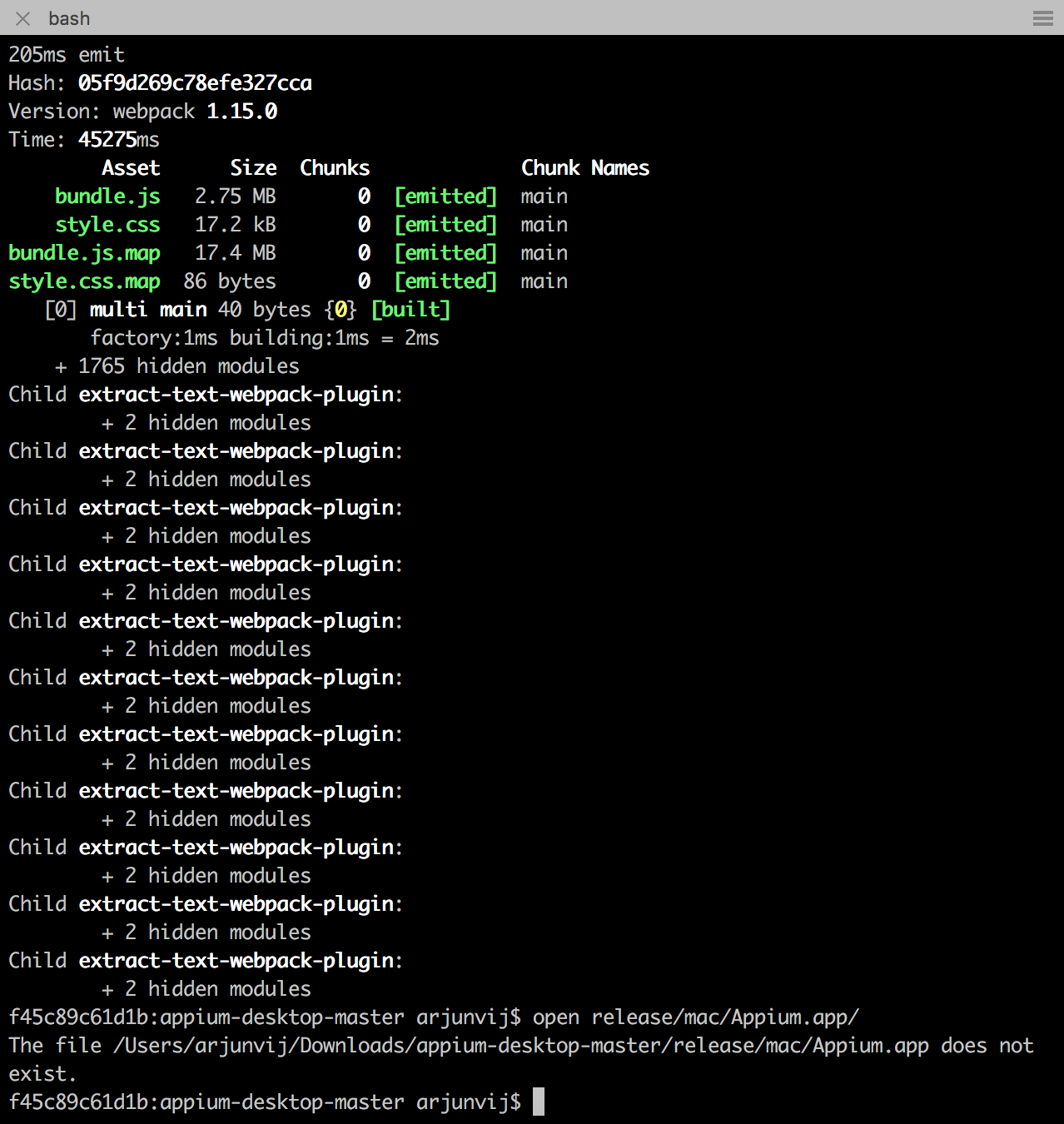
Do you think we can setup some sort of screen sharing and get this fixed quicker ? I think this back and forth commenting is taking too much time.
arjunvk
on 1 Nov 2017
I won't have time to do that unfortunately. In the meantime, are you able to do the workaround of just running appium from the CLI and then pointing your Appium Desktop session to that?
dpgraham
on 2 Nov 2017
I am able to run the source code using npm Dev run.
I don't know how to connect the Appium Desktop session to an existing Appium CLI session.
arjunvk
on 5 Nov 2017
I am facing the similar issue : below are the console logs, I am using Tetng
Starting the server
[Appium] Welcome to Appium v1.7.1
[Appium] Non-default server args:
[Appium] address: 127.0.0.1
[Appium] Appium REST http interface listener started on 127.0.0.1:4723
[HTTP] --> GET /wd/hub/status {}
[debug] [MJSONWP] Calling AppiumDriver.getStatus() with args: []
[debug] [MJSONWP] Responding to client with driver.getStatus() result: {"build":{"version":"1.7.1","revision":null}}
[HTTP] <-- GET /wd/hub/status 200 17 ms - 83
Server Started
[HTTP] --> POST /wd/hub/session {"desiredCapabilities":{"app":"/Users/mobile.testing/Desktop/Pankaj/AppiumProjectData/base.apk","browserName":"android","deviceName":"Moto","platform":"ANDROID","platformName":"Android","platformVersion":"6.0","version":""},"capabilities":{"desiredCapabilities":{"app":"/Users/mobile.testing/Desktop/Pankaj/AppiumProjectData/base.apk","browserName":"android","deviceName":"Moto","platform":"ANDROID","platformName":"Android","platformVersion":"6.0","version":""},"firstMatch":[{"browserName":"android","platformName":"android"}]}}
[debug] [MJSONWP] Calling AppiumDriver.createSession() with args: [{"app":"/Users/mobile.testing/Desktop/Pankaj/AppiumProjectData/base.apk","browserName":"android","deviceName":"Moto","platform":"ANDROID","platformName":"Android","platformVersion":"6.0","version":""},null,{"desiredCapabilities":{"app":"/Users/mobile.testing/Desktop/Pankaj/AppiumProjectData/base.apk","browserName":"android","deviceName":"Moto","platform":"ANDROID","platformName":"Android","platformVersion":"6.0","version":""},"firstMatch":[{"browserName":"android","platformName":"android"}]}]
[debug] [BaseDriver] Event 'newSessionRequested' logged at 1513250290254 (16:48:10 GMT+0530 (IST))
[Appium] Creating new AndroidDriver (v1.28.1) session
[Appium] Capabilities:
[Appium] app: '/Users/mobile.testing/Desktop/Pankaj/AppiumProjectData/base.apk'
[Appium] browserName: 'android'
[Appium] deviceName: 'Moto'
[Appium] platform: 'ANDROID'
[Appium] platformName: 'Android'
[Appium] platformVersion: '6.0'
[Appium] version: ''
[BaseDriver] The following capabilities were provided, but are not recognized by appium: platform, version.
[AndroidDriver] The desired capabilities should generally not include both an app and a browserName
[BaseDriver] Session created with session id: b4cdbc2b-6e3c-4593-8c0b-c801a9649267
[debug] [AndroidDriver] Getting Java version
[AndroidDriver] Java version is: 1.8.0_131
[ADB] Checking whether adb is present
[ADB] The ANDROID_HOME environment variable is not set to the Android SDK root directory path. ANDROID_HOME is required for compatibility with SDK 23+. Checking along PATH for adb.
[ADB] Error: Could not find adb Please set the ANDROID_HOME environment variable with the Android SDK root directory path.
at Object.wrappedLogger.errorAndThrow (../../lib/logging.js:63:13)
at ADB.callee$0$0$ (../../../lib/tools/system-calls.js:123:9)
at tryCatch (/usr/local/lib/node_modules/appium/node_modules/babel-runtime/regenerator/runtime.js:67:40)
at GeneratorFunctionPrototype.invoke [as _invoke] (/usr/local/lib/node_modules/appium/node_modules/babel-runtime/regenerator/runtime.js:315:22)
at GeneratorFunctionPrototype.prototype.(anonymous function) [as throw] (/usr/local/lib/node_modules/appium/node_modules/babel-runtime/regenerator/runtime.js:100:21)
at GeneratorFunctionPrototype.invoke (/usr/local/lib/node_modules/appium/node_modules/babel-runtime/regenerator/runtime.js:136:37)
Error: Could not find adb Please set the ANDROID_HOME environment variable with the Android SDK root directory path.
at Object.wrappedLogger.errorAndThrow (../../lib/logging.js:63:13)
at ADB.callee$0$0$ (../../../lib/tools/system-calls.js:123:9)
at tryCatch (/usr/local/lib/node_modules/appium/node_modules/babel-runtime/regenerator/runtime.js:67:40)
at GeneratorFunctionPrototype.invoke [as _invoke] (/usr/local/lib/node_modules/appium/node_modules/babel-runtime/regenerator/runtime.js:315:22)
at GeneratorFunctionPrototype.prototype.(anonymous function) [as throw] (/usr/local/lib/node_modules/appium/node_modules/babel-runtime/regenerator/runtime.js:100:21)
at GeneratorFunctionPrototype.invoke (/usr/local/lib/node_modules/appium/node_modules/babel-runtime/regenerator/runtime.js:136:37)
[debug] [AndroidDriver] Shutting down Android driver
[debug] [AndroidDriver] Called deleteSession but bootstrap wasn't active
[MJSONWP] Encountered internal error running command: Error: Could not find adb Please set the ANDROID_HOME environment variable with the Android SDK root directory path.
at Object.wrappedLogger.errorAndThrow (../../lib/logging.js:63:13)
at ADB.callee$0$0$ (../../../lib/tools/system-calls.js:123:9)
at tryCatch (/usr/local/lib/node_modules/appium/node_modules/babel-runtime/regenerator/runtime.js:67:40)
at GeneratorFunctionPrototype.invoke [as _invoke] (/usr/local/lib/node_modules/appium/node_modules/babel-runtime/regenerator/runtime.js:315:22)
at GeneratorFunctionPrototype.prototype.(anonymous function) [as throw] (/usr/local/lib/node_modules/appium/node_modules/babel-runtime/regenerator/runtime.js:100:21)
at GeneratorFunctionPrototype.invoke (/usr/local/lib/node_modules/appium/node_modules/babel-runtime/regenerator/runtime.js:136:37)
[HTTP] <-- POST /wd/hub/session 500 552 ms - 246
===============================================
Suite
Total tests run: 1, Failures: 0, Skips: 1
Configuration Failures: 1, Skips: 0
Please suggest, what to do ?
 ghost
on 14 Dec 2017
ghost
on 14 Dec 2017
Sorry for the late reply, the 'Custom Server' tab on 'New Session' window lets you point to Appium custom server (just provide the host and port). If anyone runs into this issue, I recommend doing that.
dpgraham
on 4 Jan 2018

@pankajpat2014 : Set this value in environment variables
 ChethanGKC
on 5 Feb 2018
ChethanGKC
on 5 Feb 2018
I am facing the same issue.
The appium doctor works fine.
it seems appium destop doesn't read the path correctly.
version: Appium v1.8.1
shell: zsh
os: macOS High Sierra
appium-doctor --android
info AppiumDoctor Appium Doctor v.1.4.3
info AppiumDoctor ### Diagnostic starting ###
info AppiumDoctor ✔ The Node.js binary was found at: /usr/local/bin/node
info AppiumDoctor ✔ Node version is 6.10.0
info AppiumDoctor ✔ ANDROID_HOME is set to: /Users/ll/Library/Android/sdk
info AppiumDoctor ✔ JAVA_HOME is set to: /Library/Java/JavaVirtualMachines/jdk1.8.0_131.jdk/Contents/Home
info AppiumDoctor ✔ adb exists at: /Users/ll/Library/Android/sdk/platform-tools/adb
info AppiumDoctor ✔ android exists at: /Users/ll/Library/Android/sdk/tools/android
info AppiumDoctor ✔ emulator exists at: /Users/ll/Library/Android/sdk/tools/emulator
info AppiumDoctor ✔ Bin directory of $JAVA_HOME is set
info AppiumDoctor ### Diagnostic completed, no fix needed. ###
info AppiumDoctor
info AppiumDoctor Everything looks good, bye!
info AppiumDoctor
The appnium desktop log:
[ADB] Checking whether adb is present
[ADB] The ANDROID_HOME environment variable is not set to the Android SDK root directory path. ANDROID_HOME is required for compatibility with SDK 23+. Checking along PATH for adb.
[UiAutomator2] Deleting UiAutomator2 session
[BaseDriver] Event 'newSessionStarted' logged at 1530270140223 (19:02:20 GMT+0800 (CST))
[MJSONWP] Encountered internal error running command: Error: Could not find adb Please set the ANDROID_HOME environment variable with the Android SDK root directory path.
Set the path explicitly in the terminal, and open the appium desktop in the same terminal will solve the issue above.
 lawulu
on 29 Jun 2018
lawulu
on 29 Jun 2018
has anyone figured this out? :)
 yotsubakoiwai
on 12 Jul 2018
yotsubakoiwai
on 12 Jul 2018
Any solution?
 estefafdez
on 20 Jul 2018
estefafdez
on 20 Jul 2018
Experiencing this as well.
 CraftingGamerTom
on 24 Jul 2018
CraftingGamerTom
on 24 Jul 2018
@CraftingGamerTom @estefafdez @yotsubakoiwai I'm going to work on this tomorrow and have a fix really soon. I'm planning on making it so that ANDROID_HOME can be set from inside of the GUI instead of only ever setting it in terminal. The module we use to import environment variables seems to be kind of flaky.
dpgraham
on 24 Jul 2018
@dpgraham I managed to make this work.
Needed to run
sudo apt install adb
sudo apt install aapt
I also needed to add
export PATH=$PATH:'<path-to-sdk>/platform-tools':'<path-to-sdk>/tools':'<path-to-sdk>/build-tools'
to my /home/.bashrc
This at least got things to start running. I hope this helps in some way.
CraftingGamerTom
on 24 Jul 2018
Hello,
I might have found a kind of permanent solution for this problem. For me the problem with the ANDROID_HOME and CARTHAGE environment were located on Eclipse, I needed to set the env variable on each test execution and it was not a good practice.
After several investigation, I apply this solution (for MacOSX):
I go to the LaunchAgents folder:
cd ~/Library/LaunchAgents/On the LaunchAgents there are the files that are loaded when the system turns on. All the configuration you set on this directory will be apply once the system will launch and it will be working for all the programs, console and GUI. I did not detele or edit any of the .plist folfer, instead, I created a new one called: environment.plist.
touch environment.plist (create the file)
nano environment.plist (open and edit)
- Once I have the environment.plist file open, I add the environment Appium (and Eclipse) could not find:
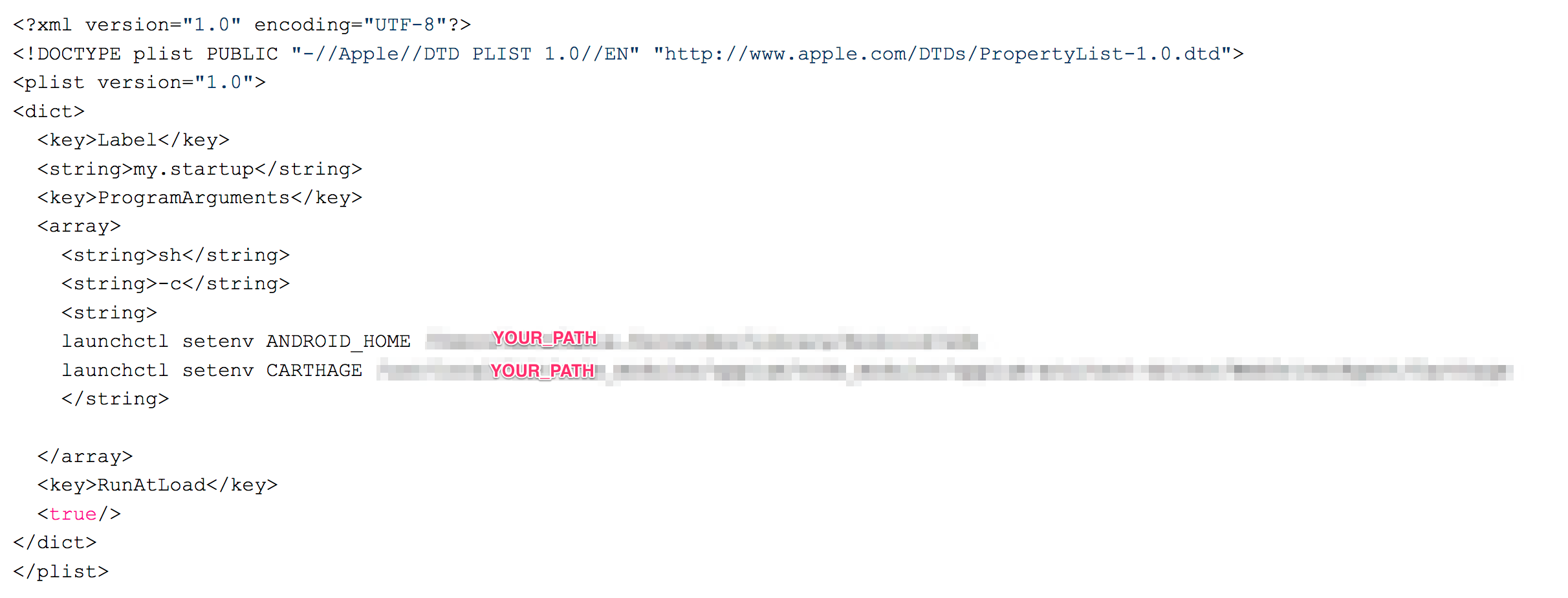
- Reboot the system in order to apply this changes. Also, if you want to launch it without restart, you can do:
launchctl load ~/Library/LaunchAgents/environment.plist
That solution help me a lot because I spend less time worring about the ANDROID_HOME environment and more time creating new test.
I hope it also works for you! 🙂
estefafdez
on 24 Jul 2018
+1 to this issue. Facing the same. What is the final accepted solution?
 apexkid
on 30 Jul 2018
apexkid
on 30 Jul 2018
The next release is almost ready. I need to do some testing before we can make the release. The solution is that users will be able to set ANDROID_HOME from within the user interface instead of having to rely on the environment variables.
dpgraham
on 4 Aug 2018
Resolved. Duplicate of: https://github.com/appium/appium-desktop/search?q=ANDROID_HOME&type=Issues
dpgraham
on 8 Aug 2018
After troubleshooting the same issue for a few hours here is what worked for me and should work for you too:
- Check if you have already set environment variables ANDROID_HOME and JAVA_HOME i.e. in ~/.bash_profile for Mac
- If environment variables are already set in your machine then set ANDROID_HOME and JAVA_HOME from Appium Desktop by clicking on Edit Configurations from Appium Home screen.
I hope it works for you as well. Have fun
 arifkhanaj
on 29 Nov 2019
arifkhanaj
on 29 Nov 2019
Hi,
I am failing to trigger my emulator .As i have set the environment variable,still getting errors while launching emulator.Can anyone help me please 👎
Encountered internal error running command: Error: Could not find 'adb' in PATH. Please set the ANDROID_HOME or ANDROID_SDK_ROOT environment variables to the corect Android SDK root directory path.
[debug] [MJSONWP] at ADB.getBinaryFromPath (/usr/local/lib/node_modules/appium/node_modules/appium-adb/lib/tools/system-calls.js:135:11)
 Anum-Zargar
on 5 Feb 2020
Anum-Zargar
on 5 Feb 2020
Related issues
 sridhar-vadlamani-ck
·
5Comments
sridhar-vadlamani-ck
·
5Comments
 jphennessey
·
9Comments
jphennessey
·
9Comments
 obstar
·
9Comments
obstar
·
9Comments
 vikramvi
·
3Comments
vikramvi
·
10Comments
vikramvi
·
3Comments
vikramvi
·
10Comments
Most helpful comment
After troubleshooting the same issue for a few hours here is what worked for me and should work for you too:
I hope it works for you as well. Have fun