Appium-desktop: autoupdate doesnt work in appium 1.4.0 - could not download update
The problem
- Start appium 1.4.0
- Click Install Now to update appium to newest version 1.4.1
- Got error: 'Could not download update'
Environment
- I am running Appium Desktop version _<1.4.0>_.
- I am on (pick one):
- [x ] Windows

- [x ] Windows
 obstar
All 9 comments
You'll have to manually download 1.4.1 and then subsequent autoupdates should work fine.
 dpgraham
on 12 Mar 2018
dpgraham
on 12 Mar 2018
update from 1.4.1 to 1.5.0 doesn't work either..
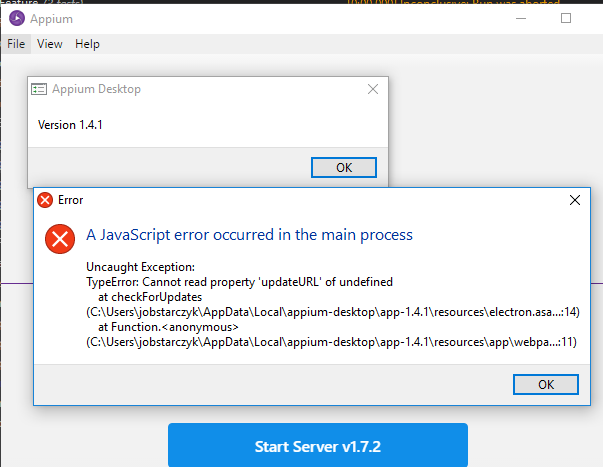
obstar
on 5 Apr 2018
@obstar Arg, that's unfortunate. Which version of Windows is this?
(In the meantime, you'll have to uninstall and reinstall manually)
dpgraham
on 5 Apr 2018
@dpgraham Windows 10 Enterprise x64 ver 1703 build 15063.909
obstar
on 6 Apr 2018
Fails on Windows 7 x64 as well. Is there any way to turn off this "feature"?
 jmazess
on 11 Apr 2018
jmazess
on 11 Apr 2018
Which version of Appium Desktop is it failing on @jmazess?
There's no way to turn off updates, but you can decline them.
dpgraham
on 12 Apr 2018
1.4.1, same as obstar's 2nd post.
I am unable to verify if the issue is fixed in 1.5.0 since it's the latest version and doesn't need to update.
jmazess
on 12 Apr 2018
It should have worked for 1.4.1... I'll need to look into this issue some more.
dpgraham
on 12 Apr 2018
update did work for me with version: 1.5.0 -> 1.6.1
obstar
on 10 May 2018
Related issues
 vikramvi
·
3Comments
vikramvi
·
3Comments
 sridhar-vadlamani-ck
·
5Comments
sridhar-vadlamani-ck
·
5Comments
 jphennessey
·
9Comments
jphennessey
·
9Comments
 Nikhil1212
·
11Comments
Nikhil1212
·
11Comments
 aaratitambe
·
6Comments
aaratitambe
·
6Comments
Most helpful comment
You'll have to manually download 1.4.1 and then subsequent autoupdates should work fine.