Appcenter: Xamarin.Android 11.2 support in App Center
Describe the solution you'd like
Able to select Xamarin.Android 11.2 in the build config.
Additional context
Xamarin.Android 11.2 has a lot of improvements and bugfixes that are critical to our application. We cannot target Xamarin.Android 11.1 or 11.0 because of it. This is the issue - https://github.com/xamarin/xamarin-android/issues/5251
Our project also fails to build using 11.1 and 11.0.
 lewisgauss
All 6 comments
Hi @lewisgauss, where did you face this problem? On the App Center portal or with the SDK?
 russelarms
on 20 May 2021
russelarms
on 20 May 2021
Hi @russelarms
App Center still doesn't have Xamarin.Android 11.2 support when building for Android.
The issue was with Xamarin.Android, it's since been fixed, and it's been released for a long time now.
So, the issue is with App Center not having it still, even today.
Hope that clarifies! 😀
lewisgauss
on 20 May 2021
Would you happen to have update on this @russelarms?
Xamarin.Android 11.2 has been released for a while now - https://docs.microsoft.com/en-us/xamarin/android/release-notes/11/11.2. But it is still not supported as a SDK option.
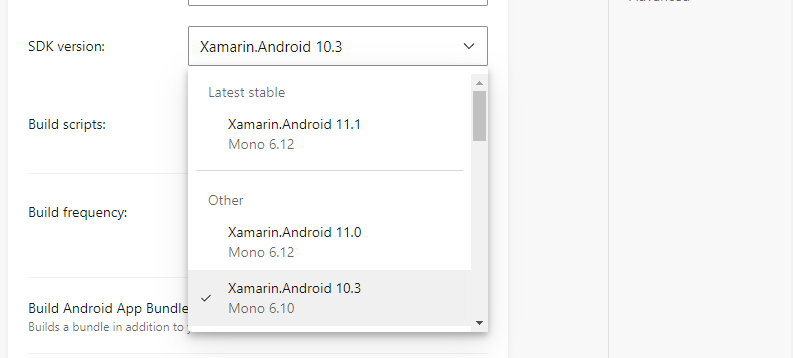
 ameenaliu
on 31 May 2021
ameenaliu
on 31 May 2021
We have this feature in the backlog, but no ETA yet.
russelarms
on 31 May 2021
you can use Xamarin.Android 11.2 thanks to Boots: https://devblogs.microsoft.com/xamarin/boots-xamarin-ci/
just create a appcenter-post-clone.sh file at the root android project. and add this:
#!/usr/bin/env bash
# App Center custom build scripts: https://aka.ms/docs/build/custom/scripts

export DOTNET_SKIP_FIRST_TIME_EXPERIENCE=true

dotnet tool install --global boots

# Workaround instead of restarting shell
# see: https://github.com/dotnet/cli/issues/9114#issuecomment-494226139
export PATH="$PATH:~/.dotnet/tools"
export DOTNET_ROOT="$(dirname "$(readlink "$(command -v dotnet)")")"

# https://github.com/xamarin/xamarin-android
boots https://aka.ms/xamarin-android-commercial-d16-9-macos
 roubachof
on 3 Jun 2021
roubachof
on 3 Jun 2021
Thanks for the suggestion @roubachof. I will try the Boots approach.
ameenaliu
on 3 Jun 2021
Related issues
 patrickdoodyIRL
·
3Comments
patrickdoodyIRL
·
3Comments
 sindresorhus
·
3Comments
sindresorhus
·
3Comments
 sklmnv
·
3Comments
sklmnv
·
3Comments
 vonovak
·
3Comments
vonovak
·
3Comments
 muhammaddadu
·
3Comments
muhammaddadu
·
3Comments
Most helpful comment
you can use Xamarin.Android 11.2 thanks to Boots: https://devblogs.microsoft.com/xamarin/boots-xamarin-ci/
just create a
appcenter-post-clone.shfile at the root android project. and add this: