Appcenter: App Center build React Native 0.60.x for Android - debug.keystore not found and jarsigner unable to sign jar
What App Center service does this affect?
Build for React Native Android
Describe the bug
React Native 0.60.x has changes related to signing configuration.
That's why App Center Build cannot finish Release build successfully.
2 problems related to each other and have one reason (change in /android/app/build.gradle file in React Native 0.60.x)
- debug.keystore not found
##[section]Starting: Gradle Task
==============================================================================
Task         : Gradle
Description  : Build using a Gradle wrapper script
Version      : 1.128.0
Author       : Microsoft Corporation
Help         : [More Information](https://go.microsoft.com/fwlink/?LinkID=613720)
==============================================================================
SYSTEMVSSCONNECTION exists true
[command]/Users/vsts/agent/2.155.1/work/1/s/android/gradlew -DMOBILECENTER_KEYSTORE_PASSWORD=*** -DMOBILECENTER_KEY_ALIAS=*** -DMOBILECENTER_KEY_PASSWORD=*** -DMOBILECENTER_BUILD_VERSION=23 -DAPPCENTER_KEYSTORE_PASSWORD=*** -DAPPCENTER_KEY_ALIAS=*** -DAPPCENTER_KEY_PASSWORD=*** -DAPPCENTER_BUILD_VERSION=23 -p android clean :app:assembleRelease :app:bundleRelease
Starting a Gradle Daemon (subsequent builds will be faster)
Gradle 5.4.1

...

> Task :app:mergeReleaseAssets
> Task :app:copyReleaseBundledJs
> Task :app:validateSigningRelease FAILED

FAILURE: Build failed with an exception.

* What went wrong:
Execution failed for task ':app:validateSigningRelease'.
> Keystore file '/Users/vsts/agent/2.155.1/work/1/s/android/app/debug.keystore' not found for signing config 'debug'.
This can be fixed easy in React Native app itself.
See this fix in React Native Template:
https://github.com/facebook/react-native/commit/d55025694be8b4ee5d09c8fdc910d42a5f144883#diff-66f6181bcb4cff4cd38fbc804a036db6
You just need to add !debug.keystore file to .gitignore and commit debug.keystore file to Git.
But then you can see next issue.
- jarsigner: unable to sign jar
##[section]Starting: Sign APK
==============================================================================
Task         : Android Signing
Description  : Sign and align Android APK files
Version      : 1.122.0
Author       : Microsoft Corporation
Help         : [More Information](https://go.microsoft.com/fwlink/?LinkID=613717)
==============================================================================
[command]/usr/bin/jarsigner -keystore /Users/vsts/agent/2.155.1/work/1/s/.certs/keystore.jks -storepass *** -keypass *** -verbose -sigalg MD5withRSA -digestalg SHA1 -signedjar /Users/vsts/agent/2.155.1/work/1/s/android/app/build/outputs/apk/release/app-release.apk /Users/vsts/agent/2.155.1/work/1/s/android/app/build/outputs/apk/release/app-release.apk.unsigned ***
jarsigner: unable to sign jar: java.util.zip.ZipException: invalid entry compressed size (expected 14523 but got 14928 bytes)
##[error]Error: /usr/bin/jarsigner failed with return code: 1
##[error]Return code: 1
##[section]Finishing: Sign APK
To Reproduce
Steps to reproduce the behavior:
react-native init RNTestForAppCenter --version 0.60.4- Configure App Center Build to use Release build variant
- Configure App Center Build to use Sign builds (upload your own keystore, fill in alias, password and keystore password)
- Run App Center Build
- Apply fix from https://github.com/facebook/react-native/commit/d55025694be8b4ee5d09c8fdc910d42a5f144883#diff-66f6181bcb4cff4cd38fbc804a036db6 - add !debug.keystore to .gitignore and commit debug.keystore to repository
- Run App Center Build after change in (5)
Expected behavior
App Center Build for React Native should ignore signingConfig if App Center Build configured with "Sign builds" settings to use own keystore file.
Additional context
It is important because no one can use App Center Build for React Native 0.60 without additional configuration.
If App Center team decides to not develop workaround, I think would be useful to know how to fix it in your React Native application.
You just need to remove one line from /android/app/build.gradle - this one: https://github.com/facebook/react-native/blob/683908dedf36c22ba8f0524268c7f461bc8478fc/template/android/app/build.gradle#L160
Problem appeared after this commit in React Native Template:
https://github.com/facebook/react-native/commit/63ebbd6bfcc9b76c000ed72a875218d388a7ee09
 alexander-w-o-s
All 8 comments
Looking at the configuration of a stock React Native 0.60.x project as you pointed out, the release configuration uses the debug signing configuration even for release. I don't know the exact rationale behind this, but it seems to be for getting going quickly - using a debug keystore for signing your release builds is generally not advised.
As the React Native template points out it is necessary to replace this with your own signing configuration. This can be done by providing your own keystore in there, or removing the line from the stock build.gradle file and using App Center's signing options.
We'll be looking into whether there are steps we can use to override the signing configuration used if something else has been supplied in the App Center build configuration - however, we try to keep the additional complexity as low as possible to keep your builds reproducible and predictable.
 matthiaswenz
on 19 Aug 2019
matthiaswenz
on 19 Aug 2019
@ranterle, maybe you can just add a note in App Center's signing options?
Can your team add a note with details what lines should be removed from build.gradle file?
It may help React Native developers who don't have experience with Android build configuration.
alexander-w-o-s
on 20 Aug 2019
@alexander-w-o-s took a deeper look into this and think we've identified a fix. We'll be working on that in the next couple days. I'll keep you updated on when this should be fixed.
 nilofer
on 21 Aug 2019
nilofer
on 21 Aug 2019
In App/build.gradle
Need to generate release.keystore file add it in App module folder and update siging config and release in build type
signingConfigs {
debug {
storeFile file('debug.keystore')
storePassword 'android'
keyAlias 'androiddebugkey'
keyPassword 'android'
}
release {
storeFile file('release.keystore')
storePassword 'xxx'
keyAlias 'xxx'
keyPassword 'xxx'
}
}
buildTypes {
debug {
signingConfig signingConfigs.debug
}
release {
signingConfig signingConfigs.release // change debug to release
minifyEnabled enableProguardInReleaseBuilds
proguardFiles getDefaultProguardFile("proguard-android.txt"), "proguard-rules.pro"
}
}
it works in app center
 santoshgistto
on 22 Aug 2019
santoshgistto
on 22 Aug 2019
Hey @alexander-w-o-s, looks like I got my tabs crossed when replying to this GitHub issue. The fix that we were looking into was actually for the other issue you opened around React Native Android. As you acknowledged, that one was fixed.
To resolve this specific issue, please take a look at @ranterle's suggestion or @santoshgistto's example.
nilofer
on 4 Sep 2019
@nrajpurkar, I see.
But I know how to fix it. I described possible fix in "Additional context" section of issue description.
I submitted this issue report to help other users.
Maybe you can just add a note in App Center's signing options?
Developers can remove this line (the same link as in issue description) in build.gradle file: https://github.com/facebook/react-native/blob/683908dedf36c22ba8f0524268c7f461bc8478fc/template/android/app/build.gradle#L160
It may help React Native developers who don't have experience with Android build configuration.
alexander-w-o-s
on 5 Sep 2019
I have the same problem.
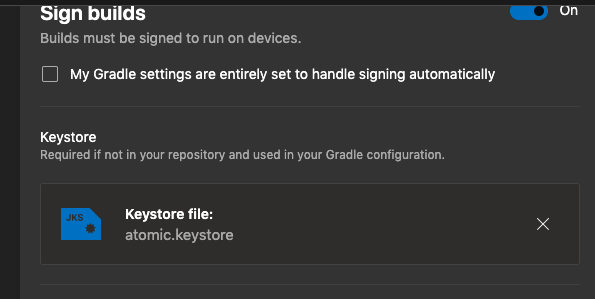
I loaded my keystore into the AppCenter dashboard because I don't want to leave it in the repository.
ERROR:
AILURE: Build failed with an exception.
* What went wrong:
Execution failed for task ':app:validateSigningRelease'.
> Keystore file '/Users/vsts/agent/2.158.0/work/1/s/android/app/atomic.keystore' not found for signing config 'release'.
* Try:
Run with --stacktrace option to get the stack trace. Run with --info or --debug option to get more log output. Run with --scan to get full insights.
* Get more help at https://help.gradle.org
BUILD FAILED in 5m 5s
Deprecated Gradle features were used in this build, making it incompatible with Gradle 6.0.
Use '--warning-mode all' to show the individual deprecation warnings.
See https://docs.gradle.org/5.5/userguide/command_line_interface.html#sec:command_line_warnings
276 actionable tasks: 257 executed, 19 up-to-date
Error: /Users/vsts/agent/2.158.0/work/1/s/android/gradlew failed with return code: 1
at ChildProcess.<anonymous> (/Users/vsts/agent/2.158.0/work/_tasks/Gradle_8d8eebd8-2b94-4c97-85af-839254cc6da4/1.128.0/node_modules/vsts-task-lib/toolrunner.js:569:30)
at emitTwo (events.js:106:13)
at ChildProcess.emit (events.js:191:7)
at maybeClose (internal/child_process.js:886:16)
at Socket.<anonymous> (internal/child_process.js:342:11)
at emitOne (events.js:96:13)
at Socket.emit (events.js:188:7)
at Pipe._handle.close [as _onclose] (net.js:497:12)
##[error]Error: /Users/vsts/agent/2.158.0/work/1/s/android/gradlew failed with return code: 1
{
"dependencies": {
"@react-native-community/async-storage": "^1.6.2",
"@react-native-community/geolocation": "^2.0.2",
"@react-native-firebase/analytics": "^6.0.0",
"@react-native-firebase/app": "^6.0.0",
"@react-native-firebase/crashlytics": "^6.0.0",
"axios": "^0.18.0",
"eventemitter3": "^3.1.2",
"formik": "^1.3.2",
"immutable": "^4.0.0-rc.12",
"lodash": "^4.17.11",
"moment": "^2.24.0",
"numeral": "^2.0.6",
"react": "16.9.0",
"react-native": "0.61.1",
"react-native-action-button": "^2.8.5",
"react-native-auto-height-image": "^1.0.5",
"react-native-bottom-action-sheet": "^1.0.2",
"react-native-camera": "3.6.0",
"react-native-circular-progress": "^1.0.1",
"react-native-color-matrix-image-filters": "5.2.0",
"react-native-config": "^0.11.5",
"react-native-counter": "git+https://github.com/JEGardner/react-native-counter#a444b60bad6af928372056b456a6d4e15969b64d",
"react-native-device-info": "^0.24.3",
"react-native-dropdownalert": "^3.7.1",
"react-native-fbsdk": "1.0.4",
"react-native-image-crop-picker": "^0.25.2",
"react-native-image-header-scroll-view": "^0.10.1",
"react-native-image-progress": "^1.1.1",
"react-native-iphone-x-helper": "^1.2.1",
"react-native-keyboard-aware-scroll-view": "0.9.1",
"react-native-masked-text": "^1.9.2",
"react-native-modal-dropdown": "0.7.0",
"react-native-navigation": "3.2.0",
"react-native-onesignal": "3.4.1",
"react-native-scrollable-tab-view": "https://github.com/jayshooo/react-native-scrollable-tab-view.git#6ac253a078c71b0cf143f3f8bd75aee7b4ddde58",
"react-native-status-bar-height": "^2.3.1",
"react-native-svg": "^8.0.8",
"react-native-video": "5.0.2",
"react-native-webview": "^7.2.5",
"react-redux": "^5.1.1",
"redux": "4.0.1",
"redux-axios-middleware": "^4.0.0",
"redux-thunk": "^2.3.0",
"reduxsauce": "^1.1.0",
"slugify": "^1.3.4",
"typesafe-actions": "^4.4.2",
"yup": "^0.26.6"
}
}
 ivanguimam
on 7 Oct 2019
ivanguimam
on 7 Oct 2019
@ivanguimam @alexander-w-o-s had the same problem. Android Code Signing Setup in App Center has some solutions.
Not storing anything in repo
If you don't want to store anything in your repository, this seems to work:
In case you uploaded a keystore to the branch configuration in the App Center portal, take into account that this approach will require to delete the signingConfig option from buildTypes section of build.gradle file if you didn't update it from the default state of the React Native project template.
To be specific remove it from buildTypes.release. Assuming you have default ReactNative 0.60+ build.gradle file - remove signingConfig from here:
release {
    // Caution! In production, you need to generate your own keystore file.
    // see https://facebook.github.io/react-native/docs/signed-apk-android.
    signingConfig signingConfigs.debug // <<<---remove this line
    minifyEnabled enableProguardInReleaseBuilds
    proguardFiles getDefaultProguardFile("proguard-android.txt"), "proguard-rules.pro"
}
I also wrote a comment so other developers on my team understand why there is nothing there, something like:
// signingConfig removed, read https://docs.microsoft.com/en-us/appcenter/build/android/code-signing
````

### Storing keystore in repo.

There is also other way described in the article - storing keystore in the repo but providing passwords via AppCenter env variables. Although I assume most people don't wanna store keystores in repos, but if you do - the following should work I guess (haven't tested myself, but let's trust AppCenter).
android {
signingConfigs {
releaseSigningConfig {
storeFile rootProject.file("app/testapp.jks")
storePassword System.getProperty("APPCENTER_KEYSTORE_PASSWORD")
keyAlias System.getProperty("APPCENTER_KEY_ALIAS")
keyPassword System.getProperty("APPCENTER_KEY_PASSWORD")
}
}
buildTypes {
    release {
        signingConfig signingConfigs.releaseSigningConfig
    }
}
}
```
 ArtemKolichenkov
on 6 Nov 2019
ArtemKolichenkov
on 6 Nov 2019
Related issues
 mason-hz
·
3Comments
mason-hz
·
3Comments
 patrickdoodyIRL
·
3Comments
patrickdoodyIRL
·
3Comments
 Oddj0b
·
3Comments
Oddj0b
·
3Comments
 botatoes
·
4Comments
botatoes
·
4Comments
 egorikftp
·
3Comments
egorikftp
·
3Comments
Most helpful comment
@ivanguimam @alexander-w-o-s had the same problem. Android Code Signing Setup in App Center has some solutions.
Not storing anything in repo
If you don't want to store anything in your repository, this seems to work:
To be specific remove it from buildTypes.release. Assuming you have default ReactNative 0.60+ build.gradle file - remove signingConfig from here:
I also wrote a comment so other developers on my team understand why there is nothing there, something like:
android {
signingConfigs {
releaseSigningConfig {
storeFile rootProject.file("app/testapp.jks")
storePassword System.getProperty("APPCENTER_KEYSTORE_PASSWORD")
keyAlias System.getProperty("APPCENTER_KEY_ALIAS")
keyPassword System.getProperty("APPCENTER_KEY_PASSWORD")
}
}
}
```