Appcenter: Support for building iOS app with Swift Package Manager
With Apple announcing support for Swift Package Manager for iOS in the next release of Xcode, I would like to see this support added here as well.
 WarSunsOfPeace
All 26 comments
@w0mba7 What exactly are you looking for? App Center's SDKs being available through Swift Package Manager?
 lumaxis
on 14 Jun 2019
lumaxis
on 14 Jun 2019
I was just actually looking to be able to build an iOS project using Swift Package Manage to pull in dependencies, the feature added in Xcode 11. Support for being able to add the SDK using SPM would be nice as well.
WarSunsOfPeace
on 14 Jun 2019
@w0mba7, we're taking a look at adding this support for Build. Does that sound like what you are looking for?
 nilofer
on 17 Jun 2019
nilofer
on 17 Jun 2019
yup, thanks.
WarSunsOfPeace
on 17 Jun 2019
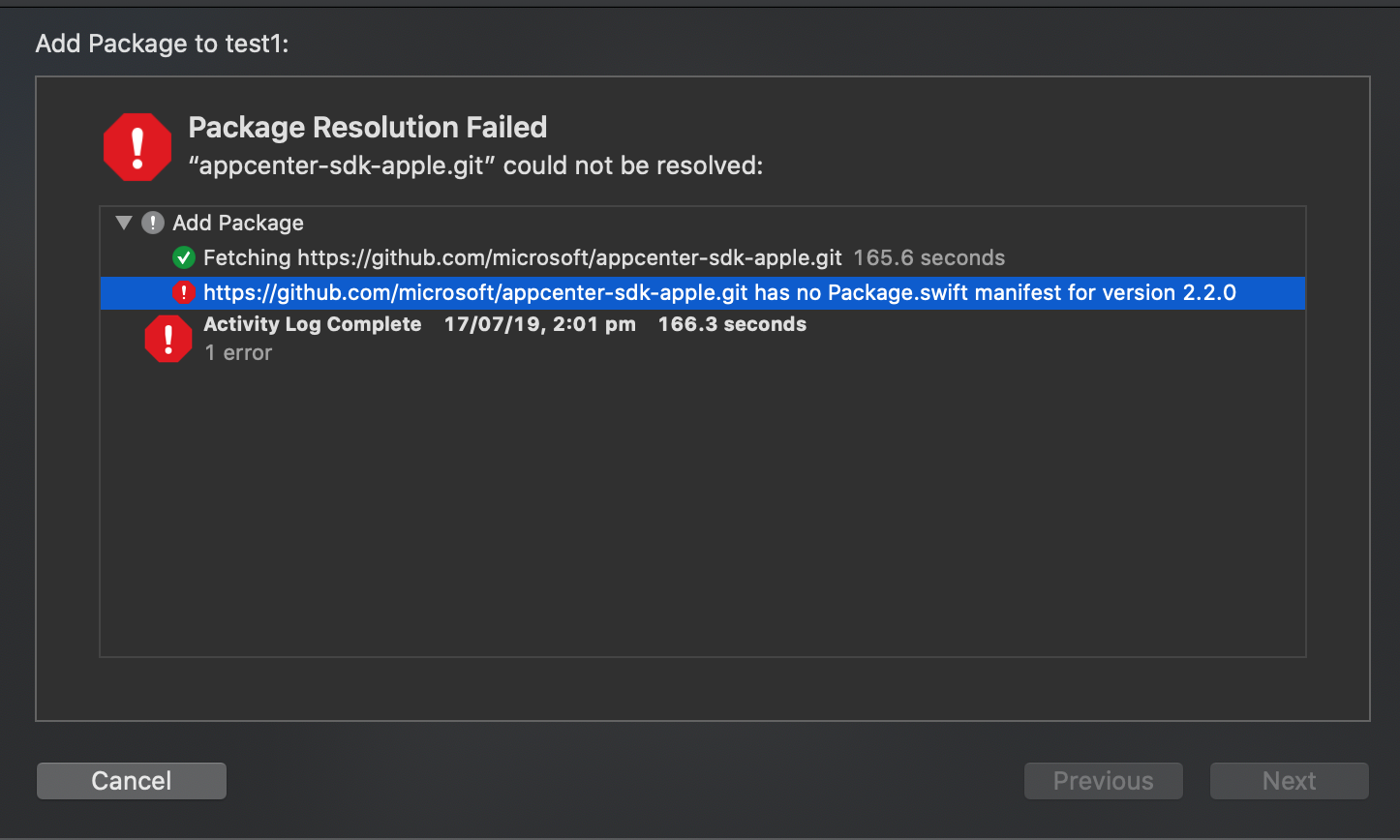
Current error.
 tkm-hc-suhas
on 17 Jul 2019
tkm-hc-suhas
on 17 Jul 2019
Has there been any work on this?
 egfconnor
on 23 Oct 2019
egfconnor
on 23 Oct 2019
Hi @egfconnor, this hasn't been added in yet.
nilofer
on 23 Oct 2019
@w0mba7 are you seeing errors building an iOS app with swift packages using App Center? If so, could you show me the error? Would be the best to have a sample project that reproduces the issue. From our testing, it resolves the dependencies correctly and built successfully.
For all that follows along the Issue, I'm scoping this down to supporting iOS app with swift packages in Build service. If you are looking for support of adding App Center SDK through Swift Package Manager, they are tracked in #1168 and #1295
 DennisPan
on 8 Nov 2019
DennisPan
on 8 Nov 2019
@DennisPan I'm facing the same issue trying to build an Xcode project on app center which relies on a local (same git repo) swift package. The error I'm getting is the following:
```/usr/bin/xcodebuild -workspace /Users/runner/runners/2.160.1/work/1/s/my.xcodeproj/project.xcworkspace -scheme staging archive -archivePath /Users/runner/runners/2.160.1/work/1/output/build/archive/my CODE_SIGN_STYLE=Manual
User defaults from command line:
IDEArchivePathOverride = /Users/runner/runners/2.160.1/work/1/output/build/archive/my
Build settings from command line:
CODE_SIGN_STYLE = Manual
note: Using new build system
note: Planning build
note: Constructing build description
Build system information
error: Missing package product 'MyLocalSwiftPackage'
* ARCHIVE FAILED *
[error]Error: /usr/bin/xcodebuild failed with return code: 65
What I tried is following Apples [SPM CI Article](https://developer.apple.com/documentation/swift_packages/building_apps_that_use_swift_packages_in_continuous_integration_workflows) resulting in the following post-clone script:
!/usr/bin/env bash
git submodule update --init --recursive;
xcodebuild -resolvePackageDependencies -forceResolvedPackageVersions
```
which is not working unfortunately. Is there any way to pass xcbuild arguments directly via the configuration? If that is not the case what could be another approach to make that work?
 christianhuck
on 6 Dec 2019
christianhuck
on 6 Dec 2019
I am trying to build the Swift-Package directly in the Appcenter Build pipeline.
Appcenter detects the package workspace (probably in the .swiftpm folder) but does not find the shared scheme that includes the test target.
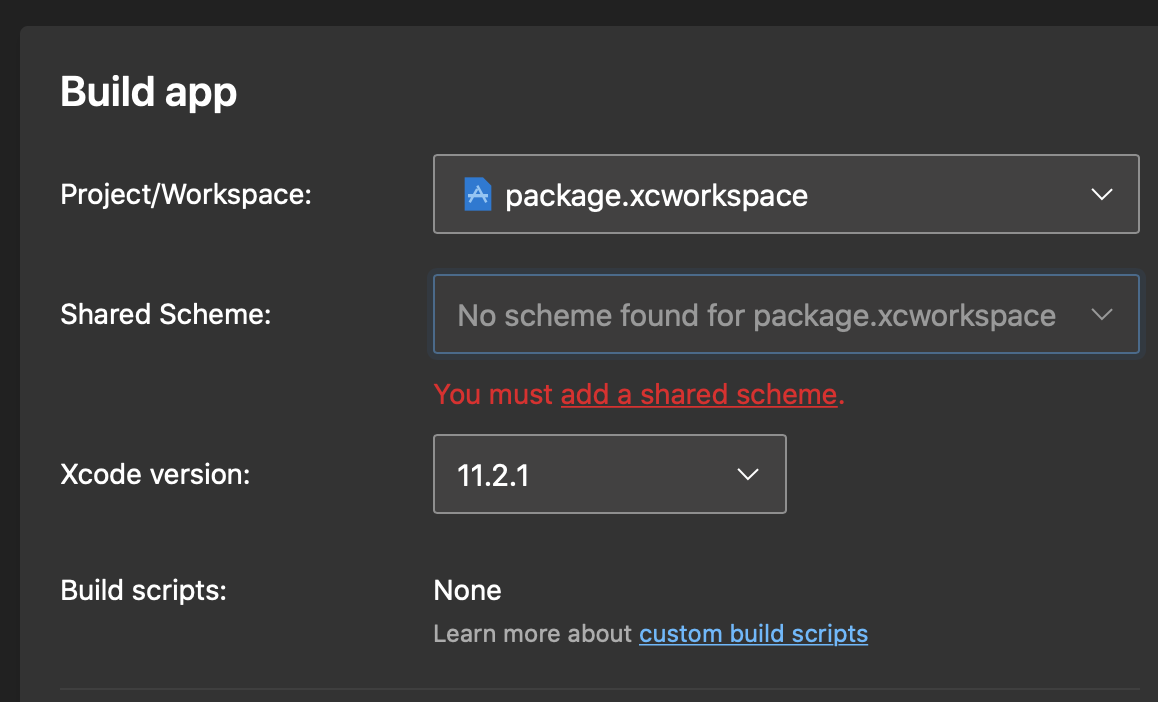

Did you consider supporting SwiftPM directly (without any real Xcode project)? There is this hidden Xcode workspace in .swiftpm though
It would also be very helpful to allow simple xcodebuild commands like
xcodebuild test -destination 'name=iPhone 11' -scheme 'MyPackageTests'
that would fix the issue too. The only workaround for now would be to add a fake project that has this xcodebuild as build phase. but this would be really nasty
 tapwork
on 18 Dec 2019
tapwork
on 18 Dec 2019
@christianhuck Regarding the question
which is not working unfortunately. Is there any way to pass xcbuild arguments directly via the configuration?
That's not configurable at the moment.
@tapwork No immediate plan on supporting building Swift package at the moment. Feel free to submit a new feature request (I don't recall we have one tracking that)
DennisPan
on 18 Dec 2019
@DennisPan that's a pity! The community is currently switching to Swift PM . Preferred over CocoaPods and Carthage.
I totally like the nice and clean App Center interface. But due to the lack of real a CLI and missing Swift package support it is not usable for real projects right now.
tapwork
on 18 Dec 2019
@tapwork To clarify, we do support build iOS app using Swift packages. Just don't support building the packages only.
DennisPan
on 18 Dec 2019
I'm unable to build my app that has a Swift Package. The cocoapods packages get pulled in fine, but during the build I get
Resolve Package Graph
Fetching [email protected]:dmytro-anokhin/url-image.git

xcodebuild: error: Could not resolve package dependencies:
  The server SSH fingerprint failed to verify.

##[error]Error: /usr/bin/xcodebuild failed with return code: 74
 Bendetta
on 9 Jan 2020
Bendetta
on 9 Jan 2020
@Bendetta could you see if the suggestion here works for you? https://stackoverflow.com/questions/58125659/github-actions-xcodebuild-fails-due-to-server-fingerprint
DennisPan
on 9 Jan 2020
For anyone using an Azure DevOps Repo with temporary tokens instead of SSH, following this worked for me:
christianhuck
on 10 Jan 2020
I'm not sure I understand this issue, the problem is that if the project uses SPM as dependency manager it will not pull dependencies, i.e. will not be buildable in app center?
From what I can see in the docs it only works CocoaPods, is this correct?
 ivanschuetz
on 24 Mar 2020
ivanschuetz
on 24 Mar 2020
@DennisPan Hi, i'm also trying to compile ios app using spm in app center, and the build failed (swift compile generation...)
 RiviElfNeura
on 22 Apr 2020
RiviElfNeura
on 22 Apr 2020
@RiviElfNeura Sorry for late response. Could you reach out to support about the build failure?
DennisPan
on 6 May 2020
I have a similar issue building my app in AC using PM to bring in the Facebook SDK - getting this error:
xcodebuild: error: Could not resolve package dependencies: because no versions of facebook-ios-sdk match the requirement 7.0.2..<8.0.0 and root depends on facebook-ios-sdk 7.0.2..<8.0.0, version solving failed.
It seems that this should be supported by AC, but not sure how to solve this problem. Anything I should try?
 rjhaveri1
on 29 Jun 2020
rjhaveri1
on 29 Jun 2020
I have a similar issue building my app in AC using PM to bring in the Facebook SDK - getting this error:
xcodebuild: error: Could not resolve package dependencies: because no versions of facebook-ios-sdk match the requirement 7.0.2..<8.0.0 and root depends on facebook-ios-sdk 7.0.2..<8.0.0, version solving failed.It seems that this should be supported by AC, but not sure how to solve this problem. Anything I should try?
Have anyone found a solution? I have the same error
 NannaML
on 3 Nov 2020
NannaML
on 3 Nov 2020
@DennisPan I have a similar issue building my app in appcenter using Swift Package Manager from private repository, getting this error:
xcodebuild: error: Could not resolve package dependencies:
Authentication failed because no credentials were provided.
##[error]Error: /usr/bin/xcodebuild failed with return code: 74
Any suggestion! my CI process is stopped
 AntonioCarrascoGBM
on 4 Feb 2021
AntonioCarrascoGBM
on 4 Feb 2021
We have the same issue. We have a swift package in private Github repository A and a project-iOS app in a Github repository B that uses the Swift package at repository A.
When trying to build the project-iOS app at App Center we get an authentication error.
xcodebuild: error: Could not resolve package dependencies:
  The server SSH fingerprint failed to verify.
We have contacted the App center's support without any answer yet.
Can you provide detailed steps to resolve this issue?
 ptsiogas
on 9 Apr 2021
ptsiogas
on 9 Apr 2021
@AntonioCarrascoGBM @ptsiogas
I had the same issue but found a solution based on these posts:
https://discuss.bitrise.io/t/spm-gitlab-the-server-ssh-fingerprint-failed-to-verify/15592/3
https://github.com/microsoft/appcenter/issues/237#issuecomment-527991036
237
Add the following to the appcenter-post-clone.sh file (this example is for Bitbucket but should work for GitHub as well):
# Add Bitbucket fingerprint to known_hosts
mkdir -p ~/.ssh

# Find Bitbucket IP's for adding to App Center's ssh known hosts: https://discuss.bitrise.io/t/xcode-11-resolving-packages-fails-with-ssh-fingerprint/10388/2
# To avoid this error:
#   xcodebuild: error: Could not resolve package dependencies:
#   The server SSH fingerprint failed to verify.
echo "Adding bitbucket to ssh known hosts"
for ip in $(dig @8.8.8.8 bitbucket.org +short); do ssh-keyscan bitbucket.org,$ip; ssh-keyscan $ip; done 2>/dev/null >> ~/.ssh/known_hosts

# Print out ssh known hosts for debugging
echo "Known hosts:"
cat ~/.ssh/known_hosts

# Add Bitbucket ssh key
echo "Adding bitbucket SSH key:"
echo $SSH_KEY | base64 -D > ~/.ssh/bitbucket-ssh
chmod 600 ~/.ssh/bitbucket-ssh
ssh-add ~/.ssh/bitbucket-ssh
Generate a base64 formatted SSH key like this:
base64 -i ~/.ssh/my_private_key | pbcopy
Add the SSH key to App Center -> Build Settings -> Environment Variables:
SSH_KEY = {key}
 anfriis
on 21 Apr 2021
anfriis
on 21 Apr 2021
This issue has been automatically marked as stale because it has not had any activity for 60 days. It will be closed if no further activity occurs within 15 days of this comment.
![msftbot[bot] picture](https://avatars.githubusercontent.com/in/26612?v=4&s=40) msftbot[bot]
on 30 Jun 2021
msftbot[bot]
on 30 Jun 2021
This issue will now be closed because it hasn't had any activity for 15 days after stale. Please feel free to open a new issue if you still have a question/issue or suggestion.
msftbot[bot]
on 15 Jul 2021
Related issues
 busterlaursen
·
4Comments
busterlaursen
·
4Comments
 chriskellor
·
3Comments
chriskellor
·
3Comments
 master-lincoln
·
3Comments
master-lincoln
·
3Comments
 thabemmz
·
3Comments
thabemmz
·
3Comments
 kuyazee
·
3Comments
kuyazee
·
3Comments
Most helpful comment
I have a similar issue building my app in AC using PM to bring in the Facebook SDK - getting this error:
xcodebuild: error: Could not resolve package dependencies: because no versions of facebook-ios-sdk match the requirement 7.0.2..<8.0.0 and root depends on facebook-ios-sdk 7.0.2..<8.0.0, version solving failed.It seems that this should be supported by AC, but not sure how to solve this problem. Anything I should try?