Appcenter: Enable Intune refresh token after 90 days
Please allow editing of the Intune Store Connection
- When going into the Settings for an Intune Store Connection, it is not possible to do anything.
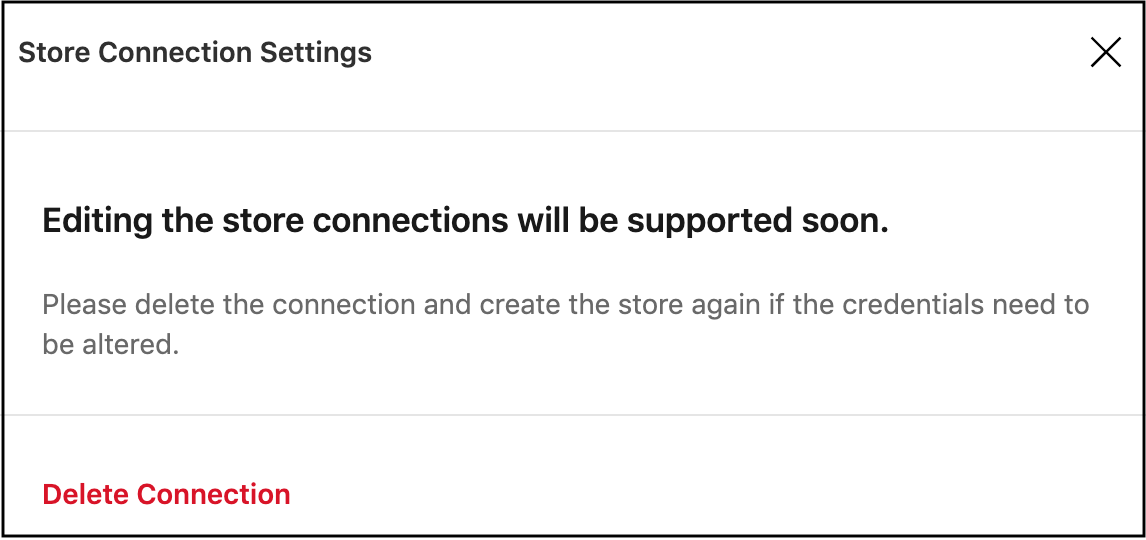
This only affects Intune Store Connection. For App Store, you will be able to edit.
This is a problem because the authentication token expires in 3 months. Once expired, you will see this error message when attempting to distribute an app via the same connection.
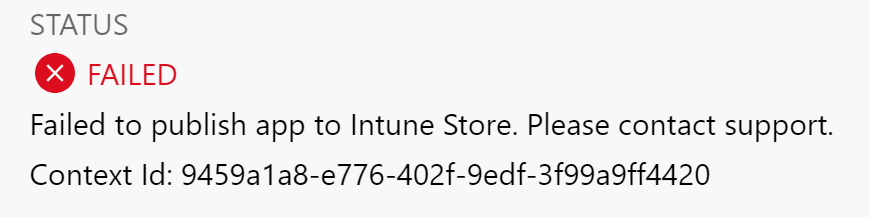
Workaround: We have to delete the store connection each time the authentication token expires. In this case, we lose history of all the distributions done within the store connection.
Request: Please help to enable editing for Intune Store Connection, even if it's just to re-authenticate the connection with the required Intune admin account.
 charleswkc
All 13 comments
Hi @charleswkc, would it be OK if renamed the feature request to "Enable Intune refresh token after 90 days"?
 Oddj0b
on 5 Jun 2019
Oddj0b
on 5 Jun 2019
@Oddj0b in this case, yes. That is my only requirement - to be able to renew the token. Thanks!
charleswkc
on 7 Jun 2019
We're also affected by this. Having the store connection expire really removes the benefit of being able to distribute via a few clicks as it then depends on a specific user with InTune credentials performing a release in case it's expired -- in which case, we may as well use InTune.
 pcampbell83
on 4 Dec 2019
pcampbell83
on 4 Dec 2019
This is a pretty critical issue for our team too, it will become particularly acute when the application is handed over to support and any deployments become infrequent and handled by a 3rd party support organisation.
The current process of a "failure please contact support" that has to be interpreted as "create a whole new store connection" so that the deployment can be run means that it's probably better for us to document the manual APK upload precedure into Intune rather than using appcenter.
 rbev
on 6 Jan 2020
rbev
on 6 Jan 2020
@Oddj0b Will you please provide an update about this request? We are still having to delete and re-create the store connection every time the token expires. Thank you.
charleswkc
on 7 Jan 2020
Any update on this? This would help our team as well.
 adupo
on 3 Apr 2020
adupo
on 3 Apr 2020
This has been a problem for us to. I really would love to know what the definition of soon is because it has been over a year we have been putting up with this. Refreshing the store connections is not a huge deal except that the guids change for the store which means we have to update all our deployment scripts in Azure Devops and when you have 12-16 of these that is a lot of work to do every 3 months.
 scoleman81
on 5 Jun 2020
scoleman81
on 5 Jun 2020
Any update on this? This has been a problem for us for a while, thanks
 hugo0991
on 9 Feb 2021
hugo0991
on 9 Feb 2021
Any update on this?
trying to recreate the connection only results in a new app in Intune and not updating the correct app.
 NatiSayada
on 24 Feb 2021
NatiSayada
on 24 Feb 2021
Our team is also affected by this. It is very important for us to be able to renew this token or edit the existing store connection in AppCenter. This has effected our application deployments.
 kashanico
on 24 Mar 2021
kashanico
on 24 Mar 2021
+1 having this issue.
 IvanJosipovic
on 24 Mar 2021
IvanJosipovic
on 24 Mar 2021
This issue has been automatically marked as stale because it has not had any activity for 60 days. It will be closed if no further activity occurs within 15 days of this comment.
![msftbot[bot] picture](https://avatars.githubusercontent.com/in/26612?v=4&s=40) msftbot[bot]
on 30 Jun 2021
msftbot[bot]
on 30 Jun 2021
This is still an issue. Has been for years. One of the main reasons we are moving away from app center.
scoleman81
on 30 Jun 2021
Related issues
 mason-hz
·
3Comments
mason-hz
·
3Comments
 DouglasMarq
·
4Comments
DouglasMarq
·
4Comments
 sklmnv
·
3Comments
sklmnv
·
3Comments
 patrickdoodyIRL
·
3Comments
patrickdoodyIRL
·
3Comments
 botatoes
·
4Comments
botatoes
·
4Comments
Most helpful comment
@Oddj0b Will you please provide an update about this request? We are still having to delete and re-create the store connection every time the token expires. Thank you.