Appcenter: This copy of libswiftCore.dylib requires an OS version prior to 10.14.4.
What App Center service does this affect?
Xamarin.UiTest
Describe the bug
After updating:
- MacOS to 10.14.4
- XCode to 10.2
Visual Studio for Mac to 8.0.1
UI tests can't be run on iOS. There is an error:
Xamarin.UITest.XDB.Exceptions.DeviceAgentException : Unable to verify app installation state

ExitCode: 134
This copy of libswiftCore.dylib requires an OS version prior to 10.14.4.

  at Xamarin.UITest.iOS.iOSAppLauncher.LaunchAppLocal (Xamarin.UITest.Configuration.IiOSAppConfiguration appConfiguration, Xamarin.UITest.Shared.Http.HttpClient httpClient, System.Boolean clearAppData) [0x001e2] in <2a16c16730a54859bda72c6bc1c728f7>:0
  at Xamarin.UITest.iOS.iOSAppLauncher.LaunchApp (Xamarin.UITest.Configuration.IiOSAppConfiguration appConfiguration, Xamarin.UITest.Shared.Http.HttpClient httpClient, Xamarin.UITest.TestCloud.TestCloudiOSAppConfiguration testCloudAppConfiguration, Xamarin.UITest.Shared.Http.HttpClient testCloudWsClient, Xamarin.UITest.Shared.Http.HttpClient xtcServicesClient, System.Boolean testCloudUseDeviceAgent) [0x00068] in <2a16c16730a54859bda72c6bc1c728f7>:0
  at Xamarin.UITest.iOS.iOSApp..ctor (Xamarin.UITest.Configuration.IiOSAppConfiguration appConfiguration, Xamarin.UITest.Shared.Execution.IExecutor executor) [0x002af] in <2a16c16730a54859bda72c6bc1c728f7>:0
  at Xamarin.UITest.iOS.iOSApp..ctor (Xamarin.UITest.Configuration.IiOSAppConfiguration appConfiguration) [0x00000] in <2a16c16730a54859bda72c6bc1c728f7>:0
  at Xamarin.UITest.Configuration.iOSAppConfigurator.StartApp (Xamarin.UITest.Configuration.AppDataMode appDataMode) [0x00017] in <2a16c16730a54859bda72c6bc1c728f7>:0
(...)
Expected behavior
Ui tests should start like before updating
Desktop (please complete the following information):
- OS: MacOS to 10.14.4
- Xamarin.UiTest 2.2.7
Additional context
Xamarin claims that this issue should be posted here, on AppCenter GitHub. More details about the bug: https://github.com/xamarin/xamarin-macios/issues/5816
 KarolStosikPowel
All 12 comments
I believe it can't install device agent on iOS as I'm getting the same error for:
iOSDeviceManager uninstall
iOSDeviceManager install
commands.
MacOS to 10.14.4
XCode to 10.2
Visual Studio for Mac to 8.0.1
Xamarin.UI.Test 2.2.7
 inikityuk
on 11 Apr 2019
inikityuk
on 11 Apr 2019
I'm getting this too... any fixes guys..?
 PaulsonM
on 12 Apr 2019
PaulsonM
on 12 Apr 2019
As am I, anyone found a solution or a good workaround?
Blocked on developing and refactoring the UI Test project for iOS currently.
 GregHowardManatee
on 12 Apr 2019
GregHowardManatee
on 12 Apr 2019
This is serious blocker for us. What's the status? If you opened the source I will fix it myself and put in a PR. Just do something!
 danstraughn
on 16 Apr 2019
danstraughn
on 16 Apr 2019
We pushed a fix 5 days ago, but where not aware of this thread. Apologies.
@KarolStosikPowel +1 for a nice bug report.
Xcode 10.2 compatible
https://www.nuget.org/packages/Xamarin.UITest/2.2.7.2002-dev
Xcode 10.2 compatible and allows NUnit 3
https://www.nuget.org/packages/Xamarin.UITest/3.0.0-dev1
@patniko This can be closed.
ATTN @maxxkrakoa @King-of-Spades
 jmoody
on 17 Apr 2019
jmoody
on 17 Apr 2019
We pushed a fix 5 days ago, but where not aware of this thread. Apologies.
@KarolStosikPowel +1 for a nice bug report.
Xcode 10.2 compatible
https://www.nuget.org/packages/Xamarin.UITest/2.2.7.2002-dev
Xcode 10.2 compatible and allows NUnit 3
https://www.nuget.org/packages/Xamarin.UITest/3.0.0-dev1
@patniko This can be closed.
ATTN @maxxkrakoa @King-of-Spades
Verified fixed for Xcode 10.2. Nunit 3.x is not supported by VS for Mac 2019 for local tests. So close... But it resolves our issues. Thank you.
danstraughn
on 17 Apr 2019
@danstraughn
Nunit 3.x is not supported by VS for Mac 2019 for local tests. So close... But it resolves our issues.
I've been able to successfully run iOS & Android tests with Xcode 10.2 + Xamarin.UITest 3.0.0-dev1 + NUnit 3.11.0 locally. Also, historically NUnit 3 typically could work locally with Xamarin.UITest despite not being supported; quite often the trouble would start when running in Xamarin Test Cloud / Visual Studio App Center.
I'm curious what error(s) you're seeing that's leading you to conclude NUnit 3 isn't supported by VS for Mac since that doesn't match my observations or expectations.
In fact, as far as I know, NUnit 3 has been supported by VS for Mac literally since before it was VS for Mac; it's predecessor that it inherited logic from, Xamarin Studio, also supported NUnit 3 for quite some time.
 King-of-Spades
on 17 Apr 2019
King-of-Spades
on 17 Apr 2019
@danstraughn
Nunit 3.x is not supported by VS for Mac 2019 for local tests. So close... But it resolves our issues.
I've been able to successfully run iOS & Android tests with Xcode 10.2 + Xamarin.UITest 3.0.0-dev1 + NUnit 3.11.0 locally. Also, historically NUnit 3 typically could work locally with Xamarin.UITest despite not being supported; quite often the trouble would start when running in Xamarin Test Cloud / Visual Studio App Center.
I'm curious what error(s) you're seeing that's leading you to conclude NUnit 3 isn't supported by VS for Mac since that doesn't match my observations or expectations.
In fact, as far as I know, NUnit 3 has been supported by VS for Mac literally since before it was VS for Mac; it's predecessor that it inherited logic from, Xamarin Studio, also supported NUnit 3 for quite some time.
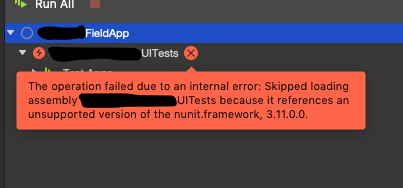
Using Visual Studio 8.0.3 (build 14) UITests will not even populate because of an unsupported version of Nunit which is 3.11 as you described. Not sure what else can be done if the IDE rejects the package.
danstraughn
on 17 Apr 2019
As part of the generally available release of NUnit3 support we have a story to update the VS templates.
jmoody
on 17 Apr 2019
As part of the generally available release of NUnit3 support we have a story to update the VS templates.
Thank you very much.
danstraughn
on 17 Apr 2019
Hey,
I hope you can help me, I really tried everything, and can't make the Xamarin.UITest 3.0.0 work with a real local device.
I have a Xamarin Forms project and I am using
- macOS Mojave 10.14.3 (18D109)
- Visual Studio Community 2019: 8.1 build 2460
- Xamarin.iOS: 12.10.0.150
- XCode: Version 10.2.1 (10E1001)
I included the following packages in my UI test project:
- NUnit: 3.12.0
- NUnit3TestAdapter: 3.13.0
- Xamarin.UITest: 3.0.0
And experience the following:
I can execute my tests on iPhone Simulator with no problem, but when I try to use a real device, I get errors.
I even tried Xamarin.UITest (3.0.0-dev1) with NUnit (3.11.0) as @King-of-Spades recommended above.
With Xamarin.UITest (2.7.7) and NUnit (2.6.4) it's working, but I must use the new version.
Here is what I get:
```Clearing app data.
1 - ClearData:
bundleId: com.----.----.ios
deviceId: ----
Running: /var/folders/----/xdb/DeviceAgent.iOS.Dependencies/----/bin/iOSDeviceManager is-installed com.----.----.ios -d ----
Exit code '134' received from '/var/folders/----/xdb/DeviceAgent.iOS.Dependencies/----/bin/iOSDeviceManager is-installed com.----.----.ios -d ----'
0 CoreFoundation 0x00007fff512f4ded __exceptionPreprocess + 256
1 libobjc.A.dylib 0x00007fff7d3c1720 objc_exception_throw + 48
10 iOSDeviceManager 0x0000000105922791 +[PhysicalDevice withID:] + 123
11 iOSDeviceManager 0x000000010592b62e +[Device withID:] + 118
12 iOSDeviceManager 0x000000010592e993 +[Command deviceFromArgs:] + 130
13 iOSDeviceManager 0x0000000105920814 +[IsInstalledCommand execute:] + 48
14 iOSDeviceManager 0x0000000105931478 +[CLI process:] + 1110
15 iOSDeviceManager 0x000000010591c8f1 main + 121
16 libdyld.dylib 0x00007fff7e48fed9 start + 1
2 CoreFoundation 0x00007fff5130fa4a +[NSException raise:format:arguments:] + 98
3 Foundation 0x00007fff536b3e0d -[NSAssertionHandler handleFailureInMethod:object:file:lineNumber:description:] + 194
4 FBControlCore 0x00000001059d6dcb -[FBControlCoreFrameworkLoader loadPrivateFrameworksOrAbort] + 635
5 FBDeviceControl 0x0000000105aa680b +[FBDeviceSet initialize] + 75
6 libobjc.A.dylib 0x00007fff7d3c4248 CALLING_SOME_+initialize_METHOD + 19
7 libobjc.A.dylib 0x00007fff7d3b400c _class_initialize + 282
8 libobjc.A.dylib 0x00007fff7d3b3a19 lookUpImpOrForward + 238
9 libobjc.A.dylib 0x00007fff7d3b3494 _objc_msgSend_uncached + 68
(
)
* First throw call stack:
2019-05-15 16:29:33.877 iOSDeviceManager[60620:782079] Assertion failure in -[FBDeviceControlFrameworkLoader_Essential loadPrivateFrameworksOrAbort], /Users/maximlobanov/Documents/Repos/TestCloud/FBSimulatorControl/FBControlCore/Utility/FBControlCoreFrameworkLoader.m:84
2019-05-15 16:29:33.879 iOSDeviceManager[60620:782079] ** Terminating app due to uncaught exception 'NSInternalInconsistencyException', reason: 'Failed to load private frameworks for FBDeviceControl with error Error Domain=com.facebook.FBControlCore Code=0 "Could not load dylib /usr/lib/swift/libswiftCore.dylib with dlopen: dlopen(/usr/lib/swift/libswiftCore.dylib, 10): image not found" UserInfo={NSLocalizedDescription=Could not load dylib /usr/lib/swift/libswiftCore.dylib with dlopen: dlopen(/usr/lib/swift/libswiftCore.dylib, 10): image not found}'
libc++abi.dylib: terminating with uncaught exception of type NSException
2 - Unsuccessful
Result message:
Xamarin.UITest.XDB.Exceptions.DeviceAgentException : Unable to verify app installation state
ExitCode: 134
0 CoreFoundation 0x00007fff512f4ded __exceptionPreprocess + 256
1 libobjc.A.dylib 0x00007fff7d3c1720 objc_exception_throw + 48
10 iOSDeviceManager 0x0000000105922791 +[PhysicalDevice withID:] + 123
11 iOSDeviceManager 0x000000010592b62e +[Device withID:] + 118
12 iOSDeviceManager 0x000000010592e993 +[Command deviceFromArgs:] + 130
13 iOSDeviceManager 0x0000000105920814 +[IsInstalledCommand execute:] + 48
14 iOSDeviceManager 0x0000000105931478 +[CLI process:] + 1110
15 iOSDeviceManager 0x000000010591c8f1 main + 121
16 libdyld.dylib 0x00007fff7e48fed9 start + 1
2 CoreFoundation 0x00007fff5130fa4a +[NSException raise:format:arguments:] + 98
3 Foundation 0x00007fff536b3e0d -[NSAssertionHandler handleFailureInMethod:object:file:lineNumber:description:] + 194
4 FBControlCore 0x00000001059d6dcb -[FBControlCoreFrameworkLoader loadPrivateFrameworksOrAbort] + 635
5 FBDeviceControl 0x0000000105aa680b +[FBDeviceSet initialize] + 75
6 libobjc.A.dylib 0x00007fff7d3c4248 CALLING_SOME_+initialize_METHOD + 19
7 libobjc.A.dylib 0x00007fff7d3b400c _class_initialize + 282
8 libobjc.A.dylib 0x00007fff7d3b3a19 lookUpImpOrForward + 238
9 libobjc.A.dylib 0x00007fff7d3b3494 _objc_msgSend_uncached + 68
(
)
* First throw call stack:
2019-05-15 16:29:33.877 iOSDeviceManager[60620:782079] Assertion failure in -[FBDeviceControlFrameworkLoader_Essential loadPrivateFrameworksOrAbort], /Users/maximlobanov/Documents/Repos/TestCloud/FBSimulatorControl/FBControlCore/Utility/FBControlCoreFrameworkLoader.m:84
2019-05-15 16:29:33.879 iOSDeviceManager[60620:782079] ** Terminating app due to uncaught exception 'NSInternalInconsistencyException', reason: 'Failed to load private frameworks for FBDeviceControl with error Error Domain=com.facebook.FBControlCore Code=0 "Could not load dylib /usr/lib/swift/libswiftCore.dylib with dlopen: dlopen(/usr/lib/swift/libswiftCore.dylib, 10): image not found" UserInfo={NSLocalizedDescription=Could not load dylib /usr/lib/swift/libswiftCore.dylib with dlopen: dlopen(/usr/lib/swift/libswiftCore.dylib, 10): image not found}'
libc++abi.dylib: terminating with uncaught exception of type NSException```
 lorant-csonka
on 15 May 2019
lorant-csonka
on 15 May 2019
Hi @lorant-csonka-planorama
I have pulled the latest Xamarin.UITest sources and tried to reproduce this problem with the embedded iOSDeviceManager.
Using Xcode 10.2.1 and Mojave latest beta I was not able reproduce with Xamarin.UITest 3.x.
With Xamarin.UITest (2.7.7) and NUnit (2.6.4) it's working, but I must use the new version.
The stacktraces you pasted look like exactly like those we saw before patching Xamarin.UITest for Xcode 10.2 support. Xamarin.UITest < 2.2.7 did not work with Xcode 10.2. Is it possible that your project is using stale Xamarin.UITest binaries? If this problem persists, please open a new issue.
jmoody
on 21 May 2019
Related issues
 sourabhtyagi2003
·
3Comments
sourabhtyagi2003
·
3Comments
 KSemenenko
·
3Comments
KSemenenko
·
3Comments
 Oddj0b
·
3Comments
Oddj0b
·
3Comments
 master-lincoln
·
3Comments
master-lincoln
·
3Comments
 mason-hz
·
3Comments
mason-hz
·
3Comments
Most helpful comment
This is serious blocker for us. What's the status? If you opened the source I will fix it myself and put in a PR. Just do something!