Appcenter: Xamarin.UITest unable to interact with Azure Login(web-view)
What App Center service does this affect?
App Center Testing using Xamarin.UI.Test
Describe the bug
Creating UITests for a Xamarin MVVM cross platform app that uses Azure login through web-view.
Unable to interact with any of the elements and therefore unable login with credentials then navigated back to the native app. This leaves us unable to create an automated test suite to run in app center.
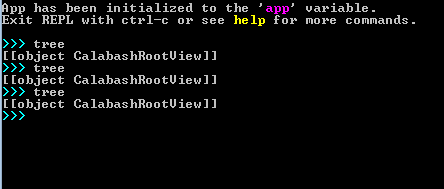
REPL: example
>>> tree
[[object CalabashRootView]]
Smartphone (please complete the following information):
- Device: Any
- OS: Android and iOS
--iOS: Has a springboardalert that is also unable to interact as described in the issue reported below. Once this issue is corrected this issue will be the next issue that will prevent devs from creating a full automation test suite.
https://github.com/Microsoft/appcenter/issues/213 - Browser [e.g. stock browser, safari] All
Visual Studio Enterprise 2019 for Mac
Version 8.0 (build 3001)
Xamarin.iOS
Version: 12.6.0.25 (Visual Studio Enterprise)
Operating System
Mac OS X 10.14.4
Xcode
Version 10.2 (10E125)
 galfonso777
All 8 comments
WebView queries have to be constructed and handled a bit differently than standard queries, see this doc for details: https://docs.microsoft.com/en-us/appcenter/test-cloud/uitest/working-with-webviews
Also, you noted "Browser [e.g. stock browser, safari] All", just to be clear, Xamarin.UITest can only automate your own app, and WebViews contained within your App Sandbox. If your app launches the system browser, for example; then Xamarin.UITest is not able to automate that.
Can you give an update your observations in this report once you've reviewed your approach with that info in mind?
 King-of-Spades
on 17 Apr 2019
King-of-Spades
on 17 Apr 2019
Referring to the system browser that gets launched via SFAuthenticationSessionBrowser/ASWebAuthenticationSession. Apologies I should have specified that in the initial description.
galfonso777
on 17 Apr 2019
Thanks for that clarification, so I think this should be classified as a feature request rather than a bug due to your scenario being with the system browser rather than being within your app sandbox.
Our general solution for tests that entail tasks not directly achievable with Xamarin.UITest is to employ a backdoor method. Backdoors can be used to call a public method or populate data that your tests require to run. See the following guides for more information:
Backdoors guide: https://docs.microsoft.com/en-us/appcenter/test-cloud/uitest/working-with-backdoors
Generic backdoors sample: https://github.com/King-of-Spades/BackdoorExample/tree/master
Information on uploading data along with your app: https://intercom.help/appcenter/test/using-datafiles-in-app-center-xamarinuitest
Generally speaking, you can include a file with your upload by using the command --include
King-of-Spades
on 17 Apr 2019
I know SFAuthenticationSessionBrowser is being deprecated but it would be nice to have support for ASWebAuthenticationSession rather than always writing a custom Backdoors. I wrote it up as bug since SFAuthenticationSessionBrowser/ASWebAuthenticationSession is common for showing a login between system browser and an app for authentication. Also this issue is linked to the iOS SpringBoardAlert not automatically being identified by Calabash which is being triggered by OAuth.
galfonso777
on 18 Apr 2019
Completely understandable, I just want to make sure the information on your issue is the clearest it can be for the App Center team. Currently @Oddj0b is out but when he's around I suspect that extra context will be beneficial. :)
King-of-Spades
on 18 Apr 2019
I am facing the same issue , is there any solution for the same? This is blocking our test execution on Real device and App center as well.
 jayanths469
on 19 Aug 2019
jayanths469
on 19 Aug 2019
@jayanths469 If the webview is outside of your app sandbox, then testing with Xamarin.UITest isn't supported because Xamarin.UITest cannot automate multiple apps at the same time. That's the main scenario discussed in this issue, which is why it is a feature request.
If the webview _is_ inside of your app sandbox, then it should be possible to query and interact with it; but webview queries work differently than the rest of your app queries, see this doc for comparison: https://docs.microsoft.com/en-us/appcenter/test-cloud/uitest/working-with-webviews
It is possible to use the REPL tool to test webview queries, but sometimes it can be tricky, because the Tree command doesn't work the same way with WebViews as it does with standard elements. I usually prefer to inspect the webpage I'm loading manually and use that to figure out how to structure my queries.
Or, you can experiment with some general queries targeting the webview directly, such as:
app.Query(x => x.WebView())
King-of-Spades
on 30 Aug 2019
This issue has been automatically closed because there has been no response to our request for more information within 7 days. If you still need any assistance please reopen the issue or submit a new one.
![no-response[bot] picture](https://avatars.githubusercontent.com/u/26350515?v=4&s=40) no-response[bot]
on 16 Sep 2019
no-response[bot]
on 16 Sep 2019
Related issues
 mason-hz
·
3Comments
mason-hz
·
3Comments
 muhammaddadu
·
3Comments
muhammaddadu
·
3Comments
 DouglasMarq
·
4Comments
DouglasMarq
·
4Comments
 KSemenenko
·
3Comments
galfonso777
·
3Comments
KSemenenko
·
3Comments
galfonso777
·
3Comments