Appcenter: Android App Bundle (.aab) Support
Issue:
Currently, AppCenter is only able to upload traditional .apk files to the Play Store. This is problematic for a number of reasons - foremost for my team because we are very sensitive to the download size/time of our app.
Request:
The Android App Bundle (.aab) is a much preferred way of uploading to the Play Store as it reduces the final app download size for the end user. It does so by deferring .apk generation to the Play Store itself, meaning the that end user only ever has the slimmest possible download for their specific platform, screensize, and language.
Feature has been available in Android Studio as of version 3.2 (Sept last year) so it seems within reason to ask for support on AppCenter. Additionally I believe it can be run via CLI so there is no dependence on the IDE.
 quinnbot2
All 133 comments
We are constantly evaluating when the right time is to work on this and are very interested to know whether or not other users looking at this issue want it too.
 patniko
on 20 Mar 2019
patniko
on 20 Mar 2019
React Native started supporting Android App Bundles (.aab) in React Native 0.58.
It would be nice to have this supported in App Center now that Google is mandating 64bit builds. And universal apk builds are ballooning in size.
 Eric-Dunaway
on 24 Mar 2019
Eric-Dunaway
on 24 Mar 2019
We definitely want this supported, too. As there are higher (150MB) file size limits on the Google Play Store for aab files, and there's an upcoming deadline to support 64-bit executables, we want to bundle both the 32-bit and 64-bit executables in the same file for ease of building, testing, and distribution.
By August 1st, all Google Play Store apps will need to have a 64-bit executable
https://android-developers.googleblog.com/2019/01/get-your-apps-ready-for-64-bit.html
 TheChrisGlass
on 25 Mar 2019
TheChrisGlass
on 25 Mar 2019
We would like AAB support as well. Right now we are building both the AAB and APK so we can distribute for testing via HockeyApp. It would be nice to build just one artifact and know that the artifact that is being tested is the same artifact that is going to the Play Store.
 xtal0
on 26 Mar 2019
xtal0
on 26 Mar 2019
Unity also support AAB too. APK with 64 bit add ~20MB
 yuewah
on 1 Apr 2019
yuewah
on 1 Apr 2019
We would very much like AAB support
 bed42
on 2 Apr 2019
bed42
on 2 Apr 2019
🙏
 yamov
on 24 Apr 2019
yamov
on 24 Apr 2019
We would definitely want this as well. It would save us about 15MB on a 35MB app
 Sammekl
on 30 Apr 2019
Sammekl
on 30 Apr 2019
We also would like AAB support.
 heheok
on 2 May 2019
heheok
on 2 May 2019
We are also looking to get AAB Support
 davichaves
on 3 May 2019
davichaves
on 3 May 2019
Adding my voice here as well in support for this feature request. Seems to be a must have with the 64bit requirements for the play store.
 msioen
on 3 May 2019
msioen
on 3 May 2019
+1
 terijyu
on 5 May 2019
terijyu
on 5 May 2019
+1
 efeyc
on 8 May 2019
efeyc
on 8 May 2019
We are also looking to get AAB Support
 zmugraby
on 15 May 2019
zmugraby
on 15 May 2019
This is a feature we would also love to see added ASAP.
 ghost
on 15 May 2019
ghost
on 15 May 2019
Google is strongly pushing app bundles. I'm very interested in this feature.
 ianduke
on 21 May 2019
ianduke
on 21 May 2019
🙏
We are also looking to get AAB Support
 softh
on 22 May 2019
softh
on 22 May 2019
We are also looking to get AAB Support
 rodineijf
on 22 May 2019
rodineijf
on 22 May 2019
We would also love to get AAB support
 romsrini
on 22 May 2019
romsrini
on 22 May 2019
There is only 2 months left till Google's deadline for 64-bit apps... Can we get a progress update on this issue?
quinnbot2
on 22 May 2019
Got this email today, would be great to get this in
By August 1, 2019, all apps that use native code must provide a 64-bit version in addition to the 32-bit version in order to publish an update. This past January, we reiterated that this is required in order to make way for innovation and in anticipation of future Android devices that only support 64-bit code.
As the deadline approaches, we wanted to remind you that at least one of your apps* uses native code but does not currently offer a 64-bit variant:
 Johan-dutoit
on 24 May 2019
Johan-dutoit
on 24 May 2019
+1 for our team as well.
 achapin-paladin
on 27 May 2019
achapin-paladin
on 27 May 2019
+1
 danilopantani-mb
on 28 May 2019
danilopantani-mb
on 28 May 2019
+1 and some for us. We lose a decent amount of the value of AppCenter if we can't distribute droid thru here.
 chris-cubhub
on 28 May 2019
chris-cubhub
on 28 May 2019
Hello everyone,
Thanks for sharing the feedback regarding the support for Android App bundles (.aab), and apologies for the delay in responding.
Looking at the feedback, the highest priority is to support .aab in the Publish to the Play store scenario.
I’ll take this feedback to the team and rank it against current priorities, so can't commit on the timeline at the moment.
The plan is to deliver the Stores support first, then we will look into adding support for other App Center services (build, distribution, and Test).
Please reply here if you have any questions or feedback, OR react to this comment with the 🎉 Hooray react if you agree that publish to store should come first, so I know you read this and agree.
 dimazaid
on 30 May 2019
dimazaid
on 30 May 2019
Distribute .aab +1
yuewah
on 30 May 2019
+1 for the .aab!
 otaro808
on 10 Jun 2019
otaro808
on 10 Jun 2019
+1 on the .aab!!!
 brickmaker17
on 12 Jun 2019
brickmaker17
on 12 Jun 2019
+1 please! The deadline is approaching.....
 mole440
on 12 Jun 2019
mole440
on 12 Jun 2019

 rakmobility
on 12 Jun 2019
rakmobility
on 12 Jun 2019
+1
For now appcenter plugin for fastlane disabled.
 thalissondev
on 13 Jun 2019
thalissondev
on 13 Jun 2019
We are counting on you, good people! Patiently waiting 🙂
 Kasendwa
on 14 Jun 2019
Kasendwa
on 14 Jun 2019
Is there any way in which the community could assist in adding support for this very highly requested feature?
 l3ender
on 14 Jun 2019
l3ender
on 14 Jun 2019
.aab as well as instant app feature such as "Try Now" feature would be beneficial.
 nksaroj
on 16 Jun 2019
nksaroj
on 16 Jun 2019
+1 for the .aab!
 ishantsagar
on 17 Jun 2019
ishantsagar
on 17 Jun 2019
+1 for the .aab!
 dheeraj221b
on 17 Jun 2019
dheeraj221b
on 17 Jun 2019
+1 for the aab
Edit: It is working on our end now. Thank you for your effort.
 sbayd
on 18 Jun 2019
sbayd
on 18 Jun 2019
+1 for our team as well.
Thanks.
 antbui
on 24 Jun 2019
antbui
on 24 Jun 2019
People, please just add a 👍 to the issue.
You don't need to copy and paste "+1 for the aab". It just adds noise to the comment section.
 Jensenks
on 24 Jun 2019
Jensenks
on 24 Jun 2019
Hello 👋 ,
I have some good news to share:
We are picking this work soon, and would like to get your feedback on the spec for the initial experience to support building and distributing AAB to Google Play Store. Here's the link to the spec:
640
Please consider adding your feedback to the spec so we avoid spamming folks here.
dimazaid
on 28 Jun 2019
@dimazaid I read the spec - can you just confirm that _React Native_ projects will be supported as well? i.e. I will be able to build an Android App Bundle for my React Native Android project?
 grahammcculloch
on 7 Jul 2019
grahammcculloch
on 7 Jul 2019
We are looking for volunteers to test uploading android app bundles to Google play store. We are looking for feedback on the implementation, and it will require you to upload a .aab file to Google Play to test it out.
Send me a mail so that I can enable it for you.
_Include your login e-mail when you apply for beta testing._
 Oddj0b
on 9 Jul 2019
Oddj0b
on 9 Jul 2019
@dimazaid I read the spec - can you just confirm that _React Native_ projects will be supported as well? i.e. I will be able to build an Android App Bundle for my React Native Android project?
Yes, that will work.
dimazaid
on 9 Jul 2019
Does this mean only uploading to Google Play and not App Center itself?
TheChrisGlass
on 9 Jul 2019
Does this mean only uploading to Google Play and not App Center itself?
Correct. Initially we will only include uploading to Google Play.
dimazaid
on 10 Jul 2019
Need for Xamarin too
 muhaym
on 12 Jul 2019
muhaym
on 12 Jul 2019
@dimazaid @Oddj0b any updates when this will come out of beta? my team is looking to use aab for play store but we need to know it will work first.
davichaves
on 15 Jul 2019
@davichaves We're aiming for next week if everything goes according to the plan.
Oddj0b
on 16 Jul 2019
@Oddj0b Can I be able to upload .aab file to appcenter after this gets done. I am just asking about uploading aab to appcenter either via Fastlane plugin, App Center UI etc., from where I can download the .aab, and not asking for dynamic .apk delivery to end user mobile from appcenter(Hockey) mobile app. JUST UPLOAD
ishantsagar
on 16 Jul 2019
upload and download .aab only, not necessary install its apk for end user device.
yuewah
on 16 Jul 2019
I was able to download the aab file and upload to store it worked great thanks!
 ralesiupgrade
on 22 Jul 2019
ralesiupgrade
on 22 Jul 2019
We have just enabled the ability to publish .aab files to Google Play Store via the App Center Stores integration.
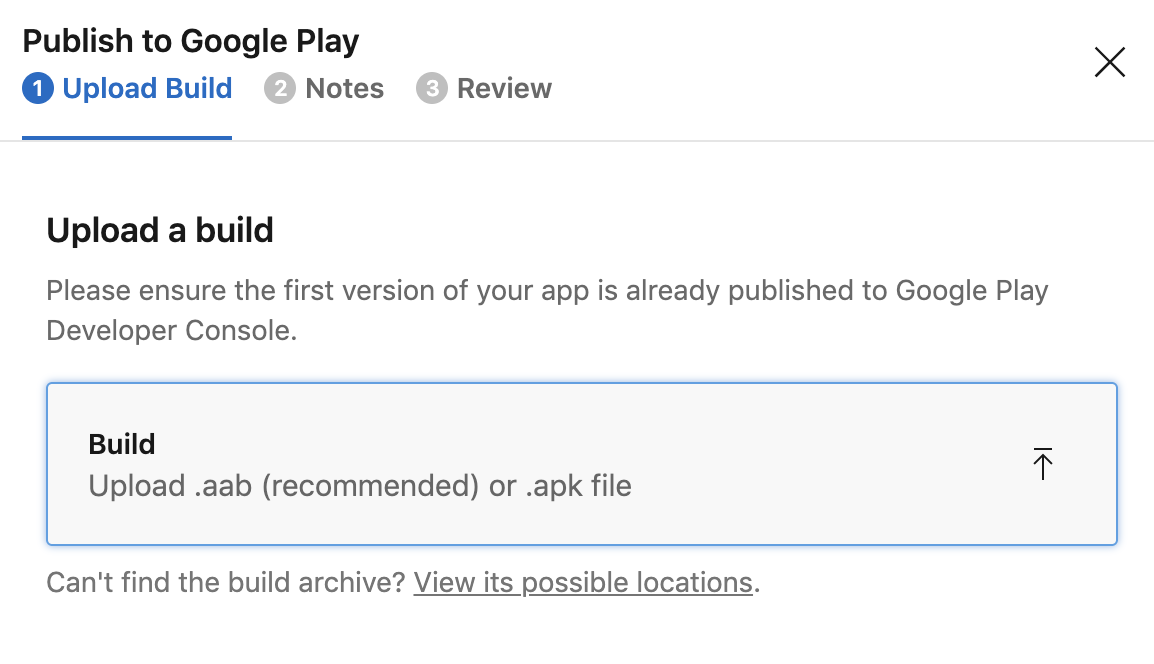
The ability to distribute .aab files generated by App Center Build is the next item we are working on, currently you will need to download the .aab file and upload it via the Portal.
 phillipleblanc
on 24 Jul 2019
phillipleblanc
on 24 Jul 2019
We have just enabled the ability to publish .aab files to Google Play Store via the App Center Stores integration.
The ability to distribute .aab files generated by App Center Build is the next item we are working on, currently you will need to download the .aab file and upload it via the Portal.
@phillipleblanc Please let me know the steps or link to build, distribute and publish aab file via the App Center.
 geethapriscilla-inspirisys
on 24 Jul 2019
geethapriscilla-inspirisys
on 24 Jul 2019
We have just enabled the ability to publish .aab files to Google Play Store via the App Center Stores integration.
The ability to distribute .aab files generated by App Center Build is the next item we are working on, currently you will need to download the .aab file and upload it via the Portal.
@phillipleblanc thanks for the update. Can you let me know where to download the .aab file for a build? If I click 'download build', I can only see the .apk file - is there additional config needed to enable this?
 jamesmsp89
on 24 Jul 2019
jamesmsp89
on 24 Jul 2019
If the .aab is built by ourself (not AppCenter build), can we distribute to AppCenter? Ok
yuewah
on 24 Jul 2019
@yuewah sorry there isn't support to release .aab files to Distribution groups, it is only available for Google Play. Which you can find in Distribute -> Stores.
Oddj0b
on 24 Jul 2019
First of, thanks again to the App Center team for working on .aab support. Even with some manual work involved, it's a great progress. 👏
Still would like to ask if there is any ETA for when .aab will be supported for distribution groups? So that one can automate the build -> distribute to PlayStore process for .aab?
yamov
on 24 Jul 2019
@Oddj0b @phillipleblanc where do I download the .aab file from app center? I only found the functionality to upload to Play Store. Or do we need to generate our .aab elsewhere and just upload. Anyways thanks for getting this done so quickly!
davichaves
on 24 Jul 2019
@davichaves @jamesmsp89 Assuming you are using Build service in App Center, the branch configuration should now have a toggle that enables you to build AAB:
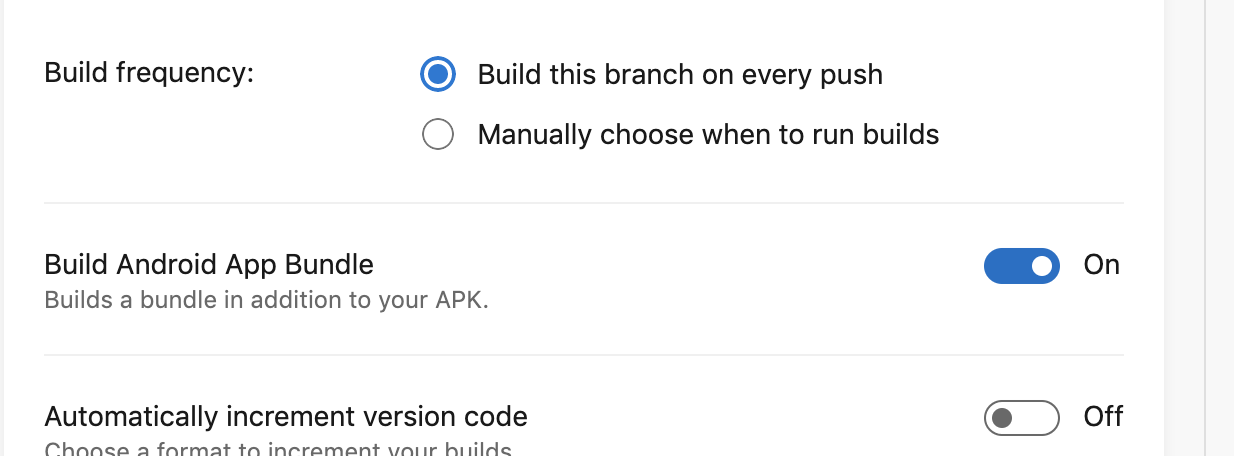
Once AAB is built, the Download dropdown should have an option to download bundle. More detailed documentation is coming.
 DennisPan
on 24 Jul 2019
DennisPan
on 24 Jul 2019
I opted in for the experiment, but I don't think the team is reading my emails, so I'll post my issue here:
I enabled the "Build Android App Bundle" option, but get this error after about 3 minutes building (so, well before distribution time):
FAILURE: Build failed with an exception.

* What went wrong:

Task 'bundleRelease' is ambiguous in project ':app'. Candidates are: 'bundleReleaseJsAndAssets', 'bundleReleaseResources'.
Is there a specific React Native or Gradle version I need to be on?
 jacob-israel-turner
on 25 Jul 2019
jacob-israel-turner
on 25 Jul 2019
@jacob-israel-turner AAB support was added in gradle plugin 3.2.0 (release notes)
Could you please check which plugin version is used in your app?
For common react-native app you can do that by looking for following lines in <repo-root>/android/build.gradle:
dependencies {
  classpath("com.android.tools.build:gradle:<your-plugin-version>")
}
 evkhramkov
on 25 Jul 2019
evkhramkov
on 25 Jul 2019
@evkhramkov Looks like that's the likely problem. I also found that React Native doesn't support 64-bit builds until 0.59, so I may need to upgrade there as well. Thanks!
jacob-israel-turner
on 25 Jul 2019
anyone face this problem?
- What went wrong:
Execution failed for task ':app:packageReleaseBundle'.
> 1 exception was raised by workers:
com.android.tools.build.bundletool.exceptions.BundleFileTypesException$FileUsesReservedNameException: File 'root/lib/META-INF/MANIFEST.MF' uses reserved file or directory name 'lib'.
 xralphack
on 26 Jul 2019
xralphack
on 26 Jul 2019
@xralphack could you please contact App Center support (blue intercom icon in bottom left corner), so we can access your build logs and investigate your issue closely
evkhramkov
on 26 Jul 2019
"Assuming you are using Build service in App Center, the branch configuration should now have a toggle that enables you to build AAB"
An exception for this is Xamarin.Android. Initial support for .aab was added in Xamarin.Android 9.4 with some limitations: https://docs.microsoft.com/en-us/xamarin/android/release-notes/9/9.4#initial-support-for-android-app-bundle-publishing-format
However, the newest version of Xamarin.Android installed by default on Build VMs is 9.2.3-0: https://docs.microsoft.com/en-us/appcenter/build/software#xamarinandroid-sdk
As such, I suspect when Xamarin.Android 9.4 support is added to the Build VMs; that is the earliest when .aab support could potentially be added as well.
I just wanted to clarify this since I didn't see that clearly stated anywhere else in this discussion, and this description made it sound like the feature was active for ALL Android platforms in Build.
 King-of-Spades
on 26 Jul 2019
King-of-Spades
on 26 Jul 2019
Somehow .aab bundles generated with app center build are twice as big (40~MB) as .aab bundles generated locally (~20MB). Any ideas why that is? I'm using RN 0.59.10 with 64-bit enabled.
 Eyesonly88
on 29 Jul 2019
Eyesonly88
on 29 Jul 2019
@Eyesonly88
What architectures do you have locally?
 zanechua
on 29 Jul 2019
zanechua
on 29 Jul 2019
Hi, I'm confused. Should the option to build with AAB be generally available now or only for customers with experimental access? We do not have an experimental subscription and I'm not seeing the option for our Android project. Just changed the app install location to Internal Only according to this article, but still no option visible for AAB: https://docs.microsoft.com/en-us/xamarin/android/release-notes/9/9.4#initial-support-for-android-app-bundle-publishing-format
I also noticed that Xamarin.Android 9.2 is the highest availble version as @King-of-Spades also pointed out in his post. Does this mean we have to wait for 9.4 to be available on the build machines? If so, any idea when this will be the case? We need to update the app in Play Store for 64-bits support before August 1 so time is running out.
 rhouweling
on 29 Jul 2019
rhouweling
on 29 Jul 2019
@rhouweling building .aab is not yet supported for Xamarin. We are working on the update for this currently as well as adding latest Xamarin.Android support.
 nilofer
on 29 Jul 2019
nilofer
on 29 Jul 2019
Somehow
.aabbundles generated with app center build are twice as big (40~MB) as.aabbundles generated locally (~20MB). Any ideas why that is? I'm using RN 0.59.10 with 64-bit enabled.
@Eyesonly88 can you share how you generate those bundles locally? Do you use Android Studio or the command line? As AABs are only zip files, can you extract the contents from both and share details on the differences here with us?
Also feel free to open a conversation with our customer support in App Center which allows for a more focused conversation.
 matthiaswenz
on 29 Jul 2019
matthiaswenz
on 29 Jul 2019
@Eyesonly88 can you reach out to App Center Support so we can take a closer look at this please?Thanks!
nilofer
on 29 Jul 2019
FWIW AppCenter created smaller bundles for me (~2-3mb smaller) than locally created bundles.
Johan-dutoit
on 29 Jul 2019
So after some more investigation, I found that when I publish the .aab file through the new app center publish section then it is sent as the correct size (~20MB). This is good for now, Ideally, I expect this to publish the bundle automatically when a build succeeds (hopefully that's coming soon -- currently it's publishing the apk). I have already talked to support 👍
Eyesonly88
on 30 Jul 2019
@rhouweling building .aab is not yet supported for Xamarin. We are working on the update for this currently as well as adding latest Xamarin.Android support.
@nrajpurkar Thanks. I am not really looking for the AAB support, but 64-bit support which is mandatory starting August 1st. As I understand this will be integrated in the AAB support? When will this update be available (approximately)? I need to prepare for manual releases through Visual Studio while it's not available.
rhouweling
on 30 Jul 2019
So after some more investigation, I found that when I publish the .aab file through the new app center publish section then it is sent as the correct size (~20MB). This is good for now, Ideally, I expect this to publish the bundle automatically when a build succeeds (hopefully that's coming soon -- currently it's publishing the apk). I have already talked to support 👍
Thanks for the update! Correct, automatically publishing from build to store will be coming later this summer.
dimazaid
on 31 Jul 2019
building .aab is not yet supported for Xamarin.
@nrajpurkar the latest stable Xamarin Android SDK does in fact support App Bundles. While the tooling to surface this in Visual Studio is still either a WIP or TODO, the fact remains support for App Bundles is here. Mind you for builds there is nothing that App Center needs to do except have the latest Xamarin Android SDK. However we really do need the ability to ship the generated aab to our testers and to the store which is currently not something we can seem to do.
We are constantly evaluating when the right time is to work on this and are very interested to know whether or not other users looking at this issue want it too.
@patniko this really should have been prioritized and delivered by now.
 dansiegel
on 2 Aug 2019
dansiegel
on 2 Aug 2019
@dansiegel sorry, should have specified that I meant building .aab for Xamarin apps is not supported yet in _App Center_. We're working on support for this and will be delivering this as soon as possible.
nilofer
on 2 Aug 2019
@nrajpurkar is there any sort of timeline on this? Like can we expect support within the next few weeks?
dansiegel
on 2 Aug 2019
Definitely @dansiegel, we're working on this as we speak. It is in our iteration plan for this month.
nilofer
on 3 Aug 2019
Looking for some feedback as we're working on Xamarin.Android support for building bundles. The experience for Java Android apps builds both an .apk and an .aab without much additional build time. We're seeing this not be the case for Xamarin.Android and can add a non-negligible amount of time onto the build on a case-by-case basis.
So our question for the Xamarin.Android folks following along here is - would you rather the App Center Build produce both the .apk and .aab or have a shorter build time? An important note is that without the .apk artifact, we won't be able to run a launch test or distribute to testers. Throw in a _hooray_ react for produce both or a _rocket_ react for shorter build time, and share any additional thoughts you may have! Thanks!
nilofer
on 3 Aug 2019
@jonathanpeppers may have some thoughts on how this might be accomplished to build both the .apk and .aab
dansiegel
on 3 Aug 2019
we need the automatically sending of the .aab bundle to the Google Play Store as well because this is something which Google had set as mandatory
 shihao92
on 5 Aug 2019
shihao92
on 5 Aug 2019
we need the automatically sending of the .aab bundle to the Google Play Store as well because this is something which Google had set as mandatory
where did you read this?
 EmilAlipiev
on 5 Aug 2019
EmilAlipiev
on 5 Aug 2019
Hey @dimazaid,
Thanks for the update! Correct, automatically publishing from build to store will be coming later this summer.
Do you mean by end of August? because I don't see it in the iteration plan for August ...
Eyesonly88
on 5 Aug 2019
@EmilAlipiev check this warning coming from Google Play Console
Sorry for the incorrect word being used, it is not really mandatory but its more like a recommended option
This release is not compliant with the Google Play 64-bit requirement

The following APKs or App Bundles are available to 64-bit devices, but they only have 32-bit native code: 9.

From August 1, 2019 all releases must be compliant with the Google Play 64-bit requirement.

Include 64-bit and 32-bit native code in your app. Use the Android App Bundle publishing format to automatically ensure that each device architecture receives only the native code it needs. This avoids increasing the overall size of your app.
yes only you must include 64 bit abi but you can continue using apks. aab is recommended and for now there is no big advantage in xamarin because xamarin doesnt handle any recommended approach beside per abis. what i mean is that even if we can create aab, we arent able to deliver by language resources, temporary files etc. You can achieve per abi by splitting into apks as well. you will end up with the same apk, aab size per cpu architecture.
EmilAlipiev
on 5 Aug 2019
@shihao92 as @EmilAlipiev mentioned you only need the 64bit abi… The Android App Bundles do present a lot of additional benefits though as they generate a smaller package than a single APK that contains all of the resources for all of your target abi's… and eliminate any scenario where you might produce individual apk's per abi. The net result with the aab, is that Google takes on the responsibility of generating an optimized apk for the user which is much smaller than what you would typically produce and ship to Google.
It's also worth noting here that they cannot be used at all unless you have provided Google with your keystore and allow them to do the final signing for you. If you have a current process in place in which you sign your apks then you would need to export your keystore with the private key and provide that to Google so they can begin to sign the apks they generate for your aab.
dansiegel
on 5 Aug 2019
It would be good to have the option to choose one or the other. Our develop branch we'd want apk to distribute. Master we'd want aab as we'd install it from google play beta not directly from AppCenter.
But at the same time if it was a gui option which injected things into the build process it'll be odd for the build to not follow the AndroidPackageFormat property I have already set in the csproj (and vice-versa, the AndroidPackageFormat property was set that the build doesn't follow what I explicitly told it from the appcenter dashboard)
 beeradmoore
on 7 Aug 2019
beeradmoore
on 7 Aug 2019
@beeradmoore I would have to say you really should take that burden on yourself particularly as it's on you to define your builds. For example in your develop branch you could build a Release configuration that generates an APK and master could build a Store configuration that generates an .aab. All you really need to do to accommodate this sort of strategy is the following in your Android project's csproj
<PropertyGroup Condition=" '$(Configuration)|$(Platform)' == 'Store|AnyCPU' ">
  <AndroidPackageFormat>aab</AndroidPackageFormat>
</PropertyGroup>
Yep, fully agree. That is exactly how we run our builds now. From the above comments I had a sense that it was being requested AppCenter doing what they do great was to add it as an option on the repo dashboard (I also could have interpreted it all wrong).
But having both as an option could cause some odd unknowns, eg. If android keystore/pass set in AppCenter and a different one is set in my csproj what one do I expect it to use to sign my app.
beeradmoore
on 7 Aug 2019
The way we are planning to support Android App Bundle for Xamarin on a build configuration level right now is in line with Android Java/Kotlin bundle support:
- We will let you choose whether to build an APK only or APK + AAB when configuring a branch.
- We will detect whether your csproj's package format in the repo is set to APK or AAB. If it's AAB, the option to also build an AAB will be enabled by default unless unchecked.
@beeradmoore The general rule of thumb with signing is: If you specify a keystore and signing credentials in App Center, we will instruct the build to sign your build artifacts through a dedicated signing step after the build step has completed. So if you don't want to sign that artifact with these options, it's probably easiest to not provide those in App Center. Signing is a very complex issue to get right, if you have a specific need for having a different signing config in your csproj than in App Center, I'd love to know more about it.
matthiaswenz
on 7 Aug 2019
@ranterle just keep in mind the notion of an "unsigned" APK or AAB is completely false. The Xamarin.Android team has told me (and I believe this is also the case with native Android) that the APK/AAB is signed with a default keystore when it's generated. Since shipping an AAB to Google Play requires that you have delegated signing to Google Play, it actually should not be necessary at all to provide a keystore to sign it.
Also FWIW with Xamarin.Android I am using something like this that takes care of everything in a single step. Both generates my artifact and signs it in the same step.
- task: DownloadSecureFile@1
  name: androidKeyStore
  inputs:
    secureFile: $(KeystoreFileName)

- powershell: |
   if($env:SYSTEM_DEBUG -eq $true)
   {
     $extraArgs = '/bl:android.binlog'
   }
   $keystorePath = $env:KeystoreFilePath
   $keystoreName = $env:KeystoreName
   $keystorePassword = $env:KeystorePassword
   $project = $env:AndroidProjectPath
   $outputDirectory = "$($env:BUILD_BINARIESDIRECTORY)/$($env:BuildConfiguration)"
   Write-Host "Output Path = $outputDirectory"
   msbuild $project /t:SignAndroidPackage /p:Configuration=$($env:BuildConfiguration) /p:OutputPath=$outputDirectory /restore /p:AndroidKeyStore=true /p:AndroidSigningKeyStore=$keystorePath /p:AndroidSigningStorePass=$keystorePassword /p:AndroidSigningKeyAlias=$keystoreName /p:AndroidSigningKeyPass=$keystorePassword $extraArgs
  displayName: Build & Generate AppBundle
  env:
    AndroidProjectPath: 'pathTo/AwesomeApp.Android.csproj'
    Secret_AppCenterSecret: ${{ parameters.appcenterKey }}
    KeystoreFilePath: $(androidKeyStore.secureFilePath)
    KeystoreName: $(KeystoreName)
    KeystorePassword: $(KeystorePassword)
We've just shipped .aab support for Xamarin.Android apps! Give it a try and reach out with any questions or feedback.
nilofer
on 16 Aug 2019
When trying to upload a .aab using fastlane but got the following error:
INFO [2019-08-16 15:57:49.19]: Driving the lane 'android upload_appcenter' 🚀
INFO [2019-08-16 15:57:49.19]: ------------------------------
INFO [2019-08-16 15:57:49.19]: --- Step: appcenter_upload ---
INFO [2019-08-16 15:57:49.19]: ------------------------------
INFO [2019-08-16 15:57:49.61]: Starting release upload...
INFO [2019-08-16 15:57:50.02]: Uploading release binary...
INFO [2019-08-16 16:01:49.01]: Binary uploaded
INFO [2019-08-16 16:01:49.71]: Release '5' committed
INFO [2019-08-16 16:01:50.61]: Release 6.0 was successfully updated
ERROR [2019-08-16 16:01:51.45]: Error adding to group 400: {"code"=>"not_supported", "message"=>"Error: Distribution of .aab is not supported for groups/testers"}
ERROR [2019-08-16 16:01:51.45]: Release '5' was not found
I haven't found documentation as of what to change to make it work. Any suggestions?
 andresesfm
on 17 Aug 2019
andresesfm
on 17 Aug 2019
We've just shipped .aab support for Xamarin.Android apps! Give it a try and reach out with any questions or feedback.
quick question: i see that there is an option to set create bundles in the Appcenter UI but should we also adjust Andorid.csproj file having aab tag like suggested by @dansiegel
EmilAlipiev
on 18 Aug 2019
@EmilAlipiev yes, when you have that App Center will detect that setting and automatically enable building the AAB for Xamarin.Android apps
nilofer
on 19 Aug 2019
@nrajpurkar well i tried that and it didn't work. To fix that error I turned the appbundle switch on in the branch build settings.
##[section]Finishing: Build Xamarin.Android project
##[section]Starting: Sign APK
==============================================================================
Task         : Android Signing
Description  : Sign and align Android APK files
Version      : 1.122.0
Author       : Microsoft Corporation
Help         : [More Information](https://go.microsoft.com/fwlink/?LinkID=613717)
==============================================================================
##[error]No matching files were found with search pattern: /Users/vsts/agent/2.155.1/work/1/s/**/*.apk
##[error]Return code: 1
##[section]Finishing: Sign APK
##[section]Starting: Checkout
 softlion
on 19 Aug 2019
softlion
on 19 Aug 2019
@softlion can you clarify what you tried and what didn't work? If I've understood correctly, the detection didn't work? You _will_ need that toggle enabled for App Center to build the bundle.
nilofer
on 20 Aug 2019
Additionally, we've enabled the ability to automatically distribute your .aab to the Play Store right after your build! You can find this setting in the Distribute section in the build configuration. And with that, our work on .aab is wrapped up! 🎉
Feel free to use this issue for any feedback or create new issues.
nilofer
on 20 Aug 2019
Thank you for all the work that was put into this!
Side question: Is it a slow roll out to everyone?
Currently I'm seeing this (from previous tests, this uploads the apk even when building the aab):

Johan-dutoit
on 21 Aug 2019
I read the comments and I really did not completely understand how can I generate a signed release aab. so, please I need some steps an explanation for how can I generate the aab, I am using VS 2017.
 majdmam
on 21 Aug 2019
majdmam
on 21 Aug 2019
is it not being released on react native? on my react native release settings i can't seems to find a way to release my generated aab to the play store
shihao92
on 21 Aug 2019
Lots of great feedback, let me try to answer these together:
- There are no visible changes to the build configuration when building a bundle, but some internal updates. We're basically distributing the AAB when a Google Play destination is selected by default. There will be an information message if you intend to distribute to Google Play but are not building an AAB. @Johan-dutoit my best guess is that your configuration was last saved before we enabled this change. Saving the configuration one more time should now upload the AAB going forward. Feel free to send your app's URL my way via email (in my GitHub profile) and I'll happily check whether this is configured for your app - the new behavior is available to everyone, though.
- @majdmam Generating a signed AAB will work exactly the same way as an APK in App Center: Providing the signing credentials will make App Center also sign the AAB with the same credentials.
- @shihao92 We also enabled this for React Native Android apps. There is no dedicated UI - when you chose to build a bundle and distribute to a Google Play destination, it will automatically use the AAB.
matthiaswenz
on 21 Aug 2019
AAB building and distributing run well! Thank you.
Is there a way to make downloading *.apk still possible (from "Releases" section) after generating the AAB build?
 mefjuu
on 26 Aug 2019
mefjuu
on 26 Aug 2019
@mefjuu The release in App Center Distribute will only contain the AAB which was uploaded to the service. If you generated the AAB and release through App Center Build you will be able to download both the APK and the AAB from the build.
matthiaswenz
on 26 Aug 2019
@ranterle Isn't manual upload of .aab files (ie without building in appcenter but through other means) in scope of this issue? If not, should I make a separate feature request to get this working properly?
Currently upload works perfectly well but distribution fails with a 400 Bad request. Because of this the .aab file is not visible on app center.
If you do know the exact url of the distribution you can manually go to it and download the .aab file confirming that the upload worked, the release is just not visible to anyone.
msioen
on 28 Aug 2019
@msioen Manual upload of AAB is supported in App Center only for distribution to the Play Store at this time. Our goal with this feature was to enable the typical scenarios for developers which involve AAB at this stage, which we identified earlier as being able to build an app with an AAB and distribute said AAB to the Play Store.
App Center itself currently does not support distributing AABs directly to users of App Center, as AAB is not an installable format itself and a lot of the process that goes into building the respective APKs from the AABs for individual devices is internal to Play Store.
You will be able to push AABs to Store destinations through App Center's portal and the API (as well as the Azure Pipelines task) but not to App Center distribution groups or individual testers. If that is what you're looking for, I would recommend opening a new feature request for this specifically, although based on the discussion here above, there would be a lot of effort connected to getting full support of AABs in App Center Distribution.
matthiaswenz
on 28 Aug 2019
Thanks for the info. We're not necessarily looking for full aab support.
I logged an issue for this with more detail: https://github.com/microsoft/appcenter/issues/955
msioen
on 28 Aug 2019
We've just shipped .aab support for Xamarin.Android apps! Give it a try and reach out with any questions or feedback.
Worked great!
However it has removed my Dutch .resx language file and everything is in English now. The .apk file has no issues.
Any fixes for this?
 c-lamont
on 3 Sep 2019
c-lamont
on 3 Sep 2019
@c-lamont
However it has removed my Dutch .resx language file and everything is in English now. The .apk file has no issues.
Do you miss it inside aab itself, or it is after installing from Google Play? If it is from Google Play, than this is expected, please check documentation:
https://support.google.com/googleplay/android-developer/answer/9006925?hl=en
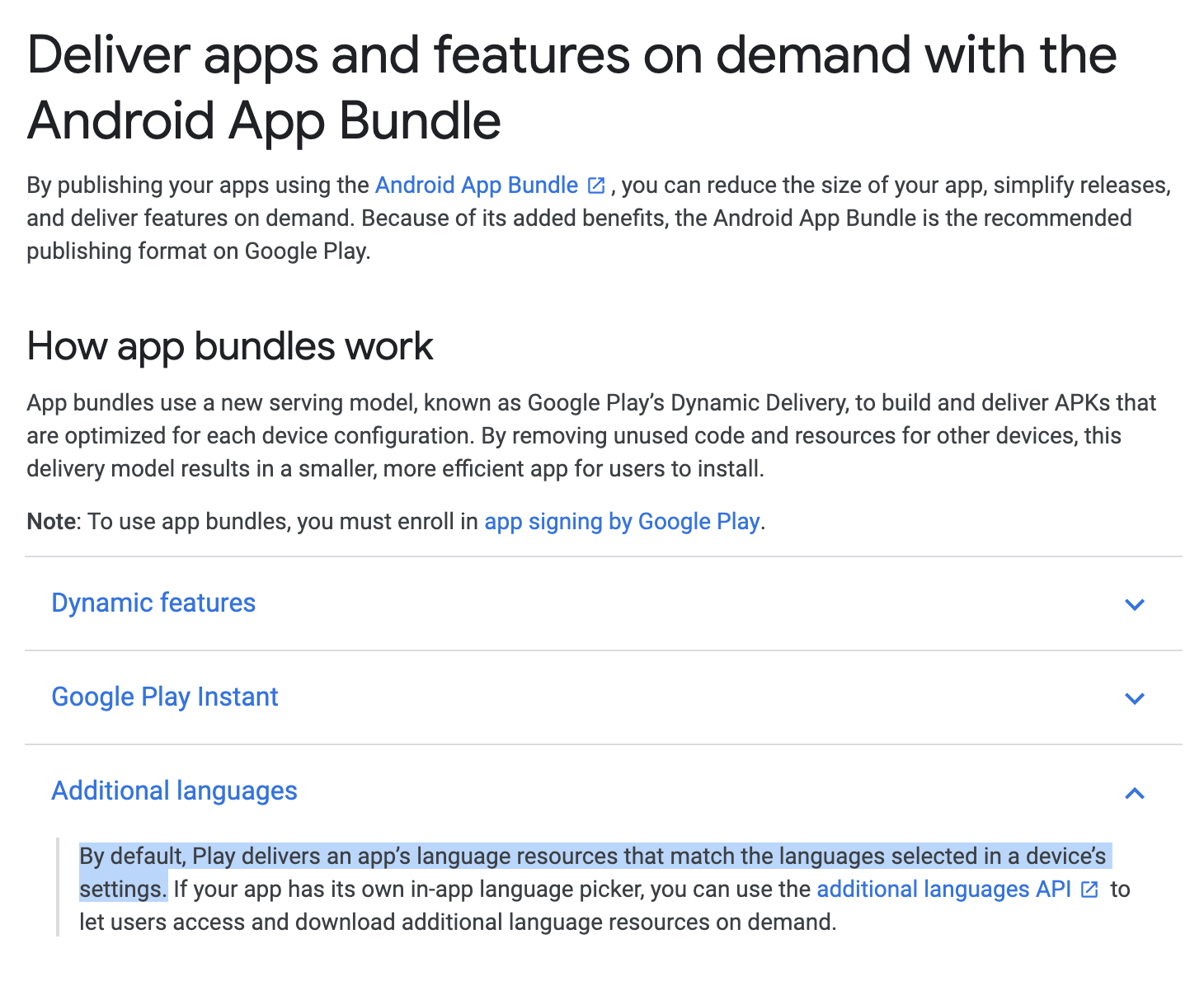
evkhramkov
on 3 Sep 2019
You can read more about the support for Android App Bundles with Xamarin in the release notes of Xamarin.Android 9.4: https://docs.microsoft.com/en-us/xamarin/android/release-notes/9/9.4#initial-support-for-android-app-bundle-publishing-format
For regular Android applications, there are some configuration options, e.g. to not remove certain dimensions when building the bundle (but it kind of goes against the very concept of the Android App Bundle): https://developer.android.com/studio/projects/dynamic-delivery/configure-base#disable_config_apks
matthiaswenz
on 3 Sep 2019
However it has removed my Dutch .resx language file and everything is in English now. The .apk file has no issues.
Android wouldn't know what a .resx file is, so I don't see how bundletool/Google Play would be stripping it from a .NET assembly..
We need to look into this @c-lamont can you file an issue here? https://github.com/xamarin/xamarin-android/issues
After installing from Google Play, you can inspect the installed assemblies with something like:
> adb shell pm list packages -f | Select-String com.xamarin.android.helloworld
package:/data/app/com.xamarin.android.helloworld-0Q-7tkiXf0G81liWcpUboA==/base.apk=com.xamarin.android.helloworld
> adb shell ls /data/app/com.xamarin.android.helloworld-0Q-7tkiXf0G81liWcpUboA==/
base.apk
lib
oat
split_config.arm64_v8a.apk
split_config.xxxhdpi.apk
> adb pull /data/app/com.xamarin.android.helloworld-0Q-7tkiXf0G81liWcpUboA==/base.apk
/data/app/com.xamarin.android.helloworld-0Q-7tkiXf0G81liWcpUboA==/base.apk: 1 file pulled. 33.7 MB/s (3034352 bytes in 0.086s)
> adb pull /data/app/com.xamarin.android.helloworld-0Q-7tkiXf0G81liWcpUboA==/split_config.arm64_v8a.apk
/data/app/com.xamarin.android.helloworld-0Q-7tkiXf0G81liWcpUboA==/split_config.arm64_v8a.apk: 1 file pulled. 36.9 MB/s (9240224 bytes in 0.239s)
> adb pull /data/app/com.xamarin.android.helloworld-0Q-7tkiXf0G81liWcpUboA==/split_config.xxxhdpi.apk
/data/app/com.xamarin.android.helloworld-0Q-7tkiXf0G81liWcpUboA==/split_config.xxxhdpi.apk: 1 file pulled. 1.0 MB/s (6474 bytes in 0.006s)
If you can post/share those APKs or inspect the assemblies within with ILSpy or something that would give some insight, thanks!
 jonathanpeppers
on 3 Sep 2019
jonathanpeppers
on 3 Sep 2019
Android wouldn't know what a
.resxfile is, so I don't see how bundletool/Google Play would be stripping it from a .NET assembly..
Indeed, so the language support from Android is not appropriate in this case.
I must also point out I can't be certain the .resx file is being removed, only that it appears to have been removed as only English text is shown.
I'll try create an issue. However I have removed the .aab file from the Play Store so I can not download it again to inspect it. If you would like the .aab file or .apk file then let me know where to send it.
c-lamont
on 4 Sep 2019
Good point @jonathanpeppers.
@c-lamont if you don't find a convenient way to share these details within the issue over on https://github.com/xamarin/xamarin-android/issues -
feel free to create a conversation in the App Center portal support chat and reference this conversation so it can be triaged correctly.
Ideally, provide the URL to the build in question and optionally the AAB/APKs
matthiaswenz
on 4 Sep 2019
@c-lamont since resx files are embedded resources as a debug in production sort of thing you might add something for yourself to see what resources are embedded in the assembly...
foreach(var name in GetType().Assembly.GetManifestResourceNames())
{
    Console.WriteLine($"Found embedded resource: {name}");
}
feel free to create a conversation in the App Center portal support chat and reference this conversation so it can be triaged correctly.
Good idea, I'll start a conversation there.
c-lamont
on 5 Sep 2019
We've just shipped .aab support for Xamarin.Android apps! Give it a try and reach out with any questions or feedback.
Worked great!
However it has removed my Dutch .resx language file and everything is in English now. The .apk file has no issues.
Any fixes for this?
I have the same issue
 losmacko
on 5 Sep 2019
losmacko
on 5 Sep 2019
Everyone can follow the issue with resx here: https://github.com/xamarin/xamarin-android/issues/3596
The issue is that the localization assemblies are compressed, and .NET assemblies must be uncompressed in Xamarin.Android:
14848        14848  assemblies\UsingResxLocalization.dll
 3584         1279  assemblies\de-CH\UsingResxLocalization.resources.dll
 3584         1275  assemblies\de\UsingResxLocalization.resources.dll
 3584         1306  assemblies\es\UsingResxLocalization.resources.dll
 3584         1273  assemblies\fr\UsingResxLocalization.resources.dll
 3584         1286  assemblies\id\UsingResxLocalization.resources.dll
 3584         1348  assemblies\ja\UsingResxLocalization.resources.dll
 3584         1280  assemblies\ms\UsingResxLocalization.resources.dll
 3584         1302  assemblies\pt-BR\UsingResxLocalization.resources.dll
 3584         1301  assemblies\pt\UsingResxLocalization.resources.dll
 3584         1288  assemblies\zh-Hans\UsingResxLocalization.resources.dll
 3584         1288  assemblies\zh-Hant\UsingResxLocalization.resources.dll
I should have a fix shortly.
jonathanpeppers
on 9 Sep 2019
@msioen Manual upload of AAB is supported in App Center only for distribution to the Play Store at this time. Our goal with this feature was to enable the typical scenarios for developers which involve AAB at this stage, which we identified earlier as being able to build an app with an AAB and distribute said AAB to the Play Store.
App Center itself currently does not support distributing AABs directly to users of App Center, as AAB is not an installable format itself and a lot of the process that goes into building the respective APKs from the AABs for individual devices is internal to Play Store.
You will be able to push AABs to Store destinations through App Center's portal and the API (as well as the Azure Pipelines task) but not to App Center distribution groups or individual testers. If that is what you're looking for, I would recommend opening a new feature request for this specifically, although based on the discussion here above, there would be a lot of effort connected to getting full support of AABs in App Center Distribution.
For me this feature is enough. I want to upload aab in AppCenter only to be sent to playstore, but I don't find a way to to that.
My application is configured with release type 'Store' (the other options are 'Alpha', 'Beta', 'Enterprise', 'Production'), is this enough to specify that the destination is the Google's playstore?
When I go in Releases and try to do a new release the only format I can upload is apk.
 gcastaldi
on 13 Dec 2019
gcastaldi
on 13 Dec 2019
@gcastaldi See if this helps (in case you haven't seen it): https://docs.microsoft.com/en-us/appcenter/distribution/stores/googleplay#publish-your-aab-to-the-google-play-store
DennisPan
on 13 Dec 2019
a lot of the process that goes into building the respective APKs from the AABs for individual devices is internal to Play Store.
Just to put this out there, the tool behind App Bundles and Google Play, bundletool is on Github and open source: https://github.com/google/bundletool
Google did this so that third parties could support the App Bundle format. It seems completely feasible to make a web service that could deliver device-specific APKs using bundletool. I am not aware of any doing this yet, but I would guess someone like the Amazon App Store would be one of the first.
jonathanpeppers
on 14 Dec 2019
Indeed, building individual APKs which are targeted at specific device and runtime configurations is possible with bundletool - I might have not been specific enough:
The distribution, transparent delivery and background installation of these configuration or feature module APKs however is handled in concert with a component on device such as Play Core library - which only supports downloading from Play Store.
I'm not saying this is impossible to also replicate a similar functionality for App Center, i.e. in App Center's SDK - it is currently not on our roadmap.
If other app stores will support processing and distributing from AABs in the future, this is something we will consider supporting - note, that we currently only support Play Store and Intune as stores for distributing Android apps.
matthiaswenz
on 14 Dec 2019
I've had a situation where I only found out about a bug (related to AAB packaging) once we got to our Google Play closed track.
Supporting extracting APKs from AAB in AppCenter is a must for us.
 slang25
on 24 Dec 2019
slang25
on 24 Dec 2019
In our case, we do not build our application using AppCenter but using Azure Devops directly with our own mac machines. Our process is the following one :
- Azure Devops Build
- Azure Devops Release -> Push to AppCenter Distribute
- AppCenter -> If we are happy push to the store.
It is a pity that AppCenter handles AppBundle when it build it itself but we cannot send one.
I would be ok for AppCenter not being apple to deliver a working app using bundletool for the moment as long as we can push a aab file from Azure Devops and then decide to push it to Google Play Store from AppCenter.
Please consider this scenario which is a real pain for us and prevents us from totally considering the move to AppBundles.
 johnthiriet
on 3 Jan 2020
johnthiriet
on 3 Jan 2020
@matthiaswenz couldn't appcenter use the mode=universal flag?
bundletool build-apks --bundle=my_app.aab --output=my_app.apks --mode=universal
According to the documentation
Set the mode to universal if you want bundletool to build only a single APK that includes all of your app's code and resources such that the APK is compatible with all device configurations your app supports.
We use Jenkins and appcenter plugin to distribute the application. If we have to upload an .apk and also generate an .aab, our CI build times will suffer a lot.
 Maragues
on 28 Jan 2020
Maragues
on 28 Jan 2020
Really wish AAB was supported to go from Azure Dev Ops to App Center. This is a big problem for us and really makes using App Center almost impossible for Android for complex pipelines. Any word on getting support for this working?
 aaronlabeau
on 28 Jan 2020
aaronlabeau
on 28 Jan 2020
@aaronlabeau can you share more about what you're expecting for Azure DevOps and App Center integration? Distributing to testers or the store?
nilofer
on 28 Jan 2020
@Maragues Yes, this is what App Center could do - however it has implications on what the distribution part of App Center would have to do or how to decide which artifact to forward to distribution from a completed build. In its current form, the distribution pipeline only supports one artifact to upload per release.
As a workaround, you could perform an AAB build and then using a post build script build the universal APK from it, and upload it to App Center using the included CLI on the build agents.
matthiaswenz
on 28 Jan 2020
@matthiaswenz thanks, that's our plan. Our only fear is that testers won't actually test the artifact we deploy. That's why it would be ideal if appcenter supported app bundle format.
I understand a huge infrastructure like yours needs to put a lot of thinking into each decision. Thanks for the support and looking forward to the development of this feature request
Maragues
on 28 Jan 2020
@aaronlabeau can you share more about what you're expecting for Azure DevOps and App Center integration? Distributing to testers or the store?
We would like both. We use App Center for our QA team to quickly get builds. Those builds if signed off are published to Google Play or Microsoft InTune.
aaronlabeau
on 28 Jan 2020
For some reason I can't give +1 to the above commenters, but our workflow is the following:
- Azure Devops Pipeline for just the CI on master branch
- Pipeline to build development releases for tester, built via DevOps and distributed via AppCenter
- Pipeline to build prod releases for the Play Store, built via DevOps and distributed via the Play Store.
We already fixed bundle-specific issues, which we luckily found while regression-testing on the "third"/final pipeline. We would have found it earlier though, if we also had been able to use bundles on the second pipeline.
 carstenhag
on 25 Feb 2020
carstenhag
on 25 Feb 2020
@c-lamont since resx files are embedded resources as a debug in production sort of thing you might add something for yourself to see what resources are embedded in the assembly...
foreach(var name in GetType().Assembly.GetManifestResourceNames())
{
    Console.WriteLine($"Found embedded resource: {name}");
}
We did work around that by downloading the languages package at runtime or on user demands through the native Play API from Xamarin. This work well, just needed to add the Google Play wrapper to access native library.
 godboutj
on 1 Jun 2021
godboutj
on 1 Jun 2021
@msioen Manual upload of AAB is supported in App Center only for distribution to the Play Store at this time. Our goal with this feature was to enable the typical scenarios for developers which involve AAB at this stage, which we identified earlier as being able to build an app with an AAB and distribute said AAB to the Play Store.
App Center itself currently does not support distributing AABs directly to users of App Center, as AAB is not an installable format itself and a lot of the process that goes into building the respective APKs from the AABs for individual devices is internal to Play Store.
You will be able to push AABs to Store destinations through App Center's portal and the API (as well as the Azure Pipelines task) but not to App Center distribution groups or individual testers. If that is what you're looking for, I would recommend opening a new feature request for this specifically, although based on the discussion here above, there would be a lot of effort connected to getting full support of AABs in App Center Distribution.
You could simply convert the .aab to given .apk:
https://stackoverflow.com/questions/53040047/generate-apk-file-from-aab-file-android-app-bundle
just need to call the bundletool:
bundletool build-apks --bundle=/MyApp/my_app.aab --output=/MyApp/my_app.apks --mode=universal
--ks=/MyApp/keystore.jks
--ks-pass=file:/MyApp/keystore.pwd
--ks-key-alias=MyKeyAlias
--key-pass=file:/MyApp/key.pwd
AppCenter could generate the universal .apk out of the .aab and serve it on demand.
godboutj
on 1 Jun 2021
Related issues
 sindresorhus
·
3Comments
sindresorhus
·
3Comments
 comply365dev
·
4Comments
comply365dev
·
4Comments
 botatoes
·
4Comments
botatoes
·
4Comments
 mason-hz
·
3Comments
mason-hz
·
3Comments
 KSemenenko
·
3Comments
KSemenenko
·
3Comments
Most helpful comment
Hello everyone,
Thanks for sharing the feedback regarding the support for Android App bundles (.aab), and apologies for the delay in responding.
Looking at the feedback, the highest priority is to support .aab in the Publish to the Play store scenario.
I’ll take this feedback to the team and rank it against current priorities, so can't commit on the timeline at the moment. The plan is to deliver the Stores support first, then we will look into adding support for other App Center services (build, distribution, and Test).
Please reply here if you have any questions or feedback, OR react to this comment with the 🎉 Hooray react if you agree that publish to store should come first, so I know you read this and agree.