Appcenter: In-app update through public distribution groups requires log-in
What App Center service does this affect?
Distribution
Describe the bug
When distributing a new release with in-app updates enabled through a public distribution group, all testers are required to log-in to receive app updates.
To Reproduce
Integrate the App Center SDK and enable the distribution module.
Create a public distribution group
Distribute a release of the app
When tester install using the public link they are requested to log-in
If the tester skips log-in, the app will not prompt for the next release
Expected behavior
That the tester isn't required to log-in for releases in a public distribution to receive notifications on updates.
 Oddj0b
All 83 comments
Just ran into this myself. Adding this would be a big improvement to how we want to manage our distribution channels.
 J-Swift
on 16 Mar 2019
J-Swift
on 16 Mar 2019
I'd like to second / third this request. We're having to roll-our-own in-app distribution until this issue is resolved. Thanks ahead of time for work done on this.
 jonathanpantall
on 6 May 2019
jonathanpantall
on 6 May 2019
We are also facing this issue as we try to migrate from HockeyApp to App Center Distribute.
The idea is that we ship a new version of the app that uses the App Center Distribute SDK via HockeyApp. But as soon as the users open the new version they are redirected to the App Center login page. So they will not be able to get any new versions via App Center.
This is blocking us from migrating to App Center. Is there already a plan or timeline when this will be fixed?
 berhir
on 29 May 2019
berhir
on 29 May 2019
We ran into this same issue. Testers in a migrated public group need to authenticate in order to recieve an update. This doesn't seem to affect groups created directly in app center - only HockeyApp groups.
 MarioInter-net
on 5 Jun 2019
MarioInter-net
on 5 Jun 2019
Hi App Center Team, do we have timeline for this issue (in-app updates not avaialble for public access URL)? Also, till this feature is available, can hockayapp SDK integration will work ? (it will impact our deliverables if hockeyapp SDK does not support after November 16, 2019).
 sridharboga
on 19 Jun 2019
sridharboga
on 19 Jun 2019
in-app updates not avaialble for public access URL
This is actually a huge show-stopper for us. With HockeyApp, you can just share a link, and testers who used that link to install the app will receive in-app update notifications as soon as a new version was released. Managing testers in distribution groups introduces management overhead that we would like to avoid.
 wtimme
on 21 Jun 2019
wtimme
on 21 Jun 2019
Hi all, just a quick update. We currently have work around this prioritized and in the pipelines. We are currently working on some in-app improvements around HA/AC SDK. The work for this should be picked up soon.
 botatoes
on 25 Jun 2019
botatoes
on 25 Jun 2019
This is also a large show-stopper for us. Are there any new updates on this?
 ybadragon
on 18 Jul 2019
ybadragon
on 18 Jul 2019
We are also waiting on this bug fix before we can launch our projects. Thanks!
jonathanpantall
on 19 Jul 2019
We are also blocked for this to be able to migrate to AppCenter
 gmerinojimenez
on 8 Aug 2019
gmerinojimenez
on 8 Aug 2019
+1
 tedgonzalez
on 11 Aug 2019
tedgonzalez
on 11 Aug 2019
I understand it is not on the Plan for August?
We are also blocked by this issue, and cannot migrate to App Center before it is fixed.
please give us an update on the state of the fix.
 adamKasapakis
on 12 Aug 2019
adamKasapakis
on 12 Aug 2019
I agree, it's been nearly 2 months with no response.
ybadragon
on 12 Aug 2019
I too am blocked from moving to App Center because of this. We use HockeyApp as our in-house distribution system and rely heavily on the in-app updates without requiring the user to login. If this isn't resolved soon I'll have to abandon HockeyApp / App Center altogether.
 eltonf
on 12 Aug 2019
eltonf
on 12 Aug 2019
My team has already done some research into other providers, namely
According to my colleagues, only TestFairy seems to be offering something like the requested "In-App auto update".
Migrating away from AppCenter requires effort from our side, and we need to sign a new contract. But having to manually invite all our enterprise users just so that they get this update dialog is more expensive, I'm afraid. 😕
wtimme
on 13 Aug 2019
Hi all, sorry for the lack of responses from my end. We are actively working with the SDK team on this. Since we'll be updating a majority of our SDKs to add this functionality, we need to make sure we plan this out correctly.
But rest assured, this is actively being worked on right now. My apologies for not adding info for Distribution on the August iteration plan (missed task on my part).
botatoes
on 14 Aug 2019
From what i understand and have red, the "in-app updates" of an app for a given distribution group is tied up to the default browser using cookies and when an update from a version that comes from HockeyApp to AppCenter is made and the new version from AppCenter has the Appcenter Sdk, the in-app updates are lost because the browser doesnt have a cookie that identifies the distribution group that the app is connected to, identity that is triggered by the AppCenter public link.
The only situation where this works is if the app is installed again through the public link provided by the AppCenter for the given app, i assume this link triggers the relation between the app and the distribution group.
Is this what really happens?
 ruieduardosoares
on 16 Aug 2019
ruieduardosoares
on 16 Aug 2019
@ruieduardosoares It also happens on some devices with the app installed through the AppCenter public link (i.e one public distribution group installer to multiple in-house devices) and no HockeyApp previous relation. The problem is, you do not know exactly why this goes on hence some truth into what you have suggested concerning cookies, BUT wont explain the aforementioned situation and my assumption now from this tread is, MS Team are resolving this in-app update issue whatever the scenario.
 Simba-Mupfunya
on 17 Aug 2019
Simba-Mupfunya
on 17 Aug 2019
This is a big show-stopper for us, we have tens of thousands of users on existing app distributed with hockey app. We don't have their email addresses and they don't have an app center login (and we don't want them to).
After updating the app with the app center sdk, the users are all stuck on a app center login page.
We need this asap as we have more than 50 apps that need migration!
 maxxximme
on 21 Aug 2019
maxxximme
on 21 Aug 2019
It doesn't even work correctly when logged in. Most of the time no prompt to update to a new version appears. Sometimes our users get prompted to install an outdated version of the app. Which is the opposite of what this feature should do.
 orkoden
on 21 Aug 2019
orkoden
on 21 Aug 2019
Are you all seeing the login prompt when distributing to a "public" distribution group? When I refer to a "public" distribution group- I mean that the distribution group has a badge that reads "Public" by the group's name and a "Public page" link listed at the top of "Distribute > Groups > {Your Public Group}" ("install.appcenter.ms/orgs/{your-organization}/apps/{your-app}/distribution_groups/{your-public-group}")?
It makes sense to prompt for a login if you're distributing an application to a distribution group that isn't public- but it doesn't make sense to prompt for login when using a public distribution group... I believe that is why we removed in-app updates from our App Center apps. We didn't want every employee to have to create an App Center account just to access a public download page...
@orkoden Please review the "Distribute > Releases" page. Make sure that you've distributed the correct versions to the correct distribution groups. Your releases must be explicitly distributed to correct groups (and/or people) in order for the download page to show your desired versions.
If everything looks correct: Are the users that are offered an outdated version logged into App Center? If so, are they a member of a distribution group that has not been assigned your latest release? It may be that the user is seeing an older version because they are a member of a non-public distribution group that has not been sent the latest release?
I'm not 100% sure what happens if you have a "public" distribution group AND a private one (that the user is a member of). If you release v1.0 to the public and private group, then release v2.0 to the public group only, maybe users assigned to the private group will only see v1.0...?
 dfoulk
on 21 Aug 2019
dfoulk
on 21 Aug 2019
Are you all seeing the login prompt when distributing to a "public" distribution group? When I refer to a "public" distribution group- I mean that the distribution group has a badge that reads "Public" by the group's name and a "Public page" link listed at the top of "Distribute > Groups > {Your Public Group}" ("install.appcenter.ms/orgs/{your-organization}/apps/{your-app}/distribution_groups/{your-public-group}")?
It makes sense to prompt for a login if you're distributing an application to a distribution group that isn't public- but it doesn't make sense to prompt for login when using a public distribution group... I believe that is why we removed in-app updates from our App Center apps. We didn't want every employee to have to create an App Center account just to access a public download page...
Yes, that is my issue, public users don't have an app center account and I don't want them to need one. Microsoft team keeps suggesting me to mail the direct link to the new version but first we don't have the user email accounts and second it still doesn't solve the app center login page after update.
maxxximme
on 22 Aug 2019
@defoulk According to my and most of the user threads, its all pertaining to the public link.
Simba-Mupfunya
on 22 Aug 2019
It’s downright embarrassing and inexcusable that Microsoft messed up such a basic and essential feature of HockeyApp.
Who is App Center designed for? It seems to be a totally different user base than those of us that have been using HockeyApp to distribute apps for years without issue.
eltonf
on 23 Aug 2019
Hello.
Any news regarding this issue?
Thanks.
ruieduardosoares
on 26 Aug 2019
It looks like there is some confusion around this issue.
As per this discussion https://github.com/MicrosoftDocs/appcenter-docs/issues/361#issuecomment-439923926 AppCenter allows to distribute your app via a public link without any login required from the user.
I have tried this on my side and it works. I could update the app from AppCenter without a single login step client side.
The problem some people seem to have is during the transition from HockeyApp to AppCenter (I haven't tried this yet on my side).
If someone is not in the a HockeyApp -> AppCenter transition scenario, there shouldn't be any issue.
 fabiendem
on 6 Sep 2019
fabiendem
on 6 Sep 2019
It looks like there is some confusion around this issue.
As per this discussion MicrosoftDocs/appcenter-docs#361 (comment) AppCenter allows to distribute your app via a public link without any login required from the user.
I have tried this on my side and it works. I could update the app from AppCenter without a single login step client side.The problem some people seem to have is during the transition from HockeyApp to AppCenter (I haven't tried this yet on my side).
If someone is not in the a HockeyApp -> AppCenter transition scenario, there shouldn't be any issue.
Thanks for the info! We will have to give Distribute another try :) Thanks
dfoulk
on 6 Sep 2019
If you download the application by the url from the final device browser, it set a cookie and when you launch the application the browser have the cookie and can auto login you.
But for exemple, if you download the application with the link on your computer and install it on your phone, when the application launch, the browser will request to login, because the cookie has not been set. So the issue is more global, if you download your app with AppCenter through HockeyApp it will not work because your entry point is not the browser.
 kvpt
on 6 Sep 2019
kvpt
on 6 Sep 2019
Currently we have apps distributed via Hockeyapp( in app update works), After upgrading app from version distributed via Hockeyapp onto version after migration to Appcenter, it requires user login.
Appcenter promisses smooth transition from Hockeyapp to Appcenter - this bug breaks our distribution process.
 tbialecki
on 9 Sep 2019
tbialecki
on 9 Sep 2019
I have tested a few scenario and get the same results:
No Transition from HockeyApp, Installation via the browser
Say you don't come from HockeyApp and start straight with AppCenter.
- Installation using the AppCenter install link via the browser
- Go to the install link
- Download the app version
vand install - At first launch of the app, the browser opens with the "Enabling in-app updates" screen
- Publish an update
v+1 - It gets downloaded via the in-app alert and installed as expected
- Same for an update
v+2
✅ This works as expected
No Transition from HockeyApp, Installation via adb
Say you don't come from HockeyApp and start straight with AppCenter.
When testing this, make sure the Cookies from https://install.appcenter.ms are cleared out in your device's browser, otherwise you will get false positives during the testing.
At first launch of the app, the browser will prompt for the AppCenter login screen
🔴 This doesn't work as expected
Transition HockeyApp --> AppCenter, Installation via the browser
- Have an app
vwith the HockeyApp SDK, installed from the browser via a HockeyApp link - Did not integrate the AppCenter SDK at this point
- Move the app to AppCenter in the dashboard
Moving the app takes a few minutes - Update the app so that you:
- Remove Hockey app in the code of the app
- Add AppCenter Distribute in the code of the app
- Bump version number to
v+1 - Upload to AppCenter and enable for distribution
- Open the app
v - Get prompted for the update for
v+1 - Install
✅ Updates successfully
🔴 But: at first launch of v+1, it opens the browser, on the AppCenter login screen
🔴 Further updates won't work
🔴 Every time you kill and reopen open the app, the AppCenter login screen is prompted, making the experience pretty bad
fabiendem
on 10 Sep 2019
@fabiendem Thank you for testing these scenarios!
I think that your results explain why I was seeing login prompts while evaluating App Center Distribute. I have been deploying the first installation of our Xamarin.Forms iOS/Android applications via Visual Studio.
I am concerned with the findings here as it sounds like the only solution (currently) is to have all of our employees uninstall their current instances of the HockeyApp-managed applications and reinstall a new build from App Center.
This is a big problem as we are in a transitional period where some applications are initially installed via HockeyApp (legacy apps), some via App Center (newer apps) and some via Meraki (apps that contain secure data).
Hopefully the App Center team can make some changes to this component that eliminate the login screen for all scenarios and public distribution groups. We will not be able to smoothly transition our HockeyApp applications to App Center until they do. _They will, they're awesome!_
dfoulk
on 10 Sep 2019
Our only solution is to continue with HockeyApp until MS decides to solve this. They did promise they would solve this before the end which is end of the year if I remember correctly.
maxxximme
on 11 Sep 2019
- The bug from this issue blocks us from updating to AppCenter,
- The bug from this other issue on Hockey HERE pushes us to migrate to AppCenter.
 budius
on 17 Sep 2019
budius
on 17 Sep 2019
It's now october and we are still waiting to migrate about 50 apps due to this issue. I hope they keep HockeyApp active another 6 months at least to leave time to test the migrations.
maxxximme
on 1 Oct 2019
Same problem also here and we have to migrate more than 400 devices...I'm looking at this issue since when was open in March and now it's the time to have an answer.
The transition doesn't work because you have to login in AppCenter after the update, and obviously this thing is impossible and unthinkable, for example our users are drivers all over Italy.
Not only, in our case we have dedicated devices that use Kioware to kiosk the device in a single application mode. When you have the kiosk you have to define, in an explicit way, which apps are allowed. And obviously (you can easily understand the reasons) Chrome is not allowed.
I think that the choice to open the browser is terrible (in every scenario) but for sure you have to ensure that EVERYTHING supported in HockeyApp MUST work also in AppCenter.
In HockeyApp the in-app update procedure is something that is "self-contained" and it works very well. Why this disaster in AppCenter????
 andrekiba
on 2 Oct 2019
andrekiba
on 2 Oct 2019
Hi all, just a quick update. We will be deploying this to prod today.
Login is no longer required for in-app update for public distribution groups when cookies are not present
Note: For iOS while login is not required, Apple has a default dialog that will have to be dismissed to kick in the public flow.
botatoes
on 2 Oct 2019
Brilliant will give it go in the morning and get back to you
 AndrewBryanScott
on 2 Oct 2019
AndrewBryanScott
on 2 Oct 2019
I’ve been testing it here on iOS and it looks to work very well. I’ll test with Android in the morning. Thanks!
 rbanker
on 3 Oct 2019
rbanker
on 3 Oct 2019
Tested on Android doesn't work yet, a chrome window shortly shows up for a few seconds after each start of the app (but the login is not required so it's a step forward).
Also as soon as mandatory update is set to true, the updater crashes and app can't be started.
maxxximme
on 3 Oct 2019
hi so, i wonder if you could shed some light on the change that has been made? we are referencing App Center 2.1.1 sdk in our application, surely the change you have made to stop the browser opening and asking for login will be located on device sdk as this is what initiates the open browser call in the first place.
so this bring me to the next question. nuget only lists verion 2.4.0 (preview) which was published 7 days ago.
Please explain what has been done here and what is supposed to be the expected behavior. and what versions of the sdk we should be using to test this correctly.
AndrewBryanScott
on 3 Oct 2019
From my previous tests https://github.com/microsoft/appcenter/issues/182#issuecomment-529969897, I retried the following:
No Transition from HockeyApp, Installation via adb
✅ This is working fine now.
If I install the app via adb (so not via the AppCenter website setting up the cookie), and publish an update, the whole process is no longer blocked by the login screen.
Browser opens but no longer asks for a login, it simply enables the in-app updates.
I will try the Transition HockeyApp --> AppCenter, Installation via the browser scenario now.
Tested on Android doesn't work yet, a chrome window shortly shows up for a few seconds after each start of the app (but the login is not required so it's a step forward).
The browser is opened by the AppCenter Android SDK.
Am pretty sure that removing this behaviour would require an update of the AppCenter Android SDK which has not been announced: https://github.com/microsoft/appcenter-sdk-android/blob/develop/CHANGELOG.md
The change done was probably server side only.
Maybe @botatoes can clarify?
fabiendem
on 3 Oct 2019
I have tested the other scenario from https://github.com/microsoft/appcenter/issues/182#issuecomment-529969897
Transition HockeyApp --> AppCenter
✅ This is working fine for me as well.
The first time you detect an update using the AppCenter SDK, the browser will open and enable the in-app updates without any login screen.
Then your app comes back to the front and the update process kicks in.
I have tried this with 2-3 updates.
fabiendem
on 3 Oct 2019
@MaximePost @herbig @AndrewBryanScott
Can you please notify our support team by using the support chat? It's the blue bubble in the bottom right corner of the screen. They will be able to help with the issue.
 dimazaid
on 3 Oct 2019
dimazaid
on 3 Oct 2019
They will be able to help with the issue
If there is a scenario leading to a crash, can you put the details here or somewhere else and link to it?
So everyone knows what they shouldn't do, not just the person raising the issue 😄
Cheers!
fabiendem
on 3 Oct 2019
Existing app on HockeyApp. Update the app to AppCenter SDK. Migrate app to AppCenter, set the distribution to public.
Start android client, receive the update notification.
Bug 1) After updating the app, at every start of the app a AppCenter window pops up for a few seconds.
Bug 2) If I am already logged in the AppCenter (android chrome), then update the app after the update I am redirected to the play store with a "app not found" message. Have to click on hardware back to get back in the app.
Bug 3) If the update is set to mandatory, each time starting the app a toast quickly shows an update si available, then app closes. Impossible to start or update the app.
maxxximme
on 7 Oct 2019
Hey @MaximePost
I am not counting the number of migrations I have done and I can't replicate your issues (am trying to.. to avoid bad surprises as well...).
But I have noticed the following:
- The doc recommends to first migrate your app in the dashboard to AppCenter, and then to update the SDK to AppCenter for the next releases.
https://docs.microsoft.com/en-us/appcenter/transition/faq#do-i-need-to-change-my-sdk
Reading your message, I am not sure if it's the flow you have been following (I am not sure it matters...)
Bug 1) After updating the app, at every start of the app a AppCenter window pops up for a few seconds.
Bug 2) If I am already logged in the AppCenter (android chrome), then update the app after the update I am redirected to the play store with a "app not found" message. Have to click on hardware back to get back in the app.
Bug 3) If the update is set to mandatory, each time starting the app a toast quickly shows an update si available, then app closes. Impossible to start or update the app.
I can't replicate any of those bugs.
BUT it looks like an update of the Android SDK is coming which may tackle some of your issues:
fabiendem
on 7 Oct 2019
Hey @MaximePost
I am not counting the number of migrations I have done and I can't replicate your issues (am trying to.. to avoid bad surprises as well...).
But I have noticed the following:
- The doc recommends to first migrate your app in the dashboard to AppCenter, and then to update the SDK to AppCenter for the next releases.
https://docs.microsoft.com/en-us/appcenter/transition/faq#do-i-need-to-change-my-sdk
Reading your message, I am not sure if it's the flow you have been following (I am not sure it matters...)Bug 1) After updating the app, at every start of the app a AppCenter window pops up for a few seconds.
Bug 2) If I am already logged in the AppCenter (android chrome), then update the app after the update I am redirected to the play store with a "app not found" message. Have to click on hardware back to get back in the app.
Bug 3) If the update is set to mandatory, each time starting the app a toast quickly shows an update si available, then app closes. Impossible to start or update the app.I can't replicate any of those bugs.
BUT it looks like an update of the Android SDK is coming which may tackle some of your issues:
I have built the current github version 2.4 of the android sdk and will test with that one. Note that I do updates from existing hockeyApp apps and all my users are anonymous (public group without email).
EDIT: after testing with version 2.4 it's still not working.
NOTE: it works with non hockeyApp apps (new apps), but not when migrating from hockeyApp
maxxximme
on 8 Oct 2019
I have built the current github version 2.4 of the android sdk and will test with that one. Note that I do updates from existing hockeyApp apps and all my users are anonymous (public group without email).
EDIT: after testing with version 2.4 it's still not working.
NOTE: it works with non hockeyApp apps (new apps), but not when migrating from hockeyApp
OK weird, sorry for you, even while migrating I don't have those issues.
It may be specific to the Android version or the project settings, who knows...
If somehow I run into a similar issue I will come back to this thread.
fabiendem
on 8 Oct 2019
Hey @MaximePost
I am not counting the number of migrations I have done and I can't replicate your issues (am trying to.. to avoid bad surprises as well...).
But I have noticed the following:
- The doc recommends to first migrate your app in the dashboard to AppCenter, and then to update the SDK to AppCenter for the next releases.
https://docs.microsoft.com/en-us/appcenter/transition/faq#do-i-need-to-change-my-sdk
Reading your message, I am not sure if it's the flow you have been following (I am not sure it matters...)Bug 1) After updating the app, at every start of the app a AppCenter window pops up for a few seconds.
Bug 2) If I am already logged in the AppCenter (android chrome), then update the app after the update I am redirected to the play store with a "app not found" message. Have to click on hardware back to get back in the app.
Bug 3) If the update is set to mandatory, each time starting the app a toast quickly shows an update si available, then app closes. Impossible to start or update the app.I can't replicate any of those bugs.
BUT it looks like an update of the Android SDK is coming which may tackle some of your issues:
I didn't experience any issue on iOS with the 2.4 SDK. It only applies to android, also I tried to take the 2.4 version that is on the github, compile and use that aar in my project but the issue is still present.
maxxximme
on 9 Oct 2019
implementation "com.microsoft.appcenter:appcenter-distribute:2.4.0"
It still doesn't work on android.
My users have the app downloaded from hockeyapp installed, if I generate a new version with the appcenter sdk, it continues to redirect me to the appcenter login website.
We do not understand why it does not work as before, without website cookies, honestly, we will look for alternatives and change distributors. bye bye appcenter
 rulogarcillan
on 18 Oct 2019
rulogarcillan
on 18 Oct 2019
@rulogarcillan Something I have noticed:
Once you generate your app with the AppCenter Android SDK, you must publish it on the AppCenter dashboard before running it, otherwise, you will get the login screen (say if you generate and install immediately on your device).
Once it's up in the dashboard, it should be able to setup the cookies when you launch the app. Make sure the public link is enabled as well.
I wish we didn't have to go through this webpage :/
fabiendem
on 18 Oct 2019
HockeyApp allowed anonymous downloads with the API key. Is this possible in AppCenter? In HockeyApp, we had Private Download Page with unrestricted builds. This is what we want to accomplish with AppCenter as well. We control the distribution of the application to select users but once they have an AppCenter enabled application, we want them to get updates without signing in.
So ideal scenario is:
1) Application updated with AppCenter SDK + Key
2) If I email the IPA to a user, they should be able to install the application and never be prompted to login to AppCenter.
3) In-app updates work
From the HockeyApp page:
By default, builds are unrestricted and can be downloaded anonymously through HockeySDK or the HockeyApp API. The reason for this anonymous access is that sandboxing on iOS and Android prevents HockeySDK from identifying the user. For a higher level of security, we recommend the following steps:
https://support.hockeyapp.net/kb/app-management-2/how-to-restrict-app-and-build-access
 jsheetzati
on 18 Oct 2019
jsheetzati
on 18 Oct 2019
Hi all, just a quick update. We will be deploying this to prod today.
Login is no longer required for in-app update for public distribution groups when cookies are not present
Note: For iOS while login is not required, Apple has a default dialog that will have to be dismissed to kick in the public flow.
Hi @botatoes
Thanks for all the work that's gone into streamlining this flow so far.
Although I understand that this dialog seems to be required by iOS to allow the app access to the cookies in the Safari browser, it does appear to represent a step backward in terms of experience for the end user. The dialog references a URL that users may not be familiar with, appcenter.ms, and employs language which could be off-putting: "This allows the app and website to share information about you".
With HockeyApp, the distribution did not rely on this web-based authentication flow and as a result did not have to present this option. Are there any plans to provide a distribution method that does not require this dialog to be accepted, or the user to be redirected to the system browser?
In an ideal world, we would hope to be able to provide an experience after the migration that was as semaless to the user as the one before, especially as there is no option to continue using HockeyApp past the impending deadline.
 markmccaigue
on 21 Oct 2019
markmccaigue
on 21 Oct 2019
Hi all, just a quick update. We will be deploying this to prod today.
Login is no longer required for in-app update for public distribution groups when cookies are not present
Note: For iOS while login is not required, Apple has a default dialog that will have to be dismissed to kick in the public flow.Hi @botatoes
Thanks for all the work that's gone into streamlining this flow so far.
Although I understand that this dialog seems to be required by iOS to allow the app access to the cookies in the Safari browser, it does appear to represent a step backward in terms of experience for the end user. The dialog references a URL that users may not be familiar with, appcenter.ms, and employs language which could be off-putting: "This allows the app and website to share information about you".
With HockeyApp, the distribution did not rely on this web-based authentication flow and as a result did not have to present this option. Are there any plans to provide a distribution method that does not require this dialog to be accepted, or the user to be redirected to the system browser?
In an ideal world, we would hope to be able to provide an experience after the migration that was as semaless to the user as the one before, especially as there is no option to continue using HockeyApp past the impending deadline.
I would also like to see a way for us to avoid displaying a foreign URL to our users. This is a red flag that we train our employees to watch for and it has caused some alarm for our users in the past.
dfoulk
on 21 Oct 2019
iOS is working ok on our side too, even though HockeyApp was better and didn't have that redirection window after the update.
Android is still not working for us with existing apps that are migrating from HockeyApp. The redirection window is opened after each app restart.
maxxximme
on 22 Oct 2019
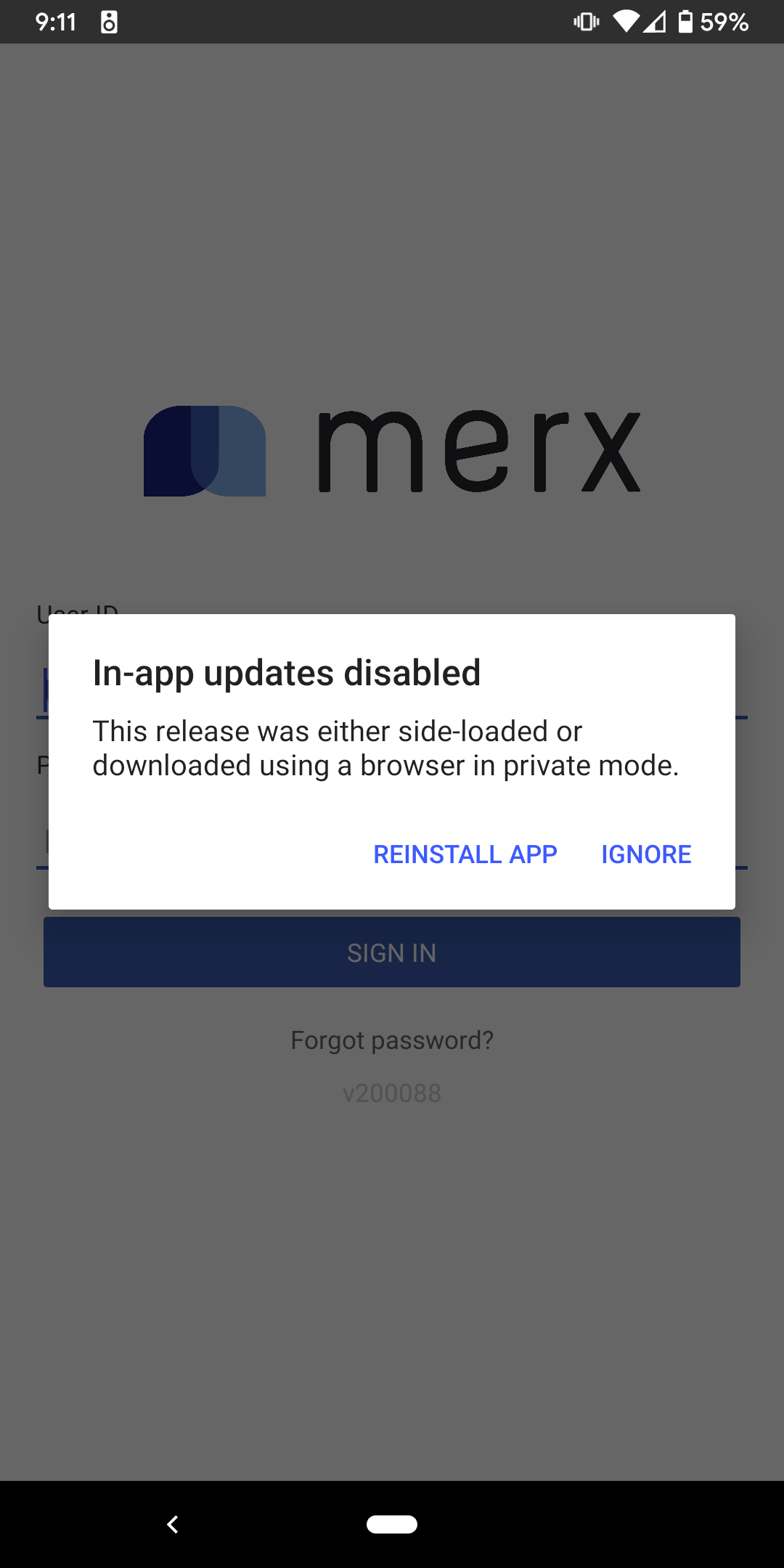
I am also having issues with getting the public distribution groups to play nice with android on a migrated application, we have version 2.2.0 of the android sdk, i have a public distribution group, but no matter what i do i get "In-app updates disabled" works fine with the same configuration of our ios application
 benjlin
on 26 Oct 2019
benjlin
on 26 Oct 2019
@benjlin
Try using the latest SDK 2.4.1 and make sure you install the app from the browser via the App center link, not via ADB or any usb transfer method.
fabiendem
on 26 Oct 2019
There were reasons why we were behind on the sdk, but we have bumped it to the latest version for testing with this, and no matter how we get to the install screen for the application, the install email, the public distribution link, signed in through appcenter, hitting the reinstall app button, using the old hockeyapp android application, we get the same message on startup.
benjlin
on 27 Oct 2019
Turns out i had an unrelated API key issue, and public distribution is now working fine for me on android
benjlin
on 27 Oct 2019
Our issue is that the AppCenter popup redirects to a google play "not found" page, and shows up after each restart. Using SKD 2.4.1, The relevant logs show:
As info (ch.post.it.nemo.siz) is our app
10-25 08:46:11.950 9250-9250/? I/AppCenter: App Center SDK configured successfully.
10-25 08:46:11.960 9250-9250/? D/AppCenter: Cannot read instrumentation variables in a non-test environment.
10-25 08:46:11.960 9250-9250/? D/AppCenter: Cannot read instrumentation variables in a non-test environment.
10-25 08:46:11.970 9250-9278/? D/AppCenter: Using appcenter.0.AES/CBC/PKCS7Padding/256
10-25 08:46:11.990 9250-9278/? D/AppCenter: Using appcenter.0.RSA/ECB/PKCS1Padding/2048
10-25 08:46:12.000 9250-9278/? D/AppCenter: Loaded stored sessions: {1571967776694=1571967776694//1571967776694}
10-25 08:46:12.010 9250-9283/? D/AppCenter: Network 100 is available.
10-25 08:46:12.010 9250-9283/? D/AppCenter: Network has been connected.
10-25 08:46:12.010 9250-9278/? I/AppCenter: Changed maximum database size to 10485760 bytes.
10-25 08:46:12.010 9250-9278/? D/AppCenter: addGroup(group_core)
10-25 08:46:12.020 9250-9278/? D/AppCenter: checkPendingLogs(group_core) pendingLogCount=0 batchTimeInterval=3000
10-25 08:46:12.020 9250-9278/? D/AppCenter: App Center initialized.
10-25 08:46:12.020 9250-9278/? D/AppCenter: removeGroup(groupErrors)
10-25 08:46:12.020 9250-9278/? D/AppCenter: removeGroup(groupErrors/one)
10-25 08:46:12.020 9250-9278/? D/AppCenter: addGroup(groupErrors)
10-25 08:46:12.020 9250-9278/? D/AppCenter: checkPendingLogs(groupErrors) pendingLogCount=0 batchTimeInterval=3000
10-25 08:46:12.020 9250-9278/? D/AppCenter: addGroup(groupErrors/one)
10-25 08:46:12.020 9250-9278/? D/AppCenter: checkPendingLogs(groupErrors/one) pendingLogCount=0 batchTimeInterval=3000
10-25 08:46:12.020 9250-9278/? I/AppCenter: Crashes service started from application.
10-25 08:46:12.020 9250-9278/? D/AppCenter: removeGroup(group_distribute)
10-25 08:46:12.020 9250-9278/? D/AppCenter: removeGroup(group_distribute/one)
10-25 08:46:12.020 9250-9278/? D/AppCenter: addGroup(group_distribute)
10-25 08:46:12.020 9250-9278/? D/AppCenter: checkPendingLogs(group_distribute) pendingLogCount=0 batchTimeInterval=3000
10-25 08:46:12.020 9250-9278/? D/AppCenter: addGroup(group_distribute/one)
10-25 08:46:12.030 9250-9278/? D/AppCenter: checkPendingLogs(group_distribute/one) pendingLogCount=0 batchTimeInterval=3000
10-25 08:46:12.030 9250-9278/? I/AppCenter: Distribute service started from application.
10-25 08:46:12.030 9250-9278/? D/AppCenter: Storing a log to the Persistence database for log type startService with flags=1
10-25 08:46:12.050 9250-9278/? D/AppCenter: Stored a log to the Persistence database for log type startService with databaseId=2
10-25 08:46:12.050 9250-9278/? D/AppCenter: enqueue(group_core) pendingLogCount=1
10-25 08:46:12.050 9250-9278/? D/AppCenter: checkPendingLogs(group_core) pendingLogCount=1 batchTimeInterval=3000
10-25 08:46:12.110 9250-9250/? D/AppCenterDistribute: InstallerPackageName=null
10-25 08:46:12.110 9250-9250/? D/AppCenterDistribute: No token, need to open browser to url=https://install.appcenter.ms/apps/58eeb76e-310a-4702-131d-55426104738d/update-setup/?release_hash=b2103ba9b956a3f341724b7e5755d866cb0f87c13f1fabfafe4bd8a038c0dbb7&redirect_id=ch.post.it.nemo.siz&redirect_scheme=appcenter&request_id=6bef8838-32ba-488a-85d3-9f243b6b396c&platform=Android&enable_failure_redirect=true&install_id=28acb3d3-da14-4fc5-96eb-7afa7b6f684d
10-25 08:46:12.120 9250-9250/? D/AppCenterDistribute: Default browser seems to be com.android.chrome/com.google.android.apps.chrome.IntentDispatcher
10-25 08:46:12.120 9250-9250/? D/AppCenterDistribute: And its not the picker.
10-25 08:46:12.120 9250-9250/? D/AppCenterDistribute: Launch browser=com.android.chrome/com.google.android.apps.chrome.IntentDispatcher
10-25 08:46:14.150 9250-9250/? D/AppCenterCrashes: The memory running level (20) was saved.
10-25 08:46:15.050 9250-9278/? D/AppCenter: triggerIngestion(group_core) pendingLogCount=1
10-25 08:46:15.050 9250-9278/? D/AppCenter: Trying to get 1 logs from the Persistence database for group_core
10-25 08:46:15.060 9250-9278/? D/AppCenter: Returning 1 log(s) with an ID, b5a37af1-a17d-46d1-93c7-c2e5796c1771
10-25 08:46:15.060 9250-9278/? D/AppCenter: The SID/ID pairs for returning log(s) is/are:
10-25 08:46:15.060 9250-9278/? D/AppCenter:  null / 2
10-25 08:46:15.060 9250-9278/? D/AppCenter: ingestLogs(group_core,b5a37af1-a17d-46d1-93c7-c2e5796c1771) pendingLogCount=0
10-25 08:46:15.060 9250-9278/? D/AppCenter: checkPendingLogs(group_core) pendingLogCount=0 batchTimeInterval=3000
10-25 08:46:15.070 9250-9439/? V/AppCenter: Calling https://in.appcenter.ms/logs?api-version=1.0.0...
10-25 08:46:15.070 9250-9439/? V/AppCenter: Headers: {Install-ID=28acb3d3-da14-4fc5-96eb-7afa7b6f684d, App-Secret=****************************6104738d, Content-Type=application/json}
10-25 08:46:15.070 9250-9439/? V/AppCenter: {
      "logs": [
        {
          "type": "startService",
          "timestamp": "2019-10-25T01:46:12.040Z",
          "device": {
            "sdkName": "appcenter.android",
            "sdkVersion": "2.4.1",
            "model": "FZ-N1",
            "oemName": "PANASONIC",
            "osName": "Android",
            "osVersion": "6.0.1",
            "osBuild": "MOB31K",
            "osApiLevel": 23,
            "locale": "en_GB",
            "timeZoneOffset": 420,
            "screenSize": "720x1184",
            "appVersion": "02.04.10-TEST",
            "appBuild": "1910250137",
            "appNamespace": "ch.post.it.nemo.siz"
          },
          "services": [
            "Crashes",
            "Distribute"
          ]
        }
      ]
    }
10-25 08:46:16.390 9250-9439/? V/AppCenter: HTTP response status=200 payload=CorrelationId: 5fd19590-2d7b-4624-afac-ddbe3fa363b2  ReasonCode: Success
10-25 08:46:16.390 9250-9278/? D/AppCenter: Deleting logs from the Persistence database for group_core with b5a37af1-a17d-46d1-93c7-c2e5796c1771
10-25 08:46:16.390 9250-9278/? D/AppCenter: The IDs for deleting log(s) is/are:
10-25 08:46:16.390 9250-9278/? D/AppCenter:  2
10-25 08:46:16.400 9250-9278/? D/AppCenter: checkPendingLogs(group_core) pendingLogCount=0 batchTimeInterval=3000
10-25 08:46:21.640 9250-9250/? D/AppCenterCrashes: The memory running level (20) was saved.
10-25 08:46:21.160 2231-3410/? I/ActivityManager: START u0 {act=android.intent.action.VIEW cat=[android.intent.category.BROWSABLE] dat=market://details?id=ch.post.it.nemo.siz&referrer=com.android.chrome flg=0x10000000 pkg=com.android.vending cmp=com.android.vending/com.google.android.finsky.activities.MarketDeepLinkHandlerActivity (has extras)} from uid 10039 on display 0
10-25 08:46:21.420 6067-6067/? W/Finsky: [1] dhe.a(8): No LoggingContext in the bundle, which breaks event chain!. Creating a new logging context.
10-25 08:46:21.520 2231-4148/? I/ActivityManager: START u0 {act=android.intent.action.VIEW cmp=com.android.vending/com.google.android.finsky.unauthenticated.UnauthenticatedMainActivity (has extras)} from uid 10016 on display 0
10-25 08:46:21.580 6067-6067/? I/Finsky: [1] lqv.a(89): Launch URL without continue URL
10-25 08:46:21.580 2231-5355/? I/ActivityManager: START u0 {act=android.intent.action.VIEW dat=http://market.android.com/... cmp=com.android.vending/com.google.android.finsky.activities.MainActivity (has extras)} from uid 10016 on display 0
10-25 08:46:21.590 2231-3728/? W/ActivityManager: Duplicate finish request for ActivityRecord{91a88b2 u0 com.android.vending/com.google.android.finsky.activities.MarketDeepLinkHandlerActivity t192 f}
10-25 08:46:21.650 2231-3410/? I/ActivityManager: START u0 {act=android.intent.action.VIEW cmp=com.android.vending/com.google.android.finsky.unauthenticated.UnauthenticatedMainActivity (has extras)} from uid 10016 on display 0
10-25 08:46:21.830 6067-6067/? I/Finsky: [1] ijh.a(23): Unauth scenario is not enabled
10-25 08:46:21.830 6067-6067/? I/Finsky: [1] ijd.a(20): Empty account name, not fetching device config token.
10-25 08:46:21.830 6067-6067/? I/Finsky: [1] xdy.a(1): Successfully uploaded device config
10-25 08:46:22.030 2231-2290/? I/ActivityManager: Displayed com.android.vending/com.google.android.finsky.unauthenticated.UnauthenticatedMainActivity: +207ms (total +738ms)
If this functionality require :
- Installation through the web browser
- Launch of the web browser at the application first start to enable update
It's useless for us.
This functionality in HockeyApp doesn't have this requirements at all.
Your app installation was based by direct apk copy (for bandwidth limit or security issue), and the update process worked fine in hockey app, but with AppCenter it doesn't work anymore.
So now we will have to find another tool which support that, because HockeyApp will be stopped. 👎
kvpt
on 29 Oct 2019
Same situation here with Android SDK.
Whether it's login page or 3 seconds redirect page, they should all go away.
AppCenter page should not appear anywhere in the flow of our app.
I'm on SDK 2.5.0.
 kmspop
on 7 Nov 2019
kmspop
on 7 Nov 2019
This bug is affecting my organization a lot.
 Brausepaul
on 11 Nov 2019
Brausepaul
on 11 Nov 2019
is this expected behavior for a public distribution group?
going from:
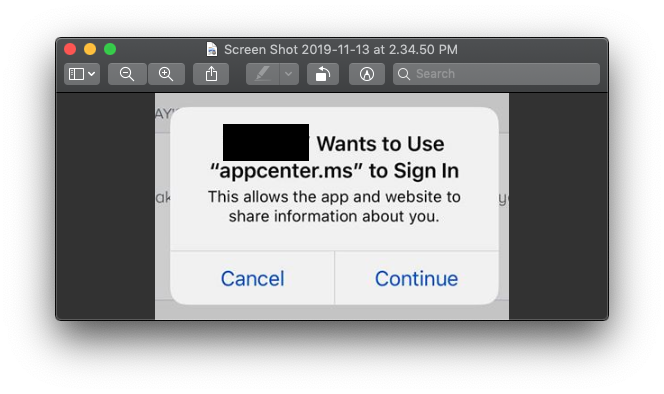
to:

this isn't the "bug" is it?
Is it possible to at least change the copy on that initial alert? it's a bit disconcerting.
 jeremyeaton89
on 13 Nov 2019
jeremyeaton89
on 13 Nov 2019
That is the intended behavior as I understand it. What we're commenting on is the App Center login page (username & password) that shows in the browser (when it shouldn't be shown at all). That login should only be shown to testers that are running "private" releases of our applications.
dfoulk
on 14 Nov 2019
The login requirement itself could be by-design, but it would be good to provide _cookie-less_ distribution toggle with a proper caution message.
 YoungjaeKim
on 22 Nov 2019
YoungjaeKim
on 22 Nov 2019
We used HockeyApp distribution for our beta users on Android TV.
Because of this now they completely unable to upgrade the app since there is no good way to even be able to login on a TV using a browser... Some users managed but 95% did not
 dant3
on 8 Dec 2019
dant3
on 8 Dec 2019
Any word on this? It is a pretty large gap from HockeyApp functionality. I believe the issue that I opened is related to some of the other posts in this thread.
jsheetzati
on 6 Jan 2020
Scary how this was missed, we are running our apps pinned and do not want to white list browser for obvious reasons, let alone these additional steps to have in-app update. Like mention before, definitely a breaking change, I'll be looking at alternatives.
 Corical
on 16 Jan 2020
Corical
on 16 Jan 2020
With imminent shutdown of Hockeyapp Feb 10, do we know if this will be addressed in AppCenter SDK?
jeremyeaton89
on 4 Feb 2020
This does not seem to be fixed for me. (Android using Microsoft.AppCenter.Distribute v2.6.4)
I get the browser window saying In-app updates enabled but I do not get the new releases no popup or anything.
 kbehren
on 5 Feb 2020
kbehren
on 5 Feb 2020
@botatoes Can we get a current bug status update?
kbehren
on 5 Feb 2020
We are expecting to fix this in the feb release of the SDK. I will keep you folks posted if anything changes. Thank you
 ahdbilal
on 6 Feb 2020
ahdbilal
on 6 Feb 2020
@ahdbilal so this will be working as expected before you guys shutdown HockeyApp, yes?
dfoulk
on 7 Feb 2020
@ahdbilal can you give details of what is changing? Thanks!
jsheetzati
on 7 Feb 2020
@ahdbilal do you have the ETA for the Feb release?
 diegoalvis
on 19 Feb 2020
diegoalvis
on 19 Feb 2020
The Feb release happened yesterday for android and couple of days back for iOS. Please review the release notes for the changes in in-app update. Also, please give the SDK a try and share your feedback here.
https://github.com/microsoft/appcenter-sdk-android/releases
https://github.com/microsoft/appcenter-sdk-apple/releases
ahdbilal
on 19 Feb 2020
@ahdbilal at https://github.com/microsoft/appcenter-sdk-android/blob/develop/CHANGELOG.md#version-300 under the Distribute section:
In those notes, while distributing an app to a public group, it's not super clear if we should still expect the web page to show up at the first launch.
Can you clarify what's bringing the setUpdateTrack method?
Also it says "Please read the documentation for more details", but I can't find more doc about this method. Do you mean the javadoc? or the AppCenter website?
Cheers!
fabiendem
on 19 Feb 2020
This issue (public groups getting log-in) should have been resolved with this new release. Please share your feedback if the issue still persists. Note that we are still rolling out the release for other SDKs and updating the docs. Once the docs are updated, I will post a comment here.
ahdbilal
on 20 Feb 2020
Does this also address private download page with public downloads? https://github.com/microsoft/appcenter/issues/1255
jsheetzati
on 20 Feb 2020
@jsheetzati Can we hop on a quick call to discuss #1255. I have recently taken over appcenter distribute and have little context of Hockey App. I will love to understand more about the issue raised by you. You can use this link to book the call. Thanks for all your support
ahdbilal
on 20 Feb 2020
Sure @ahdbilal. More than happy to go through it over a phone call next week. Shouldn't take long to go through hopefully. Thanks for reaching out!
jsheetzati
on 21 Feb 2020
This bug has been fixed with the latest version of the SDK. Therefore, I am closing this issue. Feel free to open this if you are still running into this issue.
ahdbilal
on 16 Mar 2020
Related issues
 sklmnv
·
3Comments
sklmnv
·
3Comments
 master-lincoln
·
3Comments
master-lincoln
·
3Comments
 comply365dev
·
4Comments
comply365dev
·
4Comments
 KSemenenko
·
3Comments
KSemenenko
·
3Comments
 egorikftp
·
3Comments
egorikftp
·
3Comments
Most helpful comment
Hi all, just a quick update. We will be deploying this to prod today.
Login is no longer required for in-app update for public distribution groups when cookies are not present
Note: For iOS while login is not required, Apple has a default dialog that will have to be dismissed to kick in the public flow.