What App Center service does this affect?
React Native SDK, and Build.
Describe the bug
Locally Xcode is building normally but is failing on appcenter.
Expected behavior
Build successful.
Additional context
* ARCHIVE FAILED *
The following build commands failed:
CompileC /Users/vsts/Library/Developer/Xcode/DerivedData/FinFO-fsqyecelonplshafcobztdahtvlt/Build/Intermediates.noindex/ArchiveIntermediates/FinFO/IntermediateBuildFilesPath/FinFO.build/Release-iphoneos/FinFO.build/Objects-normal/arm64/AppDelegate.o FinFO/AppDelegate.m normal arm64 objective-c com.apple.compilers.llvm.clang.1_0.compiler
(1 failure)
[error]Error: /usr/bin/xcodebuild failed with return code: 65
[section]Finishing: Xcode build (signed)
[section]Starting: Xcode build (signed)
 Faisal-Manzer
All 32 comments
@Faisal-Manzer Did you figure this issue out yourself?
 lumaxis
on 13 Mar 2019
lumaxis
on 13 Mar 2019
Yes, actually it was an error with code push integration.
Faisal-Manzer
on 13 Mar 2019
Hey, I am reopening this because problem prevails.
iOS Builds are Always failing.
The app was working properly on Local.
I added Archive to App Store also, without any problem it is building.
But on MSAC it is facing an issue.
I tried both signed and unsigned builds, no build succeeds.
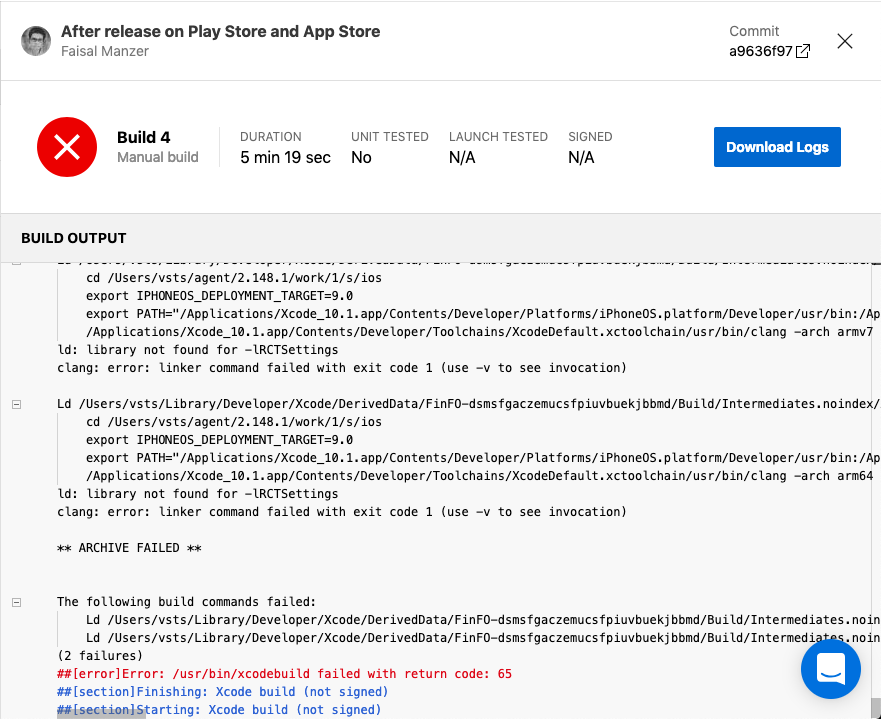
ld: library not found for -lRCTSettings
clang: error: linker command failed with exit code 1 (use -v to see invocation)
* ARCHIVE FAILED *
The following build commands failed:
Ld /Users/vsts/Library/Developer/Xcode/DerivedData/FinFO-dsmsfgaczemucsfpiuvbuekjbbmd/Build/Intermediates.noindex/ArchiveIntermediates/FinFO/IntermediateBuildFilesPath/FinFO.build/Release-iphoneos/FinFO.build/Objects-normal/armv7/FinFO normal armv7
Ld /Users/vsts/Library/Developer/Xcode/DerivedData/FinFO-dsmsfgaczemucsfpiuvbuekjbbmd/Build/Intermediates.noindex/ArchiveIntermediates/FinFO/IntermediateBuildFilesPath/FinFO.build/Release-iphoneos/FinFO.build/Objects-normal/arm64/FinFO normal arm64
(2 failures)
[error]Error: /usr/bin/xcodebuild failed with return code: 65
[section]Finishing: Xcode build (signed)
[section]Starting: Xcode build (signed)
Faisal-Manzer
on 16 Mar 2019
We have the same problem, when we try to build our ios project.
 gpetrosyan
on 18 Mar 2019
gpetrosyan
on 18 Mar 2019
@patniko @lumaxis help, please.
Faisal-Manzer
on 24 Mar 2019
I don't know if this is the same problem or not, but it sounds the same. iOS (React Native) builds for us have also started failing. We haven't made changes to our branch configuration, and have been trying to build the same commit that previously worked just a couple of days ago. Android builds are working as expected... not really sure where to go with it.
The following build commands failed:
    PrecompileSwiftBridgingHeader normal arm64
    CompileSwiftSources normal arm64 com.apple.xcode.tools.swift.compiler
(2 failures)
##[error]Error: /usr/bin/xcodebuild failed with return code: 65
##[section]Finishing: Xcode build (signed)
##[section]Starting: Xcode build (signed)
==============================================================================
Task         : Xcode
Description  : Build, test, or archive an Xcode workspace on macOS. Optionally package an app.
Version      : 4.130.0
Author       : Microsoft Corporation
Help         : [More Information](https://go.microsoft.com/fwlink/?LinkID=613730)
==============================================================================
##[section]Finishing: Xcode build (signed)
##[section]Starting: Install Apple provisioning profile
@Faisal-Manzer @gpetrosyan Are you still stuck on this too, or did you find something you could fix on your end?
 evillemez
on 27 Mar 2019
evillemez
on 27 Mar 2019
I should add, our developers were able to build the same branch locally as well.
@patniko Any thoughts on what we should try if they can build locally but it's stopped working in App Center?
evillemez
on 27 Mar 2019
@evillemez @Faisal-Manzer @gpetrosyan Do you mind going to App Center portal and use the Intercom bubble at bottom right to start a conversation with support? That will allow us to collect additional information as needed, which could be hard to do here. Also, looking at the pasted logs here, the failure are different, so they likely need to be resolved separately.
 DennisPan
on 28 Mar 2019
DennisPan
on 28 Mar 2019
Our problem ended up being the version of Cocoapods App Center was using, which must have been updated internally. We were able to provide a build script to uninstall Cocoapods, and install the version we need, and that got our iOS builds working again.
evillemez
on 28 Mar 2019
@evillemez , how did you identify that its a different version ? and how did you fix it?
 CSharped
on 24 Apr 2019
CSharped
on 24 Apr 2019
@CSharped, I ran into a similar problem and I fixed it by updating CocoaPods and dependencies (the second part was probably not needed to solve this problem)
- sudo gem install cocoapods
- pod update
After that, I have checked-in the Podfile.lock, which updated by CocoaPods version to 1.6.1.
One more note, there is a page that lists the current versions of the libraries used by the MSAC agents: https://docs.microsoft.com/en-us/appcenter/build/software
 vpulec
on 26 Apr 2019
vpulec
on 26 Apr 2019
I am also facing same issue . Native IOS(swift) builds of us are also started failing.previously it was working fine but after new commit it got failed. Locally i am able to build using xcode but in appcenter we are facing problem. Don't know how to solve this issue.
* ARCHIVE FAILED *
The following build commands failed:
SwiftCodeGeneration normal armv7Ld /Users/vsts/Library/Developer/Xcode/DerivedData/ProjectName-eemuwyhecewcnygojxxsdtijuclm/Build/Intermediates.noindex/ArchiveIntermediates/ProjectName/IntermediateBuildFilesPath/ProjectName.build/Adhoc-Prod-iphoneos/ProjectName.build/Objects-normal/arm64/ProjectName\ normal arm64
(2 failures)
[error]Error: /usr/bin/xcodebuild failed with return code: 65
[section]Finishing: Xcode build (signed)
[section]Starting: Xcode build (signed)
 puju96
on 8 May 2019
puju96
on 8 May 2019
@puju96 From a quick glance, the error you are running into is different from the other few reported in the Issue. It usually requires deeper investigation into each case. If you don’t mind, please reach out to our support via the Intercom bubble at bottom right of the portal. That will allow us to collect more details.
DennisPan
on 9 May 2019
Closing this because what I have seen is that this Issue becomes a place where different cases of build failures are reported. For any new build failure, I’d suggest either reach out to support, or creat a new Issue that’s more specifically targeted.
DennisPan
on 9 May 2019
That helped me: https://intercom.help/appcenter/build/ios/my-ios-builds-fail-with-clang-error-linker-command-failed-with-exit-code-1
 schwamic
on 13 May 2019
schwamic
on 13 May 2019
@CSharped, I ran into a similar problem and I fixed it by updating CocoaPods and dependencies (the second part was probably not needed to solve this problem)
- sudo gem install cocoapods
- pod update
After that, I have checked-in the Podfile.lock, which updated by CocoaPods version to 1.6.1.
One more note, there is a page that lists the current versions of the libraries used by the MSAC agents: https://docs.microsoft.com/en-us/appcenter/build/software
Question: Did you update cocoapods locally, or with a custom build script? I'm on cocoapods 1.7.1 locally, while App Center is on 1.7.0. Not sure if that makes a difference or not.
 ZenModeRy
on 3 Jun 2019
ZenModeRy
on 3 Jun 2019
@Faisal-Manzer I have just ran into the same problem (but for -lDoubleConversion) instead. Have you found a fix for this issue? My local pod is 1.8.4 and it is the same as AppCenter's pod version. XCode builds successfully locally.

 nartc
on 4 Feb 2020
nartc
on 4 Feb 2020
@Faisal-Manzer I have just ran into the same problem (but for
-lDoubleConversion) instead. Have you found a fix for this issue? My localpodis 1.8.4 and it is the same as AppCenter'spodversion. XCode builds successfully locally.
I'm have a equal problem.
 louzada01
on 5 Feb 2020
louzada01
on 5 Feb 2020
I don't remember how I solved that. It has been a long time.
Faisal-Manzer
on 5 Feb 2020
Same problem with me
** ARCHIVE FAILED **


The following build commands failed:
    Ld /Users/runner/Library/Developer/Xcode/DerivedData/CONNECT2DTELEDENTAL-ermrhfotmwvxkccjppkrjravmuvl/Build/Intermediates.noindex/ArchiveIntermediates/CONNECT2DTELEDENTAL/InstallationBuildProductsLocation/Applications/CONNECT2D\ TELEDENTAL.app/CONNECT2D\ TELEDENTAL normal arm64
(1 failure)
##[error]Error: /usr/bin/xcodebuild failed with return code: 65
 harshbshah2d
on 6 Apr 2020
harshbshah2d
on 6 Apr 2020
Hello Guys,
Has anyone managed to fix it ?
 avinashlng1080
on 9 Apr 2020
avinashlng1080
on 9 Apr 2020
In Appcenter Build from Swift/Xcode, I had a similar issue (archive failing, error code 65) but mine looked like it was failing to access files in a particular directory.
error: /Users/runner/runners/2.168.2/work/1/s/Pods/Target Support Files/...
I made two changes and the build succeeded afterward, and I think the success was related to the second change but for completeness I am listing both.
(1) Duplicate the shared schema for the workspace to create a project level version of the scheme that is also marked as shared
(2) Add Pods to source control and push those files to the Github repository I use for the appcenter build. (Before, I excluded pods from source control because they were not part of the workspace, so I believe the error was caused by appcenter looking for files that didn't exist in github)
 danibots
on 22 May 2020
danibots
on 22 May 2020
Can you all verify the POD version and XCode versions are the same? (on local machine and app center)
Faisal-Manzer
on 22 May 2020
+1 ,I am also facing the same issue
 tusharmutreja200
on 19 Jun 2020
tusharmutreja200
on 19 Jun 2020
Hey guys, I found the solution.
- Don"t commit node_modules, Pods, PodFile.lock,package.json on git.
- Again try to build it on Appcenter, It works
tusharmutreja200
on 19 Jun 2020
@Faisal-Manzer How did you resolve this issue ?
AppDelegate.m normal armv7 objective-c com.apple.compilers.llvm.clang.1_0.compiler
My Appcenter build getting failed
 affantechcarrot
on 19 Aug 2020
affantechcarrot
on 19 Aug 2020
Mine is also failing too with the same problem.
 katye333
on 29 Aug 2020
katye333
on 29 Aug 2020
I'm also getting the same issue
** ARCHIVE FAILED **


The following build commands failed:
    Ld /Users/runner/Library/Developer/Xcode/DerivedData/aLifeLived-hjrawomvzxvvvdeuplegfjyupvhr/Build/Intermediates.noindex/ArchiveIntermediates/aLifeLived/IntermediateBuildFilesPath/aLifeLived.build/Release-iphoneos/aLifeLived.build/Objects-normal/armv7/A\ Life\ Lived normal armv7
    Ld /Users/runner/Library/Developer/Xcode/DerivedData/aLifeLived-hjrawomvzxvvvdeuplegfjyupvhr/Build/Intermediates.noindex/ArchiveIntermediates/aLifeLived/IntermediateBuildFilesPath/aLifeLived.build/Release-iphoneos/aLifeLived.build/Objects-normal/arm64/A\ Life\ Lived normal arm64
(2 failures)
##[error]Error: /usr/bin/xcodebuild failed with return code: 65
 maxckelly
on 8 Sep 2020
maxckelly
on 8 Sep 2020
Working with cordova Im having the same issue, when i run cordova build ios
** BUILD FAILED **


The following build commands failed:
        Ld /Users/mdiaz00147/Library/Developer/Xcode/DerivedData/Casey_Research-dtrhdvfxohusmcdsdwqwdixdxhpr/Build/Intermediates.noindex/Casey\ Research.build/Release-iphonesimulator/Casey\ Research.build/Objects-normal/arm64/Binary/Casey\ Research normal arm64
(1 failure)
xcodebuild: Command failed with exit code 65
Solution: Open the platform/ios folder with xcode and build it from there and i get it to work
 mdiaz00147
on 24 Sep 2020
mdiaz00147
on 24 Sep 2020
I'm also getting the same issue with react-native
`* ARCHIVE FAILED *
The following build commands failed:
CompileC /Users/runner/Library/Developer/Xcode/DerivedData/ProjectName-fhltpqdzcpwnuyhiscptxpuntjmk/Build/Intermediates.noindex/ArchiveIntermediates/employeeApp-staging/IntermediateBuildFilesPath/Pods.build/Staging-iphoneos/Yoga.build/Objects-normal/armv7/event.o /Users/runner/work/1/s/node_modules/react-native/ReactCommon/yoga/yoga/event/event.cpp normal armv7 c++ com.apple.compilers.llvm.clang.1_0.compiler
(1 failure)
[error]Error: /usr/bin/xcodebuild failed with return code: 65`
 fuchien
on 14 Oct 2020
fuchien
on 14 Oct 2020
For iOS simulator add this to params -arch x86_64
 yurkins
on 10 Nov 2020
yurkins
on 10 Nov 2020
had .detoxrc.json like this:
"ios.sim.debug": {
      "binaryPath": "ios/build/Build/Products/Debug-iphonesimulator/Project.app",
      "build": "xcodebuild -project ios/Project.xcodeproj -scheme Project -configuration Debug -sdk iphonesimulator -derivedDataPath ios/build",
      "type": "ios.simulator",
      "name": "iPhone 11"
    },
make it to:
"ios.sim.debug": {
      "binaryPath": "ios/build/Build/Products/Debug-iphonesimulator/Project.app",
      "build": "xcodebuild -workspace ios/Project.xcworkspace -scheme Project -configuration Debug -sdk iphonesimulator -derivedDataPath ios/build -arch x86_64",
      "type": "ios.simulator",
      "name": "iPhone 11"
    },
then run:
detox build -c ios.sim.debug
this gives me bundle. then we can test:
detox test -c ios.sim.debug
 designervoid
on 11 Nov 2020
designervoid
on 11 Nov 2020
Related issues
 sourabhtyagi2003
·
3Comments
sourabhtyagi2003
·
3Comments
 Oddj0b
·
3Comments
Oddj0b
·
3Comments
 sklmnv
·
3Comments
sklmnv
·
3Comments
 master-lincoln
·
3Comments
master-lincoln
·
3Comments
 thabemmz
·
3Comments
thabemmz
·
3Comments
Most helpful comment
We have the same problem, when we try to build our ios project.