How to reproduce it (as minimally and precisely as possible):
- Installed DeFi Wallet v2.4.5
- Transferred a few DFI and USDT to the wallet
- Added USDT and DFI pair to the Liquidity Mining Pool
- Made a backup and named it mykeydefi.dat
- Deleted mykeydefi.dat by accident
- Restored mykeydefi.dat using a recovery tool right after deleting it. (This may corrupted it ?)
- Installed v.2.5.0 and tried to load mykeydefi.dat
- After a few seconds showing a loading bar the following error message occurred: “Verbindung mit der Node ist getrennt” (german error message - I’m using a german Win10 OS)
- Closing Defi Wallet App is the only way to exit.
- Defi Wallet App is not working properly anymore. App stucks on start screen. I need to delete all DFI relevant files and restart to fix this.
What are your environment parameters?
DeFi Wallet Version: v.2.5.0
Operating System (OS): Windows 10 Pro
Current free storage capacity: 205 GB
 cryptolaus
All 24 comments
@cryptolaus: Thanks for opening an issue, it is currently awaiting triage.
The triage/accepted label can be added by foundation members by writing /triage accepted in a comment.
In the meantime, you can:
- Checkout DeFiChain’s Github issue page to see if your issue has already been reported
- Submit any logs if you have them, this will greatly expedite the process for us.
- You can also join our Telegram or Reddit community channels.
Details
I am a bot created to help the DeFiCh developers manage community feedback and contributions. You can check out my manifest file to understand my behavior and what I can do. If you want to use this for your project, you can check out the DeFiCh/oss-governance-bot repository.
 defichain-bot
on 11 Jun 2021
defichain-bot
on 11 Jun 2021
Hi @cryptolaus , before you proceed to reinstall, please backup your wallets folder. In the wallets folder you'll likely see wallet-bak-123456789 as well, these are additional wallet backups.
For Windows it's located here:
C:\Users\<username>\AppData\Roaming\DeFi Blockchain\wallets\
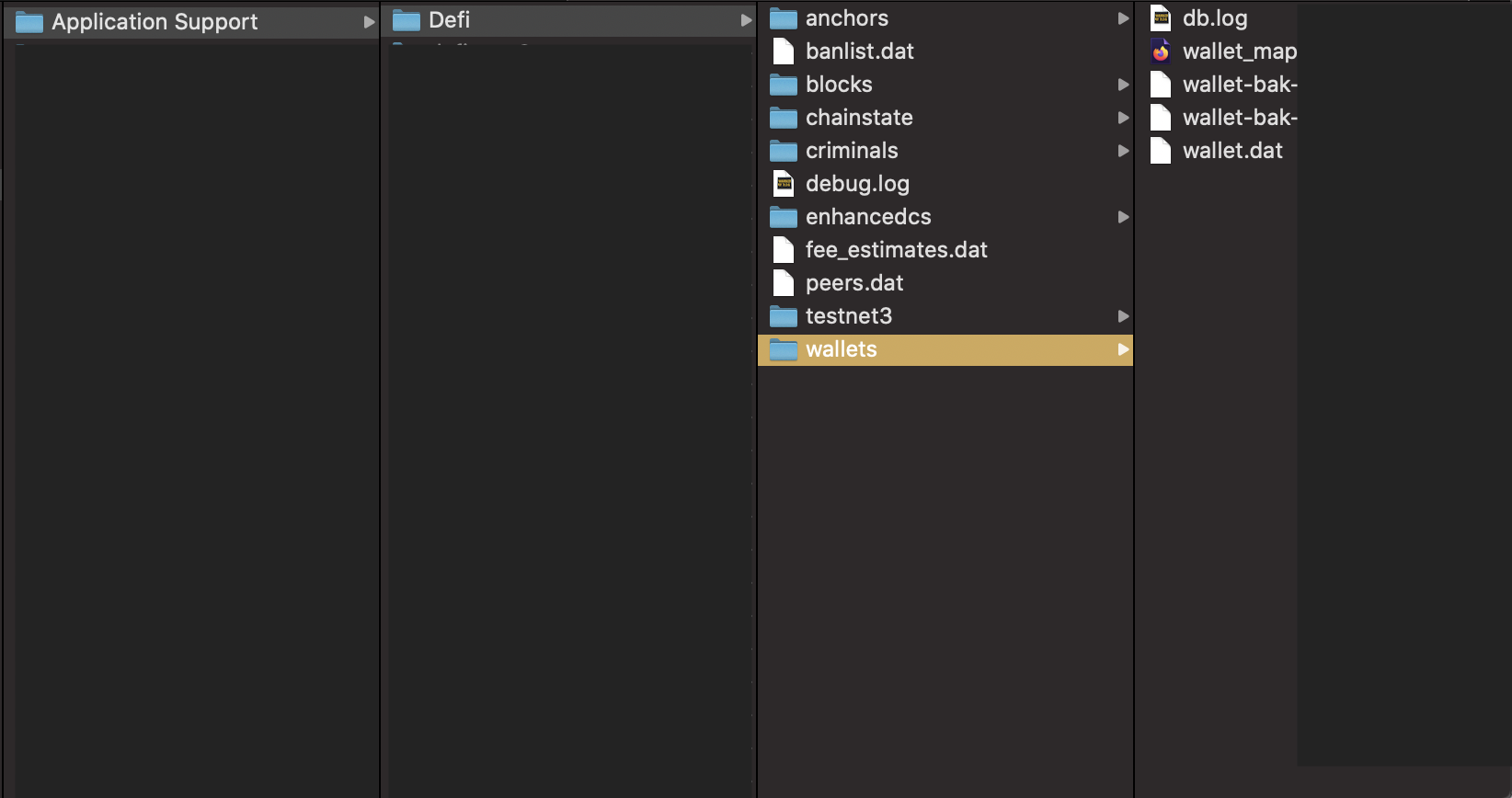
- After you've safely made a copy, proceed to delete the following folders:
App Installation
C:\Users\username\Program Files\DeFi Wallet
Blockchain folder
C:\Users\<username>\AppData\Roaming\DeFi Blockchain\
_*Remember to backup wallets folder_
DeFi Wallet folder
C:\Users\username\AppData\Roaming\defi-wallet
- Download v2.5.0
For Windows, select DeFi-Wallet-Setup-2.5.0.exe
- After installing v2.5.0 and syncing to 100%,
Restore wallet via backup(wallet.dat), use the wallet.dat that you've previously backed up (step 1)
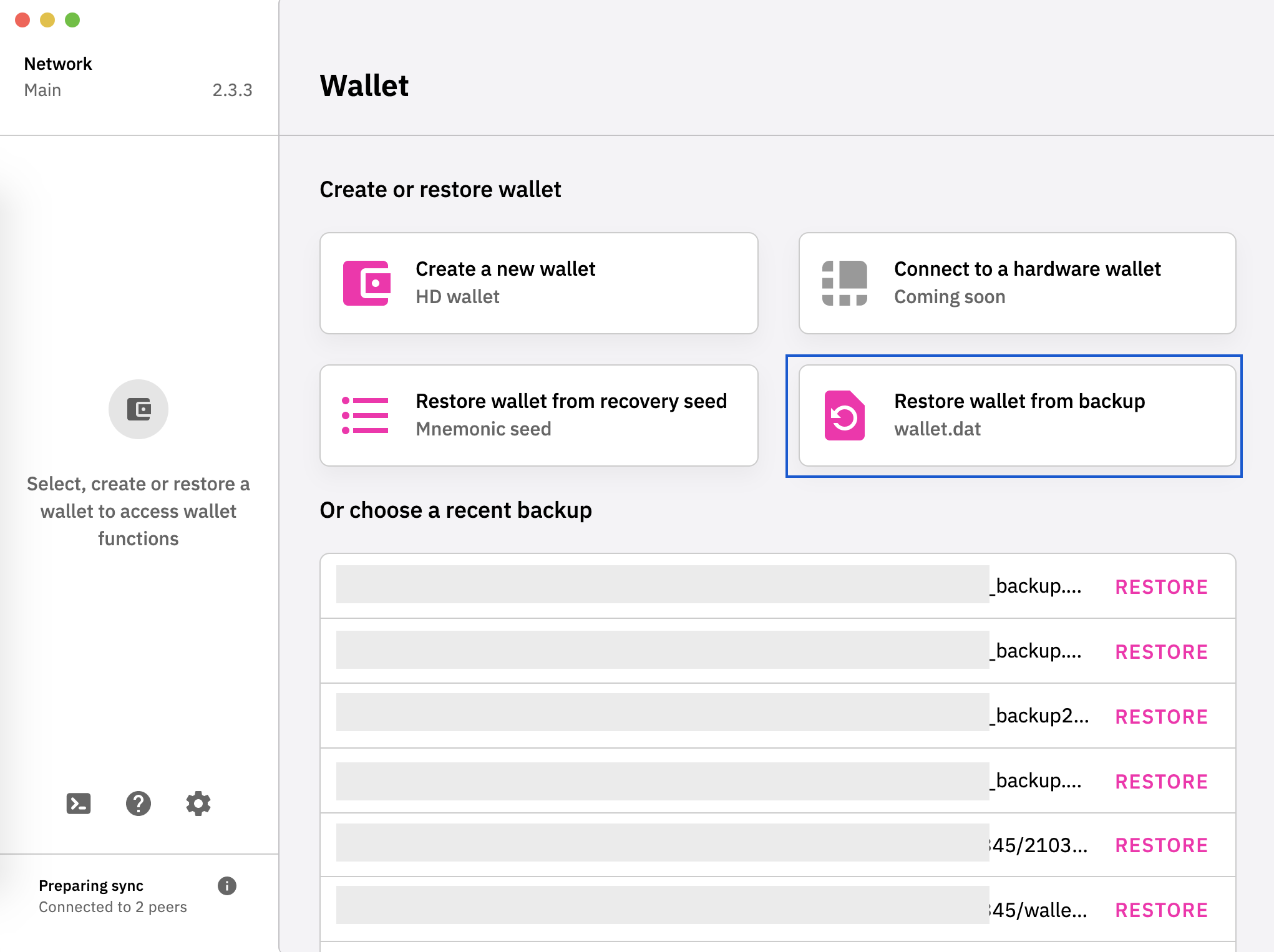
 izzycsy
on 11 Jun 2021
izzycsy
on 11 Jun 2021
Same bug on my 2 WIN Server on v2.5.0 !!
[2021-06-12 10:04:17.012] [IPC-RENDERER-error] "Network Error"
[2021-06-12 10:04:17.015] [IPC-RENDERER-error] [function(){return Zi(void 0,void 0,void 0,(function(){var e,t;return zi(this,(function(n){switch(n.label){case 0:return[4,ec()];case 1:return e=n.sent(),Py.dispatch(Ea(new(Za())(e||0))),[4,tc()];case 2:return t=n.sent(),[2,new(Za())(e).plus(t).toFixed(8)]}}))}))}] "{\"message\":\"Network Error\",\"name\":\"Error\",\"stack\":\"Error: Network Error\n at e.exports (file:///vendor.4a7557e80ba238bb49e5.js:8:178087)\n at XMLHttpRequest.m.onerror (file:///vendor.4a7557e80ba238bb49e5.js:8:174426)\",\"config\":{\"url\":\"/\",\"method\":\"post\",\"data\":\"{\\"jsonrpc\\":\\"1.0\\",\\"id\\":\\"2887960710977646\\",\\"method\\":\\"getbalance\\",\\"params\\":[\\"\\"]}\",\"headers\":{\"Accept\":\"application/json, text/plain, */\",\"Content-Type\":\"application/json;charset=utf-8\",\"Authorization\":\"Basic Sm1ITHV0TWI6MmJiODJhMWRmNDlmNmUzMjM2YzZkNTRkZDE3ZDFmMzE5ZGFjY2FjNmM4ZGJhMzA1NzU1Y2Q1ODlkODEzMTMxOQ==\"},\"auth\":{\"username\":\"JmHLutMb\",\"password\":\"2bb82a1df49f6e3236c6d54dd17d1f319daccac6c8dba305755cd589d8131319\"},\"baseURL\":\"http://127.0.0.1:8555\",\"transformRequest\":[null],\"transformResponse\":[null],\"timeout\":0,\"xsrfCookieName\":\"XSRF-TOKEN\",\"xsrfHeaderName\":\"X-XSRF-TOKEN\",\"maxContentLength\":-1,\"maxBodyLength\":-1}}"
[2021-06-12 10:04:17.017] [IPC-RENDERER-error] [queueWorker] "{\"message\":\"Network Error\",\"name\":\"Error\",\"stack\":\"Error: Network Error\n at e.exports (file:///vendor.4a7557e80ba238bb49e5.js:8:178087)\n at XMLHttpRequest.m.onerror (file:///vendor.4a7557e80ba238bb49e5.js:8:174426)\",\"config\":{\"url\":\"/\",\"method\":\"post\",\"data\":\"{\\"jsonrpc\\":\\"1.0\\",\\"id\\":\\"3176417513125098\\",\\"method\\":\\"getbalances\\",\\"params\\":[]}\",\"headers\":{\"Accept\":\"application/json, text/plain, /\",\"Content-Type\":\"application/json;charset=utf-8\",\"Authorization\":\"Basic Sm1ITHV0TWI6MmJiODJhMWRmNDlmNmUzMjM2YzZkNTRkZDE3ZDFmMzE5ZGFjY2FjNmM4ZGJhMzA1NzU1Y2Q1ODlkODEzMTMxOQ==\"},\"auth\":{\"username\":\"JmHLutMb\",\"password\":\"2bb82a1df49f6e3236c6d54dd17d1f319daccac6c8dba305755cd589d8131319\"},\"baseURL\":\"http://127.0.0.1:8555\",\"transformRequest\":[null],\"transformResponse\":[null],\"timeout\":0,\"xsrfCookieName\":\"XSRF-TOKEN\",\"xsrfHeaderName\":\"X-XSRF-TOKEN\",\"maxContentLength\":-1,\"maxBodyLength\":-1}}"
[2021-06-12 10:04:17.022] [IPC-RENDERER-error] "Network Error"
 supervolot
on 12 Jun 2021
supervolot
on 12 Jun 2021
thx for getting back to me @izzycsy
Unfortunately i needed to delete ALL relevant DFI files to make the app start properly again (app stucks in the loading screen)
Trying to recover my wallet using my previous backuped .dat file leads into the described error - "Node is disconnected"
cryptolaus
on 12 Jun 2021
Hi @supervolot @cryptolaus , can you try v2.5.1. Please backup wallet before updating.
@supervolot , you're facing a different issue from @crytolaus. Yours is likely a network error issue, update to the latest version and it should be fixed.
izzycsy
on 16 Jun 2021
Hi @supervolot @cryptolaus , can you try v2.5.1. Please
backup walletbefore updating.
Hi
I tried to install 2.5.1 but app still stucks on the loading screen. Even deleting all corresponding defi wallet files did not help to solve this issue. Here is my app.log (exchanged my Username with Username). Interesting fact. It seems that the app is still trying to load mykeydefi.dat allthough i deleted all corresponding files and uninstalled/reinstalled the wallet app too.
[2021-06-16 21:30:10.162] [IPC-MAIN-info] [Starting Electron App] OS Windows 10 - 10.0.19042
[2021-06-16 21:30:10.173] [IPC-MAIN-info] Checking for update
[2021-06-16 21:30:10.176] [IPC-MAIN-info] Wallets folder missing... Creating directory...
[2021-06-16 21:30:10.209] [IPC-MAIN-info] Generated new staging user ID: a458ad47-37ba-521c-b1fa-670082776f99
[2021-06-16 21:30:11.020] [IPC-RENDERER-error] "Error in selected unit, setting it to default one"
[2021-06-16 21:30:11.048] [IPC-RENDERER-info] Update for version 2.5.1 is not available (latest version: 2.5.1, downgrade is disallowed).
[2021-06-16 21:30:11.049] [IPC-RENDERER-debug] checkForUpdatesAndNotify called, downloadPromise is null
[2021-06-16 21:30:11.277] [IPC-RENDERER-info] "[Starting App] App is running with version 2.5.1"
[2021-06-16 21:30:11.287] [IPC-RENDERER-info] [start] - Starting node connection...
[2021-06-16 21:30:11.290] [IPC-RENDERER-info] Current Node: 1.7.10 New Node: 1.7.10
[2021-06-16 21:30:11.673] [IPC-RENDERER-info] [start] - Node start initiated
[2021-06-16 21:30:11.676] [IPC-RENDERER-info] [setLockTimeout] "Starting update of lock timeout..."
[2021-06-16 21:30:11.684] [IPC-RENDERER-info] [Update Auto-lock Time] "Timeout updated to 300 seconds"
[2021-06-16 21:30:12.127] [IPC-RENDERER-info] [start] - Node started
[2021-06-16 21:30:12.127] [IPC-RENDERER-info] [start] - Sending node started to client
[2021-06-16 21:30:12.165] [IPC-RENDERER-error] [start] - Error on node connection: Error: mykeydefi.dat corrupt, salvage failed
[2021-06-16 21:30:12.172] [IPC-RENDERER-error] [startBinary] "Error: mykeydefi.dat corrupt, salvage failed"
[2021-06-16 21:30:12.174] [IPC-RENDERER-info] [Blockchain Status] {"success":false,"data":{"message":"Error: mykeydefi.dat corrupt, salvage failed","walletMap":{"paths":["C:\Users\Username\AppData\Roaming\DeFi Blockchain\wallets\wallet.dat"],"nodeVersion":"1.7.10","hasSyncSPV":false,"hasRescan":false}}}
[2021-06-16 21:30:12.178] [IPC-RENDERER-error] [blockChainNotStarted - Not Running] ""
[2021-06-16 21:30:12.182] [IPC-RENDERER-info] [start] - Node is closed with code 1
[2021-06-16 21:30:12.183] [IPC-RENDERER-error] [start] - Error occurred while closing node with code: 1
[2021-06-16 21:30:12.188] [IPC-RENDERER-error] [startBinary] "Error occurred while closing node with code: 1"
[2021-06-16 21:30:12.190] [IPC-RENDERER-info] [Blockchain Status] {"success":false,"data":{"message":"Error occurred while closing node with code: 1","walletMap":{"paths":["C:\Users\Username\AppData\Roaming\DeFi Blockchain\wallets\wallet.dat"],"nodeVersion":"1.7.10","hasSyncSPV":false,"hasRescan":false}}}
[2021-06-16 21:30:12.192] [IPC-RENDERER-error] [blockChainNotStarted - Not Running] ""
[2021-06-16 21:30:16.191] [IPC-RENDERER-error] [isBlockchainStarted] "Network Error"
Hope that helps
cryptolaus
on 16 Jun 2021
closed by accident ! i'm still not able to start the app, still stucks on the loading screen.
cryptolaus
on 17 Jun 2021
Tried to install 2.5.2 but the app is still trying to load the "currupted" mydefikey.dat and freezes while in loading screen.
[2021-06-29 11:20:17.488] [IPC-MAIN-info] [Starting Electron App] OS Windows 10 - 10.0.19042
[2021-06-29 11:20:17.497] [IPC-MAIN-info] Checking for update
[2021-06-29 11:20:17.499] [IPC-MAIN-info] Wallets folder missing... Creating directory...
[2021-06-29 11:20:17.539] [IPC-MAIN-info] Generated new staging user ID: 3c3407de-9763-5893-8e0c-ce98df7d93bd
[2021-06-29 11:20:18.221] [IPC-MAIN-info] Update for version 2.5.2 is not available (latest version: 2.5.2, downgrade is disallowed).
[2021-06-29 11:20:18.222] [IPC-MAIN-debug] checkForUpdatesAndNotify called, downloadPromise is null
[2021-06-29 11:20:18.238] [IPC-RENDERER-error] "Error in selected unit, setting it to default one"
[2021-06-29 11:20:18.508] [IPC-RENDERER-info] "[Starting App] App is running with version 2.5.2"
[2021-06-29 11:20:18.523] [IPC-RENDERER-info] [start] - Starting node connection...
[2021-06-29 11:20:18.526] [IPC-RENDERER-info] Current Node: 1.7.11 New Node: 1.7.11
[2021-06-29 11:20:18.922] [IPC-RENDERER-info] [start] - Node start initiated
[2021-06-29 11:20:18.930] [IPC-RENDERER-info] [setLockTimeout] "Starting update of lock timeout..."
[2021-06-29 11:20:18.940] [IPC-RENDERER-info] [Update Auto-lock Time] "Timeout updated to 300 seconds"
[2021-06-29 11:20:19.585] [IPC-RENDERER-info] [start] - Node started
[2021-06-29 11:20:19.586] [IPC-RENDERER-info] [start] - Sending node started to client
[2021-06-29 11:20:19.652] [IPC-RENDERER-error] [start] - Error on node connection: Error: mykeydefi.dat corrupt, salvage failed
[2021-06-29 11:20:19.659] [IPC-RENDERER-error] [startBinary] "Error: mykeydefi.dat corrupt, salvage failed"
[2021-06-29 11:20:19.663] [IPC-RENDERER-info] [Blockchain Status] {"success":false,"data":{"message":"Error: mykeydefi.dat corrupt, salvage failed","walletMap":{"paths":["C:\Users\USERNAME\AppData\Roaming\DeFi Blockchain\wallets\wallet.dat"],"nodeVersion":"1.7.11","hasSyncSPV":false,"hasRescan":false}}}
[2021-06-29 11:20:19.667] [IPC-RENDERER-error] [blockChainNotStarted - Not Running] ""
[2021-06-29 11:20:19.673] [IPC-RENDERER-info] [start] - Node is closed with code 1
[2021-06-29 11:20:19.673] [IPC-RENDERER-error] [start] - Error occurred while closing node with code: 1
[2021-06-29 11:20:19.678] [IPC-RENDERER-error] [startBinary] "Error occurred while closing node with code: 1"
[2021-06-29 11:20:19.680] [IPC-RENDERER-info] [Blockchain Status] {"success":false,"data":{"message":"Error occurred while closing node with code: 1","walletMap":{"paths":["C:\Users\USERNAME\AppData\Roaming\DeFi Blockchain\wallets\wallet.dat"],"nodeVersion":"1.7.11","hasSyncSPV":false,"hasRescan":false}}}
[2021-06-29 11:20:19.682] [IPC-RENDERER-error] [blockChainNotStarted - Not Running] ""
[2021-06-29 11:20:23.642] [IPC-RENDERER-error] [isBlockchainStarted] "Network Error"
[2021-06-29 11:20:23.899] [IPC-RENDERER-error] [isBlockchainStarted] "Network Error"
[2021-06-29 11:20:25.647] [IPC-RENDERER-error] [isBlockchainStarted] "Network Error"
[2021-06-29 11:20:27.636] [IPC-RENDERER-error] [isBlockchainStarted] "Network Error"
[2021-06-29 11:20:29.625] [IPC-RENDERER-error] [isBlockchainStarted] "Network Error"
[2021-06-29 11:20:31.653] [IPC-RENDERER-error] [isBlockchainStarted] "Network Error"
cryptolaus
on 29 Jun 2021
Hi @cryptolaus , do you have other wallet.dat? Inside C:\Users\<username>\AppData\Roaming\DeFi Blockchain\wallets\ there are other wallet.dat backups as well — wallet-bak-123456789. Try those.

izzycsy
on 29 Jun 2021
Hi @cryptolaus , do you have other
wallet.dat? InsideC:\Users\<username>\AppData\Roaming\DeFi Blockchain\wallets\there are other wallet.dat backups as well —wallet-bak-123456789. Try those.
Hi @izzycsy
No i do not have any *.bak files in this specific folder. The only file that's located in this folder is the wallet_map.json.
cryptolaus
on 29 Jun 2021
Hi @cryptolaus , you mentioned in "10. Defi Wallet App is not working properly anymore. App stucks on start screen. I need to delete all DFI relevant files and restart to fix this.", did you make a backup of you wallets prior to deleting everything?
Yes, in 5 & 6 that you deleted and restored using a recovery tool — this may have corrupted the .dat file.
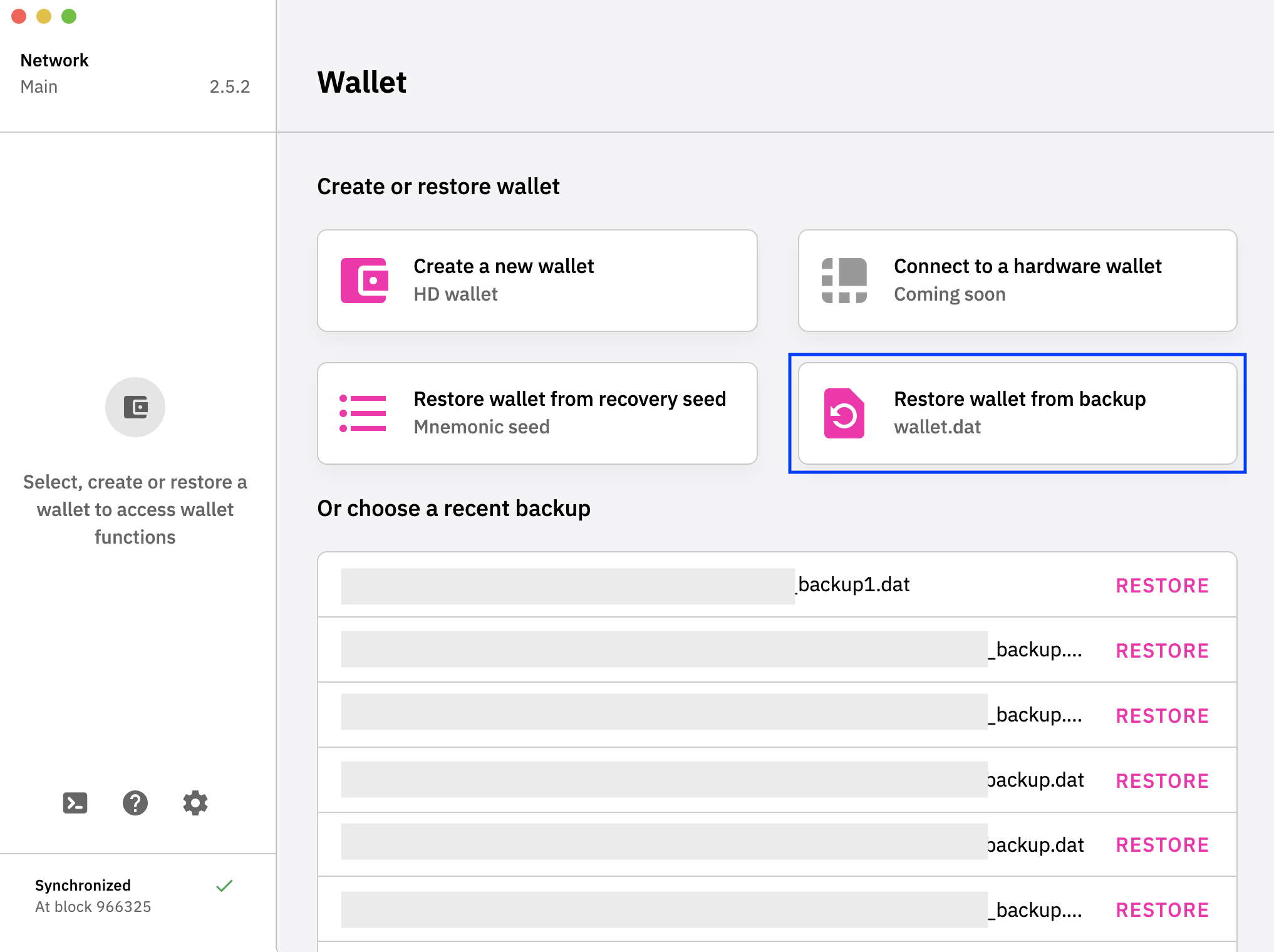
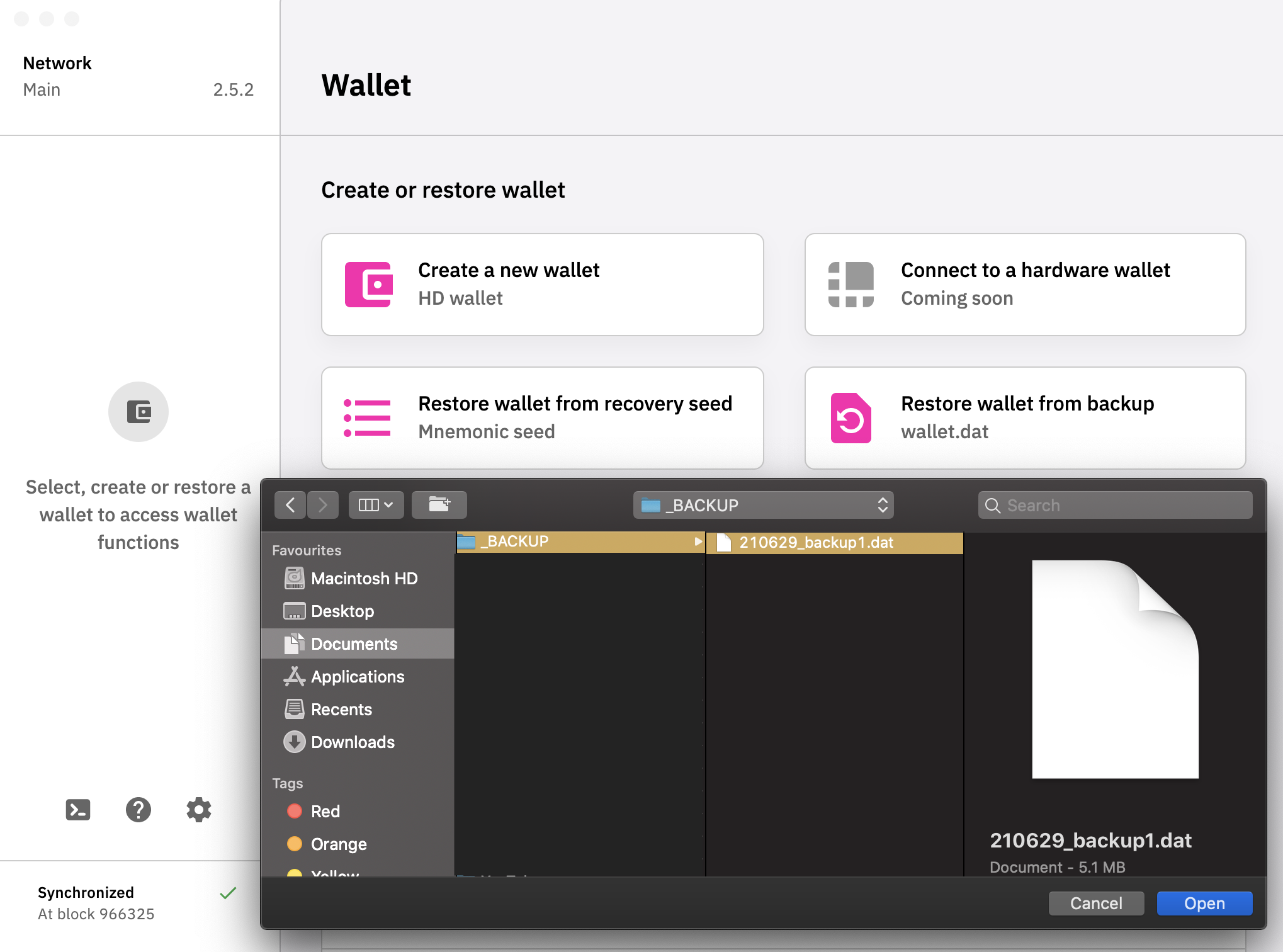
Was your app synced to 100% when you reinstalled before trying to Restore Wallet? The screen should look like this, with a green tick at the bottom left hand corner.
After selecting Restore wallet from backup, a window should pop up:
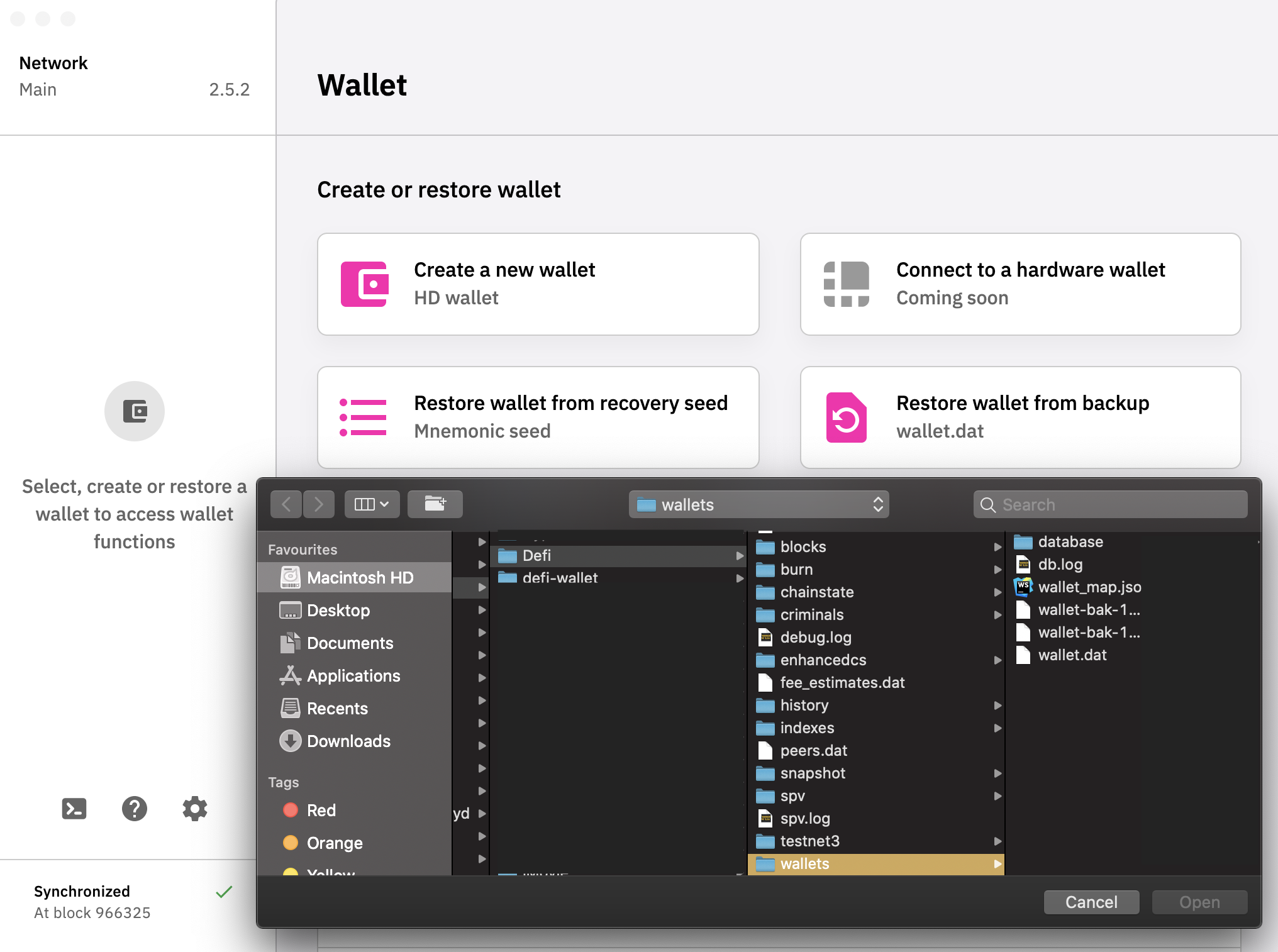
But for me I store it in another folder on my laptop, so I'll redirect the app to where the wallet.dat is located.
izzycsy
on 29 Jun 2021
Hi @izzycsy
Yes the App was synced 100%. I tried to use my backuped wallet:
7) Installed v.2.5.0 and tried to load mykeydefi.dat
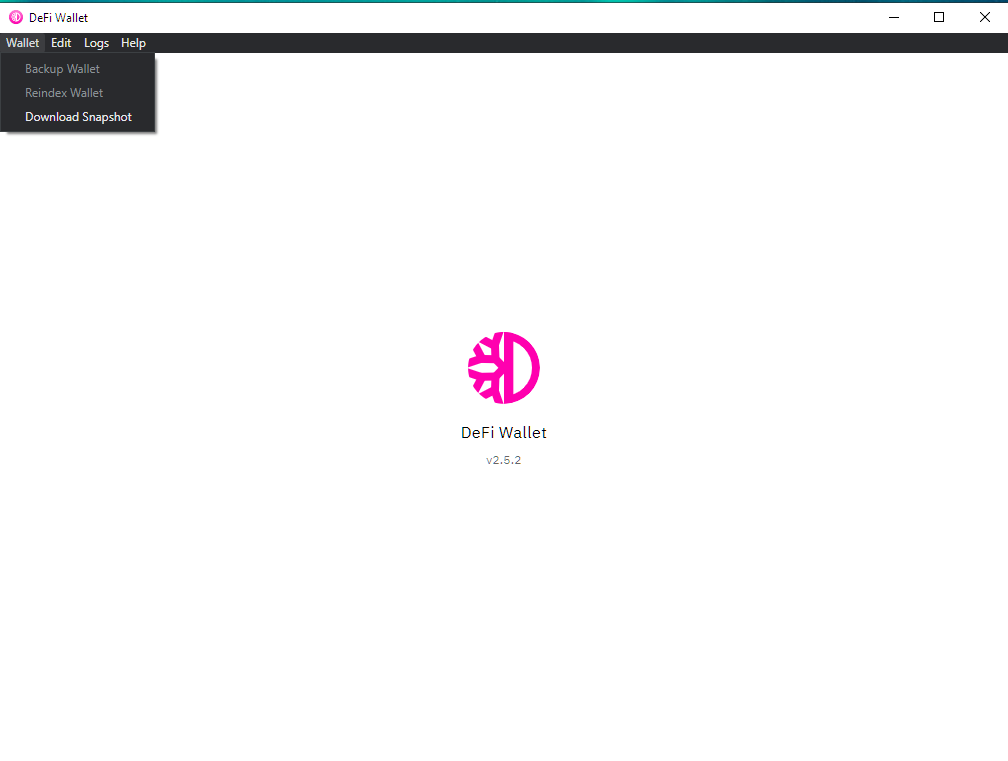
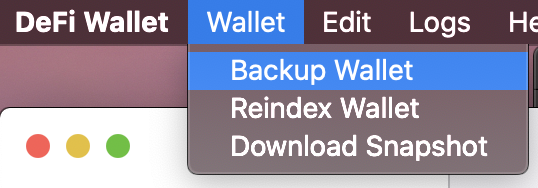
Currently i can not select anything beside downloading a snapshot.
As mentioned, i'm stucked on the loading screen. The loading animation is popping up for a few seconds and than disappear.
cryptolaus
on 29 Jun 2021
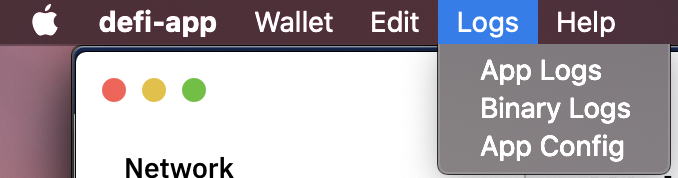
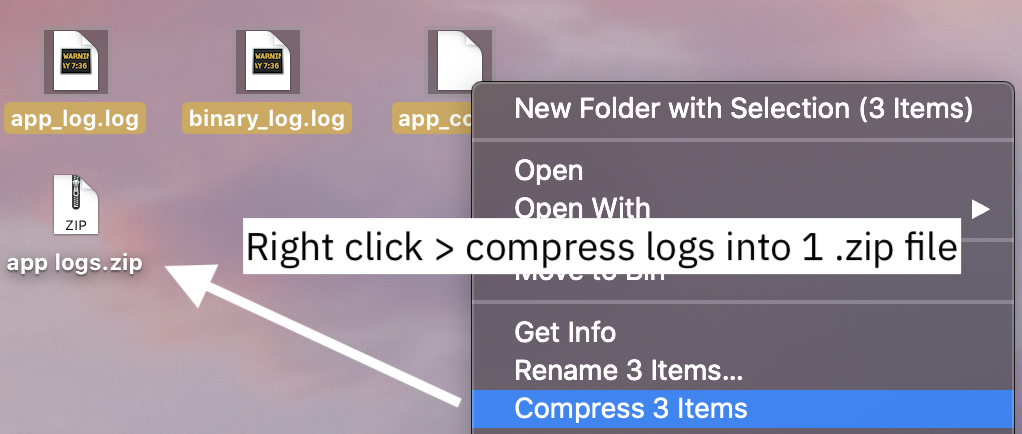
Hi @cryptolaus , can you save all 3 logs, .zip it and send here please.
izzycsy
on 29 Jun 2021
Here we are, hope that helps.
cryptolaus
on 29 Jun 2021
Hi @cryptolaus , based on your logs, did you attempt to rename mykeydefi.dat? If so, please do not rename your .dat file when the app is running, this might corrupt the file as well. In fact, do not rename / move any file that was created by the app in the 3 folders:
App Installation
C:\Users\username\Program Files\DeFi Wallet
Blockchain folder
C:\Users\<username>\AppData\Roaming\DeFi Blockchain\
DeFi Wallet folder
C:\Users\username\AppData\Roaming\defi-wallet
If you want to name your wallet.dat, do it when you're create a new wallet backup, rename it and specify where you want it to be saved. After which, don't move it around anymore.
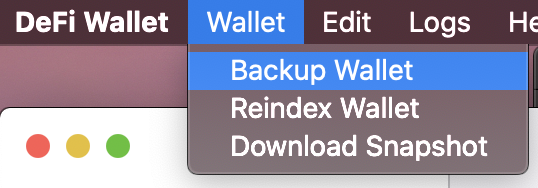
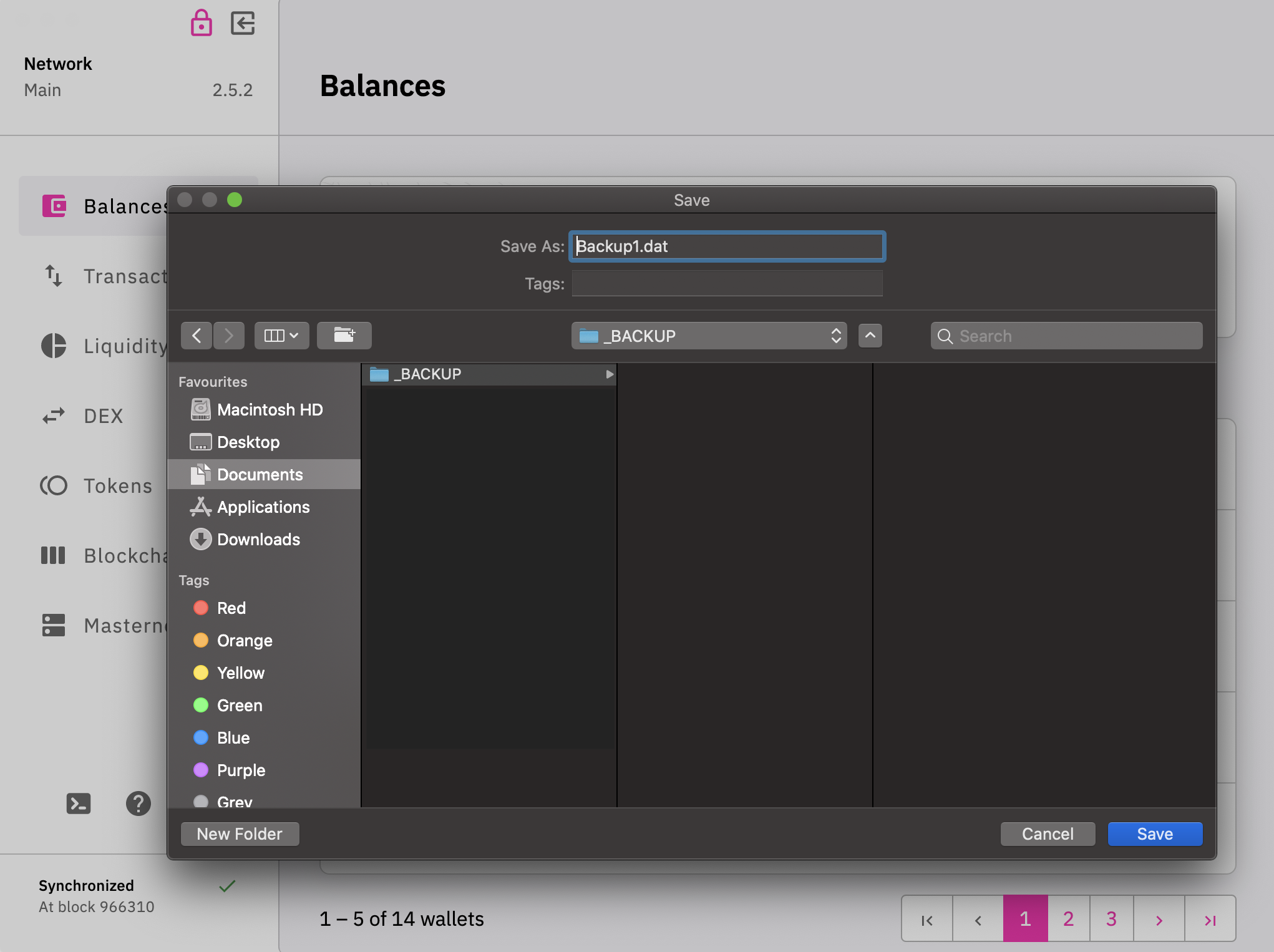
We've investigated your logs. Your wallet.dat (mykeydefi.dat) seems to be corrupted. We also suspect that your local drive might be at fault, you might want to check your hard drive.
Before you deleted everything (point 10. in your first comment), did you make a backup of your wallets folder? Because inside this wallets folder would contain other wallet.dat backups apart from the one you created in point 4. (mykeydefi.dat). Try restarting your PC and try another wallet.dat.
izzycsy
on 30 Jun 2021
Hi @izzycsy as i mentioned i deleted everything beside my backuped mykeydefi.dat. Currently i am NOT able to backup or reindex or restart the node or do anything else. I am only able to Download the Snapshot nothing else is working. It does not really help to show me option that im not able to select or perform. Any further ideas how to fix this ?
I am also afraid that mykeydefi.dat ist corrupted but how do i prevent the app from trying to load this corrupted *.dat file over and over again?
cryptolaus
on 30 Jun 2021
Hi @cryptolaus , to prevent the app from loading your mykeydefi.dat, you might have to try reinstalling again. Since you already have a a backup, albeit corrupted, you can try moving it in Documents (for example) or any folder in your C: drive, then do the reinstallation;
• Delete the 3 folders again
• Download the app
• Sync to 100%
• Restore using your mykeydefi.dat by directing the app to where the wallet.dat is
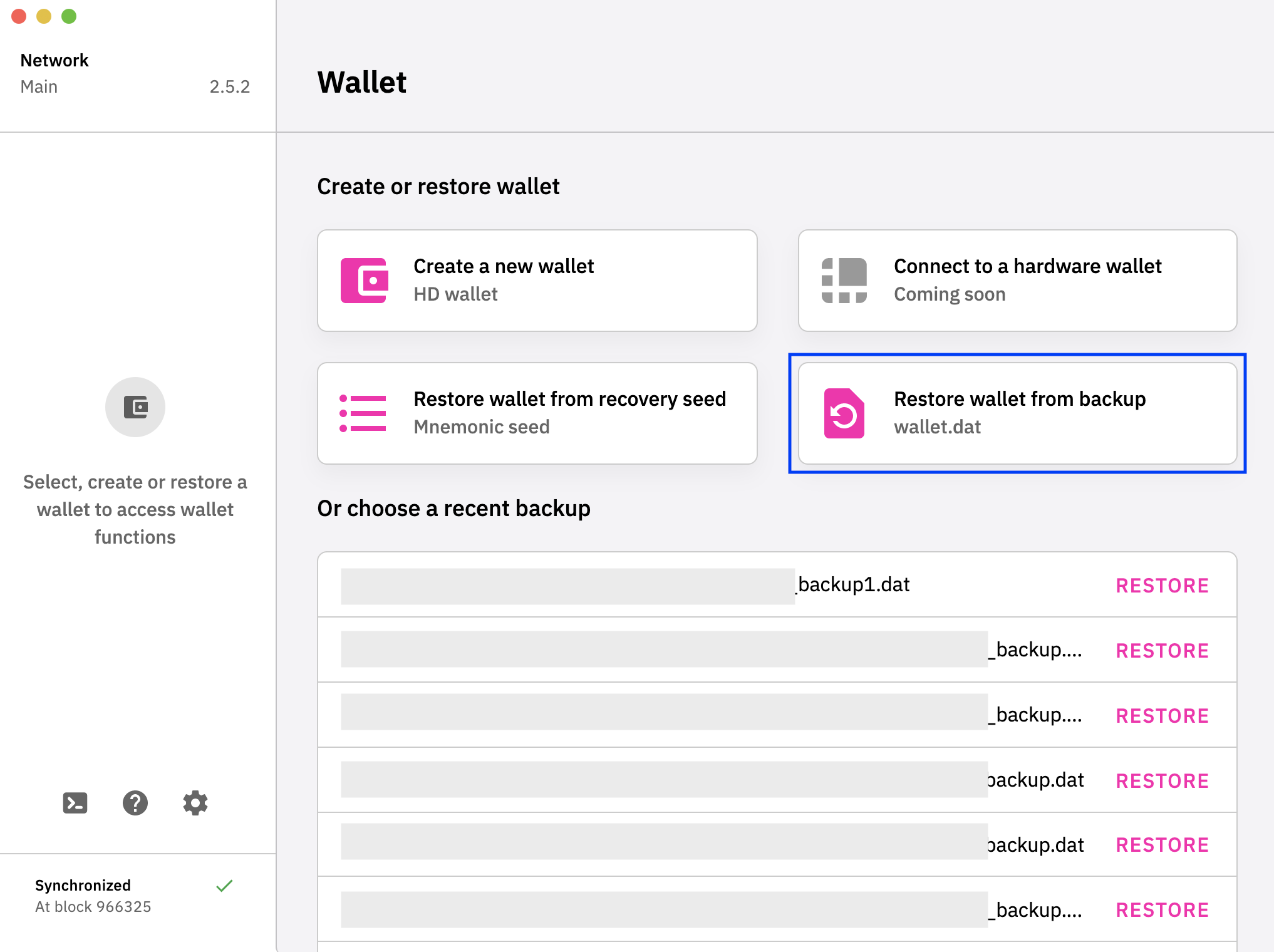
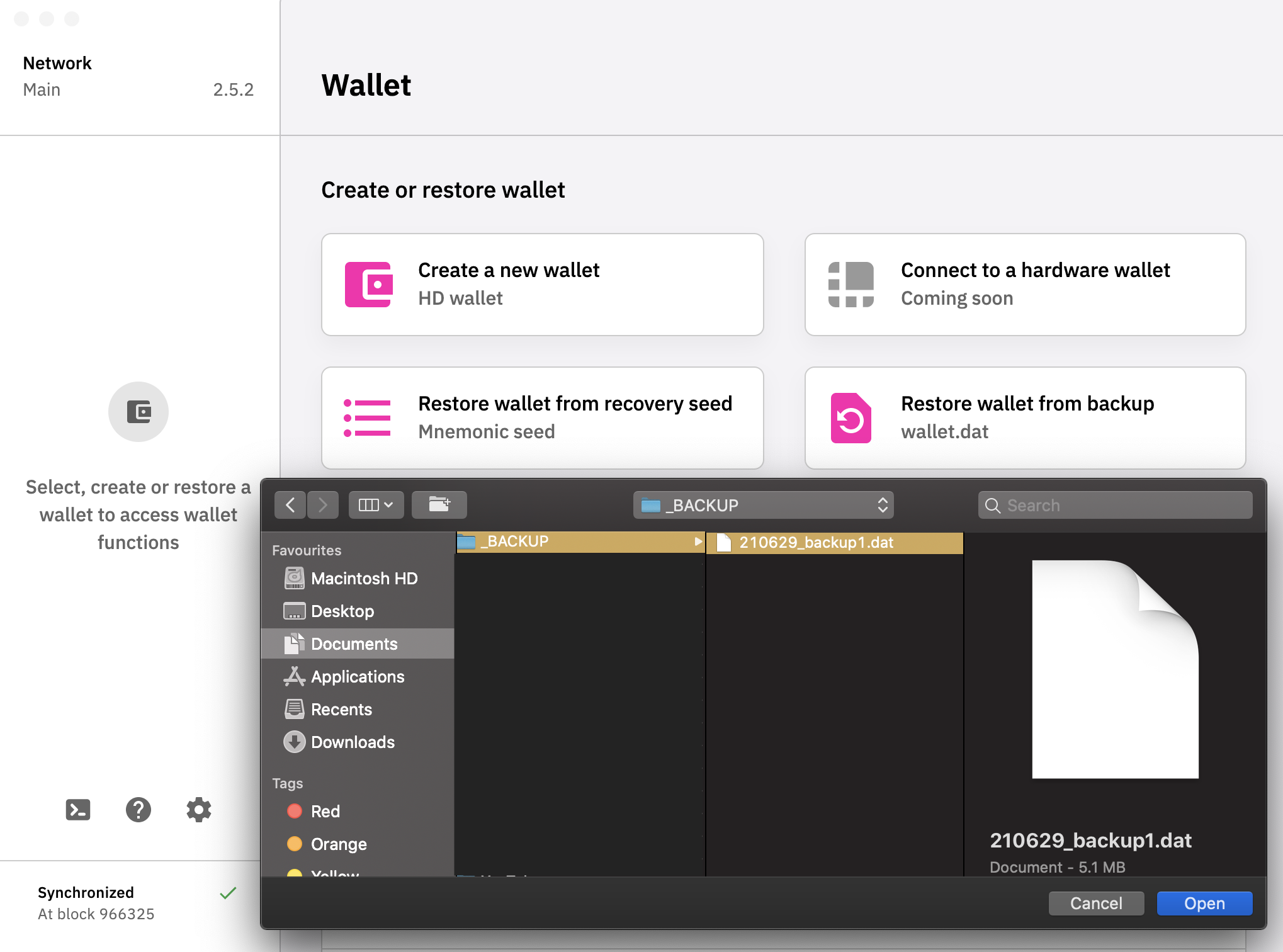
However, we do suspect that there's an issue with your hard drive as you were unable to rename a file. The following might be a technical workaround which you can try:
• open the Windows command line with
• run chkdsk /f /r
• then you will have to restart the computer to proceed with the hard drive check
• afterwards you could try the salvage wallet again.
You can also try using pywallet to recover private keys from wallets that were too corrupt to automatically salvage. Again, this is quite technical.
izzycsy
on 30 Jun 2021
Hi @izzycsy
Deleted all 3 folders > downloaded "DeFi Wallet app" Windows Version 2.5.2 from https://defichain.com/downloads/
Trojan:Win32/FormBook.AVP!MTB virus detected!
Is this a false positive ?
cryptolaus
on 1 Jul 2021
Hi @cryptolaus , as mentioned before, there could be an issue with your hard drive, and you've just confirmed that your PC is infected with a virus. Perhaps these might help:
https://applefixes.com/threat-encyclopedia/trojanwin32-cobaltstrike-mzkmtb/
https://www.trendmicro.com/vinfo/us/threat-encyclopedia/malware/trojan.win32.formbook.epj/
You might want to contact your local PC brand for technical support. I'd suggest you save your wallet.dat on a thumbdrive first, to prevent this virus from accessing your files. You could also try the wallet.dat on another computer, of course if your scanned result shows that the virus did not infect your wallet.dat. If it's unsuccessful on the 2nd computer you tried, then your wallet.dat is confirmed to be corrupted and there's nothing else we can do to help.
izzycsy
on 1 Jul 2021
Hi @izzycsy.
NO my PC was not infected by a virus.
The virus was detected in this file "DeFi-Wallet-Setup-2.5.2.exe" AFTER downloading it! Hoever ...
I also performed a chkdsk / f / r. No issues so far.
BTW i installed an older version of the DFI Wallet App (2.5.0) and the app started working / loading again AFTER i moved my backuped mykeydefi.dat file to another drive.
So i guess i have to live with a self-inflicted corrupted *.dat file, lesson learned :)
thx @izzycsy for your help!
cryptolaus
on 1 Jul 2021
Hi @cryptolaus , you manage to get your wallet.dat running again on v2.5.0? If so, please make a new backup and keep a copy in case you face node is disconnected again or some other unforeseen issue.
izzycsy
on 1 Jul 2021
Hi @cryptolaus , you manage to get your wallet.dat running again on v2.5.0? If so, please make a new backup and keep a copy in case you face
node is disconnectedagain or some other unforeseen issue.
Yes i got my wallet.dat running again on v 2.5.0 > updated within the app to v.2.5.2 > downloaded snapshot and waited till 100% sync. Tried to restore from mykeydefi.dat but failed as expected > 8) After a few seconds showing a loading bar the following error message occurred: “Verbindung mit der Node ist getrennt”
cryptolaus
on 1 Jul 2021
Hi @cryptolaus , you may stick to using a working version for now, as v2.5.2 is not a mandatory update. Our team will look into the Trojan:Win32/FormBook.AVP!MTB occurrence. I'll be closing this issue for now.
izzycsy
on 1 Jul 2021
Hi @cryptolaus, I believe it's a false positive from MS end. I've updated to the latest security intelligence update 1.343.538.0 and the file is not reported as Trojan:Win32/FormBook.AVP!MTB anymore.
 thedoublejay
on 7 Jul 2021
thedoublejay
on 7 Jul 2021
Related issues
 lraphael
·
10Comments
lraphael
·
10Comments
 John-Gee
·
5Comments
John-Gee
·
5Comments
 jpressler
·
7Comments
jpressler
·
7Comments
 gabriello79
·
4Comments
gabriello79
·
4Comments
gabriello79
·
4Comments
gabriello79
·
4Comments