App: MacOS Big Sur: Unable to open app after installation
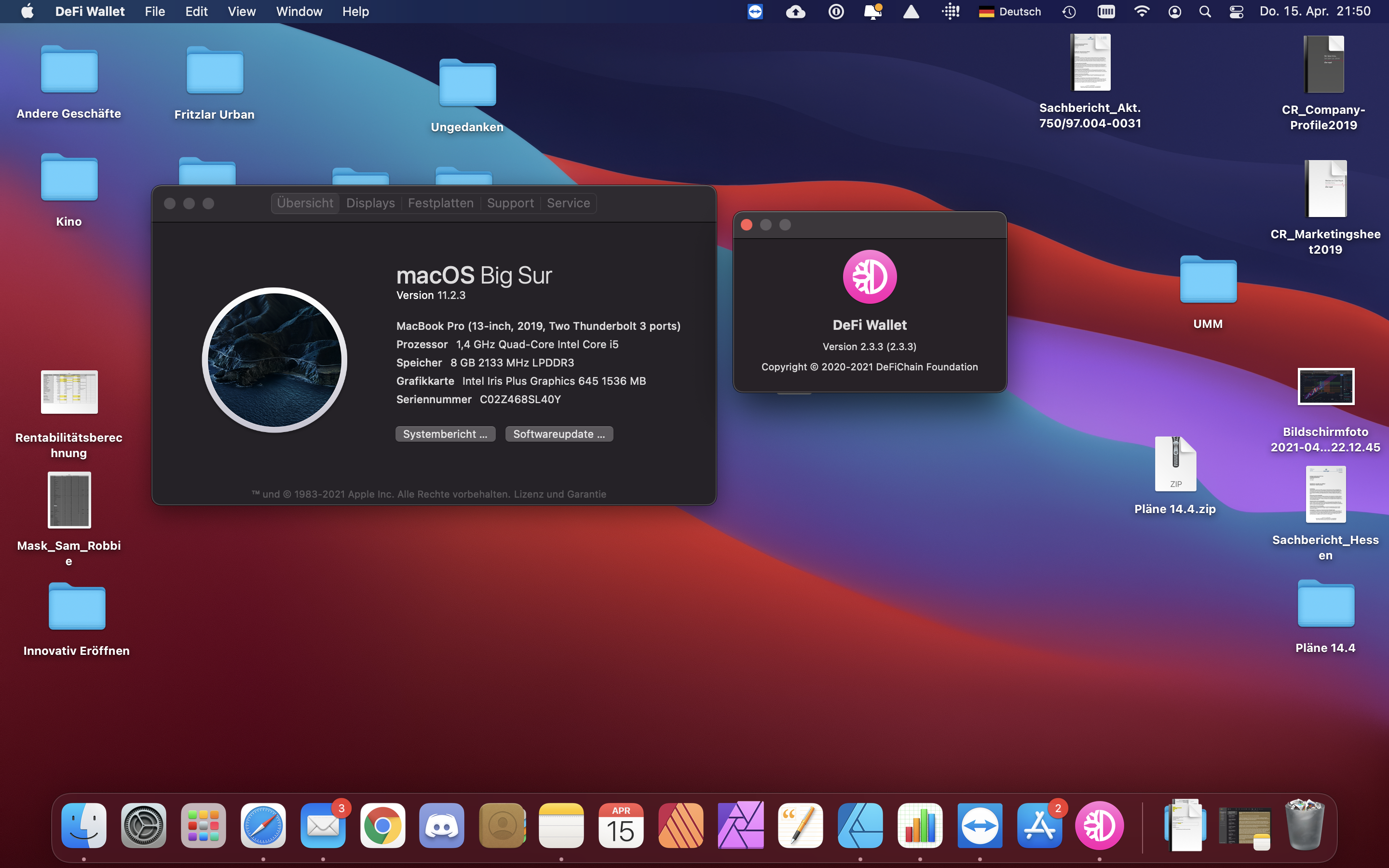
What happened: I got the latest OSX and Wallet 2.3.3 but when I open the app, the frontend isn't opening at all.
What you expected to happen: to get an interface once I open the app
How to reproduce it (as minimally and precisely as possible):
just open the app
What are your environment parameters?
- DeFi Wallet Version: 2.3.3
- Operating System (OS): 11.2.3
Anything else we need to know?:
 Morhpois01
All 14 comments
@Morhpois01: Thanks for opening an issue, it is currently awaiting triage.
The triage/accepted label can be added by foundation members by writing /triage accepted in a comment.
In the meantime, you can:
- Checkout DeFiChain’s Github issue page to see if your issue has already been reported
- Submit any logs if you have them, this will greatly expedite the process for us.
- You can also join our Telegram or Reddit community channels.
Details
I am a bot created to help the DeFiCh developers manage community feedback and contributions. You can check out my manifest file to understand my behavior and what I can do. If you want to use this for your project, you can check out the DeFiCh/oss-governance-bot repository.
 defichain-bot
on 16 Apr 2021
defichain-bot
on 16 Apr 2021
I'm having the same issue, after opening the wallet app "nothing" happens.
the process manager shows, that these processes are started:
- Defi Wallet
- Defi Wallet Helper (GPU)
- Defi Wallet Helper
the only possible option is to open the "about" menu point like shown in the original post.
defi-cli (v1.6.3) is starting normally and syncing all blocks as expected.
 adrian-schnell
on 16 Apr 2021
adrian-schnell
on 16 Apr 2021
maybe I found something - I started the app with the console and found an unhandled exception:
/Applications/DeFi\ Wallet.app/Contents/MacOS/DeFi\ Wallet
13:31:10.725 › Error: Inconsistent data in default config
at UiConfig.getExistingConfig (/Applications/DeFi Wallet.app/Contents/Resources/app.asar/electron-app/build/electron-app/src/services/uiconfig.js:165:15)
at UiConfig.(/Applications/DeFi Wallet.app/Contents/Resources/app.asar/electron-app/build/electron-app/src/services/uiconfig.js:127:51)
at step (/Applications/DeFi Wallet.app/Contents/Resources/app.asar/electron-app/build/electron-app/src/services/uiconfig.js:63:23)
at Object.next (/Applications/DeFi Wallet.app/Contents/Resources/app.asar/electron-app/build/electron-app/src/services/uiconfig.js:44:53)
at /Applications/DeFi Wallet.app/Contents/Resources/app.asar/electron-app/build/electron-app/src/services/uiconfig.js:38:71
at new Promise ()
at __awaiter (/Applications/DeFi Wallet.app/Contents/Resources/app.asar/electron-app/build/electron-app/src/services/uiconfig.js:34:12)
at UiConfig.get (/Applications/DeFi Wallet.app/Contents/Resources/app.asar/electron-app/build/electron-app/src/services/uiconfig.js:117:16)
at App.(/Applications/DeFi Wallet.app/Contents/Resources/app.asar/electron-app/build/electron-app/src/app.js:245:55)
at step (/Applications/DeFi Wallet.app/Contents/Resources/app.asar/electron-app/build/electron-app/src/app.js:52:23)
Error: Inconsistent data in default config
at UiConfig.getExistingConfig (/Applications/DeFi Wallet.app/Contents/Resources/app.asar/electron-app/build/electron-app/src/services/uiconfig.js:165:15)
at UiConfig.(/Applications/DeFi Wallet.app/Contents/Resources/app.asar/electron-app/build/electron-app/src/services/uiconfig.js:127:51)
at step (/Applications/DeFi Wallet.app/Contents/Resources/app.asar/electron-app/build/electron-app/src/services/uiconfig.js:63:23)
at Object.next (/Applications/DeFi Wallet.app/Contents/Resources/app.asar/electron-app/build/electron-app/src/services/uiconfig.js:44:53)
at /Applications/DeFi Wallet.app/Contents/Resources/app.asar/electron-app/build/electron-app/src/services/uiconfig.js:38:71
at new Promise ()
at __awaiter (/Applications/DeFi Wallet.app/Contents/Resources/app.asar/electron-app/build/electron-app/src/services/uiconfig.js:34:12)
at UiConfig.get (/Applications/DeFi Wallet.app/Contents/Resources/app.asar/electron-app/build/electron-app/src/services/uiconfig.js:117:16)
at App.(/Applications/DeFi Wallet.app/Contents/Resources/app.asar/electron-app/build/electron-app/src/app.js:245:55)
at step (/Applications/DeFi Wallet.app/Contents/Resources/app.asar/electron-app/build/electron-app/src/app.js:52:23)
(node:42814) UnhandledPromiseRejectionWarning: Error: Inconsistent data in default config
at UiConfig.getExistingConfig (/Applications/DeFi Wallet.app/Contents/Resources/app.asar/electron-app/build/electron-app/src/services/uiconfig.js:165:15)
at UiConfig.(/Applications/DeFi Wallet.app/Contents/Resources/app.asar/electron-app/build/electron-app/src/services/uiconfig.js:127:51)
at step (/Applications/DeFi Wallet.app/Contents/Resources/app.asar/electron-app/build/electron-app/src/services/uiconfig.js:63:23)
at Object.next (/Applications/DeFi Wallet.app/Contents/Resources/app.asar/electron-app/build/electron-app/src/services/uiconfig.js:44:53)
at /Applications/DeFi Wallet.app/Contents/Resources/app.asar/electron-app/build/electron-app/src/services/uiconfig.js:38:71
at new Promise ()
at __awaiter (/Applications/DeFi Wallet.app/Contents/Resources/app.asar/electron-app/build/electron-app/src/services/uiconfig.js:34:12)
at UiConfig.get (/Applications/DeFi Wallet.app/Contents/Resources/app.asar/electron-app/build/electron-app/src/services/uiconfig.js:117:16)
at App.(/Applications/DeFi Wallet.app/Contents/Resources/app.asar/electron-app/build/electron-app/src/app.js:245:55)
at step (/Applications/DeFi Wallet.app/Contents/Resources/app.asar/electron-app/build/electron-app/src/app.js:52:23)
(node:42814) UnhandledPromiseRejectionWarning: Unhandled promise rejection. This error originated either by throwing inside of an async function without a catch block, or by rejecting a promise which was not handled with .catch(). To terminate the node process on unhandled promise rejection, use the CLI flag--unhandled-rejections=strict(see https://nodejs.org/api/cli.html#cli_unhandled_rejections_mode). (rejection id: 2)
Downgrade (to app 2.3.2) or upgrade again to 2.3.3 does not solve this issue.
adrian-schnell
on 16 Apr 2021
I have the exact same issue here! :-(
 CryptoFabi
on 17 Apr 2021
CryptoFabi
on 17 Apr 2021
Hi @Morhpois01 @adrian-schnell @CryptoFabi , thanks for the feedback, please give us time to investigate. In the mean time, please keep your wallet.dat safe if you've funds on it.
 izzycsy
on 18 Apr 2021
izzycsy
on 18 Apr 2021
I found a solution:
the problem is solved after deleting the folder /Users/%username%/.defi and restarting the wallet (on MacOSX)
adrian-schnell
on 19 Apr 2021
Hi @adrian-schnell , you might be right, this may have happened because the new Mac protects you from other directory. We'll get this fix in the next release.
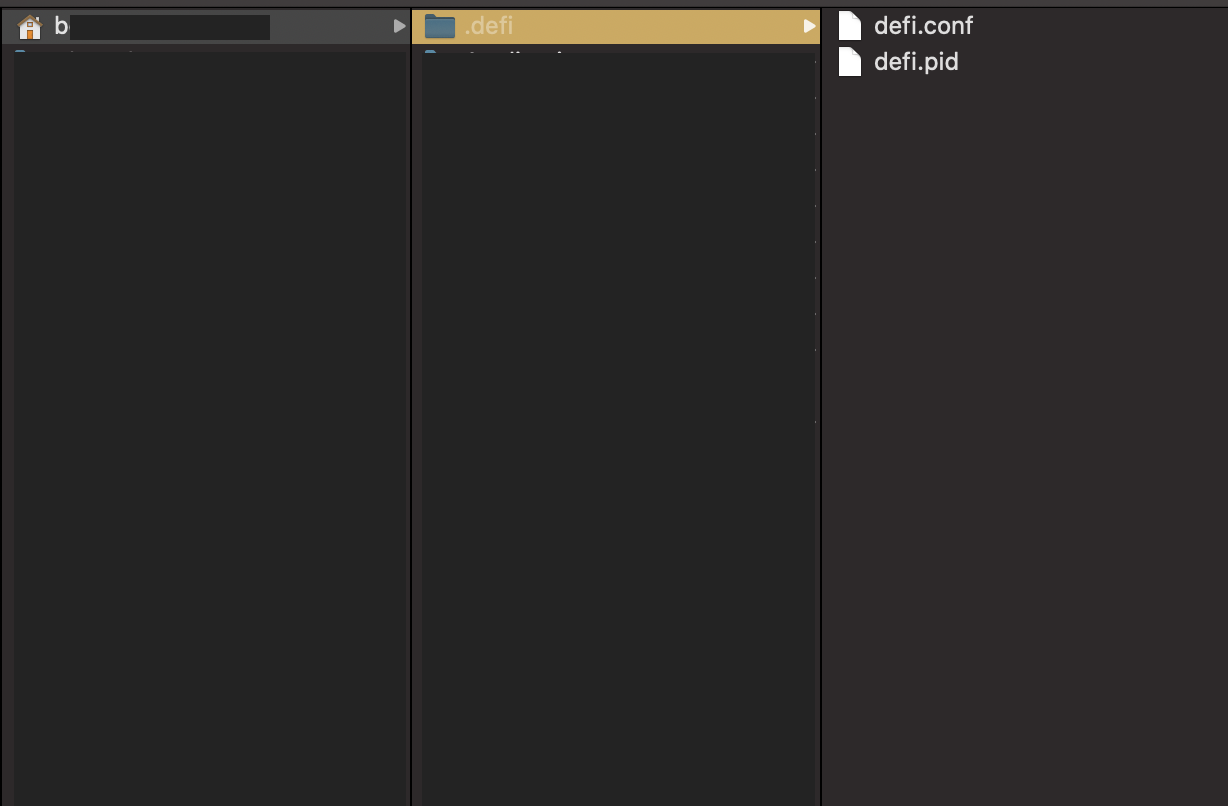
@Morhpois01 @CryptoFabi , can you try removing this file please?
Go to Folder:
/Users/<username>/.defi
izzycsy
on 19 Apr 2021
Can someone tell me how to find the file? Under the directory of my
username, there isn't anything from DeFi Wallet.
Bella @.*> schrieb am Mo., 19. Apr. 2021, 10:17:
Hi @adrian-schnell https://github.com/adrian-schnell , you might be
right, this may have happened because the new Mac protects you from other
directory. We'll get this fix in the next release.@CryptoFabi https://github.com/CryptoFabi , can you try removing this
file please?
/Users//.defi —
You are receiving this because you were mentioned.
Reply to this email directly, view it on GitHub
https://github.com/DeFiCh/app/issues/765#issuecomment-822271448, or
unsubscribe
https://github.com/notifications/unsubscribe-auth/ATWSQ7J7DCM6FOY7366BERLTJPRIHANCNFSM43BI34TA
.
Morhpois01
on 19 Apr 2021
Hi @Morhpois01 ,
- Go to Folder
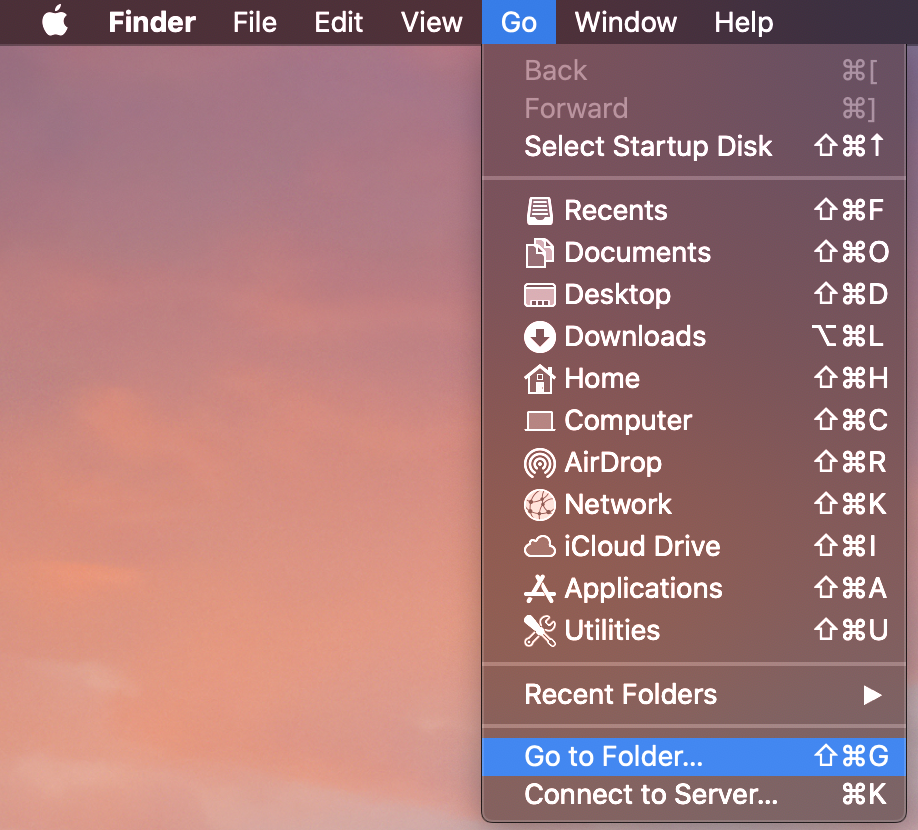
- Type:
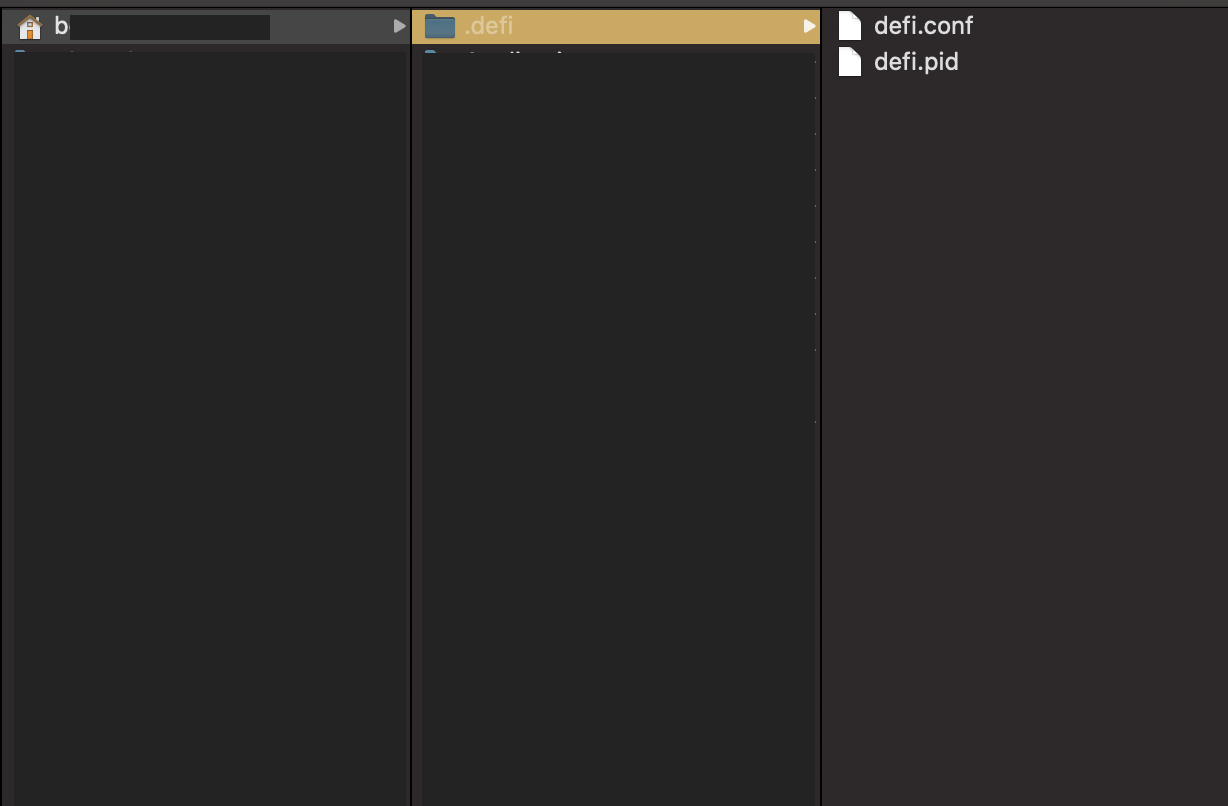
/Users/<username>/.defi, it would bring you to that folder.
izzycsy
on 19 Apr 2021
Hi bella,
I did and it brings me to my "user" folder where I got two folders "shared"
and "
"defi.conf", but my mac could not even find this specific file. 😬
Bella @.*> schrieb am Mo., 19. Apr. 2021, 11:12:
Hi @Morhpois01 https://github.com/Morhpois01 ,
- Go to Folder
[image: Mac - Go To Folder]
https://user-images.githubusercontent.com/65014479/115211530-3b48de00-a132-11eb-99e0-a94a06886bdc.png
- Type: /Users/
/.defi , it would bring you to that folder. [image: _defi folder]
https://user-images.githubusercontent.com/65014479/115211649-59164300-a132-11eb-9107-2f576d45bc11.png—
You are receiving this because you were mentioned.
Reply to this email directly, view it on GitHub
https://github.com/DeFiCh/app/issues/765#issuecomment-822309314, or
unsubscribe
https://github.com/notifications/unsubscribe-auth/ATWSQ7I6QVB3ONWBAPA46ALTJPXXVANCNFSM43BI34TA
.
Morhpois01
on 19 Apr 2021
Hi @Morhpois01 , it's a hidden folder, can you take a screenshot so I can understand how you're unable to find the folder?
Shortcut for taking a screenshot: command + shift + 4
izzycsy
on 19 Apr 2021
Hi Bella,
See below what I typed and what will appear..
Am 19.04.2021 um 11:37 schrieb Bella @.*>:
Hi @Morhpois01 https://github.com/Morhpois01 , it's a hidden folder, can you take a screenshot so I can understand how you're unable to find the folder?
Shortcut for taking a screenshot: command + shift + 4—
You are receiving this because you were mentioned.
Reply to this email directly, view it on GitHub https://github.com/DeFiCh/app/issues/765#issuecomment-822326297, or unsubscribe https://github.com/notifications/unsubscribe-auth/ATWSQ7NRZ43GBEEF6LDGLDDTJP2UJANCNFSM43BI34TA.
Morhpois01
on 19 Apr 2021
I just found the short key to Show my hidden files.. found it and deleted
it.. it is working now.. 💪
Bella @.*> schrieb am Mo., 19. Apr. 2021, 11:37:
Hi @Morhpois01 https://github.com/Morhpois01 , it's a hidden folder,
can you take a screenshot so I can understand how you're unable to find the
folder?
Shortcut for taking a screenshot: command + shift + 4—
You are receiving this because you were mentioned.
Reply to this email directly, view it on GitHub
https://github.com/DeFiCh/app/issues/765#issuecomment-822326297, or
unsubscribe
https://github.com/notifications/unsubscribe-auth/ATWSQ7NRZ43GBEEF6LDGLDDTJP2UJANCNFSM43BI34TA
.
Morhpois01
on 19 Apr 2021
Hi @Morhpois01 @adrian-schnell @CryptoFabi , v2.3.4 is out. Please read through the release notes before updating. Do give a thumbs up to this comment if your issue has been resolved.
izzycsy
on 11 May 2021
Related issues
 Rocky-81
·
8Comments
Rocky-81
·
8Comments
 jleidinger
·
6Comments
jleidinger
·
6Comments
 jpressler
·
7Comments
jpressler
·
7Comments
 elxlee
·
6Comments
elxlee
·
6Comments
 lraphael
·
10Comments
lraphael
·
10Comments
Most helpful comment
I just found the short key to Show my hidden files.. found it and deleted
it.. it is working now.. 💪
Bella @.*> schrieb am Mo., 19. Apr. 2021, 11:37: