What happened: I have updated my desktop DeFi wallet to version 2.3.3 at first it struggled with downloading the snapshot and for a couple of times it gave me errors. then I decided to let it sync the blocks from scratch and it went up to 87% and again gave another error like node is disconnected.
Now the whole app is not coming up again and it just shows the logo
What you expected to happen: The wallet to start and run the syncing process.
How to reproduce it (as minimally and precisely as possible):
What are your environment parameters?
- DeFi Wallet Version: 2.3.3
- Operating System (OS): macOS Big Sur (11.2.3)
Anything else we need to know?:
 rezaghiasi
All 25 comments
@rezaghiasi: Thanks for opening an issue, it is currently awaiting triage.
The triage/accepted label can be added by foundation members by writing /triage accepted in a comment.
In the meantime, you can:
- Checkout DeFiChain’s Github issue page to see if your issue has already been reported
- Submit any logs if you have them, this will greatly expedite the process for us.
- You can also join our Telegram or Reddit community channels.
Details
I am a bot created to help the DeFiCh developers manage community feedback and contributions. You can check out my manifest file to understand my behavior and what I can do. If you want to use this for your project, you can check out the DeFiCh/oss-governance-bot repository.
 defichain-bot
on 10 Apr 2021
defichain-bot
on 10 Apr 2021
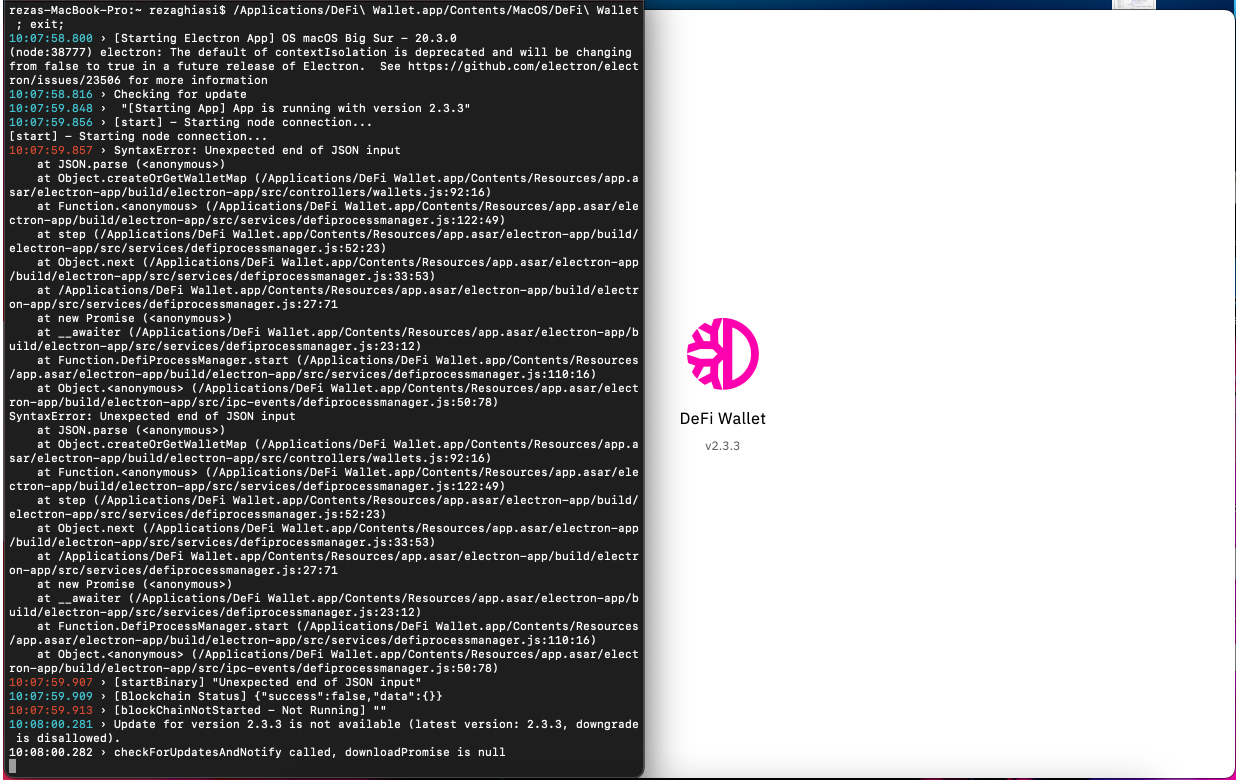
If you run the app from the command line, what does it say when you're just seeing the logo?
 John-Gee
on 11 Apr 2021
John-Gee
on 11 Apr 2021
Here is a screenshot of command line and the application
rezaghiasi
on 11 Apr 2021
So from looking at your message and the code it seems your wallet_map.json file may have some trouble in there. That file is in your defi folder.
If you know your way around computers, maybe you can look at it and figure what's wrong. Here's a sanitized version of what it should look like: https://gist.github.com/John-Gee/e66b92d439466e1f6b4ad824ccb49231 The stuff in bracket is the sanitized part.
If not, I'd be happy to help, but up to you if there's something private in there or not.
John-Gee
on 11 Apr 2021
Alright, let me have a look and get back to you
thanks a lot
rezaghiasi
on 11 Apr 2021
Sure thing!
John-Gee
on 11 Apr 2021
I think I will be needing more help on this matter, lol
how can we proceed?
rezaghiasi
on 11 Apr 2021
Come to the DFI telegram and I can help you from there.
John-Gee
on 11 Apr 2021
Thanks for the help @John-Gee. @rezaghiasi as John pointed out, there might be some issue on your wallet_map.json. Need to check it for potential issues. You can post it here but you can delete some personal info like directory etc. Just need to view the structure
 thedoublejay
on 12 Apr 2021
thedoublejay
on 12 Apr 2021
In my case the app doesn't open also, on my windows PC. Installed DeFi-Wallet-Setup-2.3.2 and DeFi-Wallet-Setup-2.3.3, but both the same. What do i have to do?
 Mabarkubus
on 20 Apr 2021
Mabarkubus
on 20 Apr 2021
My App dosen't open also. I have a Mac (macOS Big Sur (11.2.3)). What should i do?
 gianlucast1
on 22 Apr 2021
gianlucast1
on 22 Apr 2021
Hi @Mabarkubus , did you use the DeFi-Wallet-Setup-2.3.3.exe file extension format? Please backup your wallet.dat before performing a reinstallation.
Hi @gianlucast1 , for MacOS Big Sur, try removing the /Users/<username>/.defi file, here's a guide MacOS Big Sur: Unable to open app after installation.
 izzycsy
on 23 Apr 2021
izzycsy
on 23 Apr 2021
I still had made a backup of my wallet and tried severel times a reinstallation. I don't know what to do now?
Mabarkubus
on 23 Apr 2021
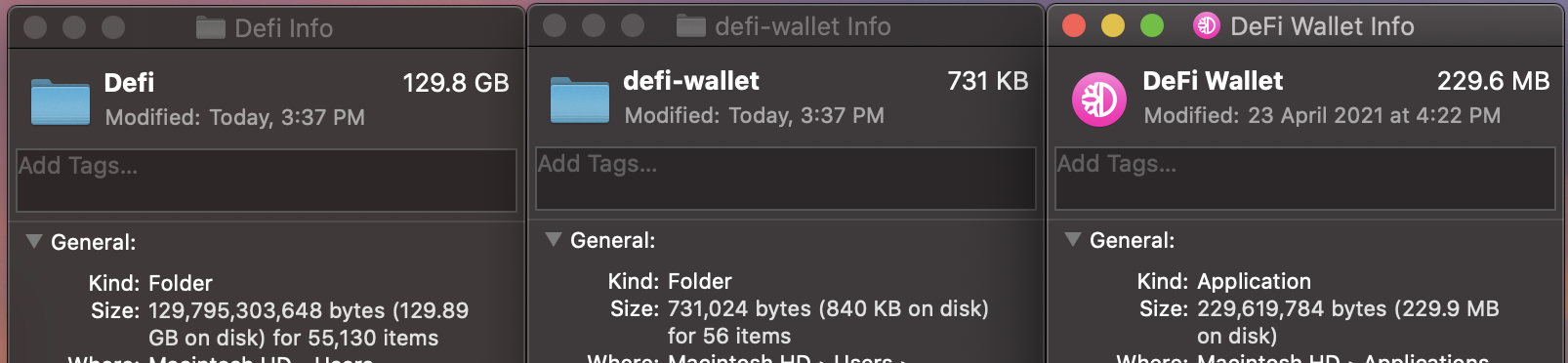
Hi @Mabarkubus , can you check if you've sufficient storage? On Windows, currently it requires >100GB of storage. The team is working on a light wallet and reducing the storage size required.
izzycsy
on 24 Apr 2021
@izzycsy it's not working. I have the same problem, like on the screenshot in the massage from "rezaghiasi" 14 days ago.
gianlucast1
on 25 Apr 2021
Then this could be the reason, i'm only having 21GB of storage on Drive C...
Mabarkubus
on 25 Apr 2021
@izzycsy it's not working. I have the same problem, like on the screenshot in the massage from "rezaghiasi" 14 days ago.
You may want to start from scratch, with a proper backup of your wallet then.
John-Gee
on 25 Apr 2021
...but i had the "older" versions of the app DeFi wallet before version 2.3.1 in use, so why is this problem now. I deleted a lot of software and files on my system, but the app doesn't work again...
Mabarkubus
on 26 Apr 2021
Hi @Mabarkubus , that's because the blockchain grows and you're running the blocks yourself in your desktop app. We understand that it's taking a lot of storage space and the team is working on reducing it somehow, including a Light Wallet. Thank you for your understanding.
izzycsy
on 26 Apr 2021
@izzycsy it's not working. I have the same problem, like on the screenshot in the massage from "rezaghiasi" 14 days ago.
You may want to start from scratch, with a proper backup of your wallet then.
How can i do this?
Do you know how many storage i need on my mac Book to Start the Wallet? Now I have 32GB free. I don't know, but maybe I don't have enough space on my Mac.
gianlucast1
on 26 Apr 2021
Hi @gianlucast1 I doubt it's enough, currently it grew to this size for MacOS, the screenshot includes the snapshot download as well. I would advice that you backup your wallet.dat and wait for a fix if you didn't manage to clear storage.
izzycsy
on 26 Apr 2021
Thx for the massage. Is it possible to download the Wallet with the Snapshot to an external hard drive and run the wallet on the hard drive?
gianlucast1
on 26 Apr 2021
Yes you can do that, the snapshot is about 29Gb and the blockchain around 80Gb, you'll need enough space for both before deleting the snapshot.
John-Gee
on 26 Apr 2021
Cool, thank you. So i will check it out.
gianlucast1
on 26 Apr 2021
Hi @rezaghiasi @Mabarkubus @gianlucast1 , v2.3.4 is out. Please read through the release notes before updating. If your issue still persist, please send your logs here and explain what you faced, Unable to start blockchain, we can further discuss on the issue there. We would like to keep same issues in one thread. Thank you.
izzycsy
on 11 May 2021
Related issues
 lraphael
·
10Comments
lraphael
·
10Comments
 elxlee
·
6Comments
elxlee
·
6Comments
 wyssen
·
4Comments
wyssen
·
4Comments
 Rocky-81
·
8Comments
Rocky-81
·
8Comments
 jpressler
·
7Comments
jpressler
·
7Comments