What happened:
After updating to 2.3.0 and waiting for full sync I made a DFI => BTC change on the DEX.
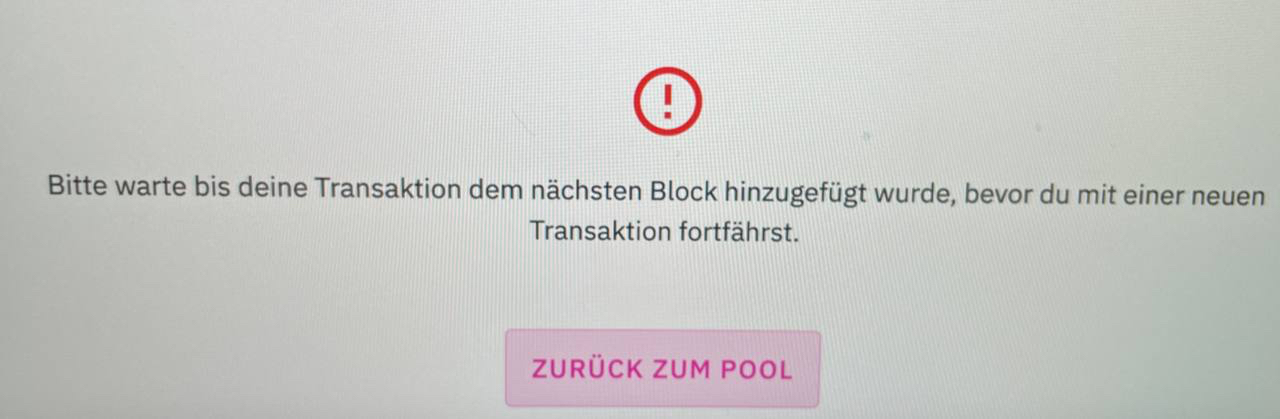
Wanted to add Liquidity to the BTC Pool, but received the error in the added screenshot.
What you expected to happen:
I expected the App to add the amount of BTC / DFI.
How to reproduce it (as minimally and precisely as possible):
Close the error and retry to to add Liquidity.
What are your environment parameters?
- DeFi App Version: 2.3.0
- Operating System (OS): macOS Big Sur 11.2.1
 Brownie89
All 19 comments
@Brownie89: Thanks for opening an issue, it is currently awaiting triage.
The triage/accepted label can be added by foundation members by writing /triage accepted in a comment.
In the meantime, you can:
- Checkout DeFiChain’s Github issue page to see if your issue has already been reported
- Checkout how to an submit issue for DeFi app
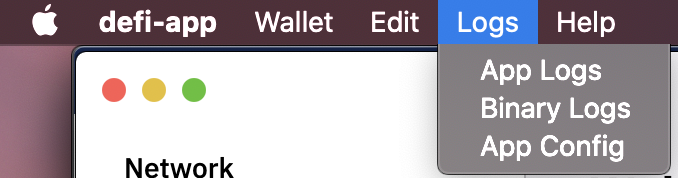
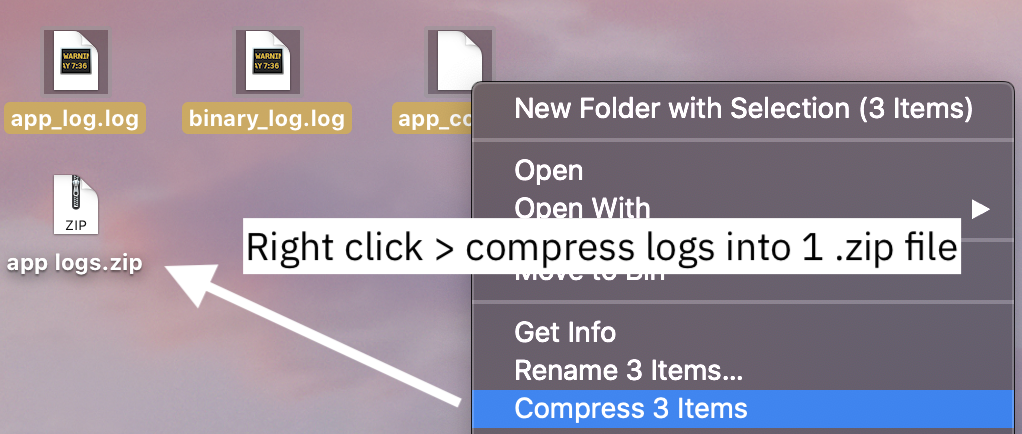
- Submit any logs if you have them, this will greatly expedite the process for us.
Details
I am a bot created to help the DeFiCh developers manage community feedback and contributions. You can check out my manifest file to understand my behavior and what I can do. If you want to use this for your project, you can check out the DeFiCh/oss-governance-bot repository.
 defichain-bot
on 24 Feb 2021
defichain-bot
on 24 Feb 2021
Hi @Brownie89 , thanks for your feedback, the error Please wait for your transaction to be reflected in the next block before proceeding with a new transaction occurred because you may have too many transactions stuck in the same block. The solution for this would be to leave your app running for about 1–2 hours and let the app process your pending transactions. Type the following to check pending transactions via CLI: listtransactions
 izzycsy
on 25 Feb 2021
izzycsy
on 25 Feb 2021
Waiting for the error to solve itself was my first idea, but this didn't help.
After waiting a couple of hours I tried to swap a little amount of ETH on the DEX, this worked, but I still wasn't able to add BTC Liquidity.
Then I added some ETH to LM successfully, this may have changed something in the background, because after this step I was also able to add BTC.
All this should be visible in the appended log-files.
Brownie89
on 25 Feb 2021
Today I was able to reproduce the error with the same steps already mentioned.
Changed DFI to BTC on DEX, tried to add it to LM and got the error. Waited for over 12 hours and retried with same error.
Added ETH to LM was successfully and afterwards I was able to add BTC to LM.
Brownie89
on 25 Feb 2021
Hi @Brownie89 , thanks for elaborating, please give us time to investigate this.
Can you try sending yourself 1 DFI and see if you can add DFI-BTC?
izzycsy
on 26 Feb 2021
I had the same issue. I solved it also by using the ETH-DFI first then the other pools worked fine but when I try to add first to BTC-DFI or USDT-DFI I'll get the same error.
 Amino159
on 26 Feb 2021
Amino159
on 26 Feb 2021
Hi @Amino159 , thanks for your feedback, can you send your app logs please?
izzycsy
on 26 Feb 2021
Of course. You'll find it attached.
app_logs.zip
Amino159
on 26 Feb 2021
Hi @Amino159 , thank you, please give us time to investigate this.
izzycsy
on 26 Feb 2021
Hi @Brownie89 @Amino159 , may I know what your output of the following:
getbalance — utxoDFI
gettokenbalances — accountDFI
The sum of utxoDFI & accountDFI would be your total DFI tokens.
izzycsy
on 14 Mar 2021
getbalance
1.52960166
gettokenbalances
[
"3.03015864@0",
Amino159
on 14 Mar 2021
Hi @Amino159 , can you send 1 DFI to your address that holds the 1.52 DFI. You can check which address holds those DFI via CLI:
listaccounts {} false false true
izzycsy
on 14 Mar 2021
@izzycsy When I check via the CLI I see serveral adresses but none of them is holding exactly the 1.52 DFI
But getbalance still same result as before.
Amino159
on 14 Mar 2021
@Amino159 does the DFI add up in your addresses? 1.52960166 + 3.03015864 = 4.5597603
DFI exist in 2 forms; utxoDFI and accountDFI. utxoDFI is used to pay for transactions fees while rewards received are in accountDFI. You can freely convert between the 2 anytime — at a 1:1 ratio. What you'll have to do is convert accountDFI to utxoDFI, the simplest way is to send DFI from your receive address B to your receive address A, the app will automatically convert for you.
Any function you use in the app charges a utxoDFI fee. It could be you've insufficient utxoDFI. Either that, or there's too many transactions going on in the same block, hence you'll have to wait for the next block to try again.
izzycsy
on 16 Mar 2021
Hi @Brownie89 @Amino159 , update v2.3.2 is out, this is a mandatory update. Please read through the release notes before updating.
Do give a thumbs up to this comment if your issue has been resolved, otherwise, please send new information (include screenshots) and app logs. Thank you.
izzycsy
on 22 Mar 2021
I just had exactly the same problem with version 2.3.2. See logs for details.
defilogs.zip
I then tried the following.
- Run the programme for a few minutes and wait -> without success.
- Add something to another pool -> without success
- Transfer a small amount from another wallet and try again to add something to the pool -> it worked
Env:
DeFi Wallet Version: 2.3.2
Operating System (OS): macOS Big Sur 11.2.3
 lraphael
on 24 Mar 2021
lraphael
on 24 Mar 2021
Having the same issue as above post installing 2.3.2
I'm able to make exchanges on DEX - however I cannot add to liquidity pool.
each time gives the above error.
"Please wait for your transaction to be reflected in the next block before proceeding with a new transaction."
DeFi Wallet Version: 2.3.2
Operating System (OS): macOS Big Sur 11.2.3
 mrowean
on 24 Mar 2021
mrowean
on 24 Mar 2021
Hi @lraphael @mrowean , it’s likely that you've insufficient utxoDFI balance (min. 1 DFI) — which is required to perform swap and all other functions. DFI exist in 2 forms; utxoDFI and accountDFI. utxoDFI is used to pay for transactions fees while rewards received from liquidity mining (for example) are in accountDFI.
You can freely convert between the 2 anytime — at a 1:1 ratio. To convert accountDFI to utxoDFI, the simplest way would via be DeFi Wallet app. Go to send DFI > paste in your address (send to yourself), the app will convert for you.
izzycsy
on 28 Mar 2021
Hi @Brownie89 @lraphael @mrowean , v2.3.3 is out. Please read through the release notes before updating. If you have not sync to 100%, there was a node issue on 05/04/2021 that may have cause the network error, everything is back online now, you may try the following:
Option 1 — Reset & Reindex (sync from 0%)
- Settings >
Reset & Reindex

Option 2 — Snapshot (sync from 90%+)
- Settings >
Reset & Reindex - Wait for app to start syncing
- Ensure you’ve at least 27GB of extra space
-
Click on
ilocated at bottom-left corner of app screen - Download Snapshot

If your issue persist, we can further discuss on the problem here v2.3.2 Unable to add liquidity. We would like to keep same issues in one thread. Thank you for your patience.
izzycsy
on 7 Apr 2021
Related issues
 John-Gee
·
5Comments
John-Gee
·
5Comments
 RobinTorque
·
7Comments
RobinTorque
·
7Comments
 diegorodriguezv
·
9Comments
diegorodriguezv
·
9Comments
 jpressler
·
7Comments
jpressler
·
7Comments
 Rocky-81
·
8Comments
Rocky-81
·
8Comments