Issue Details
- Current DeFi App Version:
- 2.1
- Previous DeFi App Version:
- . 2.1.6 --> 2.1.0
- Operating System (OS):
- Windows 10
4 -->
Screenshot(s) / screen recording(s) of issue
- Windows 10


Actual Behavior
1. Open the app
2. Go to wallet page
3. Click on DFI
4. Click Receive
5. Dont see my own wallet adress
-->
Expected Behavior
i would like to se my wallet adress to copy
App log / binary log / app config
 TTSIP
TTSIP
All 19 comments
You need to click "+Neue Adresse" to get/create a new address to send to.
It's on the top right.
 UserMaxL
on 21 Jan 2021
UserMaxL
on 21 Jan 2021
but why new adress ? i already have DFI @ the wallet so i should be have an adress already ?
TTSIP
on 21 Jan 2021
Bei mir ist der gleiche Fehler. Weil die App 2.1.4 Probleme machte habe ich mit dem Seed neu installiert. Balances stimmen aber ich kann meine 3 Adressen nicht mehr sehen. Auch kann ich sie nicht manuell hinzufügen, Button ist grau. Aber ismine ist für alle true.
 Capswiss
on 22 Jan 2021
Capswiss
on 22 Jan 2021
Well, DeFi chain is built like Bitcoin and also there you usually create multiple receive addresses for a good reason:
https://support.blockchain.com/hc/en-us/articles/210353663-Why-are-my-bitcoin-and-bitcoin-cash-addresses-changing-
But you are right, probably there should be an option to select addresses Someone owns.
UserMaxL
on 22 Jan 2021
Hi @TTSIP
@Capswiss , update v2.1.11 is out https://defichain.com/downloads/.
Are your addresses back? Please send you app logs (include screenshots) again after upgrading. Thank you.
@UserMaxL appreciate the help!
 izzycsy
on 22 Jan 2021
TTSIP
on 22 Jan 2021
izzycsy
on 22 Jan 2021
TTSIP
on 22 Jan 2021
Hi @TTSIP @Capswiss , update v2.1.11 is out https://defichain.com/downloads/.
Are your addresses back? Please send you app logs (include screenshots) again after upgrading. Thank you.@UserMaxL appreciate the help!
@izzycsy Hi, thank you.
I installed 2.1.11 but have problems starting the app.
See issue: Update 2.1.11 - stop at 99.88% and slows down my Mac extremely without error message.
https://github.com/DeFiCh/app/issues/352
You can also see my log files there.
Capswiss
on 22 Jan 2021
@Capswiss make sure u have enough disk space (C:) > 50 GB i had the same issue with more disc space it worked
TTSIP
on 23 Jan 2021
@Capswiss make sure u have enough disk space (C:) > 50 GB i had the same issue with more disc space it worked
Yes, I have 360 GB free space. I think this should be enough...
Capswiss
on 24 Jan 2021
Hi @TTSIP @Capswiss , update v2.1.12 is out https://defichain.com/downloads/. In the mean time, logs well received, please give us time to investigate.
izzycsy
on 25 Jan 2021
Same issue with 2.1.13
Apploggs.zip
TTSIP
on 26 Jan 2021
Hi @TTSIP , thanks for the update, you're referring to v2.1.13 right? Please give us time to investigate this. Thank you.
Hi @Capswiss , if you haven't updated your app, v2.1.13 is out.
izzycsy
on 27 Jan 2021
@izzycsy yes 2.1.13 (newest version)
TTSIP
on 27 Jan 2021
@izzycsy
in the end the issue is always if u deninstall the defi app and delete all folders and afterwards u install the app completly new u have to create a new adress. This is very confusing for users which are not familiar with the bitcoin logic and is definitly not userfriendly imo this should be changed that i if i reinstall the wallet and right in my private key ... it should be possible that i can choose the adresses i would like to have to (Inclusive all adresses i created in the past) because then nobody needs to create over and over a new adress and can simply use the adress he used before
TTSIP
on 30 Jan 2021
Hi @TTSIP , you're right, that logic is already in place when you restore wallet as the _mnemonic seed_ + _backup wallet_ should save your addresses. Unless you create new wallet then addresses won't be present. Is your issue resolved on v2.1.15?
izzycsy
on 6 Feb 2021
Hi @TTSIP , you're right, that logic is already in place when you
restore walletas the _mnemonic seed_ + _backup wallet_ should save you addresses. Unless youcreate new walletthen addresses won't be present. Is your issue resolved on v2.1.15?
For me with the version v.2.1.15 on a Mac everything is going to my satisfaction. I was able to add the missing addresses manually.
Capswiss
on 6 Feb 2021
Hi @Capswiss, how did you add the addresses manually? Via mnemonic seed + backup wallet or is there a different approach?
UserMaxL
on 8 Feb 2021
Hi @Capswiss, how did you add the addresses manually? Via mnemonic seed + backup wallet or is there a different approach?
Go in the App to the DFI Wallet, click on „receive“, click on „+ new Adresse“ and then unlock „create automatic new Adress“ now you can write your Adress. When the Write adress is your own, you now can click on something like „make“ i dont now the exact word of the button, i use the app in German
Capswiss
on 8 Feb 2021
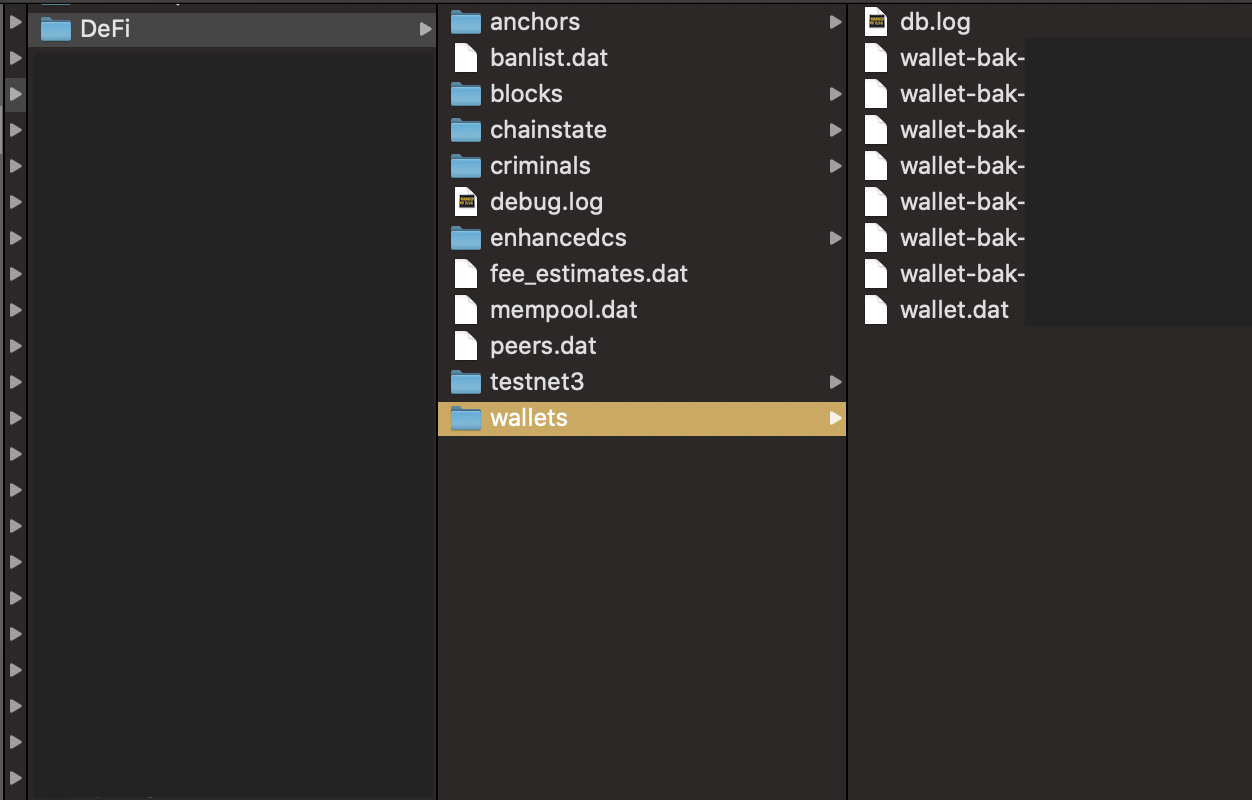
Hi all, for users who are facing this Missing receive address, rest assured you can manually add the addresses it back. In the future, you could make a copy of your wallet.dat folder — the wallet.dat is key to secure your wallet's information, we're introducing more security to it soon. In the mean time, providing the following steps for your reference:
- Save the address externally (eg. copy & paste in Notes)
- Make a copy of your wallet.dat folder
Location of wallet.dat:
Windows — C:
\Users\<username>\AppData\Roaming\DeFi Blockchain\wallets\wallet.dat
Mac — Go to Folder:
/Users/<username>/Library/Application Support/DeFi/wallets/wallet.dat
izzycsy
on 16 Feb 2021
Related issues
 elxlee
·
6Comments
elxlee
·
6Comments
 Rocky-81
·
8Comments
Rocky-81
·
8Comments
 jpressler
·
7Comments
jpressler
·
7Comments
 RobinTorque
·
3Comments
RobinTorque
·
3Comments
 adrian-schnell
·
3Comments
adrian-schnell
·
3Comments
Most helpful comment
Go in the App to the DFI Wallet, click on „receive“, click on „+ new Adresse“ and then unlock „create automatic new Adress“ now you can write your Adress. When the Write adress is your own, you now can click on something like „make“ i dont now the exact word of the button, i use the app in German