RTK寻迹过程中,dreamview里面车头朝向永远向上,与轨迹不对应。有遇到过类似情况的么?谢谢
 yufeilongyuan
All 26 comments
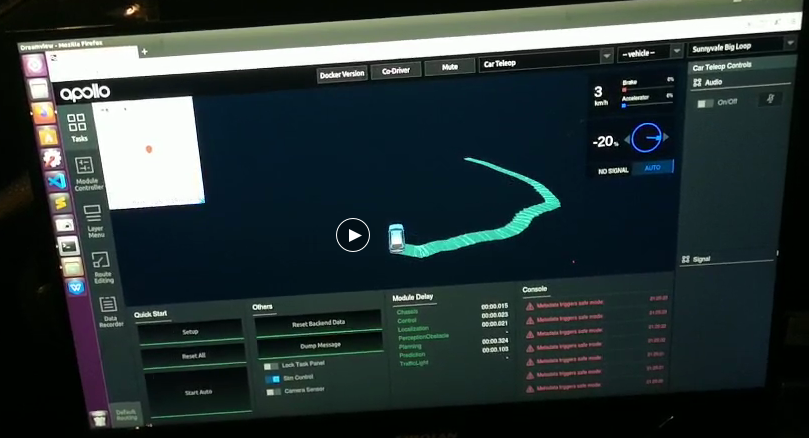
In the process of RTK tracking, the front of the vehicle in dreamview is always upward, which does not correspond to the track. Have you ever encountered a similar situation? thank you
yufeilongyuan
on 14 Oct 2020
The same issue with you!
@yufeilongyuan
我在调试过程中遇到了同样的问题。
 HTL2018
on 14 Oct 2020
HTL2018
on 14 Oct 2020
I have encountered the same situation. Does anyone know how to solve it?
 hit-moshang
on 14 Oct 2020
hit-moshang
on 14 Oct 2020
I also met the same problem. Does anyone know the solution?
 ydhongHIT
on 14 Oct 2020
ydhongHIT
on 14 Oct 2020
I have the same problem in Apollo 5.5. What caused it? Have you solved the problem? @yufeilongyuan
 SpinClown
on 14 Oct 2020
SpinClown
on 14 Oct 2020
@guoweiwan @zhouyao4321 希望得到社区帮助,感谢
yufeilongyuan
on 19 Oct 2020
Please help to check whether it's a bug of dreamview. @lj0919 Thanks.
 storypku
on 19 Oct 2020
storypku
on 19 Oct 2020
Please use cyber_monitor to verify if heading in localization is set correctly as it is where Dreamview reads the car heading
 vlin17
on 20 Oct 2020
vlin17
on 20 Oct 2020
Specifically, how to view it? How to modify the configuration? @vlin17 thanks!localizition/pose?
yufeilongyuan
on 20 Oct 2020
cyber_monitor:显示通道数据的可视化工具
- source /your-path-to-cybertron-apollo-install-dir/setup.bash
- cyber_monitor
查看如何使用cyber_monitor
cyber_monitor -h
监控某个Channel
cyber_monitor -c ChannelName
@yufeilongyuan
 lj0919
on 22 Oct 2020
lj0919
on 22 Oct 2020
cyber_monitor:显示通道数据的可视化工具
- source /your-path-to-cybertron-apollo-install-dir/setup.bash
- cyber_monitor
查看如何使用cyber_monitor
cyber_monitor -h
监控某个Channel
cyber_monitor -c ChannelName@yufeilongyuan
I know that. Thank you
yufeilongyuan
on 26 Oct 2020
Please use cyber_monitor to verify if heading in localization is set correctly as it is where Dreamview reads the car heading
@vlin17 When I use the cyber_monitor to see the channel of location/pose of "heading", it finds that there is normal data refresh. When I make the vehicle turn, the data changes normally.
yufeilongyuan
on 26 Oct 2020
Please use cyber_monitor to verify if heading in localization is set correctly as it is where Dreamview reads the car heading
@vlin17 When I use the cyber_monitor to see the channel of location/pose of "heading", it finds that there is normal data refresh. When I make the vehicle turn, the data changes normally.
May we understand why choosing "Car Teleop" mode when running RTK tracking. Teleop mode is for the purpose of teleoperation (more detail here). For RTK tracking, please choose RTK mode or Standard Debug.
vlin17
on 27 Oct 2020
Please use cyber_monitor to verify if heading in localization is set correctly as it is where Dreamview reads the car heading
@vlin17 When I use the cyber_monitor to see the channel of location/pose of "heading", it finds that there is normal data refresh. When I make the vehicle turn, the data changes normally.
May we understand why choosing "Car Teleop" mode when running RTK tracking. Teleop mode is for the purpose of teleoperation (more detail here). For RTK tracking, please choose RTK mode or Standard Debug.
@vlin17 Both patterns are used, but the problem is not solved.
yufeilongyuan
on 28 Oct 2020
@vlin17 The code location you told me ("auto"_ driving_ car->set_ heading( pose.heading ()) "), I have debugged, and there is normal data refresh. JS front-end code I am not very familiar, can you give me some advice, thank you.
yufeilongyuan
on 28 Oct 2020
Seems like backend data is ok. For frontend, please check if there's any error from the console log (for Chrome, you can see it by right-click and select 'inspect'). If you'd like to speed up the investigation, please provide the problematic record bag, so we can check it from our side. In addition, is this happens to apollo 5.5 only, or master branch has the same issue?
vlin17
on 28 Oct 2020
@vlin17 This is the case now. Although the front of the car is not in the right direction, it does not delay the use of RTK for tracking. However, when using the navigation mode, the front direction of the car is also wrong. After the automatic driving is started, the car always drives to the right track direction uncontrolled, and the track direction is vertical to the front direction. Now when the front of the car is facing due east, the heading value is 2.44. I don't know if it is right. When M2 is installed, the y-axis is consistent with the vehicle's forward direction, and the x-axis points to the right.
yufeilongyuan
on 23 Nov 2020
@vlin17 This is the case now. Although the front of the car is not in the right direction, it does not delay the use of RTK for tracking. However, when using the navigation mode, the front direction of the car is also wrong. After the automatic driving is started, the car always drives to the right track direction uncontrolled, and the track direction is vertical to the front direction. Now when the front of the car is facing due east, the heading value is 2.44. I don't know if it is right. When M2 is installed, the y-axis is consistent with the vehicle's forward direction, and the x-axis points to the right.
Navi mode is configed as FLU for vehicle reference frame and other modes are RFU, you are using the wrong model for visualize the Navi mode. And also Navi mode was not officially supported after 3.5
 Capri2014
on 23 Nov 2020
Capri2014
on 23 Nov 2020
@vlin17 This is the case now. Although the front of the car is not in the right direction, it does not delay the use of RTK for tracking. However, when using the navigation mode, the front direction of the car is also wrong. After the automatic driving is started, the car always drives to the right track direction uncontrolled, and the track direction is vertical to the front direction. Now when the front of the car is facing due east, the heading value is 2.44. I don't know if it is right. When M2 is installed, the y-axis is consistent with the vehicle's forward direction, and the x-axis points to the right.
Navi mode is configed as FLU for vehicle reference frame and other modes are RFU, you are using the wrong model for visualize the Navi mode. And also Navi mode was not officially supported after 3.5
However, I encountered the same problem in other modes. The front direction display is not correct, but the car can run normally. Only in navigation mode, the vehicle is not normal. In my opinion, you can manually open the required module in debug mode. Do you know if this is feasible? thank you
yufeilongyuan
on 23 Nov 2020
@vlin17 This is the case now. Although the front of the car is not in the right direction, it does not delay the use of RTK for tracking. However, when using the navigation mode, the front direction of the car is also wrong. After the automatic driving is started, the car always drives to the right track direction uncontrolled, and the track direction is vertical to the front direction. Now when the front of the car is facing due east, the heading value is 2.44. I don't know if it is right. When M2 is installed, the y-axis is consistent with the vehicle's forward direction, and the x-axis points to the right.
Navi mode is configed as FLU for vehicle reference frame and other modes are RFU, you are using the wrong model for visualize the Navi mode. And also Navi mode was not officially supported after 3.5
However, I encountered the same problem in other modes. The front direction display is not correct, but the car can run normally. Only in navigation mode, the vehicle is not normal. In my opinion, you can manually open the required module in debug mode. Do you know if this is feasible? thank you
@vlin17 If I want to modify the coordinate system, which code or configuration file should I modify? thank you
yufeilongyuan
on 25 Nov 2020
Coordinate system should be consistent with whatever the other apollo modules are used. As long as Navi mode isn't used, it is unlikely the issue for this thread. However, if you are interested in, this is partly how the frontend taken care of the FLU coordinate system for Navi mode.
I think it might be better to provide a bag for debugging, even just a few sec, as we aren't able to reproduce the issue.
vlin17
on 25 Nov 2020
Coordinate system should be consistent with whatever the other apollo modules are used. As long as Navi mode isn't used, it is unlikely the issue for this thread. However, if you are interested in, this is partly how the frontend taken care of the FLU coordinate system for Navi mode.
I think it might be better to provide a bag for debugging, even just a few sec, as we aren't able to reproduce the issue.
Thank you for your reply. Thank you. Can you provide an email, I will record the data to you. Or provide other ways to contact you, thank you very much.
yufeilongyuan
on 26 Nov 2020
Coordinate system should be consistent with whatever the other apollo modules are used. As long as Navi mode isn't used, it is unlikely the issue for this thread. However, if you are interested in, this is partly how the frontend taken care of the FLU coordinate system for Navi mode.
I think it might be better to provide a bag for debugging, even just a few sec, as we aren't able to reproduce the issue.Thank you for your reply. Thank you. Can you provide an email, I will record the data to you. Or provide other ways to contact you, thank you very much.
you can send to [email protected]. thanks.
vlin17
on 28 Nov 2020
Coordinate system should be consistent with whatever the other apollo modules are used. As long as Navi mode isn't used, it is unlikely the issue for this thread. However, if you are interested in, this is partly how the frontend taken care of the FLU coordinate system for Navi mode.
I think it might be better to provide a bag for debugging, even just a few sec, as we aren't able to reproduce the issue.Thank you for your reply. Thank you. Can you provide an email, I will record the data to you. Or provide other ways to contact you, thank you very much.
you can send to [email protected]. thanks.
Thank you for your convenience. I have sent the relevant data to you, looking forward to your reply, thank you.
yufeilongyuan
on 30 Nov 2020
@yufeilongyuan I checked the bag you provided, when viewing from Overhead mode (Layer Menu -> Point of View -> Overhead), the heading is rendered correctly. The 'default' mode from Point of view is to help you see surrendering from car's perspective, which is why it is heading front all the time, but the scene should change if you have map render on the ground. This mean, this is not a problem but simply the point of view you select. For more dreamview features please see the doc here.
vlin17
on 4 Dec 2020
@vlin17 The problem of the front facing of the car has been solved, because several protocols of the hardware equipment have not been sent out. Thank you for your guidance. Thank you.
yufeilongyuan
on 5 Dec 2020
Related issues
 CCodie
·
3Comments
CCodie
·
3Comments
 JSnobody
·
3Comments
JSnobody
·
3Comments
 chilihua
·
3Comments
chilihua
·
3Comments
 BenBaek
·
3Comments
BenBaek
·
3Comments
 zmsunnyday
·
3Comments
zmsunnyday
·
3Comments
Most helpful comment
I also met the same problem. Does anyone know the solution?