Apollo: How to print values xmin(), ymin(), xmax() , ymax() defined under class BBox2D( ) in perception_obstacle.pb.h
Hi,
I would like to print the values xmin(), ymin(), xmax() , ymax() defined under class BBox2D( ) in perception_obstacle.pb.h .
Can anybody help me with a code snippet, or ways to approach this problem ?
Kind Regards,
Abhi
 Avps1
Avps1
All 17 comments
maybe you could try:
    std::shared_ptr<BBox2D> bbox(
        new (std::nothrow) BBox2D);

    bbox->set_xmin(1.0);

    AINFO << bbox->xmin();
see if it works ?
 ntutangyun
on 1 Oct 2020
ntutangyun
on 1 Oct 2020
Okay @ntutangyun , thank you so much for your prompt response. But where should i add this code snippet ? Inside the perception_obstacle.pb.h file ?
Avps1
on 1 Oct 2020
The xxx.pb.h is generated by protobuf, please try not to modify them.
I think once you have a reference to a BBox2d object in any c++ code, you could just use the functions to get the values.
I'm not sure what's your intention here.
are you not sure about how to print out the values in C++ code or how to get the member values from the BBox2D instance ?
ntutangyun
on 1 Oct 2020
Hi @ntutangyun , I am new to C++, and I need your help with printing out the values in C++ code. It could also work if I got the values in the log from the AINFO command that you wrote . So I wanted to know where I could paste this code snippet that you wrote in order to get the values of these functions.
Avps1
on 1 Oct 2020
hi @Avps1 ,
If you want to print the values to the log files at /apollo/data/log/ you could use AINFO etc.
if you want to print the values directly to the terminal where you run the binary, you could use
std::cout << "the value of xmin is " << bbox2d->xmin() << std::endl;
// or
ARROR << "the value of xmin is " << bbox2d->xmin();
this way you should be able to see the realtime value printing out to the terminal.
ntutangyun
on 1 Oct 2020
Hello @ntutangyun, do you have any pointers how to do this with the Python API?
 sbhttchryy
on 1 Oct 2020
sbhttchryy
on 1 Oct 2020
@sbhttchryy you could check here
see if it helps.
ntutangyun
on 1 Oct 2020
As said by @ntutangyun perception_obstacle.pb.h is generated code, you can't edit anymore.
How to do
If you want to print out the msg, we say, you should found the object you want to print. I found below place you can try.
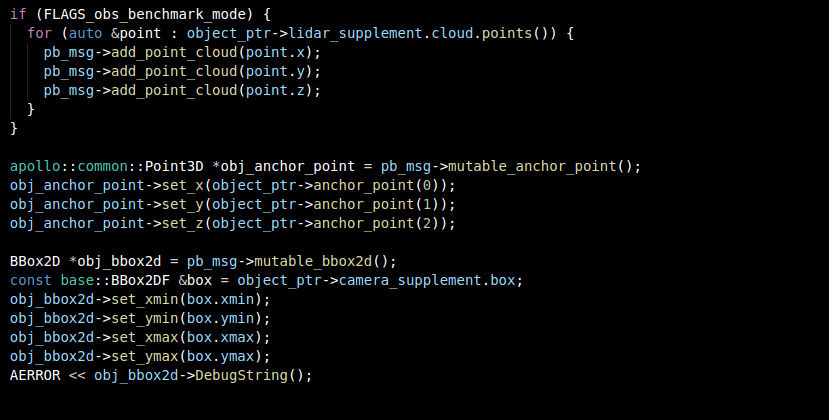
Just add after line 115
AERROR << obj_bbox2d->DebugString();
Ref
You can follow this link to find how to set and read and DebugString about protobuf
 daohu527
on 2 Oct 2020
daohu527
on 2 Oct 2020
As said by @ntutangyun
perception_obstacle.pb.his generated code, you can't edit anymore.How to do
If you want to print out the msg, we say, you should found the object you want to print. I found below place you can try.
Just add after line 115
AERROR << obj_bbox2d->DebugString();Ref
You can follow this link to find how to set and read and
DebugStringabout protobuf
@daohu527 Thanks again for such detailed explanation. So I added the line where you asked(look at the snapshot below), and built the project using ./apollo.sh build_gpu - Now, may I ask, _where do I find the printed result ? Should I look in the log files ?_ Sorry if this is obvious, I am very new to Apollo, as you can guess :) ! Thanks in advance.
Avps1
on 2 Oct 2020
You can both find the msg in screen and log file, because the output level is ERROR, you can ref https://github.com/ApolloAuto/apollo/issues/12702
daohu527
on 3 Oct 2020
Hi daohu527,
The problem is I cant find the logs of this particular file apollo/modules/perception/onboard/msg_serializer/msg_serializer.cc anywhere under data/logs. I looked inside the data/log and specially under the perception log (since msg_serializer belongs to Perception), but couldnt find any log of msg_serializer.cc .
Your help is highly appreciated.
Avps1
on 3 Oct 2020
Hi daohu527,
The problem is I cant find the logs of this particular file apollo/modules/perception/onboard/msg_serializer/msg_serializer.cc , anywhere under data/logs, even after adding these AERROR lines. I looked inside the data/log and specially under the perception log (since msg_serializer belongs to Perception), but couldnt find any log of msg_serializer.cc .
Your help is highly appreciated.
Avps1
on 4 Oct 2020
Dear @Avps1 could you tell me about the log config? You will find it in apollo/cyber/setup.bash.
I think you should check issue #12702
sbhttchryy
on 4 Oct 2020
Steps to print log
- First add the objects that need to be printed, which means add AEEROR code and recompile. ".cc" files can't exe, you should compile it and run the binary file.
- Modify the configuration in setup.bash
- Find log in data/log, the log is stored in modules.
Questions
I'm not sure how you run the perception module? If you have not successfully executed the perception module, then this is another problem
daohu527
on 4 Oct 2020
Steps to print log
1. First add the objects that need to be printed, which means add **AEEROR** code and recompile. **".cc" files can't exe**, you should compile it and run the binary file.

2. Modify the configuration in setup.bash

3. Find log in data/log, the log is stored in modules.
Questions
I'm not sure how you run the perception module? If you have not successfully executed the perception module, then this is another problem
Thanks again. The steps are clear to me. The only problem now is, I cannot file a binary file for the filke msg_serializer.cc - I am looking in bazel-bin/modules/perception/onboard/msg_serializer
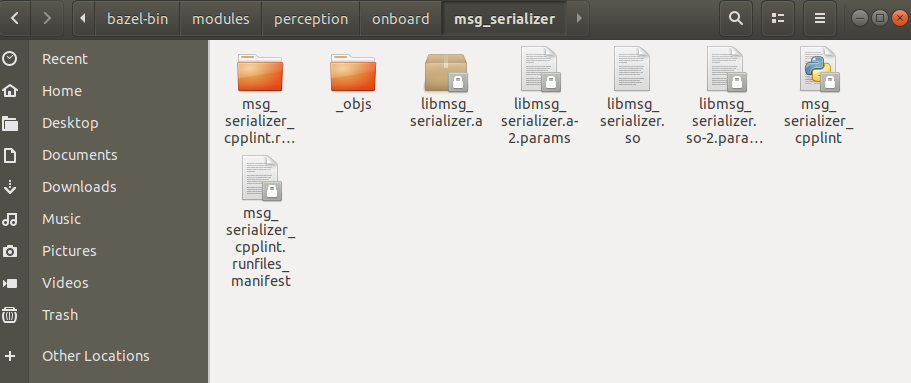 , but cant find a binary executable file here.
Avps1
on 10 Oct 2020
"Msg_serializer.cc" is not an executable file, it's a library. I don't know how you execute your application. At least you should try simulation or a separate test case?
- Use a simulation or offline to run perception module is not suitable for discussion in this question.
- A test case example
bazel build //modules/perception/base:box_test

bazel-bin/modules/perception/base/box_test
The above is just an example, you must at least understand that you have an executable program.
daohu527
on 10 Oct 2020
"Msg_serializer.cc" is not an executable file, it's a library. I don't know how you execute your application. At least you should try simulation or a separate test case?
1. Use a simulation or offline to run perception module is not suitable for discussion in this question.

2. A test case example
bazel build //modules/perception/base:box_test bazel-bin/modules/perception/base/box_testThe above is just an example, you must at least understand that you have an executable program.
Its very clear to me now. Thank you for your response and continued support.
Kind Regards,
Abhi.
Avps1
on 10 Oct 2020
Related issues
 lyletbjohnson
·
3Comments
lyletbjohnson
·
3Comments
 xinwf
·
3Comments
xinwf
·
3Comments
 zmsunnyday
·
3Comments
zmsunnyday
·
3Comments
 YaoQii
·
3Comments
YaoQii
·
3Comments
 Wsine
·
3Comments
Wsine
·
3Comments
Most helpful comment
Steps to print log
Questions
I'm not sure how you run the perception module? If you have not successfully executed the perception module, then this is another problem