Apollo: Cannot see any car image in the Dreamview or see any trajectory.
Hi All,
I successfully finish all the instructions for the demo, but when I switch into Dreamview window, there is neither car image nor trajectory such as in the readme when I rosbag play -l.
I can see the bag file playing, but there's nothing showing on the localhost:8888. Has anyone encounter same problem as me ?
Thanks!
 tomzhang666
All 39 comments
I found out the problem. When I run the HMI, and rosnode list, there is none. thats why there's no image at all..but I dont know how to solve it yet.
tomzhang666
on 5 Jul 2017
@tomzhang666 there are two bag files inside the docker. Did you try to run it ? I'm on the same boat with you. Still trying to figure what the problem is.
Did you successfully run bash docker/scripts/release_into.sh ?
Mine got an error not finding the bash: /opt/ros/indigo/setup.bash: No such file or directory
Any idea ?
 andrewraharjo
on 5 Jul 2017
andrewraharjo
on 5 Jul 2017
thats not my problem.
your problem seems that you didn't install ros in your computer?
tomzhang666
on 5 Jul 2017
@tomzhang666 got it working, permission issue again, just run the bash docker/scripts/release_into.sh as sudo
andrewraharjo
on 5 Jul 2017
@tomzhang666 Did you source /opt/ros/indigo/setup.bash in your bashrc?
 Capri2014
on 5 Jul 2017
Capri2014
on 5 Jul 2017
Yes. And I can even run roscore in the docker, but nothing shows up when i
run rosnode list...
On Wed, Jul 5, 2017 at 2:09 AM Capri2014 notifications@github.com wrote:
@tomzhang666 https://github.com/tomzhang666 Did you source
/opt/ros/indigo/setup.bash in your bashrc?—
You are receiving this because you were mentioned.
Reply to this email directly, view it on GitHub
https://github.com/ApolloAuto/apollo/issues/14#issuecomment-313046905,
or mute the thread
https://github.com/notifications/unsubscribe-auth/AVEmfTOCEzNgfxzOYsyLSua-vSSU3crGks5sK1K3gaJpZM4ON_8X
.>
Zhengyu Zhang
Master of Engineering Candidate (Experiential Advanced Control)
Department of Mechanical Engineering
Tel:(970)-889-7323
Email:[email protected]
LinkedIn: https://www.linkedin.com/in/zhengyu-zhang-163666102
-
tomzhang666
on 5 Jul 2017
@tomzhang666 Sorry I mean you should not source your host computer /opt/ros/indigo/setup.bash, use the one under third_party in docker.
Capri2014
on 5 Jul 2017

Got it working @tomzhang666 try to run the rosbag play under root@in_release_docker. See hopefully it will work out. Also the browser I'm running is Chromium. Somehow I can't run it on Firefox. I'll do some digging later on.
andrewraharjo
on 5 Jul 2017
@Capri2014 Can you specify the steps a bit more? I still didn't get it work. Its super weird, when I run hmi.sh, the command window told me that it start roscore, but when I try to check the rosnode list, there's nothing in it. Thats why I cannot see anything in my browser.
I think I have got this error because the docker setting? I am very new to docker, so any help would be very appreciated.
tomzhang666
on 5 Jul 2017
@tomzhang666 After installing docker, do you logout and login again? Try docker ps without sudo. If it is not docker sudo problem, inside docker env, can you post the output of cat /apollo/meta.txt?
Thanks.
 ycool
on 5 Jul 2017
ycool
on 5 Jul 2017
@ycool No such file exist
tomzhang666
on 5 Jul 2017
@ycool

this is my problem
tomzhang666
on 5 Jul 2017
chrome browser is needed
 smilejx
on 6 Jul 2017
smilejx
on 6 Jul 2017
Try chrome browser too. It doesn't work
On Wed, Jul 5, 2017 at 3:48 PM smilejx notifications@github.com wrote:
chrome browser is needed
—
You are receiving this because you were mentioned.
Reply to this email directly, view it on GitHub
https://github.com/ApolloAuto/apollo/issues/14#issuecomment-313247735,
or mute the thread
https://github.com/notifications/unsubscribe-auth/AVEmfbKrPjsGTXrqmpFws3FRpjicPJa2ks5sLBKtgaJpZM4ON_8X
.>
Zhengyu Zhang
Master of Engineering Candidate (Experiential Advanced Control)
Department of Mechanical Engineering
Tel:(970)-889-7323
Email:[email protected]
LinkedIn: https://www.linkedin.com/in/zhengyu-zhang-163666102
-
tomzhang666
on 6 Jul 2017
@tomzhang666 from your screen picture, you are using dev docker image. It need build from source code
bash /apollo/apollo.sh build # inside docker
The easier way to run demo is to follow the instruction at https://github.com/ApolloAuto/apollo/blob/master/docs/demo_guide/README.md
ycool
on 6 Jul 2017
I have met the same problems whatever in dev environment(bash docker/scripts/dev_start.sh) or release environment(bash docker/scripts/release_start.sh). After run the following command in apollo_release container:
/apollo# rosbag play docs/demo_guide/demo.bag --loop

[ INFO] [1499320503.064749970]: Opening docs/demo_guide/demo.bag

Waiting 0.2 seconds after advertising topics... done.

Hit space to toggle paused, or 's' to step.
 [RUNNING]  Bag Time: 1497125269.806705   Duration: 0.664225 / 41.613536
 [RUNNING]  Bag Time: 1497125270.017747   Duration: 0.875267 / 41.613536
 [RUNNING]  Bag Time: 1497125270.216592   Duration: 1.074112 / 41.613536
 [RUNNING]  Bag Time: 1497125270.407049   Duration: 1.264569 / 41.613536
 [RUNNING]  Bag Time: 1497125285.516865   Duration: 16.374386 / 41.613536
 [RUNNING]  Bag Time: 1497125285.697003   Duration: 16.554523 / 41.613536
 [RUNNING]  Bag Time: 1497125285.917519   Duration: 16.775039 / 41.613536
 [RUNNING]  Bag Time: 1497125286.076830   Duration: 16.934350 / 41.613536
 [RUNNING]  Bag Time: 1497125286.286546   Duration: 17.144066 / 41.613536
 [RUNNING]  Bag Time: 1497125309.316678   Duration: 40.174199 / 41.613536
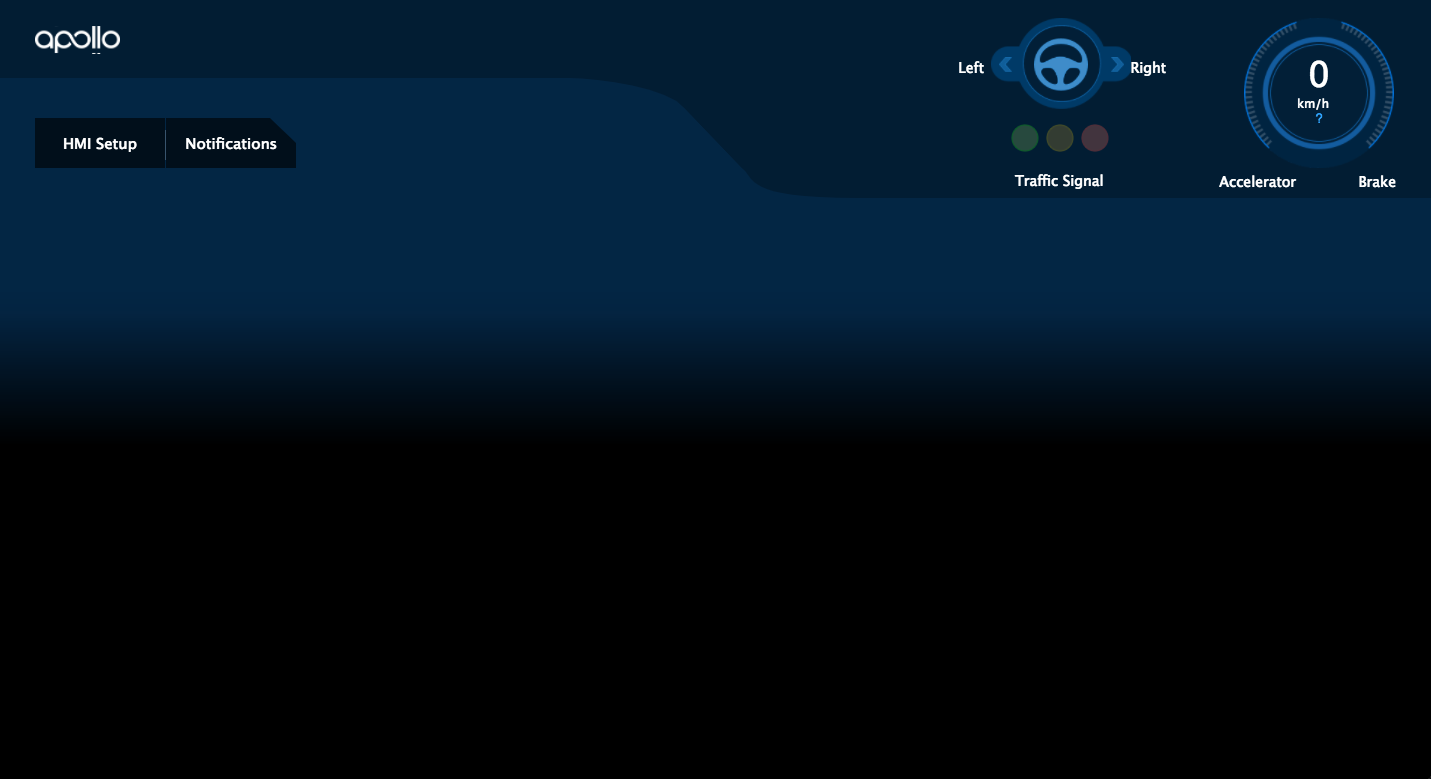
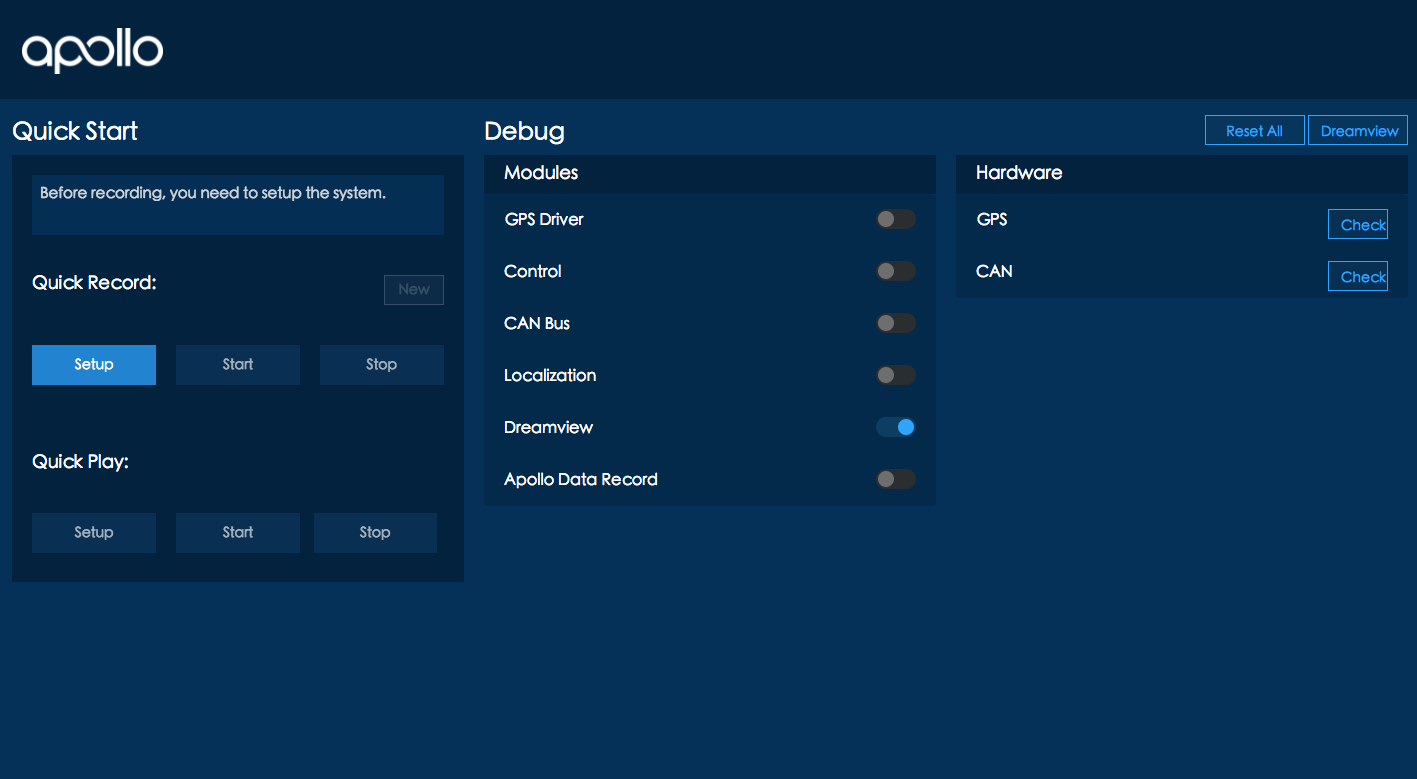
I can open the "HMI Setup" page and Dreamview page,but no vehicle or trajectory shows. the screen snapshot are below:
 bigwhite
on 6 Jul 2017
bigwhite
on 6 Jul 2017
@bigwhite in release docker, can you post the output of cat /apollo/meta.txt?
While rosbag is playing, in another terminal, insider release docker, can you help to post the output of rostopic list ?
ycool
on 6 Jul 2017
@tomzhang666 Probably you can just open a terminal and run that rosbag cmd.
For me that worked. However if I ran that cmd in docker, I would have some problems like no rosbag cmd can be found or (after I fixed it) some python dependencies were missing.
 nypdmax
on 6 Jul 2017
nypdmax
on 6 Jul 2017
@ycool
# cat apollo/meta.txt
Git commit: 0264461
Build time: 20170704_1141

one terminal run the demo:

/apollo# rosbag play docs/demo_guide/demo.bag --loop
[ INFO] [1499349615.786847156]: Opening docs/demo_guide/demo.bag

Waiting 0.2 seconds after advertising topics... done.

Hit space to toggle paused, or 's' to step.
 [RUNNING]  Bag Time: 1497125297.452324   Duration: 28.309844 / 41.613536

on another terminal:

# docker exec 8d06c801cd4a /apollo/ros/bin/rostopic list
Traceback (most recent call last):
  File "/apollo/ros/bin/rostopic", line 34, in <module>
    import rostopic
  File "/apollo/ros/lib/python2.7/dist-packages/rostopic/__init__.py", line 63, in <module>
    import rosgraph
  File "/apollo/ros/lib/python2.7/dist-packages/rosgraph/__init__.py", line 36, in <module>
    from . masterapi import Master, MasterFailure, MasterError, MasterException
  File "/apollo/ros/lib/python2.7/dist-packages/rosgraph/masterapi.py", line 49, in <module>
    from rospy.impl.broadcast_manager import BroadcastManager
  File "/apollo/ros/lib/python2.7/dist-packages/rospy/__init__.py", line 49, in <module>
    from .client import spin, myargv, init_node, \
  File "/apollo/ros/lib/python2.7/dist-packages/rospy/client.py", line 60, in <module>
    import rospy.impl.init
  File "/apollo/ros/lib/python2.7/dist-packages/rospy/impl/init.py", line 54, in <module>
    from .tcpros import init_tcpros
  File "/apollo/ros/lib/python2.7/dist-packages/rospy/impl/tcpros.py", line 45, in <module>
    import rospy.impl.tcpros_service
  File "/apollo/ros/lib/python2.7/dist-packages/rospy/impl/tcpros_service.py", line 65, in <module>
    from broadcast_manager import BroadcastManager
  File "/apollo/ros/lib/python2.7/dist-packages/rospy/impl/broadcast_manager.py", line 56, in <module>
    for sub_path in env.split(':'):
AttributeError: 'NoneType' object has no attribute 'split'
On another terminal, instead of running
$ docker exec 8d06c801cd4a /apollo/ros/bin/rostopic list, can you run following commands?
$ docker/scripts/release_into.sh
$ rostopic list # inside docker
Thanks.
ycool
on 6 Jul 2017
@ycool
~/test/apolloauto/apollo-1.0.0# bash docker/scripts/release_into.sh
root@yypdmaster:/apollo# rostopic list
ERROR: Unable to communicate with master!
root@yypdmaster:/apollo#
Can you run the following commands and post the output?
# while in another terminal, inside release docker,  to rosbag play demo.bag
# inside release docker
$ roscore &
$ rostopic list

# out of docker
$ ps -ef | grep roscore
Thanks a lot.
ycool
on 7 Jul 2017
@ycool
# inside release docker

root@yypdmaster:~/test/apolloauto/apollo-1.0.0# bash docker/scripts/release_into.sh
root@yypdmaster:/apollo#
root@yypdmaster:/apollo# roscore &
[1] 103
root@yypdmaster:/apollo# ... logging to /root/.ros/log/fee2a412-62ad-11e7-98c3-00163e1001d7/roslaunch-yypdmaster-103.log
Checking log directory for disk usage. This may take awhile.
Press Ctrl-C to interrupt
Done checking log file disk usage. Usage is <1GB.

started roslaunch server http://yypdmaster:46069/
ros_comm version 1.11.21

SUMMARY
========

PARAMETERS
 * /rosdistro: indigo
 * /rosversion: 1.11.21

NODES

auto-starting new master
process[master]: started with pid [121]
ROS_MASTER_URI=http://yypdmaster:11311/

setting /run_id to fee2a412-62ad-11e7-98c3-00163e1001d7
process[rosout-1]: started with pid [141]
started core service [/rosout]

root@yypdmaster:/apollo#
root@yypdmaster:/apollo#
root@yypdmaster:/apollo#
root@yypdmaster:/apollo#
root@yypdmaster:/apollo#
root@yypdmaster:/apollo#
root@yypdmaster:/apollo#
root@yypdmaster:/apollo# rostopic list

/apollo/canbus/chassis
/apollo/control
/apollo/control/pad
/apollo/localization/pose
/apollo/monitor
/apollo/planning
/apollo/sensor/gnss/corrected_imu
/apollo/sensor/gnss/gnss_status
/apollo/sensor/gnss/odometry
/clock
/rosout
/rosout_agg
# out of docker

root@yypdmaster:~#  ps -ef | grep roscore
root       499   455  0 08:49 pts/4    00:00:00 grep --color=auto roscore
root     32762 32709  6 08:48 pts/3    00:00:03 /usr/bin/python /apollo/ros/bin/roscore
Your rostopic list looks good. Your DreamView still shows nothing?
In your rosbag play terminal (inside docker),
bash scripts/env.sh >& env.txt
Can you post env.txt?
Thanks.
ycool
on 7 Jul 2017
@ycool
there is still no car and trajectory in my Dreamview window.
There is no scripts/env.sh file in release docker container

/apollo# ll scripts
total 132
drwxr-xr-x  2 root root 4096 Jul  6 13:42 ./
drwxr-xr-x 15 root root 4096 Jul  7 11:54 ../
-rw-r--r--  1 root root 3214 Jul  5 02:58 AGREEMENT.txt
-rwxr-xr-x  1 root root 5143 Jul  5 02:58 apollo_base.sh*
-rwxr-xr-x  1 root root 1306 Jul  5 02:58 apollo_init.sh*
-rwxr-xr-x  1 root root 1741 Jul  5 02:58 apollo_record.sh*
-rwxr-xr-x  1 root root  968 Jul  5 02:58 canbus.sh*
-rwxr-xr-x  1 root root  896 Jul  5 02:58 canbus_teleop.sh*
-rwxr-xr-x  1 root root  957 Jul  5 02:58 canbus_tester.sh*
-rwxr-xr-x  1 root root  955 Jul  5 02:58 control.sh*
-rwxr-xr-x  1 root root  942 Jul  5 02:58 control_info.sh*
-rwxr-xr-x  1 root root  972 Jul  5 02:58 decision.sh*
-rwxr-xr-x  1 root root  936 Jul  5 02:58 diagnostics.sh*
-rwxr-xr-x  1 root root  951 Jul  5 02:58 docker_adduser.sh*
-rwxr-xr-x  1 root root  880 Jul  5 02:58 docker_setup.sh*
-rwxr-xr-x  1 root root  973 Jul  5 02:58 dreamview.sh*
-rwxr-xr-x  1 root root 1443 Jul  5 02:58 gps.sh*
-rwxr-xr-x  1 root root 1446 Jul  5 02:58 gps_bj.sh*
-rwxr-xr-x  1 root root 1311 Jul  5 02:58 gps_sunnyvale.sh*
-rwxr-xr-x  1 root root 1750 Jul  5 02:58 hmi.sh*
-rwxr-xr-x  1 root root 1339 Jul  5 02:58 hw_check.sh*
-rwxr-xr-x  1 root root  960 Jul  5 02:58 localization.sh*
-rwxr-xr-x  1 root root 1158 Jul  5 02:58 pad.sh*
-rwxr-xr-x  1 root root  958 Jul  5 02:58 perception.sh*
-rwxr-xr-x  1 root root  956 Jul  5 02:58 planning.sh*
-rwxr-xr-x  1 root root  938 Jul  5 02:58 plot_trace.sh*
-rwxr-xr-x  1 root root  958 Jul  5 02:58 prediction.sh*
-rwxr-xr-x  1 root root  948 Jul  5 02:58 realtime_plot.sh*
-rwxr-xr-x  1 root root 1039 Jul  5 02:58 run_rtk_player.sh*
-rwxr-xr-x  1 root root 1133 Jul  5 02:58 run_rtk_recorder.sh*
-rwxr-xr-x  1 root root  814 Jul  5 02:58 stop_rtk_player.sh*
-rwxr-xr-x  1 root root  816 Jul  5 02:58 stop_rtk_recorder.sh*
but the env of the releases inside docker is below:
/apollo# env
HOSTNAME=yypdmaster
TERM=xterm
ROS_ROOT=/apollo/ros/share/ros
ROS_PACKAGE_PATH=/apollo/ros/share:/apollo/ros/stacks
ROS_MASTER_URI=http://localhost:11311
USER=root
LD_LIBRARY_PATH=/apollo/ros/lib:/apollo/lib:
LS_COLORS=rs=0:di=01;34:ln=01;36:mh=00:pi=40;33:so=01;35:do=01;35:bd=40;33;01:cd=40;33;01:or=40;31;01:su=37;41:sg=30;43:ca=30;41:tw=30;42:ow=34;42:st=37;44:ex=01;32:*.tar=01;31:*.tgz=01;31:*.arj=01;31:*.taz=01;31:*.lzh=01;31:*.lzma=01;31:*.tlz=01;31:*.txz=01;31:*.zip=01;31:*.z=01;31:*.Z=01;31:*.dz=01;31:*.gz=01;31:*.lz=01;31:*.xz=01;31:*.bz2=01;31:*.bz=01;31:*.tbz=01;31:*.tbz2=01;31:*.tz=01;31:*.deb=01;31:*.rpm=01;31:*.jar=01;31:*.war=01;31:*.ear=01;31:*.sar=01;31:*.rar=01;31:*.ace=01;31:*.zoo=01;31:*.cpio=01;31:*.7z=01;31:*.rz=01;31:*.jpg=01;35:*.jpeg=01;35:*.gif=01;35:*.bmp=01;35:*.pbm=01;35:*.pgm=01;35:*.ppm=01;35:*.tga=01;35:*.xbm=01;35:*.xpm=01;35:*.tif=01;35:*.tiff=01;35:*.png=01;35:*.svg=01;35:*.svgz=01;35:*.mng=01;35:*.pcx=01;35:*.mov=01;35:*.mpg=01;35:*.mpeg=01;35:*.m2v=01;35:*.mkv=01;35:*.webm=01;35:*.ogm=01;35:*.mp4=01;35:*.m4v=01;35:*.mp4v=01;35:*.vob=01;35:*.qt=01;35:*.nuv=01;35:*.wmv=01;35:*.asf=01;35:*.rm=01;35:*.rmvb=01;35:*.flc=01;35:*.avi=01;35:*.fli=01;35:*.flv=01;35:*.gl=01;35:*.dl=01;35:*.xcf=01;35:*.xwd=01;35:*.yuv=01;35:*.cgm=01;35:*.emf=01;35:*.axv=01;35:*.anx=01;35:*.ogv=01;35:*.ogx=01;35:*.aac=00;36:*.au=00;36:*.flac=00;36:*.mid=00;36:*.midi=00;36:*.mka=00;36:*.mp3=00;36:*.mpc=00;36:*.ogg=00;36:*.ra=00;36:*.wav=00;36:*.axa=00;36:*.oga=00;36:*.spx=00;36:*.xspf=00;36:
CPATH=/apollo/ros/include
ROS_DOMAIN_ID=21791177
PATH=/apollo/ros/bin:/usr/local/sbin:/usr/local/bin:/usr/sbin:/usr/bin:/sbin:/bin
PWD=/apollo
ROSLISP_PACKAGE_DIRECTORIES=
DOCKER_USER_ID=0
DOCKER_USER=root
SHLVL=1
HOME=/root
ROS_DISTRO=indigo
PYTHONPATH=/apollo/lib:/apollo/lib:/apollo/ros/lib/python2.7/dist-packages
RELEASE_DOCKER=1
PKG_CONFIG_PATH=/apollo/ros/lib/pkgconfig
LESSOPEN=| /usr/bin/lesspipe %s
CMAKE_PREFIX_PATH=/apollo/ros
DISPLAY=:0
LESSCLOSE=/usr/bin/lesspipe %s %s
ROS_ETC_DIR=/apollo/ros/etc/ros
_=/usr/bin/env
Noticed several things are not right.
1) user (root) is wrong, normally docker/scripts/release_start.sh and docker/scripts/release_into.sh will keep your normal user id.
2) inside release docker, the hostname (yypdmaster) is wrong. Normally it will be changed to in_release_docker.
Do you have any local modification for the scripts? Does docker ps without sudo work for you?
Can you pull the latest code and rerun the following command out of docker?
bash scripts/env.sh >& env.txt
Thanks.
ycool
on 7 Jul 2017
@ycool the only user I use on my host is "root". "root" is my normal user id.
I haven't change any source code locally. All code are from apollo-v1.0.0 release.
bigwhite
on 7 Jul 2017
Ok. Let's try everything again from scratch.
1. reboot your machine
2. cd YOUR_APOLLO_DIR
3. docker ps # to verify docker works
4. docker/scripts/release_start.sh
5. docker/scripts/release_into.sh
# all following commands run inside one same release docker terminal
$  scripts/hmi.sh stop
$  scripts/hmi.sh
# start DreamView from HMI (http://localhost:8887)
$ rosbag play -l docs/demo_guide/demo.bag &
$ rostopic list
# Open a browser at http://localhost:8888 and check
# if dreamview still doesn't show anything
$ rostopic echo /apollo/localization/pose  (You can ctrl-C after ~10 seconds)
Can you update us if any progress? Thanks a lot.
ycool
on 7 Jul 2017
You can try to set environment ROS_IP before start all these nodes.
export ROS_IP=127.0.0.1
Thanks.
 GoLancer
on 7 Jul 2017
GoLancer
on 7 Jul 2017
@ycool I forgot to say that my environment is Aliyun ECS ubuntu 16.04.1 LTS. Is this OK for apollo installation and later experiments?
bigwhite
on 7 Jul 2017
I tried again from scratch according to @ycool 's steps, but I still could not see the vehicle and trajectory in my Dreamview window.
1. reboot your machine

done
2. cd YOUR_APOLLO_DIR

cd ~/test/apolloauto/apollo-1.0.0
root@yypdmaster:~/test/apolloauto/apollo-1.0.0
3. docker ps # to verify docker works

root@yypdmaster:~/test/apolloauto/apollo-1.0.0# docker ps
CONTAINER ID        IMAGE                                                                                                                            COMMAND                  CREATED             STATUS                             PORTS                                                                            NAMES
4da99336163e        gcr.io/google_containers/k8s-dns-sidecar-amd64@sha256:d33a91a5d65c223f410891001cd379ac734d036429e033865d700a4176e944b0           "/sidecar --v=2 --log"   30 hours ago        Up 30 hours
... ...
4. docker/scripts/release_start.sh


root@yypdmaster:~/test/apolloauto/apollo-1.0.0# docker/scripts/release_start.sh
APOLLO_ROOT_DIR=/root/test/apolloauto/apollo-1.0.0
release-latest: Pulling from apolloauto/apollo
5d890c53be21: Already exists
f775b856e199: Already exists
552c4f407d99: Already exists
fda304b96f8a: Already exists
2b033adb904a: Already exists
df7ba7eb2dd0: Pull complete
087776164dbd: Extracting [========================>                          ] 249.6 MB/515.3 MB
087776164dbd: Extracting [========================>                          ] 255.1 MB/515.3 MB
087776164dbd: Pull complete

......

Digest: sha256:5a159e607272e8465fb3be394a6ea342b6c79fc75ec65f7bc8fe57003d0f0ba7
Status: Downloaded newer image for apolloauto/apollo:release-latest
Error response from daemon: No such container: apollo_release
Error response from daemon: No such container: apollo_release
mknod: /dev/can0: File exists
/root/test/apolloauto/apollo-1.0.0/data/core/core_%e.%p
[WARNING] Failed to find device with pattern "ttyUSB*" ...
[ OK ] Found device: /dev/ttyS31.
[ OK ] Found device: /dev/ttyS30.
[ OK ] Found device: /dev/ttyS29.
[ OK ] Found device: /dev/ttyS28.
[ OK ] Found device: /dev/ttyS27.
[ OK ] Found device: /dev/ttyS26.
[ OK ] Found device: /dev/ttyS25.
[ OK ] Found device: /dev/ttyS24.
[ OK ] Found device: /dev/ttyS23.
[ OK ] Found device: /dev/ttyS22.
[ OK ] Found device: /dev/ttyS21.
[ OK ] Found device: /dev/ttyS20.
[ OK ] Found device: /dev/ttyS19.
[ OK ] Found device: /dev/ttyS18.
[ OK ] Found device: /dev/ttyS17.
[ OK ] Found device: /dev/ttyS16.
[ OK ] Found device: /dev/ttyS15.
[ OK ] Found device: /dev/ttyS14.
[ OK ] Found device: /dev/ttyS13.
[ OK ] Found device: /dev/ttyS12.
[ OK ] Found device: /dev/ttyS11.
[ OK ] Found device: /dev/ttyS10.
[ OK ] Found device: /dev/ttyS9.
[ OK ] Found device: /dev/ttyS8.
[ OK ] Found device: /dev/ttyS7.
[ OK ] Found device: /dev/ttyS6.
[ OK ] Found device: /dev/ttyS5.
[ OK ] Found device: /dev/ttyS4.
[ OK ] Found device: /dev/ttyS3.
[ OK ] Found device: /dev/ttyS2.
[ OK ] Found device: /dev/ttyS1.
[ OK ] Found device: /dev/ttyS0.
[ OK ] Found device: /dev/can0.
[WARNING] Failed to find device with pattern "ram*" ...
[ OK ] Found device: /dev/loop7.
[ OK ] Found device: /dev/loop6.
[ OK ] Found device: /dev/loop5.
[ OK ] Found device: /dev/loop4.
[ OK ] Found device: /dev/loop3.
[ OK ] Found device: /dev/loop2.
[ OK ] Found device: /dev/loop1.
[ OK ] Found device: /dev/loop0.
[ OK ] Found device: /dev/loop-control.
589c4eb50caa606a2df912d9552b3a58c7fcbf2445437d369d39dd3ed808910e
adduser: The user `root' already exists.

adduser: The user `root' already exists.
THE APOLLO OPEN PLATFORM (“PLATFORM”) FOR AND ON BEHALF OF ITSELF AND ITS SUBSIDIARIES AND AFFILIATES UNDER COMMON CONTROL, IS WILLING TO LICENSE THE SOFTWARE TO YOU ONLY UPON THE CONDITION THAT YOU ACCEPT ALL OF THE TERMS CONTAINED IN THIS LICENSE AGREEMENT ("AGREEMENT"). PLEASE READ THE AGREEMENT CAREFULLY. BY SELECTING THE "ACCEPT LICENSE AGREEMENT" (OR THE EQUIVALENT) BUTTON AND/OR BY USING THE SOFTWARE YOU ACKNOWLEDGE THAT YOU HAVE READ THE TERMS AND AGREE TO THEM. IF YOU ARE AGREEING TO THESE TERMS ON BEHALF OF A COMPANY OR OTHER LEGAL ENTITY, YOU REPRESENT THAT YOU HAVE THE LEGAL AUTHORITY TO BIND THE LEGAL ENTITY TO THESE TERMS. IF YOU DO NOT HAVE SUCH AUTHORITY, OR IF YOU DO NOT WISH TO BE BOUND BY THE TERMS, THEN SELECT THE "DECLINE LICENSE AGREEMENT" (OR THE EQUIVALENT) BUTTON AND YOU MUST NOT USE THE SOFTWARE ON THIS SITE OR ANY OTHER MEDIA ON WHICH THE SOFTWARE IS CONTAINED.
1. DEFINITIONS. "Software" means the software identified above in binary form that you selected for download, install or use (in the version You selected for download, install or use) from Baidu or its authorized licensees, any other machine readable materials (including, but not limited to, libraries, source files, header files, and data files), any updates or error corrections provided by Baidu, and any user manuals, programming guides and other documentation provided to you by Baidu under this Agreement.
2. LICENSE GRANT: Subject to the terms and conditions of this Agreement, with the exception of different license terms and license grants for separate, individual third-party components as set forth below, the Software is licensed to you under the terms of the Apache 2.0 license available at:  https://www.apache.org/licenses/LICENSE-2.0.  You agree to these terms with respect to the Software.
3. THIRD PARTY CODE:  Additional copyright notices and license terms applicable to portions of the Software are set forth below in Appendix A.  You expressly agree to the license terms associated with third party code set forth in Appendix A.  In addition to any terms and conditions of any third party license identified in Appendix A, the disclaimer of warranty and limitation of liability provisions in paragraphs 4 and 5 of this License Agreement shall apply to all Software in this distribution.  YOU EXPRESSLY AGREE THAT YOU HAVE REVIEWED THE TERMS OF THE AGREEMENTS LINKED TO AND RESTATED IN APPENDIX A TO THIS AGREEMENT, AND THAT YOU AGREE TO THE TERMS OF THOSE AGREEMENTS.
4. DISCLAIMER OF WARRANTY. THE SOFTWARE IS PROVIDED "AS IS" WITHOUT WARRANTY OF ANY KIND. BAIDU FURTHER DISCLAIMS ALL WARRANTIES, EXPRESS AND IMPLIED, INCLUDING WITHOUT LIMITATION, ANY IMPLIED WARRANTIES OF MERCHANTABILITY, FITNESS FOR A PARTICULAR PURPOSE OR NONINFRINGEMENT.
5. LIMITATION OF LIABILITY. IN NO EVENT SHALL BAIDU BE LIABLE FOR ANY INDIRECT, INCIDENTAL, SPECIAL, PUNITIVE OR CONSEQUENTIAL DAMAGES, OR DAMAGES FOR LOSS OF PROFITS, REVENUE, DATA OR DATA USE, INCURRED BY YOU OR ANY THIRD PARTY, WHETHER IN AN ACTION IN CONTRACT OR TORT, EVEN IF BAIDU HAS BEEN ADVISED OF THE POSSIBILITY OF SUCH DAMAGES. BAIDU’S ENTIRE LIABILITY FOR DAMAGES HEREUNDER SHALL IN NO EVENT EXCEED ONE ONE CENT (U.S. $0.01).
Type 'y' or 'Y' to agree to the license agreement above, or type any other key to exit
y
the start process seems hangs after I enter 'y', but the container has started. I don't know whether it is a problem.
5. docker/scripts/release_into.sh


root@yypdmaster:~/test/apolloauto/apollo-1.0.0# docker/scripts/release_into.sh
root@yypdmaster:/apollo#
6. # scripts/hmi.sh stop

THE APOLLO OPEN PLATFORM (“PLATFORM”) FOR AND ON BEHALF OF ITSELF AND ITS SUBSIDIARIES AND AFFILIATES UNDER COMMON CONTROL, IS WILLING TO LICENSE THE SOFTWARE TO YOU ONLY UPON THE CONDITION THAT YOU ACCEPT ALL OF THE TERMS CONTAINED IN THIS LICENSE AGREEMENT ("AGREEMENT"). PLEASE READ THE AGREEMENT CAREFULLY. BY SELECTING THE "ACCEPT LICENSE AGREEMENT" (OR THE EQUIVALENT) BUTTON AND/OR BY USING THE SOFTWARE YOU ACKNOWLEDGE THAT YOU HAVE READ THE TERMS AND AGREE TO THEM. IF YOU ARE AGREEING TO THESE TERMS ON BEHALF OF A COMPANY OR OTHER LEGAL ENTITY, YOU REPRESENT THAT YOU HAVE THE LEGAL AUTHORITY TO BIND THE LEGAL ENTITY TO THESE TERMS. IF YOU DO NOT HAVE SUCH AUTHORITY, OR IF YOU DO NOT WISH TO BE BOUND BY THE TERMS, THEN SELECT THE "DECLINE LICENSE AGREEMENT" (OR THE EQUIVALENT) BUTTON AND YOU MUST NOT USE THE SOFTWARE ON THIS SITE OR ANY OTHER MEDIA ON WHICH THE SOFTWARE IS CONTAINED.
1. DEFINITIONS. "Software" means the software identified above in binary form that you selected for download, install or use (in the version You selected for download, install or use) from Baidu or its authorized licensees, any other machine readable materials (including, but not limited to, libraries, source files, header files, and data files), any updates or error corrections provided by Baidu, and any user manuals, programming guides and other documentation provided to you by Baidu under this Agreement.
2. LICENSE GRANT: Subject to the terms and conditions of this Agreement, with the exception of different license terms and license grants for separate, individual third-party components as set forth below, the Software is licensed to you under the terms of the Apache 2.0 license available at:  https://www.apache.org/licenses/LICENSE-2.0.  You agree to these terms with respect to the Software.
3. THIRD PARTY CODE:  Additional copyright notices and license terms applicable to portions of the Software are set forth below in Appendix A.  You expressly agree to the license terms associated with third party code set forth in Appendix A.  In addition to any terms and conditions of any third party license identified in Appendix A, the disclaimer of warranty and limitation of liability provisions in paragraphs 4 and 5 of this License Agreement shall apply to all Software in this distribution.  YOU EXPRESSLY AGREE THAT YOU HAVE REVIEWED THE TERMS OF THE AGREEMENTS LINKED TO AND RESTATED IN APPENDIX A TO THIS AGREEMENT, AND THAT YOU AGREE TO THE TERMS OF THOSE AGREEMENTS.
4. DISCLAIMER OF WARRANTY. THE SOFTWARE IS PROVIDED "AS IS" WITHOUT WARRANTY OF ANY KIND. BAIDU FURTHER DISCLAIMS ALL WARRANTIES, EXPRESS AND IMPLIED, INCLUDING WITHOUT LIMITATION, ANY IMPLIED WARRANTIES OF MERCHANTABILITY, FITNESS FOR A PARTICULAR PURPOSE OR NONINFRINGEMENT.
5. LIMITATION OF LIABILITY. IN NO EVENT SHALL BAIDU BE LIABLE FOR ANY INDIRECT, INCIDENTAL, SPECIAL, PUNITIVE OR CONSEQUENTIAL DAMAGES, OR DAMAGES FOR LOSS OF PROFITS, REVENUE, DATA OR DATA USE, INCURRED BY YOU OR ANY THIRD PARTY, WHETHER IN AN ACTION IN CONTRACT OR TORT, EVEN IF BAIDU HAS BEEN ADVISED OF THE POSSIBILITY OF SUCH DAMAGES. BAIDU’S ENTIRE LIABILITY FOR DAMAGES HEREUNDER SHALL IN NO EVENT EXCEED ONE ONE CENT (U.S. $0.01).
Type 'y' or 'Y' to agree to the license agreement above, or type any other key to exit
yroot@yypdmaster:/apollo#
7. scripts/hmi.sh

scripts/hmi.sh
# start DreamView from HMI (http://localhost:8887)


root@yypdmaster:/apollo# scripts/hmi.sh
Start roscore...
HMI ros node service running at localhost:8887
HMI running at http://localhost:8887
8.
$ rosbag play -l docs/demo_guide/demo.bag &

root@yypdmaster:/apollo# rosbag play -l docs/demo_guide/demo.bag &
[1] 396
root@yypdmaster:/apollo# [ INFO] [1499415621.261867192]: Opening docs/demo_guide/demo.bag


[1]+  Stopped                 rosbag play -l docs/demo_guide/demo.bag
root@yypdmaster:/apollo#
root@yypdmaster:/apollo#
root@yypdmaster:/apollo# ps aux|grep rosbag
root       396  1.7  0.3  95504 24952 ?        T    16:20   0:00 /usr/bin/python /apollo/ros/bin/rosbag play -l docs/demo_guide/demo.bag
root       399  1.2  0.2 747144 21712 ?        Tl   16:20   0:00 /apollo/ros/lib/rosbag/play --loop --queue 100 --rate 1.0 --delay 0.2 --start 0.0 docs/demo_guide/demo.bag
9.

$ rostopic list

root@yypdmaster:/apollo# rostopic list
/apollo/canbus/chassis
/apollo/control/pad
/clock
/rosout
/rosout_agg
10.

root@yypdmaster:/apollo# rostopic echo /apollo/localization/pose
/use_sim_time is not set, will not subscribe to simulated time [/clock] topic
[1]+ Stopped rosbag play -l docs/demo_guide/demo.bag
Rosbag play failed in the background.
It seems everything else is OK. Can you play bag again and check if dreamview works?
rosbag play docs/demo_guide/demo.bag -l (not in background)
Thanks
GoLancer
on 7 Jul 2017
I tried again, but dreamview was still not normal .
root@yypdmaster:/apollo# scripts/hmi.sh
Start roscore...
HMI ros node service running at localhost:8887
HMI running at http://localhost:8887
root@yypdmaster:/apollo#
root@yypdmaster:/apollo# rosbag play docs/demo_guide/demo.bag -l


[ INFO] [1499435572.740414143]: Opening docs/demo_guide/demo.bag

Waiting 0.2 seconds after advertising topics... done.

Hit space to toggle paused, or 's' to step.
 [RUNNING]  Bag Time: 1497125306.146474   Duration: 37.003994 / 41.613536


another terminal:

root@yypdmaster:/apollo# rostopic list
/apollo/canbus/chassis
/apollo/control
/apollo/control/pad
/apollo/localization/pose
/apollo/monitor
/apollo/planning
/apollo/sensor/gnss/corrected_imu
/apollo/sensor/gnss/gnss_status
/apollo/sensor/gnss/odometry
/clock
/rosout
/rosout_agg

root@yypdmaster:/apollo# rostopic echo /apollo/localization/pose
/use_sim_time is not set, will not subscribe to simulated time [/clock] topic
header {
  timestamp_sec: 1497125309.87
  module_name: "localization"
  sequence_num: 64970
}
pose {
  position {
    x: 586361.89427
    y: 4140759.67539
    z: -29.3274102081
  }
  orientation {
    qx: -0.022697063464
    qy: -0.0539189188158
    qz: -0.139600811996
    qw: 0.988478227779
  }
  linear_velocity {
    x: 0.0789115256896
    y: 0.295165496089
    z: 0.001329204289
  }
  linear_acceleration {
    x: -0.0839405352258
    y: -0.427550813181
    z: 0.0185564555196
  }
  angular_velocity {
    x: 0.00696304487913
    y: 0.00319024881022
    z: -0.00115117317356
  }
  heading: 1.28850586683
  linear_acceleration_vrf {
    x: 0.0388659133791
    y: -0.434370804554
    z: 0.00122404060012
  }
... ...
In your another terminal: (inside release docker which did rostopic list)
$ scripts/dreamview.sh  stop
$ scripts/dreamview.sh
Both your rostopic list and rostopic echo contents are correct. It is very close now :)
ycool
on 7 Jul 2017
I restart the dreamview module,but it still not works.
root@yypdmaster:/apollo#  scripts/dreamview.sh  stop
Successfully stopped module dreamview.
root@yypdmaster:/apollo# scripts/dreamview.sh
Launched module dreamview.
I'm wondering whether the problem is related to the chrome browser's version. My chrome is 59.0.3071.115(64bit) on Mac OS. If I use another chrome browser(version:52.0.2743.116 m) running on windows in my virtualbox vm, I got worse result - Only background color can be displayed and nothing else can be seen.
bigwhite
on 10 Jul 2017
@bigwhite I think Chrome version is ok. (Mine is Version 58.0.3029.110 (64-bit))
Is it possible to temporarily login your Aliyun ECS ubuntu 16.04.1 LTS instance? If so, can you send the info to boris.[email protected]? (If you want to join the realtime debug, send your wechat ID and some possible time slots)
Thank a lot for your patience.
ycool
on 10 Jul 2017
@ycool I have sent you an email, pls check.
bigwhite
on 11 Jul 2017
 lgslgs88888
on 11 Jul 2017
lgslgs88888
on 11 Jul 2017
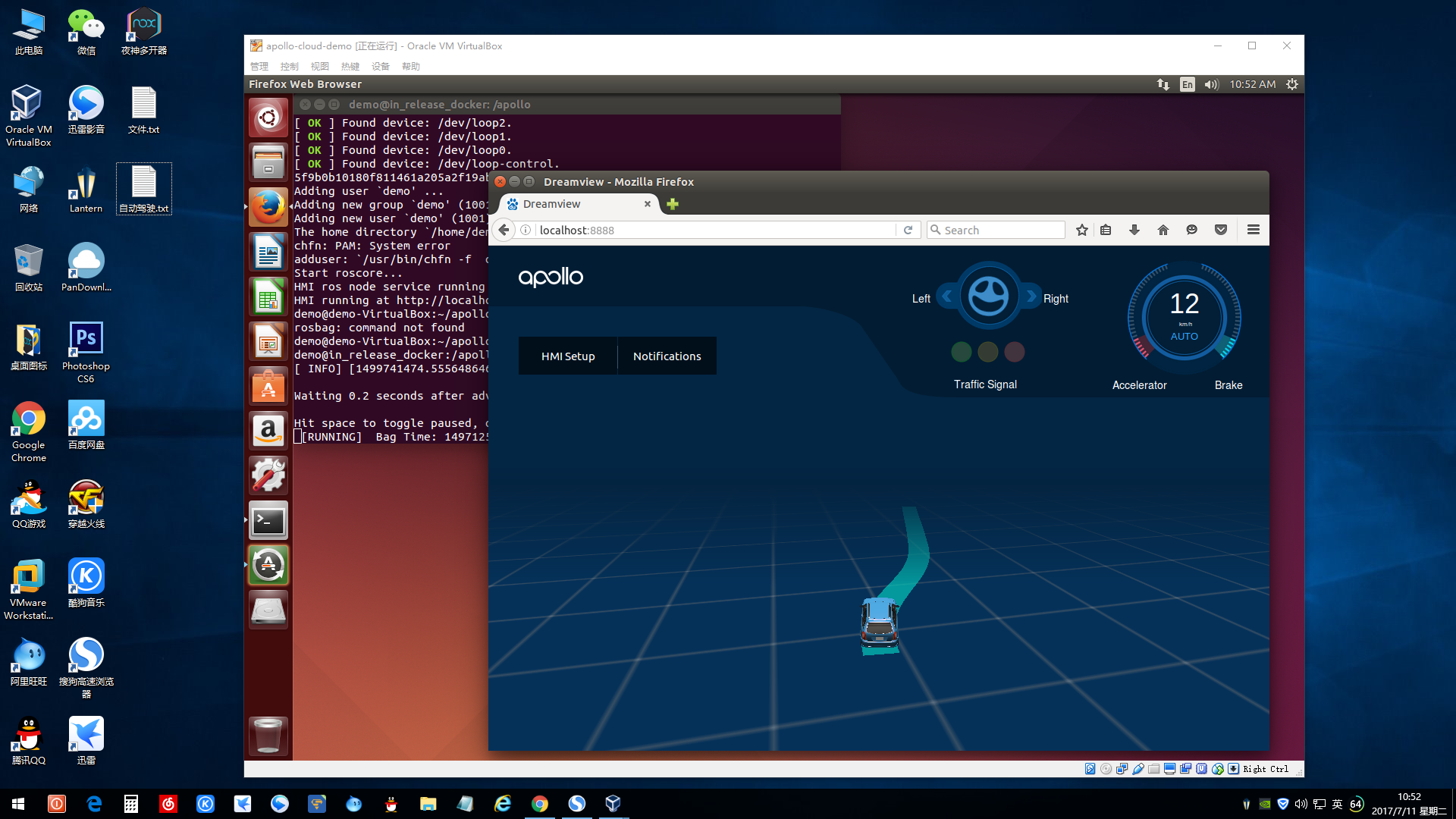
With the help of @ycool, my problem has been solved. The reason is that the websocket server port:8889 which dreamview use has been blocked by aliyun ECS firewall. After reconfiging the firewall, the vehicle and trajectory finally appear.
bigwhite
on 11 Jul 2017
Related issues
 dfremont
·
44Comments
dfremont
·
44Comments
 PikachuHy
·
28Comments
PikachuHy
·
28Comments
 hyx007
·
276Comments
hyx007
·
276Comments
 Eulerianial
·
23Comments
Eulerianial
·
23Comments
 carlin314
·
45Comments
carlin314
·
45Comments