Apollo: Any demo or tutorial to test entire apollo 3.5 stack?
I am able to run the demo .record file and visualize the output in Dreamview. However, I find that no modules are actually running and processing any sensor data.
The demo-3.5 .record file is actually just the output of the stack recorded for some run and not a sample input to test the stack. Hence what I am able to test is just cyber_recorder tool replaying a pre-recorded file and not the performance of the entire stack on a demo "sensor data" file.
Can you point me to the right documentation that explains how to test the stack with some sample sensor input data?
System information
- OS Platform and Distribution: Ubuntu 14.04
- Apollo installed from: Docker
- Apollo version: 3.5
 ankita9017
All 23 comments
Two steps to do this:
First, you should start all modules, including perception and planning.
Then, you can play the record bag, output channels that only contain raw sensor data in the record (without perception results), and disable other channels.
I don't familiar with apollo docs, maybe other people can help you to find corresponding tutorials
 zezhou
on 28 Feb 2019
zezhou
on 28 Feb 2019
same concern
 Smlight
on 6 Mar 2019
Smlight
on 6 Mar 2019
hi all ;
My question is also looks like same , how we test the specific modules like prediction to find the bugs.any demo or tutorial to test the single module ....?
 Iqbalparvi
on 12 Mar 2019
Iqbalparvi
on 12 Mar 2019
I can think of two ways to test one or more modules.
- With dreamview and other modules running in your local dev env.
Make sure you have the input data for the module you are interested in, e.g. they can be played from a record file. You will need to turn on the module you are interested in, and possibly all the downstream modules including sim_control, if you would like to see how your changes affect the way those downstream modules run, and sim_control helps to close the loop by feeding back virtual localization and chassis info. If you are able to observe the output of your module directly on dreamview, then you could just turn on your module.
- With Apollo Simulation Platform on the cloud.
Submit your code changes onto a public repository forked from Apollo, and login to the simulation platform https://azure.apollo.auto, which provides about 200 scenarios to test prediction and planning modules currently.
 unacao
on 12 Mar 2019
unacao
on 12 Mar 2019
@unacao thanks for sharing this precious info.... lets try to do something in this area ..
Iqbalparvi
on 16 Mar 2019
@unacao Do I input my raw data in a record file and run it on command line through those cyber commands or if there is somewhere else I can run those raw data? Thank you!
 AOIlunar
on 19 Mar 2019
AOIlunar
on 19 Mar 2019
@unacao Do I input my raw data in a record file and run it on command line through those cyber commands or if there is somewhere else I can run those raw data? Thank you!
that's right.
unacao
on 19 Mar 2019
@unacao Do I input my raw data in a record file and run it on command line through those cyber commands or if there is somewhere else I can run those raw data? Thank you!
that's right.
Could you please tell me which exact command should I use or which cyber file should I look into? I would appreciate that!
AOIlunar
on 19 Mar 2019
The main cyber command should be cyber_recorder.
$ cyber_recorder
usage: cyber_recorder
The cyber_recorder commands are:
info Show information of an exist record.
play Play an exist record.
record Record some topic.
split Split an exist record.
recover Recover an exist record.
$ cyber_recorder record -h
usage: cyber_recorder record [options]
-o, --output
-a, --all all channels
-c, --channel
-h, --help show help message
$ cyber_recorder split -h
usage: cyber_recorder split [options]
-f, --file
-o, --output
-a, --all all channels
-c, --channel
-b, --begin <2018-07-01 00:00:00> begin at assigned time
-e, --end <2018-07-01 01:00:00> end at assigned time
There is a script for recording data on self-driving vehicles, which could be a reference if that is relevant in your context.
unacao
on 19 Mar 2019
The main cyber command should be cyber_recorder.
$ cyber_recorder
usage: cyber_recorder > []
The cyber_recorder commands are:
info Show information of an exist record.
play Play an exist record.
record Record some topic.
split Split an exist record.
recover Recover an exist record.$ cyber_recorder record -h
usage: cyber_recorder record [options]
-o, --output output record file
-a, --all all channels
-c, --channel channel name
-h, --help show help message$ cyber_recorder split -h
usage: cyber_recorder split [options]
-f, --file input record file
-o, --output output record file
-a, --all all channels
-c, --channel channel name
-b, --begin <2018-07-01 00:00:00> begin at assigned time
-e, --end <2018-07-01 01:00:00> end at assigned timeThere is a script for recording data on self-driving vehicles, which could be a reference if that is relevant in your context.
Thank you!! Also, can I turn on all the modules in dreamview even if I do not have hardware and how can I turn on the sim_control? Does it automatically do so when I call cyber_record?
AOIlunar
on 19 Mar 2019
It is recommended to turn on modules you are interested only. Otherwise, you might cause unnecessary core dump or wast the computer resources. For instance, you might not want to turn on 'Recorder' module to record bags.
For turning on the sim_control, please refer to our FQA here.
 vlin17
on 20 Mar 2019
vlin17
on 20 Mar 2019
@unacao I have the same problem. How could I input my raw camera/Lidar/GPS dataset (the one I am using is NuScenes) into a record file and test the whole system? Thank you for your help!
 wzjin2017
on 25 Mar 2019
wzjin2017
on 25 Mar 2019
I believe you will need to convert the raw data from elsewhere into the format understood by Apollo before the modules can generate meaningful output. Here is a list of topic to proto type mapping for your reference. https://github.com/ApolloAuto/apollo/blob/master/modules/data/tools/rosbag_to_record/channel_info.cc#L55
For example, if you have topic "/apollo/sensor/gnss/odometry" in the right data format, then the localization module turned on will start to take that information and produce "/apollo/localization/pose" topic.
unacao
on 25 Mar 2019
@unacao Hello! Do you know how long does it typically take to record a bag? I was using bags from the Multi-Sensor Fusion Localization Data Set on the Open Data platform but it took more than two hours.
AOIlunar
on 25 Mar 2019
@unacao Hello! Do you know how long does it typically take to record a bag? I was using bags from the Multi-Sensor Fusion Localization Data Set on the Open Data platform but it took more than two hours.
@xiaoxq any idea?
unacao
on 25 Mar 2019
@unacao Hello! Do you know how long does it typically take to record a bag? I was using bags from the Multi-Sensor Fusion Localization Data Set on the Open Data platform but it took more than two hours.
Hi @AOIlunar , do you mean converting a bag to record? And may I know the code version you are using?
 xiaoxq
on 26 Mar 2019
xiaoxq
on 26 Mar 2019
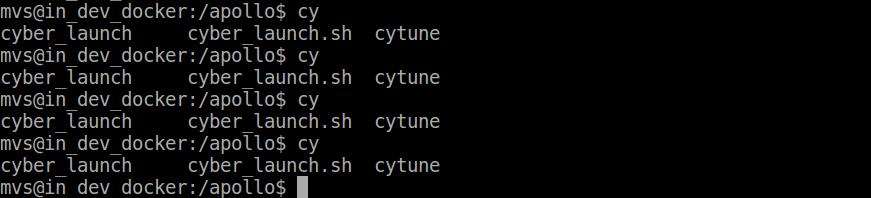
Hi ,I'm wondering why the cyber_record is missing when I try to build the linsen and talker example ,there is only the cyber_launch and cytune exist like the picture in the below
 debuleilei
on 19 Apr 2019
debuleilei
on 19 Apr 2019
@unacao
Hi, According to your previous description, I have some question on the use of sim_control and external dataset to test apollo.
- How to test apollo modules by replaying a record in sim_control mode? If I filter the localization and chassis topic, but the car will not move on the dreamview. I know sim_control will public fake localization and chassis messages, but do the messages match the apollo record file? please refer to #11261
- Can you provide more info about how to convert external dataset such as nuScenes or kitti into the format understood by Apollo? Do we need to convert external dataset into .bag file and then use rosbag_to_record tool or Can we directly convert it into .record file? I know a tool can convert kitti into rosbag, But I found some topic in apollo .bag file is based protobuf, I also don't know How to convert original .bag file into apollo compatible .bag file.
- More importantly, Can we use external data to test apollo stack such as perception, perdiction, planning modules? Due to apollo use hdmap and customized coordinate transformation system, each module has strict input requirements and so on. I'm afraid that whether external dataset can provide the necessary info.
Anyway, I really need some help, Thank you in advance.
 ideasplus
on 27 May 2020
ideasplus
on 27 May 2020
@unacao
Hi, According to your previous description, I have some question on the use of sim_control and external dataset to test apollo.
- How to test apollo modules by replaying a record in sim_control mode? If I filter the localization and chassis topic, but the car will not move on the dreamview. I know sim_control will public fake localization and chassis messages, but do the messages match the apollo record file? please refer to #11261
- Can you provide more info about how to convert external dataset such as nuScenes or kitti into the format understood by Apollo? Do we need to convert external dataset into .bag file and then use rosbag_to_record tool or Can we directly convert it into .record file? I know a tool can convert kitti into rosbag, But I found some topic in apollo .bag file is based protobuf, I also don't know How to convert original .bag file into apollo compatible .bag file.
- More importantly, Can we use external data to test apollo stack such as perception, perdiction, planning modules? Due to apollo use hdmap and customized coordinate transformation system, each module has strict input requirements and so on. I'm afraid that whether external dataset can provide the necessary info.
Anyway, I really need some help, Thank you in advance.
For Question 1, I think you need to send a routing request on Dreamview UI.
For Question 2 & 3, @ycool @weidezhang do you have more thoughts?
unacao
on 27 May 2020
@unacao
Hi, According to your previous description, I have some question on the use of sim_control and external dataset to test apollo.
- How to test apollo modules by replaying a record in sim_control mode? If I filter the localization and chassis topic, but the car will not move on the dreamview. I know sim_control will public fake localization and chassis messages, but do the messages match the apollo record file? please refer to #11261
- Can you provide more info about how to convert external dataset such as nuScenes or kitti into the format understood by Apollo? Do we need to convert external dataset into .bag file and then use rosbag_to_record tool or Can we directly convert it into .record file? I know a tool can convert kitti into rosbag, But I found some topic in apollo .bag file is based protobuf, I also don't know How to convert original .bag file into apollo compatible .bag file.
- More importantly, Can we use external data to test apollo stack such as perception, perdiction, planning modules? Due to apollo use hdmap and customized coordinate transformation system, each module has strict input requirements and so on. I'm afraid that whether external dataset can provide the necessary info.
Anyway, I really need some help, Thank you in advance.
Did you fix Q1? I have the same situation that when I tested apollo pipeline with only sensor data in record file, the car would not move in the dreamview. Really need help, thanks a lot!
 Moon-XUChengyuan
on 8 Jun 2020
Moon-XUChengyuan
on 8 Jun 2020
Are there any .record files with sensor data topics in them? The only ones I could find in the docs are planning/imu/control topics
 jimaldon
on 25 Jun 2020
jimaldon
on 25 Jun 2020
This rosbag has sensor data https://github.com/ApolloAuto/apollo/releases/download/v2.5.0/demo_2.5.bag
However you may need to convert it to record with the tool in r3.5.0
unacao
on 25 Jun 2020
@unacao
Hi, According to your previous description, I have some question on the use of sim_control and external dataset to test apollo.
- How to test apollo modules by replaying a record in sim_control mode? If I filter the localization and chassis topic, but the car will not move on the dreamview. I know sim_control will public fake localization and chassis messages, but do the messages match the apollo record file? please refer to #11261
- Can you provide more info about how to convert external dataset such as nuScenes or kitti into the format understood by Apollo? Do we need to convert external dataset into .bag file and then use rosbag_to_record tool or Can we directly convert it into .record file? I know a tool can convert kitti into rosbag, But I found some topic in apollo .bag file is based protobuf, I also don't know How to convert original .bag file into apollo compatible .bag file.
- More importantly, Can we use external data to test apollo stack such as perception, perdiction, planning modules? Due to apollo use hdmap and customized coordinate transformation system, each module has strict input requirements and so on. I'm afraid that whether external dataset can provide the necessary info.
Anyway, I really need some help, Thank you in advance.
@unacao
Hi, According to your previous description, I have some question on the use of sim_control and external dataset to test apollo.
- How to test apollo modules by replaying a record in sim_control mode? If I filter the localization and chassis topic, but the car will not move on the dreamview. I know sim_control will public fake localization and chassis messages, but do the messages match the apollo record file? please refer to #11261
- Can you provide more info about how to convert external dataset such as nuScenes or kitti into the format understood by Apollo? Do we need to convert external dataset into .bag file and then use rosbag_to_record tool or Can we directly convert it into .record file? I know a tool can convert kitti into rosbag, But I found some topic in apollo .bag file is based protobuf, I also don't know How to convert original .bag file into apollo compatible .bag file.
- More importantly, Can we use external data to test apollo stack such as perception, perdiction, planning modules? Due to apollo use hdmap and customized coordinate transformation system, each module has strict input requirements and so on. I'm afraid that whether external dataset can provide the necessary info.
Anyway, I really need some help, Thank you in advance.
Did you find the solution for this problem ? I'm in same your situation.
 nightfuryyy
on 19 Apr 2021
nightfuryyy
on 19 Apr 2021
Related issues
 Wsine
·
3Comments
Wsine
·
3Comments
 maziqiqi
·
3Comments
maziqiqi
·
3Comments
 lql7595
·
3Comments
lql7595
·
3Comments
 lyletbjohnson
·
3Comments
lyletbjohnson
·
3Comments
 lesun90
·
3Comments
lesun90
·
3Comments
Most helpful comment
The main cyber command should be cyber_recorder.
$ cyber_recorder> []
usage: cyber_recorder
The cyber_recorder commands are:
info Show information of an exist record.
play Play an exist record.
record Record some topic.
split Split an exist record.
recover Recover an exist record.
$ cyber_recorder record -h output record file channel name
usage: cyber_recorder record [options]
-o, --output
-a, --all all channels
-c, --channel
-h, --help show help message
$ cyber_recorder split -h input record file output record file channel name
usage: cyber_recorder split [options]
-f, --file
-o, --output
-a, --all all channels
-c, --channel
-b, --begin <2018-07-01 00:00:00> begin at assigned time
-e, --end <2018-07-01 01:00:00> end at assigned time
There is a script for recording data on self-driving vehicles, which could be a reference if that is relevant in your context.