Apollo: cyber_visualizer can't start (Could not initialize GLX)
Hi Apollo!
I can't seem to open cyber_visualizer due to an error. Please see my steps below.
Thanks
System information
- OS Platform and Distribution (e.g., Linux Ubuntu 14.04): Ubuntu 16.04
- Apollo installed from (source or binary): source
- Apollo version (1.0, 1.5, 2.0, 2.5, 3.0): 5.0
Steps to reproduce the issue:
- Please use bullet points and include as much details as possible:
- ./docker/scripts/dev_start.sh
- ./docker/scripts/dev_into.sh - now inside docker.
- source cyber/setup.bash
- cyber_visualizer
Result:
dan@in_dev_docker:/apollo$ cyber_visualizer
Could not initialize GLX
Aborted (core dumped)
Supporting materials (screenshots, command lines, code/script snippets):
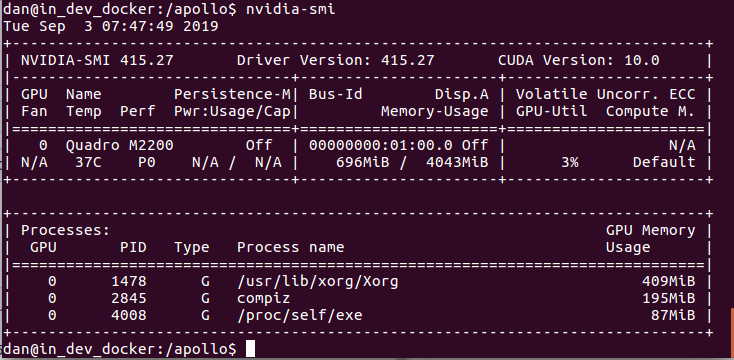

 dwrr
dwrr
All 16 comments
nVidia's OpenGL is not working perfectly in docker. The suggestion is to run cyber_visualizer out of docker, but have to install the necessary dependencies.
 fengliu00
on 5 Sep 2019
fengliu00
on 5 Sep 2019
Thanks for the reply @fengliu00. Do you have a list of the required dependencies?
dwrr
on 5 Sep 2019
- install libboost.54 if non-existent
- install ros console bridge 0.2.0, fastrtps 1.5.0 along with fastcdr 1.0.7, gflags 2.2.0, glog 0.3.5, protobuf 3.3.0 and qt 5.5.1 if non-existent
fengliu00
on 5 Sep 2019
@fengliu00 Do you have same list for Ubuntu 18.04? All libs versions are the same?
 ShepelIlya
on 13 Sep 2019
ShepelIlya
on 13 Sep 2019
Almost as same as 14.04, except QT. QT5.9.8 should be fit for 18.04.
fengliu00
on 13 Sep 2019
Finally, I have run the cyber_visualizer in the docker.
I used the master branch and the last version of the docker image.
However, you need to have exactly the same version of nvidia drivers in the docker as on the your host.
For instance, I have the nvidia driver 418.67 on the host, so I download the needed version and install it into the docker.
wget http://us.download.nvidia.com/tesla/418.67/NVIDIA-Linux-x86_64-418.67.run
sudo chmod +x NVIDIA-Linux-x86_64-418.67.run
sudo ./NVIDIA-Linux-x86_64-418.67.run -a -N --ui=none --no-kernel-module

 alexbuyval
on 23 Oct 2019
alexbuyval
on 23 Oct 2019
Finally, I have run the cyber_visualizer in the docker.
I used the master branch and the last version of the docker image.
However, you need to have exactly the same version of nvidia drivers in the docker as on the your host.
For instance, I have the nvidia driver 418.67 on the host, so I download the needed version and install it into the docker.wget http://us.download.nvidia.com/tesla/418.67/NVIDIA-Linux-x86_64-418.67.run sudo chmod +x NVIDIA-Linux-x86_64-418.67.run sudo ./NVIDIA-Linux-x86_64-418.67.run -a -N --ui=none --no-kernel-module
How did you do that, apollo-master use host's NVIDIA driver by NVIDIA docker, and will be same as host driver. Is it necessary setup NVIDIA driver again?
 qwetqwe
on 5 Dec 2019
qwetqwe
on 5 Dec 2019
@qwetqwe Yes, I have installed the Nvidia driver in the docker.
alexbuyval
on 5 Dec 2019
@alexbuyval Do you build visualizer tools by yourself? Because apollo team disabled bazel build visualizer in apollo.sh. What else dependencies do you install in the latest image? QT also disappeared in latest image...
qwetqwe
on 6 Dec 2019
@qwetqwe
I use the following:
sudo apt-get update
sudo apt-get install qt5-default
bazel build //modules/tools/visualizer:cyber_visualizer
@alexbuyval Finally,I succeed in your way.
Thanks a lot.
qwetqwe
on 9 Dec 2019
- install libboost.54 if non-existent
- install ros console bridge 0.2.0, fastrtps 1.5.0 along with fastcdr 1.0.7, gflags 2.2.0, glog 0.3.5, protobuf 3.3.0 and qt 5.5.1 if non-existent
Hi, @fengliu00 may i know what ROS distribution is this ? thank you.
 ntutangyun
on 16 Dec 2019
ntutangyun
on 16 Dec 2019
- install libboost.54 if non-existent
- install ros console bridge 0.2.0, fastrtps 1.5.0 along with fastcdr 1.0.7, gflags 2.2.0, glog 0.3.5, protobuf 3.3.0 and qt 5.5.1 if non-existent
Apollo seems to be migrated to Ubuntu 18.4. but libboost 1.54.0 seems to be no longer supported in ubuntu 1804...
currently I've installed
- fast-rtps 1.9.3
- libgflags-dev
- libgoogle-glog-dev
- Protobuf 3.3.0
- Libpocofoundation9v5
- boost 1.54.0
however, after i source .../apollo/cyber/setup.bash and execute cyber_monitor,
i got following results:
cyber_monitor: symbol lookup error: cyber_monitor: undefined symbol: _ZN3fLS13FLAGS_log_dirE
ntutangyun
on 16 Dec 2019
@alexbuyval Hi, I follow your way and build the cyber_visualizer OK, but when I run it, get the following errors:
zhanghm@in_dev_docker:/apollo$ cyber_visualizer
QStandardPaths: XDG_RUNTIME_DIR not set, defaulting to '/tmp/runtime-zhanghm'
libGL error: No matching fbConfigs or visuals found
libGL error: failed to load driver: swrast
Unrecognized OpenGL version
Unrecognized OpenGL version
QOpenGLFunctions created with non-current context
ASSERT: "QOpenGLFunctions::isInitialized(d_ptr)" in file /usr/include/x86_64-linux-gnu/qt5/QtGui/qopenglfunctions.h, line 861
Aborted (core dumped)
Do you know why?
Update:
Sovled this problem, refer this
 zhanghming
on 7 May 2020
zhanghming
on 7 May 2020
@alexbuyval Hi, I follow your way and build the cyber_visualizer OK, but when I run it, get the following errors:
zhanghm@in_dev_docker:/apollo$ cyber_visualizer
QStandardPaths: XDG_RUNTIME_DIR not set, defaulting to '/tmp/runtime-zhanghm'
libGL error: No matching fbConfigs or visuals found
libGL error: failed to load driver: swrast
Unrecognized OpenGL version
Unrecognized OpenGL version
QOpenGLFunctions created with non-current context
ASSERT: "QOpenGLFunctions::isInitialized(d_ptr)" in file /usr/include/x86_64-linux-gnu/qt5/QtGui/qopenglfunctions.h, line 861
Aborted (core dumped)
Do you know why?
Update:
Sovled this problem, refer this
Hi @zhanghming and all, the cyber_visualizer issue should have been fix now in lastest master. And it works on realtime kernels if you follow our latest RT kernel installation guide here (English , Chinese)
Thank you.
 storypku
on 3 Dec 2020
storypku
on 3 Dec 2020
Finally, nvidia never asked to install the driver in docker! Ref link
 daohu527
on 24 Apr 2021
daohu527
on 24 Apr 2021
Related issues
 lql7595
·
3Comments
lql7595
·
3Comments
 BenBaek
·
3Comments
BenBaek
·
3Comments
 chasingw
·
3Comments
chasingw
·
3Comments
 JSnobody
·
3Comments
JSnobody
·
3Comments
 YaoQii
·
3Comments
YaoQii
·
3Comments