I'm a junior developer, but it seems like common practice for iOS OAuth redirect URL's is using the bundle identifier?
For example, my app is called TransmatApp so the bundle identifier is com.jonesandcode.TransmatApp.
However, when I try and register just the bundle identifier I get an error saying The redirect URL must be a fully qualified URL using any scheme except http..
Here's an example of using the bundle identifier:
https://www.raywenderlich.com/243-oauth-2-0-with-swift-tutorial
What is the best approach for the redirect URL? I'm not quite sure what I am doing wrong. I login successfully, but don't get redirected back to the app.
 jonesandcode
All 37 comments
The bundle identifier isn't used in callback URLs on iOS. To use callback URLs on iOS, you'll be setting a "Custom URL scheme" somewhere in your App plists, such as "transmat://this" or "blackbox://meta". You would then specify, for example, "transmit://oauth-callback" as your "OAuth Redirect URL" at Bungie.net, and implement a callback handler in your app to parse whatever Bungie sends to that URL for your tokens.
 floatingatoll
on 6 Aug 2019
floatingatoll
on 6 Aug 2019
http://x-callback-url.com may help. But you can do anything you like, really, as long as you can parse whatever Bungie sends to you!
floatingatoll
on 6 Aug 2019
Okay cool, I guess a lot of the tutorials I've seen use the bundle identifier. This clears things up for me though _I think_ 🤞 . This is what I had in my Info.plist and my redirect URL was com.jonesandcode.TransmatApp://oauth2Callback.

But it sounds like I should maybe just change the identifier to something like TransmatApp and then for my redirect URL use TransmatApp://oauth2callback if I'm understanding correctly?
jonesandcode
on 6 Aug 2019
I think I see, seems like I was too concerned with the URL Identifier and it's all about the schemes
jonesandcode
on 6 Aug 2019
Schemes with dots are technically legal, but I've never seen them used. You probably could have just switched . for - and it might just magically work. Or you could shorten it, as you figured out.
floatingatoll
on 6 Aug 2019
@vthornheart-bng Though, FYI, you might want to either check your validation routines for schemes — scheme = ALPHA *( ALPHA / DIGIT / "+" / "-" / "." ) in case your validation routines are rejecting . by _accident_
floatingatoll
on 6 Aug 2019
@floatingatoll thanks for all your help, I really appreciate it.
I think I have it working 🤞 , when I type TransmatApp://oauth2callback into Safari on the simulator, it redirects me back to the app.
On bungie my redirect URL is updated to TransmatApp://oauth2callback, so hopefully in 20 minutes when it updates it will work! 🎉
jonesandcode
on 6 Aug 2019
@floatingatoll learned some good stuff regarding the URL scheme, but I fear it was unrelated.
I still receive 302 response code, which I think yesterday you mentioned a 302 could have something to do with an an extra / somewhere in the URL?
I get a 200 from the oauth endpoint, the BattleNetId endpoint returns me the 302 response code.
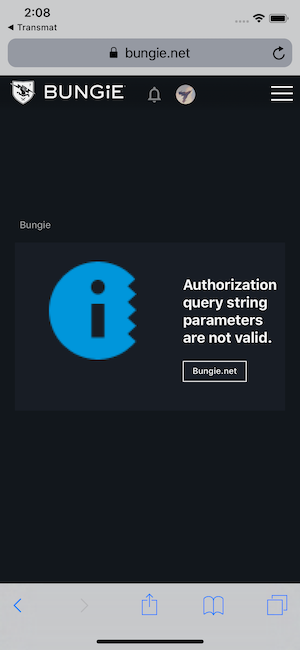
Any tips on what I should look for? This is the error bungie gives me
jonesandcode
on 6 Aug 2019
I get a 200 from the oauth endpoint, the BattleNetId endpoint returns me the 302 response code.
What are the exact URLs you're using for each?
floatingatoll
on 6 Aug 2019
So I'm using a pod for the oauth work
authorizationUrl: https://www.bungie.net/en/oauth/authorize
accessTokenUrl: https://www.bungie.net/platform/app/oauth/token/
Responses url's that produce a 302:
https://www.bungie.net/en/User/SignIn/BattleNetId?code=*****&state=******
https://www.bungie.net/en/User/SignIn/BattleNetId?bru=%25252Fen%25252Foauth%25252Fauthorize%25253Fclient_id%2*****b55f4b4b99159adf49500e73%252526redirect_uri%25253DTransmatApp%25253A%25252F%25252Foauth2callback%252526response_type%25253Dcode&flowStart=1
I added the stars in the URL's, are those what you are looking for?
jonesandcode
on 6 Aug 2019
https://www.bungie.net/en/User/SignIn/BattleNetId?code=*****&state=******
Is this entire URL, from https to &state=, something you received verbatim in a Bungie response — or did you construct the URL https://www.bungie.net/en/User/SignIn/BattleNetId in your codebase somewhere somehow, and then append ?code=&state= to it?
floatingatoll
on 6 Aug 2019
I'm not entirely sure, the pod I'm using constructs the url for me and the authorize api does have a scope and state parameter that I set to empty strings.
oauthswift.authorize(withCallbackURL: URL(string: "TransmatApp://oauth2callback")!,
                             scope: "", state: "") { (result) in
                                switch result {
                                case .success(let (credential, response, parameters)):
                                    print(credential.oauthToken)
                                case .failure(let error):
                                    print(error.localizedDescription)
                                }
        }
This is what it looks like Charles Proxy, but I sadly don't know what the blue icon means.
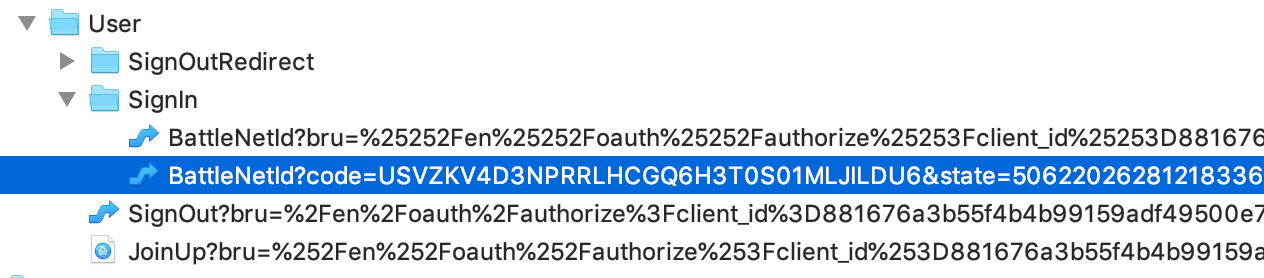
Under contents in Charles Proxy it says the battle net URL's are a GET method if that helps.
jonesandcode
on 6 Aug 2019
Okay, a couple steps here.
First: In the SignIn/BattleNet 302 response, what is the value of that 302's 'Location' response header? Does it contain the exact string SignIn/BattleNet/ (note the trailing slash)?
Second: If you sort Charles by time (oldest to newest) and search for the first appearance of SignIn/BattleNetId _anywhere_ in _any_ response, is it present in _any_ of them?
If not, it's in the callback URL data from Bungie — your code will have something like this in it somewhere:
OAuthSwift.handle(url: url)
Please breakpoint on that line and capture what the value being passed to url: is and see if _that_ contains SignIn/BattleNetId _or_ if it contains SignIn/BattleNetId/ with trailing slash.
EDIT: If you can't find SignIn/BattleNetId, the slash could be URI-encoded — look for SignIn%2FBattleNetId or SignIn%252FBattleNetId for example
floatingatoll
on 6 Aug 2019
This is all super helpful, I'm learning a ton! Thank you.
Looks like my AppDelegate class isn't even getting hit, which is where the OAuthSwift.handle(url: url) call lives. This could be the problem lol
Also, I did not see SignIn/BattleNetId in any of the responses in Charles. But I could not PO the OAuthSwift.handle(url: url) because it's never getting called apparently.
jonesandcode
on 6 Aug 2019
That might well be it! If you fix that and it still breaks, then grab that url value and also the 302 Location response value and provide both here (okay to * out specific token characters but don't abbreviate/shorthand).
floatingatoll
on 6 Aug 2019
Sounds good, thanks again for the help!
jonesandcode
on 6 Aug 2019
https://us.battle.net/oauth/authorize?client_id=****&scope=&response_type=code&state=5062202628121833679&loc=en-US&redirect_uri=https%3A%2F%2Fwww.bungie.net%2Fen%2FUser%2FSignIn%2FBattleNetId
SignIn%2FBattleNetId
Looks like I'm possibly missing a trailing slash at the end of this sign in url?
jonesandcode
on 6 Aug 2019
Yes!
Where did you get that URL from?
On Aug 6, 2019, at 2:34 PM, Jordan Jones notifications@github.com wrote:
https://us.battle.net/oauth/authorize?client_id=*&scope=&response_type=code&state=5062202628121833679&loc=en-US&redirect_uri=https%3A%2F%2Fwww.bungie.net%2Fen%2FUser%2FSignIn%2FBattleNetId*
Looks like I'm possibly missing a trailing slash at the end of this sign in url?
—
You are receiving this because you were mentioned.
Reply to this email directly, view it on GitHub
, or mute the thread
.
floatingatoll
on 6 Aug 2019
Nice! From the signIn endpoint in Charles, I'm going to try and set a breakpoint to edit the response and add a / and see what happens
jonesandcode
on 6 Aug 2019
Wait, so, you found that in a response from Bungie.net?
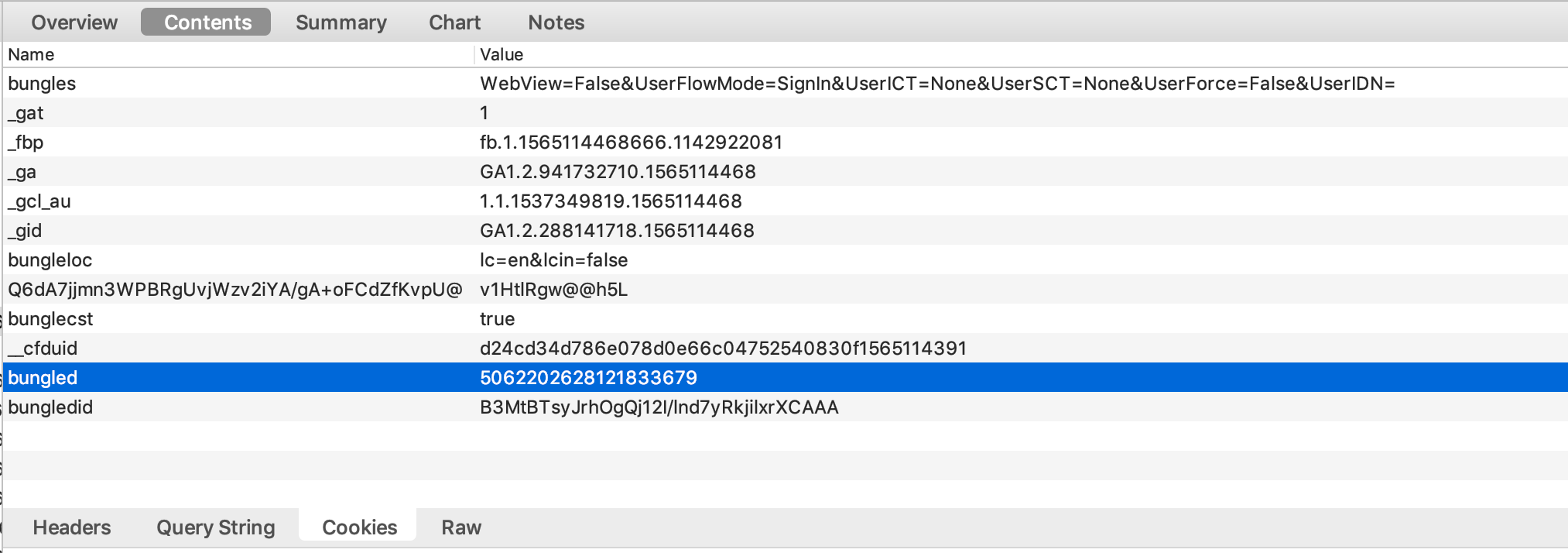
Could you please pull the value for Set-Cookie ‘bungled=…’ from that precise response and paste it here?
On Aug 6, 2019, at 2:40 PM, Jordan Jones notifications@github.com wrote:
Nice! From the signIn
endpoint in Charles, I'm going to try and set a breakpoint to edit the response and add a /
and see what happens—
You are receiving this because you were mentioned.
Reply to this email directly, view it on GitHub
, or mute the thread
.
floatingatoll
on 6 Aug 2019
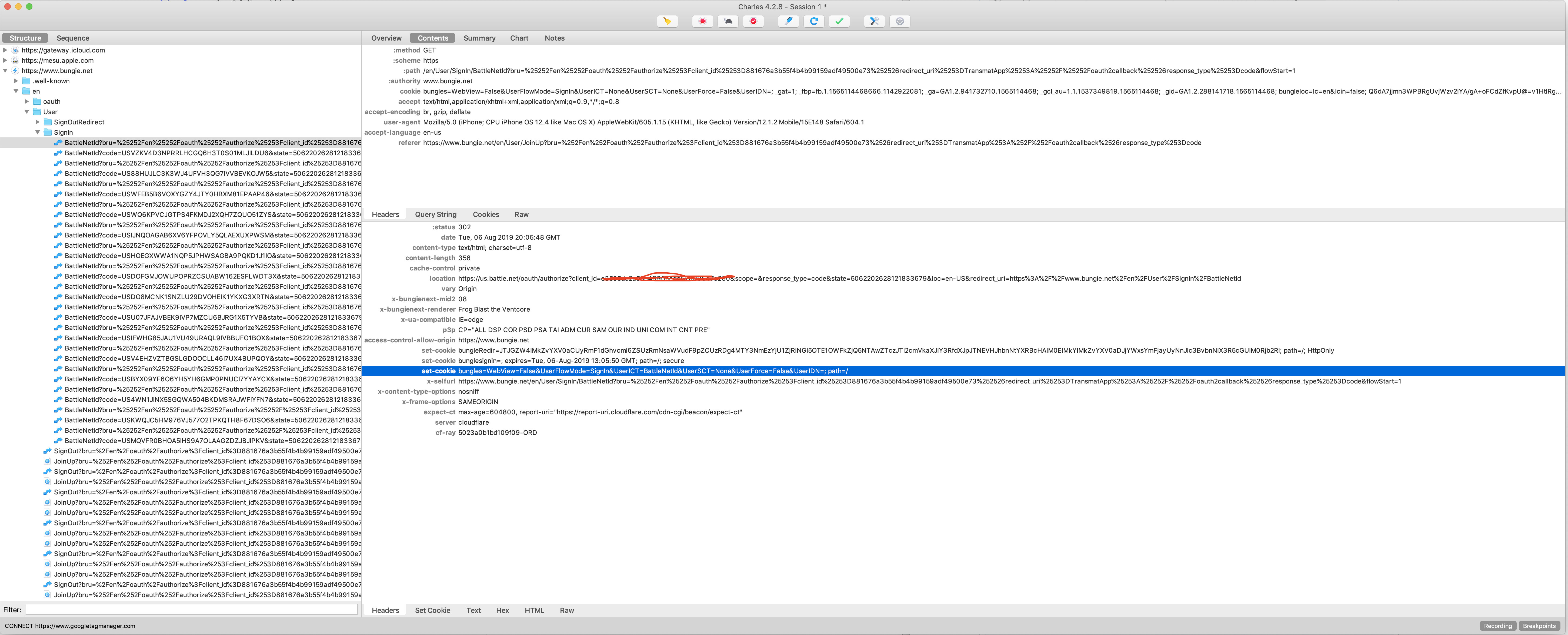
I have three set-cookie values, here they are:
bungleRedir=JTJGZW4lMkZvYXV0aCUyRmF1dGhvcml6ZSUzRmNsaWVudF9pZCUzRDg4MTY3NmEzYjU1ZjRiNGI5OTE1OWFkZjQ5NTAwZTczJTI2cmVkaXJlY3RfdXJpJTNEVHJhbnNtYXRBcHAlM0ElMkYlMkZvYXV0aDJjYWxsYmFjayUyNnJlc3BvbnNlX3R5cGUlM0Rjb2Rl; path=/; HttpOnly
bunglesignin=; expires=Tue, 06-Aug-2019 13:05:50 GMT; path=/; secure
bungles=WebView=False&UserFlowMode=SignIn&UserICT=BattleNetId&UserSCT=None&UserForce=False&UserIDN=; path=/
Here is a screenshot of Charles as well if its helpful
jonesandcode
on 6 Aug 2019
Actually sorry, I think this is what you're looking for. _Dealing with a noob_
jonesandcode
on 6 Aug 2019
FYI I'm heading out for dinner, I'll check this when I get back
jonesandcode
on 6 Aug 2019
@vthornheart-bng I think there's a possibility that the OAuth process is sending a URL that is missing the trailing slash here, but I can't get enough debug detail to prove it. Fortunately, please enjoy a bungled cookie! Can you look into it?
floatingatoll
on 6 Aug 2019
EDIT: Ah, I see - yes, try that out and let me know.
 vthornheart-bng
on 7 Aug 2019
vthornheart-bng
on 7 Aug 2019
Ha, of course there’s one place where no-trailing-slash + 302 is legal. Sorry :(
On Aug 6, 2019, at 3:06 PM, Vendal Thornheart notifications@github.com wrote:
Ah, so in terms of the us.battle.net URL above, that one doesn't actually need a trailing slash - that's the URL that we redirect you to for OAuth when you try to sign in with Battle.net, so that Battle.net can show you their login page and redirect back to us.
Do you have the response that came back from them?
—
You are receiving this because you were mentioned.
Reply to this email directly, view it on GitHub
, or mute the thread
.
floatingatoll
on 7 Aug 2019
Sorry for the confusion all, I’ll take a look at a response when I get home
jonesandcode
on 7 Aug 2019
Trailing slashes are only required on API urls. These are easy to spot because the path starts with /platform (or /d1/platform)
 Tetron-bng
on 7 Aug 2019
Tetron-bng
on 7 Aug 2019
https://us.battle.net/oauth/authorize?client_id=****&scope=&response_type=code&state=5062202628121833679&loc=en-US&redirect_uri=https%3A%2F%2Fwww.bungie.net%2Fen%2FUser%2FSignIn%2FBattleNetIdSignIn%2FBattleNetId
Looks like I'm possibly missing a trailing slash at the end of this sign in url?
The above is a battle.net URL (not bungie.net) and so the trailing slash rule does not apply.
Tetron-bng
on 7 Aug 2019
Yep, my fault for not realizing /en/User wasn’t subject to platform slashes, sorry!
floatingatoll
on 7 Aug 2019
OP, can you please sort your CharlesProxy recording by Timeline and highlight where the error occurs in it? You’re sorting the screenshots by Site which makes it difficult to understand what you’re seeing.
(IIRC You can swipe to delete hosts from the top level or the recording once it’s paused if they’re interfering with the timeline view.)
On Aug 6, 2019, at 17:28, Rowan Green rowan@pobox.com wrote:
Yep, my fault for not realizing /en/User wasn’t subject to platform slashes, sorry!
On Aug 6, 2019, at 5:18 PM, Paul Tidwell notifications@github.com wrote:
https://us.battle.net/oauth/authorize?client_id=**&scope=&response_type=code&state=5062202628121833679&loc=en-US&redirect_uri=https%3A%2F%2Fwww.bungie.net%2Fen%2FUser%2FSignIn%2FBattleNetId
SignIn%2FBattleNetId
Looks like I'm possibly missing a trailing slash at the end of this sign in url?
The above is a battle.net URL (not bungie.net) and so the trailing slash rule does not apply.
—
You are receiving this because you were mentioned.
Reply to this email directly, view it on GitHub, or mute the thread.
floatingatoll
on 7 Aug 2019
I'm so sorry everyone, I really appreciate all the support. This is my first experience with oauth and this cocoa pod.
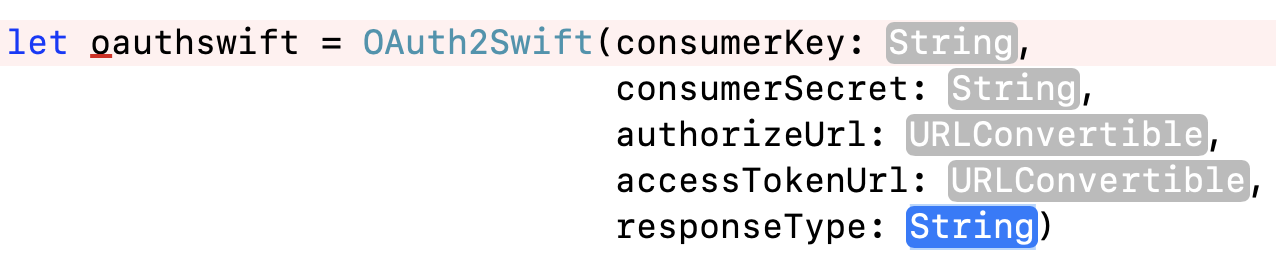
So I got it working...and it was something really stupid.
The api for the pod for clientID property specifies it as a consumerKey... so I was passing the API key and not the clientID 🤦♂ . After looking at the request a bunch, I changed the consumerKey property to the clientID and it works.
jonesandcode
on 7 Aug 2019
Ah, no worries at all, no need to apologize! We found a lot of good information - and uncovered a lot of useful "gotchas" that we should warn people about in the future and/or file bugs about - as a result of digging in there! Thank you for your question, and as always thank you for your investigation @floatingatoll !
vthornheart-bng
on 7 Aug 2019
@floatingatoll doesn't work for bungie?!
I'm going to relieve some stress and kill some hive. I really appreciate everyones help, I learned a ton!
jonesandcode
on 7 Aug 2019
Unfortunately we haven't convinced him yet, despite my best efforts! ;)
vthornheart-bng
on 7 Aug 2019
GitHub issues are my favorite kind of Internet forum
floatingatoll
on 7 Aug 2019
@floatingatoll well I really appreciate all your help even more, thanks for taking the time to help a noob!
jonesandcode
on 7 Aug 2019
Related issues
 lax20attack
·
4Comments
lax20attack
·
4Comments
 justrealmilk
·
3Comments
justrealmilk
·
3Comments
 Bizow
·
4Comments
Bizow
·
4Comments
 nathabba
·
3Comments
nathabba
·
3Comments
 andyschott
·
3Comments
andyschott
·
3Comments
Most helpful comment
Unfortunately we haven't convinced him yet, despite my best efforts! ;)