hi,
i setup my api key with all scopes as none public application with the status "confidential".
when i do api calls like https://bungie.net/Platform/Destiny2/1/Profile/4611686018434504253/?components=102,103 i don´t get my inventory or profileCurrencies ;(
{
    "Response": {
        "profileInventory": {
            "privacy": 2
        },
        "profileCurrencies": {
            "privacy": 2
        },
        "itemComponents": {}
    },
    "ErrorCode": 1,
    "ThrottleSeconds": 0,
    "ErrorStatus": "Success",
    "Message": "Ok",
    "MessageData": {}
}
in the header of this request i send X-API-Key and authorization with a valid Bearer ,
but still, there is something i am missing here.
what i noticed, but i don´t know if that is the problem, when getting the oauth-token, i get the result:
"membership_id": "17429800"
but my real "membership_id" is 4611686018434504253
maybe that´s the problem here. i don´t know... thanks for any help !
 michabbb
All 35 comments

just to proof that all scopes are set....
michabbb
on 22 May 2018
that first membershipId looks like a Bungie membershipId, so instead of that you need to pass along the platform specific membershipId (the second one) instead
 jamie1192
on 22 May 2018
jamie1192
on 22 May 2018
I don't understand you, please say it in other words.
The point is, the destiny item manager is doing exact the same call, and nothing is private. So the difference is somewhere with the app itself or the way getting the oauth token, I don't know. My app-user and the user I am testing with, are the same, maybe that's a problem. I don't know 😕
michabbb
on 22 May 2018
okay so, the membershipId you get in the OAuth response is not the one you use for retrieving a players inventory. After you successfully authorise through OAuth, the membershipId you're getting back is for the players account on www.bungie.net, not their membershipId for either PSN/Xbox/Battle.Net.
The easiest way (in my opinion) to handle getting the membershipId's and displayNames you need, is to hit the platform/User/GetMembershipsForCurrentUser/ endpoint, and pass along the Bearer token in the header.
This will give you a response like so-
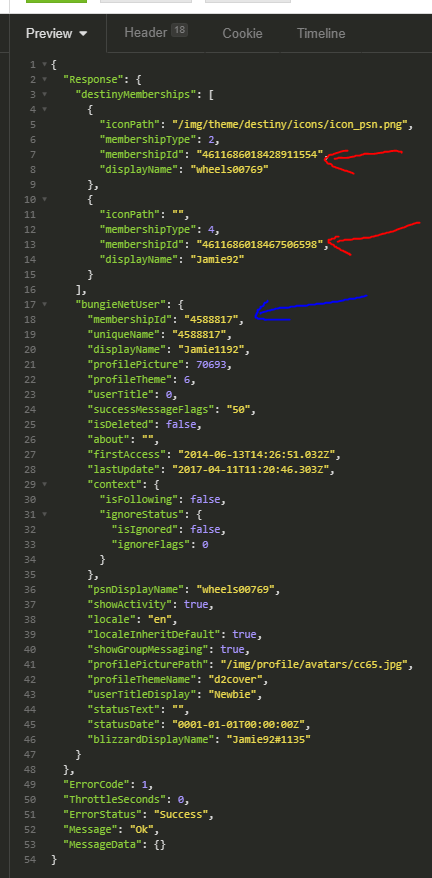
the red arrows are pointing to the membershipId's you need to retrieve inventories and just about every other endpoint for whichever platform the player is active on, the blue arrow is the players Bungie accountId (which is what I assume you were trying to pass)
jamie1192
on 22 May 2018
@jamie1192 thank you very very much for these detailed infos. the point is: i don´t know howto influence the way of getting the _correct_ membershipid with getting the tokens, maybe my auth-url is wrong, it´s:
https://www.bungie.net/en/OAuth/Authorize?client_id=23760&response_type=code
then i get asked to login via xbox, psn, battle and so on...
i choose xbox, than i get presented the screen with the scopes (my screenshot i have posted)
then i get redirected with the code in the URL. i use that code to get my access and refreshtoken.
when i get the tokens, the result looks like this...
{
    "access_token": "xxxxxxx",
    "token_type": "Bearer",
    "expires_in": 3600,
    "refresh_token": "xxxxxxx",
    "refresh_expires_in": 7776000,
    "membership_id": "17429800"
}
and as you can see, the membership_id is the other one, not 4611686018434504253
maybe i am doing the authorize wrong, i don´t know. i will check the call GetMembershipsForCurrentUser.
michabbb
on 22 May 2018
i feel really stupid, when trying the GetMembershipsForCurrentUser i get the following result:
{
    "ErrorCode": 99,
    "ThrottleSeconds": 0,
    "ErrorStatus": "WebAuthRequired",
    "Message": "Please sign-in to continue.",
    "MessageData": {}
}
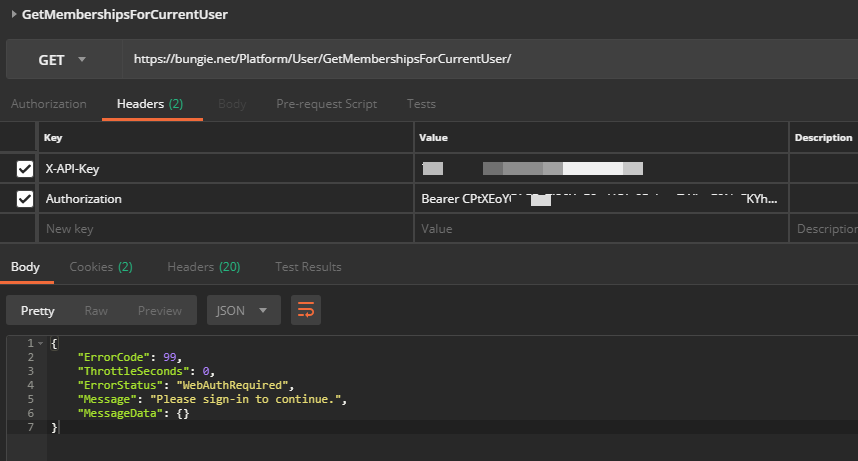
and i used a new fresh access token, so that shouldn´t be the problem here ;-((
i cannot identify my problem with an older issue found here. i guess the whole confusen starts with getting the access-token, but i don´t see it ;(
michabbb
on 22 May 2018
@jamie1192 the docu gives me an example here:
POST https://www.bungie.net/platform/app/oauth/token/ HTTP/1.1
Authorization: Basic czZCaGRSa3F0MzpnWDFmQmF0M2JW
Content-Type: application/x-www-form-urlencoded

grant_type=authorization_code&code=SplxlOBeZQQYbYS6WxSbIA
can your please tell me, what the string behind Basic is ?
i don´t get this from the docu and maybe i am missing something here when making this call.
michabbb
on 22 May 2018
@jamie1192 you said:
The easiest way (in my opinion) to handle getting the membershipId's and displayNames you need, is to hit the platform/User/GetMembershipsForCurrentUser/ endpoint, and pass along the Bearer token in the header.
do you mean, the _membershipid_ has to be placed in the header when doing calls like /Platform/Destiny2/1/Profile/ ?? i haven´t seen anything about that anywhere, so i am a bit confused (again), sorry.
michabbb
on 22 May 2018
if you're getting the webAuthRequired error then the token may have expired, each one only lasts an hour so you'll need to get another access_token and attach that as the Auth bearer
jamie1192
on 22 May 2018
@jamie1192 the access token used here is not older than 5minutes... as i said, i used a new fresh token, right after getting this i made my call. there must be another probleme somewhere.... so frustrating...
michabbb
on 22 May 2018
okay i just tested myself, you're getting the WebAuthRequired because you're passing the X-API-Key in the header so remove that, it's not necessary for GetMembershipsForCurrentUser endpoint, you only need the bearer token in the header
jamie1192
on 22 May 2018
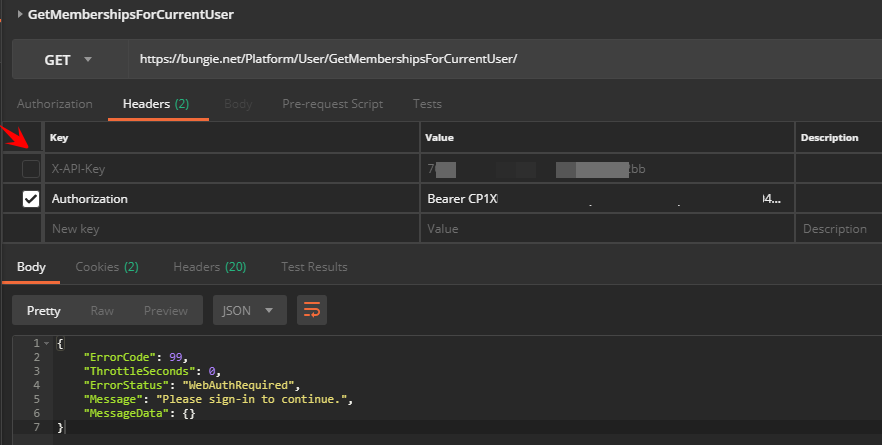
i wish it would be that easy, still getting the same error, as you can see and the access token used here is not older than 5minutes... catched a fresh new one.
maybe its because the membershipid assigned to that token is not a bungie-membershipid, as you already said. when getting the access_token, i would expact to see this:
{
    "access_token": "xxxxxxx",
    "token_type": "Bearer",
    "expires_in": 3600,
    "refresh_token": "xxxxxxx",
    "refresh_expires_in": 7776000,
    "membership_id": "4611686018434504253" <--------------------
}
but instead i get this, and i don´t know if that is okay, and if now, i have no idea
what i need to change when, i study the docu over and over again.. i don´t get it ;(
{
    "access_token": "xxxxxxx",
    "token_type": "Bearer",
    "expires_in": 3600,
    "refresh_token": "xxxxxxx",
    "refresh_expires_in": 7776000,
    "membership_id": "17429800" <--------------------
}
When you authenticate with Bungie.net you get back the membership ID of the 'Bungie.net' account. The next step is to call GetMembershipDataForCurrentUser. This will give you a list of all of the account associated with the Bungie.net account you just authenticated. Here is a link to the documentation:
https://bungie-net.github.io/multi/operation_get_User-GetMembershipDataForCurrentUser.html#operation_get_User-GetMembershipDataForCurrentUser
From here you can see the Xbox, PSN, or Blizzard account associated with the authenticated user. Use one of these membership IDs to call GetProfile.
 Tetron-bng
on 22 May 2018
Tetron-bng
on 22 May 2018
@Tetron-bng i am thankful for your tips, but that´s what i did. right now everbody is telling me todo things i am doing exact the way i was told to. as you can see in my very first posting: I AM using the correct memebershipid, i am testing with my own, and in fact i am only reproducing the calls the DIM (destiny item manager) is doing, so every call this app is doing with my own account, should also work with my own app - but it doesn´t. can you tell me if "get token request" is supposed to return the "bungie.net" account-id - is that normal ? if yes, i don´t need to worry any longer about that.
the membership-confusion was only an idea of myself, maybe the reason why things don´t work, nobody said or confirmed this till now ;-(
and sending me a link to a call that is not working, which i documentated here very detailed isn´t a help either ;-((
michabbb
on 22 May 2018
@Tetron-bng @vthornheart-bng i know there are a lot of postings here, but i did my very best to documente everything as best i can, with examples and screenshots. i would be really thankful (let me know how i can send you a sixpack beer, no problem) if you can start from beginning and help me with that. as usual, i guess it´s a very small detail i don´t see here. it´s related to "getting the auth token" or "doing the call wrong" - i read the docu 100 times now, i don´t get it ;-(( sorry ! ;-/
and there things in the docu, that are not very well explained, like "what is basic", see an older posting from me ;(
michabbb
on 22 May 2018
The response from get token request should return the bungie.net, so this is working as expected. Let me study this whole thread and see if I can spot the problem.
Tetron-bng
on 22 May 2018
I think your authentication is done correctly. Now you should focus on getting GetMembershipDataForCurrentUser to work. The question is why are you getting WebAuthRequired for this call?
The only reasons I can think of is that you are not passing the correct token to the Authorization header (your screenshot looks like you are indeed passing something) and you are including your API Key, so that is good.
Are you using the value from 'access_token' in the your Authorization header? Could it be getting truncated somehow?
Tetron-bng
on 22 May 2018
@Tetron-bng yes, i use access_token and i did a refresh before to be 100% sure that the token is valid. there a whitespace between Bearer and the token and the token is "copy & paste" - so i have no idea what else can go wrong here. my app has all scopes activated, so this should be fine, too.
michabbb
on 22 May 2018
If it were scope problem, you would get a specific error. If the token were expired, you would get a specific error for that too. One last very important thing to try: Make sure your URL starts is https://www.bungie.net. The https is critical as is the 'www'.
Tetron-bng
on 22 May 2018
@Tetron-bng if you like to follow me (only for this case) on twitter , i can send you all tokens, credentials, whatever you need....
michabbb
on 22 May 2018
Try checking your URL first. That could be the problem.
Tetron-bng
on 22 May 2018
@Tetron-bng see my screenshot, you will see that i am using https, that something i already noticed while study many other issues ;-((
michabbb
on 22 May 2018
But I can also see you are not using www.
Tetron-bng
on 22 May 2018
@Tetron-bng you are right i have to apologize... don´t know if that spell exists in englisch, but in german we would say: i don´t see the forest because of all the trees... ;-( i will check that asap !
michabbb
on 22 May 2018
@Tetron-bng OMG - this is so so so so stupid, i cannot believe it ;-( as i said, as terrible wrong things are, as easy the solution is. this whole case here is because i missed the www 😭
THANK YOU SO SO MUCH for seeing this !!
michabbb
on 22 May 2018
If it's of any comfort, we've all hit it at least once.
On Tue, May 22, 2018 at 11:16 AM, Michael Bladowski <
[email protected]> wrote:
Closed #499 https://github.com/Bungie-net/api/issues/499.
—
You are receiving this because you are subscribed to this thread.
Reply to this email directly, view it on GitHub
https://github.com/Bungie-net/api/issues/499#event-1640026070, or mute
the thread
https://github.com/notifications/unsubscribe-auth/AAFqDFLBcXig7n93gLtfgeLqaFE5h7jfks5t1FXugaJpZM4UH2Fb
.
 floatingatoll
on 22 May 2018
floatingatoll
on 22 May 2018
@Tetron-bng to avoid such stupid mistakes, it would be nice if the API does not answer at all on bungie.net without www ;)
michabbb
on 22 May 2018
Your tenacity is impressive! Keep it up. If you are using a PC, trying using a tool called 'Fiddler' it makes these types of problems more obvious. There are layers in the service that redirect your request from bungie.net to www.bungie.net, but the redirect causes the Authorization header to be dropped. There are three things that cause this: http instead of https, missing www, and missing the final / on the URL. All of these problems have created the same frustration you have experienced for many people.
Tetron-bng
on 22 May 2018
@Tetron-bng as a developer you fail so many times in your life with these stupid things, you spend hours for nothing, just u missed one single char in 500 lines of code.... that´s our (poor) life ;-))))))) again: thank you so much for seeing this ! and thanks for mentioning fiddler, will check that !
michabbb
on 22 May 2018
Awww Tetron, answering questions even after you went to Amazon! We miss you over here! Thanks for the assist, it is greatly appreciated!
 vthornheart-bng
on 23 May 2018
vthornheart-bng
on 23 May 2018
What is the HTTP body of the 500?
On Jul 20, 2019, at 14:34, Josh Freeman notifications@github.com wrote:
Hello, I am really sorry for bumping an old thread however I am getting this error and I do have "www". I am getting:
HTTP/2 500 returned for "https://www.bungie.net/Platform/Destiny2/4/Profile/4611686018467261336/".
I can access GetMembershipsForCurrentUser and I can perform GetMembershipsById, I am using the correct ID's as I have even copied them directly from Bungie site to test, but no go...Is there anything else that could return a 500 error code from the API? I get it for GetCharacter too, even with the correct character id's copied from bungies site.
—
You are receiving this because you commented.
Reply to this email directly, view it on GitHub, or mute the thread.
floatingatoll
on 21 Jul 2019
@floatingatoll It was InvalidParameters (or similar), it was due to missing componants, which is not listed as required on the docs (and should be a 400 Response, not 500, but i see this is still WIP)
 viion
on 21 Jul 2019
viion
on 21 Jul 2019
Ah, sorry, and thanks for reconfirming
floatingatoll
on 21 Jul 2019
Mmm yeah let me file a bug for that one - TFS 813502
vthornheart-bng
on 22 Jul 2019
That'll be fixed in a future update!
vthornheart-bng
on 22 Jul 2019
Related issues
 ttgmpsn
·
3Comments
ttgmpsn
·
3Comments
 lax20attack
·
4Comments
lax20attack
·
4Comments
 as-com
·
3Comments
as-com
·
3Comments
 theoperatore
·
4Comments
theoperatore
·
4Comments
 pancakeslp
·
3Comments
pancakeslp
·
3Comments
Most helpful comment
If it's of any comfort, we've all hit it at least once.
On Tue, May 22, 2018 at 11:16 AM, Michael Bladowski <
[email protected]> wrote: