Apexcharts.js: Grid lines overlaps floating legend
Bug report
Codepen
https://codepen.io/ashlanderr/pen/VwaGpVa
Explanation
- What is the behavior you expect?
Floating legend should be in front layer. It must not be overlapped by the rest of the chart.
- What is happening instead?
The legend is under the grid lines of the chart:

With single series I can use offsetY to shift the legend, but with multiple and unknown number of series that doesn't work. I tried to use the z-index property, but it doesn't work in SVG.
 ashlanderr
All 6 comments
Thanks for reporting, fixed it.
 junedchhipa
on 17 Sep 2020
junedchhipa
on 17 Sep 2020
@junedchhipa I think the fix 7af7b30221d2ea8470250c0c329d83098da2a425 causes a regression where tooltips and filter functions no longer "work" correctly. For example, when building the library from that commit (7af7b30221d2ea8470250c0c329d83098da2a425) the following behaviour can be observed:
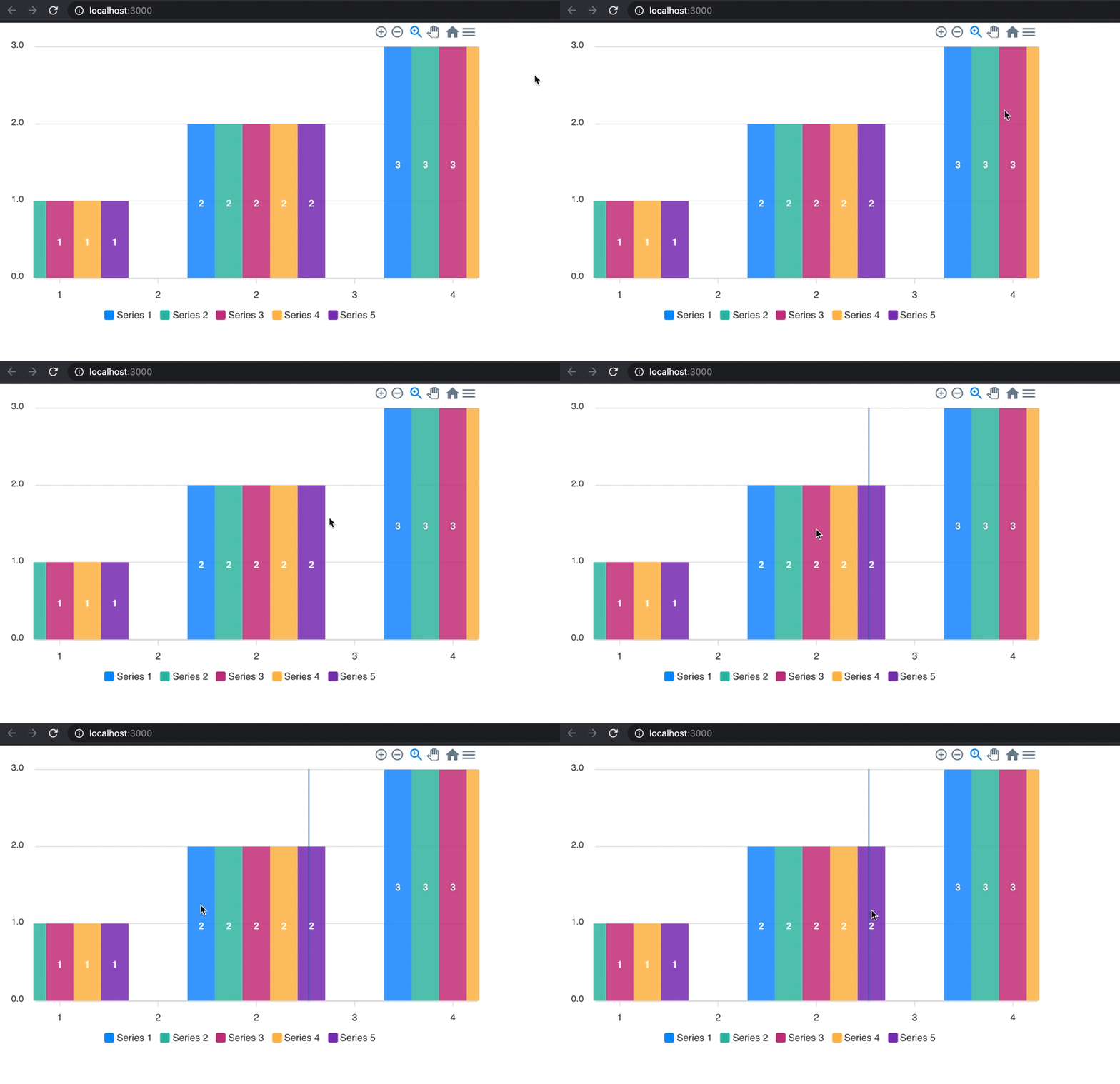
However, when building the library from the previous commit (7113e8860cd25eb8e072fb28e1c759ef8c90201b) the unexpected behaviour can no longer be observed:
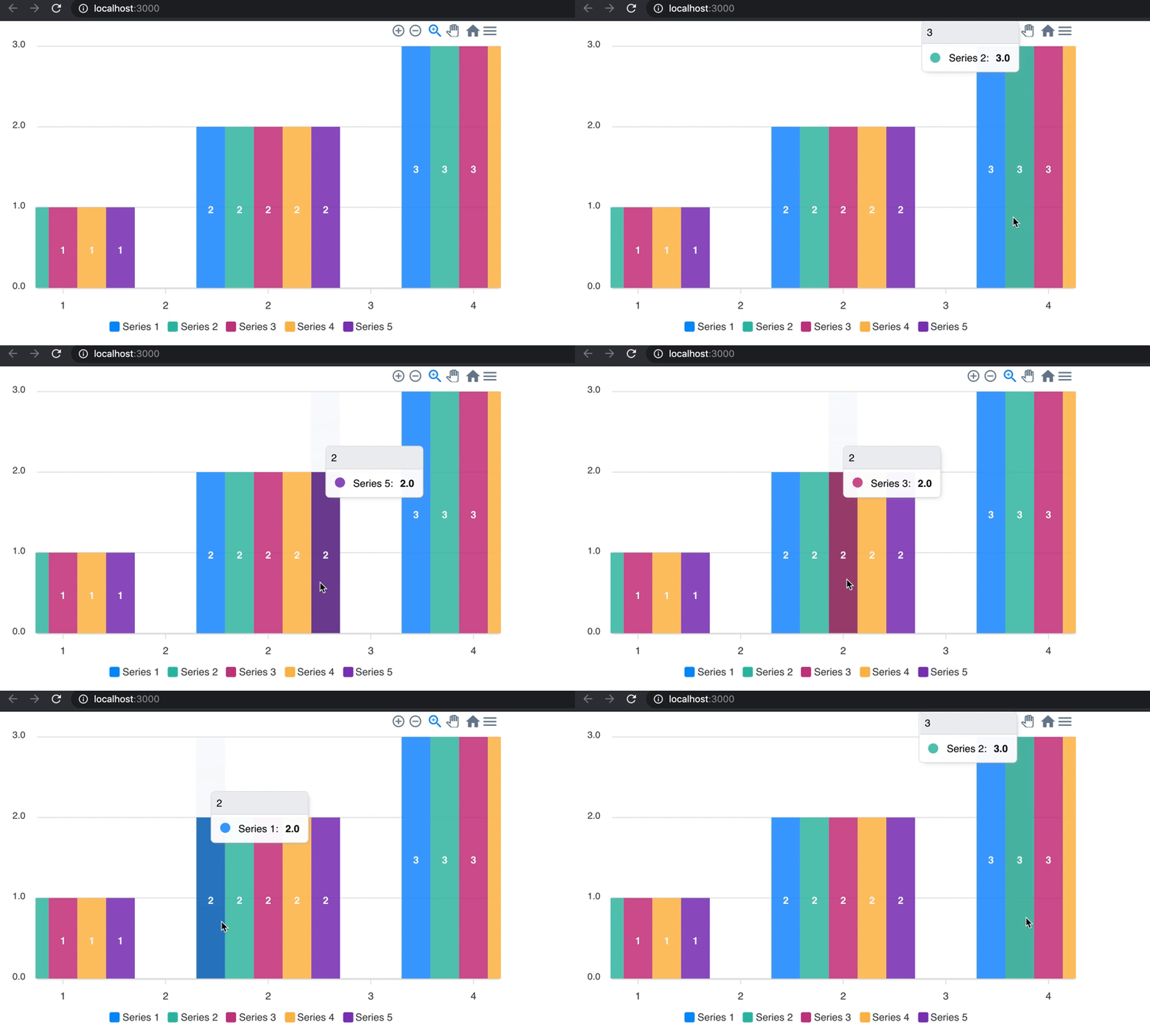
The code used in above examples is:
import React, { Component } from "react";
import Chart from "react-apexcharts";

const colorArray = ["#0490FD", "#2EBCA7", "#C73583", "#FFBB4B", "#8033BA"];

var options = {
  series: [
    {
      name: "Series 1",
      data: [1, 2, 3]
    },
    {
      name: "Series 2",
      data: [1, 2, 3]
    },
    {
      name: "Series 3",
      data: [1, 2, 3]
    },
    {
      name: "Series 4",
      data: [1, 2, 3]
    },
    {
      name: "Series 5",
      data: [1, 2, 3]
    }
  ],
  colors: colorArray,
  states: {
    hover: { filter: { type: "darken", value: 0.85 } }
  }
};

class App extends Component {
  constructor(props) {
    super(props);
  }

  render() {
    return (
      <div className="app">
        <div className="row">
          <div className="mixed-chart">
            <Chart
              options={options}
              series={options.series}
              type="bar"
              width="600"
            />
          </div>
        </div>
      </div>
    );
  }
}

export default App;
Unexpected Behaviour:
- Tooltip no longer renders correctly on-hover.
- The "Filter" behaviour no longer works correctly; the color of bars are not changed on-hover.
- The "Selection" behaviour no longer works correctly; the color of bars are not changed on-click.
The version of react-apexcharts I am using is 1.3.7.
 KylePinkerton
on 20 Sep 2020
KylePinkerton
on 20 Sep 2020
@KylePinkerton Thanks for the heads up.
I was going to release a new version in a few hours and this really helped.
Looking into this.
junedchhipa
on 20 Sep 2020
No worries! Thanks for all your hard work on this awesome project!
KylePinkerton
on 20 Sep 2020
Hello. Is there any updates about the issue? Maybe I can help fix it?
ashlanderr
on 5 Oct 2020
@junedchhipa could you please look at this issue again?
ashlanderr
on 17 Nov 2020
Related issues
 Epithumia
·
17Comments
Epithumia
·
17Comments
 taheri24
·
19Comments
taheri24
·
19Comments
 CheyenneForbes
·
17Comments
CheyenneForbes
·
17Comments
 stalnikar
·
13Comments
stalnikar
·
13Comments
 benhaynes
·
19Comments
benhaynes
·
19Comments
Most helpful comment
Hello. Is there any updates about the issue? Maybe I can help fix it?