Apexcharts.js: x-axis is displayed as local datetime instead of UTC
(This may or may not be related to #95)
First of all, I assume that I've miss-configured something, but my X-axis appears to always be shown as local time instead of UTC. I tried using both timestamp (1536104489000) and datetime (2018-09-04 23:41:29) as x-axis data.
The first entry in the raw data is 1536104489000 (2018-09-04T23:41:29) but when viewed it shows up as 2018-09-05 01:41:29. I am in a UTC+2 timezone.
Is it possible that Apexcharts or underlying frameworks somehow converts my UTC data into local timezone? If so, is it possible to turn it off?
PS: Thank you so much for Apex :) I love it
 tforssander
All 24 comments
Hi @tforssander
Yes, I need to look into the datetime offset issues as many users are reporting it.
It is a possibility that while manipulating datetime, I might have accidentally used local time instead of UTC.
Needs digging further, thanks for reporting the issue. And glad you loved it :)
 junedchhipa
on 18 Sep 2018
junedchhipa
on 18 Sep 2018
@junedchhipa Great, thank you for the quick reply.
tforssander
on 18 Sep 2018
Fixed it. You will see the correct "hours" in the next patch release of ApexCharts
junedchhipa
on 20 Sep 2018
By the way, I checked the code - It is not converting UTC dates to local date anywhere.
ApexCharts deals everything in UTC
junedchhipa
on 20 Sep 2018
Hi,
This solves the issue for GMT+1, but not for those of us on GMT+2 (or any other timezone, really). I've made a suggestion for a solution on https://github.com/apexcharts/apexcharts.js/commit/661647c0f899c2f09e7aa9ee765fba8b06dddb13
 bivald
on 21 Sep 2018
bivald
on 21 Sep 2018
Forgot to ping @junedchhipa :) should I try to do a PR?
bivald
on 24 Sep 2018
@bivald Sorry for the delay, missed the message.
I tried your suggestion you provided in that commit, but for some reason - it didn't work great.
Sure, you can try creating a PR :)
junedchhipa
on 1 Oct 2018
Hello
This solves the issue for GMT+1, but not for those of us on GMT+2
There is no solution ?
and please what do you mean by the word PR ?
 engHusseinMansour
on 8 Oct 2019
engHusseinMansour
on 8 Oct 2019
Hi @junedchhipa , this is still an issue unfortunately, it's not using UTC date times.
See the following example: https://codepen.io/miketrell/pen/mddeyYK
I've modified the start time to 1570606650000, which corresponds to the date '9 October 2019 07:37:30' UTC time, or '9 October 2019 08:37:30' GMT + 1 (my) local time.
If you change you systems local time, the charts line starts from UTC +/- the offset you've set, rather than 07:37:30 UTC as I would expect. Is there a hidden utc toggle you can set on the xaxis that I'm missing here?
(EDIT: I'm running version 3.8.5)
 mikesjp
on 10 Oct 2019
mikesjp
on 10 Oct 2019
I'm having the same issue. The chart weirdly displays the data on hour 1 instead of hour 0 and then on hour 17 instead of hour 15. 🤔
 alex-lechner
on 8 Nov 2019
alex-lechner
on 8 Nov 2019
@junedchhipa : where does it say that the display format should be UTC? This change broke my setup, as I want to show timestamps in localtime.
 drpuur
on 7 Jan 2020
drpuur
on 7 Jan 2020
Should I add a boolean option for UTC? Be default, it should be true, but in case someone wants to display local time, it will not convert.
junedchhipa
on 7 Jan 2020
That would be great, yes! Thanks.
drpuur
on 7 Jan 2020
@drpuur Can you please create a codepen with the local timestamp series and give me a brief description of what are you expecting v/s what you're seeing?
junedchhipa
on 7 Jan 2020
@junedchhipa : here is the link: https://codepen.io/drpuur/pen/ExaQWGx
It should show a chart with one datapoint every two hours on 06-Jan-2020 (from midnight to midnight localtime, which is from 05-Jan-2020 23:00 (UTC) to 06-Jan-2020 23:00 (UTC).
What I would like to see is the time in localtime, the newest Release of ApexCharts (Version 3.12.0) does show all timestamps in UTC.
drpuur
on 7 Jan 2020
Thanks for the codepen. I have added a new boolean option xaxis.labels.datetimeUTC.
Please try it after the next release and let me know if it fixes the issue.
junedchhipa
on 7 Jan 2020
When could we expect the next release? I'm looking forward to it. :-)
 loopezz
on 9 Jan 2020
loopezz
on 9 Jan 2020
In a few hours :)
junedchhipa
on 9 Jan 2020
Just a note: it would be very welcome if the datetimeUTC would work for tooltips as well.
I included the setting for xaxis.labels in my codepen.
drpuur
on 9 Jan 2020
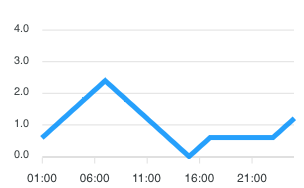
@junedchhipa : I noticed today that the xaxis labels are still wrong in Safari (I checked with an IPad and with an IPhone). https://codepen.io/drpuur/pen/ExaQWGx
Tests with Chrome do not have this problem.
Tooltips are fine for Chrome and Safari.
Chrome Output:

Safari Output:
drpuur
on 17 Jan 2020
Hi guys,
GMT+2 time still seems not to work. Do you have any estimation about this fix ?
 vladTeplitski
on 27 Apr 2020
vladTeplitski
on 27 Apr 2020
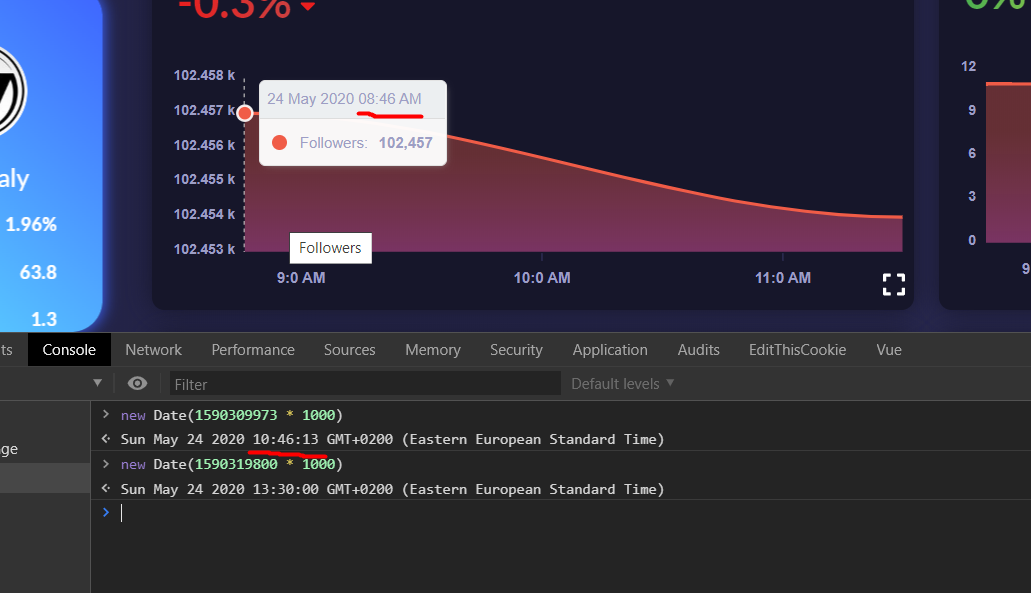
the same issue here, it formats hours in UTC
 kamaladenalhomsi
on 24 May 2020
kamaladenalhomsi
on 24 May 2020
for incoming people facing this:
as @drpuur showed in his codepen, just add:
xaxis: {
   labels: {
       datetimeUTC: false
   }
}
this will fix it for both labels and tooltip
kamaladenalhomsi
on 24 May 2020
for incoming people facing this:
as @drpuur showed in his codepen, just add:
xaxis: {
   labels: {
       datetimeUTC: false
   }
}
this will fix it for both labels and tooltip
You, Sir (and @junedchhipa ofc), are a gentleman and a scholar!
I can't say how long I spent trying rummaging around trying to fix this, thinking I'd messed up a calculation somewhere... ><
 coconut-cracker
on 8 Sep 2020
coconut-cracker
on 8 Sep 2020
Related issues
 rcoundon
·
3Comments
rcoundon
·
3Comments
 drummad
·
3Comments
drummad
·
3Comments
 georgehardy
·
3Comments
georgehardy
·
3Comments
 thellimist
·
3Comments
thellimist
·
3Comments
 felixalguzman
·
3Comments
felixalguzman
·
3Comments
Most helpful comment
for incoming people facing this:
as @drpuur showed in his codepen, just add:
this will fix it for both labels and tooltip