AnySoftKeyboard's bottom row is too low on-screen
Steps to reproduce
- Install ASK on a device with Android 10 gestures enabled
- Try and use the bottom row of keys
Expected behaviour
Tell us what should happen
The bottom row of keys shouldn't encroach on the navbar.
Actual behaviour
Tell us what happens instead
The entire keyboard is shifted down, and moves into the navbar area. This causes the bottom ~40% of those keys to not be usable. (See screenshot below)
Attempting to use these keys will sometimes cause the 'hide keyboard' or 'change input method' corner buttons to be triggered, or the navigation bar to be triggered
Android OS version: 10
Device manufacturer and model: OnePlus 7 Pro (running OxygenOS 10.3.1)
List of installed add-ons (like languages, or themes): None to my knowledge
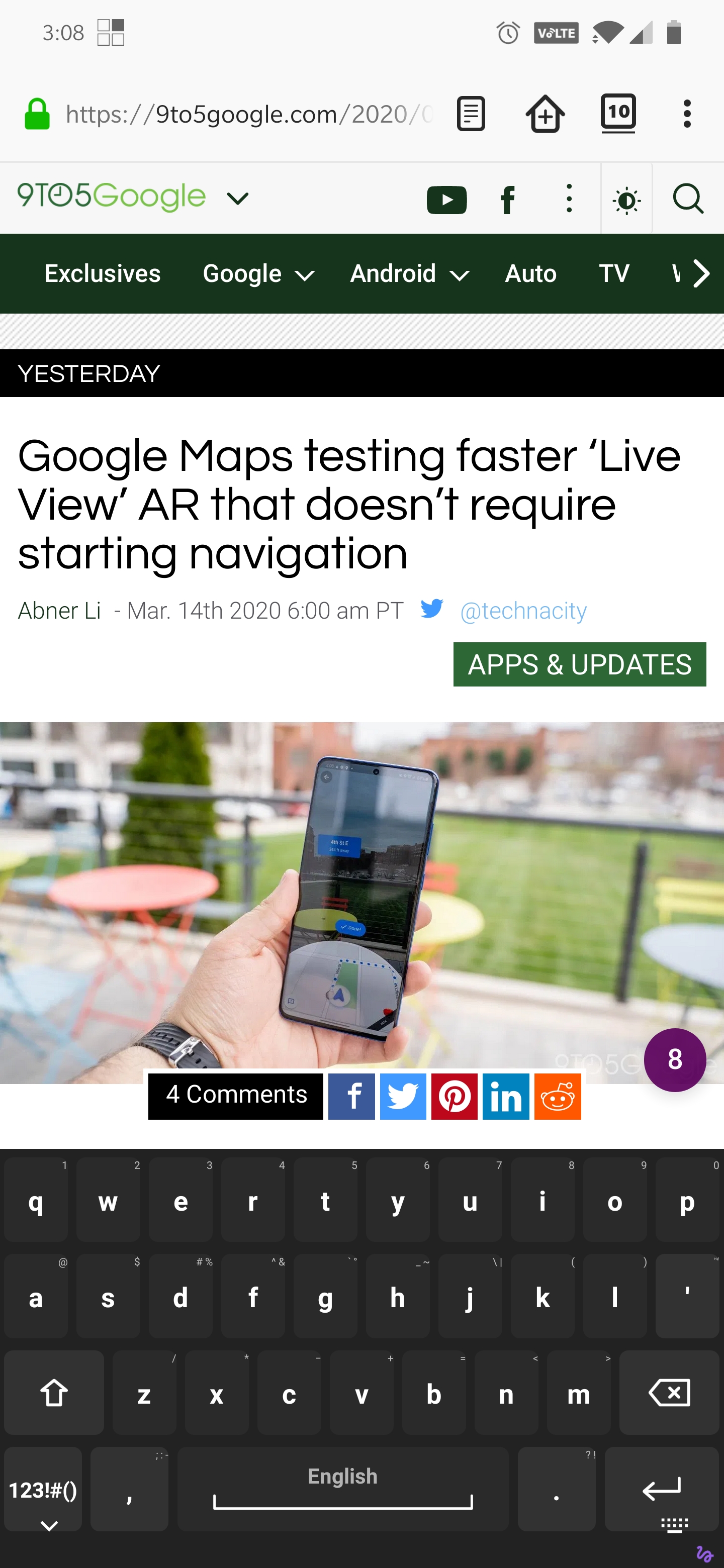
Please let me know if more information or help is required.
 agottschling
All 7 comments
I think it's probably a device/manufacturer/OxygenOS related issue as I'm not seeing that on an Essential Phone running stock Android 10, need some more reports,
Note: The emoji board used to go under a transparent navbar which was a pain as often try to tap emoji underneath as they were visible and then it minimized etc, this is now fixed but guess fix has now caused your issue.
 IronJunkie
on 30 Mar 2020
IronJunkie
on 30 Mar 2020
Duplicate #1994
On a Pixel so not as I suggested above, more devices must be affected
IronJunkie
on 30 Mar 2020
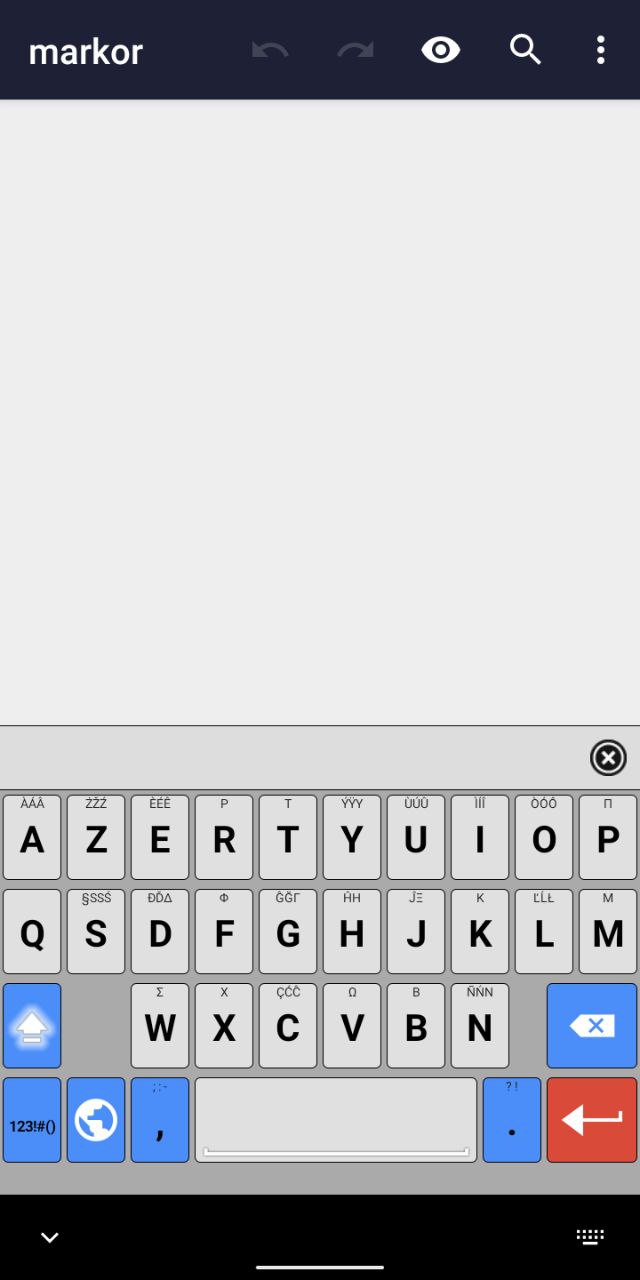
I see similar behaviour on LineageOS 17 with gesture navigation. There is both an unneeded black navbar and a grey band below the space key (see screenshot). The "Draw behind navigation-bar" option doesn't help: the navbar becomes not visible behind the ASK, but the bottom row keys are insensitive to touches.
 hatta123
on 1 Apr 2020
hatta123
on 1 Apr 2020
So, after some testing, this only is an issue when 'Draw behind the navigation bar' is enabled. However, with it off, it shifts the keyboard too high up and the navbar (at least on my OP7P) becomes completely transparent.
I think that a fix could be to just shift the entire keyboard up slightly when this option is enabled.
agottschling
on 1 Apr 2020
I can confirm this issue exists on both OxygenOS and LineageOS on my OnePlus 7 Pro. The "Draw behind the navigation bar" option ends up being a choice of being able to access the bottom half of your bottom row of keys, or having the keyboard start abnormally high.
The only current workaround is to disable gesture navigation and use the classic three button navigation setup. Really hope this gets fixed in ASK
 prg318
on 16 Apr 2020
prg318
on 16 Apr 2020
FYI: OnePlus 7 Pro OxygenOS does provide a workaround for this: there's an option to hide the bottom navigation bar completely so that there is no overlap
prg318
on 16 Apr 2020
I'm experiencing the same behaviour as @agottschling mentioned on Samsung S20+ 5G, Android 10 OneUI 2.5
with the draw behing the navigation bar, the keyboard is just too high and looks ugly ( could at least color the botom space) so it doesn't have a huge break.
With that option enabled approx 40% of bottom row is not usable, so typing fast it is quite easy to miss punctuation
So far I've been using ASK for 7+ years now and haven't had any major issues. I wouldn't want to switch just because of this annoying feature.
edit: Ok, just found the option "Show button to hide keyboard" under Navigation bar options - I disabled it and so far the keyboard seems to be working great, no issues with overlays and all bottom row is working
 pavars
on 7 Sep 2020
pavars
on 7 Sep 2020
Related issues
 dbolton
·
6Comments
dbolton
·
6Comments
 AdKiller
·
4Comments
AdKiller
·
4Comments
 afrey15
·
6Comments
afrey15
·
6Comments
 christarazi
·
6Comments
christarazi
·
6Comments
 Krzmbrzl
·
5Comments
Krzmbrzl
·
5Comments
Most helpful comment
So, after some testing, this only is an issue when 'Draw behind the navigation bar' is enabled. However, with it off, it shifts the keyboard too high up and the navbar (at least on my OP7P) becomes completely transparent.
I think that a fix could be to just shift the entire keyboard up slightly when this option is enabled.