Anysoftkeyboard: space bar too small
Expected behaviour
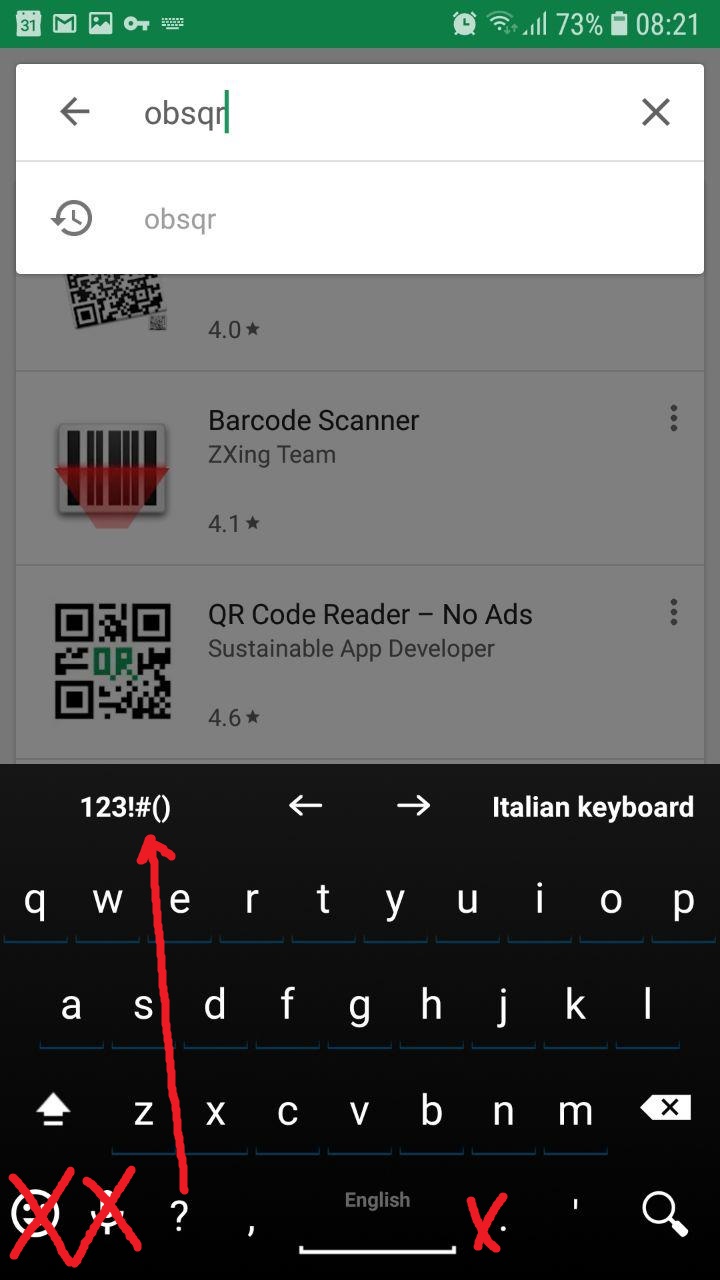
I find the space bar uncomfortably small. Is there any way to modify the keys and remove some keys like audio input, emoji, dot which is a redundant because you can use double space.
desired modifications highlighted in this screenshot:
Android OS version:
8.0
Device manufacturer and model:
Samsung Galaxy S7
List of installed add-ons (like languages, or themes):
Default
 AdKiller
👍1
All 4 comments
Go to UI -> Tweaks -> Common bottom generic row and choose the "simple" layout. Worked for me.
 RPDiep
on 28 Sep 2018
RPDiep
on 28 Sep 2018
👍3
Go to UI -> Tweaks -> Common bottom generic row and choose the "simple" layout. Worked for me.
Thanks that indeed works. missed that in the sea of options xD
AdKiller
on 7 Oct 2018
Closing issue, marked as solved.
 AnXh3L0
on 22 Oct 2018
AnXh3L0
on 22 Oct 2018
How do I get the Emoji Key while also using the "simple" layout?
 Hypfer
on 1 Oct 2019
Hypfer
on 1 Oct 2019
Was this page helpful?
0 / 5 - 0 ratings
Related issues
 afrey15
·
6Comments
afrey15
·
6Comments
 xmiseggs
·
5Comments
xmiseggs
·
5Comments
 kojid0
·
5Comments
kojid0
·
5Comments
 fronki
·
5Comments
fronki
·
5Comments
 ingodeutschmann
·
5Comments
ingodeutschmann
·
5Comments
Most helpful comment
Go to UI -> Tweaks -> Common bottom generic row and choose the "simple" layout. Worked for me.