Antennapod: Mini player when playing a video podcast do not have pause button
When playing a video podcast there is no pause button in mini player to stop playback or resume it.
Yet it works if you used play button from notification. (At least with settings set to continue to play audio when quitting player)
Tested on alpha 2.0.0-RC4 for this video podcast : https://www.rts.ch/emissions/geopolitis/podcasts/?format=rss/podcast
 Matth7878
All 10 comments
This was already the same on previous versions. I guess pressing play on that button should directly open the video player, right?
 ByteHamster
on 6 Jun 2020
ByteHamster
on 6 Jun 2020
Probably. It is the first time I tested a video podcast. Until now I wasn't even sure it existed. ;-)
Matth7878
on 6 Jun 2020
Probably. It is the first time I tested a video podcast. Until now I wasn't even sure it existed. ;-)
How do you play video podcasts? I want to watch video podcasts from youtube but they only play audio
 Enfml
on 6 Sep 2020
Enfml
on 6 Sep 2020
can i work on it
 heyyviv
on 20 Sep 2020
heyyviv
on 20 Sep 2020
@heyyviv Sure, that would be great :)
ByteHamster
on 20 Sep 2020
can you please elaborate the problem
heyyviv
on 20 Sep 2020
I don't know on what you need more info on? If you don't understand what is mini player it's the bar you see at bottom where you can see what is currently playing even if you're not on player screen.
I took a screenshot while playing with podcast linked in main post to illustrate issue :
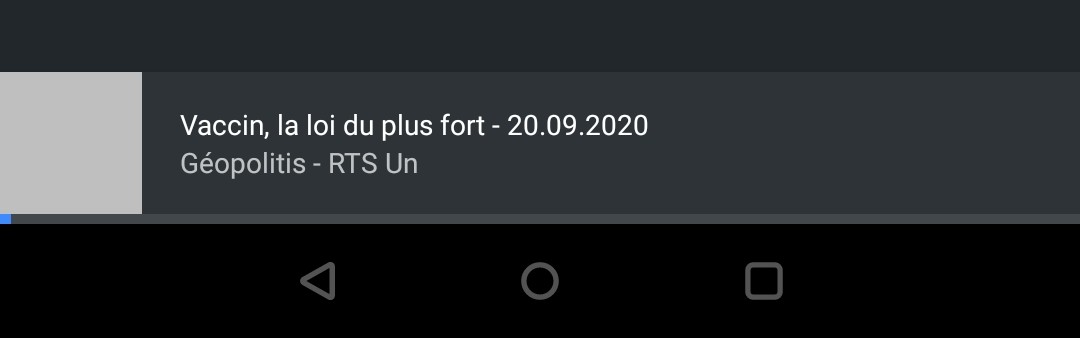
vs classic/normal audio only podcast :
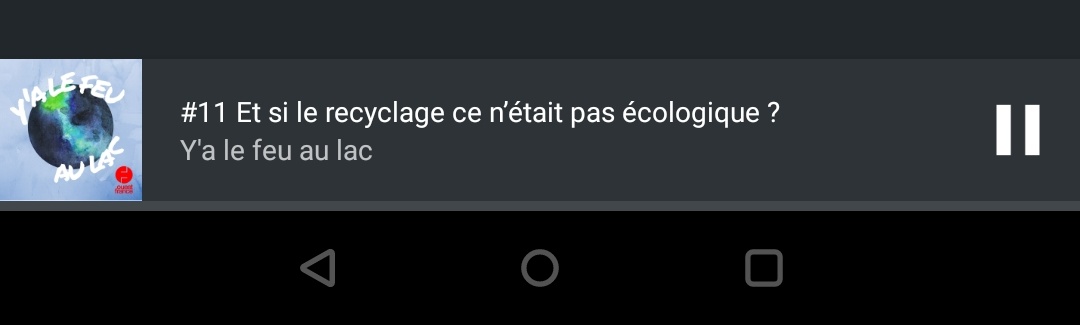
Matth7878
on 20 Sep 2020
I am not able to find the xml file where miniplayer code is written.
it will very kind if anybody give me the file(xml) name.
heyyviv
on 30 Sep 2020
Hi,
a good starting point should be the class ExternalPlayerFragment. This is the place where the play button is set to visible for audio and to invisible for video.
ByteHamster
on 30 Sep 2020
i have sent a pull request can you check that
heyyviv
on 1 Oct 2020
Related issues
 yosefmizrahi
·
3Comments
yosefmizrahi
·
3Comments
 chaulo
·
4Comments
chaulo
·
4Comments
 fabolhak
·
3Comments
fabolhak
·
3Comments
 keunes
·
4Comments
keunes
·
4Comments
 maxxo
·
4Comments
maxxo
·
4Comments
Most helpful comment
I don't know on what you need more info on? If you don't understand what is mini player it's the bar you see at bottom where you can see what is currently playing even if you're not on player screen.
I took a screenshot while playing with podcast linked in main post to illustrate issue :
vs classic/normal audio only podcast :