Antennapod: Rewind button gray/grey/not available on Android v10 lock screen
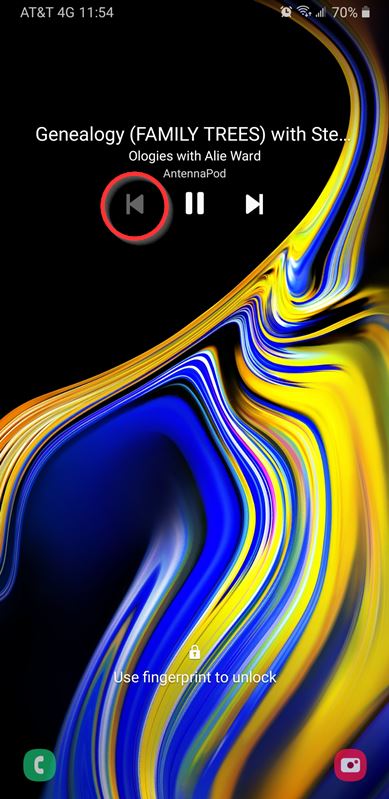
The rewind button is gray and unavailable to me on my Samsung Note 9 lock screen, but it still appears/works in the app controls (screenshots attached). I can't find a setting to fix this, particularly since it works in one place and not the other. This is a recent problem that appears to have appeared out of nowhere (though I may have unwittingly done something provoke it), so it may be related to a recent Android or AntennaPod upgrade. It may also be related to
https://github.com/AntennaPod/AntennaPod/issues/3803
https://github.com/AntennaPod/AntennaPod/issues/3035
Should I try uninstalling/reinstalling the app? If so, will either an OPML export or a database export preserve my current subscriptions, queue, and playback history, or am I doomed to lose those in the reinstall?
App version: 1.8.1 from Google Play
Android version: 10
Device model: Samsung Galaxy Note 9
Expected behaviour: Rewind button on lock screen should work as it does in the app interface, rewinding the episode per my settings when clicked.
Current behaviour: Rewind button on lock screen is grayed out and non-functional.
First occurred: In the past two months.
Steps to reproduce: It's like this all the time now.Environment: I don't recall changing any settings that might have provoked this, but I've been trying different settings in an attempt to fix it...with no luck.
Thanks for any suggestions!
...........Curtis.............

 boneygit
All 17 comments
Should I try uninstalling/reinstalling the app?
I am pretty sure that this will not help
If so, will either an OPML export or a database export preserve my current subscriptions, queue, and playback history, or am I doomed to lose those in the reinstall?
Database export will have subscriptions, queue and history. OPML will just have subscriptions. The next AntennaPod version will display explanations for the export types.
@tonytamsf There must be something wrong with our MediaSession. Fixing this should also fix Android Auto without needing a custom button. I have no idea what we do wrong, though.
 ByteHamster
on 29 Feb 2020
ByteHamster
on 29 Feb 2020
yeah, this is an interesting clue. I will look
 tonytamsf
on 1 Mar 2020
tonytamsf
on 1 Mar 2020
@boneygit Settings > User Interface > Lockscreen Buttons > (which 2 did you pick?)
 jmichael2497
on 3 Mar 2020
jmichael2497
on 3 Mar 2020
Rewind and Fast forward.
..........Curtis............
[image: lockscreen_buttons_20200303-163315.jpg]
On Tue, Mar 3, 2020 at 3:23 PM jmichael2497 notifications@github.com
wrote:
Settings > User Interface > Lockscreen Buttons > (which 2 did you pick?)
—
You are receiving this because you authored the thread.
Reply to this email directly, view it on GitHub
https://github.com/AntennaPod/AntennaPod/issues/3902?email_source=notifications&email_token=AOWGVQRUCP4XZT2QP5MCN33RFVYNFA5CNFSM4K64ZIK2YY3PNVWWK3TUL52HS4DFVREXG43VMVBW63LNMVXHJKTDN5WW2ZLOORPWSZGOENVGQ6Y#issuecomment-594176123,
or unsubscribe
https://github.com/notifications/unsubscribe-auth/AOWGVQSGZFAREQ2PY6JSQFLRFVYNFANCNFSM4K64ZIKQ
.
boneygit
on 3 Mar 2020
just for fun, have you tried turning them off and on? 🤷🏽♂️ other than trying that, i dunno.
seems odd the rewind would be greyed out unless you're at the start of the queue or file.
jmichael2497
on 4 Mar 2020
Your recommendation to try turning lock screen button settings on/off was
worth a try. Interestingly, the buttons appear to be placebos and do
nothing. If I change them up, select only one, or select none, the lock
screen buttons remain the same: left grayed out and right functional (but
it always skips ahead, regardless of being set to do otherwise).
I thought it might be a Nova Launcher issue, but Nova is not controlling my
lock screen. The lock screen is under the Samsung phone's Android control.
To test this, I have to have the episode playing, so it cannot be at the
beginning of an episode.
As you say, it seems odd.
..........Curtis............
On Tue, Mar 3, 2020 at 5:01 PM jmichael2497 notifications@github.com
wrote:
just for fun, have you tried turning them off and on? 🤷🏽♂️ other than
trying that, i dunno.seems odd the rewind would be greyed out unless you're at the start of the
queue or file.—
You are receiving this because you were mentioned.
Reply to this email directly, view it on GitHub
https://github.com/AntennaPod/AntennaPod/issues/3902?email_source=notifications&email_token=AOWGVQSGXHNPV4MXKJREUGDRFWD4NA5CNFSM4K64ZIK2YY3PNVWWK3TUL52HS4DFVREXG43VMVBW63LNMVXHJKTDN5WW2ZLOORPWSZGOENVQHRI#issuecomment-594215877,
or unsubscribe
https://github.com/notifications/unsubscribe-auth/AOWGVQR2ZWF7WG5IBXKRBITRFWD4NANCNFSM4K64ZIKQ
.
boneygit
on 4 Mar 2020
Please assign to me @ByteHamster
tonytamsf
on 2 Apr 2020
Just checking in to see if there has been any progress on this.
Thanks!
..........Curtis............
On Thu, Apr 2, 2020 at 12:30 AM Tony Tam notifications@github.com wrote:
Please assign to me @ByteHamster https://github.com/ByteHamster
—
You are receiving this because you were mentioned.
Reply to this email directly, view it on GitHub
https://github.com/AntennaPod/AntennaPod/issues/3902#issuecomment-607648542,
or unsubscribe
https://github.com/notifications/unsubscribe-auth/AOWGVQW32FBFHQXB3R7KHY3RKQWJHANCNFSM4K64ZIKQ
.
boneygit
on 21 May 2020
Thanks for the reminder, I will get on it this week
tonytamsf
on 22 May 2020
Hi, Tony,
This is a tickler email. 😉 Thanks!
..........Curtis............
On Fri, May 22, 2020 at 12:32 AM Tony Tam notifications@github.com wrote:
Thanks for the reminder, I will get on it this week
—
You are receiving this because you were mentioned.
Reply to this email directly, view it on GitHub
https://github.com/AntennaPod/AntennaPod/issues/3902#issuecomment-632491563,
or unsubscribe
https://github.com/notifications/unsubscribe-auth/AOWGVQQ3ZATEKU3UVSMKEO3RSYFAHANCNFSM4K64ZIKQ
.
boneygit
on 3 Jul 2020
I am also seeing this issue on my Samsung Galaxy S10e with Android 10 installed. It shows the skip episode button (which is what the screenshot above has despite the description) instead of the rewind and fast forward buttons despite my selections. When I first saw this I realized it was, by default, set to show the skip episode button so I went and changed the selections, and it worked for the duration of that episode. However as soon as it went to a new episode it went back to showing the skip episode button instead of the fast forward and rewind buttons I had selected and I haven't been able to get it to switch back.
I am using the F-Droid build of version 1.8.3 of AntennaPod.
Thanks for your help and the great app.
 ds33
on 24 Aug 2020
ds33
on 24 Aug 2020
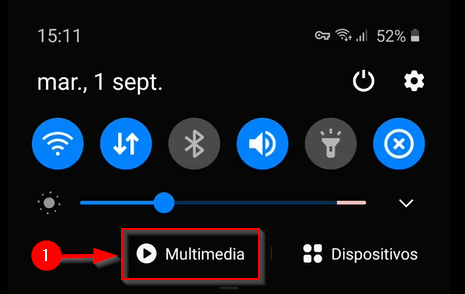
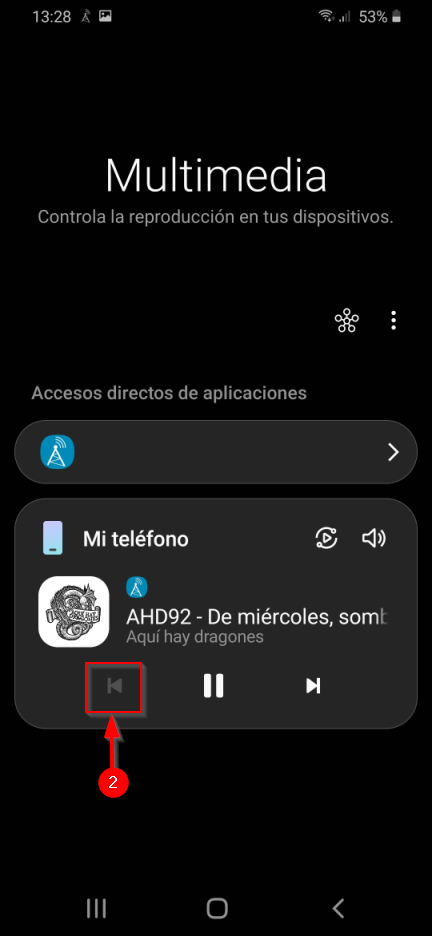
I can confirm this happens on a Samsung M31 running AntennaPod v1.8.3 under Android 10, but not only on the lock screen.
Moreover, the backward button is also disabled on the Samsung "Multimedia and Devices" panel as shown below (it appears as "Multimedia and Dispositivos" in Spanish):
I've tried to reinstall AntennaPod, downgrade it down to version 1.8.1, and I have even tried to erase stored data from "Multimedia and devices", all of them without any success.
I'm willing to help to debug this if needed.
Thank you anyway.
 aliron19
on 1 Sep 2020
aliron19
on 1 Sep 2020
I may have found part of the cause of the control buttons problem. In the device settings, under Lock Screen -> FaceWidgets, if you turn "Music" off the AntennaPod lockscreen controls go back to having the buttons you selected, instead of just the default "skip episode" option. This may be a problem if you wanted to use the Music FaceWidget, but it does seem to be the root of the lockscreen control button problem on my Samsung S10e phone running Android 10.
ds33
on 8 Sep 2020
Following the steps described by @ds33 on my Samsung M31 (with Android 10) the AntennaPod controls reappears on my lock screen too. Thanks mate!
However, after disabling "Music" the multimedia controls remain the same (just as shown in my previous screenshots).
aliron19
on 9 Sep 2020
@aliron19
I'm glad I could help. I only found the FaceWidgets setting because I was trying to get rid of the "no music playing" notification on the lock screen.
I haven't seen the multimedia controls problem, but have you tried disabling "Show media and devices" in the "Quick panel layout" options?
https://nerdschalk.com/how-to-disable-the-media-and-devices-bar-on-android-10-update-on-galaxy-s10-and-note-10/
It looks like both these problems may be specific to conflicts with Samsung's customized interface options.
ds33
on 9 Sep 2020
(@tonytamsf I unassigned you as there hasn't been any activity on this for a while. Perfectly fine, of course - this is just to manage expectations ;) Do let us know if you want to pick this up (again))
 keunes
on 15 Oct 2020
keunes
on 15 Oct 2020
@keunes perfectly fine to unassign me. I am thinking of what to tackle next. Looks like a lot of Media Control issues are still open.
tonytamsf
on 15 Oct 2020
Related issues
 ghost
·
4Comments
ghost
·
4Comments
 zequip
·
3Comments
zequip
·
3Comments
 mamehacker
·
3Comments
mamehacker
·
3Comments
 benediktg
·
4Comments
benediktg
·
4Comments
 fabolhak
·
3Comments
fabolhak
·
3Comments
Most helpful comment
Your recommendation to try turning lock screen button settings on/off was
worth a try. Interestingly, the buttons appear to be placebos and do
nothing. If I change them up, select only one, or select none, the lock
screen buttons remain the same: left grayed out and right functional (but
it always skips ahead, regardless of being set to do otherwise).
I thought it might be a Nova Launcher issue, but Nova is not controlling my
lock screen. The lock screen is under the Samsung phone's Android control.
To test this, I have to have the episode playing, so it cannot be at the
beginning of an episode.
As you say, it seems odd.
..........Curtis............
On Tue, Mar 3, 2020 at 5:01 PM jmichael2497 notifications@github.com
wrote: