Antennapod: Overviewpage for enable/disable autodownload
Today I have recommended AntennaPod to a friend and his first question was:
How can I block/allow specific podcast to automatically download new content?
Thing is:
If you added "a lot" of podcasts, it is a hassle to disable the auto-download feature for the majority of them.
If there would be a page where you have a list of all you subscriptions and you only un-/tick the preferred podcasts, it would be much easier.
Or is there a way to make this without opening every podcast setting to disable the download, that I haven't seen yet?
App version: 1.x (from Google Play/F-Droid/Custom build)
1.6.6-RC1 (Gplay)
Android version: 5.x [Please mention if you are using a custom rom!]
Android 7.1.2 (Custom Rom)
Device model:
HTC 10
 Stimmenhotel
All 17 comments
There is no such option currently. That list would nicely fit into the "Automatic download" section of the redesigned settings screen in 1.6.6 (currently in beta).
 ByteHamster
on 4 Aug 2018
ByteHamster
on 4 Aug 2018
Yeah, already wondered why the settings menus look different between my version (beta) and my friends hers.
But instead of navigating over the settings, there should be a quick-jump-icon (if dl is enabled) within the subscription list.
Or another idea we had:
Inside the subscription overview, on a icon touch, there could be made checkboxes visible, that shows which sub is auto-downloaded.
Stimmenhotel
on 4 Aug 2018
Hmm, to be honest, I don't want to clutter the interface even more than it currently is. If someone enables autodownload, he will also see that the list exists, even if it is only displayed in settings. To me, changing that setting does not seem to be something that is done too often. Anyway, I like the idea of having an overview of which feeds have autodownload enabled.
ByteHamster
on 4 Aug 2018
I think there should also be a setting to choose if new subscription should be set with automatic download on or off.
Right now the default is on and if you want to auto download only some podcast it's really annoying to turn it off for each subscription you add.
 Matth7878
on 5 Aug 2018
Matth7878
on 5 Aug 2018
Would be a great complement for this.
@ByteHamster The interface in the subscriptions menu/tab has no icons on top, so there would no overly filled screen there. Or do you mean the overlay icons on the single subs?
Stimmenhotel
on 5 Aug 2018
Inside the subscription overview, on a icon touch, there could be made checkboxes visible, that shows which sub is auto-downloaded.
Currently no search, batch edit or filter options exist in the Subscriptions view, where they do in the Podcast view. Adding search and batch edit (filter doesn't make much sense here) wouldn't harm the user interface. Introducing batch edit would also allow deleting podcasts, marking them 'played' and change the 'keep updated' setting in bulk, which may be convenient.
Also, I think changing auto-download in the settings is a bit odd: settings currently are for changing app settings, not for podcast-specific changes, I would keep it that way and instead keep consistency between batch editing episodes and podcasts.
 keunes
on 24 Mar 2019
keunes
on 24 Mar 2019
Feature request #3065 (filter on subscription screen) could help to alleviate the pain point. Users can, say, filter to show only subscriptions with auto-download disabled, then enable them.
3065 by itself doesn't support bulk changes, however.
 orionlee
on 5 Apr 2019
orionlee
on 5 Apr 2019
Adding more options is, in most cases, a bad thing. I think the main use-case is covered in #3065. In order to focus development on the main functionality of the app, I do no longer think that this should be implemented as a separate feature. If you want to read about why it is good to have less options, you might want to have a look at this article.
ByteHamster
on 26 Mar 2020
User feedback from the 2.0.0 alpha:
I turned [auto download] on and AntennaPod immediately and without warning started to download hundreds of episodes.
This is a pretty strong argument for an overview page. We should probably even show that page automatically when enabling auto download for the first time.
ByteHamster
on 7 Apr 2020
overview page
Were you thinking of a new 'view' or some way to do this from the existing podcast view?
keunes
on 7 Apr 2020
Maybe a dialog with checkboxes on the auto download settings page? Not sure.
ByteHamster
on 7 Apr 2020
What about adding filter / mass edit on subscription screen ?
You could choose "manage auto download" settings then each podcast will have a little box checked when on or not when off.
User could quickly change which podcast will autodownload.
In Antenna global settings next to the option for auto download you could have an entry which take you to subscription screen already set to manage which podcast will auto download or not.
In the future filter on subscription screen could potentially improve to mass manage other settings. (Like keep updated or any other on/off settings)
Matth7878
on 8 Apr 2020
Maybe a dialog with checkboxes on the auto download settings page? Not sure.
It's not an app-wide preference, so I wouldn't add it to the general settings. Instead, I believe the 'Subscriptions' view is a better place indeed. The view could be updated to, along the lines of this quick mock-up (with left a new menu item, and right new interface elements which should replace number of episode labels and where the 'done' button is floating):
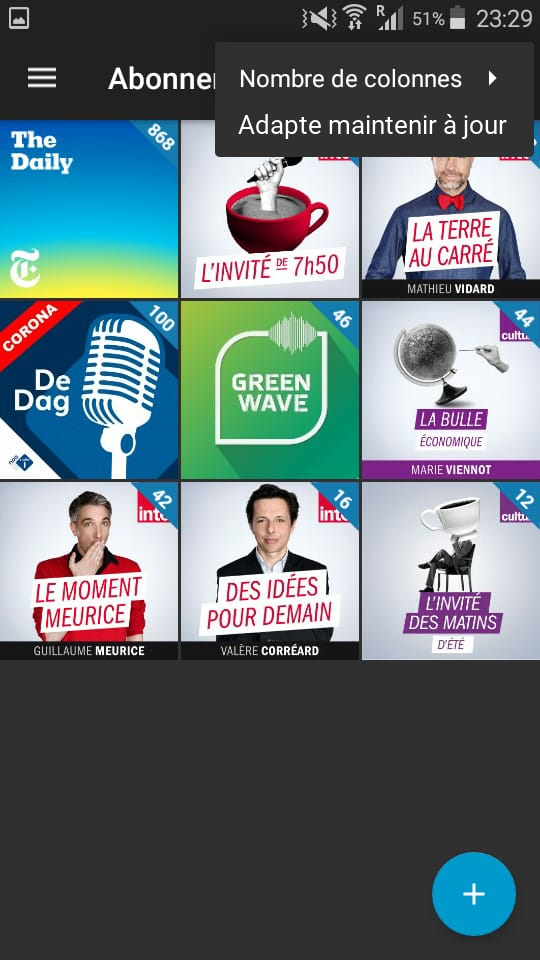
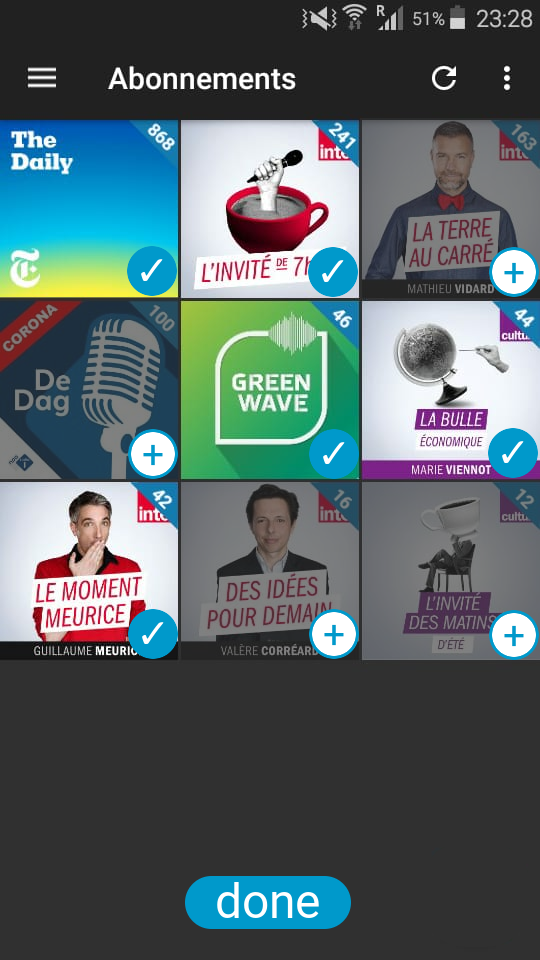
While the actual elements should probably more look something like this :P

keunes
on 10 Apr 2020
It's not an app-wide preference, so I wouldn't add it to the general settings.
Good point. Your suggestion looks nice (but also like it could be a lot of work). It does not fix the problematic use-case, though:
I turned [auto download] on and AntennaPod immediately and without warning started to download hundreds of episodes.
I think we still need some way to link between the setting and the select screen. Alternatively, we could just add a "Cancel all" button to the downloads page, so users can at least stop the downloads and then set up auto download manually
ByteHamster
on 10 Apr 2020
+1 to Keunes for his mockup. It's exactly what I meant. :-)
If not an entry in settings to go subscription view/screen in mass auto download edition mode maybe it could just be a dialog which would be shown when switching on auto download in settings.
The dialog would propose to go to subscription screen to manage which podcast should auto download.
More importantly I think the problem is that by default podcast have their auto download setting on. It should be off and if you want to auto download you should change it to on.
Turning on auto download in general settings then could suggest to switch the specific setting to on for all podcast or/and warn that user need to manage which podcast will auto download in subscription screen.
Matth7878
on 10 Apr 2020
It does not fix the problematic use-case, though. I think we still need some way to link between the setting and the select screen
True. I can imagine, after enabling (only first time, or every time?) auto-download in the settings, a dialog shows up: Do you want to adjust from which podcasts episodes are downloaded automatically? _Yes please_ / _No thanks_ (question needs to be refined)
Yes > brings user to podcasts view with edit functions, returns to settings screen when tapping 'done'
No > closes dialog (and one is back in the settings screen)
Alternatively, only let users change auto-download per podcast (remove global setting). In this case we might want to pose the autodownload-question each time a new podcast is added.
I think the problem is that by default podcast have their auto download setting on. It should be off
I disagree. If users turn on global auto-download, they'll expect something to happen. This would not be the case if everything is turned off by default. If everything is off by default, reverting to my 'alternatively' scenario above sounds more sensible to me.
keunes
on 10 Apr 2020
This is strongly related to #4681: Introduce multi-select/batch-edit for podcasts
While that issue doesn't provide an 'overview' of the current settings, getting such overview is now already possible with the filter introduced in #4502.
Given it is now possible to get an overview of which are auto-downloaded (4502) and changing settings for multiple podcasts in one go is covered by the open, newer & general-purpose issue (4681), I would propose to close this issue. Any comments or thoughts on this?
(Also, I'm shocked in hind-sight about my mock-ups here :P )
keunes
on 15 Nov 2020
Related issues
 matthiasroos
·
3Comments
matthiasroos
·
3Comments
 thom-github
·
3Comments
thom-github
·
3Comments
 zequip
·
3Comments
zequip
·
3Comments
 fabolhak
·
3Comments
fabolhak
·
3Comments
 Cj-Malone
·
5Comments
Cj-Malone
·
5Comments