Antennapod: Display of items without media
I think this is probably a documentation issue. In some cases a podcast will appear with check marks on the right hand side:
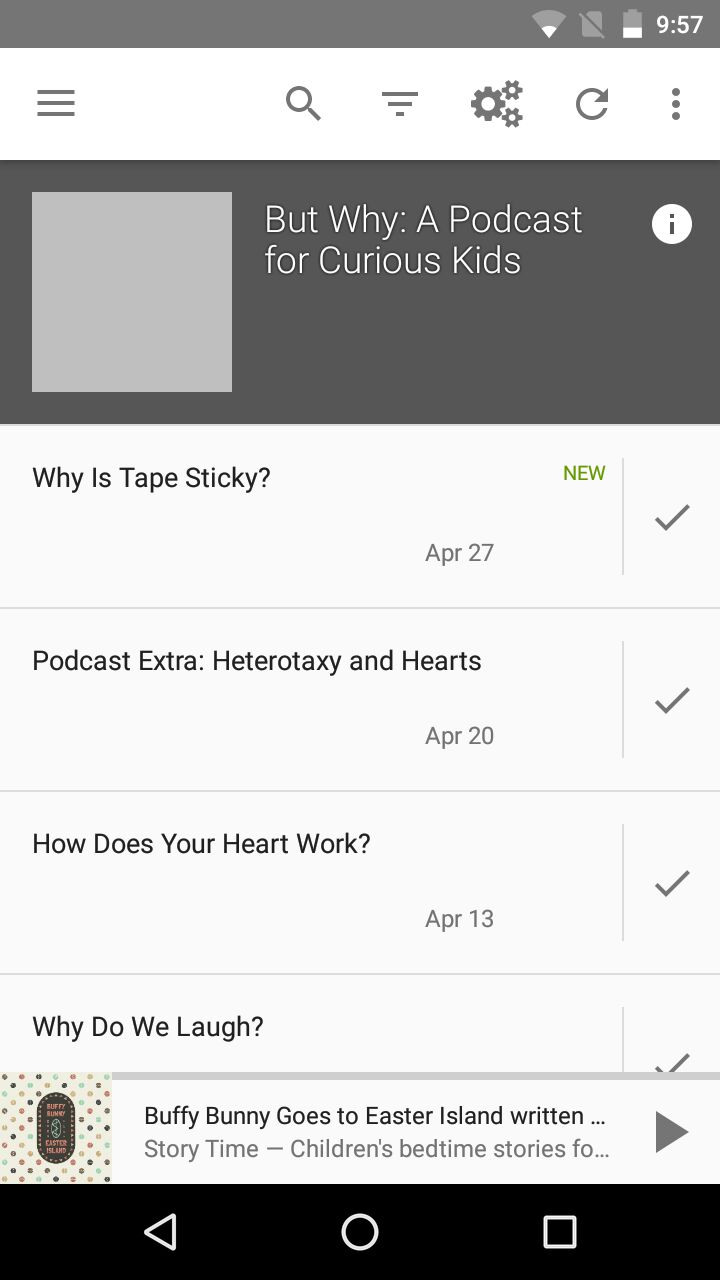
The episodes aren't available to mark for download and there's no indication of why that is. I _think_ that the check mark means that somehow the episode isn't available for download, but I can't find any confirmation of that in an FAQ or documentation or anything.
App version: 1.6.5 from F-Droid
Android version: 5.x
Device model: MotoG 3rd Gen
Expected behaviour:
When I long press on the check mark I should get clued into why it is that the episode isn't available for download, or what I need to do to download it.
Current behaviour:
I can toggle "played" on the episode but I can't download it.
First occured: Since I started using AntennaPod a year or so ago this has been a source of confusion.
 amandabee
All 13 comments
This behavior usually means that the server does not provide media files. You get the same thing for text-only rss feeds. Could you please tell us the url of the podcast feed that you use? You can find the url when clicking on the "info" button next to the feed title
 ByteHamster
on 9 May 2018
ByteHamster
on 9 May 2018
http://digital.vpr.net/feeds/37371/rss.xml is the URL I have -- some research suggests that a better URL is https://podcasts.vpr.net/but-why -- but again I think this is an interface/documentation issue. I've hit this intermittently in the past and just removed the podcast because I couldn't figure out why it was taunting me. Later I tried adding whatever it was again and it worked. Presumably that's because I found a better URL, but I didn't know that at the time.
If I expand any one episode/item I have the option to "mark as played" or "visit website" but there's no indication of why those are my only choices.
In a podcast that works (ie. does successfully download media), I see either "download | stream" as options or "play | delete" -- those make sense. When I'm looking at an entry that doesn't have media, it should just say that, so I know what I'm troubleshooting.
In a podcast that doesn't work, I can select the gear icon and check as many episodes as I care to, and my options include "Download" and "Add to Queue" but selecting either option just returns me to the list of episodes. It never says "Hey, I can't add these to your queue because there's nothing to download." The silent failure is super confusing.
Again, I think this is an interface issue. I can troubleshoot the podcasts themselves. But I'm pretty smart and couldn't figure this out for ages. I just thought Antennapod was glitchy.
amandabee
on 9 May 2018
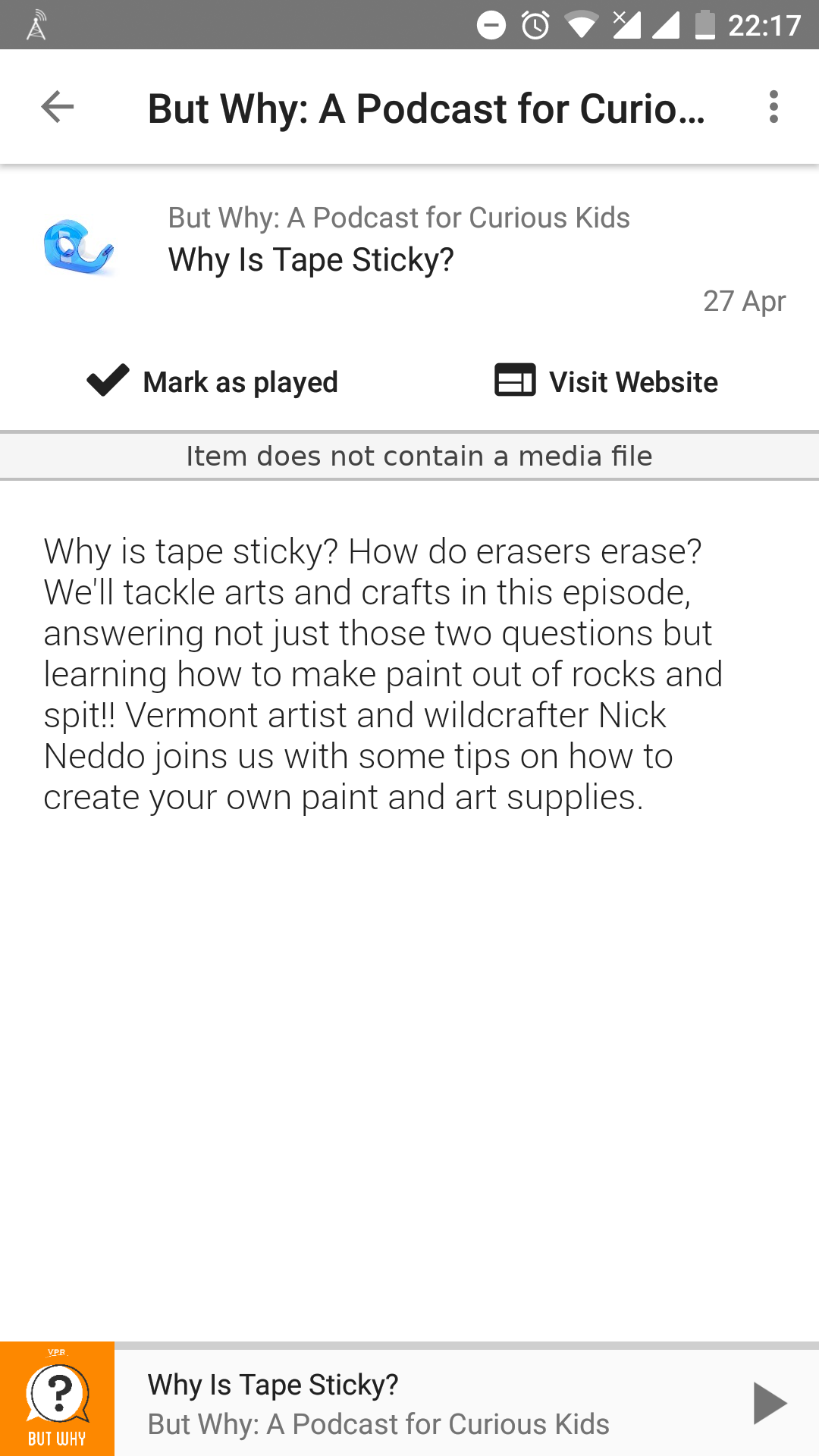
Do you think something like that is enough to make things clear? I don't want to remove those buttons because users will probably complain and request an option to re-enable the old layout. This way, it's at least not too obtrusive if someone intentionally adds a text only feed.
ByteHamster
on 9 May 2018
Maybe, in addition, we could do some other interface tweaks, such as changing 'Mark as played' into 'Mark as read' for episodes without a media file?
 keunes
on 10 May 2018
keunes
on 10 May 2018
- @keunes suggestion ("Mark as read") would help with clarity.
- And "Item does not contain a media file" is good. I wonder if "Entry does not include a media file" is better but at least this kind of points a user (me) towards resolution.
That leaves the options under the "gear" icon:
In a podcast that doesn't work, I can select the gear icon and check as many episodes as I care to, and my options include "Download" and "Add to Queue" but selecting either option just returns me to the list of episodes. It never says "Hey, I can't add these to your queue because there's nothing to download." The silent failure is super confusing.
I think that if I choose "Download" or "Add to Queue" and some entries fail, I should see an error like "Some entries could not be {downloaded | added to queue} because they do not contain a media file."
amandabee
on 10 May 2018
Hello,
Would it be possible to add an option to hide such items?
Some feeds contains both media items and text ones, and I’m only interested in the media items when I’m on AntennaPod (I have an other RSS client for text content).
(See https://social.chilliet.eu/@come/101023455582823524 for a real usecase in french if you’re interested.)
 MCMic
on 12 Nov 2018
MCMic
on 12 Nov 2018
@MCMic
This is already possible. You can click the "filter" item in the action bar (if you look at a feed) and then select "Has media".
ByteHamster
on 12 Nov 2018
@ByteHamster Wow, thanks!
Because of the icon I never understood there was a filter feature, I thought this was for sorting. The icon is misleading (not sure if this is something from the App or my OS).
Now I’ll know.
MCMic
on 12 Nov 2018
I was mislead too. Anyway, this is the official "filter" icon by Google.
ByteHamster
on 12 Nov 2018
I would like to work on this. Could you explain me how to get started.
Thankyou.
 asaikarthikeya
on 16 Oct 2020
asaikarthikeya
on 16 Oct 2020
There is nothing much I could explain. Add the message to the layout and change its visibility based on media availability. I don't know the layout name from the top of my head but finding the relevant files is part of the challenge ;)
ByteHamster
on 16 Oct 2020
I am a new developer looking to make my first contribution to something. I cloned AntennaPod and started poking around and thought I'd see if I could add a read-only message for feed items with no media. Ended up with a solution and will submit a pull request. Please let me know if I'm missing a step or anything. I would have commented about working on it, but had a solution before I was sure I could do it.
 markamaze
on 24 Nov 2020
markamaze
on 24 Nov 2020
@markamaze you should submit a PR 👍
 tonytamsf
on 24 Nov 2020
tonytamsf
on 24 Nov 2020
Related issues
 yosefmizrahi
·
3Comments
yosefmizrahi
·
3Comments
 ghost
·
4Comments
ghost
·
4Comments
 reverse-unina
·
5Comments
reverse-unina
·
5Comments
 thom-github
·
3Comments
thom-github
·
3Comments
 clixyz
·
4Comments
clixyz
·
4Comments
Most helpful comment
Do you think something like that is enough to make things clear? I don't want to remove those buttons because users will probably complain and request an option to re-enable the old layout. This way, it's at least not too obtrusive if someone intentionally adds a text only feed.