Antennapod: Different playback speed for different podcasts
Would be great if I there would be a setting for each podcast defining the playback speed, e.g. I could listen to music podcasts in its original playback speeds, whereas I can speed things up for "spoken" podcasts.
 kbabioch
All 18 comments
I don't know if you noticed, but in Settings you can set different Playback Speeds that can be changed while playing an episode. It requires another app to be downloaded for it to be enabled.
 seppo0010
on 18 Jan 2015
seppo0010
on 18 Jan 2015
I think the idea is to not do it manually. It's really annoying when you're driving to change playback speed because you ended an episode at 1.5 speed and switched to next episode in your list with people speaking normally. It's not really safe because you need to pay a lot of attention to your phone. (Even more if antenna is not the forefront app)
 Matth7878
on 18 Jan 2015
Matth7878
on 18 Jan 2015
Great idea! I miss this feature as well
:+1:
 bittracker
on 4 Mar 2017
bittracker
on 4 Mar 2017
Great idea!
👍
 victron
on 2 Jan 2018
victron
on 2 Jan 2018
Great Idea. This would be good for listening to music heavy shows and talk shows
 Jesse-Millwood
on 3 Feb 2019
Jesse-Millwood
on 3 Feb 2019
So is there any update on this feature request? This is a feature I very much want.
 anonymous-user
on 17 Feb 2019
anonymous-user
on 17 Feb 2019
I would also want to get this. It could be done in the feed configuration now that variable speed has been built in fur a while now. Something like "always play this feed at __ speed" that overrides the current set speed and puts it back at the end of the episode. I listen to all kinds of podcasts at 2x, but audio dramas and stories (either short or novel length) I listen to at 1x due to the nature of the content
 JudahsShadow
on 30 May 2019
JudahsShadow
on 30 May 2019
I'm probably going to implement this in my fork. Would the maintainers be interested in a pull request for this feature?
I think @JudahsShadow 's idea seems like a reasonable implementation. I'm open to opinions so that the PR is right from the start.
 spacecowboy
on 11 Sep 2019
spacecowboy
on 11 Sep 2019
Sure, pull requests are always welcome. I suggest to add a "Playback speed" setting to the podcast settings screen which has a default value of something like "Global" (I am not too sure about the wording but maybe you can come up with something better).
 ByteHamster
on 11 Sep 2019
ByteHamster
on 11 Sep 2019
@spacecowboy it's probably going to be more productive if you can first share some screenshot on the changes in the UI.
 orionlee
on 11 Sep 2019
orionlee
on 11 Sep 2019
So this is what I added GUI wise @orionlee
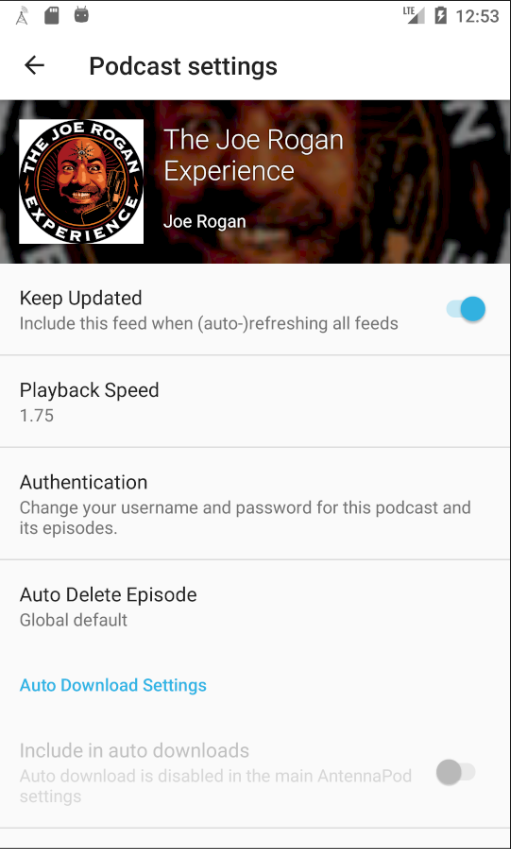
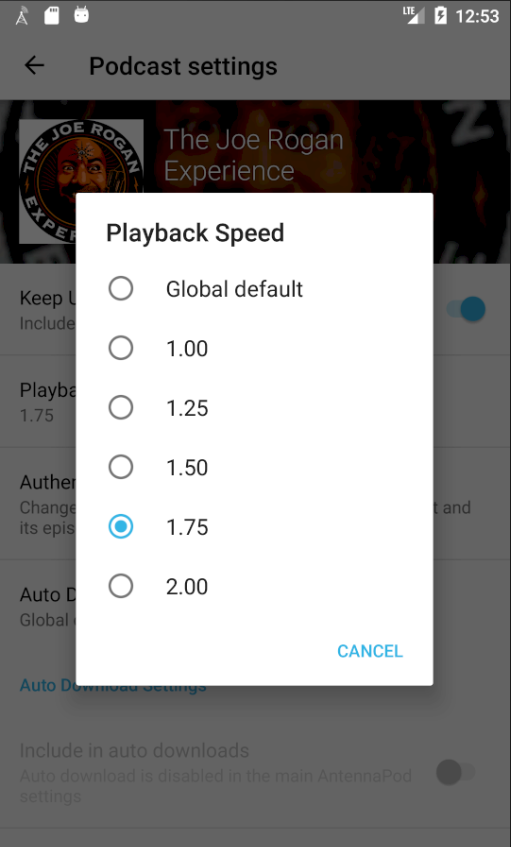
The default is Global default.
See https://github.com/AntennaPod/AntennaPod/pull/3415 for behavior description.
spacecowboy
on 12 Sep 2019
Playback speed settings UI: it's quite reasonable. Placing "Playback Speed" as the second item seems a bit weird though, though I can't quite articulate the reason.
(On player screen) When the user presses the button to change the speed, the app changes the global playback speed setting (like today) and sets the currently used playback speed to match. It does NOT update the per-feed speed setting.
Let's try to clarify the semantics of the proposal (changing playback speed on player screen means changing global speed) as I feel there could still be confusion. Imagine the following scenario
- Global Speed is 1.00X, Podcast A has a custom speed of 1.50X
- An user listens to episode A1 of podcast A, he changes the speed from 1.50X (podcast custom speed) to 1.25X (a new global speed).
- In the middle of listening to A1, user pauses the playback and does something else.
- User swipes away AntennaPod (from in recent apps list and notifications), basically making the app stop.
- Later, user reopens AntennaPod and continue the playback of episode A1.
- The playback speed will be back to 1.50X (podcast custom speed).
Is that what we want / desirable?
orionlee
on 12 Sep 2019
@orionlee Number 6 is not what happens. The speed will resume at 1.25X because that speed has been saved to the media item itself and it only clears when playback finishes (end of item, skipping to next, playing something new).
Swiping away Antennapod and making the app stop will not clear it (at least as far as I understand the callback structure).
So I think the behavior is reasonable.
spacecowboy
on 12 Sep 2019
About where it goes in the list; I didn't think it belonged below any of the section headers which meant it went pretty high up the list
spacecowboy
on 12 Sep 2019
@spacecowboy Thanks for the clarification! So essentially each episode may carry a custom playback speed that overrides all.
Going back to the scenario of playing episode A1 again at step 6, podcast custom speed = 1.50X, episode custom speed = 1.25X, global default = 1.25X :
- Continue to play episode A1 at 1.25X (episode custom speed)
- A1 playback done.
- Play the next episode B1 in the queue (with no custom settings), thus at global defaults 1.25X
- User adjusts the speed back to 1.00X (and thus set the global default)
- Later, user goes to Playback History screen and picks up A1 to play again.
- A1 will be played at 1.25X (episode custom speed)
That's the intended behavior, right?
orionlee
on 13 Sep 2019
No. At 11, A1 will now be played at 1.50X since that is the podcast custom speed.
When playback finished in step 7, the per-episode data was cleared. The per-episode setting is only there to allow for correct resume behavior.
One could argue both ways, but in my opinion a second playthrough of A1 should start at the podcast custom speed.
spacecowboy
on 14 Sep 2019
How about a single toggle: Remember playback speed for this podcast (off|on) [Note: feel free to improve this text.]
If disabled, the playback speed follows the global one.
If enabled, whenever the user changes the playback speed during play, this speed is saved only for this podcast (instead of saving globally).
This avoids having to list many playback speeds at that dialog. Additionally, unless the user is listening to the playback, the user cannot know which playback speed is best.
This also avoids some discussed corner cases, as the playback speed of the current episode will always match either the global one or the podcast one, making the overall behavior more predictable and simpler to understand and simpler to implement.
 denilsonsa
on 14 Sep 2019
denilsonsa
on 14 Sep 2019
@spacecowboy Thanks for the clarification. It sounds quite reasonable, pending real usage feedback (I rarely change playback speed myself so I am not quite qualified.).
orionlee
on 14 Sep 2019
Related issues
 thom-github
·
3Comments
thom-github
·
3Comments
 Rotzbua
·
4Comments
Rotzbua
·
4Comments
 maxxo
·
4Comments
maxxo
·
4Comments
 fabolhak
·
3Comments
fabolhak
·
3Comments
 ggshuini
·
4Comments
ggshuini
·
4Comments