Antennapod: Android Auto: Not showing information when resuming currently playing track
App version: 1.6.4.1 (from Google Play)
Android version: 7.0, patch level October 1, 2017 [Please mention if you are using a custom rom!]
Device model: Samsung Galaxy S8
Expected behaviour: When switching to AntennaPod in Android Auto, it should show the currently playing track, and controls.
Current behaviour: If the track selected, either on start-up of Android Auto, or by selecting from the Queue, is not played from the beginning. Android Auto does not show information about the currently playing track, including not showing controls for playback control.
Additionally the information is not transmitted to the car via Bluetooth.
If a new track is selected, the information is shown.
First occured: Not sure, has started noticing it after using Android Auto, 2 weeks ago.
Steps to reproduce:
- Start a track and pause it.
- Close AntennaPod
- Start Android Auto
- Navigate to Media > AntennaPod
- Select Queue -> [Track]
Environment: Connected via Bluetooth to car, phone running Android Auto. Not tested using USB-connected Android Auto environment.
 mkholt
All 17 comments
The problem does not seem to occur when running Android Auto through a car infotainment system.
mkholt
on 29 Nov 2017
I have this problem using Android Auto with AntennaPod 1.6.4.2 on my LG G6 (Android 7.0 / 1-Sep-2017 patch) connected by USB to a (rented) Chevy Cruze screen. The screen tells me to choose something to play, with no play controls, even as it's playing.
I'd be fine with not seeing the episode info if I could have the play controls.
 rfunk
on 28 Dec 2017
rfunk
on 28 Dec 2017
@rfunk Can you provide a screenshot or camera picture?
 mfietz
on 28 Dec 2017
mfietz
on 28 Dec 2017
Actually after posting my previous comment, i have experienced the problem when connected to android auto on my2017 Peugeout 3008..
The problem does not occur every time Android Auto is used, but when it does, it is quite annoying.
mkholt
on 28 Dec 2017
I can't use the phone camera to get a picture of the car's Android Auto screen because it disables Android Auto when I start the camera app. But I can replicate the problem on the phone screen. This was taken with AntennaPod playing a podcast within Android Auto (having selected the previously-paused episode at the top of the queue).
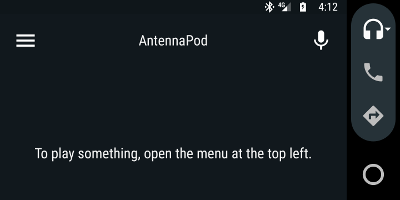
I have that same screen not just when AntennaPod starts up within Android Auto, but also after I start playing something that has previously been paused. When the next episode begins, I finally get the proper display (complete with controls), but if I then pause and leave the car, when I come back it's stuck back at "To play something, open the menu at the top left."
Other Android Auto audio apps I've tried (e.g. Spotify, Amazon Music, Pandora, D-Sub) always start up showing the controls and the last track they were aware of playing, so it seems like AntennaPod is probably just missing one piece.
rfunk
on 29 Dec 2017
App version: 1.6.4.5 (beta from Google Play)
Android version: 7.0, patch level December 1, 2017
Device model: LG G5 (LGLS992)
I have had the same issue. My phone is connected via USB to my 2017 Honda Ridgeline RTL-E, and Android Auto displays the "To play something..." message. I tap the menu button, Queue, and select the first file. The file resumes playback (I hear it going), but the display still shows the "To play something..." message. It only happens about half the time I connect my phone to my vehicle. Please let me know if there's any additional information I can provide to help track this down.
 johnp789
on 25 Jan 2018
johnp789
on 25 Jan 2018
As an additional note, if i switch to a different track, the player controls will show up. I can then "switch back" to the original track, and the controls will persist.
mkholt
on 19 Feb 2018
Update: The issue persists on Android 8, and Android Auto 3.3
mkholt
on 12 Jun 2018
Was able to reproduce this with the the latest code from the develop branch.
Here is the logcat: logcat.log
And a quick reproduction of the actual issue.

The audio is playing in the background after selecting the queue item, so you can pause it via the notification.
The second attempt to start it after pausing shows the correct media information with playback controls.
This also occurs on my Sony XAV-AX100 Head Unit and with the DHU Emulator.
I'm willing to put some time into debugging this if anyone would be willing to point me in the correct direction.
 wbagdon
on 18 Aug 2018
wbagdon
on 18 Aug 2018
Still have this on 1.6.5
 tiptick
on 6 Sep 2018
tiptick
on 6 Sep 2018
I am no longer seeing this issue on 1.7.0 using the new ExoPlayer implementation
mkholt
on 8 Nov 2018
I'm still seeing this issue on 1.7.1 using ExoPlayer on Pie. I'd be happy to look into debugging it if someone has suggestions for a good starting place in the code.
 jeffreyssmith2nd
on 2 Dec 2018
jeffreyssmith2nd
on 2 Dec 2018
You are absolutely correct @jeffreyssmith2nd, I too am still experiencing the problem on Oreo.
Sounds like a related issue to #2606 and perhaps the entry point for debugging could be found here:
https://github.com/AntennaPod/AntennaPod/issues/2606#issuecomment-375624623
mkholt
on 4 Jan 2019
This issue still exists with Android 10 and the recent Android Auto update.
Whenever I open AntennaPod after connecting the phone to my car' infotainment system with USB, it will only show "Getting your selection". Opening another podcast always fixes this issue until the next connect.
 stovocor
on 25 Sep 2019
stovocor
on 25 Sep 2019
I confirmed that I can replicate this problem
 tonytamsf
on 20 Feb 2020
tonytamsf
on 20 Feb 2020
@keunes please assign to me
tonytamsf
on 25 Nov 2020
I confirm this bug
- playing with USB plugged in
- pause on the phone
- unplug USB
- The phone button playing is gone
- plugin in to car
- The play control on the car doesn't do anything
Seems similar to https://github.com/AntennaPod/AntennaPod/issues/2606
tonytamsf
on 10 Jan 2021
Related issues
 Cj-Malone
·
5Comments
Cj-Malone
·
5Comments
 clixyz
·
4Comments
clixyz
·
4Comments
 mamehacker
·
3Comments
mamehacker
·
3Comments
 keunes
·
3Comments
keunes
·
3Comments
 gappleto97
·
3Comments
gappleto97
·
3Comments
Most helpful comment
@keunes please assign to me