Antennapod: Audio player: Show pubDate
So i noticed a couple of inconsistencies when browsing to an episoe (even running latest beta):
- Date of the episode is shown.
- Button to link to the website for possible show notes and other information.
This information is missing if I click on the currently playing episode. Would be nice to have those both options on that screen/view
 gena01
All 13 comments
Sorry, I'm not 100% sure I understand your suggestion. You're asking to add in the 'Currently playing screen': date of episode? (I'd imagine it to be displayed right below the episode title)
Button to link to the website for possible show notes and other information.
This is already available via the menu button in the top-right if you tap on 'Visit website', if I understood your question correctly.
 keunes
on 14 Feb 2016
keunes
on 14 Feb 2016

On the first screenshot above you can see that the episode is from April 1, 2014. This information seems to be missing from the 2nd screenshot bellow:

gena01
on 16 Feb 2016
I think 2. is available via "Share..."
to 1): the second screenshots shows the shownotes of an episode. Don't think we should change anything here. If the podcaster doesn't care for shownotes, so be it. Don't think there is any space for the date on the cover view, either.
 mfietz
on 16 Feb 2016
mfietz
on 16 Feb 2016
Don't think there is any space for the date on the cover view, either
I think I would argue for making more space available by making the image smaller, in order to display it right below the episode title.
keunes
on 16 Feb 2016
I'm not even sure why the player should even display the publication date. You are already playing the episode, why is the pubDate of any importance at that moment?
Consistency aka "the other view shows it so that view should show it aswell" is a rather weak argument in my opinion. On Android, it is very important to use the little space we have in the right way. Just because there is some space left (which might be only true for a big display or a high resolution!) doesn't mean it _has_ to be filled.
mfietz
on 16 Feb 2016
I can think of several times I wanted to know the publication date. Especially when listening to a very old or episode of a podcast.
In fact, I have written podcasters and asked them to include the date in their description, so that I can see it when listening to that particular episode. (In particular they are news-type shows that I wrote to)
 yzerman19
on 16 Feb 2016
yzerman19
on 16 Feb 2016
@TomHennen what is your opinion on this? I would like to keep the audio player as simple as possible. Also, at least on my phone, there really is no space left to display the date of publication (yes, we could make the cover smaller, but where would we present the date? I think this would look unbalanced).
If the user wants to know the date, she can just hit the back button.
This is not a desktop app, we just cannot show all information all the time.
mfietz
on 17 Mar 2016
I think we could show it with the show notes. I. E. Don't have it visible
on all the views, just with the show notes prior to the actual notes?
On Thu, Mar 17, 2016, 12:30 PM Martin Fietz [email protected]
wrote:
@TomHennen https://github.com/TomHennen what is your opinion on this? I
would like to keep the audio player as simple as possible. Also, at least
on my phone, there really is no space left to display the date of
publication (yes, we could make the cover smaller, but where would we
present the date? I think this would look unbalanced).
If the user wants to know the date, she can just hit the back button.
This is not a desktop app, we just cannot show all information all the
time.—
You are receiving this because you were mentioned.
Reply to this email directly or view it on GitHub
https://github.com/AntennaPod/AntennaPod/issues/1672#issuecomment-197961698
 TomHennen
on 18 Mar 2016
TomHennen
on 18 Mar 2016
Shownotes are HTML. How exactly do you want to get the date of publication in there? Parse the DOM?
mfietz
on 18 Mar 2016
I agree with mfietz:
This is not a desktop app, we just cannot show all information all the time.
See also https://github.com/AntennaPod/AntennaPod/pull/3750#issuecomment-740659989:
In #4731 the available screen space is decreased noticeably. We might want to add skip buttons later that allow to jump to the next/previous chapter. I think those would be more useful than the date.
While I can definitely see use-cases for this, we always have to balance usability and features. Sorry, this feature will not be implemented.
 ByteHamster
on 10 Dec 2020
ByteHamster
on 10 Dec 2020
@ByteHamster May I ask you to reconsider? The date is pretty basic information that's very useful. Example case: News shows don't always mention their publication date in the audio. I sometimes get confused about the content - then it appears the episode is a bit older so the timeline of events is mixed up in my mind. A quick glance at the playback screen would in that case be helpful.
It doesn't need to take much space also, so I don't really see that as a good argument. Left the best case (short titles, short date), right the worst case (long titles, long date):
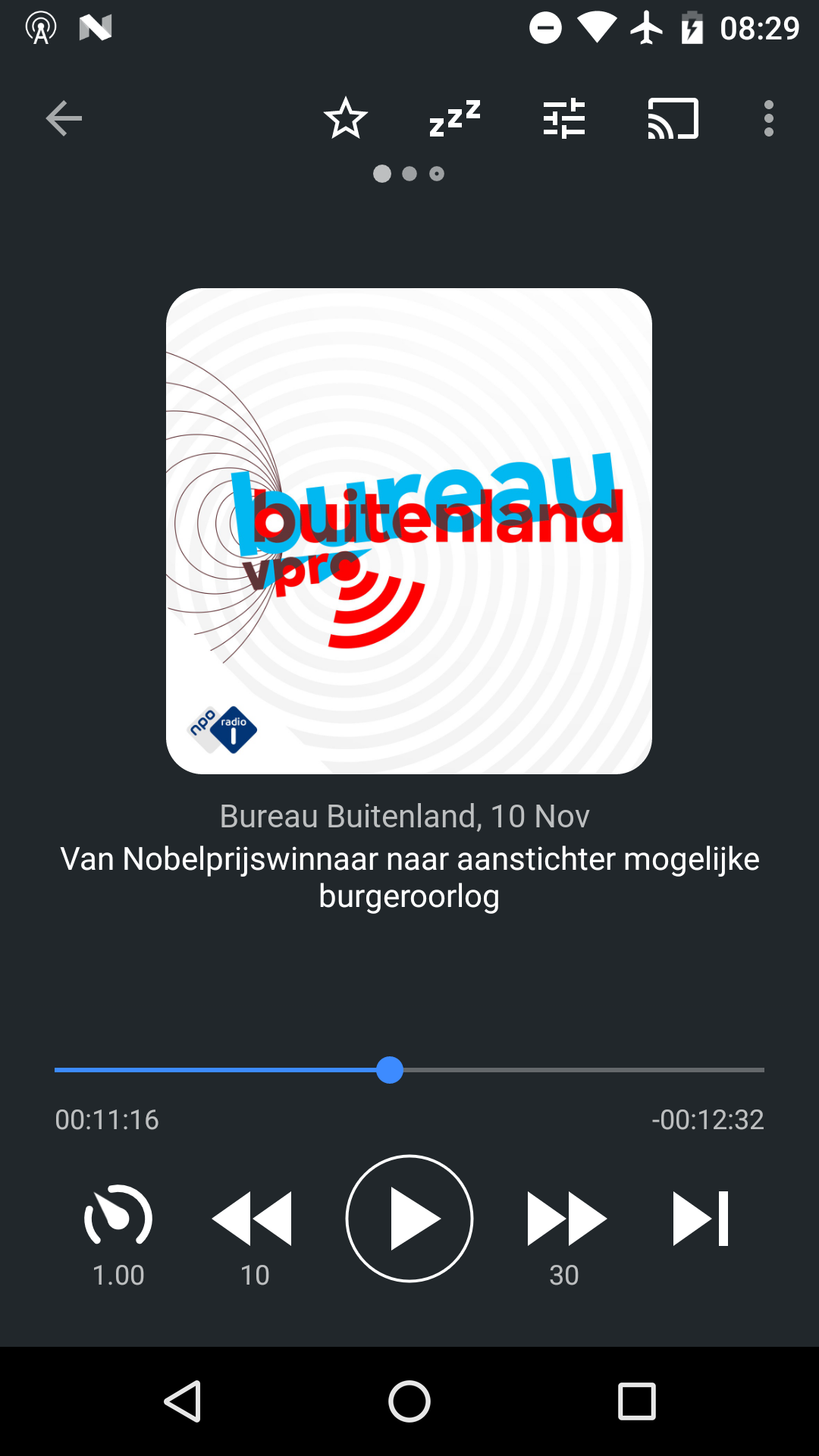
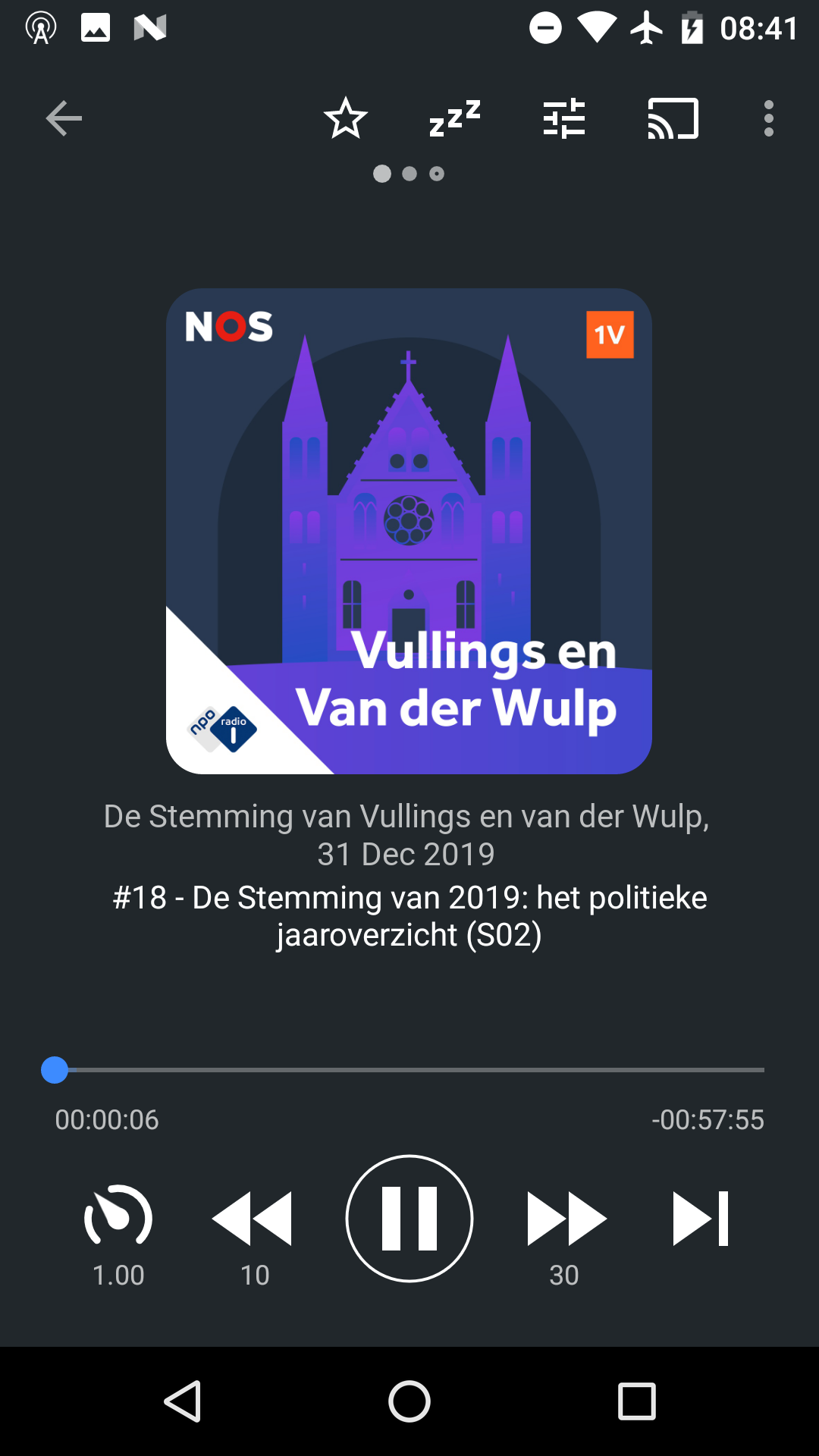
Also: to be honest I was hoping we could find a better (visually more elegant) solution to the accessibility issue than what's implemented in #4731.
keunes
on 11 Dec 2020
Good idea adding it to the podcast title. That looks more clean than the proposal in #3750
ByteHamster
on 15 Dec 2020
It doesn't need to take much space also, so I don't really see that as a good argument. Left the best case (short titles, short date), right the worst case (long titles, long date)
Thank you @keunes for the mock, I really wanted the publish date. This will give me a way forward.
Here is the PR https://github.com/AntennaPod/AntennaPod/pull/4862
 tonytamsf
on 15 Jan 2021
tonytamsf
on 15 Jan 2021
Related issues
 AAM1119
·
3Comments
AAM1119
·
3Comments
 mamehacker
·
3Comments
mamehacker
·
3Comments
 chaulo
·
4Comments
chaulo
·
4Comments
 zequip
·
3Comments
zequip
·
3Comments
 Matth7878
·
3Comments
Matth7878
·
3Comments
Most helpful comment
I can think of several times I wanted to know the publication date. Especially when listening to a very old or episode of a podcast.
In fact, I have written podcasters and asked them to include the date in their description, so that I can see it when listening to that particular episode. (In particular they are news-type shows that I wrote to)