Ant-design-pro: 怎么配置详情页路由 (多个详情页对应同一个菜单)
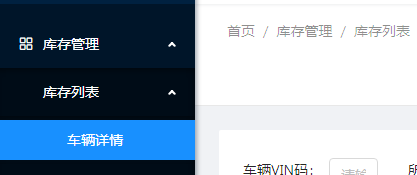
ant design pro项目怎么配置详情页路由,按官方文档配置的详情页会在菜单栏上以三级菜单来显示,并且配置后二级菜单就不能点击出页面了,点击二级菜单会展开三级菜单的详情页。
我需要在二级菜单的页面上点击查看详情时才跳转到详情页路由,在菜单的右边加载详情页的组件
component: dynamicWrapper(app, ['user', 'login'], () => import('../layouts/BasicLayout')),
    layout: 'BasicLayout',
    name: '控制台', // for breadcrumb
    path: '/',
    children: [
      {
        name: '库存管理',
        path: 'stock',
        icon: 'appstore-o',
        children: [
          {
            name: '库存列表',
            path: 'stock-list',
            component: dynamicWrapper(app, ['stock'], () => import('../routes/StockControl/StockList.js')),
            hideInMenu: true,
            children: [
              {
                name: '车辆详情',
                path: 'stock-detail',
                component: dynamicWrapper(app, ['market'], () => import('../routes/Auth/Market')),
                hideInMenu: true
              },
            ],
          },
 Lzw2016
All 24 comments
stock-detail 可以不要放到children里面,然后隐藏掉。
就可以实现你的想法了
 chenshuai2144
on 3 Feb 2018
chenshuai2144
on 3 Feb 2018
@chenshuai2144 我这样做了 并不能实现这个功能。
Lzw2016
on 3 Feb 2018
我是不是理解错你的需求了?
车辆信息->单击->信息界面->点击详情按钮->详情界面?
chenshuai2144
on 3 Feb 2018
应该是 ant-design-pro 现在还没有这个功能,多个详情页对应同一个菜单“ 菜单、面包屑、页面 ” 都能正常,这个功能很常见呀,急需支持,官方demo的详情页有毛病,因为详情页不会有对应的菜单
Lzw2016
on 3 Feb 2018
不是很懂你的意思?
多个详情页指的是?
chenshuai2144
on 3 Feb 2018
@chenshuai2144 应该是点击“库存列表”菜单进入库存列表页面,选中一条记录 点击“查看详情” 按钮,进入“车辆详请页面”,此时 左侧菜单 应该是选中 “库存列表”这一项的, 面包屑 显示 “首页 / 库存管理 / 库存列表 / 车辆详请”
Lzw2016
on 3 Feb 2018

这这儿加个name属性 面包屑就可以正常了。菜单这个, 你可以按照你的需求重写一下openkeys的转化逻辑。我记得本来就支持的
chenshuai2144
on 3 Feb 2018
建议 在children 同一级的地方加一个 details 数组 用于配置详情页面,
Lzw2016
on 3 Feb 2018
搞得太复杂了。。你可以实现一下
chenshuai2144
on 3 Feb 2018
一样的需求,请问解决了吗
 zhuanglong
on 11 Feb 2018
zhuanglong
on 11 Feb 2018
凉凉, 之前的一个React项目中所有详情页面全是用模态框解决的。。。
以前在还没有前后端分离的时候, 后端也写jsp页面,
有的情况是要写 一个列表页面, 一个只读页面, 一个编辑页面,但三个页面都还是在一个菜单下
就有点像用Bootstrap的 Ace Admin模板那样
 suncunhu
on 19 Jun 2018
suncunhu
on 19 Jun 2018
这是很常见的需求
 codepandy
on 21 Jun 2018
codepandy
on 21 Jun 2018
我也碰上了这样的需求,然而并没有想到好的解决方案,根据带参数的路由(products/:id)渲染详情页。那么它的路由和菜单该如何配置。。。
 USTCLX
on 8 Jul 2018
USTCLX
on 8 Jul 2018
@chenshuai2144 帅哥,这个问题能指点下咋弄不,和楼主一样的需求。
 t880216t
on 17 Jul 2018
t880216t
on 17 Jul 2018
刚好改过一版,可以实现菜单和列表匹配,跳转到详情页,菜单仍然选中,实现逻辑大概就selectedKey切换时,判断下是不是当前route的parentKey,是的话就不切换selectedKey
 lyingd
on 17 Jul 2018
lyingd
on 17 Jul 2018
@lyingd 多谢,实现了,
在siderMenu.js line 202加个这个
if(selectedKeys[1] === "详情路由" && selectedKeys[2] !== "列表路由"){
      selectedKeys.push("列表路由")
    }
我是这么处理的,不知道大家觉得合理不?
1.在router.js中配置路由,比如:我在角色列表页面下面增加一个角色详情界面。这里需要配置在角色列表中配置exact为true。如果要面包屑标题正常使用,还需要给自层级配置name
'/users/role': {
exact:true,
component: dynamicWrapper(app, ['role'], () => import('../routes/Role/List')),
},
'/users/role/edit/:id': {//非服务器配置的菜单
name: '角色详情',
component: dynamicWrapper(app, ['role'], () => import('../routes/Role/Edit')),
},
2.注释掉utils.js中的是否包含判断,因为有一些子层级和父层级存在前缀一样,不去掉的话自层级无法路由。
function getRenderArr(routes) {
let renderArr = [];
renderArr.push(routes[0]);
for (let i = 1; i < routes.length; i += 1) {
// 去重
renderArr = renderArr.filter(item => getRelation(item, routes[i]) !== 1);
// 是否包含
//const isAdd = renderArr.every(item => getRelation(item, routes[i]) === 3);
//if (isAdd) {
renderArr.push(routes[i]);
//}
}
return renderArr;
}
这样就可以了
效果图:
http://www.luoxudong.com/wp-content/uploads/2018/09/2-1024x527.png
http://www.luoxudong.com/wp-content/uploads/2018/09/3-1024x483.png
 rohsuton
on 6 Sep 2018
rohsuton
on 6 Sep 2018
@rohsuton 对于新版本的不知道是官方文档没更新,还是详情页功能这块官方已经实现了? 对于最新版本Ant-Design-Pro 有解决办法吗?
 gogogo1024
on 29 Oct 2018
gogogo1024
on 29 Oct 2018
@jxycbjhc 新版本我还没有用过,我用的是1.4.4
rohsuton
on 29 Oct 2018
@rohsuton 那个问题昨天已经解决了,参照umi的动态路由
gogogo1024
on 30 Oct 2018
@rohsuton 那个问题昨天已经解决了,参照umi的动态路由
怎么解决的啊?
 chimisu
on 9 Jan 2019
chimisu
on 9 Jan 2019
@chenshuai2144 大佬,详情页这块有官方解决方案吗?
chimisu
on 10 Jan 2019
@doterme 通过这种配置可以实现多级菜单的问题,但是有一个问题是面包屑最多只能显示2层。哪位有更好的解决办法吗?
// 会员管理
{ path: '/', redirect: '/users/list' },
{
path: '/users',
name: 'users',
icon: 'user',
routes: [
{
path: '/users/list',
name: 'list',
component: './users/list',
exact: true,
},
{
path: '/users/list/:id',
name: 'detail',
component: './users/detail',
hideInMenu:true,
}
],
}
rohsuton
on 15 Jan 2019
这是我直接拿的官方的实例;不知道这是你的问题吗
exportdefault [
// user
{
path:'/user',
component:'../layouts/UserLayout',
routes: [
{ path:'/user', redirect:'/user/login' },
{ path:'/user/login', component:'./User/Login' },
{ path:'/user/register', component:'./User/Register' },
{ path:'/user/register-result', component:'./User/RegisterResult' },
],
},
// app
{
path:'/',
component:'../layouts/BasicLayout',
Routes: ['src/pages/Authorized'],
authority: ['admin', 'user'],
routes: [
// dashboard
{ path:'/', redirect:'/dashboard/analysis' },
{
path:'/dashboard',
name:'dashboard',
icon:'dashboard',
routes: [
{
path:'/dashboard/analysis',
name:'analysis',
component:'./Dashboard/Analysis',
routes:[
{
path:'/form/step-form',
redirect:'/form/step-form/info',
},
{
path:'/form/step-form/info',
name:'info',
component:'./Forms/StepForm/Step1',
routes: [
{
path:'/list/search',
redirect:'/list/search/articles',
},
{
path:'/list/search/articles',
name:'articles',
component:'./List/Articles',
},
{
path:'/list/search/projects',
name:'projects',
component:'./List/Projects',
},
{
path:'/list/search/applications',
name:'applications',
component:'./List/Applications',
},
],
},
{
path:'/form/step-form/confirm',
name:'confirm',
component:'./Forms/StepForm/Step2',
},
{
path:'/form/step-form/result',
name:'result',
component:'./Forms/StepForm/Step3',
},
]
},
{
path:'/dashboard/monitor',
name:'monitor',
component:'./Dashboard/Monitor',
},
{
path:'/dashboard/workplace',
name:'workplace',
component:'./Dashboard/Workplace',
},
],
},
// forms
{
path:'/form',
icon:'form',
name:'form',
routes: [
{
path:'/form/basic-form',
name:'basicform',
component:'./Forms/BasicForm',
},
{
path:'/form/step-form',
name:'stepform',
component:'./Forms/StepForm',
hideChildrenInMenu:true,
routes: [
{
path:'/form/step-form',
redirect:'/form/step-form/info',
},
{
path:'/form/step-form/info',
name:'info',
component:'./Forms/StepForm/Step1',
},
{
path:'/form/step-form/confirm',
name:'confirm',
component:'./Forms/StepForm/Step2',
},
{
path:'/form/step-form/result',
name:'result',
component:'./Forms/StepForm/Step3',
},
],
},
{
path:'/form/advanced-form',
name:'advancedform',
authority: ['admin'],
component:'./Forms/AdvancedForm',
},
],
},
// list
{
path:'/list',
icon:'table',
name:'list',
routes: [
{
path:'/list/table-list',
name:'searchtable',
component:'./List/TableList',
},
{
path:'/list/basic-list',
name:'basiclist',
component:'./List/BasicList',
},
{
path:'/list/card-list',
name:'cardlist',
component:'./List/CardList',
},
{
path:'/list/search',
name:'searchlist',
component:'./List/List',
routes: [
{
path:'/list/search',
redirect:'/list/search/articles',
},
{
path:'/list/search/articles',
name:'articles',
component:'./List/Articles',
},
{
path:'/list/search/projects',
name:'projects',
component:'./List/Projects',
},
{
path:'/list/search/applications',
name:'applications',
component:'./List/Applications',
},
],
},
],
},
{
path:'/profile',
name:'profile',
icon:'profile',
routes: [
// profile
{
path:'/profile/basic',
name:'basic',
component:'./Profile/BasicProfile',
},
{
path:'/profile/advanced',
name:'advanced',
authority: ['admin'],
component:'./Profile/AdvancedProfile',
},
],
},
{
name:'result',
icon:'check-circle-o',
path:'/result',
routes: [
// result
{
path:'/result/success',
name:'success',
component:'./Result/Success',
},
{ path:'/result/fail', name:'fail', component:'./Result/Error' },
],
},
{
name:'exception',
icon:'warning',
path:'/exception',
routes: [
// exception
{
path:'/exception/403',
name:'not-permission',
component:'./Exception/403',
},
{
path:'/exception/404',
name:'not-find',
component:'./Exception/404',
},
{
path:'/exception/500',
name:'server-error',
component:'./Exception/500',
},
{
path:'/exception/trigger',
name:'trigger',
hideInMenu:true,
component:'./Exception/TriggerException',
},
],
},
{
name:'account',
icon:'user',
path:'/account',
routes: [
{
path:'/account/center',
name:'center',
component:'./Account/Center/Center',
routes: [
{
path:'/account/center',
redirect:'/account/center/articles',
},
{
path:'/account/center/articles',
component:'./Account/Center/Articles',
},
{
path:'/account/center/applications',
component:'./Account/Center/Applications',
},
{
path:'/account/center/projects',
component:'./Account/Center/Projects',
},
],
},
{
path:'/account/settings',
name:'settings',
component:'./Account/Settings/Info',
routes: [
{
path:'/account/settings',
redirect:'/account/settings/base',
},
{
path:'/account/settings/base',
component:'./Account/Settings/BaseView',
},
{
path:'/account/settings/security',
component:'./Account/Settings/SecurityView',
},
{
path:'/account/settings/binding',
component:'./Account/Settings/BindingView',
},
{
path:'/account/settings/notification',
component:'./Account/Settings/NotificationView',
},
],
},
],
},
{
component:'404',
},
],
},
];
在 2019-01-15 10:52:22,"东哥" notifications@github.com 写道:
@Do 通过这种配置可以实现多级菜单的问题,但是有一个问题是面包屑最多只能显示2层。哪位有更好的解决办法吗?
// 会员管理 { path: '/', redirect: '/users/list' }, { path: '/users', name: 'users', icon: 'user', routes: [ { path: '/users/list', name: 'list', component: './users/list', exact: true, }, { path: '/users/list/:id', name: 'detail', component: './users/detail', hideInMenu:true, } ], },
—
You are receiving this because you were mentioned.
Reply to this email directly, view it on GitHub, or mute the thread.
gogogo1024
on 15 Jan 2019
Related issues
 yadongxie150
·
3Comments
zhuanglong
·
3Comments
yadongxie150
·
3Comments
zhuanglong
·
3Comments
 happier2
·
3Comments
happier2
·
3Comments
 yjz1004
·
3Comments
yjz1004
·
3Comments
 ghost
·
3Comments
ghost
·
3Comments
Most helpful comment
这是很常见的需求