Anki-android: Request: Option to disable missing media error message.
In version 2.13.0: « Fix Improved messaging when collection is missing media ».
Reproduction Steps
- Add a picture by drap and drop to a card on Anki desktop.
- Sync only cards, not media on both desktop and Ankidroid.
- Study on Ankidroid.
Expected Result
Like previous versions (2.12.1 and under), when "fetch media" is not active while syncing, avoid showing an error and simply do not show the media that are missing.
Actual Result
Show an error message for every card. This message cannot be disabled.
Research
Enter an [x] character to confirm the points below:
- [X ] I have read the support page and am reporting a bug or enhancement request specific to AnkiDroid
- [X ] I have checked the manual and the FAQ and could not find a solution to my issue
- [x ] I have searched for similar existing issues here and on the user forum
- [ ] (Optional) I have confirmed the issue is not resolved in the latest alpha release (instructions)
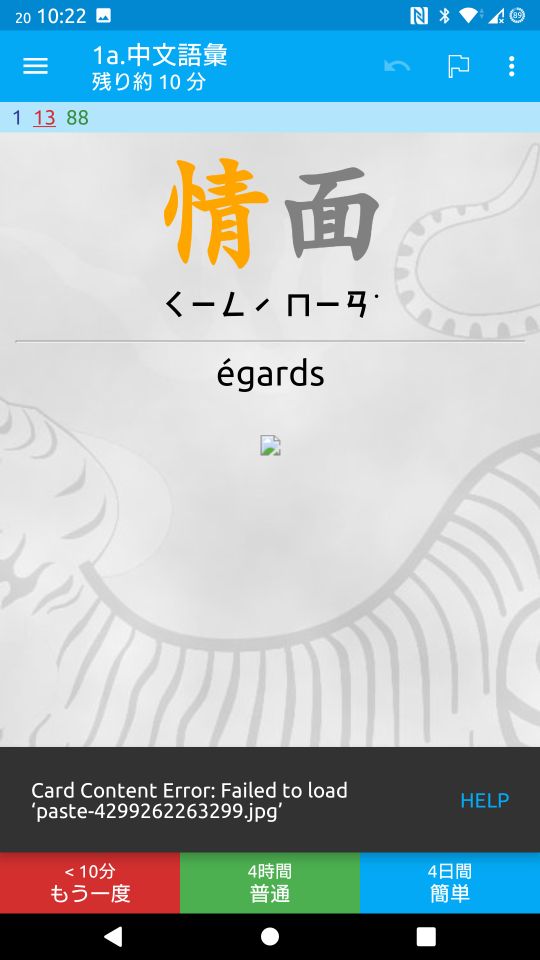
 vintotal
All 10 comments
Hello! 👋 Thanks for logging this issue. Please remember we are all volunteers here, so some patience may be required before we can get to the issue. Also remember that the fastest way to get resolution on an issue is to propose a change directly, https://github.com/ankidroid/Anki-Android/wiki/Contributing
![welcome[bot] picture](https://avatars0.githubusercontent.com/in/4141?v=4&s=40) welcome[bot]
on 20 Sep 2020
welcome[bot]
on 20 Sep 2020
Hi, thanks for the report.
We should only show this message twice per study session: https://github.com/ankidroid/Anki-Android/blob/f5479302a3f3964dad0e6d31c4f974a7dd612002/AnkiDroid/src/main/java/com/ichi2/anki/cardviewer/MissingImageHandler.java#L32
We find that people disabling "fetch media" without knowing that it will cause this issue is one of the main problems that people report, and I added this snackbar to cut down on our support issues.
@mikehardy
I'd rather avoid adding another preference for this. Would checking for <!--ANKIDROID:DISABLE-MISSING-IMAGE-WARNING--> in the card template be acceptable?
 david-allison-1
on 20 Sep 2020
david-allison-1
on 20 Sep 2020
This was a large support request source, so I like the message, it should not go away.
It should only be showing twice though, and I'm not sure what the use case is for having truly missing media, but we're all adults so I'll assume it's valid :-). Probably disk space I'm guessing? Or similar, but that as a hypothetical is enough to grant it as valid, sure
I want to understand more how this shows every time, that seems contrary to the "2 times per study session" rule.
I don't like the idea of toggles implemented in hidden ways. If we make a way to disable it, it should be a real pref IMHO
 mikehardy
on 20 Sep 2020
mikehardy
on 20 Sep 2020
@vintotal Can you confirm that this appears more than twice per review session?
david-allison-1
on 20 Sep 2020
If a session is delimited by the time you spend on reviewing cards without going back to the deck list, it shows only twice. I should have written it shows on every card _that has missing media_. I am sorry it was interpretated as showing every time. Even though in my case the message is not required, it is a minor issue and I think we can live with it. :-)
If I study for exemple a few card the message shows an error twice. Then, if I go back to the deck list then start reviewing again, the message will show again twice.
vintotal
on 20 Sep 2020
Interesting. Could perhaps be once per review session without being deck specific as an easy back-off on frequency with no other changes
mikehardy
on 20 Sep 2020
I'd be fine to use a global static if that'd be appropriate?
david-allison-1
on 20 Sep 2020
Seems like an easy way to get 'er done @david-allison-1 -> works for me
mikehardy
on 20 Sep 2020
and I'm not sure what the use case is for having truly missing media,
Just to give you an example, my use case is that some of my cards are automatically generated based on the history of word lookup in the dictionary. The automatically extracted content contains links to media (images) but I don't really care, only text is important to me. I guess proper solution would be for me to adjust the parser/extractor that generates such notes, but of course it's best if I don't have to touch it :)
 balta2ar
on 21 Sep 2020
balta2ar
on 21 Sep 2020
@balta2ar This should be resolved in AnkiDroid 2.13.3 (2 instances of the snackbar per app run). Many thanks for the polite report
david-allison-1
on 21 Sep 2020
Related issues
 homocomputeris
·
5Comments
homocomputeris
·
5Comments
 SimonePols
·
3Comments
SimonePols
·
3Comments
 kanjieater
·
4Comments
david-allison-1
·
5Comments
kanjieater
·
4Comments
david-allison-1
·
5Comments
 Acelya-9028
·
4Comments
Acelya-9028
·
4Comments
Most helpful comment
Just to give you an example, my use case is that some of my cards are automatically generated based on the history of word lookup in the dictionary. The automatically extracted content contains links to media (images) but I don't really care, only text is important to me. I guess proper solution would be for me to adjust the parser/extractor that generates such notes, but of course it's best if I don't have to touch it :)