Anki-android: Audio recording crashes
Reproduction Steps
- Edit a note
- attempt to record audio
- attempt to stop recording and save the audio
Expected Result
Audio is either recorded and saved successfully, or there is a dialog noting the problem
Actual Result
A variety of crashes in current prod (2.8.4), one per comment below
 mikehardy
All 8 comments
java.lang.RuntimeException: stop failed.
at android.media.MediaRecorder._stop(Native Method)
at android.media.MediaRecorder.stop(MediaRecorder.java:1199)
at com.ichi2.anki.multimediacard.AudioView.notifyStopRecord(AudioView.java:194)
at com.ichi2.anki.multimediacard.AudioView$RecordButton$1.onClick(AudioView.java:412)
at android.view.View.performClick(View.java:6261)
at android.view.View$PerformClick.run(View.java:23748)
at android.os.Handler.handleCallback(Handler.java:751)
at android.os.Handler.dispatchMessage(Handler.java:95)
at android.os.Looper.loop(Looper.java:154)
at android.app.ActivityThread.main(ActivityThread.java:6776)
at java.lang.reflect.Method.invoke(Native Method)
at com.android.internal.os.ZygoteInit$MethodAndArgsCaller.run(ZygoteInit.java:1496)
at com.android.internal.os.ZygoteInit.main(ZygoteInit.java:1386)
mikehardy
on 20 Oct 2018
java.lang.RuntimeException: Unable to destroy activity {com.ichi2.anki/com.ichi2.anki.multimediacard.activity.MultimediaEditFieldActivity}: java.lang.NullPointerException: Attempt to invoke virtual method 'void com.ichi2.anki.multimediacard.AudioView.notifyReleaseRecorder()' on a null object reference
at android.app.ActivityThread.performDestroyActivity(ActivityThread.java:4203)
at android.app.ActivityThread.handleDestroyActivity(ActivityThread.java:4221)
at android.app.ActivityThread.-wrap6(ActivityThread.java)
at android.app.ActivityThread$H.handleMessage(ActivityThread.java:1538)
at android.os.Handler.dispatchMessage(Handler.java:102)
at android.os.Looper.loop(Looper.java:154)
at android.app.ActivityThread.main(ActivityThread.java:6119)
at java.lang.reflect.Method.invoke(Native Method)
at com.android.internal.os.ZygoteInit$MethodAndArgsCaller.run(ZygoteInit.java:886)
at com.android.internal.os.ZygoteInit.main(ZygoteInit.java:776)
Caused by: java.lang.NullPointerException: Attempt to invoke virtual method 'void com.ichi2.anki.multimediacard.AudioView.notifyReleaseRecorder()' on a null object reference
at com.ichi2.anki.multimediacard.fields.BasicAudioFieldController.onDestroy(BasicAudioFieldController.java:109)
at com.ichi2.anki.multimediacard.activity.MultimediaEditFieldActivity.onDestroy(MultimediaEditFieldActivity.java:340)
at android.app.Activity.performDestroy(Activity.java:6922)
at android.app.Instrumentation.callActivityOnDestroy(Instrumentation.java:1154)
at android.app.ActivityThread.performDestroyActivity(ActivityThread.java:4190)
... 9 more
java.lang.NullPointerException: Attempt to invoke virtual method 'void com.ichi2.anki.multimediacard.AudioView.notifyReleaseRecorder()' on a null object reference
at com.ichi2.anki.multimediacard.fields.BasicAudioFieldController.onDestroy(BasicAudioFieldController.java:109)
at com.ichi2.anki.multimediacard.activity.MultimediaEditFieldActivity.onDestroy(MultimediaEditFieldActivity.java:340)
at android.app.Activity.performDestroy(Activity.java:6922)
at android.app.Instrumentation.callActivityOnDestroy(Instrumentation.java:1154)
at android.app.ActivityThread.performDestroyActivity(ActivityThread.java:4190)
at android.app.ActivityThread.handleDestroyActivity(ActivityThread.java:4221)
at android.app.ActivityThread.-wrap6(ActivityThread.java)
at android.app.ActivityThread$H.handleMessage(ActivityThread.java:1538)
at android.os.Handler.dispatchMessage(Handler.java:102)
at android.os.Looper.loop(Looper.java:154)
at android.app.ActivityThread.main(ActivityThread.java:6119)
at java.lang.reflect.Method.invoke(Native Method)
at com.android.internal.os.ZygoteInit$MethodAndArgsCaller.run(ZygoteInit.java:886)
at com.android.internal.os.ZygoteInit.main(ZygoteInit.java:776)
mikehardy
on 20 Oct 2018
Marking these as good for people that want to try their hand at developing because the feature already exists and for me troubleshooting issues on mostly-working features was a great way to just figure out how the development environment (Android Studio, emulators, the test suite) worked. Feel free to ask questions if you want to give it a try!
mikehardy
on 20 Oct 2018
I try to solve this problem. These are the things I already did:
I ran the program at real phones api 21 and 27 everything is OK error did not appear.
Started to test at virtual devices. 28 api worked fine.
When I tryed api 22 I met a exeption:
java.lang.RuntimeException: stop failed
.
I tryed to understand why method MediaRecorder.stop() does not work and finally figured out that if plug in a microphone the exception do not appear.
I checked this second time at Genymotion emulator.
When I uncheck in audio seting "Enable Audio Output" and"Enable Audio Input" i have exception again.
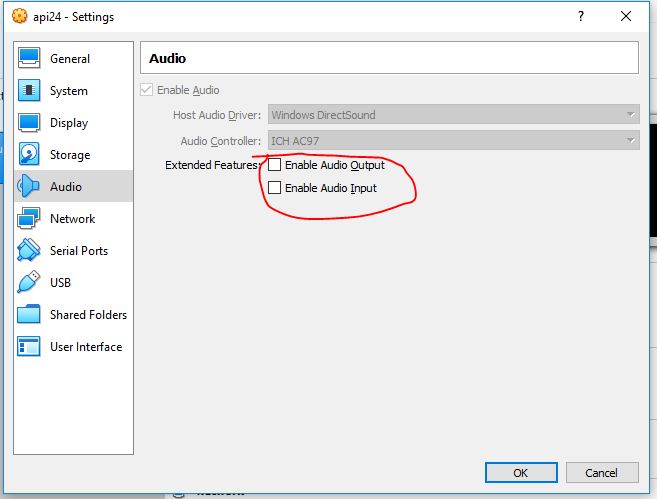
I finded at stackoverflow that the exception can aper if a device does not have a microphone.
But if I rut
"boolean micPresent = pm.hasSystemFeature(PackageManager.FEATURE_MICROPHONE);"
In Virtual device it returns TRUE in any cases.(I think it is because the mic just turn outed but fisicly exist)
What I will do next:
I will try to emulate a virtual device without mic.
I will try find method to check a mic.
I will ask for help stackoverflow community.
I think simple solution add put "mRecorder.stop()" in "try" and say user in "catch" about mic.
 snailp4el
on 22 Apr 2019
snailp4el
on 22 Apr 2019
Very interesting! Now that the standard emulators use hardware acceleration I never bothered to set up Genymotion so I only use the standard google emulator images. Is this reproducible there? Either way, the general plan of catching around the methods is a good idea to stop the crashes but maybe you can try revoking the permission for microphone on a regular device and trigger it, then a more targeted message could be achieved by checking for permission first or similar. It does seem like it shouldn't ever crash there though, doesn't it?
mikehardy
on 22 Apr 2019
try to understand how to get errors:
----Test 1----
api24 Genymotion Android Emulator
multirun - ok
Play - ok
Stop - ok
checked 3 times
I try change the settings
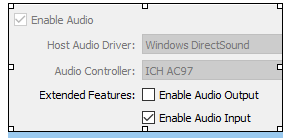
I get error
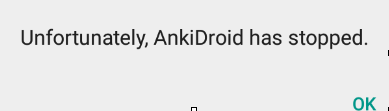
04-23 01:27:37.144 7338-7338/com.ichi2.anki E/AndroidRuntime: FATAL EXCEPTION: main
    Process: com.ichi2.anki, PID: 7338
    java.lang.RuntimeException: stop failed.
        at android.media.MediaRecorder.stop(Native Method)
        at com.ichi2.anki.multimediacard.AudioView.notifyStopRecord(AudioView.java:168)
        at com.ichi2.anki.multimediacard.AudioView$RecordButton$1.onClick(AudioView.java:384)
        at android.view.View.performClick(View.java:4780)
        at android.view.View$PerformClick.run(View.java:19866)
checked 3 times. I have this error every time.
----Test2----
I try reproduce error in AVD(standart VM) api 21
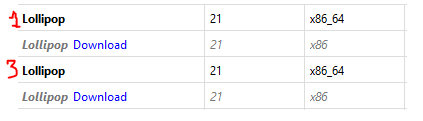
device 1
error when stop:
04-23 07:13:30.311 1146-2096/? W/StagefrightRecorder: Intended audio encoding bit rate (192000) is too large and will be set to (96000)
04-23 07:13:30.311 1146-2096/? W/StagefrightRecorder: Intended number of audio channels (2) is too large and will be set to (1)
04-23 07:13:30.317 1146-2096/? E/audio_hw_generic: Error opening input stream format 1, channel_mask 0010, sample_rate 16000
error
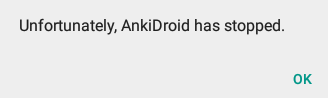
04-23 07:17:52.692 4084-4109/? E/eglCodecCommon: glUtilsParamSize: unknow param 0x000082da
04-23 07:17:52.698 4084-4109/? E/eglCodecCommon: glUtilsParamSize: unknow param 0x00008cdf
04-23 07:17:52.699 4084-4109/? E/eglCodecCommon: glUtilsParamSize: unknow param 0x00008824
device 2
error like the first device
Resume I don't know how make it work.
----Test3----
AVD api23

it works
----Test4----
AVD api22 recomend
It work but if to press record second time i have error.

04-23 08:07:07.940 3645-3645/com.ichi2.anki E/MediaRecorder: start failed: -2147483648
04-23 08:07:07.943 3645-3645/com.ichi2.anki E/MediaRecorder: start failed: -2147483648
04-23 08:07:07.943 3645-3645/com.ichi2.anki E/AudioView$RecordButton: RecordButton.onClick() :: error recording to /storage/sdcard/AnkiDroid/collection.media/ankidroid_audiorec-277485421.3gp
if after that press the play we have error
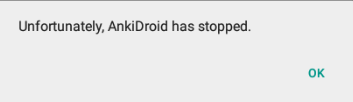
04-23 08:28:56.017 3645-3645/com.ichi2.anki E/AudioView$PlayPauseButt: java.lang.NullPointerException: Attempt to invoke virtual method 'void android.media.MediaPlayer.prepare()' on a null object reference
        at com.ichi2.anki.multimediacard.AudioView$PlayPauseButton$1.onClick(AudioView.java:231)
        at android.view.View.performClick(View.java:4780)
        at android.view.View$PerformClick.run(View.java:19866)
        at android.os.Handler.handleCallback(Handler.java:739)
        at android.os.Handler.dispatchMessage(Handler.java:95)
        at android.os.Looper.loop(Looper.java:135)
snailp4el
on 23 Apr 2019
Very interesting! Now that the standard emulators use hardware acceleration I never bothered to set up Genymotion so I only use the standard google emulator images. Is this reproducible there? Either way, the general plan of catching around the methods is a good idea to stop the crashes but maybe you can try revoking the permission for microphone on a regular device and trigger it, then a more targeted message could be achieved by checking for permission first or similar. It does seem like it shouldn't ever crash there though, doesn't it?
"Is this reproducible there?" - I plug in and plug out microphone and have the similar situation at google emulator. But today I can't reproduce this it at the google emulator. I will try to understand how to make this error happened.
"but maybe you can try revoking the permission for microphone on a regular device" - I think we need some device with api 22 or less. I don't have this kind. I will try to found it.
snailp4el
on 23 Apr 2019
Hello 👋, this issue has been opened for more than 2 months with no activity on it. If the issue is still here, please keep in mind that we need community support and help to fix it! Just comment something like _still searching for solutions_ and if you found one, please open a pull request! You have 7 days until this gets closed automatically
![github-actions[bot] picture](https://avatars2.githubusercontent.com/in/15368?v=4&s=40) github-actions[bot]
on 3 Jun 2020
github-actions[bot]
on 3 Jun 2020
Related issues
 david-allison-1
·
4Comments
david-allison-1
·
4Comments
 tingsu
·
5Comments
tingsu
·
5Comments
 sudomain
·
3Comments
david-allison-1
·
5Comments
sudomain
·
3Comments
david-allison-1
·
5Comments
 Mornon
·
5Comments
Mornon
·
5Comments
Most helpful comment
Marking these as good for people that want to try their hand at developing because the feature already exists and for me troubleshooting issues on mostly-working features was a great way to just figure out how the development environment (Android Studio, emulators, the test suite) worked. Feel free to ask questions if you want to give it a try!