Anki-android: Feature request: Reset progress button
In AnkiDroid it's possible to add several buttons for when the card is being studied:
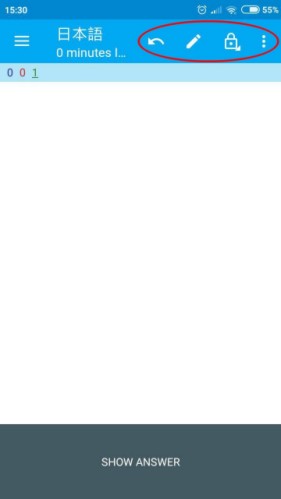
Would it be possible to have a Reset progress button? Sometimes I need to reset the progress on one card while studying, and since Again with my settings doesn't reset (being set at 75% percent of the interval) such a button would be handy.
Edit: Resized the image, which was too big.
 Mornon
All 13 comments
Interesting - I see that in the Card Browser you can reset progress on an individual card, so the feature exists even though it only exists as a plugin for Anki Desktop but no, it does not exist as a button you may add on the review bar. @timrae what's your guidance on what to do with feature requests that definitely aren't in Anki Desktop? The closest Anki Desktop gets to this is allowing you to "reschedule to end of new cards queue" via the card browser. This one is more subtle in particular because we do have "reset progress" in the card browser already...
 mikehardy
on 13 Sep 2018
mikehardy
on 13 Sep 2018
The closest Anki Desktop gets to this is allowing you to "reschedule to end of new cards queue" via the card browser.
The names have diverged over time, but reset progress hooks into libanki forgetCards() which is the same as that desktop option to reschedule to end of new cards queue.
what's your guidance on what to do with feature requests that definitely aren't in Anki Desktop?
Well the general guidance is to close such issues as won't fix unless there's a really compelling reason not to. If someone were to submit a PR or were asking on whether or not it would be merged then that's a different story and would evaluate case by case. In this case it's a pretty simple change, which could be implemented such that the menu item was completely hidden by default unless explicitly enabled, so I wouldn't be against merging if there were a clean implementation.
 timrae
on 14 Sep 2018
timrae
on 14 Sep 2018
@Mornon - if you can find me a nice icon to use I can maybe do this
Examples are here in the "drawables" directories. I can code but graphics is not my thing. It is likely there are resources online which can take one good icon and generate all the necessary size variants so this is not as hard as it may seem
mikehardy
on 17 Sep 2018
FYI: The icon must be open source with vector version, most of ours come from the main Google repository which is a good place to start
timrae
on 17 Sep 2018
Thanks! In the Google Repository I found some that could work; if these aren't fit let me know and I'll search for more.
https://material.io/tools/icons/?icon=fast_rewind&style=baseline
which I like because it already mean "Bring to the start" in music and the like, so a concept similar to reset.
https://material.io/tools/icons/?icon=cancel_presentation&style=baseline
which I like because it's a card with an X, the idea of "The card is being reset"; which I don't like because it could mean "Delete the card".
https://material.io/tools/icons/?icon=highlight_off&style=baseline
which I like for similar reasons to the previous one, without the backdrop of being like a deleted card.
I'm trying to understand if Repository has all the necessary size variants; if not I can try to generate them, just not sure which they are.
Mornon
on 17 Sep 2018
I like fast rewind, can't help on sizes I would have to compare file by file with an existing button - haven't done one before
mikehardy
on 17 Sep 2018
Ok, I'll look about fast rewind; Google Repository has the vectorial version. Now I'll try to understand if that's enough, since it's scalable, or which size(s) I need to do.
Mornon
on 17 Sep 2018
I'm not sure what the current state of vector graphics is on Android (i.e. whether or not we still need pngs on Jellybean), but traditionally Google provides all the resolutions and we put them all in down to mdp, you can see the existing icons in the source tree
timrae
on 17 Sep 2018
I'll check about the resolutions, not sure what are mdp and source tree (sorry, not really used to GitHub).
Mornon
on 17 Sep 2018
not sure what are mdp and source tree (sorry, not really used to GitHub). - you are right where I was last December :-). If you keep trying I'm sure you'll get it, I'll try to help if I can
mikehardy
on 17 Sep 2018
Still not sure about mdp, but thanks to a friend of mine I found the icon repository; I checked the icons there and they are either 72x72 or 96x96, so I took those sizes from Google Repository, here they are (I'm unable to uploade them in drawable):


Is this enough?
Mornon
on 20 Sep 2018
@Mornon - thanks for these, I'll check. @timrae I'm still learning UI stuff but I'm fine sort of blundering through it on the way to a PR as part of the learning process so don't worry about this one until you see the PR come through
mikehardy
on 20 Sep 2018
@timrae Could you please close this issue?
 JordanCleeve
on 26 Nov 2018
JordanCleeve
on 26 Nov 2018
Related issues
 homocomputeris
·
5Comments
homocomputeris
·
5Comments
 Acelya-9028
·
4Comments
Acelya-9028
·
4Comments
 hanpingchinese
·
5Comments
mikehardy
·
4Comments
hanpingchinese
·
5Comments
mikehardy
·
4Comments
 david-allison-1
·
4Comments
david-allison-1
·
4Comments
Most helpful comment
FYI: The icon must be open source with vector version, most of ours come from the main Google repository which is a good place to start